
Welcome Guest ( Log In | Register )

Outline · [ Standard ] · Linear+

 Ethernet port can't access network, conflict IP address maybe?

views
     
TSRochoaEvans
post Nov 4 2022, 12:18 PM

Getting Started
**
Junior Member
225 posts

Joined: Aug 2017


QUOTE(daoh2.0.10 @ Nov 4 2022, 10:46 AM)
Ok maybe i make it confuse.
1. At the computer which is working, has no problem to access internet - check ipconfig.
2. At the computer that has problem, no access to internet - copy the same setting from step 1, except you for the part IP Address: aaa.aaa.aaa.xxx, change xxx to other number(do not use the same number).
3. How to get number that is not in used (even by other computer)? -  From the computer that is working (Step 1), do ping to aaa.aaa.aaa.xxx (for xxx try number 1-254). if got reply then it is in used. If didn't got reply/time out, then you can use that number.
*
this is for his ipconfig
p/s : I set the IP address & DNS according to the right pic
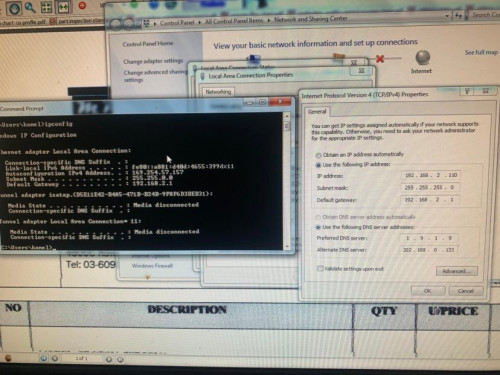
user posted image

if i use the manual tcp for IP & DNS then his PC can't access to the internet network
user posted image

this is when I try to ping the manual IP address
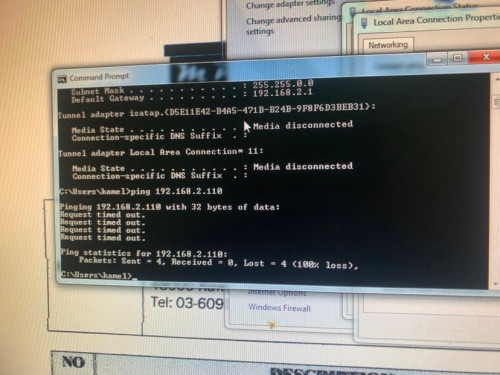
user posted image


hope you understand it cry.gif
axoloke
post Nov 4 2022, 12:23 PM

On my way
****
Senior Member
631 posts

Joined: Jan 2003
From: Pearl Of The Orient


Actually TS, you are conflating 2 separate problems.

1. Is the PC IP issue resolved first? Are you able to ping the FujiXerox machine? If so, basic connection is up.

2. The FujiXerox is an MFP device. The setting should be either for the individual user or all users who scan will send to a shared folder or email or such. You will need to change the setting for this particular user on the MFP itself.
TSRochoaEvans
post Nov 4 2022, 12:44 PM

Getting Started
**
Junior Member
225 posts

Joined: Aug 2017


QUOTE(axoloke @ Nov 4 2022, 12:23 PM)
Actually TS, you are conflating 2 separate problems.

1. Is the PC IP issue resolved first? Are you able to ping the FujiXerox machine? If so, basic connection is up.
for PC IP right now I'm just using the automaticaly for IP & DNS.. thats why he can connect to the internet now but currently his PC can't receive any scanned document directly since the printer address book is set to 192.168.2.110. If I change it back to like before there will no connection to internet cry.gif that's why when I try to troubleshoot is says "DHCP is not enabled for "LAN"

QUOTE(axoloke @ Nov 4 2022, 12:23 PM)
2. The FujiXerox is an MFP device. The setting should be either for the individual user or all users who scan will send to a shared folder or email or such. You will need to change the setting for this particular user on the MFP itself.
*
Yeah it is an MFP device in which I'm not familiar with.. do I need to change the address book myself?
jeniferlim
post Nov 4 2022, 12:45 PM

New Member
*
Newbie
24 posts

Joined: Feb 2017


For Fuji Xerox IV-3065, setting the scan is a bit tricky. Even I asked experienced computer technician, they also failed to set. Better consult the printer copier supplier.

The tricky part is actually you need to create a user, eg "SCAN" and share the shared folder to that user "SCAN". Then at Fuji Copier there, input SCAN user username and password, to send the scan document to that shared folder.

NOT just create "share folder" and shared the "share folder" to everyone, it WON'T work.


Can refer to youtube video:
https://www.youtube.com/watch?v=ZwlXTNs2zCc


Also, if you are not familiar with network security, like me bangwall.gif , better set the shared folder in Public Documents. Then create a shortcut at desktop for user to easy access to that shared folder for scanned documents. (This is because a lot of time, firewall or some network security settings will actually block the access of the Fuji Xerox copier to send the scanned document to the computer.)

This post has been edited by jeniferlim: Nov 4 2022, 12:54 PM
axoloke
post Nov 4 2022, 12:53 PM

On my way
****
Senior Member
631 posts

Joined: Jan 2003
From: Pearl Of The Orient


QUOTE(RochoaEvans @ Nov 4 2022, 12:44 PM)
for PC IP right now I'm just using the automaticaly for IP & DNS.. thats why he can connect to the internet now but currently his PC can't receive any scanned document directly since the printer address book is set to 192.168.2.110. If I change it back to like before there will no connection to internet  cry.gif that's why when I try to troubleshoot is says "DHCP is not enabled for "LAN"
Yeah it is an MFP device in which I'm not familiar with.. do I need to change the address book myself?
*
So what IP are you getting via DHCP? Also what do you mean by no internet network when using fixed IP, the user cannot browse webpages? Or just the icon is showing no internet? The network icon can be misleading at times.

For example, if DHCP is 192.168.2.50, then the scanning target address must also be set to 192.168.2.50 in the FujiXerox MFP. See the quick reference poster here :

FujiXerox


Frankly speaking, there's a few variables you need to figure out in your environment. Easiest would be to follow the settings from a working PC that's connected to the Internet as well as being able to scan.

This post has been edited by axoloke: Nov 4 2022, 12:55 PM
cassian948
post Nov 4 2022, 01:41 PM

Enthusiast
*****
Junior Member
931 posts

Joined: Jan 2017
From: Kuala Lumpur
If you noticed, the CMD returns IP 169.x.x.x.
TSRochoaEvans
post Nov 4 2022, 03:02 PM

Getting Started
**
Junior Member
225 posts

Joined: Aug 2017


QUOTE(jeniferlim @ Nov 4 2022, 12:45 PM)
For Fuji Xerox IV-3065, setting the scan is a bit tricky. Even I asked experienced computer technician, they also failed to set. Better consult the printer copier supplier.

The tricky part is actually you need to create a user, eg "SCAN" and share the shared folder to that user "SCAN". Then at Fuji Copier there, input SCAN user username and password, to send the scan document to that shared folder.

NOT just create "share folder" and shared the "share folder" to everyone, it WON'T work.
Can refer to youtube video:
https://www.youtube.com/watch?v=ZwlXTNs2zCc
Also, if you are not familiar with network security, like me  bangwall.gif , better set the shared folder in Public Documents. Then create a shortcut at desktop for user to easy access to that shared folder for scanned documents. (This is because a lot of time, firewall or some network security settings will actually block the access of the Fuji Xerox copier to send the scanned document to the computer.)
*
I see.. so it is beyond my level for someone who just started working here biggrin.gif btw thanks for reply and tips

TSRochoaEvans
post Nov 4 2022, 03:12 PM

Getting Started
**
Junior Member
225 posts

Joined: Aug 2017


QUOTE(cassian948 @ Nov 4 2022, 01:41 PM)
If you noticed, the CMD returns IP 169.x.x.x.
*
maybe thats because I set it on automatically IP & DNS address?
TSRochoaEvans
post Nov 4 2022, 03:17 PM

Getting Started
**
Junior Member
225 posts

Joined: Aug 2017


QUOTE(axoloke @ Nov 4 2022, 12:53 PM)
So what IP are you getting via DHCP? Also what do you mean by no internet network when using fixed IP, the user cannot browse webpages? Or just the icon is showing no internet? The network icon can be misleading at times.

For example, if DHCP is 192.168.2.50, then the scanning target address must also be set to 192.168.2.50 in the FujiXerox MFP. See the quick reference poster here :

FujiXerox
Frankly speaking, there's a few variables you need to figure out in your environment. Easiest would be to follow the settings from a working PC that's connected to the Internet as well as being able to scan.
*
no internet network like you can't surf from web browser if I'm not mistaken.. for other PC I think they're just using wireless.. later I check
trix
post Nov 4 2022, 03:25 PM

Enthusiast
*****
Senior Member
848 posts

Joined: Feb 2005
From: everywhere, yet nowhere.


QUOTE(RochoaEvans @ Nov 4 2022, 03:12 PM)
maybe thats because I set it on automatically IP & DNS address?
*
so from the screenshot, cmd output is before you applied the setting?
why are you making things hard here
apply IP, then show ipconfig /all output

and have you checked whether that pc has ftp service running on it or not

TSRochoaEvans
post Nov 4 2022, 04:42 PM

Getting Started
**
Junior Member
225 posts

Joined: Aug 2017


QUOTE(trix @ Nov 4 2022, 03:25 PM)
so from the screenshot, cmd output is before you applied the setting?
why are you making things hard here
apply IP, then show ipconfig /all output

and have you checked whether that pc has ftp service running on it or not
*
hahahha sorry2 like I said I'm still new at this.. I just know all the basic only cry.gif


Change to:
| Lo-Fi Version
0.0182sec    0.72    5 queries    GZIP Disabled
Time is now: 21st December 2025 - 03:04 PM