

QUOTE(cklove96 @ Sep 13 2023, 06:36 PM)
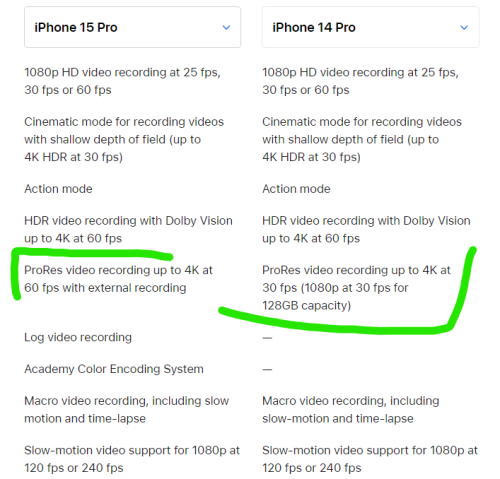
so iphone 15 pro even 128gb can support prores video recording up to 4K at 30 FPS? 14pro need at least 256gb to support

[2023] iPhone 15 Pro/Pro Max Discussion, The ultimate iPhone.
|
|
 Sep 13 2023, 10:15 PM Sep 13 2023, 10:15 PM
Return to original view | Post
#1
|
 
Senior Member
1,265 posts Joined: Oct 2011 From: 1 Infinite Loop, Cupertino  
|
QUOTE(cklove96 @ Sep 13 2023, 06:36 PM) so iphone 15 pro even 128gb can support prores video recording up to 4K at 30 FPS? 14pro need at least 256gb to support |
|
|
|
|
|
Sep 14 2023, 12:07 AM
Return to original view | Post
#2
|
|
Senior Member
1,265 posts Joined: Oct 2011 From: 1 Infinite Loop, Cupertino
|
iPhone 15 Pro models have 8 GB of RAM
hmmmm Apple trying to poison me to upgrade from my 13 Pro Max lol these features are hard to turn down: 1. A17 Pro chip with 3nm architecture (better battery life with similar perf to 14PM) 2. 8 GB RAM (more memory for apps is always great) 3. all-new powerful Apple GPU (play a lot of games so i'd love this) 4. USB-C with USB3 transfer speeds (transfer a lot of movies/TV shows will be so much quicker) 5. lighter weight from the titanium (13PM dman heavy weh) 6. Dynamic island + always-on display that goes up to 2000nit in sunlight (sexy screen lol) This post has been edited by KaiHD: Sep 14 2023, 12:15 AM |
|
|
Sep 14 2023, 11:19 AM
Return to original view | Post
#3
|
|
Senior Member
1,265 posts Joined: Oct 2011 From: 1 Infinite Loop, Cupertino
|
QUOTE(decavalera @ Sep 14 2023, 10:22 AM) The usb-c 3 from epal is dayem expensive as expected at RM399. That's not a normal USB-C cable - that's a Thunderbolt certified cable. Meant for professionals using Macs and iPads that need transfer files at 40Gbps speeds.Whats the different time to fully charge compare to Usb-c 2? Whats the best price around? Worth to buy? iPhone 15 Pro doesn't support Thunderbolt, only USB3 (up to 10Gbps speeds). So you can get a cheaper USB3 data cable from any reputable manufacturer like the Anker Powerline III. Alternatively, you can still get a Thunderbolt cable (or USB4, which is cheaper but similar speeds) like this Anker one and that will future proof you down the line in case Apple decides to add Thunderbolt support in future models QUOTE(fruitie @ Sep 14 2023, 10:51 AM) It’s going to be my first time transferring to a new iPhone. I want to know what happens when I turn on the iPhone 15 PM later and logged in with my Apple ID? I will be picking up my phone from a physical store and head straight to Digi for eSIM transfer to new phone. Will it work by the time? Or do I need to have everything transferred only can apply for eSIM? I have tons of stuff on iCloud and gonna take very long time to transfer I supposed? best way is to just use the USB-C to lightning cable from your old iPhone. Connect the Lightning end to old phone and USB-C end to new phone and it will allow you to do the transfer over the cable which should be fasterThis post has been edited by KaiHD: Sep 14 2023, 11:25 AM decavalera liked this post
|
|
|
Sep 14 2023, 11:36 AM
Return to original view | Post
#4
|
|
Senior Member
1,265 posts Joined: Oct 2011 From: 1 Infinite Loop, Cupertino
|
QUOTE(fruitie @ Sep 14 2023, 11:26 AM) So I turn on and login to Apple ID, then skip everything to activate my eSIM? Then go back home only do the transfer? How do I trigger this part again? I’m sorry for the many questions because I don’t want to screw up the process. If you login with Apple ID to transfer eSIM and skip all the setup, you will only get data from old phone that is using iCloud. Some apps's settings or login state will not transfer over. What you can do then is to erase the phone again to factory, while choosing to keep the eSIM instead of erasing it also. The setup process will recognise the stored eSIM and offer to use that. I didn’t know this. So, I need to endure both phones are fully charged or will be cut off if no battery.  Again the question is can I login with Apple ID to activate the phone to transfer my eSIM then only perform all these? I personally don't recommend that though. Much more advisable to just go home with the phone and the eSIM QR code, do the 1:1 transfer over cable and then take the eSIM QR code and activate it. emilyngsc liked this post
|
|
|
Sep 14 2023, 11:38 AM
Return to original view | Post
#5
|
|
Senior Member
1,265 posts Joined: Oct 2011 From: 1 Infinite Loop, Cupertino
|
QUOTE(decavalera @ Sep 14 2023, 11:32 AM) Thanks bro, just read the tech spec that 15 pro only support 10Gbps. correct, in terms of iPhone to iPhone transfer lol Anyway, 1st time reading/knowing about this cable transfer.. so this is the 1st time able to transfer right since previously cant since there is no lightning-lightning cable..  android to iPhone transfers can use that method long time already lol decavalera liked this post
|
|
|
Sep 14 2023, 12:07 PM
Return to original view | Post
#6
|
|
Senior Member
1,265 posts Joined: Oct 2011 From: 1 Infinite Loop, Cupertino
|
QUOTE(fruitie @ Sep 14 2023, 11:46 AM) OK, so activate eSIM and restart the process later. Got it. How to activate an eSIM on your iPhone | Apple SupportSo, your advice is transfer everything first then only finally do eSIM? Digi needs to go Digi Centre to get the QR code. I'm not sure if they can give me the QR code first and I keep it until I need it.  You can add eSIM as part of the Setup process (see video from Apple Support above). Since Cellular setup is at the beginning, it will ask you for the QR code first. (Before it even asks you for Apple ID or if you want to transfer data from iCloud/another phone) If you don't want to spend long time at the Digi Center or if they don't let you take the QR code home, you can just start the Setup process and scan QR code there, got through rest of setup, connect your old phone via cable, then go home while the transfer process starts. This post has been edited by KaiHD: Sep 14 2023, 12:09 PM |
|
|
|
|
|
Sep 15 2023, 11:58 AM
Return to original view | Post
#7
|
|
Senior Member
1,265 posts Joined: Oct 2011 From: 1 Infinite Loop, Cupertino
|
QUOTE(westlife @ Sep 15 2023, 07:33 AM) what is the recommended charger to charge iphone 15 pro max at the fatest charging speed? QUOTE(decavalera @ Sep 15 2023, 07:44 AM) Yeah, is the 20W apple charger & the provided c-c charging cable already maximise the 10gbps ? Any USB Power Delivery (PD) certified charger works. I personally use a ChargeAsap 200W multi-port one that can charge my Mac (100W) and iPhone (30W) at the same time. My iPhone 13 Pro Max only uses 30W in the first few minutes when charging from 0-20% though, in most cases charging maxes out at 20W. This might change with 15.And you'll need to buy a USB4 or Thunderbolt cable to get the 10Gbps data transfer speed. The included cable is just a standard charging cable that maxes out at USB2 speeds (480Mbps / 0.48Gbps) |
|
|
Sep 15 2023, 02:47 PM
Return to original view | Post
#8
|
|
Senior Member
1,265 posts Joined: Oct 2011 From: 1 Infinite Loop, Cupertino
|
QUOTE(M4A1 @ Sep 15 2023, 02:42 PM) i dun understand/confuse with the cabel lol of course it's usb-c to usb-c.so what cabel will be given inside the box? usb -> usb C? or lightning -> usb c? it's been usb-c at the charger end since 2020. and this year they changed the phone end from lightning to usb-c. no more lightning iphones This post has been edited by KaiHD: Sep 15 2023, 02:48 PM ezypepper liked this post
|
|
|
Sep 16 2023, 02:24 AM
Return to original view | Post
#9
|
|
Senior Member
1,265 posts Joined: Oct 2011 From: 1 Infinite Loop, Cupertino
|
QUOTE(M4A1 @ Sep 16 2023, 01:07 AM) cause like i mention this afternoon Better you get this Anker charger. Same USB Power Delivery certification like the Apple one, but costs RM 20 less and runs cooler/less hot than that 20W Apple original charger since they use more advanced material called Gallium Nitrate (GaN). Apple actually also has their own GaN charger that can go up to 70W (can charge laptops also), but it's much more expensive at RM 240i thought they only have plug for normal usb only instead of usb C https://www.apple.com/my/shop/product/MHJF3...112c62019243960 ok la , then solve my problem/query LOL rm99 ok la QUOTE(fruitie @ Sep 16 2023, 01:16 AM) Nope. When they changed from USB-A to USB-C for the cable, they started selling it. Me too everything try to be Apple stuff but I don’t like their fragile cable. At least this year the cable is braided, so should be less fragile?? hahaha Also it’s very short for my liking, cannot play my phone on bed.  This post has been edited by KaiHD: Sep 16 2023, 02:26 AM decavalera liked this post
|
|
|
Sep 18 2023, 04:30 PM
Return to original view | Post
#10
|
|
Senior Member
1,265 posts Joined: Oct 2011 From: 1 Infinite Loop, Cupertino
|
QUOTE(attw @ Sep 18 2023, 02:42 PM) https://support.apple.com/en-us/HT213839 lol no need to buy Thunderbolt 4 cable. iPhone tak support pun. get a USB4 cable like this one enough dy1. iPhone 15 Pro and iPhone 15 Pro Max support fast USB 3.2 Gen 2 speeds up to 10Gbit per second when using an optional USB 3 cable. (The USB-C cable that comes with your iPhone supports charging and USB 2 speeds. If you want to use a USB 3 device, use a compliant USB 3 cable that supports 10Gbit/s - which Apple sells in Malaysia for RM399) 3. iPhone uses the DisplayPort protocol to support connections to USB-C displays at up to 4K resolution and 60Hz. To connect your iPhone to high-resolution displays, use a USB-C cable that supports USB 3.1 or higher, such as the cable included with the display or the Thunderbolt 4 (USB‑C) Pro Cable (1 m), sold separately (but of course)… QUOTE(Andrewtst @ Sep 18 2023, 03:11 PM) Wonder what USB-C version Apple equipped in iPad Pro 11" (4th gen). Do you have any idea? Thunderbolt 3 / USB 4. Up to 40Gbps transfer speeds, requires a Thunderbolt 3 / USB 4 cable or newer (Thunderbolt 4 cable also can)This post has been edited by KaiHD: Sep 18 2023, 04:43 PM |
|
|
Sep 18 2023, 04:42 PM
Return to original view | Post
#11
|
|
Senior Member
1,265 posts Joined: Oct 2011 From: 1 Infinite Loop, Cupertino
|
Actually, it's a bit hard to check which USB-C cables can do the higher transfer speeds, so this is the downside of switching to USB-C lol.
most cables are meant for charging - they advertise the Watt number only, and the data transfer speed usually only goes to USB 2 (0.48Gbps) some cables meant for data transfer are branded USB 3.1 Gen 2 (such a stupid branding) and these can do 10Gbps. charging usually goes up to 60W only however, the latest spec is USB4, and this is the one I recommend y'all get. they repackaged the Thunderbolt 3 spec, so all USB4 cables are certified to do 100W charging, 40Gbps data transfer, and video output at 6K resolution at 60Hz |
|
|
Sep 18 2023, 05:02 PM
Return to original view | Post
#12
|
|
Senior Member
1,265 posts Joined: Oct 2011 From: 1 Infinite Loop, Cupertino
|
QUOTE(fruitie @ Sep 18 2023, 04:50 PM) I checked with Switch WhatsApp CS, we can pay deposit RM 300 during online pre-order and pay the remaining via Maybank credit card installment during iPhone collection, this option will get RM 200 voucher too. i wonder, can we pre-order telco set at Machines or Switch? I remember they had special units allocated on their sites for Maxis customers.Was thinking, I get the phone with the standard 2-year contract (not zerolution) and then split the upfront payment into credit card EPP. that way my Maxis bill remain same and I can still get the second-year warranty / protection plan that Machines/Switch offers |
|
|
Sep 20 2023, 11:28 AM
Return to original view | Post
#13
|
|
Senior Member
1,265 posts Joined: Oct 2011 From: 1 Infinite Loop, Cupertino
|
QUOTE(fruitie @ Sep 19 2023, 11:27 AM) https://shp.ee/82pndxm Not sure if this is durable since it’s not braided? I personally recommend Anker - no other third party brand that I trust more. https://shp.ee/jxjyug6 Is this good enough? Otherwise, please suggest me by inserting the sales link here and I will place order. If you want to charge only, go with their 544 USB-C cable (140W charging, 0.48Gbps transfer): https://shopee.com.my/ANKER-544-USB-C-to-US...178.19991864778 If you want to charge + data transfer, go with their Thunderbolt 3 cable (100W charging, 40Gbps transfer): https://shopee.com.my/Anker-A8858-Thunderbo...0148.8800730605 |
|
|
|
|
|
Sep 22 2023, 08:45 PM
Return to original view | Post
#14
|
|
Senior Member
1,265 posts Joined: Oct 2011 From: 1 Infinite Loop, Cupertino
|
QUOTE(westlife @ Sep 22 2023, 08:39 PM) Serious? Resell value good meh? I saw iPhone 14 pro max resell value is not that good. Maxis and Machines give RM 2.9K for 512 GB 13PM trade in. on Carousell I saw 256 GB 13PM going for around RM 3.5K, so probably can get RM 4K for 512 GB? |
|
|
Sep 23 2023, 12:50 AM
Return to original view | Post
#15
|
|
Senior Member
1,265 posts Joined: Oct 2011 From: 1 Infinite Loop, Cupertino
|
QUOTE(fruitie @ Sep 23 2023, 12:32 AM) Which clear casing covers all the buttons (includes the new Action button)? Preferable MagSafe charging compatible but without the ugly ring at behind, does such thing exist? MagSafe compatibility requires the ring of magnets (it's in the name lol). So if you want to go clear case with MagSafe, definitely must have ring one.If you die2 don't want to see the ring and want a clear case, have to get one without magsafe compatibility. but then, other magsafe accessories like holders or chargers won't work as well because they will not stick as well to the phone if you really want nice aesthetic and magsafe compatibility, have to get a non-clear case so the ring of magnets is "hidden" lol |
|
|
Sep 24 2023, 05:18 PM
Return to original view | Post
#16
|
|
Senior Member
1,265 posts Joined: Oct 2011 From: 1 Infinite Loop, Cupertino
|
QUOTE(Buyalotforgaming @ Sep 23 2023, 08:14 PM) For those of us migrating from Lightning to USB C, any good adapters out there? Will be quite painful to replace all the cables at home, work, car etc etc. QUOTE(Buyalotforgaming @ Sep 23 2023, 10:20 PM) Thanks! I agree, but some of my other devices still use lightning. Would be easier to buy adapters rather than carry around 2 cables Change all your cables to USB-C. This Anker 322 braided cable is just RM 19: https://shopee.com.my/Anker-322-USB-Type-C-...149.22569800746then for devices that still use Lightning, just get this RM 15 Orico Lightning port to USB-C receptacle OTG adapter: https://shopee.com.my/ORICO-WL-Series-Light...009.22652501641 you'll thank me when those Lightning devices are upgraded to USB-C ones down the road  This post has been edited by KaiHD: Sep 24 2023, 05:22 PM |
|
|
Sep 24 2023, 06:48 PM
Return to original view | Post
#17
|
|
Senior Member
1,265 posts Joined: Oct 2011 From: 1 Infinite Loop, Cupertino
|
QUOTE(decavalera @ Sep 24 2023, 06:05 PM) What about the speed bro? Most prob USB2 rite Yeah, a cable that cheap is USB2 (0.48Gbps) of course lol. A USB3.2 (20Gbps) or USB4 cable (40Gbps) will be more expensive, but not that much actually. For example, Orico has cheap USB-C data transfer cables - RM 45 for USB3.2 and RM 51 for USB4 If you care about USB-IF certification, they also sell a certified USB4 cable priced at RM 79. I recommend it cause can use for charging as well as data transfer/video output. Good thing is both types have e-Marker chips, so they're safe to use. This post has been edited by KaiHD: Sep 24 2023, 07:07 PM |
|
|
Sep 25 2023, 11:00 AM
Return to original view | Post
#18
|
|
Senior Member
1,265 posts Joined: Oct 2011 From: 1 Infinite Loop, Cupertino
|
QUOTE(Andrewtst @ Sep 25 2023, 08:10 AM) Just order Mujjio leather case. Hope it was nice. 😊 Report back to us once you have it 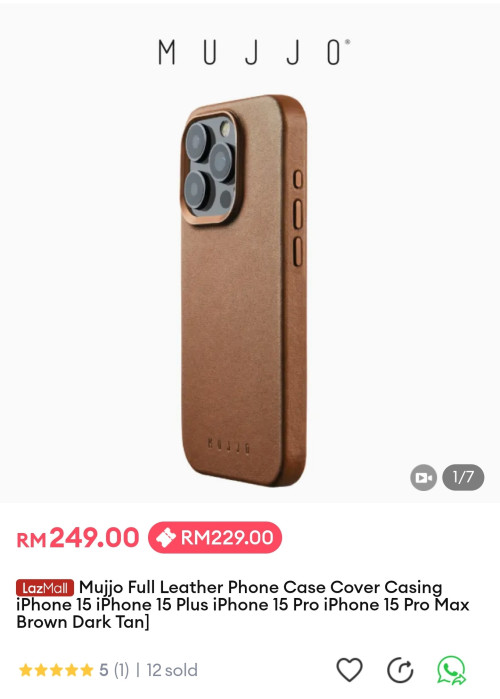  I love a good leather case. Apple's one was okay to me, but a lot of people say they're not that good recently (and was better during 11/12 series). Since Apple stopped making leather case, gonna have to go third-party if I upgrade. Mujjo seems pretty affordable, but not many YouTube reviews showcase it. Other brands I've seen reviews of that have good quality are Ryan London, Andar, and Bullstrap (but those are all above RM 350) Also a found some user recommendations on MacRumors that the YNW leather case at AliExpress have similar quality to the above brands and is pretty great, especially since it only costs around RM 150. This post has been edited by KaiHD: Sep 25 2023, 11:03 AM |
|
|
Sep 26 2023, 01:48 AM
Return to original view | Post
#19
|
|
Senior Member
1,265 posts Joined: Oct 2011 From: 1 Infinite Loop, Cupertino
|
QUOTE(ezypepper @ Sep 25 2023, 07:17 PM) Y’all, u know this has been discussed earlier, but usb C cables, which is better…Belkin or anker? What about U green? Have bought a couple charger and cable from Ugreen before, but they ended up rosak.I personally use Anker. Cost like a bit more than Ugreen (at that time around RM 60 for braided cable although they now sell a non-braided cable for just RM 29) but rock-solid quality. That USB-C cable I got from them in 2020 still working lol Belkin I consider one of the most overpriced third party accesory maker hahaha This post has been edited by KaiHD: Sep 26 2023, 01:49 AM ezypepper liked this post
|
|
|
Sep 26 2023, 09:35 PM
Return to original view | Post
#20
|
|
Senior Member
1,265 posts Joined: Oct 2011 From: 1 Infinite Loop, Cupertino
|
QUOTE(Prometric @ Sep 26 2023, 03:51 PM) Ahh sorry bro min i need 256gb. Buy my 13 PM 512GB then. 4K only |
| Change to: |  0.3035sec 0.3035sec
 0.32 0.32
 7 queries 7 queries
 GZIP Disabled GZIP Disabled
Time is now: 6th December 2025 - 05:57 AM |
 Quote
Quote