Welcome Guest ( Log In | Register )

Bump Topic Topic Closed RSS Feed
3 Pages  1 2 3 >Bottom

Outline · [ Standard ] · Linear+

Unifi Official TM UniFi High Speed Broadband Thread V40, READ 1ST PAGE FOR RELEVANT WIFI INFO

views
     
blacktubi
post Jul 17 2022, 09:54 PM

-
Group Icon
Elite
8,415 posts

Joined: Jul 2008

QUOTE(westlife @ Jul 17 2022, 09:05 PM)
ic. good to hear that.  tongue.gif

but i think the dlink one support easymesh which it can work with other brand of mesh wifi router. so technically it is a better model?
*
The support for EasyMesh is very limited currently. I believe most vendor will refuse to support it to keep people locked into their own ecosystem.

It's also not as good as proprietary mesh standards developed by most OEMs.
blacktubi
post Jul 17 2022, 11:07 PM

-
Group Icon
Elite
8,415 posts

Joined: Jul 2008

QUOTE(westlife @ Jul 17 2022, 09:59 PM)
ic. so tehcnically even other brand, must have this easymesh supported in order to use with this given tm dlink mesh wifi router?

then still ok..  tongue.gif

anyway, one needs to have 500Mbps plan and above to take advantage of wifi 5. so not a must for me to use wifi 6 since i am not using those plans. wifi 6 mesh (other popular brands) are not cheap still actually.
*
Yes, good luck getting every vendor to implement it properly. Some brands can't even mesh properly within their own ecosystem.

The biggest different of WiFi 6 is the speed when the signal is weak. Let's say after 2 walls WiFi 5 will only give you 100Mbps. WiFi 6 could be around 250Mbps in best case scenario.

WiFi 6 is more efficient so it can transport more data even on poor signal conditions.

QUOTE(Oltromen Ripot @ Jul 17 2022, 10:28 PM)
just had Huawei "EasyMesh" delivered by Maxis as part of upgrade.

what was initially thought Easy - like Deco easy - to mesh with existing sibling Easymesh-cum-router unit, turn out to be "kena configure this", "kena press-hold that", and seeing the technician setting it up like it's some kind of kungfu not meant for home user.

For now, I am convinced to not fall into Easymesh hype.

.... probably ride out the bundled units as-is first, later change mesh when i really need pedal-to-the-metal.
*
EasyMesh is nothing more than refined WDS repeater mode.

AP steering, band steering and roaming will still depends on how each OEM configure them.

blacktubi
post Jul 18 2022, 12:27 AM

-
Group Icon
Elite
8,415 posts

Joined: Jul 2008

QUOTE(westlife @ Jul 17 2022, 11:16 PM)
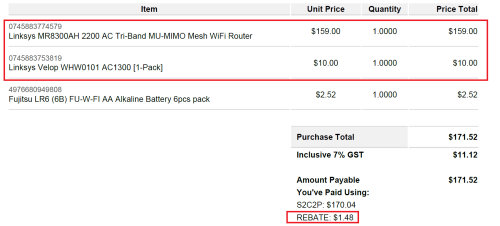
i think the position of the mesh nodes make a big big difference. i spent quite a few hours to test the best spots to place the child node in my master bedroom to get the best speed. finally i found it and now i am having the same speed in my master bedroom as downstairs.

I am using linksys wifi 5 mesh which i find it quite little ppl use in bolehland. they work quite well for me to cover my double storey.  tongue.gif

spent about sgd169 for this combi. (that time there was promo to get 1 x velop at sgd10 with the purchase of the MR series mesh wifi router)

user posted image
*
Yup the Linksys Velop series are pretty decent. Somehow they are rather pricey over here.


blacktubi
post Jul 28 2022, 09:34 PM

-
Group Icon
Elite
8,415 posts

Joined: Jul 2008

QUOTE(soonwai @ Jul 28 2022, 01:45 AM)
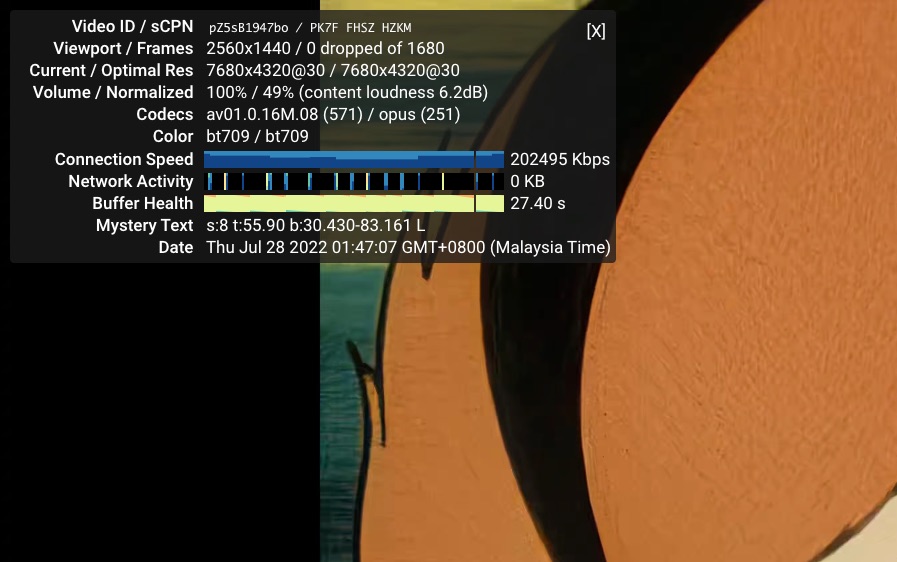
My apologies, after reading afif92 reply, I realise I was testing only at 2K. Safari only displays VP9 encoded resolutions for Youtube. This is on Mac mini M1. Apple M1 does not have hardware AV1 decoding.

Tried again in Chrome. No problems.

user posted image

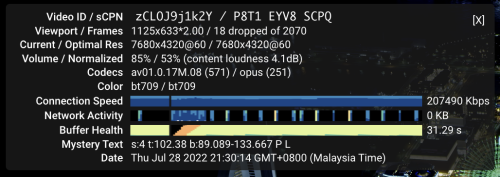
Try this video. 8K 60FPS. This is bad. Neither my Macmini M1 nor my 12400F/RX6600XT can play this.
https://www.youtube.com/watch?v=zCLOJ9j1k2Y
*
M1 Pro over Wi-Fi
Consume a ton of CPU though.

user posted image
blacktubi
post Jul 29 2022, 09:57 PM

-
Group Icon
Elite
8,415 posts

Joined: Jul 2008

TM blocked TCP traceroute since the Streamyx or even 1515 days.
blacktubi
post Jan 2 2023, 09:01 PM

-
Group Icon
Elite
8,415 posts

Joined: Jul 2008

QUOTE(dcUni @ Jan 1 2023, 05:30 PM)
Hi have anyone using the dlink x1860z router that encounter internet connection error or slow connect for the wifi? I been encountered this when connecting with my phone and both my phone is facing this. No issue on Lan connection but only wifi connection. I never encounter this when I am using the previous c1200 router and only face this after I upgrade my package with new router provided.
*
If you are facing strange issues like things loading longer, constant reload but speedtest is fine, you probably need a new router.
blacktubi
post Jan 21 2023, 08:03 PM

-
Group Icon
Elite
8,415 posts

Joined: Jul 2008

QUOTE(iymm @ Jan 21 2023, 01:34 PM)
Anyone can explain why sub-mesh router wifi speed only have almost half the speed compare to main router?
BUT if I use lan cable it can run at full speed? Weird....
*
Cause the mesh you are using is not fast enough. You need to really overspec your mesh WiFi to get optimal speed.

Take a dual-band WiFi 6 AX1800 mesh system as example, the maximum capacity is 1200Mbps on 5GHz.

Maximum attainable speed on mesh node is half of the capacity due to WiFi retransmission = 600Mbps

Factor in around 50% signal loss over 2 walls = 300Mbps

Factor in another 20% lost due to various inefficiencies = 240Mbps

You can apply this formula to get a rough estimation of the speed you can get on the mesh node of your mesh WiFi system.

When you want to buy a dual-band mesh WiFi system, just multiply the 5GHz backhaul speed by 20% to get a rough estimation of the maximum speed you can get on the mesh node.
blacktubi
post Mar 11 2023, 09:16 PM

-
Group Icon
Elite
8,415 posts

Joined: Jul 2008

QUOTE(Maxieos @ Mar 11 2023, 07:35 PM)
yeh ,sorry press wrongly the number.

Someone suggest me to do so for more function.

Sorry , not familiar with ddwrt , I though flashing with wrt will improve connectivity ? no ?
The reason i wanted to flash was to test whether it'll improve wifi connection and i wanted an extra function like power down the router at admin setting.
Stock tm firmware only have reboot but no power down.Did I miss something ?
I plug my external HDD 2.5 but there is no power down button or safely remove.What should I do ? forcefully remove the HDD that is running ?
*
It's 2023, custom firmware only provide added features. Gone are the days where vendors happily provide the source code.

Their performance and stability is way worst than stock firmware most of the time as they do not have access to the Wi-Fi drivers and many other non-standard ARM features backed in the SoC including NAT acceleration, Wi-Fi offload engine, crypto and etc.

Don't think the TM D-Link firmware comes with an unmount (safety remove) feature.
blacktubi
post Apr 5 2023, 09:02 PM

-
Group Icon
Elite
8,415 posts

Joined: Jul 2008

QUOTE(nanpengyou @ Apr 5 2023, 11:33 AM)
Hi, my android tv is getting very low WiFi speed after my unifi upgraded to 300mbps with the new WiFi router provided by TM. However, I can get good speed if I switched back to old tm router.

Whtas wrong with the new tm WiFi 6 router?
I have tried to hard reset router and tv too.
*
Some devices just don't work well with Wi-Fi 6.

I have an older Sony TV and a few China TV box with this exact issue too.

blacktubi
post Apr 16 2023, 11:18 PM

-
Group Icon
Elite
8,415 posts

Joined: Jul 2008

QUOTE(go626201 @ Apr 15 2023, 07:48 PM)
Why TM not just provide an additional option for user who really want to use full 2gbps at once,
with providing an addon that give ONR that atleast have 1x 2.5Gbps port.
Like one time payment or every month + RM15-RM25 addon.

And 4x2.5G port router/ONR not common and price not cheap,so this is not considerable i think. But 1x 2.5Gbps is acceptable,better than 4x1gbps port.
*
That's their trick, they really don't want you to be constantly pulling 2Gbps

With that configuration, it will be really hard to pull more than 1Gbps especially with that free modem router

But, it is possible to use another router and do bonding to get the full 2Gbps. However, it is tricky and expensive. A router that can trunk 2Gbps without NAT acceleration gonna cost quite a bit as well.

This post has been edited by blacktubi: Apr 16 2023, 11:19 PM
blacktubi
post Apr 17 2023, 09:16 PM

-
Group Icon
Elite
8,415 posts

Joined: Jul 2008

Unifi 2Gbps ONR modem router specs

D-Link DPN-FX3060V
Wi-Fi Specs: Wi-Fi 6 AX3000
Configuration: 2x2 (2T2R)
5GHz max bandwidth: 160MHz
5GHz max speed: 2402Mbps
2.4GHz max bandwidth: 80MHz
2.4GHz max speed: 576Mbps

Based on screenshots from sya102003, TM still sticking with VLAN 500 and PPPoE for authentication.
blacktubi
post Apr 17 2023, 09:58 PM

-
Group Icon
Elite
8,415 posts

Joined: Jul 2008

QUOTE(petpenyubobo @ Apr 17 2023, 09:22 PM)
That's really lame considering you're paying close to RM500 a month for a SOHO/Home plan?

AX3000 WiFi with non detachable antennas? shocking.gif

If you can afford that price, you could have done better buying your own router setup. Just get the 10G Ethernet port for your subscribers to hook up.

PPPoE for a 10G connection REALLY lame...
*
I am curious to know whether it can even NAT 2Gbps reliably to reach the promised 2Gbps aggregate speed.
blacktubi
post Apr 19 2023, 01:23 PM

-
Group Icon
Elite
8,415 posts

Joined: Jul 2008

QUOTE(earlofclarendon @ Apr 18 2023, 07:10 PM)
Hi should I subscribe to 1gbps or settle for 300mbps and invest in XT8

Not heavy user, 2 person 1500sf condo. Netflix 4K maximum two devices at same time.
*
It's either 1Gbps and having equipment that can't even provide speed more than 50Mbps after 2 walls

Or choose 300Mbps, invest a good equipment that will guarantee 300Mbps on every corner of your property

If you ask me, I will choose option 2
blacktubi
post Apr 19 2023, 02:19 PM

-
Group Icon
Elite
8,415 posts

Joined: Jul 2008

QUOTE(petpenyubobo @ Apr 19 2023, 01:34 PM)
Hoping TM will be among the first ISP in Asia to start supplying uninterrupted backup supply to support their FXS landline stand/push with their CPEs.

They'll be ahead of even Singapore, Japan and South Korea. thumbsup.gif
Those who can afford to spend close to RM500 a month on a home internet subscription will most certainly afford to also invest in high end enterprise grade network equipments.  MikroTik, Ubiquiti, custom built servers for routing, or even a network rack dedicated for just the internet in their home.
*
Did you read the question asked by the original author?
blacktubi
post Apr 30 2023, 07:53 PM

-
Group Icon
Elite
8,415 posts

Joined: Jul 2008

QUOTE(morphware @ Apr 30 2023, 05:26 PM)
Does anyone know if the DPN-FX3060V fibre modem that TM supplies supports LACP-IEEE 802.3ad (LAN Aggregation)?

Using an Asus GT-AX11000 in my setup. Can get over 2Gbps in the dlink app testing the modem but cannot get link aggregation to work.

I have been try to make it work but cannot, also have double NAT problem now so my plex server won't work properly.

Any suggestions or help greatly appreciated.
*
No, it doesn’t support link aggregation

blacktubi
post May 1 2023, 09:09 PM

-
Group Icon
Elite
8,415 posts

Joined: Jul 2008

QUOTE(morphware @ May 1 2023, 11:19 AM)
Is there any solution to this? Can I buy a different fibre optic ont with 802.3ad? Or maybe one with a 2.5Gbps port?

Pretty annoyed about this actually because they advertise an aggregate speed of 2Gbps but it is only a load balanced connect with this  particular ont.
*
There's no easy solution.

It's possible to clone the OLT authentication shown by Anime4000 and used it on some modded Huawei ONU or GPON SFP module.

Meanwhile, feedback to SKMM and YB Fahmi else we will have more telco doing this soon.
blacktubi
post May 2 2023, 10:06 PM

-
Group Icon
Elite
8,415 posts

Joined: Jul 2008

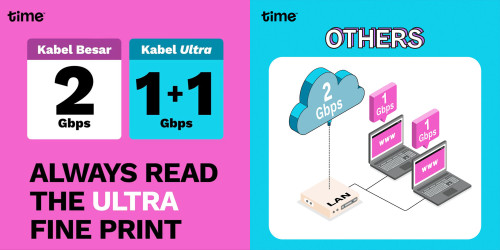
Meanwhile, TIME is having a good time poking fun at Unifi 2Gbps

Edit: This 1+1 analogy is actually a pretty good explanation on how the current Unifi 2Gbps works

user posted image

This post has been edited by blacktubi: May 2 2023, 10:09 PM
blacktubi
post May 7 2023, 09:17 PM

-
Group Icon
Elite
8,415 posts

Joined: Jul 2008

QUOTE(HumanExtinction @ May 7 2023, 05:17 PM)
tm really failure

last week i want to downgrade my plan through the unifi app from 800 to 300 cause money is a bit tight for me atm.

one week ltr no phone calls, email or any response from them. ask thrugh unifi chat and assure me will contact me within a few days. guess what, no response again. now chat with the support again and say will open a report for me. lets see how it goes this time. really dont understand, why cant support just do it and we as a customer have to go through so many hoops and loops just to downgrade the plan?
*
IMO, their most reliable touch point is still physically going to an actual TM point but they are closed during weekends.

All other channel is hit and miss doh.gif

This post has been edited by blacktubi: May 7 2023, 09:18 PM
blacktubi
post May 15 2023, 08:53 PM

-
Group Icon
Elite
8,415 posts

Joined: Jul 2008

QUOTE(zerorating @ May 15 2023, 08:49 PM)
dear boss, a question here.
did TM use XG-PON to deliver 1/2gbps package or they used the old school 2.5gbps G-PON?

i dont require that much bandwidth, just a concern if the network got congested badly when few users in the neighborhood utilized all the bandwidth they paid for.
*
2.5Gbps GPON

Hence almost no infra upgrade is required on their end, almost every FTTH location is covered

There's a discussion on split ratio many pages back
blacktubi
post May 15 2023, 08:59 PM

-
Group Icon
Elite
8,415 posts

Joined: Jul 2008

Just a quick update regarding public IP for 100Mbps plan.

I helped a friend with genuine use case to request for public IP via live chat on Unifi portal yesterday and it's already done this morning.

They will require some pictures and I attached a picture of the CCTV DVR and the screen showing the ports that are required.

3 Pages  1 2 3 >Top
Topic ClosedOptions
 

Change to:
| Lo-Fi Version
0.2445sec    0.29    7 queries    GZIP Disabled
Time is now: 13th December 2025 - 08:25 AM