

QUOTE(HumanExtinction @ May 3 2022, 09:46 PM)
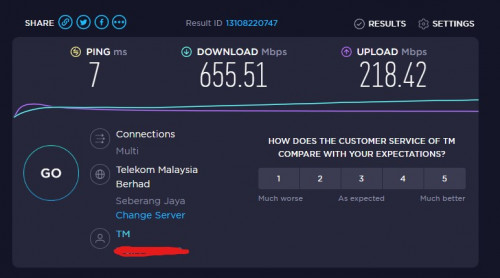
My speed tripling after changing from deco m9+ to x90. Can even get around 700 - 800mbps. No regrets


Are you using wired backhaul or wireless backhaul ?
How many nodes? 2 pack or 3 pack?
Thanks!
Unifi Official TM UniFi High Speed Broadband Thread V40, READ 1ST PAGE FOR RELEVANT WIFI INFO
|
|
 May 4 2022, 06:01 PM May 4 2022, 06:01 PM
Return to original view | Post
#1
|
 
Junior Member
306 posts Joined: Sep 2007 
|
QUOTE(HumanExtinction @ May 3 2022, 09:46 PM) My speed tripling after changing from deco m9+ to x90. Can even get around 700 - 800mbps. No regrets Are you using wired backhaul or wireless backhaul ? How many nodes? 2 pack or 3 pack? Thanks! |
|
|
|
|
|
May 4 2022, 08:19 PM
Return to original view | Post
#2
|
|
Junior Member
306 posts Joined: Sep 2007
|
QUOTE(HumanExtinction @ May 4 2022, 07:56 PM) Wired backhaul from main router to main mesh, then main mesh wireless backhaul to second mesh. I bought 2 pack. When you screenshot the speed testWere you connected to the main mesh or the second mesh? Via Lan or WiFi? **** Edit Why didn't you use the main mesh directly as the main router? I believe it is able to do so This post has been edited by NooBiE888: May 4 2022, 08:20 PM |
|
|
May 4 2022, 08:55 PM
Return to original view | Post
#3
|
|
Junior Member
306 posts Joined: Sep 2007
|
QUOTE(MyProLife @ May 4 2022, 08:22 PM) Not easily to tell unless check from deco app His whole setup if bought newHe already has one strong router archer ax90 So he can only wire the main router to mesh, mesh put in ap mode I glad he go for something the best from tp link, must be cost so much I think more than rm2k ****** I still believe better to retire the ax90 Not to pollute the wifi channels Unless the ax90 WiFi is turned off This post has been edited by NooBiE888: May 4 2022, 08:57 PM |
|
|
May 4 2022, 09:13 PM
Return to original view | Post
#4
|
|
Junior Member
306 posts Joined: Sep 2007
|
QUOTE(HumanExtinction @ May 4 2022, 09:08 PM) Second mesh. The distance between the first mesh and second mesh not very far and i use a 10m cat 6 cable to link between the main router and the main mesh. Since i ard bought the ax90 last year, might as well just use it. Another thing is my house has a lot of wifi devices and i got 3 other family members all very tech heavy use. So my other family members will use the ax90 while i will use the x90. Thanks for replyya, whole setup cost me around 2.2k. I bought the ax90 last year at around 829 and the x90 i bought yesterday at 1349 at harvey norman cause got do promotion. If bought online then a bit cheaper but dont want to wait since raya sure package will delay. Was considering the deco x50 But tp link now limited features available for the deco series and they lock it behind the subscription service I assume you just basic usage? Means you ask all other users to connect to only ax90 wifi ? Means ax90 its own 5ghz and deco have 2 x 5ghz? |
|
|
May 4 2022, 09:31 PM
Return to original view | Post
#5
|
|
Junior Member
306 posts Joined: Sep 2007
|
QUOTE(HumanExtinction @ May 4 2022, 09:24 PM) Depend on your use case, range and wall thickness. For me since i download a lot so i need to have a bit high end mesh to help me achieve the speed that i paid for, my house walls also quite thick so there's that. Thanks for reply.In AP mode, TP link app and LAN IP website to configure your internet settings is very limited. If through router mode all the internet settings are good enough for normal users. No need to subscribe the service, quite useless IMO. Both the AX90 and X90 has 5ghz and 5ghz - 2. I close the 2.4ghz on X90 since i dont need it. My family members room is nearer to the ax90 hence i ask them to connect it and the speed is more than suffice for them. Since my pc is at the very back of my house, hence i need the mesh to achieve the download speed that i want. Forget to mention that the second mesh has a cat 6 lan cable connect directly to my pc. Yes I hate that they force users to subscribe to a service. Have to pay additional every month after we already invested in the hardware. But coming future , even Apple also sell you subscription Iphone , cannot outright buy it. Anyways , I'm planning to test 2 x Xiaomi AX3200 . I got wired cable ready, so just test cheap mesh. |
|
|
May 4 2022, 09:50 PM
Return to original view | Post
#6
|
|
Junior Member
306 posts Joined: Sep 2007
|
QUOTE(HumanExtinction @ May 4 2022, 09:46 PM) Agree i feel after paying such a high price for your product yet you want ppl to subscribe something that is very basic and essential is outright stupid. Like ASUS, is expensive but at least they provide tons of features and also frequent updates.I saw at the xiaomi store last few days this ax3000 mesh like not bad. The price is rm499 for 2 mesh which is very cheap. ax3000 This deco need to pay expensive, then need us subscribe to a subscription to keep milking you. Xiaomi dont have fast roaming. So far I only know TP LINK support fast roaming. Not sure other more expensive brands. So no difference between the AX3000 and AX3200 I hope to get the AX3200 cheaper tomorrow (~ RM170 / pc) |
|
|
|
|
|
May 4 2022, 11:24 PM
Return to original view | IPv6 | Post
#7
|
|
Junior Member
306 posts Joined: Sep 2007
|
QUOTE(MyProLife @ May 4 2022, 10:43 PM) Yes only deco series supports fast roaming (k/v/r) full mesh technology I'll update once I get a unit to testOther brands like aimesh only has k/v mesh technology Xiaomi mesh AX3000 is cheaper by almost half if compared to similar spec Deco X50, but also the warranty is much shorter at up to 1 year (depending on reseller, some resellers only give shop warranty instead of manufacture warranty) Also xiaomi has had bad rep of compatibility with VLAN fiber systems widely used in Malaysia. But global firmware should at least support Internet vlan settings actually I will wait for further feedback about this model, because it has limited availability, not ever available on xiaomi global stores online, only some online and offline resellers carry this Quite sure it's basic mesh only Global unit for ax3200 have unifi profile and unifi IPTV support I manage to saw it on some YouTube review videos |
|
|
Oct 16 2022, 01:51 PM
Return to original view | IPv6 | Post
#8
|
|
Junior Member
306 posts Joined: Sep 2007
|
QUOTE(apalexar @ Oct 15 2022, 09:03 AM) This month my loyalty 300mbps bill suddenly become rm123 instead rm159, wondering why  QUOTE(MyProLife @ Oct 15 2022, 08:10 PM) 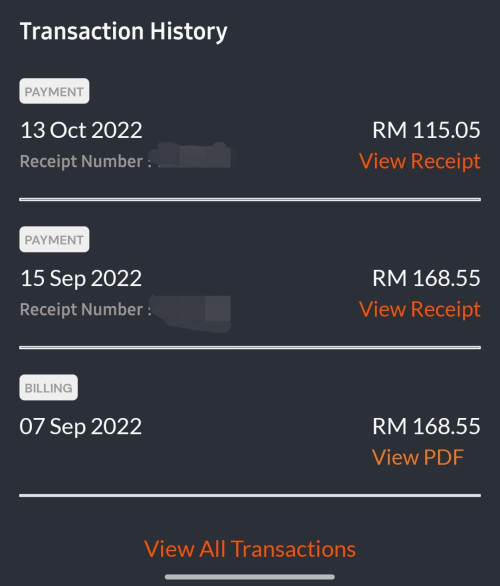 Same Sms says october bill is this much. Wonder how? Billing period change? 300mbps YEP with ruby tv QUOTE(annoymous1234 @ Oct 16 2022, 10:26 AM) No discount for me  still same price still same price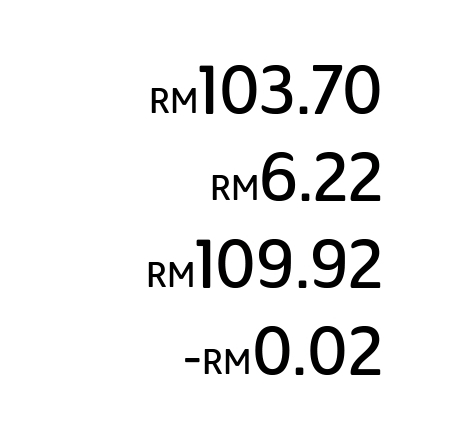 I also got it Hope its permanent YEP 2019 plan - previous RM159 before sst Dont know how they calculate the discount |
|
|
Oct 16 2022, 02:19 PM
Return to original view | IPv6 | Post
#9
|
|
Junior Member
306 posts Joined: Sep 2007
|
QUOTE(annoymous1234 @ Oct 16 2022, 01:54 PM) U using 300mbps? I think only for 300mbps. I'm using 100mbps Yep 300mbpsThanks to gobind for the x10 speed boost Originally thinking to jump ship as the price not cheapest already If this discount is permanent then no need . Downside is that they add the discount to the internet charges - means can claim less for income tax *** Details below 300mbps Ultimate pack 600 min 2 years hotstar *** Now i wondering those that got super cheap 500mbps and 800mbps what is their new discounted price There are a few in this thread This post has been edited by NooBiE888: Oct 16 2022, 02:20 PM |
|
|
Oct 16 2022, 06:56 PM
Return to original view | IPv6 | Post
#10
|
|
Junior Member
306 posts Joined: Sep 2007
|
QUOTE(MGM @ Oct 16 2022, 06:50 PM) Did u recently upgrade like trix above to: No i didnt upgrade anything - was thinking to jump to cheaper package.Offer through whatsapp Wifi6 router, disney+h 24m, recontract 24m, no need to topup anything. Pure 2019 YEP Only got Hotstar due to ultimate pack |
|
|
Oct 23 2022, 09:24 AM
Return to original view | IPv6 | Post
#11
|
|
Junior Member
306 posts Joined: Sep 2007
|
QUOTE(jhleo1 @ Oct 22 2022, 06:06 PM) As per member mentioned discount due to error only. Will be adjusted next month. QUOTE(Max2006 @ Oct 22 2022, 07:11 PM) It seems that no more discounts for the others after you checked with TM chat. LOL QUOTE(Oltromen Ripot @ Oct 22 2022, 07:38 PM) pity those who thought they are getting chummy good deal from TM. Damn , got jinxed.they wouldn't be able to smile with next bill  If really true I'll plan to jump ship then. Time to read up on maxis offers |
|
|
Nov 17 2022, 11:59 AM
Return to original view | IPv6 | Post
#12
|
|
Junior Member
306 posts Joined: Sep 2007
|
QUOTE(wai57 @ Nov 16 2022, 10:17 PM) gawd dem! #&*)% Here slow af, started these 2 days. SameKL area Fast.com full speed But Surfing at night feels laggy - should be international line saturated or something |
|
|
Aug 2 2023, 01:12 PM
Return to original view | IPv6 | Post
#13
|
|
Junior Member
306 posts Joined: Sep 2007
|
I see a lot of people mentioning rm119 / 300mpbs SWU 3.0
Anyone have info for 100mbps SWU 3.0? I want to downgrade |
|
|
|
|
|
Aug 2 2023, 02:32 PM
Return to original view | IPv6 | Post
#14
|
|
Junior Member
306 posts Joined: Sep 2007
|
I at TM Point now Any questions please ask ***** SWU 3.0 - sorry update below *info given at main counter* 100mbps / rm99 300mbps / rm119 / waive 6 months / 1 year temporary 500mbps / free wifi 6 mesh 500mbps / rm189 / waive 6 months / 1 year temporary 800mbps / free wifi 6 mesh Above verified This post has been edited by NooBiE888: Aug 2 2023, 02:46 PM The.Lucas.DaY, MGM, and 1 other liked this post
|
|
|
Aug 2 2023, 02:35 PM
Return to original view | IPv6 | Post
#15
|
|
Junior Member
306 posts Joined: Sep 2007
|
QUOTE(joehann @ Aug 2 2023, 02:34 PM) if currently on 300mbps plan with aneka pack of RM169 per month can change to SWU 3.0 300 mbps? contract left 1 year 2 month. I can try ask but preference is contract finished**** Counter say just walk in try They will try process Not confirmed will get This post has been edited by NooBiE888: Aug 2 2023, 02:36 PM joehann liked this post
|
|
|
Aug 2 2023, 02:40 PM
Return to original view | IPv6 | Post
#16
|
|
Junior Member
306 posts Joined: Sep 2007
|
QUOTE(EroS @ Aug 2 2023, 02:37 PM) (100mbps) Include unifi tv? If yes, possible to remove the tv package & reduce price? These should be pure broadband only packages so no more reduction QUOTE(joehann @ Aug 2 2023, 02:39 PM) Meaning no issue with me currently on contract and also current plan which is more expensive than SWU 3.0 package? As answeredWalk in and try This post has been edited by NooBiE888: Aug 2 2023, 02:41 PM joehann liked this post
|
|
|
Aug 2 2023, 02:46 PM
Return to original view | IPv6 | Post
#17
|
|
Junior Member
306 posts Joined: Sep 2007
|
QUOTE(deepan84 @ Aug 2 2023, 02:43 PM) The SA didn’t mention anything bout the 1 year temp 500mbps upgrade. He did tell that UNIFI trying to phase out 100MBPS package. Refer my modified postSWU 3.0 only for 300 mbps above ** Done and out This post has been edited by NooBiE888: Aug 2 2023, 02:48 PM |
|
|
Aug 2 2023, 02:58 PM
Return to original view | IPv6 | Post
#18
|
|
Junior Member
306 posts Joined: Sep 2007
|
QUOTE(TongCN @ Aug 2 2023, 02:49 PM) The waive 6 months means no need pay anything for 6 months ? Only charge on 7th months onward ? 1) correct pay 7th month onwardsCurrently i have contract - unifi 300Mbps - Special Edition (VAR + UPB) which left 1 year. So 50 (success) : 50 (fail) if walk in ? 2) yes 50/50 - if you still want use UPB this is not for you. QUOTE(EroS @ Aug 2 2023, 02:50 PM) Saw the modified post. Really sorry ya100mbps @ rm99. I like it even though no "free" goodies.  Thanks.  Front counter give different info from main counter QUOTE(deepan84 @ Aug 2 2023, 02:52 PM) I just agreed to 300mbps with 6 mths waiver. But no mention of the temporary upgrade. Ah well 300 also more than enough for me. 💁🏼♂️ Agree actually i want 100mbps, they dont have any offers for itFor normal users 100mbps more than enough QUOTE(deepan84 @ Aug 2 2023, 02:53 PM) RM119 for 18mths with free 6 mths is about RM89/mth bro. Cheaper than the 100MBPS package. Yes you are right |
|
|
Aug 2 2023, 03:05 PM
Return to original view | IPv6 | Post
#19
|
|
Junior Member
306 posts Joined: Sep 2007
|
QUOTE(Kadaj @ Aug 2 2023, 02:57 PM) I'm very struggling to get this package or Allo RM69 with 100mbps which is actually enough for me and better with symmetrical upload speed 100mbps. If you dont have major issues with Allo go for Allo QUOTE(Momo33 @ Aug 2 2023, 02:58 PM) above is for broadband plan . I didnt askif need Ruby/Aneka Park do can add on at 30 rm ? or Ultimate Pak ? My TV already thrown long ago Try ask at TM Point Momo33 liked this post
|
|
|
Aug 2 2023, 07:23 PM
Return to original view | IPv6 | Post
#20
|
|
Junior Member
306 posts Joined: Sep 2007
|
QUOTE(Coldf3ar @ Aug 2 2023, 05:23 PM) This for new user? This is for customer retention meaning exist unifi customerThinking to get unifi. No allo in the area so sad If new will get different plan and rates SWU = stay with unifi QUOTE(chungss @ Aug 2 2023, 05:38 PM) Walked in to TMpoint Taipan this afternoon and managed to get myself upgraded with SWU 3.0 300Mbps at RM119 / free 6 months / free WiFi 6. However, no receipt or email or any kind of confirmation. She just told me to wait for the appointment SMS within 1-3 days. Same hereAny idea how do I keep track of the progress? No receipt for tracking Checking my account periodically for any activity This post has been edited by NooBiE888: Aug 2 2023, 07:23 PM |
|
Topic ClosedOptions
|
| Change to: |  0.0406sec 0.0406sec
 0.98 0.98
 7 queries 7 queries
 GZIP Disabled GZIP Disabled
Time is now: 13th December 2025 - 11:00 PM |
 Quote
Quote