Welcome Guest ( Log In | Register )

Bump Topic Topic Closed RSS Feed

Outline · [ Standard ] · Linear+

Unifi Official TM UniFi High Speed Broadband Thread V40, READ 1ST PAGE FOR RELEVANT WIFI INFO

views
     
Max
post Jun 20 2022, 04:42 PM

Regular
******
Senior Member
1,705 posts

Joined: Jan 2003
From: Sepang - Putrajaya - Cyberjaya


QUOTE(Brotherjoe @ Jun 20 2022, 04:37 PM)
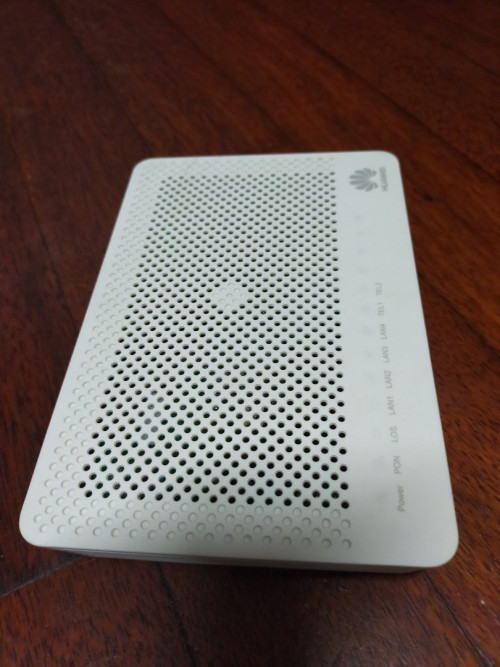
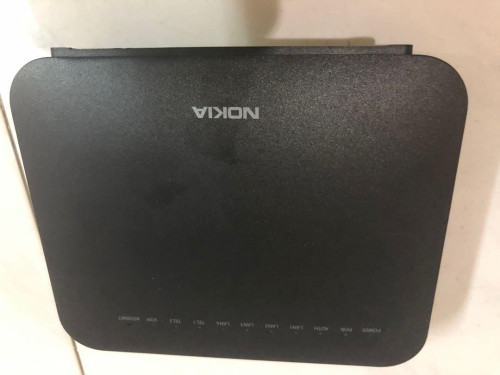
How reliable is the unifi modem? Mine was the Huawei model.. kaput after 1 year and about 3 months.

user posted image

Got replaced with Nokia version

user posted image
*
mine working very well from 2019.
still on "stock" TM equipment. this huawei modem and Dlink 842 (flashed non-TM Dlink firmware)

This post has been edited by Max: Jun 20 2022, 04:43 PM
Max
post Jun 24 2022, 03:25 PM

Regular
******
Senior Member
1,705 posts

Joined: Jan 2003
From: Sepang - Putrajaya - Cyberjaya


QUOTE(fookhing @ Jun 23 2022, 08:44 PM)
Does TM installer able to drop the fiber cable through a concealed wire tunnel from upstairs to downstairs?

Normally 2 storey house they will pull from pole to upstairs first and then pull downstairs if need be?
*
if the pipe already installed properly, and can pull cable/fiber thru it, should be no problem.

ive done mine previously, but piping thru 3 walls only. i prepared/diy the pipe, make hole thru 3 walls.. and put 'fishing' cable thru the pipe..
installer just pull cable from pole behind house, tie to my 'fishing' cable, and just pull away from inside house..
they even left extra 4-5 meters of fiber (loop inside room).
standard installation, no extra charge.. smile.gif
Max
post Jul 20 2022, 07:52 PM

Regular
******
Senior Member
1,705 posts

Joined: Jan 2003
From: Sepang - Putrajaya - Cyberjaya


QUOTE(westlife @ Jul 20 2022, 06:26 PM)
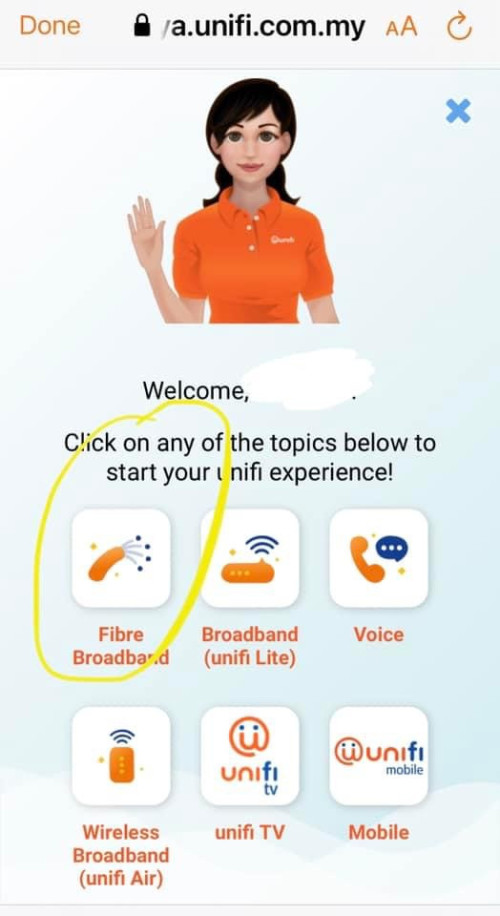
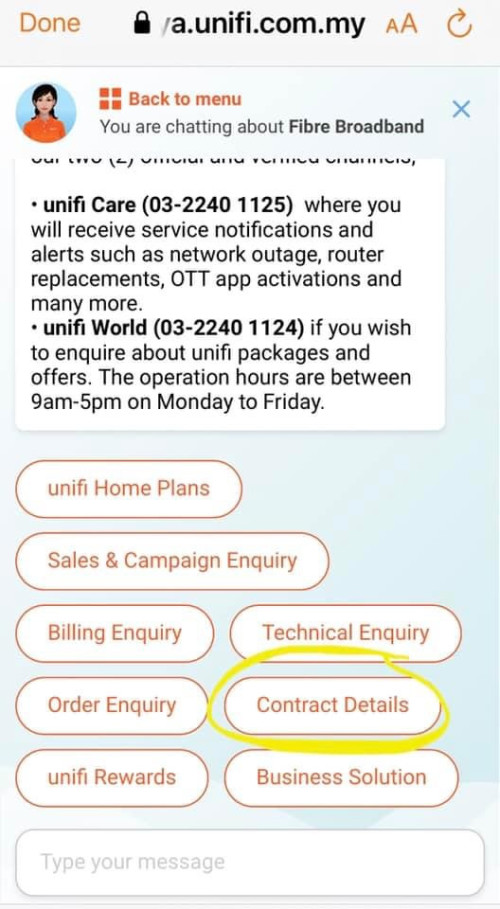
Hi guys, are the contract details reflected under the myunifi app support option as below accurate?

user posted image
user posted image
*
Nice.. never knew this also..
Mine ends 9 years ago .. 😆
Max
post Jul 20 2022, 11:14 PM

Regular
******
Senior Member
1,705 posts

Joined: Jan 2003
From: Sepang - Putrajaya - Cyberjaya


QUOTE(soonwai @ Jul 20 2022, 08:04 PM)
Aiyo, should have requested for new router and renewed. 8yrs, 4 free routers. LOL.

Mine ended Oct 2021 because of taking the YEP 2019 free 3-months back in 2019.
*
Come to think of it... My previous home no fiber (vdsl) cant support the turbo package (Gobind era) so got offer 30mbps + ultimate.
Then when moved new home (early 2019 like that) with fiber, i relocate the unifi.. once setup.. i did ask about the turbo.. and got it without any extra chargers .. and then applied the yep2019.
Looks like no contract was applied..

Btw, i got new fiber modem (Huawei) + router (dlink842) when relocate.
Max
post Jul 22 2022, 09:50 PM

Regular
******
Senior Member
1,705 posts

Joined: Jan 2003
From: Sepang - Putrajaya - Cyberjaya


QUOTE(XeactorZ @ Jul 21 2022, 08:53 PM)
Change to RM 129 for 300mbps without contract?

Currently I am paying RM 139 for 300mbps, yet TM point only open on weekday doh.gif
*
im paying RM139 for 300mbps too.. but with ultimate packs.
urs no tv pack?

QUOTE(brainocide @ Jul 22 2022, 08:47 PM)
Anyone from Turbo Upgrade 2018 lately got issue with the monthly price?  especially with discount for internet section. My bill naik RM30
*
check mine, july. still ok.
unifi advanced 300mbps. RM199 - RM120. RM79
ultimate pack. RM60.
Max
post Aug 22 2022, 06:42 PM

Regular
******
Senior Member
1,705 posts

Joined: Jan 2003
From: Sepang - Putrajaya - Cyberjaya


QUOTE(sgpdsmss @ Aug 22 2022, 06:14 PM)
so die die must walk in tm point to try counter offer ...
even intention to transfer to others fiber ...
leave application is must then ...
*
Yes.
Getting 'better' things, sometimes need sacrifice.. 😆

Btw, i got offer free upgrade wifi 6 router.. 😍

With contract renew of course.. 😆


Max
post Aug 22 2022, 10:12 PM

Regular
******
Senior Member
1,705 posts

Joined: Jan 2003
From: Sepang - Putrajaya - Cyberjaya


QUOTE(sgpdsmss @ Aug 22 2022, 06:48 PM)
do u meant no need to visit tm point ? just renew contract toget wifi6 router with 300m speed for RM129?

with foc 6 months?

thanks ..
*
mine the wifi 6 router promo. must be for long time subscriber. TM email and whatsapp for consent.
mine already long time turbo upgrade + ultimate @ RM139.

the SWU is other promo.. that 1 u need to go TM point.
if u read thru this thread most of them get SWU with walk in TM point or with transfer ID.

Max
post Aug 25 2022, 11:50 AM

Regular
******
Senior Member
1,705 posts

Joined: Jan 2003
From: Sepang - Putrajaya - Cyberjaya


QUOTE(westlife @ Aug 25 2022, 06:29 AM)
I dun think anyone really use the 2.4Ghz.
*
got la.. nod.gif
old wifi stuff.. IoT / home smart devices.. <- mostly this. current smart devices only support 2.4Ghz (need long range). not many new smart devices support 5GHz.


Max
post Aug 28 2022, 09:42 PM

Regular
******
Senior Member
1,705 posts

Joined: Jan 2003
From: Sepang - Putrajaya - Cyberjaya


My 'free' wifi6 router arrived. Got DLink.
Haven't got chance to install yet.
Read the manual, auto configure.. just plug in power, WAN..
Will get new unifi login password from sms.

» Click to show Spoiler - click again to hide... «


This post has been edited by Max: Aug 28 2022, 09:43 PM
Max
post Aug 29 2022, 11:33 PM

Regular
******
Senior Member
1,705 posts

Joined: Jan 2003
From: Sepang - Putrajaya - Cyberjaya


QUOTE(MGM @ Aug 29 2022, 10:14 PM)
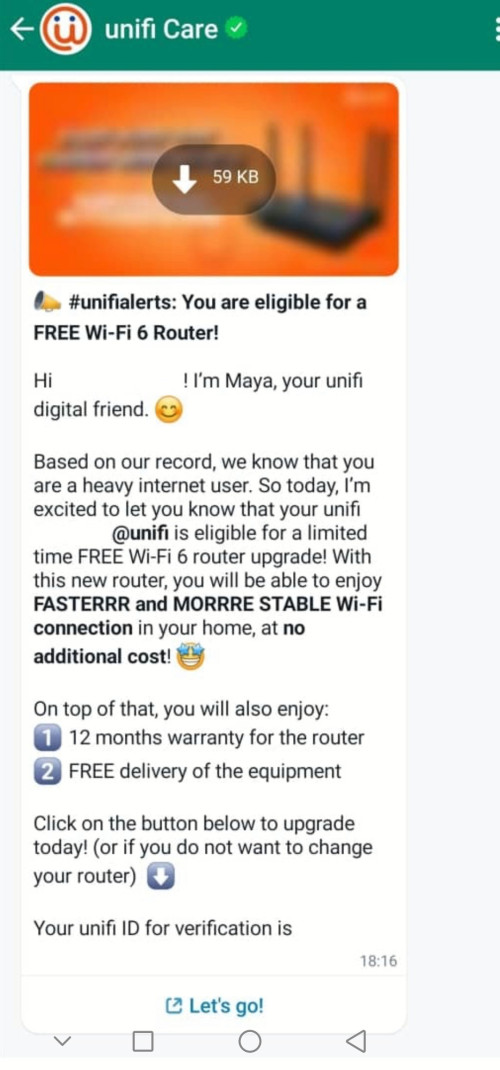
Is this a genuine offer? Received by whatsapp UNIFI CARE +603-22401125:

user posted image
*
Yep. Already received the wifi 6 router.
I got DLink X1860Z. I think customize lite version for unifi.
Retail version doesn't have Z prefix and different shape.

But dem.. the router doesn't have holes for mounting.. 🤦😒
Max
post Aug 30 2022, 09:26 AM

Regular
******
Senior Member
1,705 posts

Joined: Jan 2003
From: Sepang - Putrajaya - Cyberjaya


QUOTE(aniq8676 @ Aug 30 2022, 12:28 AM)
  DIR-X1860Z
The specifications of this router can be found on the D-LINK Malaysia website.

YTL Broadband also provides this router to their customers
*
but no 'support' from dlink as i see it.. no downloadable firmware from dlink.
unlike the previous, 842, can flash with dlink official firmware.

i scroll the pic in that dlink portal, in pic, 4+1wan ports.. but actually only 3+1wan


QUOTE(MGM @ Aug 30 2022, 06:37 AM)
My existing contract already long over with perpetual monthly fee of rm129 for 300mbps@rm49 + ultimate@rm60 + 600min-calls@rm20. So if i take this free router every thing remains or it comes with a new 24-month contract?
*
mine also long ago contract free.
24m contract for the free router.

QUOTE(chkwong @ Aug 30 2022, 07:43 AM)
Can it be re-use for Astro/Maxis broadband?
*
should be able to.
u need to configure manually ur account setting, vlan.

This post has been edited by Max: Aug 30 2022, 09:30 AM
Max
post Aug 30 2022, 09:56 AM

Regular
******
Senior Member
1,705 posts

Joined: Jan 2003
From: Sepang - Putrajaya - Cyberjaya


QUOTE(MGM @ Aug 30 2022, 09:42 AM)
Fee remains perpetual and not renewable upon expiry of the new contract?
*
according to my updated service details. (300mbps Yep2019)
its stated 12m tenure (maybe for user still under contract will be 24m) unsure.gif
Promo Discount Perpetual still there.
Max
post Aug 30 2022, 04:16 PM

Regular
******
Senior Member
1,705 posts

Joined: Jan 2003
From: Sepang - Putrajaya - Cyberjaya


QUOTE(Volfeed @ Aug 30 2022, 03:21 PM)
Is it worth to take? Now I am still using old TPLink AC1200.
*
if u want 'free' wifi 6 router.
wifi6 connection very fast even in 2.4Ghz mode.
coverage i havent test yet. but in my 2 storey home (router perfectly in the middle house. middle and hang under stair) full coverage on 2.4Ghz.

QUOTE(soonwai @ Aug 30 2022, 03:37 PM)
Have you used the X1860Z? How is it? I tried the Zyxel EX3220-T0 which was pretty good and firmware seems quite complete. Wonder if the X1860Z is crippled in any way compared to the non-Z retail version.

Can you find a manual for it? Can share a screenshot of the Mesh config page? Or is it the same as the non-Z retail version?
Where do you see the Promo Discount Perpetual ? I can't find it any more on the Unifi portal.
*
tested.. and seems ok.. nothing interesting.. just wifi6 supported. UI usual Dlink.
but i do feel the UI sometimes lag (on wifi, not tested on LAN)
not sure about retail non-Z version UI.

but most config is there..
done port forward/virtual server, running smoothly also..

Mesh from what i saw on videos just press2 wps button.. or use Dlink Wifi connect (this i think dedicated for TM -Z router, only 2 Z-router supported in the description)
and from the app can see more details of the router status, link, bla3..

youtube mesh setting
» Click to show Spoiler - click again to hide... «


btw, only 3 LAN port available + 1wan
if plug in hypptv stb (port3) left 2 Lan only.

that perpetual thing actual cant be seen anywhere.. but under order, track order.. it came out.. if no order i think cannot be found..
donno how TM develop the user portal UI.. rclxub.gif

i try screenshot later

This post has been edited by Max: Aug 30 2022, 04:21 PM

Max
post Aug 30 2022, 07:12 PM

Regular
******
Senior Member
1,705 posts

Joined: Jan 2003
From: Sepang - Putrajaya - Cyberjaya


QUOTE(Volfeed @ Aug 30 2022, 05:36 PM)
Cannot change DNS is a bummer
*
Can change both ipv4/6 DNS.
Im using Google dns.
Actually theres remote access TR09 something like that.. this can also disable..
But will lose TM remote diagnose/troubleshoot access.

Btw, there's 1_INTERNET_R_VID label connection.. not sure about that . Haven't googling yet ..
Max
post Aug 30 2022, 08:03 PM

Regular
******
Senior Member
1,705 posts

Joined: Jan 2003
From: Sepang - Putrajaya - Cyberjaya


QUOTE(MyProLife @ Aug 30 2022, 07:24 PM)
that might be for VLAN. dont touch that or else you will lose internet
*
Nope.
The VLAN is in another menu.
Might be for voice connection.
Need some digging later..
Max
post Sep 3 2022, 07:23 PM

Regular
******
Senior Member
1,705 posts

Joined: Jan 2003
From: Sepang - Putrajaya - Cyberjaya


QUOTE(Khan92 @ Sep 3 2022, 09:41 AM)
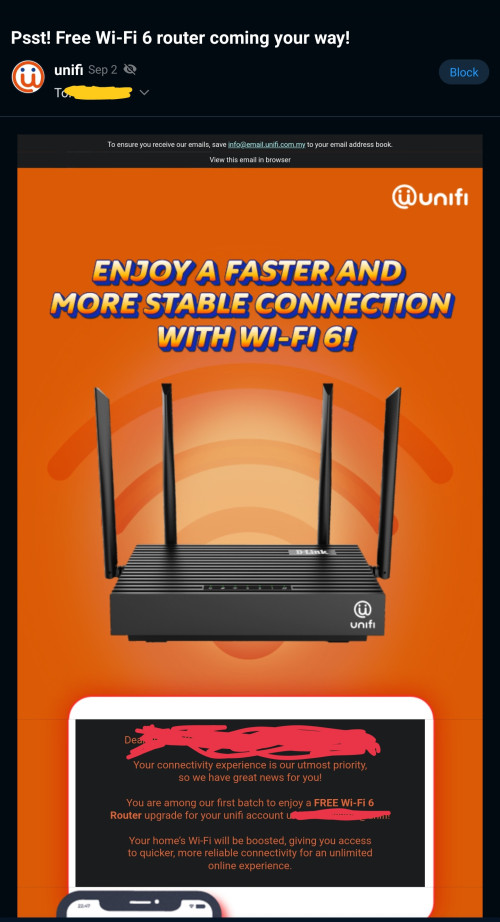
user posted image

Hi guys,

Anyone got this email?
*
U can read few pages back.
Max
post Sep 4 2022, 07:49 PM

Regular
******
Senior Member
1,705 posts

Joined: Jan 2003
From: Sepang - Putrajaya - Cyberjaya


QUOTE(sgpdsmss @ Sep 4 2022, 05:16 PM)
just keep the router ..in case current one breakdown ..haha..

thanks ..
*
Yeah.. if its working fine and get full speed, no problem using it..
Normal user doesn't notice any different..
For power or advance user, surely will use their on equipments..
Max
post Sep 9 2022, 12:27 PM

Regular
******
Senior Member
1,705 posts

Joined: Jan 2003
From: Sepang - Putrajaya - Cyberjaya


QUOTE(L7E @ Sep 8 2022, 06:45 PM)
user posted image

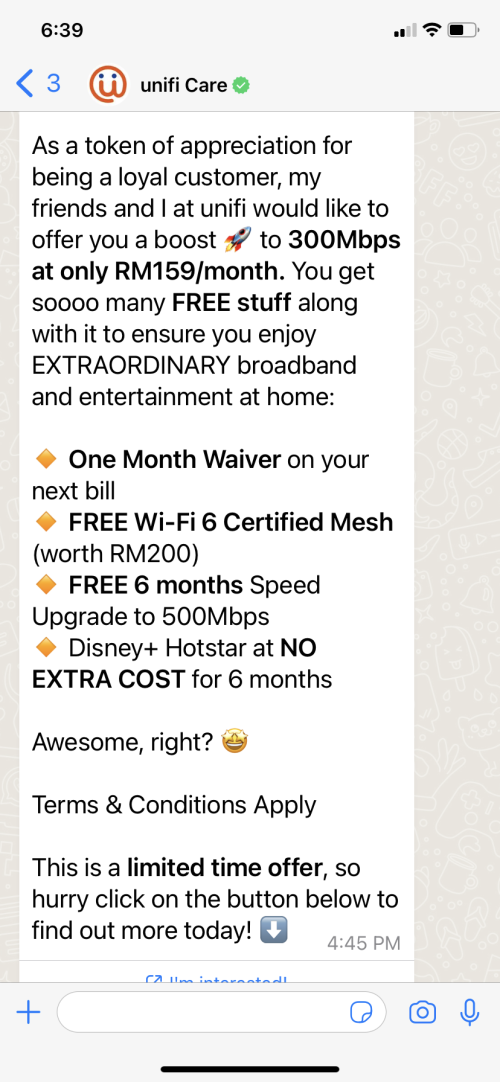
Hi guys just got message via whatsapp
Is this legit? Anyone have more info?

I think its worth it for just 20+ increase in monthly bill. Now 100mbps for 139
*
Their whatsapp is legit. Provided its from unifi contact.
But u need to read properly.
That 'speed boost' and Hotstar only 6months.

Max
post Sep 18 2022, 08:57 PM

Regular
******
Senior Member
1,705 posts

Joined: Jan 2003
From: Sepang - Putrajaya - Cyberjaya


QUOTE(19 Degree South @ Sep 18 2022, 01:27 PM)
hi , unifi told me that wifi 6 would have issue with android tv. anyone can comment on this?
*
What security do u use for wireless? Wpa2 wpa3?
Maybe u can try wpa2 1st. See got problem or not .
Mine iot devices have problem with wpa3 security.
So for 2.4ghz i use wpa2 only.

Max
post Sep 20 2022, 11:01 AM

Regular
******
Senior Member
1,705 posts

Joined: Jan 2003
From: Sepang - Putrajaya - Cyberjaya


QUOTE(TongCN @ Sep 20 2022, 10:52 AM)
It shows "It's quiet here" for both order and technical report  doh.gif

I'm using myunifi app though
*
for that page, u have to use pc web browser thou..
that order/report thing wont show up in the unifi app. sweat.gif

2 Pages  1 2 >Top
Topic ClosedOptions
 

Change to:
| Lo-Fi Version
0.2561sec    1.08    7 queries    GZIP Disabled
Time is now: 17th December 2025 - 02:13 PM