Welcome Guest ( Log In | Register )

Bump Topic Topic Closed RSS Feed
4 Pages < 1 2 3 4 >Bottom

Outline · [ Standard ] · Linear+

Unifi Official TM UniFi High Speed Broadband Thread V40, READ 1ST PAGE FOR RELEVANT WIFI INFO

views
     
yenchenje
post Aug 28 2023, 10:32 PM

Enthusiast
*****
Junior Member
932 posts

Joined: Dec 2019
QUOTE(AVFAN @ Aug 28 2023, 08:21 PM)
bolded... a mistake there?

800mbps rm259, 1gbps rm269... if no tv pack, they aren't worth much.
*
Yeah typo, my bad tongue.gif

QUOTE(aniq8676 @ Aug 28 2023, 08:27 PM)
Because that is not SWU plan.

That is another promo plan under the Unifi NGAM Campaign
*
But SWU is the more worth one correct? Guess I'll have to visit another branch to see rclxub.gif
yenchenje
post Aug 28 2023, 11:49 PM

Enthusiast
*****
Junior Member
932 posts

Joined: Dec 2019
QUOTE(PJng @ Aug 28 2023, 11:25 PM)
so which is correct info?
*
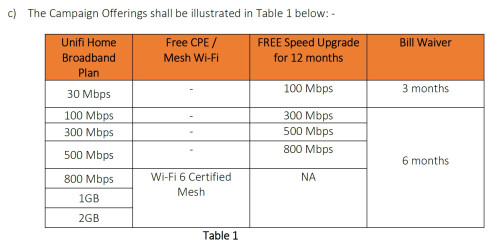
100 to 300
300 to 500
Both 6 months bill wavered, for 6 months free upgrade
yenchenje
post Aug 30 2023, 10:10 AM

Enthusiast
*****
Junior Member
932 posts

Joined: Dec 2019
QUOTE(pokemon @ Aug 30 2023, 10:02 AM)
I notice unifi has refreshed/recycled another range of ip address to my area.. now the ip range is 175.xxx.xxx.xxx, 118,xxx.xxx.xxx, 219.xxx.xxx, 115.xxx.xxx.
Anybody else notice?

Which ip range has better ping, speed experiences?
*
175 and 118 has the best performance in my area, I’m also behind CGNAT so those are the best, the rest either have bad ping times/hampered speeds
yenchenje
post Aug 31 2023, 02:15 PM

Enthusiast
*****
Junior Member
932 posts

Joined: Dec 2019
QUOTE(aniq8676 @ Aug 11 2023, 05:59 PM)
user posted image

user posted image

Or you can go to any TMPoint to apply SWU plan.

Based on TnC, the StayWithUnifi Plan now offers speeds up to 2Gbps.
*
Just checked back with this, SWU also offers 1 year free upgrade and 6 months waiver, isn't that the same as Ngam campaign? Or is SWU 3.0 currently also offering 1 year free upgrade + waiver? I'm confused rclxub.gif
yenchenje
post Aug 31 2023, 08:14 PM

Enthusiast
*****
Junior Member
932 posts

Joined: Dec 2019
QUOTE(pokchik @ Aug 31 2023, 06:04 PM)
https://forum.lowyat.net/index.php?showtopi...ost&p=108004775

NGAM = Official.

SWU 3.0 = borderline unofficial (you may get declined if you ask for it), btw - only for existing subscribers out of contract *current standing*
*
Oh so does that mean that we won’t be losing out much choosing Ngam as compared to SWU 3.0? Then might just take Ngam directly then as opposed to trying to score SWU
yenchenje
post Aug 31 2023, 11:07 PM

Enthusiast
*****
Junior Member
932 posts

Joined: Dec 2019
QUOTE(pokchik @ Aug 31 2023, 10:27 PM)
depends on which plan you'd like to take..

as an example, for me :
- previously paying RM159 for 300Mbps with M4 Deco.
- was told during sign-up that there will be RM10 deducted after 24mths contract finishes.
- on my 25th month but no change, called 100 and operator said RM159 sampai bila2.
- rasa tertipu, browsed Unifi website, got Ngam offer RM149 for 300Mbps with 6mths free speed upgrade.
- browsed this thread, in case got any 'undertable offers' like last years (i know for a fact that my father in law got offered RM129 for 300Mbps).
- saw people getting SWU 3.0 RM119/300Mbps, RM189/500Mbps
- interested to upgrade to 500Mbps, called 100 again, but told that I need to go to counter for subscription plan change.
- went to counter. counter lady bising2 ask me where did I hear about SWU 3.0, not offered to everyone.. bla bla bla.. but she straightaway re-contract me for 300Mbps.
- now happily getting 6mths bill waiver, 500Mbps speed upgrade for 1yr.. no complaints.

do yourself a favour : go to the nearest TM Point/Unifi counter to check any interesting offer specialized for you.
*
Interesting, I’m planning to get my mom to recontract 1gbps from 30mbps, equipment? Not needed since I run my own router, switch and AP. But from what I can see Ngam is probably the best choice here except 1Gbps DOESNT get free upgrade to 2Gbps in Ngam but from what I can understand, SWU 1Gbps does offer, tomorrow will be going to a few more outlets to see what’s the offer like but if the SWU 1Gbps offer is same/better than Ngam, if not maybe I’ll just get her to take the 1Gbps Ngam or just upgrade in app to get the 1Gbps package with free 2Gbps upgrade

yenchenje
post Sep 3 2023, 08:36 PM

Enthusiast
*****
Junior Member
932 posts

Joined: Dec 2019
Went to TM Point Pelangi at JB just now, asked about SWU straight, no fuss no muss, reception lady said we're eligible and straight upgraded to 1Gbps SWU 3.0

From the graph they showed which is presumably in their WhatsApp group, SWU 3.0 currently for 1Gbps is 269, no speed upgrade, 6 months waiver and pair of mesh, no mention of what mesh but should be X60 since the graph mentioned it's a Wifi 6 mesh. Gonna see how it performs with the mesh, if it's worst than my EAP670, gonna retire the stock router and mesh together straightaway after installation which is scheduled on the 9th of Sept tongue.gif

This post has been edited by yenchenje: Sep 3 2023, 08:38 PM
yenchenje
post Sep 3 2023, 08:51 PM

Enthusiast
*****
Junior Member
932 posts

Joined: Dec 2019
QUOTE(aniq8676 @ Sep 3 2023, 08:43 PM)
No lah, D-LINK DPN-FX3060V

user posted image
*
Aw, guess I'm retiring it straight up then whistling.gif
yenchenje
post Sep 3 2023, 09:34 PM

Enthusiast
*****
Junior Member
932 posts

Joined: Dec 2019
QUOTE(Oltromen Ripot @ Sep 3 2023, 09:28 PM)
You can't.
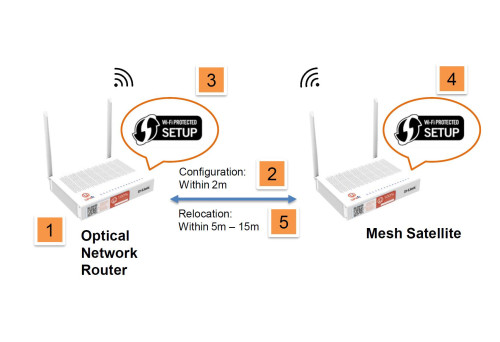
If below 1Gbps, you have 2 devices: BTU/ONU/ONT and router.

If 1Gbps and above, those are both combined into this single Optical Network Router.
*
Not able to do bridge mode like TIME or? If not then I seriously despise that ranting.gif
yenchenje
post Sep 4 2023, 08:17 AM

Enthusiast
*****
Junior Member
932 posts

Joined: Dec 2019
QUOTE(PRSXFENG @ Sep 3 2023, 10:53 PM)
nope, even if possible, it would be a waste of 2gbps as the ports are only 1gig
*
Has there been anyone able to replicate ONU to another standalone ONU? Like the 2.5Gbps ZTE models or Huawei models?

QUOTE(MyProLife @ Sep 4 2023, 01:16 AM)
Officially you can't

But in theory it's possible to replace onr with custom sfp thing, need follow the anime4000 thread for details. Since this is unofficial and unsupported, you got to follow the instructions carefully to avoid possible service disruption and breach of terms
*
Yes I know that exist and I have been following project closely ever since I stumbled upon it a few months back, I vetoed the project ultimately cause I didn’t have time to deal with it and my current custom server only has 2 SFP+ ports and both of them I already have plans for. Which I will be unable to allocate to GPON ONU Stick, but if the modem can’t be turned into bridge mode, I might just buy it and tinker with it as I have custom QoS rules and VLAN that I need to segregate on the router level.. TM TM Haiz
yenchenje
post Sep 4 2023, 10:33 AM

Enthusiast
*****
Junior Member
932 posts

Joined: Dec 2019
QUOTE(Oltromen Ripot @ Sep 4 2023, 09:50 AM)
The dlink onr has bridge and router mode.
never tried bridge mode, though.
for 2Gbps subscription, it is a waste to only be able to downstream 1Gbps to a downstream PPPoE login router.
*
Guess I have to just tinker with that crap router when the installer finish installing it. Hopefully it can be set into bridge mode and still allow me to use my OPNSense router

If not, time to get a ONU off taobao/aliex and migrate it over or just go ONU SFP
yenchenje
post Sep 4 2023, 11:32 AM

Enthusiast
*****
Junior Member
932 posts

Joined: Dec 2019
QUOTE(Oltromen Ripot @ Sep 4 2023, 10:44 AM)
i confirm it has bridge mode.

when i upgraded to 1Gbps, the technician said it is also his first time installing that ONR.
so we sat and toyed with it together.

i would suggest you go through the wizard first as if setting it up as router. after everything works as they should, then only switch to bridge mode.

i am not sure if whatever config that was set up prior to switching to bridge mode is retained. it should at least retain VoIP credentials. and i guess bridge mode will dump every VLAN flowing through the fibre onto the LAN port, which downstream router can pick up and do PPPoE.

but what i can confirm, once you switch to bridge mode, ONR will immediately reboot and will no longer be accessible.
maybe there is a special IP address still to access it. but we couldn't figure it out, let alone attempt to log in.

we factory reset it few times when trying bridge mode.
then we gave up since it wasn't accessible any longer, and stick to router mode.

he gave me OLT password for me to continue toying on my own after he left.
the screenshot that i posted here few months ago were from that extended play session.
*
Yep I’ll be also supervising when they come down to install.
I’m gonna be trying to get PLOAM, VoIP creds tongue.gif

And bridge mode might be acting the same ONU where when it’s successfully connected to OLT it will disable web UI login? Hoping for that as that means it can just be used as an ONU straight up instead of AIO since that’s how my Fibrehome ONU acted when I was trying to get the credentials off it
yenchenje
post Sep 10 2023, 12:17 PM

Enthusiast
*****
Junior Member
932 posts

Joined: Dec 2019
1Gbps upgrade success, but so far after playing around with the router to set it to multiple modes, no dice to be able to just set it to Bridge mode.

Will be patiently waiting for a guide to change it so I can swap back to my OPNSense router which I recently just upgraded to have 10GBe + 1GBe ports :’)
yenchenje
post Sep 10 2023, 10:41 PM

Enthusiast
*****
Junior Member
932 posts

Joined: Dec 2019
QUOTE(sadlyfalways @ Sep 10 2023, 08:11 PM)
Bruh you can’t set the gigabit router to bridge mode? What a downgrade from the current tm setup 😭😭 makes me not want to upgrade. I can’t run my udm se in access point mode, and double Nat reduces the speeds so much especially with a pppoe connection 😢😢😢😢
*
From what I could test in a short time just now, nope, none of the settings can clearly set the modem to bridge mode for GPON, unless someone here with 1Gbps/2Gbps have any prior experience? Except for Ultraman I guess :’)
yenchenje
post Sep 11 2023, 04:27 PM

Enthusiast
*****
Junior Member
932 posts

Joined: Dec 2019
QUOTE(LostAndFound @ Sep 11 2023, 03:46 PM)
There's such a thing as bandwidth limitation (or cap) on download server side. 200-300 mbps is very fast di in general for a single connection.
*
Unless the server on speed test side is like 20 years old, most speed test servers nowadays able to sustain 1Gbps without much issues, or even 10Gbps.

500mbps is like a walk in the park even for local Malaysia speedtest servers. Their router/connection is the one that’s not working properly here
yenchenje
post Sep 11 2023, 04:31 PM

Enthusiast
*****
Junior Member
932 posts

Joined: Dec 2019
QUOTE(keong8867 @ Sep 11 2023, 04:26 PM)
I  understand what you are saying. This is the first time that I use 500mbps. So I'm not familiar how it works. When I using 100mbps before,i download in steam or epic games it always get the full speed 100mbps. But this time i download it but it only get 200-300mbps , so i thinking is it the router problem.

2 years ago when install unifi, the first router they give me that cant get 100 mbps, and it will dc when I using. But after it change to AC1200, everything is fine
*
Since you’re currently on 500mbps, your BTU should still be separated from your router, do you still have your old AC1200 kicking around? If you have the know how, try changing it back to AC1200 and do a speedtest (Putting old PPPoE credentials back and see)

I personally won’t trust D-Link’s equipment too much due to their track record. Best case is just getting like the AX50 and replace it completely. You lose the mesh but the AX50’s internal radio should still be better than your D-Link
yenchenje
post Sep 11 2023, 04:33 PM

Enthusiast
*****
Junior Member
932 posts

Joined: Dec 2019
QUOTE(LostAndFound @ Sep 11 2023, 04:31 PM)
Why you comment without reading his messages above? So confidently diagnosing summore, better than TM support ni.
*
Overlooked that message. Whoops tongue.gif

Still my point stands tho, to your message I quoted. Speedtest servers generally are uncapped till at least gigabit.
yenchenje
post Sep 16 2023, 12:24 PM

Enthusiast
*****
Junior Member
932 posts

Joined: Dec 2019
QUOTE(soonwai @ Sep 16 2023, 11:48 AM)
You bet.
*
Guess all the 1gbps and 2gbps sign ups gonna be maxed out mega_shok.gif
yenchenje
post Sep 16 2023, 03:24 PM

Enthusiast
*****
Junior Member
932 posts

Joined: Dec 2019
Just curious but does anyone know whether TM's 1Gbps/2Gbps modem - DPN-FX3060V is full 1Gbps or 2.5Gbps? The sticker on the bottom of the modem says 2.5Gbps but I can't get any 2.5Gbps negotiation on any of the ports to my intel 10G transceiver.. doh.gif
yenchenje
post Sep 16 2023, 04:34 PM

Enthusiast
*****
Junior Member
932 posts

Joined: Dec 2019
QUOTE(Oltromen Ripot @ Sep 16 2023, 03:30 PM)
(facepalm)

each of the LAN port is 1Gbps.
And it does not support port aggregation protocol.

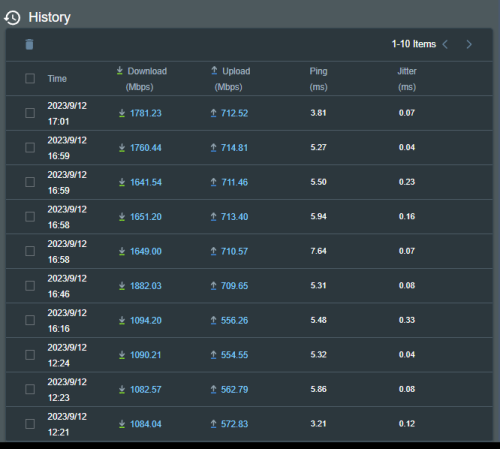
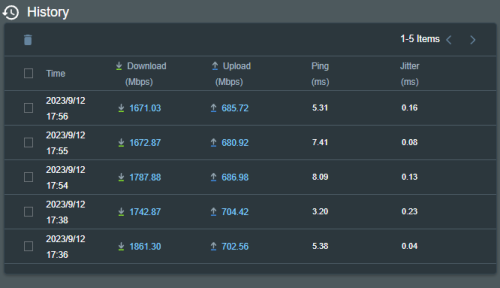
I use RT-AX86U multi-WAN 1:1 load-balancing, only able to get 1.75Gbps/750Mbps at best. Probably because my local exhange is saturated.

user posted image

user posted image
*
Okay I thought it’s a 2.5gbps port + 3 gigabit. I thought my equipment is damaged cause it couldn’t negotiate anything higher than 1000Base-T

Thanks for the confirmation tho

4 Pages < 1 2 3 4 >Top
Topic ClosedOptions
 

Change to:
| Lo-Fi Version
0.1192sec    0.58    7 queries    GZIP Disabled
Time is now: 16th December 2025 - 02:37 AM