Outline ·
[ Standard ] ·
Linear+
Unifi Official TM UniFi High Speed Broadband Thread V40, READ 1ST PAGE FOR RELEVANT WIFI INFO
|
PJng
|
 Nov 18 2022, 11:30 PM Nov 18 2022, 11:30 PM
|

|
QUOTE(soonwai @ Nov 18 2022, 11:11 PM) Better give back to TM. Later they come and look for it since technically it belongs to them. Or keep as spare in case modem rosak. Also can sell to those who wants to terminate but lost their modem when moving house. Can sell for RM200-300 since got RM500* penalty. *amounts are for illustrative purposes only. what? even staff not take it, may still penalty? last year i upgrade copper to fiber, installer did not take back huawei BTU, useless for me, since is copper BTU |
|
|
|
|
|
PJng
|
Dec 2 2022, 12:28 AM
|
|
|
QUOTE(drbone @ Dec 1 2022, 09:30 PM) Just upgraded to unifi 300mbps , using their new wifi router and my own new tp link mesh wifi, but speedtest rarely shows high speed download info. most of the time am able to get 50-80mbps download speed, with all other devices switched off . anyone else with this issue? you try on LAN or wifi? see network properties say how many mbps or gbps look like stuck on wifi 4 or wifi 5 speed |
|
|
|
|
|
PJng
|
Dec 10 2022, 11:31 PM
|
|
|
i know someone posted before, but until now when click 'change my plan' it go to this page anyone got try? 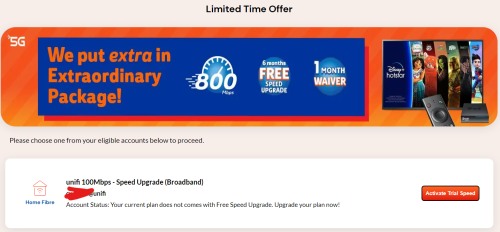 |
|
|
|
|
|
PJng
|
Jan 4 2023, 11:53 PM
|
|
|
QUOTE(mihina69 @ Jan 4 2023, 04:49 PM) hi sifus, im currently on 500mbps (Turbo Upgrade 2018) thinking of downgrading to the SWU RM129 300mbps, am i entitled to?..my contract ended long time ago, and i think my 500mbps is overkilled for me... what is the process?..just walk in to any TM point and tell them about SWU?...anyone has similar case as me? not sure what is your 500mbps price, if is near 129, 139... |
|
|
|
|
|
PJng
|
Jan 21 2023, 07:00 PM
|
|
|
TM need give 2 box is it, on RM149 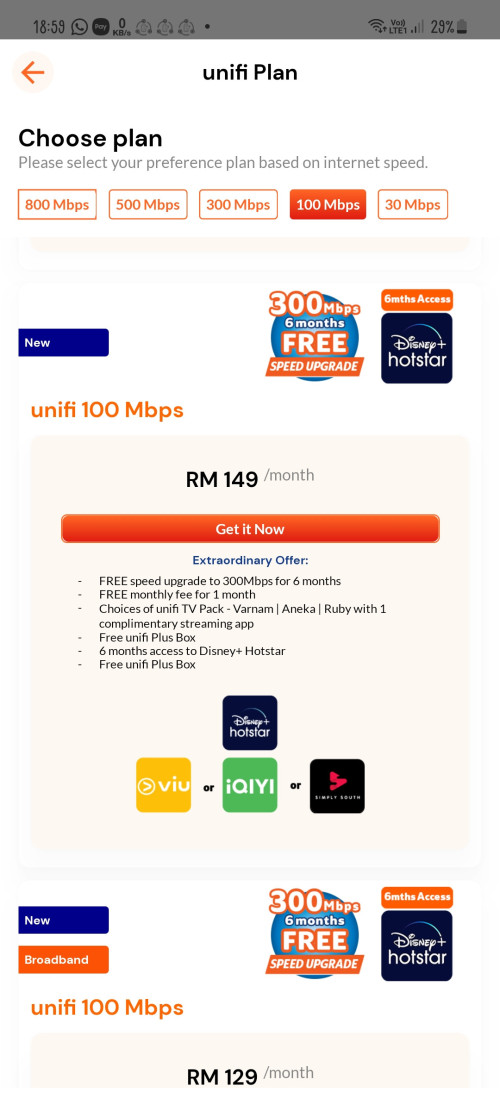 |
|
|
|
|
|
PJng
|
Feb 10 2023, 12:16 AM
|
|
|
QUOTE(BenYeeHua @ Feb 9 2023, 11:23 PM) Was interesting and checked my record on UniFi, and it is 550G as highest on past 3 months, and it is just 30M FYI. This 300G was for who, I wonder... Maybe for someone never watch video, I guess... download one AAA game, already use 100GB, then next 3 week limited speed |
|
|
|
|
|
PJng
|
Feb 16 2023, 11:44 AM
|
|
|
QUOTE(excaliburcombo @ Feb 16 2023, 04:06 AM) still intact till latest bill. take mesh around july last year. right now no idea how to check perpetual discount like last time in unifi dash. but during live chat cs told all remain same except add contract. [attachmentid=11418436] OMG, no idea how to push TM for cheaper plan |
|
|
|
|
|
PJng
|
Feb 21 2023, 11:33 PM
|
|
|
i always got problem loading any embed imgur picture, video, very slow to load 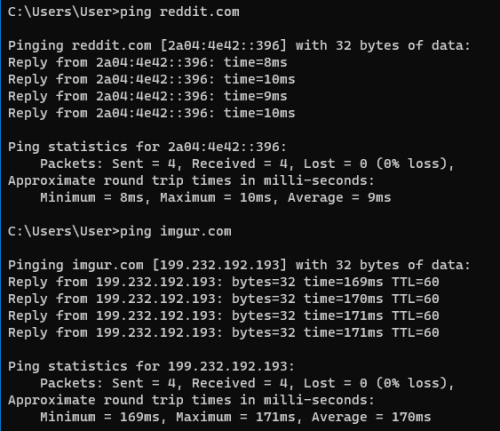 |
|
|
|
|
|
PJng
|
Feb 24 2023, 05:53 PM
|
|
|
Why change name? 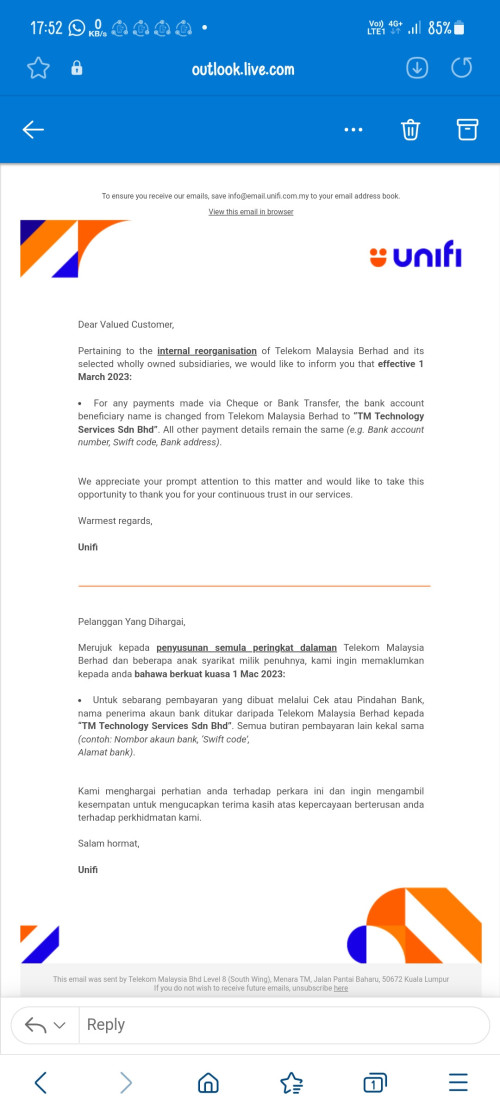 |
|
|
|
|
|
PJng
|
Mar 2 2023, 06:50 PM
|
|
|
QUOTE(HariszKilz @ Mar 2 2023, 06:02 PM) I hope the recent leaks are true that TM decided to use their famous 2018 move which is the Turbo Upgrade for existing users. This will also protect their Average Revenue Per Customer (ARPU). Only recently, they only announced that the 30Mbps Perpaduan Package is coming in the upcoming days. Hopefully they don't forget about the other packages. To 800mbps my old pc cannot handle No point uograde speed for me |
|
|
|
|
|
PJng
|
Mar 2 2023, 09:49 PM
|
|
|
QUOTE(The.Lucas.DaY @ Mar 2 2023, 09:48 PM) About the free upgrade back in 2018, are they even upgraded for customers with contract expired? My contract has expired so waiting for this pricing review to decide As i remeber yes, but that time my home no fibre, so no free upgrade |
|
|
|
|
|
PJng
|
Mar 10 2023, 11:41 PM
|
|
|
QUOTE(Maxieos @ Mar 10 2023, 08:24 PM) Want to flash dlink router to dd-wrt , normally how many years warranty does unifi provide ? btw anyone using Dlink832 router ? how do I turn off router through admin login ? Not the physical button Anyone flash ddwrt on t his router ? any function get remove after flashing like unifi tv and etc ? TM stock router can flash other firmware? |
|
|
|
|
|
PJng
|
Mar 24 2023, 12:25 AM
|
|
|
QUOTE(silverwave @ Mar 23 2023, 10:58 PM) Probably broadcast server cannot be reached because of the new router. Last time with the default router, it used to work fine. Earlier i swapped the LAN cable to port 1 and then i could at least enter Hypp tv. It was at port 3 in the new router and it would only show hypptv main screen and just load but nothing changes. Regarding the wifi, i was just testing it today since i saw a WLAN icon. It somehow can't enter although it's connected. By LAN, it can enter but shows black screen and the icon above when i click on any channels. Seems like i need to make some changes in the TotoLink router or hypptv won't work with 3rd party routers? 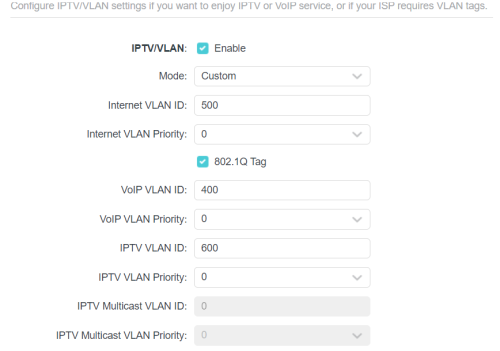 TP link, port 1, vlan 600, old unifi tv you cannot use wifi, it will not work |
|
|
|
|
|
PJng
|
Mar 25 2023, 09:31 AM
|
|
|
100mbps is more that enough for me
Don even have 4k device on home
I no need speed upgrade, but TM know la never give cheap
|
|
|
|
|
|
PJng
|
Mar 25 2023, 01:28 PM
|
|
|
QUOTE(aniq8676 @ Mar 25 2023, 01:11 PM) Coming Soon 1Gbps & 2Gbps Staff give picture? |
|
|
|
|
|
PJng
|
Mar 27 2023, 04:24 PM
|
|
|
Are you ok unifi?  |
|
|
|
|
|
PJng
|
Mar 27 2023, 11:29 PM
|
|
|
QUOTE(Jack234 @ Mar 27 2023, 10:59 PM) I tried connect using LAN cable and the speed is only 94mbps. I'm not sure is it because of my few years old LAN cable issue or unifi issue. Few of you suggested to change router. I don't mind changing router, it's just that if TM router can't even hit 20% of my package speed, then why they supply it at the first place? Is it normal for a fully functional TM router to hit that low speed against the package? I'm trying to rule out the issue of router so that I don't get a new router but the problem isn't the router. What I cannot understand is if their router cannot support even 200mbps, they came my house change "loose" connector(which the loose connector is also provided by Tm 3 years back) , charge me RM60 but slow Internet issue still not resolved. Is it fair to charge me when the issue isn't resolved/issue is the TM router that cannot support 500mbps/poor quality connector provided by TM? When I live chat them, they mentioned they will only charge me for the visit if the fault is on my side. 94mbps, open this is say 100mbps or 1.0gbps?  look like is connect to 100mbps mode |
|
|
|
|
|
PJng
|
Mar 28 2023, 02:14 PM
|
|
|
QUOTE(eclectice @ Mar 28 2023, 09:38 AM) According to the screenshot, your laptop/PC's Ethernet connection is also a bottleneck, with a maximum speed of 100 Mbps. That may be unchangeable on your side (PC/Laptop), or it may be defective due to the Ethernet cable used, or a remote Ethernet port (from a network switch/bridge or a router) to which it is connected is restricted to 100 Mbps. » Click to show Spoiler - click again to hide... « If the remote Ethernet port is restricted to 100 Mbps but the network/bridge or router claims to have Gigabit Ethernet ports, a faulty port may exist if it is not due to the Ethernet cable used. If your PC/laptop's Ethernet port specifications restrict it to 100Mbps, get a USB-to-Ethernet adapter that supports Gigabit speeds (but must use a USB 3.x standard interface if you have one) or use a WIFI connection. However, because you can currently only achieve WIFI rates of less than 100 Mbps, I am skeptical of the WIFI device's competence on your PC/laptop. Examine the highest WIFI standard enabled by the WIFI device. 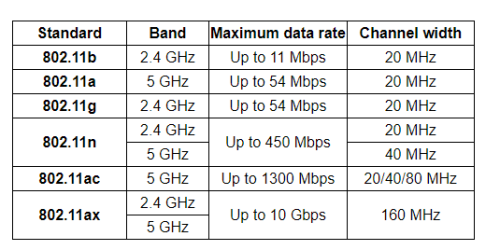 Use Device Manager for Windows OS to check... 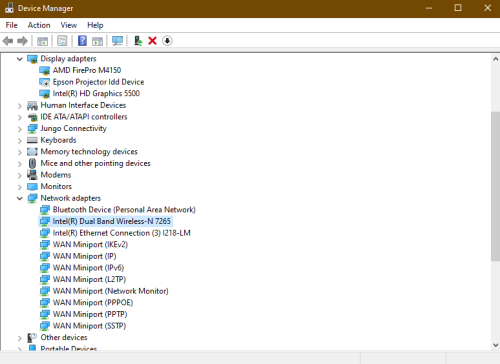 If your WIFI device appears to only support the WIFI 802.11n standard, you should verify the accessible bands in either 2.4 Ghz (20 MHz channel width) or 5 GHz (40 MHz channel width) allowed by it. 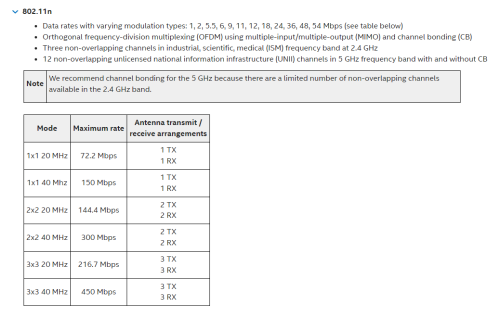 https://www.intel.com/content/www/us/en/sup...s-products.html https://www.intel.com/content/www/us/en/sup...s-products.htmlFor example, when connected to a WIFI 5 GHz network, my Intel WIFI N-7265 device supports up to 300 Mbps (via 2X2 40 MHz mode), but only 144.4 Mbps (via 2X2 20 MHz mode) when connected to a WIFI 2.4 GHz network. 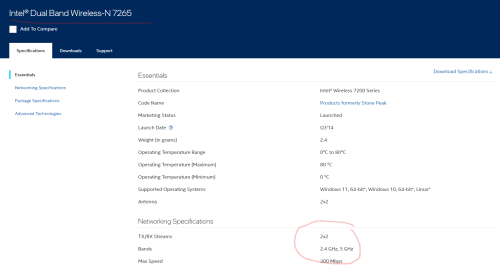 https://www.intel.com/content/www/us/en/pro...ifications.html https://www.intel.com/content/www/us/en/pro...ifications.htmlThe antenna arrangement is indicated by the 2x2 marking. N-7265 cannot take full benefit of the 2x2 MU-MIMO because it does not support 2x2 MU-MIMO. 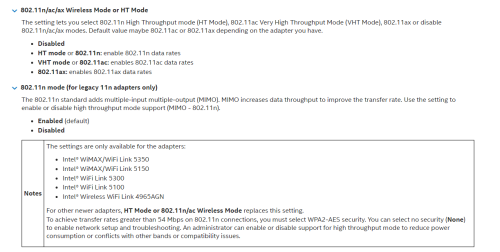 https://www.intel.com/content/www/us/en/sup...s-products.html https://www.intel.com/content/www/us/en/sup...s-products.html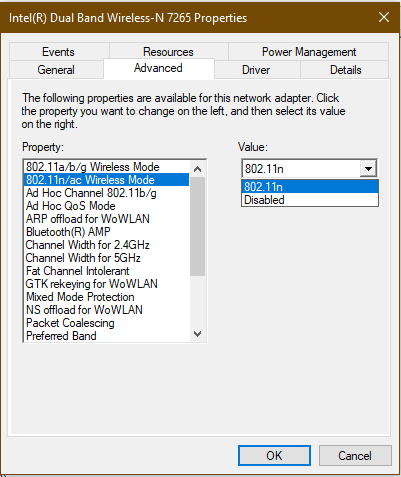  Need jack234 read this, not me I connected to a old router that have only 100mbps, that why show 100mbps This post has been edited by PJng: Mar 28 2023, 02:14 PM |
|
|
|
|
|
PJng
|
Mar 28 2023, 03:25 PM
|
|
|
QUOTE(Selectt @ Mar 28 2023, 02:52 PM) guys i m paying rm89 unifi and i have DL speed below. 1,375 KB/s - 954 MB of 1.4 GB, 6 mins left am i having low speed? what can i do? So RM89 is what speed plan? No mention it |
|
|
|
|
|
PJng
|
Mar 28 2023, 03:33 PM
|
|
|
QUOTE(Selectt @ Mar 28 2023, 03:31 PM) 30mbps, max about 3.7MB/s |
|
|
|
|



 Quote
Quote
 0.2840sec
 0.84
0.84
 7 queries
 GZIP Disabled