Welcome Guest ( Log In | Register )

Bump Topic Topic Closed RSS Feed

Outline · [ Standard ] · Linear+

Unifi Official TM UniFi High Speed Broadband Thread V40, READ 1ST PAGE FOR RELEVANT WIFI INFO

views
     
PRSXFENG
post Oct 3 2022, 01:04 PM

Look at all my stars!!
*******
Senior Member
2,608 posts

Joined: Nov 2020


QUOTE(syncomp @ Oct 3 2022, 12:31 AM)
With the emergence of 5G mobile internet which reach 1000 Mbps speed, do you guys think that Unifi will release 2 Gbps plan as what has been experienced by our neighbor's country since 2016
*
The problem is that our infrastructure for fibre isnt quite there for 2gbps speeds

GPON has a max speed of 2.4Gbit down and 1.2Gbit up, problem is that our infra used a lot of splitters, over provisioning and such, offering 2gbit to a customer would mean a lot of new fibre runs
there's XG-PON but not sure if they have plans for that
PRSXFENG
post Oct 5 2022, 01:15 PM

Look at all my stars!!
*******
Senior Member
2,608 posts

Joined: Nov 2020


QUOTE(hussain @ Oct 5 2022, 01:01 PM)
TPLINK ARCHER AXE75 TRI-BAND ROUNTER / AXE5400 / WIFI 6E. So if I get this and pair with deco m5 mesh ..will.it work ?
*
TP-Link routers and deco mesh really dont mix well

best you either fully commit to deco with deco wifi 6 models (such as deco x20)
or only use tplink router

seems like your current setup is

Modem -> TP-Link C1200 -> Deco M5

try instead

Modem -> Deco M5

guide here
https://www.youtube.com/watch?v=kZRfyCXg3JM
PRSXFENG
post Oct 5 2022, 05:32 PM

Look at all my stars!!
*******
Senior Member
2,608 posts

Joined: Nov 2020


QUOTE(19 Degree South @ Oct 5 2022, 03:53 PM)
why M5?wifi 6 so,far that i researched...x50 is quite ok. but price is on the high side.
*
they already have the m5, I suggested to try and remove the old stock tm router from the middle to see if that helps with performance
but yeah if want to upgrade, deco ax series for sure
PRSXFENG
post Oct 6 2022, 08:25 PM

Look at all my stars!!
*******
Senior Member
2,608 posts

Joined: Nov 2020


QUOTE(tng55 @ Oct 6 2022, 04:52 PM)
Real or scam found facebook
300mbps RM119 unifi its realy ?

[attachmentid=11272276]
*
Some agent posting an ad i suppose
Maxis provides a wifi 6 router too, and actually before TM offered a wifi 6 router.

Just an ad, can ignore.

Edit, I just looked into it
Seems like the actual plan price is RM159 monthly with a 6 months free promo

The 119 price comes from
159x6=954
159x24=3816
3816-954=2862
2862/24=~119

This post has been edited by PRSXFENG: Oct 6 2022, 08:35 PM
PRSXFENG
post Nov 18 2022, 12:53 PM

Look at all my stars!!
*******
Senior Member
2,608 posts

Joined: Nov 2020


QUOTE(ZY2016 @ Nov 18 2022, 12:15 PM)
for exixting unifi user, can i request to change modem with high speed modem?
What is best modem to used?
*
Please dont confuse modem and router

anyways, tplink ax or asus ax series are good choices
(tplink ax23, asus rt-ax56u)

PRSXFENG
post Dec 7 2022, 06:04 PM

Look at all my stars!!
*******
Senior Member
2,608 posts

Joined: Nov 2020


QUOTE(lala_cai @ Dec 7 2022, 04:59 PM)
Thanks but I can't seem to find anything on dlink DIR AX3000.
*
sometimes this is because isps like to rebrand models so you cant find info about it
example is the Maxis TP-Link Archer c5v, non isp branded model is vr1200v
or the TP-Link AX10, isp branded model is EX220-G2u
PRSXFENG
post Jan 27 2023, 05:11 PM

Look at all my stars!!
*******
Senior Member
2,608 posts

Joined: Nov 2020


QUOTE(kueks @ Jan 23 2023, 12:39 PM)
TM's Zyxel EX3220-T0

i google is wifi 6 router?

tried to use my 6 year old wifi extender but cannot connect, in the market how to check if the wifi extender adapter is compatible with the wifi 6 router please?
*
It's probably possibly to make it work
But it's not a good idea as it will probably hurt the performance of your wifi network a lot

Look into a new modern wifi 6 repeater
Or a mesh system (which tm does offer)
PRSXFENG
post Jan 31 2023, 08:23 PM

Look at all my stars!!
*******
Senior Member
2,608 posts

Joined: Nov 2020


QUOTE(wiraone @ Jan 31 2023, 12:07 PM)
Are you sure? I saw Digi put their infrastructure, Time and Maxis have already done so too. TNB too.
*
TNB just reuse their electrical poles to add fibre
in somewhat rare cases, Maxis, Celcom, the others will lay their own infrastructure
as for TIME, they try to expand but usually is limited to only high rise
PRSXFENG
post Feb 5 2023, 07:33 PM

Look at all my stars!!
*******
Senior Member
2,608 posts

Joined: Nov 2020


QUOTE(GOPI56 @ Feb 5 2023, 07:14 PM)
TM lobbying power is strong here, TM will keep denying it that is not their problem.

What TM can do to solve international routing issues is to peer up with better good quality Tier 1 network providers as they have efficient and less congested network routes. But this do cost much more money to TM.

But Time ISP did this, and they peered up better good quality Tier 1 network providers. Time ISP have their own efficient international routing.
*
most typical consumers dont know about these peering, routing things
they just know a magical box in their house gives them their internet

when go complain, TM can easily just blame their device, or router and upsell mesh, or upsell higher plan

and most it doesnt help that most promoters say "aiya unifi maxis fibre all same one, get unifi better lah got xyz promo"
PRSXFENG
post Feb 20 2023, 07:14 PM

Look at all my stars!!
*******
Senior Member
2,608 posts

Joined: Nov 2020


QUOTE(jhleo1 @ Feb 20 2023, 05:11 PM)
the 30Mbps and 100Mbps plans seems useless lol and only exist just to upsell you to 300Mbps
PRSXFENG
post Feb 24 2023, 07:56 AM

Look at all my stars!!
*******
Senior Member
2,608 posts

Joined: Nov 2020


QUOTE(Prissy Elf @ Feb 23 2023, 09:35 PM)
user posted image

Dear all,

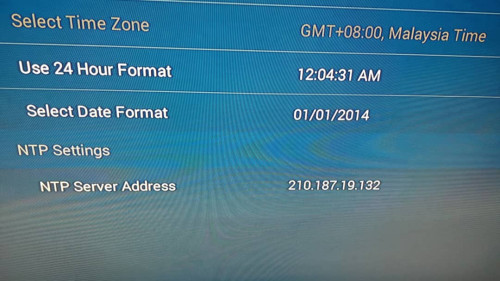
I'm getting NTP server error on my Unifi Set Top Box. The time and date stuck at 12.00am and 01/01/2014 every time I startup the device. I can't load the app my mom uses to watch drama when the time and date is not accurate. Can someone give alternative NTP server address? Contacted TM CS but all they know is to reset my internet. The internet is working just fine, only the NTP server seems not to be working. Any help is much appreciated!

Thank you!  notworthy.gif
*
https://gist.github.com/mutin-sa/eea1c396b1...a1e5550d94b0453
Here's a list of many servers

I suggest using either pool.ntp.org or time.google.com or time.cloudflare.com
PRSXFENG
post Feb 24 2023, 11:24 AM

Look at all my stars!!
*******
Senior Member
2,608 posts

Joined: Nov 2020


QUOTE(k-rolll @ Feb 24 2023, 10:56 AM)
You can use 169.254.169.123 it from Amazon Time Sync Public NTP. I used that almost 2 years now. No issue at all
*
um, 169.254.x.x is a reserved range, you sure that is the correct ip?
PRSXFENG
post Feb 25 2023, 09:21 AM

Look at all my stars!!
*******
Senior Member
2,608 posts

Joined: Nov 2020


QUOTE(k-rolll @ Feb 24 2023, 09:19 PM)
Yes it work for me. I setup on my Huawei EC6108V8.
*
I guess there is an NTP Time Server somewhere in TM's Network on that local address

This post has been edited by PRSXFENG: Feb 25 2023, 09:21 AM
PRSXFENG
post Apr 12 2023, 08:14 PM

Look at all my stars!!
*******
Senior Member
2,608 posts

Joined: Nov 2020


QUOTE(zioburosky13 @ Apr 12 2023, 07:01 PM)
If this is true,

Do I need to replace the current router - ASUS RT-AX3000 for the 2Gbps service?
*
There really isnt much options to go 3rd party for the 2Gbps plan

since the provided all in one modem/router doesnt have 2.5gbps ports, and doesnt support link aggregation either, you dont really have a way to replace it while keeping 2Gbps unless you go all out with GPON/XGPON SFP modules

even if it did, that router also doesnt have 2.5gbps ports nor does it support link aggregation

just take 1gbps and youll be fine, or use 2gbps with stock router

PRSXFENG
post Apr 12 2023, 10:47 PM

Look at all my stars!!
*******
Senior Member
2,608 posts

Joined: Nov 2020


QUOTE(go626201 @ Apr 12 2023, 09:38 PM)
I not sure this way can work or not,
I think it might be possible to use load balancing with 2 ethernet cable "bonding" to bridge another router as main PPPoE router.
Concept:
TM wifi BTU router(A) with bridge mode <2 ethernet cable > another router(B) support bonding and got 2.5G Lan port

And the router B can transmit 2gbps between router A and B, and with router B connect 2.5G Lan port to a PC,might be able to hit 2gbps speed.
*
TM provided router needs to know what to do about 2 cables/ports being connected to the same router
but seems like it does not support bonding, so it just wont work, both sides need to support bonding
PRSXFENG
post Apr 12 2023, 10:51 PM

Look at all my stars!!
*******
Senior Member
2,608 posts

Joined: Nov 2020


QUOTE(countingcrows @ Apr 12 2023, 09:45 PM)
But what about the phone line?
*
the phone jack from modem?
it also has its vlan, just break it out into an ethernet port and connect a VoIP ethernet phone or an voip ethernet to old school analogue phone adapter box or use software like microsip

see thread https://forum.lowyat.net/topic/5243640

though it is for Maxis, it could probably be adapted to Unifi if the server address, ports, auth details are figured out
PRSXFENG
post Apr 13 2023, 11:55 AM

Look at all my stars!!
*******
Senior Member
2,608 posts

Joined: Nov 2020


QUOTE(Oltromen Ripot @ Apr 13 2023, 10:41 AM)
I imagine there is built-in wifi inside the ONR

  • Can we disable the wifi altogether? Just to use Ethernet cable to load-balancing router like Asus, or connect to own existing wifi mesh. No point having duplicate transmission that competes with existing mesh.
  • It's another custom DLink router after all - will it force-append the widely-hated "@unifi" to wifi SSID?

*
Dunno tbh until someone gets their hands on the hardware
But tm is basically going "don't touch use our stuff" for the 2gbps plan by not providing 2.5gbps port

Load balancing, depending on the method, the ONR may need to support too, which it seems like it doesn't.

Connect mesh... You'll be bottlenecked by Gigabit Ethernet, so pay for 2gbps only get 1gbps, might as well get 1gbps plan
Unless you want to connect 2 mesh networks up that are separated and compete with each other

Only real way is to replace the combo thing to a system with 2.5gbps lan
PRSXFENG
post May 23 2023, 11:24 AM

Look at all my stars!!
*******
Senior Member
2,608 posts

Joined: Nov 2020


QUOTE(castiel2012 @ May 22 2023, 02:47 PM)
user posted image

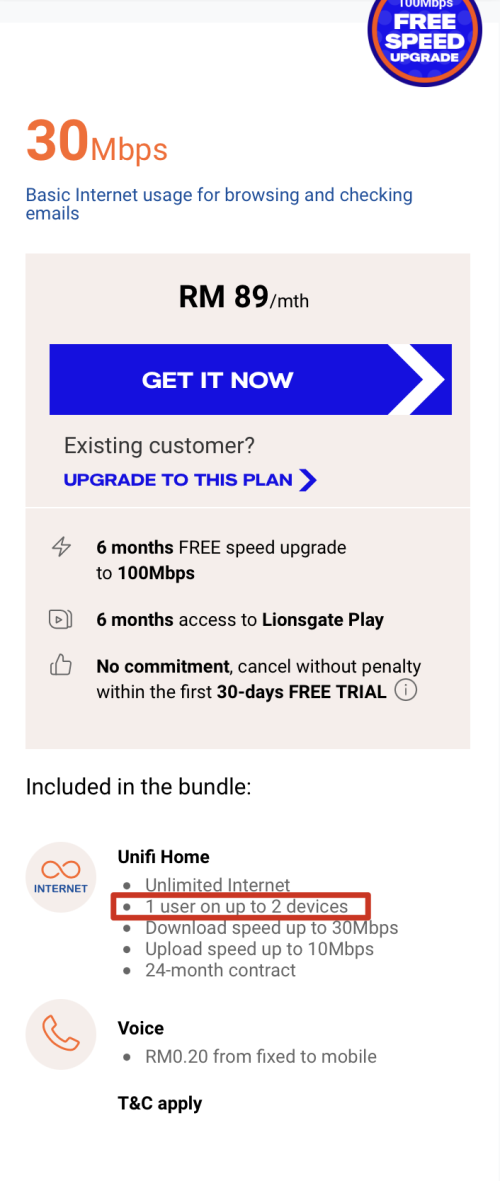
Hey guys, i wonder if they really mean it when they say the 30Mbps package is limited to only 2 devices. Cuz i definitely have way more than 2 internet devices.
*
It's just a recommendation on how many users is this plan suitable for
But honestly they put a low number to upsell you on the higher speed plans

PRSXFENG
post May 30 2023, 08:29 PM

Look at all my stars!!
*******
Senior Member
2,608 posts

Joined: Nov 2020


QUOTE(josh5671 @ May 30 2023, 03:03 PM)
hello, asking is there any way to use SFP router, still able to use RJ11 telephone line?
last year asked anime4000(if i correct spell his/her name) turn out not so viable to do it, unless spend quite abit money on the digital analog convertor?
asking maybe there got alternative? whistling.gif
*
You could get an Ethernet VOIP Phone
or use a software based VOIP Phone like MicroSIP
PRSXFENG
post Jun 3 2023, 01:29 PM

Look at all my stars!!
*******
Senior Member
2,608 posts

Joined: Nov 2020


QUOTE(Oltromen Ripot @ Jun 3 2023, 11:57 AM)
guys, this might not be the correct thread. but it's related.

i have over-ceiling attic (duh!) divided into 2, because of outdoor rooftop tank area and 2 laters of firewallon both sude of the tank area  (yes, a wall to divide in case of fire). so i cannot easily pull CAT6 without it exposed at the tank area before it comes in again on the other side.
so i have degraded (in my opinion) internet-ivity at the rear of the house.

is it possible to pull fibre instead to join both sides over the ceiling? what do i need to get fibre for my LAN? reference build?

and in case of wrong thread/section, then where?
*
Media converter + premade fiber cable?
such as this https://shopee.com.my/Gigabit-Fiber-Optical...4236.2855113350

or conduits, or rugged ethernet cables?

3 Pages < 1 2 3 >Top
Topic ClosedOptions
 

Change to:
| Lo-Fi Version
0.2845sec    0.88    7 queries    GZIP Disabled
Time is now: 11th December 2025 - 12:30 PM