Welcome Guest ( Log In | Register )

Outline · [ Standard ] · Linear+

 Help me switching to IOS

views
     
TSneuromancerx
post Mar 13 2022, 07:15 PM, updated 4y ago

Enthusiast
*****
Junior Member
879 posts

Joined: Jan 2007
My last iPhone was Iphone 4 and 3GS. I switched to Android after Installous was shutdown back then (in era where we will install SBSettings in our jalibroken iPhone). Android is great due to numerous apps in Google Play and also APK from XDA. After some time, i felt like switching back to IOS. I heavily relied on below apps in Android, and i need the similar or alternative app in IOS.

1. File Explorer - I use ES File Explorer and MiX Explorer. These apps support local file manager, as well as ability to connect to SAMBA and FTP. I need this to connect to my NAS at home. Also I can easily transfer files between my phone and remote server.

2. Video Player - I use MX Player, because it support almost all major codecs. I will use file manager stated above, and open the media using MX Player - direct stream to my HP. Last time i check IOS doesnt have this kind of app, unless I enable DLNA on server side, but DLNA require more processing on the server (transcoding).

3. Remote uTorrent/Transmission app - because i have a torrent client running in my NAS/server, i need to control (stop, start, add, remove) it conveniently using my phone. Android app used for this - Transdrone

4. Wifi scanner and analyzer app. Due to my work nature, sometimes i need to use this app to check the wireless signal strength and checking for wireless congestion/business.

Side note: I have Synology NAS, and I noticed the number of apps published in App Store is lesser than Google Play (example DS Get and Synology Active Insight are not in App Store), may be due to restrictions? Because i was under impression that developer will publish on App Store first before anything else.

Synology apps in Google Play Store
CODE
https://play.google.com/store/apps/developer?id=Synology+Inc.
(link ended with a . and BBCode prevented it)
Synology apps in Apple AppStore

This post has been edited by neuromancerx: Mar 13 2022, 07:24 PM
kevinpss
post Mar 14 2022, 03:55 PM

Casual
***
Junior Member
497 posts

Joined: Feb 2010


Well, use iCloud, then all problems solved. cheap, fast, and easy. How much your Synology NAS? I was think about NAS too, but after calculations, iCloud still better to my usage. I heard that the NAS is fully compatible to work in iOS and MacOS

This post has been edited by kevinpss: Mar 14 2022, 03:56 PM
acbc
post Mar 14 2022, 04:06 PM

Look at all my stars!!
*******
Senior Member
9,050 posts

Joined: Jan 2003
U will be restricted after a while.

VLC can stream movie files from Synology NAS. U can also copy the files from NAS and store inside VLC itself. However, other apps cannot open the files. Only VLC can. No biggie since VLC is the only player I used.

U won't have access to the phone storage unless it is inside the app. Apple don't allow direct file system access. Which is why many JB their iOS devices last time.

IMO, iOS is kinda limited. Which is why I carry both devices.

For torrent apps, no such running on iOS natively. U will need a web-based app running off the Synology or a PC via uTorrent web GUI to work. Very troublesome.

My old Mi A3 has Flud torrent app installed. Can download with WiFi or mobile data. No need a server to work. When travelling, the free data is useful for downloading movies and watching on a large TV via USB-C to HDMI cable.

This post has been edited by acbc: Mar 14 2022, 04:11 PM
bergstein
post Mar 14 2022, 04:08 PM

Casual
***
Junior Member
352 posts

Joined: Nov 2011
1. apple's own Files actually does support SMB, not FTP though. You can try Documents app (support SMB, FTP, SFTP).

2. try VLC, or Outplayer (this based on mpv)

3. I just use web interface of the bittorrent client

4. I don't think there's any non-JB app that can match Android's wifi analyzer apps, there are something like this though https://apps.apple.com/us/app/network-analyzer/id562315041
quebix
post Mar 14 2022, 08:46 PM

Gelato Director
******
Senior Member
1,238 posts

Joined: Sep 2006
From: Ampang. KL.
QUOTE(neuromancerx @ Mar 13 2022, 07:15 PM)
My last iPhone was Iphone 4 and 3GS. I switched to Android after Installous was shutdown back then (in era where we will install SBSettings in our jalibroken iPhone). Android is great due to numerous apps in Google Play and also APK from XDA. After some time, i felt like switching back to IOS. I heavily relied on below apps in Android, and i need the similar or alternative app in IOS.

1. File Explorer - I use ES File Explorer and MiX Explorer. These apps support local file manager, as well as ability to connect to SAMBA and FTP. I need this to connect to my NAS at home. Also I can easily transfer files between my phone and remote server.

2. Video Player - I use MX Player, because it support almost all major codecs. I will use file manager stated above, and open the media using MX Player - direct stream to my HP. Last time i check IOS doesnt have this kind of app, unless I enable DLNA on server side, but DLNA require more processing on the server (transcoding).

3. Remote uTorrent/Transmission app - because i have a torrent client running in my NAS/server, i need to control (stop, start, add, remove) it conveniently using my phone. Android app used for this - Transdrone

4. Wifi scanner and analyzer app. Due to my work nature, sometimes i need to use this app to check the wireless signal strength and checking for wireless congestion/business.

Side note: I have Synology NAS, and I noticed the number of apps published in App Store is lesser than Google Play (example DS Get and Synology Active Insight are not in App Store), may be due to restrictions? Because i was under impression that developer will publish on App Store first before anything else.

Synology apps in Google Play Store
CODE
https://play.google.com/store/apps/developer?id=Synology+Inc.
  (link ended with a . and BBCode prevented it)
Synology apps in Apple AppStore
*
Why do u feel wanna switch back to ios?
Whats the reason?

TSneuromancerx
post Mar 14 2022, 09:55 PM

Enthusiast
*****
Junior Member
879 posts

Joined: Jan 2007
QUOTE(kevinpss @ Mar 14 2022, 03:55 PM)
Well, use iCloud, then all problems solved. cheap, fast, and easy. How much your Synology NAS? I was think about NAS too, but after calculations, iCloud still better to my usage. I heard that the NAS is fully compatible to work in iOS and MacOS
*
For on the go and important files, i rely on Google Drive. Currently my NAS is 4TB, mostly just for mobile photos backup from all family members (around 300GB) while the rest are cold backup for work related and movies collections. There is a native app for iOS, but again it is limited to certain folders due to iOS app jails.

QUOTE(acbc @ Mar 14 2022, 04:06 PM)
U will be restricted after a while.

VLC can stream movie files from Synology NAS. U can also copy the files from NAS and store inside VLC itself. However, other apps cannot open the files. Only VLC can. No biggie since VLC is the only player I used.

U won't have access to the phone storage unless it is inside the app. Apple don't allow direct file system access. Which is why many JB their iOS devices last time.

IMO, iOS is kinda limited. Which is why I carry both devices.

For torrent apps, no such running on iOS natively. U will need a web-based app running off the Synology or a PC via uTorrent web GUI to work. Very troublesome.

My old Mi A3 has Flud torrent app installed. Can download with WiFi or mobile data. No need a server to work. When travelling, the free data is useful for downloading movies and watching on a large TV via USB-C to HDMI cable.
*
If media streaming from the app, of course i can use Plex or DLNA, but it involved transcoding. Not big issue actually, just trying to adapt the existing habit.
For torrent, I'm not actually intend to run torrent client on the phone itself because i already have my NAS running 24/7. In android, there is an app that can connect to your torrent server frontend (be it uTorrent, transmission, deluge, rTorrent etc) and you can easily manage the torrent from your phone easily.

QUOTE(bergstein @ Mar 14 2022, 04:08 PM)
1. apple's own Files actually does support SMB, not FTP though. You can try Documents app (support SMB, FTP, SFTP).

2. try VLC, or Outplayer (this based on mpv)

3. I just use web interface of the bittorrent client

4. I don't think there's any non-JB app that can match Android's wifi analyzer apps, there are something like this though https://apps.apple.com/us/app/network-analyzer/id562315041
*
1. I think i noticed that option (SMB support in Documents app), will recheck.
2. Ok will give a try
3. Yeah, even tough a bit troublesome, i think will use this as a last resort.
4. I remembered there was an app for that in iOS last time, probably now iOS more restrictive

QUOTE(quebix @ Mar 14 2022, 08:46 PM)
Why do u feel wanna switch back to ios?
Whats the reason?
*
1. Probably because of bored with Android (or waiting for Google Pixel to be recognized officially here).
2. Too old already to tinker with devices (rom flashing, mods etc).
3. iOS privacy is better
4. iOS apps are optimized, because there are no fragmentation. Apps were designed for specific HW and SW.
5. I read notch will be removed on next model.

Thanks for all replies, i believed i know what to expect if i made the switch. Feel free to add more opinions (sorry ya, almost 10 years didnt use iOS tongue.gif)
kevinpss
post Mar 14 2022, 10:15 PM

Casual
***
Junior Member
497 posts

Joined: Feb 2010


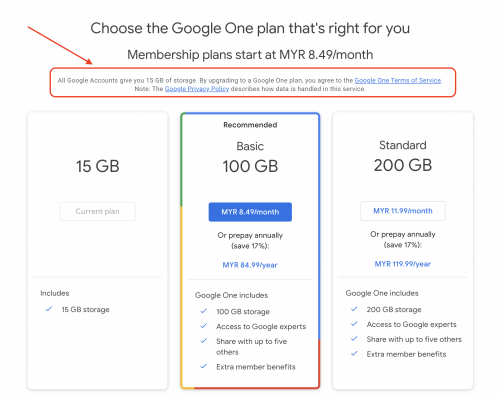
google drive for important file? I'm sure you didn't read their privacy statement, and know how they use your data.

This post has been edited by kevinpss: Mar 14 2022, 10:15 PM
kevinpss
post Mar 14 2022, 10:28 PM

Casual
***
Junior Member
497 posts

Joined: Feb 2010


QUOTE(neuromancerx @ Mar 14 2022, 09:55 PM)
For on the go and important files, i rely on Google Drive. Currently my NAS is 4TB, mostly just for mobile photos backup from all family members (around 300GB) while the rest are cold backup for work related and movies collections. There is a native app for iOS, but again it is limited to certain folders due to iOS app jails.
If media streaming from the app, of course i can use Plex or DLNA, but it involved transcoding. Not big issue actually, just trying to adapt the existing habit.
For torrent, I'm not actually intend to run torrent client on the phone itself because i already have my NAS running 24/7. In android, there is an app that can connect to your torrent server frontend (be it uTorrent, transmission, deluge, rTorrent etc) and you can easily manage the torrent from your phone easily.
1. I think i noticed that option (SMB support in Documents app), will recheck.
2. Ok will give a try
3. Yeah, even tough a bit troublesome, i think will use this as a last resort.
4. I remembered there was an app for that in iOS last time, probably now iOS more restrictive
1. Probably because of bored with Android (or waiting for Google Pixel to be recognized officially here).
2. Too old already to tinker with devices (rom flashing, mods etc).
3. iOS privacy is better
4. iOS apps are optimized, because there are no fragmentation. Apps were designed for specific HW and SW.
5. I read notch will be removed on next model.

Thanks for all replies, i believed i know what to expect if i made the switch. Feel free to add more opinions (sorry ya, almost 10 years didnt use iOS tongue.gif)
*
I strongly recommend you to go thru the google privacy policy and terms and conditions, if you really store important data in google drive.

user posted image
TSneuromancerx
post Mar 14 2022, 10:33 PM

Enthusiast
*****
Junior Member
879 posts

Joined: Jan 2007
QUOTE(kevinpss @ Mar 14 2022, 10:15 PM)
google drive for important file? I'm sure you didn't read their privacy statement, and know how they use your data.
*
Thanks for highlighting this. I got your point, Google is evil biggrin.gif .

For me, important != sensitive.

If i need to access my sensitive document, i will connect to my home using OpenVPN and access my NAS (i don't have any port-forwarding set on the router for NAS services). But this is rare occasion, maybe only 2, 3 times in a month.

Even my NAS is running on RAID1, I still have my copies of sensitive files in TrueCrypt/VeraCrypt and kept it somewhere in cloud - only mount it on demand, just to update some files.
kevinpss
post Mar 14 2022, 10:38 PM

Casual
***
Junior Member
497 posts

Joined: Feb 2010


QUOTE(neuromancerx @ Mar 14 2022, 10:33 PM)
Thanks for highlighting this. I got your point, Google is evil  biggrin.gif .

For me, important != sensitive.

If i need to access my sensitive document, i will connect to my home using OpenVPN and access my NAS (i don't have any port-forwarding set on the router for NAS services). But this is rare occasion, maybe only 2, 3 times in a month.

Even my NAS is running on RAID1, I still have my copies of sensitive files in TrueCrypt/VeraCrypt and kept it somewhere in cloud - only mount it on demand, just to update some files.
*
no la, not to say google is evil, it just scan thru the email, pic, drive and put everything in their server. and they can access it.
kevinpss
post Mar 14 2022, 10:41 PM

Casual
***
Junior Member
497 posts

Joined: Feb 2010


QUOTE(neuromancerx @ Mar 14 2022, 09:55 PM)
For on the go and important files, i rely on Google Drive. Currently my NAS is 4TB, mostly just for mobile photos backup from all family members (around 300GB) while the rest are cold backup for work related and movies collections. There is a native app for iOS, but again it is limited to certain folders due to iOS app jails.
If media streaming from the app, of course i can use Plex or DLNA, but it involved transcoding. Not big issue actually, just trying to adapt the existing habit.
For torrent, I'm not actually intend to run torrent client on the phone itself because i already have my NAS running 24/7. In android, there is an app that can connect to your torrent server frontend (be it uTorrent, transmission, deluge, rTorrent etc) and you can easily manage the torrent from your phone easily.
1. I think i noticed that option (SMB support in Documents app), will recheck.
2. Ok will give a try
3. Yeah, even tough a bit troublesome, i think will use this as a last resort.
4. I remembered there was an app for that in iOS last time, probably now iOS more restrictive
1. Probably because of bored with Android (or waiting for Google Pixel to be recognized officially here).
2. Too old already to tinker with devices (rom flashing, mods etc).
3. iOS privacy is better
4. iOS apps are optimized, because there are no fragmentation. Apps were designed for specific HW and SW.
5. I read notch will be removed on next model.

Thanks for all replies, i believed i know what to expect if i made the switch. Feel free to add more opinions (sorry ya, almost 10 years didnt use iOS tongue.gif)
*
How much your NAS system? which model you using now?

Since you are talking about photo storage, one thing good about iOS/MacOS is they give you free "Lightroom" like photo app. That will be very helpful for photo management and back-up. And it free a lot space out from your device, automatically.

How NAS manage the photo inside the server?
TSneuromancerx
post Mar 14 2022, 10:49 PM

Enthusiast
*****
Junior Member
879 posts

Joined: Jan 2007
It's an open secret that google know about you better than yourself. The moment you sign in to google, you already gave your life to them. I'm aware of it, and I'm okay with it laugh.gif. Mostly they used it for profiling so that they can get targeted ads and so on.
TSneuromancerx
post Mar 14 2022, 10:56 PM

Enthusiast
*****
Junior Member
879 posts

Joined: Jan 2007
QUOTE(kevinpss @ Mar 14 2022, 10:41 PM)
How much your NAS system? which model you using now?

Since you are talking about photo storage, one thing good about iOS/MacOS is they give you free "Lightroom" like photo app. That will be very helpful for photo management and back-up. And it free a lot space out from your device, automatically.

How NAS manage the photo inside the server?
*
I started with Buffalo NAS enclosure with 2x2TB, used it for almost 8 years without issue. Until Google announced that there will be no more unlimited space saver photos upload, i started to figure my own self-hosted solutions. I bought QNAP TS-230 and load it with 2x4TB Seagate Ironwolf, it works well and it had an app called QuMagie for Google Photos replacement, with facial recognition of course.

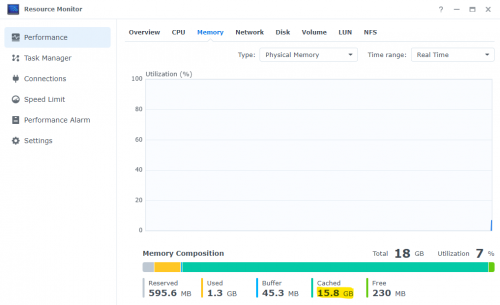
But i feel that 2GB RAM is not enough for the whole system, so after 9 months I bought Synology DS220+ (because it support additional DIMM). Out of the box it came with 2GB of RAM, then I installed 1x16GB DDR4 RAM, it's overkill but very snappy (sometimes i run docker image or vm, just for fun). Synology have this Synology Photos app, and personally i feel it way better and polished than QNAP's QuMagie. Installed the app on my phone and it will automatically upload to NAS (with option to delete the original files from your phone). Satisfied with it, but of course Google Photos features are miles ahead lah.

Cincai calculations
DS220+ - RM1.4k
Seagate Ironwolf 4TB - RM500 x 2 (reuse)
16GB RAM - RM350 (reuse)

user posted image

Noticed the cached memory amount? Unused memory is wasted memory, they say tongue.gif

https://www.synology.com/en-global/DSM70/SynologyPhotos

This post has been edited by neuromancerx: Mar 14 2022, 11:03 PM
firdausbhari
post Mar 15 2022, 01:16 AM

Look at all my stars!!
*******
Senior Member
2,281 posts

Joined: Feb 2012


why not use both iOS and Android?
TSneuromancerx
post Mar 15 2022, 08:47 AM

Enthusiast
*****
Junior Member
879 posts

Joined: Jan 2007
QUOTE(firdausbhari @ Mar 15 2022, 01:16 AM)
why not use both iOS and Android?
*
Great idea, but I don't like bringing 2 phones with me when i walk.
quebix
post Mar 15 2022, 10:23 AM

Gelato Director
******
Senior Member
1,238 posts

Joined: Sep 2006
From: Ampang. KL.
QUOTE(neuromancerx @ Mar 14 2022, 09:55 PM)
For on the go and important files, i rely on Google Drive. Currently my NAS is 4TB, mostly just for mobile photos backup from all family members (around 300GB) while the rest are cold backup for work related and movies collections. There is a native app for iOS, but again it is limited to certain folders due to iOS app jails.
If media streaming from the app, of course i can use Plex or DLNA, but it involved transcoding. Not big issue actually, just trying to adapt the existing habit.
For torrent, I'm not actually intend to run torrent client on the phone itself because i already have my NAS running 24/7. In android, there is an app that can connect to your torrent server frontend (be it uTorrent, transmission, deluge, rTorrent etc) and you can easily manage the torrent from your phone easily.
1. I think i noticed that option (SMB support in Documents app), will recheck.
2. Ok will give a try
3. Yeah, even tough a bit troublesome, i think will use this as a last resort.
4. I remembered there was an app for that in iOS last time, probably now iOS more restrictive
1. Probably because of bored with Android (or waiting for Google Pixel to be recognized officially here).
2. Too old already to tinker with devices (rom flashing, mods etc).
3. iOS privacy is better
4. iOS apps are optimized, because there are no fragmentation. Apps were designed for specific HW and SW.
5. I read notch will be removed on next model.

Thanks for all replies, i believed i know what to expect if i made the switch. Feel free to add more opinions (sorry ya, almost 10 years didnt use iOS tongue.gif)
*
notch to be removed? i heard this. but not so soon. maybe next year.

firdausbhari
post Mar 17 2022, 01:14 AM

Look at all my stars!!
*******
Senior Member
2,281 posts

Joined: Feb 2012


QUOTE(neuromancerx @ Mar 15 2022, 08:47 AM)
Great idea, but I don't like bringing 2 phones with me when i walk.
*
well in that case, just use any that you're comfortable with. both OS works great. pros n cons.
AeroMiku
post Mar 18 2022, 06:26 AM

New Member
*
Junior Member
35 posts

Joined: Jan 2015
If you heavily relied on Android ecosystem, don’t switch. iOS is a pretty restrictive ecosystem where you have to put some efforts for a simple task that usually straightforward on Android like sideload/transfer unsupported files. I switched to iPhone 13 from Android (Last phone was Galaxy S10+) and feel kinda regret switching to iOS. It can’t do what I usually did to my previous S10
miyakochan89
post Mar 18 2022, 09:43 AM

Wut?
*******
Senior Member
6,725 posts

Joined: Aug 2008


I have been jumping here and there from iOS to Android, and Android back to iOS. From the list of things that you mentioned, it looks like Android is the only one that fits your demand. Be prepared to feel frustrated for the first few months of using iOS and then see if the frustration goes away or not. xD
@POTUS
post Mar 18 2022, 05:21 PM

Getting Started
**
Junior Member
219 posts

Joined: Apr 2017
1. I use apple own file system, connect to synology via SMB in LAN status

2. Video player i sub infuse pro, yearly 44 only.

3. I occasionally also using ds download, unfortunately due to apple restrictions, no longer available. I use tailscale to remote login and start my ds download

4. I dont use any wifi analyzer. Cannot help on this

This post has been edited by @POTUS: Mar 18 2022, 05:22 PM

2 Pages  1 2 >Top
 

Change to:
| Lo-Fi Version
0.0157sec    0.45    5 queries    GZIP Disabled
Time is now: 20th December 2025 - 06:21 PM