Welcome Guest ( Log In | Register )

Outline · [ Standard ] · Linear+

 Help me switching to IOS

views
     
kevinpss
post Mar 14 2022, 03:55 PM

Casual
***
Junior Member
497 posts

Joined: Feb 2010


Well, use iCloud, then all problems solved. cheap, fast, and easy. How much your Synology NAS? I was think about NAS too, but after calculations, iCloud still better to my usage. I heard that the NAS is fully compatible to work in iOS and MacOS

This post has been edited by kevinpss: Mar 14 2022, 03:56 PM
kevinpss
post Mar 14 2022, 10:15 PM

Casual
***
Junior Member
497 posts

Joined: Feb 2010


google drive for important file? I'm sure you didn't read their privacy statement, and know how they use your data.

This post has been edited by kevinpss: Mar 14 2022, 10:15 PM
kevinpss
post Mar 14 2022, 10:28 PM

Casual
***
Junior Member
497 posts

Joined: Feb 2010


QUOTE(neuromancerx @ Mar 14 2022, 09:55 PM)
For on the go and important files, i rely on Google Drive. Currently my NAS is 4TB, mostly just for mobile photos backup from all family members (around 300GB) while the rest are cold backup for work related and movies collections. There is a native app for iOS, but again it is limited to certain folders due to iOS app jails.
If media streaming from the app, of course i can use Plex or DLNA, but it involved transcoding. Not big issue actually, just trying to adapt the existing habit.
For torrent, I'm not actually intend to run torrent client on the phone itself because i already have my NAS running 24/7. In android, there is an app that can connect to your torrent server frontend (be it uTorrent, transmission, deluge, rTorrent etc) and you can easily manage the torrent from your phone easily.
1. I think i noticed that option (SMB support in Documents app), will recheck.
2. Ok will give a try
3. Yeah, even tough a bit troublesome, i think will use this as a last resort.
4. I remembered there was an app for that in iOS last time, probably now iOS more restrictive
1. Probably because of bored with Android (or waiting for Google Pixel to be recognized officially here).
2. Too old already to tinker with devices (rom flashing, mods etc).
3. iOS privacy is better
4. iOS apps are optimized, because there are no fragmentation. Apps were designed for specific HW and SW.
5. I read notch will be removed on next model.

Thanks for all replies, i believed i know what to expect if i made the switch. Feel free to add more opinions (sorry ya, almost 10 years didnt use iOS tongue.gif)
*
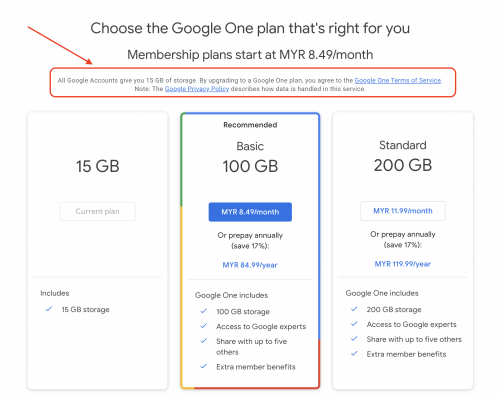
I strongly recommend you to go thru the google privacy policy and terms and conditions, if you really store important data in google drive.

user posted image
kevinpss
post Mar 14 2022, 10:38 PM

Casual
***
Junior Member
497 posts

Joined: Feb 2010


QUOTE(neuromancerx @ Mar 14 2022, 10:33 PM)
Thanks for highlighting this. I got your point, Google is evil  biggrin.gif .

For me, important != sensitive.

If i need to access my sensitive document, i will connect to my home using OpenVPN and access my NAS (i don't have any port-forwarding set on the router for NAS services). But this is rare occasion, maybe only 2, 3 times in a month.

Even my NAS is running on RAID1, I still have my copies of sensitive files in TrueCrypt/VeraCrypt and kept it somewhere in cloud - only mount it on demand, just to update some files.
*
no la, not to say google is evil, it just scan thru the email, pic, drive and put everything in their server. and they can access it.
kevinpss
post Mar 14 2022, 10:41 PM

Casual
***
Junior Member
497 posts

Joined: Feb 2010


QUOTE(neuromancerx @ Mar 14 2022, 09:55 PM)
For on the go and important files, i rely on Google Drive. Currently my NAS is 4TB, mostly just for mobile photos backup from all family members (around 300GB) while the rest are cold backup for work related and movies collections. There is a native app for iOS, but again it is limited to certain folders due to iOS app jails.
If media streaming from the app, of course i can use Plex or DLNA, but it involved transcoding. Not big issue actually, just trying to adapt the existing habit.
For torrent, I'm not actually intend to run torrent client on the phone itself because i already have my NAS running 24/7. In android, there is an app that can connect to your torrent server frontend (be it uTorrent, transmission, deluge, rTorrent etc) and you can easily manage the torrent from your phone easily.
1. I think i noticed that option (SMB support in Documents app), will recheck.
2. Ok will give a try
3. Yeah, even tough a bit troublesome, i think will use this as a last resort.
4. I remembered there was an app for that in iOS last time, probably now iOS more restrictive
1. Probably because of bored with Android (or waiting for Google Pixel to be recognized officially here).
2. Too old already to tinker with devices (rom flashing, mods etc).
3. iOS privacy is better
4. iOS apps are optimized, because there are no fragmentation. Apps were designed for specific HW and SW.
5. I read notch will be removed on next model.

Thanks for all replies, i believed i know what to expect if i made the switch. Feel free to add more opinions (sorry ya, almost 10 years didnt use iOS tongue.gif)
*
How much your NAS system? which model you using now?

Since you are talking about photo storage, one thing good about iOS/MacOS is they give you free "Lightroom" like photo app. That will be very helpful for photo management and back-up. And it free a lot space out from your device, automatically.

How NAS manage the photo inside the server?


Change to:
| Lo-Fi Version
0.2401sec    0.35    6 queries    GZIP Disabled
Time is now: 20th December 2025 - 06:19 PM