Welcome Guest ( Log In | Register )

Outline · [ Standard ] · Linear+

 Windows 11, To be announce on 24 June 2021

views
     
1024kbps
post Nov 3 2024, 07:59 PM

李素裳
*******
Senior Member
6,017 posts

Joined: Feb 2007


QUOTE(andyjyneo @ Nov 2 2024, 10:45 PM)
Hi, anyone using Win11 on non-TPM2.0 CPU?
At first, I didn't notice lag issue.
However, some apps really lag on non-TPM2.0 CPU, but when I run on TPM2.0-enabled CPU, no lag at all.
Oh ya, before I forget, my CPU is Xeon E5, Socket 2011LGA.
*
more likely is related CPU performance
Windows OS isn't too resource friendly toward old gen cpu.

you want snappy performance you have to get latest tech...
1024kbps
post Feb 4 2025, 10:50 PM

李素裳
*******
Senior Member
6,017 posts

Joined: Feb 2007


QUOTE(UbuntuClient @ Feb 4 2025, 06:06 PM)
Does powershell have this features when open multitab?

user posted image
*
user posted image
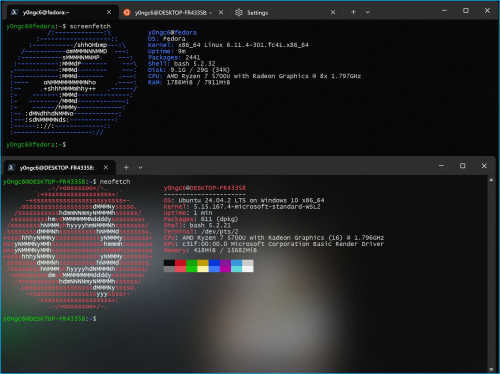
powershell is the scripting language
Windows Terminal have it like for ages

Another one is Fluent, but Fluent no longer updated, not much stable
1024kbps
post Feb 5 2025, 03:45 PM

李素裳
*******
Senior Member
6,017 posts

Joined: Feb 2007


QUOTE(Xploit Machine @ Feb 5 2025, 08:33 AM)
» Click to show Spoiler - click again to hide... «


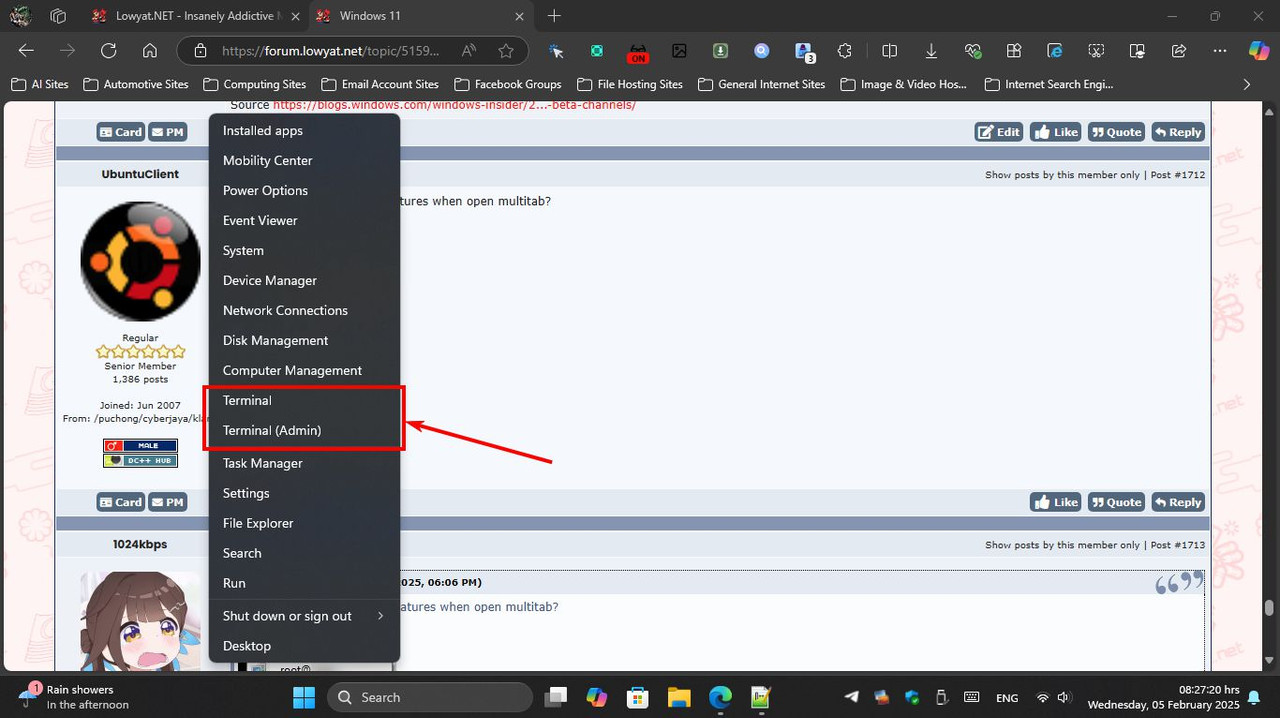
its common .. when first install Powershell will be the main command, after update it will switch to Terminal automatically .. actually both are the same function, I prefer to Terminal / Powershell (WINGET) rather than going to Windows Update ..

POwershell can be customised according to user's preferences smile.gif

user posted image
user posted image
*
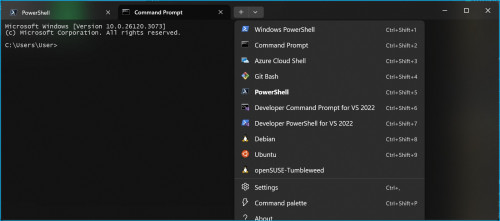
Terminal can manage all the shell and command processor/cmd/ps/wsl

going forward Terminal should be the only default "Terminal" to manage all the script/command processor.
I think MS will replace or remove the old terminal, there are too many dupes, it's waste of resource to code and manage the same thing.

1024kbps
post Feb 12 2025, 01:20 AM

李素裳
*******
Senior Member
6,017 posts

Joined: Feb 2007


QUOTE(UbuntuClient @ Feb 6 2025, 03:12 PM)
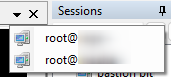
I think you all missunderstand. I mean is dropdown with profile name like superputty.
*
superputty is specialized program...

Terminal is more of a general propose terminal emulator
the best it can do just tabbed output... sweat.gif

user posted image
1024kbps
post Feb 27 2025, 01:37 AM

李素裳
*******
Senior Member
6,017 posts

Joined: Feb 2007


QUOTE(PJng @ Feb 26 2025, 11:12 PM)
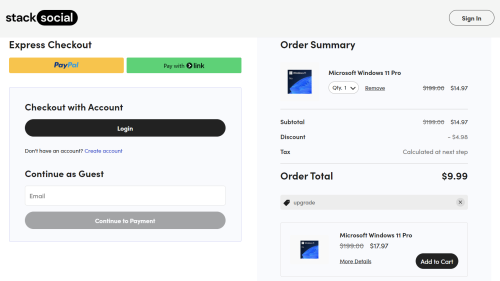
https://www.xda-developers.com/windows-11-pro-10-deal/

again xda got such deal, usable on malaysia?
or upgrade for current pc?

user posted image
*
seems all prices got jacked up
i bought retail key like 2.59 dollars few years ago, now such deal doesn't exist anymore

Should be working, i bought from UAE site and the key worked iirc.

This post has been edited by 1024kbps: Feb 27 2025, 01:39 AM
1024kbps
post May 15 2025, 09:39 AM

李素裳
*******
Senior Member
6,017 posts

Joined: Feb 2007


QUOTE(PJng @ May 15 2025, 01:11 AM)
The annoying thing is back, use to work for some month
I click Update and shutdown, after update pc restart again

So there is no point windows put 2 option, update and shutdown, update and restart, is just same thing pc will start back
*
Win11 for normal user is buggy as heck, we end user are just free OS tester for them,

For me Win11 is just Win 7+4
there are no new windows after 7, every "new" windows version are just slight modified win 7 with more shits add into OS tongue.gif
1024kbps
post May 15 2025, 09:48 AM

李素裳
*******
Senior Member
6,017 posts

Joined: Feb 2007


QUOTE(soonwai @ May 12 2025, 02:35 PM)
Anyone here using Windows ARM? How is Excel ARM compared to Excel x86?

Specifically the ALT accelerator keys, are they the same? For example, for setting column width, it is ALT-HOW (new) or ALT-OCW (old).

Asking because on Excel ARM MacOS, it only goes up to ALT-HO then have to use mouse to click.

Looking to get a X Elite lappy for wife to use. Excel is priority so if cannot do the above, will have to consider Core Ultra instead.
*
just go to shop test physically
for long term, just get core ultra unit instead of X elite, WARM probably still have a lot of restrictions like hardware/software compatibility.
x86 unit also easier to offload to second hand market.
1024kbps
post May 15 2025, 05:01 PM

李素裳
*******
Senior Member
6,017 posts

Joined: Feb 2007


QUOTE(PJng @ May 15 2025, 10:30 AM)
And until now right click menu still a bit delay, if open old menu by shift+click no delay
Open file explorer also same delay, unlike windows 10 instant open
*
For lappy, Win11 works surprisingly well, my old R7 6800HS smooth as butter after done full reset.
But my HTPC win11 works like crap lol, in the future probably wont be using Win11 as it's power hog for old PC
Most likely the drivers for my lappy are more up to date. while HTPC no longer receives update.

as for the menu, I have disabled it completely, revert to old menu can use this trick
https://www.reddit.com/r/sysadmin/comments/...ontext_menu_in/


1024kbps
post Sep 5 2025, 06:25 PM

李素裳
*******
Senior Member
6,017 posts

Joined: Feb 2007


QUOTE(PJng @ Sep 4 2025, 10:47 PM)
i just hate sometime explorer slow respond, open file explorer need wait a bit, new right click menu need some time to show
unlike windows 10 no delay

don have such issue on my old 13 years pc with windows 10
*
if you right click and you see a lot odd programs associate it to the menu, it's partially windows at fault, then those programs self register the DLL make shit slower
google this "remove programs associate with right click", Windows for ages made this difficult to remove it.

TLDR if you want to reduce the overhead of rightclick menu, dont let program associate it with right click menu.
My right click menu is as tall as the screen height lol,

another trick is remove the menushowdelay to 0ms, default is always 400ms.
1024kbps
post Sep 5 2025, 09:05 PM

李素裳
*******
Senior Member
6,017 posts

Joined: Feb 2007


QUOTE(acbc @ Sep 5 2025, 08:07 AM)
I bought an used Precision 7530 and found it has a Xeon CPU inside plus 32GB RAM. I bumped the RAM to another 32GB making a total of 64GB plus triple 2TB NVME storage.

All bought used from Carousell and boy, the performance is ultimate. W11 is smooth and zero delays.

Did the same for my T590 by bumping the RAM from 8GB to 40GB with another 32GB stick. Smoother now.

W11 need min 32GB to run lag free. 64GB even better. Virtually no lag at all.
*
W11 very depend on CPU performance, on W10 it will be even faster.
Ram sweet spot is 16gb but bigger the better, i have R7 5700U, the thermal throtting with my PC is crazy it will keep scaling down the CPU clock lol
It's nearing 80c with when gaming, i have 32GB ram but it does not help much, the whole HTPC need to put inside fridge to be able to operate properlly.
1024kbps
post Oct 13 2025, 11:16 PM

李素裳
*******
Senior Member
6,017 posts

Joined: Feb 2007


QUOTE(PJng @ Oct 13 2025, 09:01 PM)
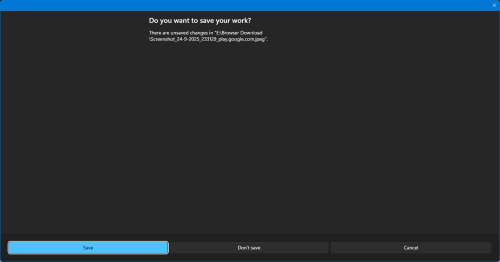
lol, what happen to paint? so big
user posted image
*
Windows thought you have big fingers so, it shows you large save dialogs lol

Typical bugs from insider builds
1024kbps
post Oct 23 2025, 02:12 AM

李素裳
*******
Senior Member
6,017 posts

Joined: Feb 2007


Temp folder store cached data for browser, your program temp data, file/folder index, you only delete if it become too large or experience programe issue.
if you keep clearing, you delete the "memory" created by your program and force it to make new one, your program start-up become slow...

It's hidden away from plain sight because it's not mean for regular clearing out

This post has been edited by 1024kbps: Oct 23 2025, 02:13 AM
1024kbps
post Oct 23 2025, 06:26 PM

李素裳
*******
Senior Member
6,017 posts

Joined: Feb 2007


welp, regularly clearing temp folder should be fine if you're using HDD,
for SSD, you're basically accelerate the aging of your SSD because every time you delete stuff, your games your programs write the same thing back to your SSD, your ssd very fast will reach the TBW earlier than expected.

If you don't regularly check the ssd performance one day you will be surprised with BSOD due to exhausted SSD cell.
1024kbps
post Oct 31 2025, 12:21 AM

李素裳
*******
Senior Member
6,017 posts

Joined: Feb 2007


QUOTE(soonwai @ Oct 29 2025, 09:48 PM)
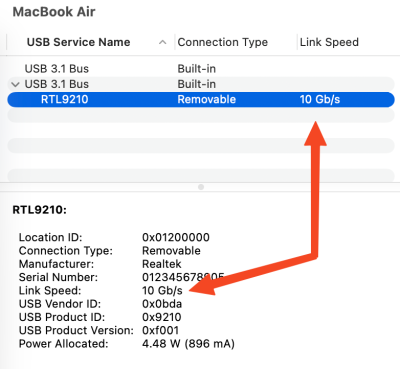
Guys, is there a place in Windows 11 to see the link speed of a connected USB device? I want to check to see if my ext USB SSD is connected at USB3 10Gbps.

Something like this from macOS.
user posted image
*
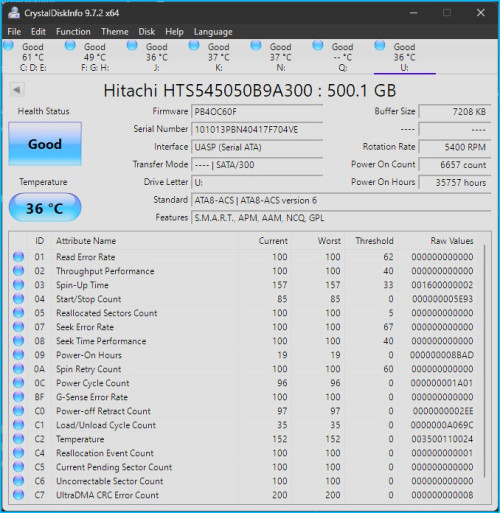
the best software is CrystalDiskInfo for your requirements,
Currently Windows does not show any useful info.

The Transfer Mode and Interface probably are the info you're looking for

user posted image
1024kbps
post Nov 3 2025, 10:29 PM

李素裳
*******
Senior Member
6,017 posts

Joined: Feb 2007


QUOTE(countingcrows @ Nov 3 2025, 08:48 PM)
Okie my bad. I didn't read all the comments on there...
*
Redditor comments should be taken with grain of salt, most people there aren't really tech savvy
but when executing powershell script, you should exercise with caution, review the script thoroughly, make sure you get the file from same website and same author.

Malicious Powershell script can literally destroy your pc in the blink of eyes, i code powershell script everyday so I know what i'm talking about.
1024kbps
post Nov 9 2025, 03:45 PM

李素裳
*******
Senior Member
6,017 posts

Joined: Feb 2007


QUOTE(soonwai @ Nov 9 2025, 01:45 PM)
Hey guys, thanks for the info. Win11 Settings, as mentioned, only shows USB3 and CrystalDiskInfo doesn't show anything for USB connected SSDs. However I finally found something that shows the USB link speed.

UsbTreeView
https://www.uwe-sieber.de/usbtreeview_e.html

user posted image
Can see the 10Gbps there. Can't test 20Gbps since my PC mobo only up to USB3 10G.
*
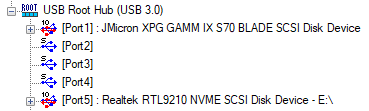
NVME SCSI suggested the interface is UASP, aka USB attached SCSI protocol
Even if the bandwidth shows USB 20Gbps, does not mean you can actually achieve the speed

UASP is better than typical USB transfer model aka BOT.
but your device transfer rate is still limited by the device, much better than typical portable hdd but less than native NVME SSD.

5 Pages « < 3 4 5Top
 

Change to:
| Lo-Fi Version
0.0774sec    0.61    7 queries    GZIP Disabled
Time is now: 23rd December 2025 - 12:10 AM