Welcome Guest ( Log In | Register )

Outline · [ Standard ] · Linear+

 Mobo Guide - Power Socket, Motherboard power query

views
     
TScawan
post May 29 2021, 12:26 AM, updated 5y ago

Casual
***
Junior Member
404 posts

Joined: Jul 2006


Hi all,

Using Msi Z590 motherboard.
i7-11700
2 ssd 500x2gb
Rtx 2060 Super 175watt
Psu corsair Rm750. Watt.

Want to ask.

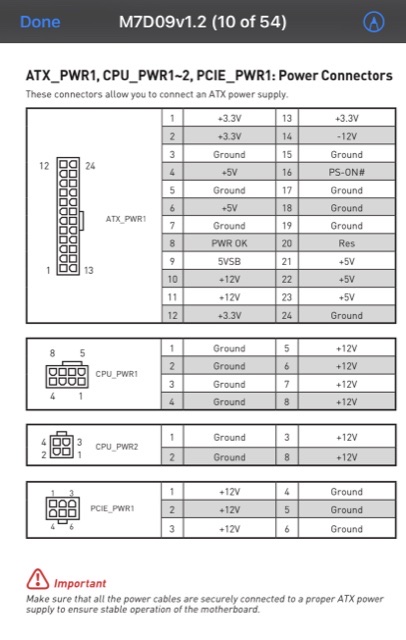
1. psu 24 pin to motherboard pwr1 yes it a must plug. - ok
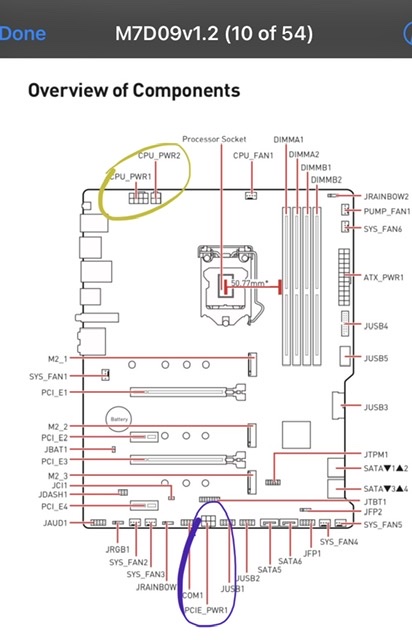
2. Cpu pwr1 also a must plug in?
- never know since my last build 8 years back.
3. What cpu pwr2 then? Must or optional? When?
4. From Psu plug 8 pin to graphic - ok
5. What then motherboard have 6 pin pcie pwr1 for? From psu attach to this board Or kind of molex cable from this motherboard to graphic card?? Or optional when or why?

Help.

user posted image
user posted image
buraqdunia
post May 29 2021, 12:40 AM

On my way
****
Junior Member
617 posts

Joined: Jul 2006


See that red exclamation mark?. There is no either optional or compulsory involved. ALL POWER CABLES ARE SECURELY CONNECTED.
SUSceo684
post May 29 2021, 12:50 AM

Component Burner
********
All Stars
11,667 posts

Joined: Jan 2003
From: Klang/Subang


You use heavy machinery (i7 and GPU) combined, of course need to plug in all lah.. if heavy current draw cannot be supported by the cables, it will result in voltage drop.

Nowadays assembling PC very easy got plug and matching socket kasi plug sama dia. Only need to worry if your PSU is too old that it doesn't come with enough/the right plugs.

The reason why need so many plug is because the wattage is high, but voltage only 12V so those tiny cables by its own (from zaman pentium III) cannot sustain. Also they section off the power delivery CPU is CPU power section, GPU is GPU power section (PCIE bottom), probably for less fluctuation and other reason.

This post has been edited by ceo684: May 29 2021, 12:53 AM
TScawan
post May 29 2021, 07:32 AM

Casual
***
Junior Member
404 posts

Joined: Jul 2006


QUOTE(buraqdunia @ May 29 2021, 12:40 AM)
See that red exclamation mark?. There is no either optional or compulsory involved.  ALL POWER CABLES ARE SECURELY CONNECTED.
*
Once plug in all, in avoid motherboard electricity overload,

any step should i take precautions before? Any hardware should i unplug first?

Boot up, and see see if no issue first hmm.gif
TScawan
post May 29 2021, 07:39 AM

Casual
***
Junior Member
404 posts

Joined: Jul 2006


QUOTE(ceo684 @ May 29 2021, 12:50 AM)
You use heavy machinery (i7 and GPU) combined, of course need to plug in all lah.. if heavy current draw cannot be supported by the cables, it will result in voltage drop.

Nowadays assembling PC very easy got plug and matching socket kasi plug sama dia. Only need to worry if your PSU is too old that it doesn't come with enough/the right plugs.

The reason why need so many plug is because the wattage is high, but voltage only 12V so those tiny cables by its own (from zaman pentium III) cannot sustain. Also they section off the power delivery CPU is CPU power section, GPU is GPU power section (PCIE bottom), probably for less fluctuation and other reason.
*
If motherboard not enough power, pc will shut off / reboot, or just performance issue?

For pcie pwr1, choosing not plug it, perform stress test would throw results. Correct?

Skylinestar
post May 29 2021, 11:40 AM

Mega Duck
********
All Stars
10,475 posts

Joined: Jan 2003
From: Sarawak
QUOTE(cawan @ May 29 2021, 12:26 AM)
1. psu 24 pin to motherboard pwr1 yes it a must plug. - ok
2. Cpu pwr1 also a must plug in?
- never know since my last build 8 years back.
3. What cpu pwr2 then? Must or optional? When?
4. From Psu plug 8 pin to graphic - ok
5. What then motherboard have 6 pin pcie pwr1 for? From psu attach to this board Or kind of molex cable from this motherboard to graphic card?? Or optional when or why?

*
2. yes. must.
3. generally optional. if u have a beefy cpu and oc, it's a must. some mobo go crazy without plugging it (even without oc).
5. again, it's mainly for oc purpose and beefy pcie cards installed. plug directly from your psu.

https://linustechtips.com/topic/363516-what...pu-power-cable/
will not POST sweat.gif

QUOTE(cawan @ May 29 2021, 07:39 AM)
If motherboard not enough power, pc will shut off / reboot, or just performance issue?

For pcie pwr1, choosing not plug it, perform stress test would throw results. Correct?
*
random shutdown / crash. please don't kill it sweat.gif
if everything is good without crash, no need to plug in.

This post has been edited by Skylinestar: May 29 2021, 11:44 AM
xxboxx
post May 29 2021, 12:35 PM

The mind is for having ideas, not holding them
*******
Senior Member
5,261 posts

Joined: Oct 2004
From: J@Y B33


Yours is i7 and Z590 mobo, better to plug it.
k!nex
post May 30 2021, 04:37 PM

Restless stars
*******
Senior Member
3,389 posts

Joined: Mar 2007
From: KL


QUOTE(cawan @ May 29 2021, 12:26 AM)
Hi all,

Using Msi Z590 motherboard.
i7-11700
2 ssd 500x2gb
Rtx 2060 Super 175watt
Psu corsair Rm750. Watt.

Want to ask.

1. psu 24 pin to motherboard pwr1 yes it a must plug. - ok
2. Cpu pwr1 also a must plug in?
- never know since my last build 8 years back.
3. What cpu pwr2 then? Must or optional? When?
4. From Psu plug 8 pin to graphic - ok
5. What then motherboard have 6 pin pcie pwr1 for? From psu attach to this board Or kind of molex cable from this motherboard to graphic card?? Or optional when or why?

1. ATX 24 pin connector must plug in.
2. 8 pin EPS power connector must plug in.
3. CPU PWR 2 is additional power if the first 8pin EPS power connector cannot supply enough power. Both of them are connected in parallel.
- If your CPU does not pull more than 384W of power, you don't need to plug in the CPU PWR 2. In your case, non K CPU, nah... its optional to plug in.
5. That 6 pin PCIe PWR 1 is to feed additional power to the PCIe slots. The ATX 24 pin connector only has 2 units of 12V cable, they do max out around 8A on average per cable. So 12V X (2X8A) = 192W . Anything more than 200W , there is a good chance you will melt the ATX 24 pin connector or even catch fire. The PCIe PWR1 is to supplement the 12V requirement from the 24 pin ATX connector. If you only have 1 GPU, nah, you don't need to plug this in as well.

SUSceo684
post May 30 2021, 06:52 PM

Component Burner
********
All Stars
11,667 posts

Joined: Jan 2003
From: Klang/Subang


QUOTE(cawan @ May 29 2021, 07:32 AM)
Once plug in all, in avoid motherboard electricity overload,

any step should i take precautions before? Any hardware should i unplug first?

Boot up, and see see if no issue firstĀ  hmm.gif
*
It won't overload, its like 18 wheeler trailer.. if u fit 18 wheels to run then it will be perfectly within spec (without delving into details).
If you run 18 wheeler only with 6 wheels with fully loaded container the tyres will be so overloaded they will burst in minutes.

So the idea here is if it fits and labelled for correct purpose just use lah.
ie 24pin go to 24pin
4pin to 4pin
etc
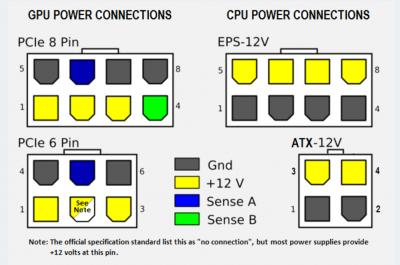
Only thing is when it looks the same size but keyed for diff purpose DO NOT FORCE IT IN wrongly - like 8pin CPU NOT equal to 8pin (6+2) PCIE do not plug them in wrongly

QUOTE(cawan @ May 29 2021, 07:39 AM)
If motherboard not enough power, pc will shut off / reboot, or just performance issue?

For pcie pwr1, choosing not plug it, perform stress test would throw results. Correct?
*
Plugging all available connectors (into the correct sockets) avoid the risk of tyre bursting.
It may be able to boot up BIOS and idle but once you use heavy loads the voltage drop will cause many issues.

This post has been edited by ceo684: May 30 2021, 06:58 PM


Attached thumbnail(s)
Attached Image


Change to:
| Lo-Fi Version
0.0209sec    0.46    6 queries    GZIP Disabled
Time is now: 8th December 2025 - 03:34 PM