Outline ·
[ Standard ] ·
Linear+
Mobo Guide - Power Socket, Motherboard power query
|
TScawan
|
 May 29 2021, 12:26 AM, updated 5y ago May 29 2021, 12:26 AM, updated 5y ago
|

|
Hi all, Using Msi Z590 motherboard. i7-11700 2 ssd 500x2gb Rtx 2060 Super 175watt Psu corsair Rm750. Watt. Want to ask. 1. psu 24 pin to motherboard pwr1 yes it a must plug. - ok 2. Cpu pwr1 also a must plug in? - never know since my last build 8 years back. 3. What cpu pwr2 then? Must or optional? When? 4. From Psu plug 8 pin to graphic - ok 5. What then motherboard have 6 pin pcie pwr1 for? From psu attach to this board Or kind of molex cable from this motherboard to graphic card?? Or optional when or why? Help. 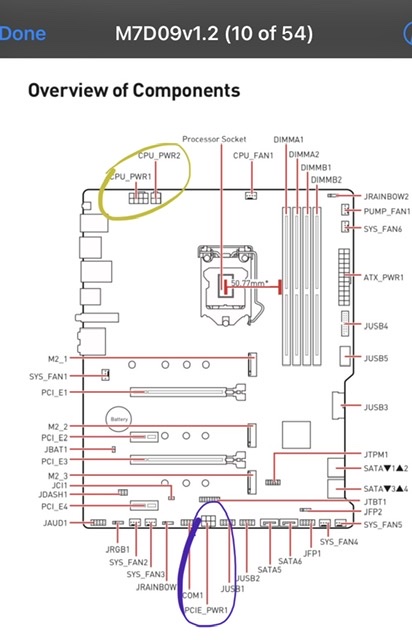 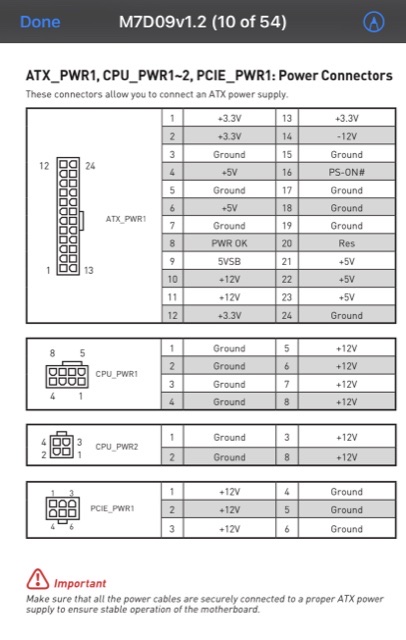 |
|
|
|
|
|
TScawan
|
May 29 2021, 07:32 AM
|
|
|
QUOTE(buraqdunia @ May 29 2021, 12:40 AM) See that red exclamation mark?. There is no either optional or compulsory involved. ALL POWER CABLES ARE SECURELY CONNECTED. Once plug in all, in avoid motherboard electricity overload, any step should i take precautions before? Any hardware should i unplug first? Boot up, and see see if no issue first  |
|
|
|
|
|
TScawan
|
May 29 2021, 07:39 AM
|
|
|
QUOTE(ceo684 @ May 29 2021, 12:50 AM) You use heavy machinery (i7 and GPU) combined, of course need to plug in all lah.. if heavy current draw cannot be supported by the cables, it will result in voltage drop. Nowadays assembling PC very easy got plug and matching socket kasi plug sama dia. Only need to worry if your PSU is too old that it doesn't come with enough/the right plugs. The reason why need so many plug is because the wattage is high, but voltage only 12V so those tiny cables by its own (from zaman pentium III) cannot sustain. Also they section off the power delivery CPU is CPU power section, GPU is GPU power section (PCIE bottom), probably for less fluctuation and other reason. If motherboard not enough power, pc will shut off / reboot, or just performance issue? For pcie pwr1, choosing not plug it, perform stress test would throw results. Correct? |
|
|
|
|





 Quote
Quote

 0.0168sec
 0.61
0.61
 7 queries
 GZIP Disabled