Outline ·
[ Standard ] ·
Linear+
Unifi Connection Issue to International Server, Occured usually at night 9-11pm
|
yenchenje
|
 Jan 31 2023, 01:45 AM Jan 31 2023, 01:45 AM
|

|
Has anyone in JB area recently experienced big IP changes? Usually my PPPoE assigned IP range is either 115.134.x.x, 60.53.x.x and 175.141.x.x. After restarting I get assigned with one of these 3 IPs under CGNAT. But like yesterday or the day before I get assigned 124.13.x.x, which I have never seen before assigned to me and when I woke up today, checked my IP again and it's back to 175.141.x.x. And with the 124.13 range, everything was just BAD, games were having packet drops(Pings weren't fluctuating), speedtest couldn't be completed and would report internet connection is not available when it clearly was (Was on Twitch at the time), and just bad time in general for any content consumption in house.
Is the 124.13 range more for just testing or fallback for TM when the more "better" ranges are being tweaked or something?
And funnily enough, after connecting to my OVH SG server (OVPN VPN), it fixed packets drop issues in my games (But had ping spikes, but made the game way more playable than random packet drops)
|
|
|
|
|
|
yenchenje
|
Feb 3 2023, 12:54 AM
|
|
|
QUOTE(dev/numb @ Jan 31 2023, 05:22 PM) IP pool rarely makes a difference now. I’m in JB as well (Mt. Austin), and have been assigned all the IP ranges you listed, including the obscure ones like 124.13.xxx or 1.32.xxx and it seldom makes much of a difference. On bad days, basically there will be a period every hour that lasts anywhere between 5 - 30 minutes where certain peering routes get overloaded and TM will do traffic shaping or load balancing of some sort (I don’t know the exact technical term, sorry). The only difference your assigned IP pool makes is the time it occurs, but it almost definitely will occur once every hour for all these IPs. Like you say, a VPN helps, but there are limitations. If the route to your VPN is through one of these overloaded peering providers, then it makes no difference. For example, for your VPN’s SG servers, it would depend on which datacenter they’re housed in and what peering hops are taken back to your TM IP address. In my experience, M247 and DataPacket/DataCamp servers in certain datacenters rely on PCCW, which is completely f@#ked when this issues happen. M247-Level3 is much more reliable. If what you say is true and OVPN relies on OVH, then you’re already in a quite good situation since (according to a poster here) OVH has a private peering agreement set up with TM. Anyway, it’s a good idea to do proper traceroutes to any commercial VPN provider’s servers in the region before you commit to a subscription. Even then, it’s better to pay a bit more for a monthly sub rather than discounted yearly deals, since TMs peering situation may change at any time. Obviously rolling your own on a VPS is also great, ut those have their own limitations like reduced privacy (because most require CC details) and data caps. Very interesting, I've also noticed recently on Unifi even on the same IP I've always been on, my game (Valorant) can connect me to servers in SG thats 120-150ms and 20-30% packet loss, the moment I connected to my OVH VPN instantly solved. Not sure if this is on Riot or me but  . Also currently I have 3 devices setup with a OVPN profile to connect to the SG OVH server (Paying 1$ per month for the first 12 months for 1vCPU, 2GB RAM, 20GB storage). Also the IP I got assigned to has really good peering to my Unifi connection. I used to use Nord but it just had so many issues with me I just stopped and started paying for a cheap VPS to host as a VPN. IPv4 
IPv6 
|
|
|
|
|
|
yenchenje
|
Feb 25 2023, 01:15 AM
|
|
|
QUOTE(BenYeeHua @ Feb 25 2023, 01:09 AM) Hmm, another crash at 0 AM and now heavy packet drop on 10.233 to 10.55, most oversea line force disconnect, guess another CGNAT issues? Strange that it happen sharp 0 AM again lol, guess someone setup a bot or spider to send a lot of traffic + TCP half-open line during 0 AM. Not sure if related but I have restarted my router 3 times in the span of about 10 minutes to get it to change gateway and get a new IP, my twitch connection has been very bad, mainly connection not being consistent, dropping from 1080p60 randomly to 144p. Same with my Apex games, packet drops and high ping (Not sure if this is my side or EA's side). But it's been really bad for my connection in general. Feeling like CGNAT gateway recently has been getting congested after 12AM straight..  |
|
|
|
|
|
yenchenje
|
Feb 25 2023, 01:31 AM
|
|
|
QUOTE(BenYeeHua @ Feb 25 2023, 01:25 AM) And another is, the Malaysia going out/in is crashing. Like lazada now, the static CDN server is at Malaysia Akamai, it take 21s for loading, and telling the browser it is CDN server loading/downloading from main server at SG. So, even local CDN making it worst....   Wow that's interesting.. TM should really figure out what's going on with their CGNAT implementation cause the connection issues has been getting worst lately it looks like |
|
|
|
|
|
yenchenje
|
Feb 25 2023, 07:11 PM
|
|
|
Wow I really wonder what the hell is TM doing with their IP assignment pool.. I'm assigned a new ip again that I've never seen, 118.100.x.x , also a lot of 60.x, ranging from 60.50.x.x to 60.58.x.x... , though credits where credit is due, my connection is significantly smoother within this IP, tho it was 180.70.x.x before and it changed without me noticing, so it might have just been a failover..  |
|
|
|
|
|
yenchenje
|
Feb 26 2023, 01:41 AM
|
|
|
QUOTE(BenYeeHua @ Feb 26 2023, 12:41 AM) IP range is nothing as long as it give the good route, but it is not, that's the problem. Even UniFi Mobile is better than UniFi fiber.... Feels like it's getting worse recently as well. wonder if there's any major international cables affecting it |
|
|
|
|
|
yenchenje
|
Feb 26 2023, 01:33 PM
|
|
|
QUOTE(BenYeeHua @ Feb 26 2023, 01:54 AM) At least back to normal for me now, gonna see how long will it last. Based on record, a quick and silent disconnect happen around 10 PM 25th, kicked me to 124.13.x.x, while route #3 also changed from 10.233.97.55 to 10.233.33.88. 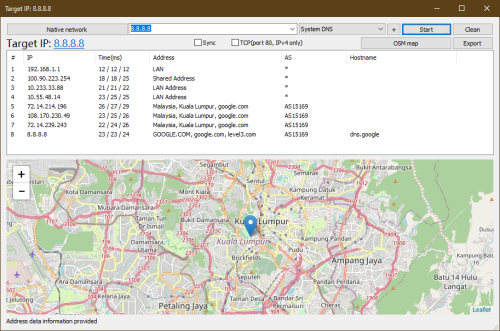 If you still got issues on Lazada, u may try can get 124.x.x.x IP range or not, if lazada fine and ping Google DNS 8.8.8.8 also fine, that's normal oversea line issues lol.  I'm also at the same 3rd route as you atm, and everything has been fine and dandy so far, but I also got a silent disconnect and my IP changed back to 118.100.. |
|
|
|
|
|
yenchenje
|
Mar 1 2023, 10:06 PM
|
|
|
QUOTE(BenYeeHua @ Feb 26 2023, 01:39 PM) You also under CGNAT, or under higher plan which got public IP? If public IP, then it means TM fxxk up for all customers lol, IP just nothing for them.  Just 30mbps so CGNAT, but has been getting progressively worst overtime, for games especially I'm getting packet loss/drops. Parents going to TM point this weekend, to cancel another TM plan that my mom has underneath her name. And either gonna stay with TM 300mbps or move over to Maxis since I've been hearing good things about their peering to international services. |
|
|
|
|
|
yenchenje
|
Mar 1 2023, 10:57 PM
|
|
|
QUOTE(BenYeeHua @ Mar 1 2023, 10:30 PM) At least can pay maxis to get public IP lol. Would still prefer TM providing it by default, but if they don't counter with SWU then I guess it's the only choice, celcom/digi both of them for my family at least, isn't subscribed to a plan that's entitled for discounts..  |
|
|
|
|
|
yenchenje
|
Mar 1 2023, 11:45 PM
|
|
|
QUOTE(BenYeeHua @ Mar 1 2023, 11:01 PM) Guess only me waiting RM 69 30M lol, gonna see lower QoS or not. Need the extra speed cause I plan to move my remote homelab on Hetzner to my own home so(Partially at least, datacenter connection still gonna be more stable when compared to residential)  |
|
|
|
|
|
yenchenje
|
Mar 2 2023, 02:42 PM
|
|
|
QUOTE(BenYeeHua @ Mar 2 2023, 07:15 AM) Ya, better split it out, never put eggs into same bucket lol. Exactly, but if Unifi still has issues, then Hetzner can fallback and can jump ship to maxis |
|
|
|
|
|
yenchenje
|
Mar 2 2023, 10:42 PM
|
|
|
QUOTE(BenYeeHua @ Mar 2 2023, 10:06 PM) Maxis even got 4G as backup, lol. Nah, almost all the mobile data coverage at my place is garbage, can't really rely on any of them except fibre connection |
|
|
|
|
|
yenchenje
|
Mar 3 2023, 05:02 PM
|
|
|
QUOTE(BenYeeHua @ Mar 2 2023, 10:53 PM) Most of fiber downtime just midnight, should not be a issues I guess? Should be fine, dynamic IP but whatever, DDNS can solve that quite easily |
|
|
|
|
|
yenchenje
|
Mar 8 2023, 08:07 PM
|
|
|
QUOTE(BenYeeHua @ Mar 7 2023, 08:45 PM) Xiaomi AX1800 OpenWrt based router, technically I can modify it with some bypass to the LuCI GUI but didn't bother cuz I'm planning to run OPNSense/Mikrotik stuff soon since I want more granularity control over my network  |
|
|
|
|
|
yenchenje
|
Mar 10 2023, 11:34 AM
|
|
|
QUOTE(go626201 @ Mar 10 2023, 02:26 AM) No seeing problem on my end. Try download with download software. Google chrome is not design use for downloading.  Edited: France server slower but still okay. 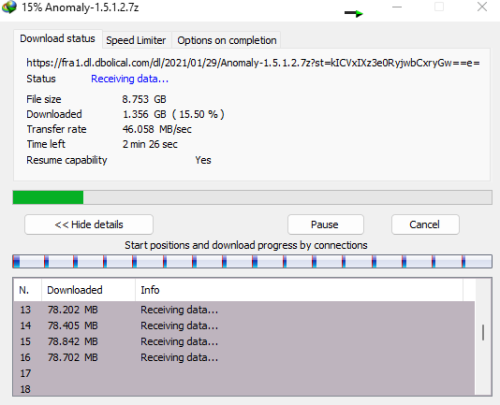 Edited 2: SJC server okay. 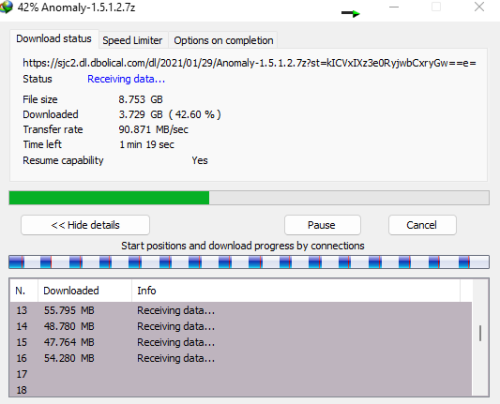 My humble opinion: Do not use google chrome to download any file that bigger than 100mb.(when u need to download a Big file please use a Download software to download) I feel like this is just Chrome not handling CDN properly, I've used browser internally to download big files (Upwards of 10-15GBs of video files) but never had any issues even on my parents' 30Mbps connection |
|
|
|
|
|
yenchenje
|
Apr 25 2023, 10:28 AM
|
|
|
Was doing some work at my company in singapore testing M1 silicon in the cloud (Scaleway), and noticed that the connection with VNC is insanely sluggish. After digging, found out that Singtel is not peering directly with HE LLC or Cogent like how TM does, but instead going through two layers of Singtel’s own AS (AS9506 - AS3758 - AS7473) before reaching international peers (Main is Zayo, sub being HE LLC, and AS1299 Arelion Sweden AB)
Wonder if TM’s peering setup is maybe even better for international usage :v
|
|
|
|
|



 Quote
Quote


 0.0801sec
 0.32
0.32
 7 queries
 GZIP Disabled