Welcome Guest ( Log In | Register )

Outline · [ Standard ] · Linear+

 Unifi Connection Issue to International Server, Occured usually at night 9-11pm

views
     
dev/numb
post Dec 26 2021, 12:01 PM

On my way
****
Junior Member
691 posts

Joined: Nov 2021
QUOTE(Gaara92 @ Dec 26 2021, 08:00 AM)
unifi Alert still is ongoing but they removed the ETTR haha. Now you know you cannot fix submarine cable fault in a few hours. Probably interns doing the updates lol
*
Usually it's a matter of days, but for us, thanks to Minister Weebotage, it'll probably be weeks/months. bangwall.gif
dev/numb
post Dec 26 2021, 11:47 PM

On my way
****
Junior Member
691 posts

Joined: Nov 2021
QUOTE(heLL_bOy @ Dec 26 2021, 10:41 PM)
update for yesterday incident::

cable fault at Tseung Kwan O, Hong Kong from ASE submarine cable

no estimate date for this cable to be fixed. so far only under investigation
*
At least it's not in Malaysian waters, so hopefully repairs won't be affected by Weebotage issues.

Still, if in HK how come my connection to SG vpn also affected? Is it because TM having to do rerouting and bandwidth balancing thanks to the HK submarine cable cable?

My vpn all got packet loss and/or slow speeds with SG, HK and JP servers. Even some Euro servers have small packet loss now. Earlier (afternoon) no packet loss with SG, but download speeds were low, so switched to HK, but then at night packet loss started. JP even worse (as documented by other posts here). Currently connected to Sydney. Higher latency, but at least can get ~200mbps download.
dev/numb
post Dec 27 2021, 10:53 PM

On my way
****
Junior Member
691 posts

Joined: Nov 2021
QUOTE(go626201 @ Dec 27 2021, 05:54 PM)
But actually so far it does not affect me alot, since i just mitigate those problematic routing with vpn in router.. tongue.gif
Now i just port redirect all my vpn service through my OVH SG,so my unifi to any vpn service is totally smooth. (Unifi to OVH to SG VPN Server  - CDN77/GSLNetwork/M247/LeaseWeb etc)
I mainly use Nordvpn to avoid those unifi routing problem. (Even for CN service,i also all day on vpn tunnel for it,because those are server network,so it still better than residential network or unifi)

But i actually didn't face any Netflix or Youtube issue in 99% of time. (Only happens when YT local specific cache server overloaded)
*
Means you roll your own VPN on a OVH VPS instance and configure that on your router, and then you connect to Nord via your PC?
Am I understanding you correctly?

dev/numb
post Dec 28 2021, 02:06 PM

On my way
****
Junior Member
691 posts

Joined: Nov 2021
QUOTE(Gaara92 @ Dec 28 2021, 08:36 AM)
He understood you alright. Means you connected to Nord over OVH SG as your internet, not unifi. A tunnel over tunnel.
*
Did that for a short time before. Deployed a WireGuard VPN on a DigitalOcean droplet and configured it on my old GL.iNet router (OpenWRT) working as access point. Connect to that over wifi and then connect to Mullvad on laptop/phone. Then DO route also got affected by packet loss at that time. Expensive though, since you're paying double, plus most VPS have metered bandwidth for their cheaper instances. Will consider OVH if this problem persists.

Meh, I guess I should be thankful I'm not affected by floods or anything....


dev/numb
post Dec 28 2021, 05:59 PM

On my way
****
Junior Member
691 posts

Joined: Nov 2021
Looks like TM started throttling download speeds from SG from around 5pm. No latency issues (yet) but download speeds are bad for me. Morning to afternoon was almost full speed (with VPN overhead), but after 5pm my Unifi500 becomes Unifi30. Strangely, upload speeds are still okay. Seems that's their "network optimization" in effect. sad.gif
dev/numb
post Dec 29 2021, 06:01 PM

On my way
****
Junior Member
691 posts

Joined: Nov 2021
QUOTE(Oltromen Ripot @ Dec 29 2021, 05:39 PM)
i reckon now have to look north not south for alternative path to exit this region.
*
Didn't someone mention (either here or main unifi thread) that Shinjiru.my use a different peering and don't suffer from the current issue? Dunno true or not, also dunno about their prices.
Australia is also an option, I think. I don't have VPS there, but currently use my VPN provider's Sydney servers and no packet loss, though latency is obviously nowhere near as good as SG or HK (comparable to JP).

dev/numb
post Dec 30 2021, 10:54 PM

On my way
****
Junior Member
691 posts

Joined: Nov 2021
Ugh... thought they managed to stabilize HK throughput but 10pm started throttling and dropping packets again. SG don't even need to ask. Unusable.

Sigh, going to be a crappy next few weeks (probably months).
dev/numb
post Dec 30 2021, 11:07 PM

On my way
****
Junior Member
691 posts

Joined: Nov 2021
QUOTE(tzxsean @ Dec 30 2021, 10:50 PM)
I'm using the free version .. tried Canada, HK, US ... None worked ... despite using some bandwidth
*
I don't use Windscribe, so I'm not sure what options you have for the free version. Is it the servers here that don't have a star next to them on the Windscribe website's Status page?

If so, try Turkey, Switzerland, Netherlands or Norway.

You say "none worked, despite using some bandwidth" means what exactly? Speedest showing sufficient up/down speeds but when browsing websites not loading?
dev/numb
post Dec 31 2021, 02:04 PM

On my way
****
Junior Member
691 posts

Joined: Nov 2021
QUOTE(Oltromen Ripot @ Dec 31 2021, 10:38 AM)
How's the "weather" today?


*looks outside*

Evil TM Kaiju terrorizing our connections. Save us, Oltromen!! tongue.gif

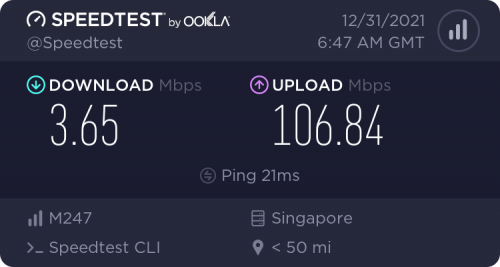
Seriously, still terrible. SG unusable for me (VPN using m247 server). Half the time dropping packets. When no packet loss, they throttle download speeds.

[vomit blood emoji]
dev/numb
post Dec 31 2021, 02:57 PM

On my way
****
Junior Member
691 posts

Joined: Nov 2021
QUOTE(go626201 @ Dec 31 2021, 02:43 PM)
On my end only 2.4% packet loss for M247
*
But download speeds heavily throttled

user posted image
dev/numb
post Dec 31 2021, 03:29 PM

On my way
****
Junior Member
691 posts

Joined: Nov 2021
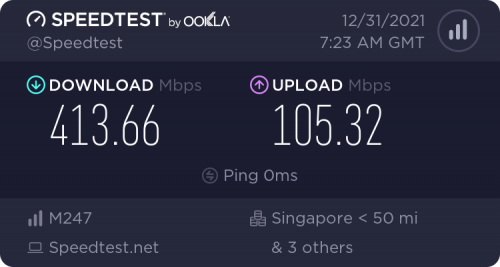
Hmmm.... maybe it was my IP prefix.
Tried disconnecting/reconnecting on router. Now on 210.187.xxx.xxx (previously on 115.135.xxx.xxx). Seems to be better now.
Means past couple of days I was on badly throttled IP pool? confused.gif

user posted image

Will continue to monitor. Night time peak hours still dunno how. sweat.gif

Thanks, chaps. notworthy.gif
dev/numb
post Jan 3 2022, 09:30 PM

On my way
****
Junior Member
691 posts

Joined: Nov 2021
QUOTE(heLL_bOy @ Jan 3 2022, 05:34 PM)
to anyone still having latency or connectivity issue to HKG/JP/US West

pls provide MTR or pingplotter result and attach in here.

i will submit feedback to TM
*
Thank you, sir.
Sent you a PM with some MTR output.
dev/numb
post Jan 3 2022, 09:37 PM

On my way
****
Junior Member
691 posts

Joined: Nov 2021
QUOTE(AzureSkies @ Jan 3 2022, 08:35 PM)
Paid for Mullvad for the sake of playing Granblue Fantasy smoothly. Tried Hong Kong, Japan, Singapore, Australia, New Zealand, the UK. Seems like Australia gives the best results, but even that's nothing to shout about. The game goes through menus and the loading times have been insufferable. I read someone used a VPN that had a Cambodia node and they were doing fine, but Mullvad's mostly European. Maybe I should have gone with ProtonVPN or ExpressVPN.  hmm.gif
*
If you're using the Mullvad desktop app try to go to the WireGuard Settings (under the Advanced section) and set the port to 51820 and IP version to IPv6. I found that it helps with connection to SG servers the last couple of days, particularly at night, although I can't comment about latency on shooter/twitch games.
dev/numb
post Jan 7 2022, 02:02 PM

On my way
****
Junior Member
691 posts

Joined: Nov 2021
QUOTE(heLL_bOy @ Jan 7 2022, 01:04 PM)
yesterday some of the route has been change by TM

but still there are loss packet at peak hours

how about others?
*
Yesterday was terrible for me even during non-peak hours connecting to VPN servers in SG, HK, JP, UK, DE, CH - all unusable.
Switched IP pool a few times. 115.xx, 175.xx, 210.xx - all koyak. puke.gif

Then I landed on 60.52.xxx.xxx and then mysteriously everything was good. Was able to connect to SG servers and get decent speeds. Still some packet loss during peak-hours yesterday, but at least I wasn't getting my download speed throttled anymore. Traceroutes to SG server indicate no change in route, so I don't know it was the timing where TM fixed their load balancing or if they hired that famous durian bomoh for this particular IP prefix only. blink.gif

Of course, now that TM knows I have a good route, they'll pakat with TNB to potong my electricity tonight, and later when router restarts I won't be able to get that good prefix again.
Always like that. sweat.gif


dev/numb
post Jan 7 2022, 08:48 PM

On my way
****
Junior Member
691 posts

Joined: Nov 2021
QUOTE(heLL_bOy @ Jan 7 2022, 05:09 PM)
i am not sure about other region M247 server are affecting on this... but using SG region M247 using via HE.net is totally gone case becos one of the port TM using over HE.net are always congested in all time.
*
I've noticed that not all M247-SG servers take the same route. I guess it depends on the VPN provider's setup, or possibly different datacenter within Singapore. Here's Mullvad vs IVPN;

CODE
geezer@ThinkPad:~$ mtr -wz sg5-wireguard.mullvad.net
Start: 2022-01-07T20:24:33+0800
HOST: ThinkPad                                                  Loss%   Snt   Last   Avg  Best  Wrst StDev
 1. AS???    router.asus.com                                    0.0%    10    2.4   2.6   1.3   6.4   1.4
 2. AS4788   60.52.xxx.xxx                                      0.0%    10    3.5   4.2   3.5   4.6   0.4
 3. AS???    10.55.106.5                                        0.0%    10   14.6  10.2   8.5  14.6   2.3
 4. AS???    10.55.50.52                                        0.0%    10   13.9  10.0   8.2  13.9   2.1
 5. AS???    10.55.37.90                                        0.0%    10    9.4  10.7   8.3  14.8   2.4
 6. AS3491   63-218-166-1.static.pccwglobal.net                 0.0%    10    9.8  12.5   8.8  27.6   5.6
 7. AS3491   HundredGE0-5-0-0.br03.sin02.pccwbtn.net            0.0%    10   18.6  18.1  17.3  19.1   0.6
 8. AS3491   HundredGE0-5-0-0.br03.sin02.pccwbtn.net            0.0%    10   18.1  18.0  16.9  20.8   1.1
 9. AS3491   metro.tenGigE0-6-0-20.10.br03.sin02.pccwbtn.net    0.0%    10   14.0  13.9  13.0  14.4   0.5
10. AS???    ???                                               100.0    10    0.0   0.0   0.0   0.0   0.0
11. AS9009   193.27.15.40                                       0.0%    10   13.4  13.5  13.1  14.3   0.5
12. AS9009   94.198.43.50                                       0.0%    10   16.3  14.3  13.3  16.3   0.9


I think the 10th hop above is M247 for their own internal routing. Probably not publicly announced, so not showing up in my traceroute.

CODE
geezer@ThinkPad:~$ mtr -wz sg1.wg.ivpn.net
Start: 2022-01-07T20:29:51+0800
HOST: ThinkPad                                        Loss%   Snt   Last   Avg  Best  Wrst StDev
 1. AS???    router.asus.com                          0.0%    10    2.0   1.9   1.3   3.1   0.5
 2. AS4788   60.52.xxx.xxx                            0.0%    10    6.4   4.5   3.8   6.4   0.9
 3. AS???    10.55.106.5                              0.0%    10   10.7  22.2  10.2  40.9  10.6
 4. AS???    10.55.100.54                             0.0%    10   10.4  11.0   9.9  12.8   1.0
 5. AS???    10.55.209.28                             0.0%    10   25.5  14.5  10.4  25.5   5.2
 6. AS3356   4.68.62.137                              0.0%    10   12.9  12.2  10.5  16.1   1.6
 7. AS3356   ae-1-3504.edge2.Singapore3.Level3.net    0.0%    10   10.8  11.7   9.7  16.7   2.0
 8. AS3549   113.29.103.210                           0.0%    10   11.1  11.8  10.1  14.6   1.3
 9. AS???    vlan2908.as03.wco1.sg.m247.com           0.0%    10   10.9  17.8  10.2  64.7  17.0
10. AS9009   37.120.151.122                           0.0%    10   12.4  11.3  10.5  12.7   0.8


dev/numb
post Jan 11 2022, 07:43 PM

On my way
****
Junior Member
691 posts

Joined: Nov 2021
QUOTE(heLL_bOy @ Jan 11 2022, 12:16 AM)
since today evening TM adding more new route right now for ingress traffic.. Cogent,Telstra,NTT as per check

moving away from HE.net(AS6939) for HKG/JPY/US West
*
Permanent or temporary?
Will they go back to solely relying on cheap-ass HE.net after the undersea cable issue is sorted?
dev/numb
post Feb 5 2022, 01:19 AM

On my way
****
Junior Member
691 posts

Joined: Nov 2021
QUOTE(go626201 @ Jan 25 2022, 08:52 PM)
Maybe another submarine cable break?  brows.gif
*
More likely some TM exec/crony songlap the peering fund and buy rolex submariner for themselves. shakehead.gif


dev/numb
post Feb 7 2022, 12:26 AM

On my way
****
Junior Member
691 posts

Joined: Nov 2021
For me, connecting to SG M247 servers, seems all the IP ranges except for 60.5x.xx.xx totally koyak. Spent 30 minutes connect/disconnect router until I managed to get 60.5x range again. dry.gif

Every other IP range seems to have download speeds heavily throttled on my end. Means this problem since the undersea cable incident still haven't fixed. I just never realize because I was on 60.5x since that time and only found out just now because of power outage that rebooted the router. doh.gif

I miss Gobind. sad.gif
The Weebotage and Richard Mille morons totally don't have a clue. mad.gif

dev/numb
post Feb 21 2022, 10:30 PM

On my way
****
Junior Member
691 posts

Joined: Nov 2021
#2 may work.... if you include a Richard Mille inside the envelope.
dev/numb
post Feb 23 2022, 11:01 PM

On my way
****
Junior Member
691 posts

Joined: Nov 2021
Maybe someone can start a petition of some sort, like change.org

List the issues with data, get as many people as possible to sign, share with news outlets. Most corporations will only fix their shit if there's bad media publicity.

2 Pages  1 2 >Top
 

Change to:
| Lo-Fi Version
0.0879sec    0.39    7 queries    GZIP Disabled
Time is now: 5th December 2025 - 08:52 AM