Outline ·
[ Standard ] ·
Linear+
SONY TV 2021 available for order
|
otnuus
|
 Mar 13 2022, 05:24 PM Mar 13 2022, 05:24 PM
|

|
QUOTE(xphr3ak @ Mar 11 2022, 11:40 AM) Hi, I bought X90J yesterday. So far, no blooming issue. Need help. I can't get Netflix 4k. How to fix it? Thanks. [attachmentid=11114160] Can share what size and price you get it? |
|
|
|
|
|
otnuus
|
Mar 14 2022, 03:02 PM
|
|
|
QUOTE(xphr3ak @ Mar 14 2022, 09:11 AM) 55" RM4917 + 5Y warranty from Senheng. Thanks bro. QUOTE(underscore_lee @ Mar 14 2022, 10:45 AM) Is it super obvious to the point it makes u feel like u bought a cheap TV? I always feel Sony is the best for TV, bought a older version 4-5 years ago for the 49" but now looking to upgrade to a bigger screen size. For this 80AJ I found on Shopee priced at RM3.2K so it is within my range. Should I upgrade it to get a better experience (if yes what's the next better model & how much would it cost?) or should I try out other TV brands in your opinion? My max budget is RM3.5K for a new 65" TV. Usage is mainly for entertainment (4K movies & Netflix, YouTube) and light gaming (Nintendo Switch and future-proofing it for PS5). Thanks guys! I’m also looking for size upgrade to 65” from 10 years old 50” Panasonic plasma tv that failed to power on. Interested in x90j but the price has gone up. New 2022 models may not come until May. Probably will aim for x85j and see if there is any good deal in Shopee or Lazada birthday sale. |
|
|
|
|
|
otnuus
|
Mar 15 2022, 02:45 PM
|
|
|
QUOTE(shinchan5347 @ Mar 15 2022, 12:41 PM) Is it okay the price for 65X90J RM5.8k or can get it cheaper? The cheapest I find online is about this price. I called a few shop over the weekend and all quoted 6k and above. @andrekua2 got his in 12.12, at that time the listed price is 5399. I’m holding on for Lazada birthday sale. At this rate, the price gap between 65x85j and 65x90j are getting wider. I may just go for x85j. https://forum.lowyat.net/index.php?showtopi...ost&p=103097242 |
|
|
|
|
|
otnuus
|
Mar 15 2022, 05:53 PM
|
|
|
QUOTE(shinchan5347 @ Mar 15 2022, 04:02 PM) 27 March |
|
|
|
|
|
otnuus
|
Mar 30 2022, 02:54 PM
|
|
|
QUOTE(tmc @ Mar 30 2022, 01:53 PM) The issue here is that my phones and pc are able to use the 5g connection, and an additional cheap router can also connect to it. Only Sony cannot. So Sony 5G wifi is sub par. Period. I could add a cheap router and use it as repeater it will work ( ie the additional router provides an ethernet for Sony and it connects WiFi 5g to the original internet router ). But that will require additional powered up device. My router has no such setting. Only can select 20/40/80 vs 20/40. Both setting making no difference. Cannot connect. That’s the channel bandwidth. 20 will have lower throughput, supposedly better range. What andrekua2 mean is the 5Ghz band selection. Normally you have option like control channel 36, 40, 44, 48, 149,153,157, 161. Go for the lower channel theoretically will have a bit better range. Anyhow, looks like the built in wifi is very weak. |
|
|
|
|
|
otnuus
|
Mar 30 2022, 06:26 PM
|
|
|
QUOTE(andrekua2 @ Mar 30 2022, 05:30 PM) Should be fine la... The problem is actually quite common. My hisense tv also cant connect unless I lowered the channel and so are my wifi dongle for my pc. Some laptop with atheros or realtek wifi card are also likely to encounter such issue. That also depends on our environment. Like my house, I think all my neighbor set their transmit power to maximum. 2.4GHz is almost not usable. I simply turn off 2.4GHz radio on my router. Even the shorter range 5GHz I still can detect many AP available. In my case, the lower 4 5GHz channels are more congested. I get better throughput with the higher control channel. Best is to test it out and use the best performance channel in your environment. |
|
|
|
|
|
otnuus
|
Mar 31 2022, 03:25 PM
|
|
|
QUOTE(tmc @ Mar 31 2022, 01:27 PM) A channel in 5G is 20MHz, so I supposed it is understood that changing the auto channel selection to a fixed channel will mean limiting the WiFi bandwidth of the router to max that can be handled via 20MHz channel width. My internet bandwidth is capped at 100Mbps, so I supposed it is not an issue, for me. But for those people who subscribe to higher internet bandwidth > 100Mbps, manual channel selection might limit the throughput of the router ? For your case should be ok. You can use your phone or laptop to run speedtest and see if the throughout is expected. If you are adventurous, you can try iperf. I remember someone posted somewhere in the forum how to use iperf to test throughout. 40/80MHz channel size will have better throughout than 20MHz. What you gain with smaller channel size is higher signal to noise ratio, giving you better coverage. Everyone’s environment is different. If you have a lot of interference from your neighbor using the same control channel, you may even get better throughout with smaller channel size. Sometimes it is worth to try other control channel while maintaining 20MHz channel size. There are chances neighbor add new mesh AP or changing their control channel. If you noticed your throughput suddenly drop then have to re-do again and get your optimum setup. |
|
|
|
|
|
otnuus
|
Apr 1 2022, 01:19 PM
|
|
|
The supplied power cable is rather short. I have long power cable for those three pin plug but not these connector. Any recommendation where to buy?
|
|
|
|
|
|
otnuus
|
Apr 1 2022, 02:35 PM
|
|
|
QUOTE(tmc @ Apr 1 2022, 02:29 PM) Not sure exactly what you are asking but I am pretty sure you can get what you want from visiting Mr DIY. I’m wall mouting the tv. The supplied power cord is too short and I cannot properly route the power cable. Yeah, I think the power cord connector is IEC C7. Should be easy to find longer power cable with this connector. Or get IEC C14 to C7 adaptor since I already have long cable with C14 connector. This post has been edited by otnuus: Apr 1 2022, 02:38 PM |
|
|
|
|
|
otnuus
|
Apr 1 2022, 03:41 PM
|
|
|
QUOTE(tmc @ Apr 1 2022, 03:28 PM) I don't know those IEC terms/lingos. As for my Sony TV, they give me a EU two pin plug. But such plug can go into a UK 3 pin socket by either using a screw driver inserting into the earth pin, or get a RM 2 plastic cap from Mr DIY.  I have no issue plug the two pin power to three pin plug. My issue is the cable too short to lay properly along the wall mount. Now it is dangling. The two pin connector to tv like figure 8 is IEC C7. I don’t have such spare cable. So have to buy already. Update: Found 90 degree angle C7 connector with standard 3 pin plug cable, 2.5A. Comes with 2m, 3m and 5m options. Will measure what length to get. 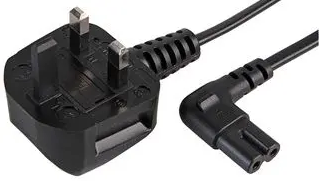  This post has been edited by otnuus: Apr 1 2022, 04:30 PM This post has been edited by otnuus: Apr 1 2022, 04:30 PM |
|
|
|
|
|
otnuus
|
Apr 2 2022, 03:09 PM
|
|
|
QUOTE(AV_2018 @ Oct 11 2021, 06:06 PM) For older AVR that doesn't support eARC or Dolby Digital Plus via ARC, disable eARC and set Dolby Digital Plus to Dolby Digital in the TV audio output settings. These settings work for old AVR via TOSLINK. I use TOSLINK as I find it more reliable than ARC which relies on CEC that sometimes gets disconnected due to some connected STBs. I notice in newer Sony Android TVs, Netflix constantly outputs Dolby Digital 5.1 even when no 5.1 content is playing. It's mentioned in this link. This might cause Netflix app to act differently in certain configurations. If you go for optical cable, does it means you lost the control of receiver from TV remote? I haven’t try Netflix. With Astro ultra box connected directly to tv hdmi 1, and hdmi 3 ARC to receiver, I don’t need to use receiver remote. Volume can be control from TV/astro remote. Receiver automatic wake up when I switch on TV and go to standby by itself when I switch off tv. I also plug in optical cable for backup. But when I unplug hdmi 3 cable, no audio coming out from my receiver via optical cable. Any different setting required from tv to switch from hdmi arc to optical output? Update: I guess muted audio on optical output is due to DD+ settings in tv with hdmi arc. I read that optical output only support DD and not DD+. This post has been edited by otnuus: Apr 2 2022, 10:36 PM |
|
|
|
|
|
otnuus
|
Apr 8 2022, 02:48 PM
|
|
|
QUOTE(skzzi @ Jan 18 2022, 10:54 PM) Observation 3. TV is confused with the soundbar and astro hdmi. Happens on my Sony bravia too. You need to disable the astro hdmi pin 13. Find a smallest pin you have n poke it, it should disconnect pin 13. Refer to the picture for pin 13. Somehow this only happen with sony, never happen on my old panasonic. 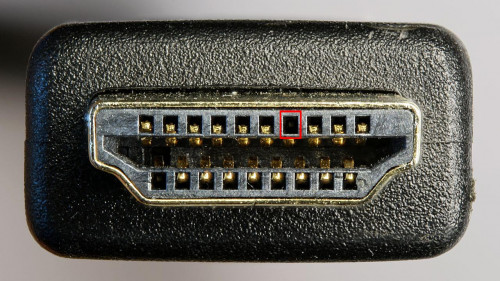 Mask pin 13 helps me too. I had problem sometimes switch on TV does not wake up my receiver. When I switch off TV, my receiver will go to standby. If I wait long enough after switch off TV then switch on TV again, my receiver is able to wake up. The problem is if I immediately switch on TV again, my receiver does not wake up. Masking pin 13 solves this issue. I am trying to use single remote. However, Astro remote is not able to switch on/off TV. I’m now trying to do it with Sony remote instead. Can I use Sony remote to change Astro channel? |
|
|
|
|
|
otnuus
|
Apr 11 2022, 01:30 PM
|
|
|
QUOTE(Puteih @ Apr 11 2022, 09:16 AM) Does anyone know if Sony TVs have MyTV built-in? My family often watch local channel (currently using web browser). If possible I don't want to use web browsers because a lot of time it's not stable (whole day 320p, suddenly cannot access channel, etc...). I don’t use MyTV. From their website https://www.mytvbroadcasting.my/en/installation_guide/ it uses DVB-T2. From Sony J series, looks like it supports DVB-T/T2 You still need to have the aerial antenna. |
|
|
|
|
|
otnuus
|
Apr 12 2022, 07:42 AM
|
|
|
QUOTE(AV_2018 @ Apr 11 2022, 11:48 PM) Ya optical doesn't support DD+. Need set Dolby Digital Plus setting to Dolby Digital for using optical. If using HDMI CEC for controlling receiver from TV, it should still work when using optical as long as CEC is not disabled. I see. As long as CEC works can control the receiver. ARC is working well with my receiver. The issue receiver sometimes doesn’t wake up from standby is solved after masked HDMI pin 13 from Astro ultra box. |
|
|
|
|
|
otnuus
|
Apr 14 2022, 03:19 PM
|
|
|
QUOTE(Puteih @ Apr 13 2022, 04:11 PM) Now I'm contemplating between X85J and X90J. Both are using VA panels, and the only big difference is the processor right? It's a big difference between these 2 models for 65" size. I was also looking for these two models. Major difference is processor, local dimming and true 10 bit depth panel vs 10 bits (8 bit + FRC) panel. In the end I get 65x85j during Lazada sales for 3.5k. I don’t play game, mostly parent watch Astro. I watch some Netflix when parent not watching Astro. I’m happy with it coming from 50” Panasonic 3D plasma tv. QUOTE(Puteih @ Apr 14 2022, 02:49 PM) Do you guys get extended warranty on your TVs? or normal warranty should be enough? I bought extended warranty for my previous Panasonic TV as it was more expensive. This time around I didnt buy. For peace of mind it is worth to get extended warranty. |
|
|
|
|
|
otnuus
|
Apr 17 2022, 11:55 PM
|
|
|
QUOTE(andrekua2 @ Apr 17 2022, 06:06 PM) Stoner sold them in garage sale few years ago. Was using it as soundcard but psu broke down and still haven't replaced them. This morning hand itchy and tried it with X90J and pleasantly surprised to see it was working really good. Now can use my Edifier S730 instead of the lousy tv built in speaker. https://forum.lowyat.net/topic/4391557/allHave you try connect your speaker directly to your tv audio output jack? Probably it will work too but not as good as your dac. |
|
|
|
|
|
otnuus
|
Apr 20 2022, 01:00 PM
|
|
|
QUOTE(lala_cai @ Apr 20 2022, 12:13 AM) May I know which shop you bought it from? I'm also still considering 65x90j and 65x85j but am thinking whether if the rm2k differences worth it. Seems x90j price has went up since end of last year. For me the price gap between these two range is getting too wide apart especially for my application. I bought from a Lazada seller in Johor. Shipped to KL. 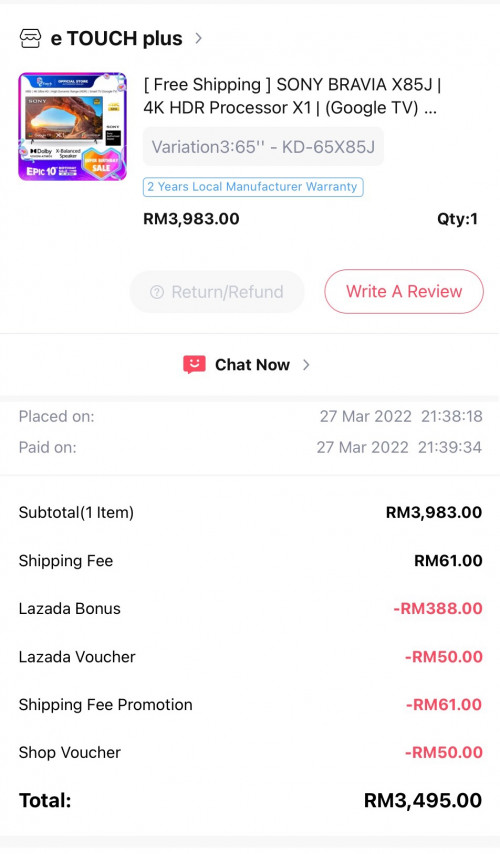 By the way, new k series will come soon. Hopefully someone know TV appliances trend can share when is the better time to hunt for outgoing model bargain. |
|
|
|
|
|
otnuus
|
Apr 20 2022, 10:56 PM
|
|
|
QUOTE(tmc @ Apr 20 2022, 10:44 PM) i want to know for x85j, how to receive audio with tv speaker together with another audio output ? I read somewhere it is only possible with optical connection. The other connections using 3.5 mm headset jack or bluetooth can only have audio from one output, ie when one is on, the other will be muted. Seems possible: https://www.sony-asia.com/electronics/suppo...ticles/00201347 |
|
|
|
|
|
otnuus
|
Apr 21 2022, 03:21 PM
|
|
|
QUOTE(tmc @ Apr 21 2022, 08:21 AM) Yeah I read that article before my post. I wonder anyone here has tried it.  Guess you have to try it yourself already. QUOTE(Puteih @ Apr 21 2022, 10:46 AM) My bad, it's still not released in Malaysia as per confirmed by Sony Malaysia live chat. I was looking at the terms and conditions over here, guess I missed the part they said to K models only. https://www.sony-asia.com/electronics/bravi...-BRINGCINEMATICHopefully they'll let us use the core app after they released the K series. I don't want to use VPN because I read in Reddit it will lock the app on second usage, with or without VPN. So you get 65x90J? Congratulation. Not sure why the offer only for k series since you already have the xr processor. |
|
|
|
|
|
otnuus
|
Apr 22 2022, 01:43 PM
|
|
|
QUOTE(Medusakia @ Apr 22 2022, 11:40 AM) Any issue with 85J? If 90J and 90AJ which one better for old people? No issue with x85j. What is 90AJ? Do you mean X80AJ or A90J? Totally different price range product. It depends how particular your old people are on tv requirement, and of course your budget. |
|
|
|
|



 Quote
Quote
 0.0667sec
 0.47
0.47
 7 queries
 GZIP Disabled