Outline ·
[ Standard ] ·
Linear+
SONY TV 2021 available for order
|
TongCN
|
 Apr 8 2025, 01:08 PM Apr 8 2025, 01:08 PM
|

|
QUOTE(westlife @ Apr 8 2025, 08:33 AM) Bravia 5 is meant to replace current X90 series actually. X90 series has XR chip long ago. The key improvement is that it is now using mini led similar to higher product which is Bravia 7 also. Previously X90L the key difference is only that it has only local dimming zones full array led but now mini led also. So it should be closer and closer to Bravia 7 indeed of overall performance and now only Bravia 5 has the biggest screen size available up to 98 inch. So it shows that Sony is targeting majority of buyers to go for Bravia 5. But better check region difference also Sometime their website also "copy and paste" where as the actual Malaysia version products might has slightly tweak. Typical case such as Samsung :\ |
|
|
|
|
|
TongCN
|
Apr 8 2025, 02:36 PM
|
|
|
QUOTE(westlife @ Apr 8 2025, 01:17 PM) yes, it is the same like how they compare X90L with X95L i guess. one is not mini-led one is mini-led. i also wonder how much difference will it be... likely just dimming zones difference but i guess difference maybe smaller. So bravia 5 is 60hz while 7 is 120hz Bravia 7 has Imax enhanced and DTS:X audio That's big for gamer and movie-er  |
|
|
|
|
|
TongCN
|
Apr 8 2025, 02:51 PM
|
|
|
QUOTE(westlife @ Apr 8 2025, 02:42 PM) bravia 5 is a X90L successor, so it does come with 120hz. so technically cannot be worse than X90L. somemore from full array LED -> mini-LED, the improvement should be substantial. the starting price reported to be lower than X90L also. but with the donald duck effect now... not sure if things will change...  both of them have imax enhanced and DTS support actually if chatGPT did not make mistake. https://www.whathifi.com/tv-home-cinema/tel...s/sony-bravia-5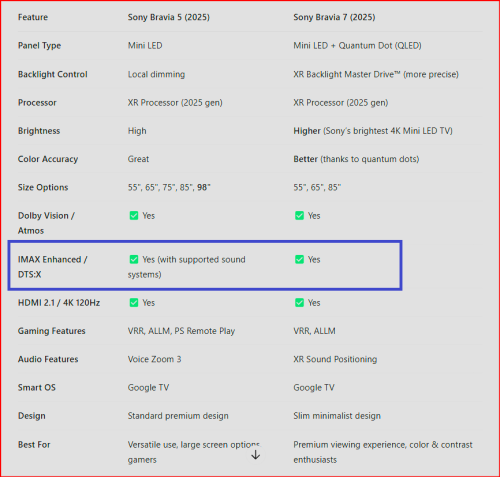 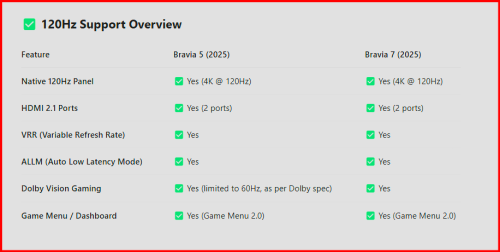 The audio mentioned is with external sound system i presumed The built-in one probably won't support. I got info from Co-pilot which mentioned the refresh rate of Bravia 5 is fixed at 60hz Add-on: Flatpanel probably more accurate https://www.flatpanelshd.com/news.php?subac...l&id=1743609600This post has been edited by TongCN: Apr 8 2025, 02:52 PM |
|
|
|
|
|
TongCN
|
May 28 2025, 04:16 PM
|
|
|
QUOTE(Barricade @ May 17 2025, 03:43 PM) My 65X90K suddenly got one rainbow dotted line at the bottom of the screen near the bezel. Very annoying. The line will be less noticeable if darker scenes or view at top angle. Is it panel problem? 2.5 years old and no more warranty. FML  No more support Sony TV already, basically can see their products having issue very fast  My fellow friend around me always say Sony TV must pair with PS5 for ultimate experience, yea yea 1 year later, ada issue 2 years later, ada issue I think i did mention last time here that most Sony TV after 2020 likely bad quality control |
|
|
|
|
|
TongCN
|
May 29 2025, 09:35 AM
|
|
|
QUOTE(VeeJay @ May 28 2025, 08:37 PM) Hey, lets not jinx it! my X90h is still working fine...keeping fingers crossed! In general, most of electronics nowadays, the quality is thrown out of windows. Lol .. so far Sony holding the top failure rate here XD among BIG 3 (Samseng, LaoGong & SuaiNi) |
|
|
|
|
|
TongCN
|
Jun 26 2025, 04:42 PM
|
|
|
QUOTE(westlife @ Jun 25 2025, 06:39 PM) Hi guys, I am playing pc game on my pc. I wonder if there is any solution I can either cast the screen of my pc to my Sony a80j so that I can play the pc game on my tv with no lag or minimum lag that it is still playable? Or is there is any wired solution e.g. a lot hdmi cable to connect my pc to my tv from my study room to living room? Note that if goes wired hdmi solution mode, 4k120hz VRR might be disabled due to long distance/wired I connect my PS5 from gaming room out to my living room using Vention HDMI 2.1 5meter+ and my LG OLED TV won't detect it has 4k120hz Max also like 4k60hz with VRR Tested using HDMI direct connect console to TV as well as using HDMI Switch [8k capable]. The HDMI Switch if using 3 meter below HDMI 2.1 has no issue 4k120 |
|
|
|
|
|
TongCN
|
Jul 1 2025, 01:42 PM
|
|
|
QUOTE(westlife @ Jun 26 2025, 06:56 PM) icic. thanks for the tips. i think must use fibre hdmi like what the other bro suggested in order to bypass the limitation. i am trying another method. 1) connect my old mac mini (with windows 10 bootcamp) to the sony tv via hdmi cable. 2) remote desktop from my mac mini to my PC in the study room. need to try and see if the latency is bearable thru this method. and yes, my old mac mini also limits the connection to 4k 60hz only. but i think it is ok if it can work. QUOTE(celciuz @ Jun 27 2025, 06:01 AM) Use HDMI 2.1 certified cables no issue, generally for long travel need use those optical cables or even active for very long travel. Yea, even the HDMI org also got mentioned that longer than 3 metre will degrade the performance. |
|
|
|
|
|
TongCN
|
Jul 1 2025, 01:53 PM
|
|
|
QUOTE(celciuz @ Jul 1 2025, 01:51 PM)  actually HDMI 2.1 certified cables above 3m is pretty rate... normally is optical or active by then. Rare but still exist, haha XD But optical cannot transmit Dolby Atmos format those  |
|
|
|
|
|
TongCN
|
Jul 1 2025, 05:15 PM
|
|
|
QUOTE(westlife @ Jul 1 2025, 02:24 PM) so seems like no better solution? is there is any connector that can connect multiple hdmi cables together to make it longer? I did and still remain this solution, just that it reduce the spec of hdmi 2.1 back to somewhere hdmi 2.0 Function wise : 4k60 with VRR, dolby atmos It just cannot go full hdmi 2.1 QUOTE(celciuz @ Jul 1 2025, 03:30 PM)  is it? Should be the same no? Not enuf bandwidth in optical |
|
|
|
|
|
TongCN
|
Jul 1 2025, 05:50 PM
|
|
|
QUOTE(celciuz @ Jul 1 2025, 05:26 PM) Nowadays HDMI 2.1 is very messy term, haha But what i mean is after certain length of extension for HDMI 2.1, the feature will degrade. Example in my case now for Xbox Series X and LG TV CX: 1) I use hdmi 2.1 "3 meter" combine with hdmi 2.1 "2 meter" extension = no 4k120 2) I then change the "3 meter" to "1 meter" (meaning 1 meter + 2 meter extension) = i get 4k120 So case 1 (3+2), under xbox hdmi 4k = not all green tick while case 2 (1+2), all green tick  This post has been edited by TongCN: Jul 1 2025, 05:51 PM
 |
|
|
|
|
|
TongCN
|
Jul 1 2025, 06:28 PM
|
|
|
QUOTE(westlife @ Jul 1 2025, 05:55 PM) Thanks for the sharing bro. Ur tv is what model again already? 🤪 Stated above actually, haha LG CX 65" - 4 years usage LG C1 48" - 3 years usage |
|
|
|
|
|
TongCN
|
Jul 2 2025, 08:27 AM
|
|
|
QUOTE(celciuz @ Jul 2 2025, 07:46 AM) The cables are HDMI 2.1 by itself, the moment they are extended... it is different condition already. Most HDMI 2.1 certified are just 3M. I have a optical HDMI, I think 12 meters long which is claimed as HDMI 2.1 (not certified...) Using it for projector la nothing fancy. But before it was installed I tried connecting my PS5 to A80K TV, supports 4k120 from the PS5. But in my case 2, it still can detect and fully utilise HDMI 2.1 spec , all green ticks under xbox tv setting. |
|
|
|
|
|
TongCN
|
Jul 2 2025, 01:15 PM
|
|
|
QUOTE(Kahlamx @ Jul 2 2025, 11:06 AM) How did you get the 4k dolby gaming to show up with green tick and not a warning sign? I had green tick before then became a input latency warning sign since few years back. Some model will show, lol .. I plug into CX will show the yellow sign C1 doesn't |
|
|
|
|
|
TongCN
|
Jul 4 2025, 02:24 PM
|
|
|
QUOTE(westlife @ Jul 3 2025, 03:10 PM) Technician came to change the mainboard of the TV. Still the same. The particular usb port is just slow. So not my previous mainboard prob also. But not bad. At least confirm that before warranty ends. And with the new mainboard changed, also hopefully the TV will last longer also? 🤪 And with new mainboard, everything is reset too. Previously I installed the latest firmware of the TV but kind of regretted because it makes it less responsive for casting. Now at least I can skip whatever new updates. 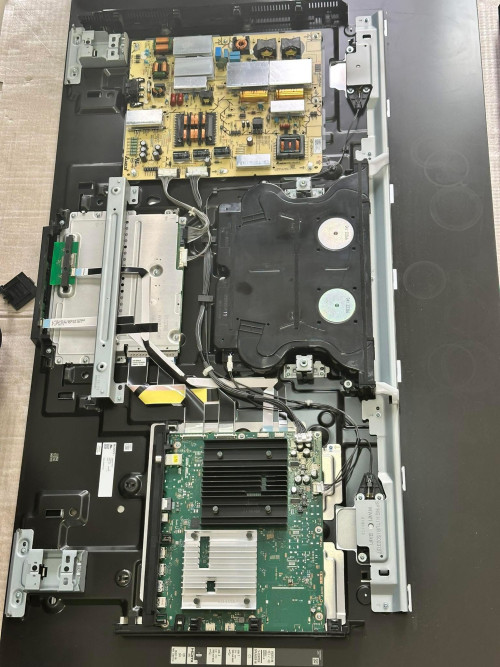 Board renew ok, but main high cost probably still panel after warranty ends |
|
|
|
|
|
TongCN
|
Jul 7 2025, 08:21 AM
|
|
|
QUOTE(MasBoleh! @ Jul 5 2025, 02:28 PM) Will continue to look see look see hehe is there any more affordable branded TV? even LG OLED also super expensive. Sharp too... If you look at LG promo during festival, those rebate actually quite good deal, they even give +1 warranty |
|
|
|
|



 Quote
Quote
 0.0536sec
 0.39
0.39
 7 queries
 GZIP Disabled