Welcome Guest ( Log In | Register )

10 Pages < 1 2 3 4 5 > » Bottom

Outline · [ Standard ] · Linear+

Xiaomi Redmi K40/POCO F3 Discussion

views
     
Optizorb
post Dec 30 2021, 09:39 PM

Regular
******
Senior Member
1,259 posts

Joined: Sep 2021
QUOTE(wirelessbuyer @ Dec 30 2021, 07:15 PM)
Enabling USB debugging only still doesn't work
Enabling both USB debugging and USB debugging (security setting) also doesn't work

I just tested again with usb wireless mouse, poco F3 doesn't detect it. When I tested on my samsung tablet, it's working right after I plug in the dongle with type-c adapter. Also, if I connect my phone to my pc, using the original usb cable, my pc also doesn't detect the phone

Any ideas?  rclxub.gif
*
restart the phone after enable dev options + enable usb debugging?
Optizorb
post Dec 30 2021, 10:20 PM

Regular
******
Senior Member
1,259 posts

Joined: Sep 2021
QUOTE(wirelessbuyer @ Dec 30 2021, 10:08 PM)
Still doesn't work for me. Btw, does yours working fine?
*
what is your ROM? Stock? when did you buy your phone?

yea mine working fine with original cable connect to pc.. does anything pop up on your phone after you connect the cable to phone and pc?
I selected file storage option when connected to pc..

and i use my old OTG adapter that came with my S8, can connect and use mouse no problem.. no hdd to test, but should be able to connect as well..

1) try a different usb port on your pc..
if still cant
2) can test on another computer to see if it connects?

Could be your this computer got some missing drivers.. but then it doesn't explain why cant detect through OTG as well.. rclxub.gif

ultimately, if do all those still cant. then i guess you need to take a visit to SC and let them check.
Could be the type C port got hardware issue.. and if that's the case then go get it claimed under warranty..

I seen people complained before in F3 fb groups regarding charging port issues..

This post has been edited by Optizorb: Dec 30 2021, 10:27 PM
Optizorb
post Dec 31 2021, 03:19 PM

Regular
******
Senior Member
1,259 posts

Joined: Sep 2021
QUOTE(wirelessbuyer @ Dec 30 2021, 10:43 PM)

EDITED: After factory reset and connect to my pc and laptop I saw this error message on windows10 and it still doesn't detect the phone, maybe the data pin on the type c connector is faulty. The otg function also still didn't work
*
yeah i guess its a hardware issue. Go claim ur warranty for it.. I seen quite a few others had this problem as well.. doh.gif
Optizorb
post Dec 31 2021, 03:20 PM

Regular
******
Senior Member
1,259 posts

Joined: Sep 2021
QUOTE(Run69 @ Dec 31 2021, 03:03 PM)
Yes sure I have enabled it, I believe my current EU stock ROM does not support Digi voWifi due to missing MBN in the configuration (similar issue like other phone model/brands)
*
how come yours is EU stock rom? Did u flash it to EU rom?
Optizorb
post Jan 2 2022, 11:03 AM

Regular
******
Senior Member
1,259 posts

Joined: Sep 2021
QUOTE(Tokik Siwok @ Jan 2 2022, 10:19 AM)
Anyone using smart devil anti blue light tempered glass?
The display will appear yellowish due to the TG, how should i set the display to lessen the effect?
*
then it kinda defeats the purpose of the so called anti blue light, no?


Optizorb
post Jan 3 2022, 01:21 AM

Regular
******
Senior Member
1,259 posts

Joined: Sep 2021
QUOTE(Tokik Siwok @ Jan 2 2022, 10:11 PM)
yes, but i cant stand the yellow colour...i have adjusted to cooler colour, seems to balance it back now
*
ah i see. next time get ori better.


Optizorb
post Jan 3 2022, 02:09 PM

Regular
******
Senior Member
1,259 posts

Joined: Sep 2021
QUOTE(kop2299 @ Jan 3 2022, 02:06 PM)
Are you using F3? I received those UK & HK calls since last week. 3 times/day mostly evening. At the moment i use truecaller to block. Nothing i can do. I suspect Poco server kena hacked and our numbers were sold to these suckers.
*
????

What got to do with Poco knowing your number LOL.

Like seriously. What??? LMAO

More like go blame your telco la..
Optizorb
post Jan 4 2022, 05:37 PM

Regular
******
Senior Member
1,259 posts

Joined: Sep 2021
QUOTE(gxthelord @ Jan 4 2022, 05:19 PM)
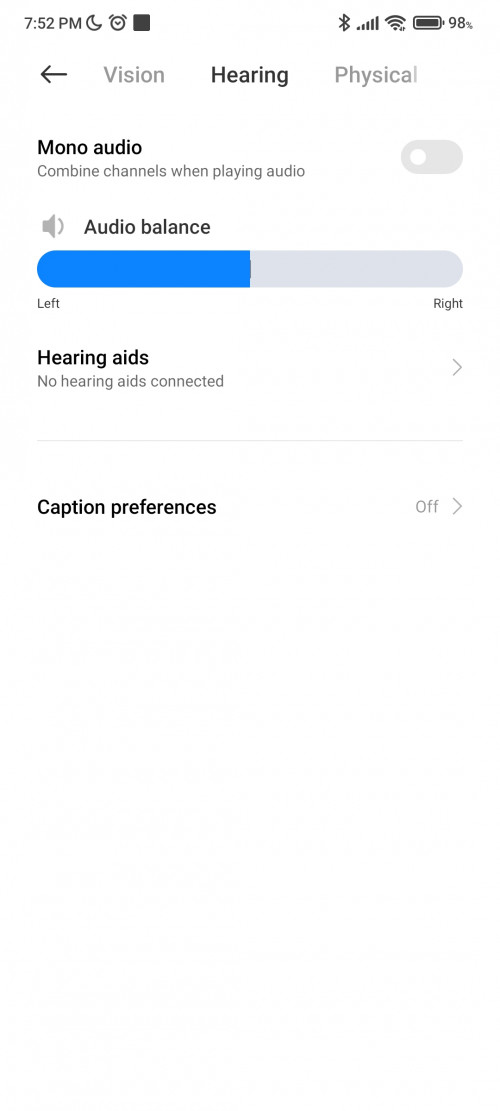
Anyone had issue with tws on pocof3? Not sure why my fill t1 lite only play on one side. Used to be able play on both side. Tested the tws on other phone like Samsung and sony no issue just on poco f3. Mono audio is off also
*
check one of the accessibility setting that controls left/right speaker output.. you can set to 50/50 or like 100% on left/right speaker/earphone

This post has been edited by Optizorb: Jan 4 2022, 05:38 PM
Optizorb
post Jan 4 2022, 08:24 PM

Regular
******
Senior Member
1,259 posts

Joined: Sep 2021
QUOTE(gxthelord @ Jan 4 2022, 07:52 PM)
user posted image

U mean this right it's normal tho
*
yup i meant that..

hmm so thats not the issue.. then idk dy cause previously working fine?

Remember if you changed any settings?
Optizorb
post Jan 7 2022, 06:21 PM

Regular
******
Senior Member
1,259 posts

Joined: Sep 2021
QUOTE(Run69 @ Jan 7 2022, 04:43 PM)
I simply buy in Europe
*
QUOTE(Run69 @ Jan 7 2022, 04:47 PM)
I already contact Digi to enable VoLTE, that works. VoLTE always needs to be enabled from network side, while VoWifi depends only on the device.
VoWifi requires VoLTE to work first, that's the reason you experienced that.
*
ah okay. so now you still dont have vowifi? but at least got volte still ok la.. honestly cant tell the diff between vowifi and volte..

flashing to global rom should solve the problem right?
Optizorb
post Jan 8 2022, 03:50 AM

Regular
******
Senior Member
1,259 posts

Joined: Sep 2021
QUOTE(Run69 @ Jan 8 2022, 12:49 AM)
In high rise LTE signal is not so good, so VoLTE keep dropping calls, VoWifi would solve this. I hope with next update I can change to global rom
*
if you are on EU rom, your future updates will all be EU rom as well. If you want to get back to global you will need to unlock bootloader and flash global rom first..


Optizorb
post Jan 8 2022, 03:57 AM

Regular
******
Senior Member
1,259 posts

Joined: Sep 2021
QUOTE(Zhik @ Jan 7 2022, 09:58 PM)
I guess it is not the proximity that spoil. Because, all xiao mi device come with no physical proximity hardware but they use the virtual proximity solution that utilise the gyrometer and others.
The test is easy, play some voice message, and cover the phone, it wont turn off the loud speaker nor dim the display.
By this virtual proximity sensor, xiaomi actually save them a lot.
*
yea the promixity is wonky.. to get it to work properly, i place the top of phone pointing slightly towards my head when calling, << if you cant visualize it, think of your head as a TV and you are using the IR blaster of the phone on your head laugh.gif laugh.gif

this usually does the trick and the screen will turn off, then only i lower the phone and hold it like normal again..

basically for xiaomi devices the proximity detection is towards the top of the phone rather than like normal devices where its front facing..

This post has been edited by Optizorb: Jan 8 2022, 04:01 AM
Optizorb
post Jan 8 2022, 03:58 AM

Regular
******
Senior Member
1,259 posts

Joined: Sep 2021
btw anyone on 12.5.5 and using dark theme notice there's black crush at the notification shade?

and one more thing, youtube vanced on poco f3 no need disable the miui optimization shit right? I read the guide it says for MIUI got that extra steps, but i tried to install without doing the dev options + miui optimization things and managed to install the vanced manager just fine..

This post has been edited by Optizorb: Jan 8 2022, 04:04 AM
Optizorb
post Jan 8 2022, 03:09 PM

Regular
******
Senior Member
1,259 posts

Joined: Sep 2021
QUOTE(sexysarah1992 @ Jan 8 2022, 08:37 AM)
Need to disable that miui optimization when install vance manager. The moment u do that, the phone becomes laggy and shit. After install manager then activate back the miui thingie
*
yea i know thats the usual step for MIUI devices, but i tried without enabling dev options + disable miui optimization.. and still able to install vanced manager straight away, then able to install youtube vanced as well.. no errors came out or blocked from installing and asked to disable miui optimization..

so just like other android ady, less that headache step.. Because turn on/off miui optimization the icons/dark theme all become buggy, then permissions all get reset as well which is fking mafan..

So just sharing in case others know about this..

EDIT: did some digging, it seems with MIUI 12.5, miui optimization no longer conflicts with YT vanced.. So take this as a PSA to others out there. You can skip that stupid step like I did, and save yourself from the trouble of having permissions reset

This post has been edited by Optizorb: Jan 9 2022, 02:33 AM
Optizorb
post Jan 12 2022, 09:55 PM

Regular
******
Senior Member
1,259 posts

Joined: Sep 2021
QUOTE(JohnLai @ Jan 12 2022, 09:40 PM)
.........I just realised Poco F3 and Redmi Note 9T have faulty wifi driver that caused battery drain after updating to latest firmware. If I turned off the Wifi, those phones practically can last few days before recharging is needed.
Been wrecking my brain over the sudden battery drain only to discover the wifi as the culprit.

With my new Asus AX86u router, I noticed the wifi client belonging to F3 and 9T doesn't enter PSM 802.11 Power Saving Mode at all even when idling. Compared to my Samsung M30s and M31 (and even ancient galaxy S4), Asus router will report those Samsung devices entering PSM immediately after no traffic.

With Wifi turned on and connected, F3 and 9T battery are drained within 12 - 15 hours while idlingranting.gif

Note: before updating F3 and 9T firmwares, there was no wifi battery drain. Tested with Asus AC2600, TP-Link AX50 and TP-Link A6 routers. Same issue.

Anyone with Asus AX router can verify if their Poco or Redmi with MIUI 12 can enter PSM correctly when idling?

Example :

[attachmentid=11074570]
*
what??
how much drain are we talking about here? from 100% to 0% in 12~15 hours of idling?

i'm on 12.5.5, after fully charged 100% (I always charge my F3 for exactly 60 mins, usually from around 20~40% battery remaining), and from night into next day (around 10~12 hours), from 100% sometimes will still show 99%~98% the next day. Usually around 92~95% when there is more app notification activities in background..

So i think the battery performance when idle is quite impressive for me. and no missed notifications too most importantly..

Wifi on all the time.

This post has been edited by Optizorb: Jan 12 2022, 10:10 PM
Optizorb
post Jan 12 2022, 10:09 PM

Regular
******
Senior Member
1,259 posts

Joined: Sep 2021
QUOTE(JohnLai @ Jan 12 2022, 10:05 PM)
Bought F3 and 9T few months ago together during 11.11 sales. Never update the firmware until last week.

I am using F3 and 9T as alarm clock with 10 minutes interval to wake me up in the morning.
Imagine my surprise when these two phones (fully charged) used to drop around 1% to 3% from 10 pm until 7am next morning suddenly drop 60% - 70%. shocking.gif

Note: F3 and 9T have no SIM. Running airplane mode with Wifi active only.

Betterbatterystats ---> doesn't show anything. No wakelock etc. F3 and 9T are spending 99% in deep sleep during those night sleep time.

If Wifi is turned off, then there is no serious battery drain at all and it is back to usual 1% to 3%.
*
What was the firmware version previously?

Because if out of the box 12.0.X something like that straight jump to latest 12.5.5 could have bugs as result maybe.. New phones recommended to do factory reset after major firmware update for first time..

Last time people have buggy firmware was when making the jump from MIUI 12.0.x when F3 newly released, to 12.5 enhanced edition, then overtime with the other updates to like 12.5.2 > 12.5.4 and now 12.5.5 ironed out most of the bugs..

When i got my phone i straight updated it, then do factory reset. Then explore/mess around with features, then only factory reset the phone again to set up and use..

This post has been edited by Optizorb: Jan 12 2022, 10:17 PM
Optizorb
post Jan 12 2022, 11:27 PM

Regular
******
Senior Member
1,259 posts

Joined: Sep 2021
QUOTE(Zhik @ Jan 12 2022, 10:53 PM)
Seriously?
How is ur setting?
Never experience that.
*
It's my work phone for the moment. no social media apps on this phone. Could that be the reason?

Just whatsapp and emails. and mostly night time I dont get many incoming whatsapp messages and/or emails..

But soon-ish going to turn it into a regular phone and install all those social media apps, etc etc..

Will see how much the idling battery life takes a hit then..

I'm assuming it's gonna be about 1% an hour drain?

This post has been edited by Optizorb: Jan 12 2022, 11:28 PM
Optizorb
post Jan 13 2022, 07:19 PM

Regular
******
Senior Member
1,259 posts

Joined: Sep 2021
QUOTE(JohnLai @ Jan 13 2022, 07:09 PM)
GOT IT. FOUND THE DARN ISSUE. wink.gif

The issue is DTIM at router setting.
If the DTIM value is set more than 15, then the F3 and 9T wifi will never enter PSM.

Previously, uncle sets the DTIM value at 30 with beacon interval at 100 (default) for all routers uncle tested. The purpose is to save battery power by not sending DTIM too often to wake up the phone.

Using wireshark + adb, uncle realised F3 and 9T wifi drivers are waiting for DTIM message in period between 1 - 15. When phones don't receive the DTIM message in this period, it seems to "reset" the timer and ignore the subsequent DTIM message that tells the phone wifi to enter PSM.

Basically, when the F3 and 9T wifi drivers don't receive DTIM in certain time period, the wifi chip will never enter power saving mode. doh.gif

Strange that other android and apple devices plus laptops don't have issue with high DTIM value. hmm.gif
*
well, looks like it backfired from what you intended laugh.gif

This post has been edited by Optizorb: Jan 13 2022, 07:19 PM
Optizorb
post Jan 17 2022, 01:08 PM

Regular
******
Senior Member
1,259 posts

Joined: Sep 2021
QUOTE(N_Silver @ Jan 17 2022, 12:20 PM)
Hi guys,any suggestion for TP for poco f3?
*
ibywind TG
Optizorb
post Jan 20 2022, 04:36 PM

Regular
******
Senior Member
1,259 posts

Joined: Sep 2021
anyone's whatsapp got this bug?

The photo taken is wider than what is shown in the viewfinder..

10 Pages < 1 2 3 4 5 > » Top
 

Change to:
| Lo-Fi Version
0.1121sec    0.45    7 queries    GZIP Disabled
Time is now: 7th December 2025 - 06:31 PM