Outline ·
[ Standard ] ·
Linear+
Samsung Samsung Galaxy S21 | S21+ | S21 Ultra 5G - V2, 1 month anniversary
|
ChaChaZero
|
 Mar 17 2021, 08:58 AM Mar 17 2021, 08:58 AM
|

|
QUOTE(leongsem @ Mar 17 2021, 07:26 AM) May I know how to disable the "whatsapp is chekcing for new message" it prompt out quite often and I don know why. Also my gmail did not get sync in real time, does it because I enable the power saving mode? THank you. Yes it is due to the power saver mode. To make them stop checking every now and then or sync in real time, turn off power optimization for Whatsapp and Gmail. |
|
|
|
|
|
ChaChaZero
|
Mar 17 2021, 09:26 AM
|
|
|
QUOTE(leongsem @ Mar 17 2021, 09:20 AM) could you show me how to turn off the power optimization for these two apps?thanks Do a long press on the Whatsapp icon > Press the small "i" symbol to go into App Info Then tap on "Battery" > "Optimize battery usage" > Select "All" from the drop down menu to list all the apps Find Whatsapp/Gmail/Other apps you want to sync in real time and turn off the optimization. |
|
|
|
|
|
ChaChaZero
|
Mar 23 2021, 02:20 PM
|
|
|
QUOTE(humanbeing99 @ Mar 23 2021, 12:45 PM) [attachmentid=10818736] Anyway to turn off the ads on weather widget? Mine doesn't have ads. Did you enable all those customization services during the phone set up? 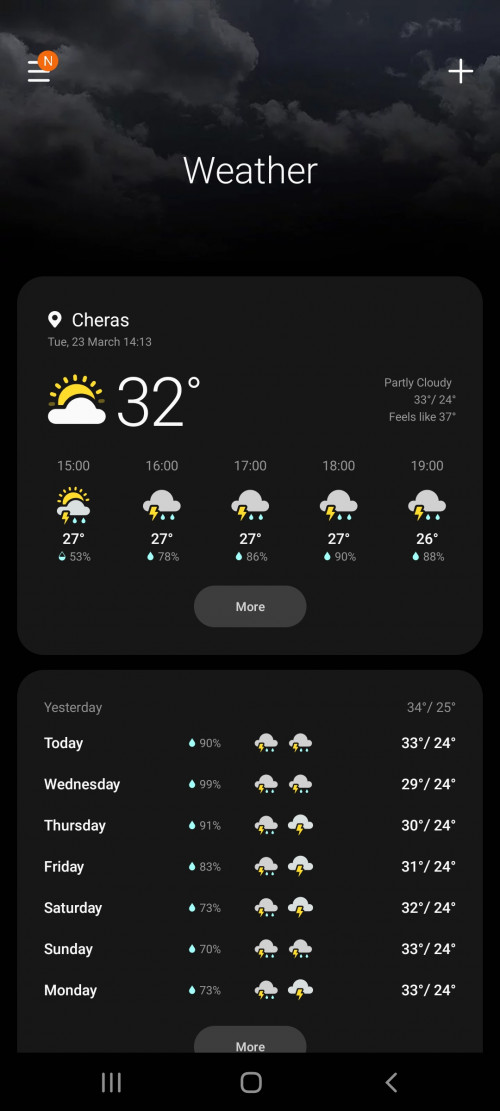 QUOTE(Created On 21/1/2021 @ Mar 23 2021, 01:51 PM) Is this the stock weather app? Yes that's the stock weather app. |
|
|
|
|
|
ChaChaZero
|
Mar 23 2021, 04:20 PM
|
|
|
QUOTE(humanbeing99 @ Mar 23 2021, 03:55 PM) Ya Not sure did i accidentally enable or not. Most of the time no ads, sometimes got. The poster said to try opening it and closing it. I tried a few times for the past hour, I didn't see any ads. You can go into the Settings and disable the Customization Service. See if that works for you. Mine is disabled since I turned them off during set up. I haven't seen any ads on the phone for any of the preinstalled apps so far. |
|
|
|
|
|
ChaChaZero
|
Mar 24 2021, 12:09 PM
|
|
|
QUOTE(danieltan @ Mar 24 2021, 11:23 AM) should I update latest patch? from I purchase this phone till now, I yet upgrade the software. Not sure will be an issue afterward. Go ahead and update it. There shouldn't be any issues. If anything there should be some improvements. There is an update that was released sometime in Feb that was supposed to fix some battery drain issues. Personally I see no difference at all. |
|
|
|
|
|
ChaChaZero
|
Mar 28 2021, 09:50 PM
|
|
|
There is a preinstalled screen protector on the S21 series. The video that was posted is the packing film that is peeled off. There is a second layer under it. The actual SP doesn't make that plasticky sound when it gets flipped around. Just the sound itself makes it obvious.
I recall a few posters already clarifying this in earlier posts and my own S21 comes with a SP preinstalled by Samsung. It's not a tempered glass SP if that's what anyone is expecting. It is a plastic SP thats above average quality but beats a lot of the less than RM10 TPU SP's out there.
And I am quite sure everyone is misunderstanding the video that was posted. He mentioned there is a preinstalled screen protector on it after peeling off the packing film. Watch the video in Full HD and slow it down to 0.25, then take a very good look at the screen when he tilts it, there is clearly a SP installed after peeling off the packing film.
|
|
|
|
|
|
ChaChaZero
|
Aug 18 2021, 05:56 PM
|
|
|
QUOTE(skylinelover @ Aug 18 2021, 02:53 PM) If moderate use that is mang 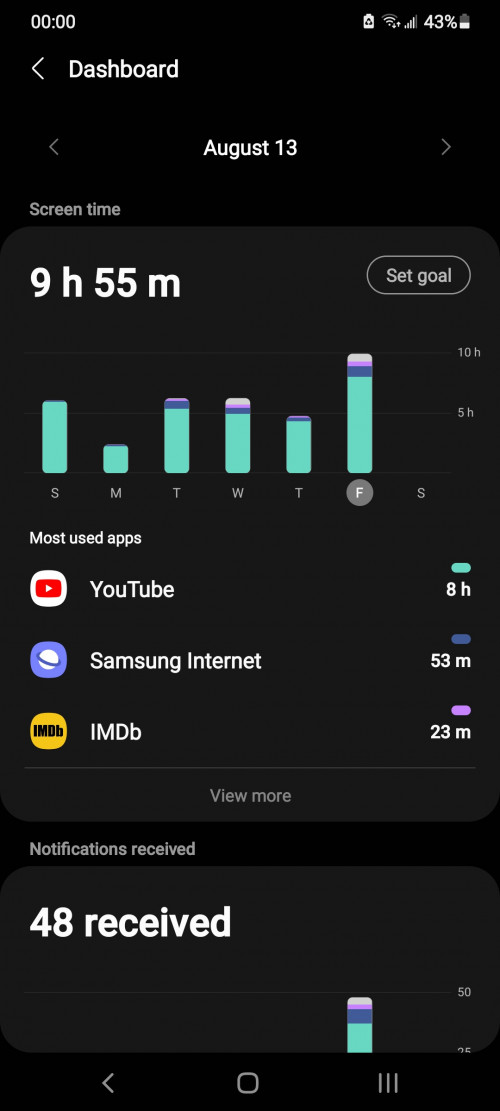 This my heavy use  Can share the same day's usage from the battery usage screen? |
|
|
|
|
|
ChaChaZero
|
Aug 18 2021, 06:12 PM
|
|
|
QUOTE(lightbringer @ Aug 18 2021, 06:04 PM) Is my device supposed to get hot when using the camera? I'm using S21 (vanilla) and every time I mess around with the camera even for just a minute, the top area (around the phone) starts to get noticeably warm. Using it more than a few minutes and it would get warm enough that it starts to get uncomfortable holding it. Note that I didn't get any overheat warning, nor does my phone starts to lag. Another strange thing is, I tried to play some games on my phone and even that doesn't get the phone as hot, so this is something specific with the camera. Yes, my S21 seems to heat up near the camera, just slightly below the camera module itself. I once let the camera run for about an hour just to see what would happen, it got really hot but the camera prompt the overheating warning. I wasn't using the 64MP setting either. Lost a ton of battery doing this too. |
|
|
|
|
|
ChaChaZero
|
Aug 18 2021, 06:28 PM
|
|
|
QUOTE(stormaker @ Aug 18 2021, 06:26 PM) Just notice its digital wellbeing after u mentioned it, so its not SOT then. It is not entirely wrong, just that if there is a charge in between digital well being doesn't show that. It just tracks your activity within the day. |
|
|
|
|
|
ChaChaZero
|
Aug 20 2021, 10:48 AM
|
|
|
QUOTE(skylinelover @ Aug 19 2021, 11:03 PM) There is difference between moderate use and heavy use Go figure  8 hours of Youtube is not moderate use. |
|
|
|
|
|
ChaChaZero
|
Oct 16 2021, 08:20 PM
|
|
|
QUOTE(johnnyenglish123 @ Oct 16 2021, 11:10 AM) For the regular s21, battery life so far can last a full day? Whatsapp, some documents editor & viewer, abit of FB IG, abit of camera, and a couple of hours of waze. Oh and phone calls No games Able to last a full day with what you do, plus some light gaming. |
|
|
|
|
|
ChaChaZero
|
Nov 24 2021, 06:04 PM
|
|
|
QUOTE(Created On 21/1/2021 @ Nov 24 2021, 01:09 PM) That's the point of using power saving mode right? To reduce power consumption. He's referring to a workaround/bug that was available in ANdroid 11 to enable power saver and keep the 120 hz refresh rate. It has been fixed in Android 12. |
|
|
|
|
|
ChaChaZero
|
Dec 3 2021, 10:46 AM
|
|
|
QUOTE(svchia78 @ Dec 3 2021, 10:00 AM) Nice to see all the A12 updates and patches of fellow members... meanwhile G9910 model main A12 update habuk pun tiada You use China model ke G9910? S21 G991B/DS got A12 with the smaller follow up patch for a while already. |
|
|
|
|
|
ChaChaZero
|
Apr 28 2023, 02:48 PM
|
|
|
QUOTE(steventan85 @ Apr 28 2023, 02:47 PM) almost 1Gb security patch ... wow April update actually came a couple of weeks back. It's more than the security updates, it also gets the gallery functions that debuted in the S23 as well as some additional camera and video functions. |
|
|
|
|
|
ChaChaZero
|
Jun 18 2023, 09:32 PM
|
|
|
QUOTE(ckming21 @ Jun 18 2023, 07:08 PM) Do s21+ support umobile 5g ? Anyone using umobile 5g ? Yes S21 and S21+ both support uMobile 5G. I have both, using it daily but I do notice that if I connect to 5G and leave it idle for a while it will drop back to 4G even when 5G has full bars of signal. On continuous use 5G connectivity seems to stay. |
|
|
|
|
|
ChaChaZero
|
May 2 2024, 09:38 AM
|
|
|
QUOTE(aaz2082 @ May 1 2024, 10:44 PM) Hi everyone. I bought my S21 FE in August 2022. Phone is fine currently. However, I'm tempted to upgrade to S24. Is my S21 FE still current, or it is already outdated and I should consider to upgrade? I heard that the S21 FE will still receive updates until end-2025. Thanks. It's not current but it is still a decent phone and nowhere near outdated. It doesn't have those AI features like the S24 but from what I have used, I hardly touch those AI features anyway unless you have very specific use cases where those AI features will make a difference. S21 FE's support has been extended to 2027. You'll at least receive Android 16. Do you have any specific reasons for the upgrade? |
|
|
|
|
|
ChaChaZero
|
May 9 2024, 10:00 AM
|
|
|
QUOTE(hashtag2016 @ May 9 2024, 02:58 AM) hi, AFAIK, from samsung official news it only will get update android 15 , and get security update until Jan 2027. same as other S21 variant.  Yeah it looks like it. S21 FE isn't getting the 4 OS updates like the other high end devices. Thats too bad. |
|
|
|
|



 Quote
Quote
 0.1123sec
 0.64
0.64
 7 queries
 GZIP Disabled