Welcome Guest ( Log In | Register )

Outline · [ Standard ] · Linear+

 Restart Issue

views
     
SFX
post Feb 1 2021, 02:10 PM

Getting Started
**
Junior Member
236 posts

Joined: Nov 2006
QUOTE(igx0908 @ Jan 30 2021, 11:07 PM)
I reinstalled Windows without HDD plug in, still cannot. Somehow Windows Boot Manager will disappear on every reboot
*
Reinstalling Windows on the same NVME drive still encounter the same issue? By the way, can you please confirm my previous reply if that is your actual problem?

And where did you see Windows Boot Manager disappear on every reboot? Any pictures you can take to show exactly where did it disappear?
TSigx0908
post Feb 3 2021, 02:27 AM

Getting Started
**
Junior Member
95 posts

Joined: Jan 2018

QUOTE(SFX @ Feb 1 2021, 02:10 PM)
Reinstalling Windows on the same NVME drive still encounter the same issue? By the way, can you please confirm my previous reply if that is your actual problem?
*
Yeah, you described it correctly, better than I did sweat.gif. I did disconnect my HDD and wipe the NVME drive before reinstalling Windows.

QUOTE(SFX @ Feb 1 2021, 02:10 PM)
And where did you see Windows Boot Manager disappear on every reboot? Any pictures you can take to show exactly where did it disappear?
*
So on every restart, I will need to wait on the AsRock boot screen for about 5 minutes and it will go to BIOS itself. From there, if I go to Storage Configuration there, I can see my NVME drive (Kingston ....) listed with correct capacity but when I go to Boot Option there, it will be empty (if don't restart, normally Windows Boot Manager (Kingston ...) will be listed).
SFX
post Feb 3 2021, 05:36 PM

Getting Started
**
Junior Member
236 posts

Joined: Nov 2006
QUOTE(igx0908 @ Feb 3 2021, 02:27 AM)
So on every restart, I will need to wait on the AsRock boot screen for about 5 minutes and it will go to BIOS itself. From there, if I go to Storage Configuration there, I can see my NVME drive (Kingston ....) listed with correct capacity but when I go to Boot Option there, it will be empty (if don't restart, normally Windows Boot Manager (Kingston ...) will be listed).
*
You are lucky. I was reading some articles at Anandtech website and apparently, one of the site author (Billy Tallis) encounter the same issue as you. Article here, check comments section
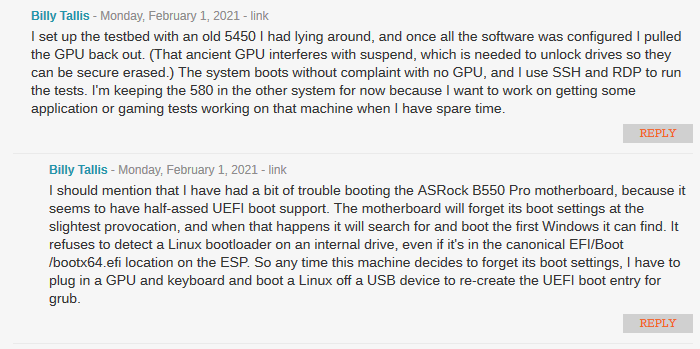
user posted image

Although the author has ASRock B550 Pro4 motherboard, the base code will still be the same, in terms of UEFI support for booting.

So, there are some experiments you can try:
1. Clear CMOS (Section 2.5 Jumpers Setup in your motherboard manual) to reset the BIOS into default state, reconfigure your Kingston NVME in the Boot Option, save the configuration. Try to perform multiple reboots to check if you still encounter the same issue.
2. Get a spare SATA drive, doesn't matter if it is good old mechanical HDD or SSD, install a fresh copy of Windows 10 and perform multiple reboots. Check if when you go into Boot Option inside the BIOS, if the entry is empty, causing it unable to boot up.
3. If both experiments still fail, worst case scenario is to change motherboard to a different brand.

chocobo7779
post Feb 3 2021, 05:55 PM

Power is nothing without control
********
All Stars
14,674 posts

Joined: Sep 2010
QUOTE(igx0908 @ Feb 3 2021, 02:27 AM)
Yeah, you described it correctly, better than I did sweat.gif. I did disconnect my HDD and wipe the NVME drive before reinstalling Windows.
So on every restart, I will need to wait on the AsRock boot screen for about 5 minutes and it will go to BIOS itself. From there, if I go to Storage Configuration there, I can see my NVME drive (Kingston ....) listed with correct capacity but when I go to Boot Option there, it will be empty (if don't restart, normally Windows Boot Manager (Kingston ...) will be listed).
*
Did you turn off instant boot in the BIOS? hmm.gif

Also, did you create a UEFI Windows install via Rufus?
https://www.thomas-krenn.com/en/wiki/Creati...tick_in_Windows

You may also want to ask ASRock tech support if you can, as they sometimes provide you with a beta BIOS that may alleviate the issue:
https://event.asrock.com/tsd.asp

On the worst case scenario you can always revert to regular MBR booting tongue.gif

This post has been edited by chocobo7779: Feb 3 2021, 06:00 PM
TSigx0908
post Feb 6 2021, 10:24 PM

Getting Started
**
Junior Member
95 posts

Joined: Jan 2018

QUOTE(SFX @ Feb 3 2021, 05:36 PM)
You are lucky. I was reading some articles at Anandtech website and apparently, one of the site author (Billy Tallis) encounter the same issue as you. Article here, check comments section

user posted image

Although the author has ASRock B550 Pro4 motherboard, the base code will still be the same, in terms of UEFI support for booting.

So, there are some experiments you can try:
1. Clear CMOS (Section 2.5 Jumpers Setup in your motherboard manual) to reset the BIOS into default state, reconfigure your Kingston NVME in the Boot Option, save the configuration. Try to perform multiple reboots to check if you still encounter the same issue.
2. Get a spare SATA drive, doesn't matter if it is good old mechanical HDD or SSD, install a fresh copy of Windows 10 and perform multiple reboots. Check if when you go into Boot Option inside the BIOS, if the entry is empty, causing it unable to boot up.
3. If both experiments still fail, worst case scenario is to change motherboard to a different brand.
*
I did clear CMOS back then but didn't solve the issue. I don't have any spare drive yet, so can't test. At this point, might just not restart in Windows anymore haha doh.gif. Thanks for your help!

QUOTE(chocobo7779 @ Feb 3 2021, 05:55 PM)
Did you turn off instant boot in the BIOS? hmm.gif

Also, did you create a UEFI Windows install via Rufus?
https://www.thomas-krenn.com/en/wiki/Creati...tick_in_Windows

You may also want to ask ASRock tech support if you can, as they sometimes provide you with a beta BIOS that may alleviate the issue:
https://event.asrock.com/tsd.asp

On the worst case scenario you can always revert to regular MBR booting tongue.gif
*
Instant boot is turned off by default. I used the Windows 10 Media Creation Tool instead. Point noted!


Change to:
| Lo-Fi Version
0.0137sec    0.91    5 queries    GZIP Disabled
Time is now: 18th December 2025 - 06:12 AM