Welcome Guest ( Log In | Register )

Bump Topic Topic Closed RSS Feed
4 Pages < 1 2 3 4 >Bottom

Outline · [ Standard ] · Linear+

 Samsung Galaxy S21 | S21+ | S21 Ultra 5G - V1, Exynos 2100 | Available in stores

views
     
Josh95
post Jan 30 2021, 03:48 PM

Getting Started
**
Junior Member
86 posts

Joined: Feb 2016


QUOTE(joeblow @ Jan 30 2021, 03:34 PM)
Yes Court is fast. Ordered 28th Jan delivered today 30th Jan. But inside the box just the separate boxes with no air plastic cushion. Hope no damage during transport. BTW did your Court order came with receipt and invoice? Mine came only with a delivery note. Now I don't know which invoice or receipt to submit for the FITBIT2.
*
Well bubble wrap is not needed for Court's case since they are not using normal courier services (where they throw products into the cart and risking damage the packaging sometimes). You need to spent at least RM 500 just to be eligible for free delivery hence you should expect their quality of delivery service is much quicker, more careful and gentle in handling the customer's product.
Mine came with physical invoice, slightly different than online invoice. You can use either one, both are valid. I suggest just use the softcopy as you don't need to take extra hassle steps to scan the physical copy.

This post has been edited by Josh95: Jan 30 2021, 03:49 PM
Josh95
post Jan 31 2021, 07:24 PM

Getting Started
**
Junior Member
86 posts

Joined: Feb 2016


QUOTE(Mondello @ Jan 31 2021, 07:10 PM)
S7 edge....i hv no issue with my old phone

The heat is not normal heat tho...is burning my.palm
*
S7 Edge can only fast charge up to 15W while your S21 can super fast charge to 25W. The extra 10W will definitely make your phone hotter than usual if you multitask that uses more CPU/GPU usage.
If you wanna avoid overheating, disable super fast charge feature and stick with normal fast charge.

This post has been edited by Josh95: Jan 31 2021, 07:27 PM
Josh95
post Jan 31 2021, 07:40 PM

Getting Started
**
Junior Member
86 posts

Joined: Feb 2016


QUOTE(joeblow @ Jan 31 2021, 07:28 PM)
Not sure why, my phone with no sim card and only WIFI and Always Display On, battery decreases by 6% when doing nothing for 5 hours. Goes down even more over the past one hour trying to configure it, now only 80%.

For those with S21 Ultra, can you try the palm gesture to capture screen? I have it activated in the option and checked internet, but no matter how fast/slow/side palm/ etc still won't capture screen. Not sure if it is bug or I am not doing it right? This palm gesture quite useful for taking screen shots.
*
Not working on my S21 Ultra also but worked on my S20 Plus, I guess is a bug.
Josh95
post Jan 31 2021, 07:49 PM

Getting Started
**
Junior Member
86 posts

Joined: Feb 2016


QUOTE(Max2006 @ Jan 31 2021, 07:26 PM)
Ya. That's why I advised him to stop that practise. But he said he didn't encounter this in his old S7edge. That's kind of weird though.  hmm.gif
*
It is not really weird if you factor in the difference between different charging output speed. 15W vs 25W. Higher Wattage produces more heat
Josh95
post Jan 31 2021, 08:13 PM

Getting Started
**
Junior Member
86 posts

Joined: Feb 2016


QUOTE(changleonghao @ Jan 31 2021, 07:56 PM)
user posted image

user posted image

user posted image

thinking to buy s21u and enjoy all its features. but really worried now.
this was how the note 7 scandal started.

worst part is, not sure whether it is due to exshtnot or s888

s21 overheat issues
*
Why would you worry that much? Newer Android version have software layer protection implemented that will disable charging if it detects the device is overheating. Note 7 scandal happen due to a design flaw for fitting too large capacity and leaving no room for battery expansion when it heated up, hence causing short-circuit.

Ok, you just edited your message so now I will include my other thoughts. If the phone overheats due to normal usage without charging, then yes, this is a very big concern indeed. As far as I know only the Snapdragon 888 is having this issue right now. I have S21 Ultra with me and so far I have not encounter any overheating message even with heavy gaming.
Xiaomi Mi 11 is experience this overheating issue right now (it is a widespread issue) with this new chip, SD888. Let's see if MIUI 12.5 would fix it or not.

This post has been edited by Josh95: Jan 31 2021, 08:20 PM
Josh95
post Jan 31 2021, 08:52 PM

Getting Started
**
Junior Member
86 posts

Joined: Feb 2016


QUOTE(skylinelover @ Jan 31 2021, 08:26 PM)
haha i iz disappointed

i was hoping it will be mega improvement over 865 but if that is the case mega_shok.gif  rclxub.gif
me to with note 9 b4 changing laugh.gif doh.gif

exy9810 vs sd845 is like heaven and hell hahahaha
*
It was quite an improvement in terms of CPU and GPU power but at the expense of power efficiency and heat generation. The new X1 prime core architecture is still 1st gen so they will be a lot of software optimization update coming soon to optimize this power hungry core sweat.gif
Josh95
post Feb 2 2021, 12:16 PM

Getting Started
**
Junior Member
86 posts

Joined: Feb 2016


QUOTE(Max2006 @ Feb 2 2021, 12:11 AM)

Breaking news!

Exynos 2100. Switch into power saving mode will improve the GPU performance up to 30%. But the power saving mode will drain the battery much faster. What kind of sorcery is this!? Sounds like a bug.
*
Power saving mode applies on CPU only on the Exynos model. Smartphones have restricted TDP due to passive cooling. For this case, since CPU is using less power, it gives more power for the GPU to boost clock higher like nVidia Dynamic Boost 2.0 (this one uses AI to dynamically adjust power for both CPU and GPU), rather than AI, we are doing manual control here. This is just my assumption but the theory does make sense to a certain extent.
By right power saving mode, should reduce power usage for both CPU & GPU which is true for Snapdragon model, but only CPU for Exynos model. I guess there is some software bugs needs fixing here.

Since games uses less CPU power for mobile game anyway, the increase performance for GPU will lead to higher FPS in games that rely heavily on graphics.

This post has been edited by Josh95: Feb 2 2021, 12:25 PM
Josh95
post Feb 3 2021, 09:47 AM

Getting Started
**
Junior Member
86 posts

Joined: Feb 2016


QUOTE(joey @ Feb 3 2021, 12:09 AM)
me no unique code,jus try luck send order number... tongue.gif
*
LOL, you really wanna try your luck despite knowing it will most likely be a failed attempt doh.gif
Josh95
post Feb 3 2021, 04:49 PM

Getting Started
**
Junior Member
86 posts

Joined: Feb 2016


QUOTE(tomastan4134 @ Feb 3 2021, 04:46 PM)
just curious ,  does the unique code  tie up to pre-order ID  and serial number of the phone??
*
No, but it might be tied up to registered email during preorder interest. Whether they cross check with email or not I'm not sure.
Josh95
post Feb 3 2021, 05:11 PM

Getting Started
**
Junior Member
86 posts

Joined: Feb 2016


QUOTE(ipohps3 @ Feb 2 2021, 10:00 PM)
Wanted to post about this earlier (as in few days before) but in the end did not do, so congratz for discovering this and share this news to other people. Be warned this new OLED tech only applicable for the Ultra model.

QUOTE(Max2006 @ Feb 2 2021, 10:29 PM)
I read the article. So basically they are saying that S21 adaptive refresh rate will only work under bright ambient light. If you are using in the darker environment or room, the adaptive mode won't work and it will stay at 120hz all the time. Am I right?
*
Based on the article, yes your understanding is right.

QUOTE(kumhoo @ Feb 2 2021, 10:25 PM)
I found that store freebies is better. Got additional 1 year warranty (mean 2 years SME warranty) + 1 time free screen replacement (1st year only).

Then if you opt for installment, you will get off one discount around 8%.

You still get the Fit2, smart tag & trio charger.

So store promo is still the best.
*
How the heck paying via installment net additional 8%? What is their hidden T&C? Normally from a business point of view, they offer cash discount if pay in full.

QUOTE(bennedict82 @ Feb 2 2021, 10:38 PM)
Oh oh .. Thank you. this definitely better than other offer.

1. WarrantyĀ  ~ Rm400
2. Discount 8% ~RM400
3. Free Gifts ....

rclxm9.gifĀ  rclxm9.gif
*
Pre-order with Courts was still the best deal. tongue.gif

1. 8% discount (HUAT8) - worth ~RM400
2. Pre-order free gifts - worth RM 1,317 (Buds Pro RM799 + Wireless Trio Charger RM399 + SmartTag RM119), provided you ordered the Ultra model, else reduce RM200
3. ROI gifts (Galaxy Fit2) - worth RM 179

This post has been edited by Josh95: Feb 3 2021, 05:17 PM
Josh95
post Feb 3 2021, 05:43 PM

Getting Started
**
Junior Member
86 posts

Joined: Feb 2016


QUOTE(marcyeo @ Feb 3 2021, 05:32 PM)
does it matter if i turn off auto brightness?? or it doesnt matter if i turn on or off auto brightness. in darker room, rr will stay at 120hz?
*
Just tested it on my side. Indeed it stays at 120 Hz in darker room, damn VRR not working here. Auto brightness does not play a role here, it is based on the ambient brightness detected by the sensor.
Josh95
post Feb 3 2021, 05:49 PM

Getting Started
**
Junior Member
86 posts

Joined: Feb 2016


QUOTE(marcyeo @ Feb 3 2021, 05:45 PM)
interesting information bro. do you have fps meter to test? thanks for sharing bro
*
No need FPS meter, Android 11 got built-in refresh rate checker. You need to turn on Developer options to enable this setting though.
Under Debugging, there is an option called as Show refresh rate

Btw FPS and refresh rate are two different things. Maybe you can get this fact right 1st.

This post has been edited by Josh95: Feb 3 2021, 05:50 PM
Josh95
post Feb 3 2021, 06:17 PM

Getting Started
**
Junior Member
86 posts

Joined: Feb 2016


QUOTE(marcyeo @ Feb 3 2021, 06:07 PM)
i know the difference between FPS and Refresh rate. it it just that with Xiaomi built in FPS meter that can monitor RR also...so i thought perhaps samsung or third party one can show also..
phone is mi10t lite

in xiaomi it is called Frame Rate Monitor Tools
*
I'm glad you know the difference. Those naming schemes needs to be renamed. Those terms used interchangeably (since they are correlated in some ways) and non tech savvy people will definitely get confused.
Well, if the built-in tool does its job, I don't see the need for any third party software unless you seeking for more detailed features and info.

As far as I know, no Samsung tools that can check this though. If you want to use third party, I have just stumbled one on the Play Store
Refresh Rate Checker

Edit: Just tested this is not real time checker. I see if I can find one

This post has been edited by Josh95: Feb 3 2021, 06:20 PM
Josh95
post Feb 3 2021, 06:28 PM

Getting Started
**
Junior Member
86 posts

Joined: Feb 2016


QUOTE(marcyeo @ Feb 3 2021, 06:23 PM)
sure mate. thanks for the sharing smile.gif
*
Found one that is real time, although not as comprehensive as the Xiaomi's one that came with FPS, resolution and Refresh rate overlay.
Display Checker with Real-Time Refresh Rate
Josh95
post Feb 3 2021, 06:37 PM

Getting Started
**
Junior Member
86 posts

Joined: Feb 2016


QUOTE(derict @ Feb 3 2021, 06:06 PM)
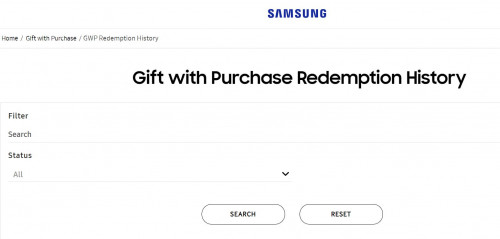
Sorry, i am a little lost. So the redemption for the following link, we should claim using what reference? Invoice, order number, IMEI?
https://samsung-redemption.com/customer/#/sasso/MY-gwp
user posted image
*
You used the wrong link, I wonder who gave you this incomplete hyperlink doh.gif. That will only bring you to your redemption account history.
This is the correct link: https://samsung-redemption.com/customer/#/sasso/MY-gwp-130
Josh95
post Feb 3 2021, 07:52 PM

Getting Started
**
Junior Member
86 posts

Joined: Feb 2016


QUOTE(Koki @ Feb 3 2021, 07:13 PM)
There's a built-in tool for One UI 3.1. I used it here.


Perhaps I'll make a vid on how to enable it.
*
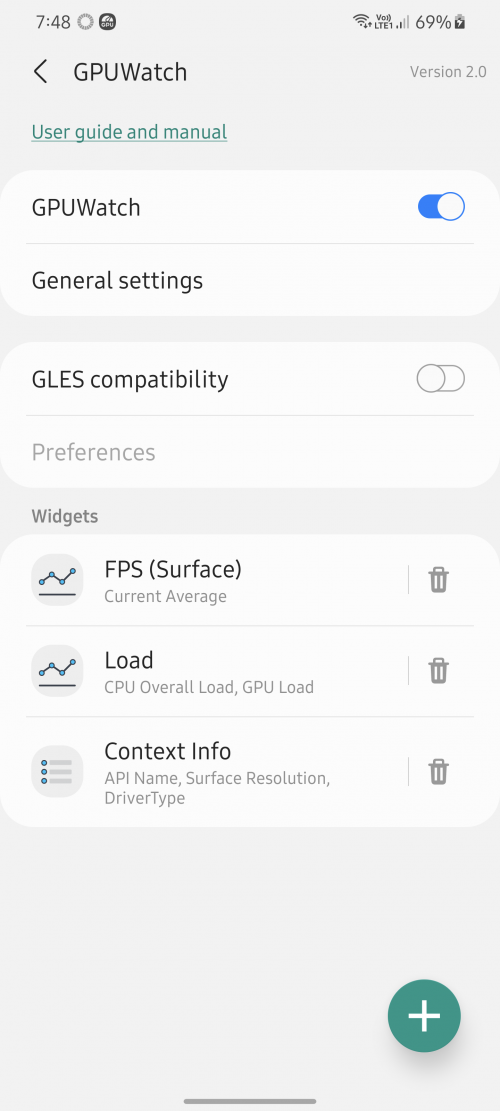
But the one shown on your video is the realtime FPS checker with CPU and GPU usage graph. It does not check for Refresh rate though.
Anyway, we still welcome you to make a video on how to enable that graph tool.

This is still under Developers option. The app name is called as GPUWatch
user posted image

QUOTE(Pyjamas999 @ Feb 3 2021, 07:07 PM)
I read the article too.. another interesting finding from their graph is that 1440p consumes less display power compared to when set at 1080p? Weird haha.

When I turn on my refresh rate checker from developer settings, my display only alternates between 120 -> 60hz -> back to 120hz again when I touch the display. Is yours the same?

I can't seem to activate the claimed 10hz VRR
*
I have no idea how to activate 10Hz too. The panel is capable but I think the software has locked that feature. The lowest it can get is 48Hz, occurs when you watch 24 FPS video.
I would have appreciate Samsung if they downclock to 30Hz for 30 FPS content/games or 24Hz for 24 FPS movies. Saves even more battery, just wonder why they not doing that for the Ultra model since the panel is capable...

This post has been edited by Josh95: Feb 3 2021, 07:57 PM
Josh95
post Feb 3 2021, 08:00 PM

Getting Started
**
Junior Member
86 posts

Joined: Feb 2016


QUOTE(joey @ Feb 3 2021, 07:54 PM)
jus found my unique code at junk/spam e-mail,can i redeem?
*
Of course you can. You should have check your junk mail long time ago, other LYN members already told you to do so, not sure why you did not do it, until now that is.
What you can do now is to live chat with Samsung customer support to correct your redemption info so that you are eligible again or resubmit the form. I advice using the former steps to avoid conflicts.

This post has been edited by Josh95: Feb 3 2021, 08:01 PM
Josh95
post Feb 3 2021, 08:13 PM

Getting Started
**
Junior Member
86 posts

Joined: Feb 2016


QUOTE(emy_xvidia @ Feb 3 2021, 06:55 PM)
Cancelled with Courts due to them not having stocks at allĀ  (have to wait till God knows when) and went to the Samsung Store and managed to get the additional one-year warranty inclusive of 1st year screen protection plus all the 3 gifts and one month waiver (worth 8% and must do EPP, lump sum pay won't get discount lol). Take note that the extended warranty FOC has branch-based quota.

I think those who missed out the PO this is the best deal to get.
*
Did you ask why must do installment to get 8% off? To offset credit card interest rate? But a lot of credit cards already support 0% interest during installment plans. I wonder is it because they wanna force you to use credit card as installment so that bank can benefit from this with other charges, hmmm.

QUOTE(kumhoo @ Feb 2 2021, 10:25 PM)
I found that store freebies is better. Got additional 1 year warranty (mean 2 years SME warranty) + 1 time free screen replacement (1st year only).

Then if you opt for installment, you will get off one discount around 8%.

You still get the Fit2, smart tag & trio charger.

So store promo is still the best.
*
KCY3701 Could you pin this on 1st page or create a post about this? This is currently the best offer available for walk-in customer. Also add a disclaimer saying there is a branch store quota limit for extended warranty freebies.
But be warned to keep yourself safe during the pandemic though as the risk is there if you prefer to walk-in. And remember to archive my Court post since 3 Feb 2021 is the last day the promo code works.

This post has been edited by Josh95: Feb 4 2021, 11:03 AM
Josh95
post Feb 3 2021, 08:15 PM

Getting Started
**
Junior Member
86 posts

Joined: Feb 2016


QUOTE(derict @ Feb 3 2021, 08:09 PM)
Thank you so much.. now i am at the correct site... I can't proceed as i must have my phone IMEI to continue.

What about the unique code? I buy from samsung online direct and already have all the free gift (smarttag, wireless trio, ear bud pros) so i still can redeem this ah??
SIGHs. Now i regret to buy from samsung online since TILL NOW there are no status and god knows when i will receive the phone.
*
Yes, you can still redeem Galaxy Fit2 provided you get the code via email when you register interest to preorder at Samsung website. If you did not do this steps, unfortunately you need someone else here to give you the code (if they are generous enough that is).

QUOTE(joey @ Feb 3 2021, 08:06 PM)
thanks for advice,but date of purchase is the date i online pre-order or the date i go senQ collect the hp?
*
The date you preorder of course (the most important part is they wanna know whether you purchase during preorder date or not), when you collect the phone is not important to them.

This post has been edited by Josh95: Feb 3 2021, 08:18 PM
Josh95
post Feb 4 2021, 07:14 AM

Getting Started
**
Junior Member
86 posts

Joined: Feb 2016


QUOTE(Koki @ Feb 3 2021, 09:06 PM)
Yep, that is correct. There is another refresh rate widget in the Developer Options menu.
Also, Perf Z is dead.
*
Why do you say Perf Z is dead?

QUOTE(Pyjamas999 @ Feb 3 2021, 10:08 PM)
Yeah I tried playing 24 FPS video with Samsung stock Video app, the screen will manage to go down to 48hz but no lower. Hmm maybe their so called '10 hz' is only triggered by some very specific applications? Like those e-readers lol

Oh well.. I'm surprised no reviewer, not even anandtech covered this. All just superficially say 'can go down to 10hz etc' but no one investigated it properly haha. You're right though, if the panel is capable they should have implemented like a full real time VRR
*
GSMArena did covered this but even they failed to get the supposedly promised 10Hz. They still have no clue what thing to trigger that lowest refresh rate.
https://www.gsmarena.com/samsung_galaxy_s21...view-2219p3.php

QUOTE(bennedict82 @ Feb 3 2021, 10:12 PM)
I believe 10hz just applied to stagnant view. But as you all mentioned, still seeing 60hz when view stopped moving/touch. Or maybe 10hz applied on AOD only. not sure...at the moment.

For sure 10hz cannot work either game or browsing.
*
GSMArena have tested this with AOD on and still it is stuck at 60Hz.

4 Pages < 1 2 3 4 >Top
Topic ClosedOptions
 

Change to:
| Lo-Fi Version
0.0770sec    0.43    7 queries    GZIP Disabled
Time is now: 2nd December 2025 - 04:25 AM