Welcome Guest ( Log In | Register )

Bump Topic Topic Closed RSS Feed
5 Pages < 1 2 3 4 5 >Bottom

Outline · [ Standard ] · Linear+

 Official TM UniFi High Speed Broadband Thread V39, READ 1ST PAGE FOR RELEVANT WIFI INFO

views
     
BenYeeHua
post Dec 25 2021, 04:37 PM

Regular
******
Senior Member
1,873 posts

Joined: Nov 2010


QUOTE(heLL_bOy @ Dec 25 2021, 04:34 PM)
TM to Baidu is using HKIX
Baidu back to TM not using HKIX.. is using HKG HE.net 10G

baidu, cdnnetwork, zenlayer HKG cdn are useless they using NTT via JP into mainland sweat.gif
*
ok then, I recalled as, if using TCP server will going the same route as ping after handshake, if using UDP will going different route, guess my old memory failed me again, I better read all those TCP and route tutorial. doh.gif

Because each time when ping are unstable, then it will be unstable with slow speed, never through about upstream and downstream going different route after going via TCP. tongue.gif

This post has been edited by BenYeeHua: Dec 25 2021, 04:40 PM
BenYeeHua
post Dec 25 2021, 04:44 PM

Regular
******
Senior Member
1,873 posts

Joined: Nov 2010


QUOTE(heLL_bOy @ Dec 25 2021, 04:40 PM)
icmp or TCP/UDP
*
? sweat.gif
IPv4 TCP/IP? hmm.gif

As I understand, you means TM to HK are fine, hkix fine, but hkix going back to TM are not fine, they going via HKG HE.net 10G, that's why I saw packet loss after #4
So ICMP only test for ping and pong, but it don't test for upstream or downstream path got issues, even through the traceroute told you it is coming back from hkix IP address as part of the route, correct? hmm.gif
BenYeeHua
post Dec 25 2021, 04:48 PM

Regular
******
Senior Member
1,873 posts

Joined: Nov 2010


QUOTE(twice1020 @ Dec 25 2021, 04:45 PM)
user posted image
*
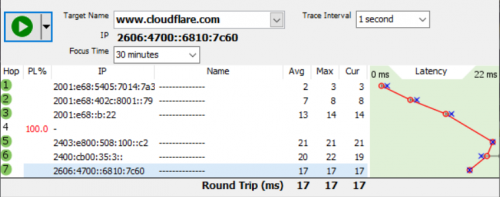
Lucky most website using CloudFlare, badly most China website not using CloudFlare. doh.gif
---
Anyways, found out today Lazada are using back MY Aliyun server, so I guess TM affected them and they think they should not depend on TM to having a good connection back to SG... sweat.gif
BenYeeHua
post Dec 25 2021, 04:54 PM

Regular
******
Senior Member
1,873 posts

Joined: Nov 2010


QUOTE(heLL_bOy @ Dec 25 2021, 04:48 PM)
yes.. most probably route over HKG He.net has been QoS or been attack.

for Cloudflare HKG PoPs TM are using Telstra if not mistaken.
*
Ok, never know the tutorial is only means for one path, lecture just teach as it will going for same path, up and down(the failure rate for this basic subject is too high, so he have to simplify a lot, lot of thing, for advance he put on CCNA training), and lab are teaching just using local network like Cisco Packet Tracer no more than 2 path. tongue.gif

Yes, so better going to JP CDN for me la, lucky most China website they take care of JP people friendly, because of vtuber, can get 800kb/s video stream, enough. tongue.gif

QUOTE(a_capybara @ Dec 25 2021, 04:54 PM)
Take your "Works For Me" attitude back to where it belongs. Unless you can provide a reasonable solution that does not involve a fix that works for your use case (which fortunately for you involves IPv6) please refrain from spamming up the board - I'm certain those encountering problems have already seen your post.
*
Yes, acting like 99% of internet running on IPv6 and cloudflare are...
Too much ignoring... doh.gif

https://www.google.com/intl/en/ipv6/statistics.html

This post has been edited by BenYeeHua: Dec 25 2021, 04:56 PM
BenYeeHua
post Dec 25 2021, 05:06 PM

Regular
******
Senior Member
1,873 posts

Joined: Nov 2010


QUOTE(michaelkkl @ Dec 25 2021, 04:58 PM)
TM has 4 HE.net link in HKG, 3 of them are 10G, another one not sure as it didn't show on PTR record.

Not sure how TM can saturate all those link doh.gif

TM to Cloudflare HKG is using HKIX, but return path from Cloudflare HKG to TM varies from CW HKG, HKIX if not mistaken.
*
Unbalance caused by unbalanced sharing of Public IP, I think, so far now I am still using the same Public IP, like the SG packet drop case a few days ago, mine Public IP changed at the moment of issues fixed. hmm.gif

And now it is affecting SG users(based on many SG CDN server are failed to obtain data from HK), TM always like to pulling others into their trouble. laugh.gif
BenYeeHua
post Dec 25 2021, 05:11 PM

Regular
******
Senior Member
1,873 posts

Joined: Nov 2010


QUOTE(heLL_bOy @ Dec 25 2021, 05:07 PM)
good info  thumbsup.gif

problem if Cloudflare or TM announce the route using HKIX over to He.net will be the main problem since port size is smaller compare standalone HKIX port.
if using HKIX shouldn't be problem since TM got 2x100G on there.

but i can say high possibly wont use CW HKG back to TM.
*
As long as they don't doing something like Facebook which drop themselves out from this Internet, I will be very grateful. tongue.gif
Still remember this news. brows.gif
https://www.bgpmon.net/massive-route-leak-c...ernet-slowdown/

For issues like now, can be solved easily by users using VPN, but if no internet access, then nothing can be done by users. laugh.gif

This post has been edited by BenYeeHua: Dec 25 2021, 05:17 PM
BenYeeHua
post Dec 26 2021, 02:48 AM

Regular
******
Senior Member
1,873 posts

Joined: Nov 2010


QUOTE(Oltromen Ripot @ Dec 26 2021, 01:13 AM)
Those Celcom Fibre subscribers on HSBB, are they affected?

Those Digi Fibre subscribers on HSBB, are they affected?

Who else ride on HSBB? Are they affected?
*
HSBB only affected by your area issues, like fiber cut or too much subs in your area overloading the bandwidth etc.
If is just like you are using VPN A and asking about how are those VPN B performing, while HSBB is like from your ISP to your VPN A and B. icon_rolleyes.gif

This post has been edited by BenYeeHua: Dec 26 2021, 02:51 AM
BenYeeHua
post Jan 11 2022, 02:13 PM

Regular
******
Senior Member
1,873 posts

Joined: Nov 2010


QUOTE(badai @ Jan 11 2022, 02:06 PM)
Is this acceptable speed for 500/100 package?

[attachmentid=11073580]
*
fine for latency, not fine for top speed, might be your router don't enable Hardware NAT or performance not enough, should not feel the different, unless you always download steam or ps5 or xbox games. brows.gif
---
Look like the connection to HK getting worst, even Taobao can't works properly like yesterday now. sweat.gif

This post has been edited by BenYeeHua: Jan 11 2022, 02:13 PM
BenYeeHua
post Jan 25 2022, 03:05 AM

Regular
******
Senior Member
1,873 posts

Joined: Nov 2010


Just saying, UniFi is doing hidden promotion to 30M user for refreshing the 2 years contract, 50M plan are provided with RM 99/month.

CODE
RM0 unifi: Today only! Just add RM10* and get higher internet connection at 50Mbps with only RM99/month. Register your interest now! i.unifi.my/Upgrade


If you ignore it, they will call you for promotion after few days.

Link posted here for record. icon_rolleyes.gif
https://i.unifi.my/Upgrade
https://unifi.com.my/unifi-en/ijoin/leave-c..._campaign=cpu04
BenYeeHua
post Jan 25 2022, 10:47 AM

Regular
******
Senior Member
1,873 posts

Joined: Nov 2010


QUOTE(PJng @ Jan 25 2022, 10:28 AM)
For chopper? Never offer me RM99 when i still on copper 30mbps
*
FTTH.

Just reached me again(yesterday missed the call because sleeping), upload still the same, 10M.
So this plans is 50M down, 10M up, so RM 10 for 20M more download speed only... hmm.gif

Sadly re-sign for another 2 years is a bit risky for me because of Covid, else I will go for it, as 30M is a bit slow, 50M will be a prefect point for me. icon_rolleyes.gif

------
But yes, you may try to call TM or sign up using the link I provided, they may provide 50M if they allowed to do it.
BenYeeHua
post Jan 25 2022, 09:06 PM

Regular
******
Senior Member
1,873 posts

Joined: Nov 2010


QUOTE(PJng @ Jan 25 2022, 10:48 AM)
I just done change to fibre last month to 100mbps
TM keep send SMS to me since july 2021 say fibre available
*
Yes, the system is messy, it take 5 mins for server to process my data before allowing me to check it. doh.gif

QUOTE(YoungMan @ Jan 25 2022, 03:57 PM)
Might as well you go for SWU plan. RM99 for 100mbps versus RM99 for 50mbps.
*
Thank for the info, because of 2 year contract so I don't monitor thread much. thumbsup.gif
And yes, this 50M means they may provide it to those VDSL users, which explain why no upload speed upgrade, as VDSL upload is slower than download. hmm.gif

QUOTE(go626201 @ Jan 25 2022, 08:59 PM)
This should be mainly for Johor,so far i only saw Johor user getting this ips range.
*
Can confirm.

Never saw this IP range in Melaka, so nope. laugh.gif
-----
Anyways, fast.com are fine on IPv4, chrome fallback it to IPv4.
Facebook on v4 also fine, v6 nope.
115.134.x.x

So can come to this one if you use v4. thumbsup.gif

Edit: Tested more, low latency 8 ms, but the total speed is low, so image will be loading slow, but image server is on MY while FB on SG, strange... sweat.gif
---
Extra info, certain IPv4 HK server also got issues, but it is Tencent server, so lucky they kick me to SG after I firewall it. tongue.gif

This post has been edited by BenYeeHua: Jan 25 2022, 09:16 PM
BenYeeHua
post Jan 25 2022, 09:18 PM

Regular
******
Senior Member
1,873 posts

Joined: Nov 2010


QUOTE(linkinstreet @ Jan 25 2022, 09:15 PM)
I just got back from JB. We had issues with routing there as well
*
Hmm, I think just affected certain area, like Melaka and JB last time only affected, others fine, can be another round of enabling private IP and causing new issues again.... hmm.gif

Like mine is since yesterday CloudFlare v6 got issues, unable to send UDP packet to v6, only v4 can use, lucky HTTP3 still using TCP so no issues for it.

This post has been edited by BenYeeHua: Jan 25 2022, 09:22 PM
BenYeeHua
post Jan 25 2022, 09:26 PM

Regular
******
Senior Member
1,873 posts

Joined: Nov 2010


QUOTE(annoymous1234 @ Jan 25 2022, 09:23 PM)
Astro go, hbo go, Disney plus Hotstar again can't access
*
Cloudflare over IPv6 + UDP at SG also same, speedtest dropped it to 4Mbps + 200 ms latency. tongue.gif
If TCP at https://speed.cloudflare.com/ is fine, but still high latency. laugh.gif

On IPv4 works fine, 22ms.

So to seek for good IP, better disable IPv6 first. icon_rolleyes.gif

This post has been edited by BenYeeHua: Jan 25 2022, 09:28 PM
BenYeeHua
post Jan 25 2022, 09:30 PM

Regular
******
Senior Member
1,873 posts

Joined: Nov 2010


QUOTE(annoymous1234 @ Jan 25 2022, 09:28 PM)
Lol. Lazada live no voucher, now wanna watch TV also cannot. Sien loh
*
You are cross posting. brows.gif
---
And yes, Lazada live video also affected, it stutter sometimes, should works over IPv4.

You may keep reconnect to seek for good IPv4 la, mine just using Windows, so disable IPv6 on Windows and/or Firefox about:config is enough for me. biggrin.gif

This post has been edited by BenYeeHua: Jan 25 2022, 09:31 PM
BenYeeHua
post Jan 25 2022, 09:45 PM

Regular
******
Senior Member
1,873 posts

Joined: Nov 2010


QUOTE(evilhomura89 @ Jan 25 2022, 09:31 PM)
fast.com is working for me now
*
It will fallback to v4 if v6 too high latency. brows.gif

QUOTE(heLL_bOy @ Jan 25 2022, 09:32 PM)
you have tencent 轻量 server in HK?
*
No, I use QQ chat software la. brows.gif

I was getting crazy disconnect and reject over Tencent MY server since Private IP, unsure why, so getting kick to Tencent HK and found out 1kb/s only for chat sync(new message but unable to sync chat history), so I firewall the whole ASN, then kick me back to old SG is good news for me, all stable now. rclxms.gif
(connection timeout when I am disconnected from MY server, but can ping, should be server side issues doh.gif )

I think it is because of Private IP, before that I am connecting to server over UDP IPv4, but double NAT break it, so it can only use TCP, and issues show up...
QQ is a complex software, before that it is TCP on HK fine, then UDP fine, then now got oversea server and TCP/UDP don't matter, until Private IP shown up... sweat.gif

But yes, if QQ got issues, it means network is very very bad, because QQ is the only software that works by having build in IP list and a lot of server(SEA server and IPv6), and yes it works when you are getting UniFi paywall block, for why I will not explain it, else TM will fix it. brows.gif

EDIT: Just having quick test on YouTube, using IPv6 UDP, no issues, so I guess v4 UDP is dead. thumbsup.gif

QUOTE(Rhetoric @ Jan 25 2022, 09:34 PM)
in /k people said UNIFI problem but im only having problem with FB owns sites like FB and Instagram. everything else seems fine.
*
V6 got SG line issues, for v4 is the Facebook Image server at MY got issues, you may try to force fixing it by using other DNS to get other IP on SG or HK etc, or just VPN, icon_rolleyes.gif

This post has been edited by BenYeeHua: Jan 25 2022, 09:52 PM
BenYeeHua
post Jan 25 2022, 11:08 PM

Regular
******
Senior Member
1,873 posts

Joined: Nov 2010


QUOTE(jhleo1 @ Jan 25 2022, 10:57 PM)
FB and Instagram are issue from FB itself today not unifi. Same. No issue to unifi, Netflix is okay for me.
*
Yes, FB MY image server over IPv4 got issues, but IPv6 it is UniFi issues to SG.

QUOTE(sadlyfalways @ Jan 25 2022, 10:09 PM)
I can't seem to access anything on epic games store too. Unable to download update or new games
*
Understand Chinese?
https://www.dogfight360.com/blog/475/

If can't, just use following. tongue.gif

CODE
MY
23.45.232.11 epicgames-download1.akamaized.net

CODE
SG
173.222.148.42  epicgames-download1.akamaized.net


Choose either one.

And for Akamai

CODE
SG
54.192.150.36 download.epicgames.com
54.192.150.36 download2.epicgames.com
54.192.150.36 download3.epicgames.com
54.192.150.36 download4.epicgames.com


or
CODE
99.86.174.34 download.epicgames.com
99.86.174.34 download2.epicgames.com
99.86.174.34 download3.epicgames.com
99.86.174.34 download4.epicgames.com


For more country servers, just use that tools la, not that hard to understand, the above selected one is lowest ping I can obtain one. icon_rolleyes.gif
---
Having quick test for you, talon(for login and checking session or game token etc) Malaysia server are having issues.
But I lazy to copy paste la, so you just use that tools la. laugh.gif

This post has been edited by BenYeeHua: Jan 25 2022, 11:11 PM
BenYeeHua
post Feb 12 2022, 11:26 AM

Regular
******
Senior Member
1,873 posts

Joined: Nov 2010


Lol, just back from CNY, and fiber port getting unplugged by, who know, the technical don't wanna tell me, either lazy partner or Celcom. tongue.gif
Lucky still got extra port without the head/connector, just need to put it as new port inside the box before reconnect my cable.

Also found out someone pulling fiber directly to window, was wonder why there are flying fiber until drop to ground, then check it is connected to window, not hanging on the walls like official contractor jobs, can be the house owner disallow tenant drilling a hole on the house. brows.gif

QUOTE(QuantumEdge @ Feb 11 2022, 12:45 PM)
I was having issues with FB and Twitter images not loading every night, and often Youtube videos loading super slow.
Often lag spikes in-game during the same time.
Seems like a common problem for TM users in the southern region.
*
IPv6 issues, try disable it first.
If still there, and your speed test normal, then it is UniFi issues. biggrin.gif

QUOTE(sadlyfalways @ Feb 11 2022, 03:14 PM)
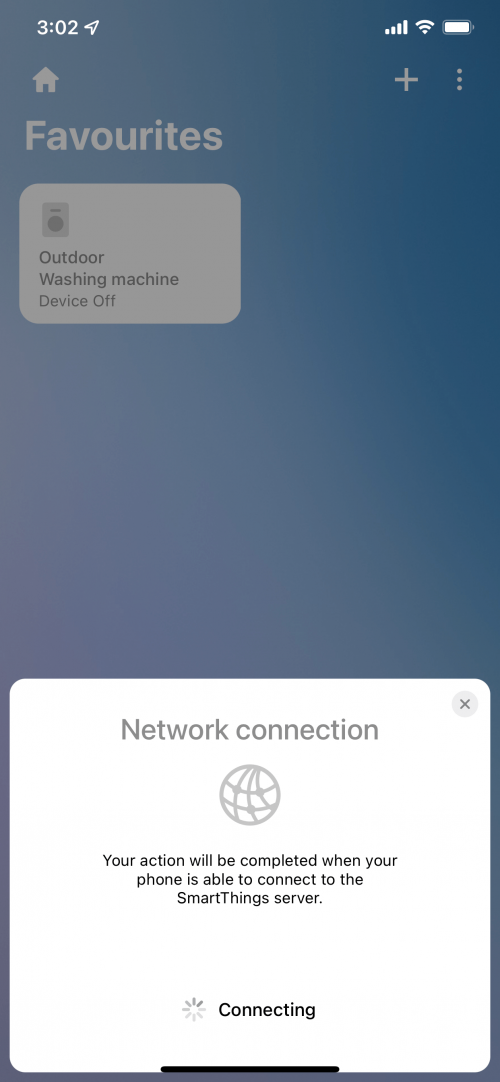
Hello guys, anyone else here Samsung smart things user? I am unable to use smart things app when I am connected to Wi-Fi. It just loads constantly. Works instantly on 4G. I’ve tried disabling ipv6 but the issue is still there.

Anyone else having this problem too ?

user posted image
*
DNS?
Try setup temporary DNS first, tutorial.
https://developers.google.com/speed/public-...s/using#android

Normally the server is at SG, so...

If still can't, then need extra software for checking the IP it is connecting to.

QUOTE(annoymous1234 @ Feb 12 2022, 11:10 AM)
Weird. I didn't know upgrading from 50mbps to 100mbps requires installer to come. I used 100mbps before and no need installer
*
Free speed upgrade 30 days 30M to 100M also not required, hmm...
I think it is because they got in record that your TM modem/router can't support 1Gbps or something. hmm.gif
BenYeeHua
post Feb 12 2022, 11:01 PM

Regular
******
Senior Member
1,873 posts

Joined: Nov 2010


QUOTE(YoungMan @ Feb 12 2022, 12:20 PM)
What made you think it's Celcom? Other provider using TM infra still need TM's technician to come to premise.
*
Got New WiFi SSID without @unifi, I don't think 99% of people will change the router after 10 days of UniFi installation, because most stick with 100Mbps.
And yes, here the wall are thin enough(or the metal inside), that 3 house around me can causing 5Ghz interference with 100Mbps, or 80Mhz.... hmm.gif

Anyways, why TM technician always take so long inside the van?
Just wonder, each time when they come to install UniFi, after finish, they always stay there at least 20 mins, remoting checking the port issues for next customer that open report or?

If they need 20 mins to write a close report for plugging a new port back, then I will just... sweat.gif

QUOTE(coolkwc @ Feb 12 2022, 02:35 PM)
After a long waiting for Unifi (since 2014) it finally here. While i subscribed to 300Mbps you guys seems like jump ship ady. sad.gif Is it really that bad?
Anyway i still need to finished my 2 years contract before can jump although i know my current price can get me a 1Gbps Allo Fiber which is going to available year end or next year, but i just can't wait any longer.
*
QUOTE(akhito @ Feb 12 2022, 03:50 PM)
well international routing monthly got new problems usually at night but if got fibre problem or LOS signal can resolve quite fast by technician team after livechat. Your mileage may vary.  Fee not the cheapest
*
And also depend on area, UniFi so far is the 99.9% uptime if no fiber issues, and it is fast enough if you just browsing 99% of people using.
(while I keep sawing people open post on /k asking about downtime maintain on midnight)

For Chinese like me that like to browsing China website, the experience is....
I can say Crap if the company don't setup CDN server on HK or SG, because the default line for China Telecom ISP is going to US, then to China... doh.gif
Most China mobile game you can't playing smooth, most of them will lag or hang...

The only good line is China Education or any that using CN2, including IPv6, tested and monitoring using qbittorrent. brows.gif

So yes, if no Time or Maxis on your location, then you are comparing UniFi with ADSL2+ streamyx, sure UniFi are good enough for intranet(within MY), but you need to get yourself a VPN for best routing experience to going oversea.

Also, you can
1. jump ship to others with promotion like free TV brows.gif
2. promotion call every year and sms notification from TM(yay~)
3. get same network like UniFi Mobile, if it crap, then it is also crap on UniFi
4. Very likely no public IPv4 in the future(for 300M), and you can't ask for it

A lot more, but Time and Allo is best if you can get it, just Allo not coming to any old location with UniFi, they only pulling cable to location that have
1. smart meter
2. new house
3. No Fiber like UniFi or Maxis

QUOTE(sky_loong_naris @ Feb 12 2022, 07:51 PM)
anyone having problem with unifi connecting to international servers atm?
*
Yes, since 9 PM they start throttling the connection like crazy.... sweat.gif

BenYeeHua
post Feb 15 2022, 09:25 PM

Regular
******
Senior Member
1,873 posts

Joined: Nov 2010


QUOTE(dev/numb @ Feb 12 2022, 11:58 PM)
Why the smart meter requirement? They route the fiber via the electricity meter??
I thought it's just pull their cable to the pole (usually service road behind the house) and gantung a box there, similar to TM.
*
QUOTE(aniq8676 @ Feb 13 2022, 01:25 PM)
1. Allo fiber coverage has nothing to do with TNB Smart meters.

2. Allo will pull their infra into the old/new residential area.

3. Allo will still install their infra even though the area there already has TM infra.

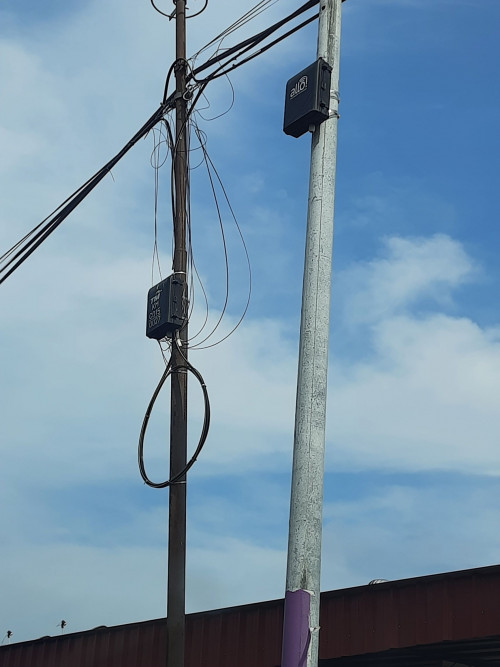
user posted image
*
Good to know this them, because I through the main target for TNB to pull cable is to get smart meter data transfer without using TM fiber. icon_rolleyes.gif

Allo, so far Melaka full with TM fiber, rarely saw any Allo in nearby TM area except new area, guess depend on state law then.

So I guess those area with Allo will get smart meter in near future?

QUOTE(steelv @ Feb 13 2022, 04:06 AM)
I hear alot of allo users complaint about the shit routing.
*
Hmm, so better stick with TM first, even it is bad, but not the worst...

QUOTE(heLL_bOy @ Feb 13 2022, 12:46 AM)
Those CDN provided by China provider like Tencent or Alibaba and some others will have private line direct to mainland and not using public upstream like CT,CU or CM from HK to mainland.

unless you got for cheap option it will connect you to public upstream.
*
Yes, but SG back to mainland is bad than HK back to mainland, image for example, 200 ms in total for HK, 200-1s(or timeout) latency for SG/MY back to mainland with cache miss...
Live stream or others like video that not latency sensitive but bandwidth are working fine, some that got QoS will throttling to 700kb/s, but not live stream. tongue.gif
-----
So far Tencent also having strange setup for their QQ chat history this year, UDP on HK are fine, but TCP on SG/MY/Indonesia(HK sometimes) are taking 5s to load the chat history on cloud, and disconnect might happen after 12 hours... sweat.gif

QUOTE(YoungMan @ Feb 13 2022, 09:18 AM)
In that case the TM appointed installer should be blame for taking shortcut by unplugging other port because they are the one accessing the FDP.
And that's really bad... 5GHZ congestion.
*
Yes, TM fault mostly, I guess the system is messed up because that fiber cable that in use is hold by tenant that moved away but still holding the address.
There is 2 fiber pulled into the house, 2 are broken because they just pull the fiber out with header stay inside the modem for return. brows.gif

So currently using the fiber that pulled from 5 house away, not the fiber box that 2 house away, because that new fiber is much longer than the old one inside of house. laugh.gif

And causing everybody around me using fiber pulled at least 5 house away, so messed up I can say. sweat.gif
----
For that 5Ghz, I was a bit crazy when I find out 5Ghz interference happen with free speed upgrade to 300M for all peoples in this area, with XiaoMi repeater causing more interference. laugh.gif
BenYeeHua
post Feb 15 2022, 09:34 PM

Regular
******
Senior Member
1,873 posts

Joined: Nov 2010


QUOTE(GamaX320 @ Feb 15 2022, 05:48 PM)
After technician came to upgrade router need to turn it on 24hrs? Because the technician told me don’t turn off router until next day just curious why?
*
They should have a special monitoring request for new customer, so if 24 hours the modem still online, then they no need to double check what's going on.

QUOTE(annoymous1234 @ Feb 15 2022, 09:17 PM)
Yes multiple times. I keep checking the cable but it's all tight. This issue happen right after they upgrade my speed and change the modem. Haiz. My remote desktop connection quality also drop. Affecting my work
*
Check for speedtest, if speedtest to TM are fine, then it is not modem.

To find out it is modem or UniFi, there is sign like this.

1. Strange PPPoE connection, like IPv6 dropped, but IPv4 still online, reset of router caused failed PPPoE setup
2. Speedtest unstable, strange latency jitter for speedtest
3. PPPoE disconnect
etc

QUOTE(Hobbez @ Feb 15 2022, 09:23 PM)
It's nothing to do with your equipment la.

Today is very bad. Very unstable.

Anyway, there is a lot of "noise" about WW3 now, so if there is a war, first things to go is the internet (submarine cables will be cut).
*
Yes, this started after undersea fiber broken, depend on where is the server is, cloudflare, twitter for example, IPv6 will get throttling at least 200kb/s after 8 PM.
So far cloudflare are using MY so that's fine, but certain website that get special IPv6 setup will still getting anycast to SG, unlike MY in https://speed.cloudflare.com/

For mine, after 1 AM, most QoS are back to normal, but those China mainlain server still getting packet loss, so for some servers, it is affecting whole day.

5 Pages < 1 2 3 4 5 >Top
Topic ClosedOptions
 

Change to:
| Lo-Fi Version
0.2240sec    0.45    7 queries    GZIP Disabled
Time is now: 14th December 2025 - 04:01 AM