Welcome Guest ( Log In | Register )

Bump Topic Topic Closed RSS Feed
5 Pages < 1 2 3 4 > » Bottom

Outline · [ Standard ] · Linear+

 Official TM UniFi High Speed Broadband Thread V39, READ 1ST PAGE FOR RELEVANT WIFI INFO

views
     
BenYeeHua
post Dec 17 2021, 12:22 PM

Regular
******
Senior Member
1,873 posts

Joined: Nov 2010


QUOTE(jerry123939 @ Dec 17 2021, 12:17 PM)
haih ya, speedtest.net also slow.
*
So it is 2 possible.

1. Badly, the global exchange connection burst at the same time they switch on Private IP for most 30M customers, so not Private IP fault.
2. After switch on the Private IP, the device that handle for Private IP burst for too much users to be handle, QoS setting misconfigured for multi user.
3. TM staff own account have higher QoS than normal customers.

Still thinking which one is it, sadly no Time on landed house, else who want to perform testing to find it out...

---
Quick copy paste from other thread.
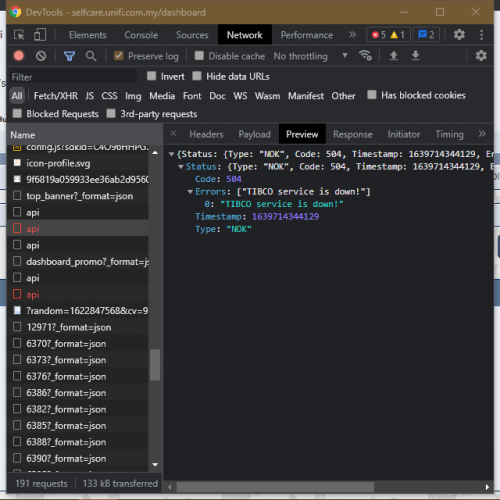
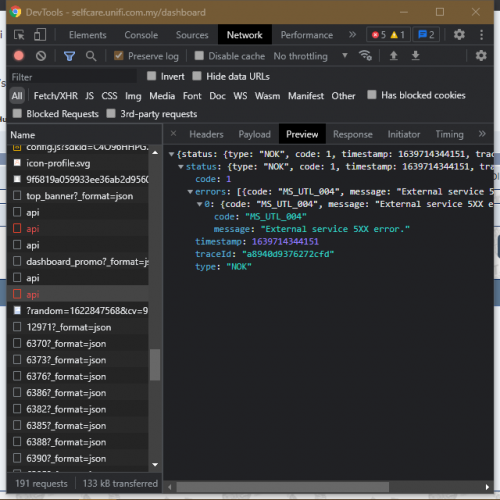
For UniFi portal and self-test, it is their side problem, 500 lol... laugh.gif

» Click to show Spoiler - click again to hide... «


Still finding... hmm.gif

This post has been edited by BenYeeHua: Dec 17 2021, 12:23 PM
BenYeeHua
post Dec 17 2021, 01:46 PM

Regular
******
Senior Member
1,873 posts

Joined: Nov 2010


QUOTE(QuantumEdge @ Dec 17 2021, 01:26 PM)
Why the heck Unifi is so problematic...
*
My best guess is TM are earning money by asking more money for CDN traffic that hosting in Malaysia, they refused.
So they moved CDN back to SG, leaving Malaysia CDN to those content provider that willing to paid the traffic money, in case they want to provide good server to Malaysia users.

So, the ball kicked back to TM, and TM have to bare the cost for paying lot of traffic going to SG.
And us, as UniFi user, are paying to TM to pay those exchange for traffic to SG.

That's why we have expensive traffic cost compare to others, TM are not having cheap traffic for local MY CDN, so they ran to SG CDN.
In the end, TM have to pay for SG exchange, to provide service for MY user to use those services provider that hosted on SG CDN.

Just like Netflix on US, are asking by Comcast to pay the unbalance traffic from Comcast users and Netflix as content provider, they want double the money from both side, like Foodpanda or Grabfood, paid by customer and restaurant. laugh.gif


So you should ask, why TM not willing to sell cheap but reasonable local traffic to local CDN, find a balance point to reduce the cost, but willing to pay for expensive traffic to exchange with SG? hmm.gif
(as it is cheaper for you to pull the local cable to increase the bandwidth, instead of going to another exchange on SG, except they are lazy to pull the local cable la..)

QUOTE(Rhetoric @ Dec 17 2021, 01:32 PM)
Is twitter okay guys?. website load but feed is loading slow
Usually yes.
*
No, packet drop start on TM local private range IP that hosted on SG, so TM are packet dropping now. doh.gif

And no, IPv4 also the same packet drop... sweat.gif

This post has been edited by BenYeeHua: Dec 17 2021, 01:51 PM

BenYeeHua
post Dec 17 2021, 02:33 PM

Regular
******
Senior Member
1,873 posts

Joined: Nov 2010


QUOTE(AV_2018 @ Dec 17 2021, 02:17 PM)
Okay here on browser when browsing profiles without signing in. Videos can load and play without delay. Using Google DNS with IPv6 enabled. The video is loaded from IP belonging to Edgecast CDN via IPv6.
*
So it is area depended?
Melaka, loading take like 1 mins with heavy packet drop, others thing are the same. hmm.gif

This post has been edited by BenYeeHua: Dec 17 2021, 02:34 PM
BenYeeHua
post Dec 17 2021, 03:18 PM

Regular
******
Senior Member
1,873 posts

Joined: Nov 2010


QUOTE(AV_2018 @ Dec 17 2021, 03:07 PM)
Sarawak here.
*
Hmm, so Sarawak are special now with their line routed back to here, maybe QoS priority are higher than normal UniFi user. hmm.gif

Anyways, most thing that hosted on SG are giving me a crappy experience for me now, because heavy packet drop.

QUOTE(westlife @ Dec 17 2021, 03:06 PM)
I received sms from tm about free trial of speed upgrade which I never request at all. Do I need to do anything not to continue with the trial?
*
No, it will force free upgrade for 30 days trial, and your plans will still be the same as now.
BenYeeHua
post Dec 17 2021, 09:56 PM

Regular
******
Senior Member
1,873 posts

Joined: Nov 2010


QUOTE(go626201 @ Dec 17 2021, 04:44 PM)
Normal issue,so just wait tm to fix it.
Quite normal now.

And to be clear 95% of time for normal usage, Public ip or private ip does not have big difference.
Can ask the unifi lite user,they use private ip for long time,other than low upload speed and abit more high latency,all usage is normal with or without public ip.
*
During Streamya era, before I talk to them about CCTV and Public IP switch, opening lowyat caused connection reset, guess port not enough or CloudFlare seen as DDOS user.
Then after switch back Public IP, all went back to normal, just like UniFi.

And now, UniFi are forcing Private IP, I hope this case don't show up anymore.
---
For that IP range, good and bad QoS, I can say it is true.

Someone that I know have a agreement on TM WiFi(yes, that one you can use at any TM WiFi AP), they will give you a private local account for you to use.
After they detect your usage are 100% 24 hours, the private company that sign the contract with you will change the QoS from Business QoS level back to Streamyx level quietly.

This is how TM let you feeling good outside as a potential customer(that using data, but found TM WiFi and trial for it), but feeling bad as Streamyx customer. sweat.gif


Also a very old time, 60.48.x.x is best to China mainland(80ms), HK(70ms) and TW(50ms).
But now, it is China mainland(300ms), HK(50ms) and TW(80ms). doh.gif

This post has been edited by BenYeeHua: Dec 17 2021, 09:58 PM
BenYeeHua
post Dec 18 2021, 11:15 AM

Regular
******
Senior Member
1,873 posts

Joined: Nov 2010


QUOTE(ycs @ Dec 18 2021, 11:01 AM)
oh, i only got a fiberhome router
*
Depend on location, mine home town at N.Sembilan, pulling around 2016 long time ago, then pull extension and extension then give everyone 30M max only, get fiberhome, and having unable to PPPoE issues sometimes, then fixed after maintenance.
Even through it is 30M only, at least it is Fiber, thunder here can be crazy and going through phone line copper, my computer's network card and phone burn like 3 times already, while the ADSL modem safe from it. brows.gif

Here Melaka much older and all under Huawei Modem.

For router, wait, VDSL fiberhome router?
If yes, then great. doh.gif

QUOTE(akhito @ Dec 18 2021, 11:05 AM)
31 is cukup makan only around 35 will have problem ald. usually good installation can get around 17-25 la. well they offer 1 day gurrantee to solve any connection problem so just chill with it.
*
In a very rare case, nothing changed, but mine case are too high sensitive and modem keep disconnect the PPPoE session lol. laugh.gif
As long as it is fiber, I can ensure that the quality is much much much and much better than ADSL/VDSL. icon_rolleyes.gif

Just look outside of my neighbor's fiber cable, it is dropped nearly to the ground(5 m from ground), still no complain from them. laugh.gif doh.gif

This post has been edited by BenYeeHua: Dec 18 2021, 11:18 AM
BenYeeHua
post Dec 18 2021, 06:52 PM

Regular
******
Senior Member
1,873 posts

Joined: Nov 2010


QUOTE(nicktaylor @ Dec 18 2021, 03:53 PM)
My final update :

Technician came around 2pm today,

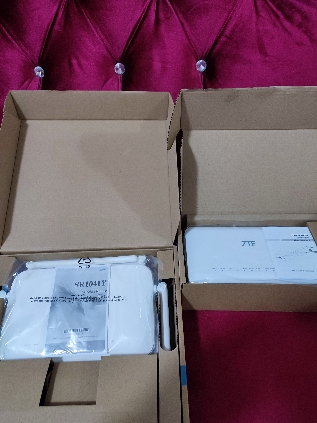
Bringing 2 boxes consist of new router and modem, they see my current modem (not from tm one) , they ask me want to change or not, since I lazy to set my cctv all over again for new ssid, i just said can i just keep those new device as my backup. They say i can.

I repeatedly reconfirm with them are these new devices given will be charged or not. They mention since i updated new package and renew contract it's Foc.

I oso asked, isn't the modem is a lifetime warranty, so can i keep two device at my premise, since if lifetime warranty, if one spoilt then they  should take old spoiled one, and give new. But now im keeping 2 working modem with me.

They said, just keep it. If any issues occur in future, call 100 then the technician will use the backup modem that they giving me for backup. Okay2 jer laa..

Yada.. Yada.. Finally asked my to sign digitally in the technician device.
» Click to show Spoiler - click again to hide... «

*
Good to you, for that cctv setup, except you don't have @unifi at your old SSID, you can just copy paste the SSID and password to new modem. tongue.gif

Hope you already taken a photo on your PPPoE password as your own backup. icon_rolleyes.gif

This post has been edited by BenYeeHua: Dec 18 2021, 06:53 PM
BenYeeHua
post Dec 18 2021, 11:35 PM

Regular
******
Senior Member
1,873 posts

Joined: Nov 2010


QUOTE(John42 @ Dec 18 2021, 08:32 PM)
Is anyone having problem with FB right now?

user posted image
*
You are second one say about this since yesterday, can be Android hang socket bug.

Force stop Facebook, turn off then on your phone WiFi, open FB again, if normal, yes, Android old bug. icon_rolleyes.gif
BenYeeHua
post Dec 19 2021, 02:41 PM

Regular
******
Senior Member
1,873 posts

Joined: Nov 2010


QUOTE(PJng @ Dec 19 2021, 12:10 AM)
Anyway force youtube app on mobile play at least 720p?
So stupid the app, even now 100mbps still auto 480p
Already set wifi higher quality
There is no problem on pc, most of time i watch gameplay, 480p become blur if thing move fast
*
New bug like 1.5 month ago, after update it become like that, just, nah, forget about it, it is Google! tongue.gif

QUOTE(John42 @ Dec 19 2021, 02:00 PM)
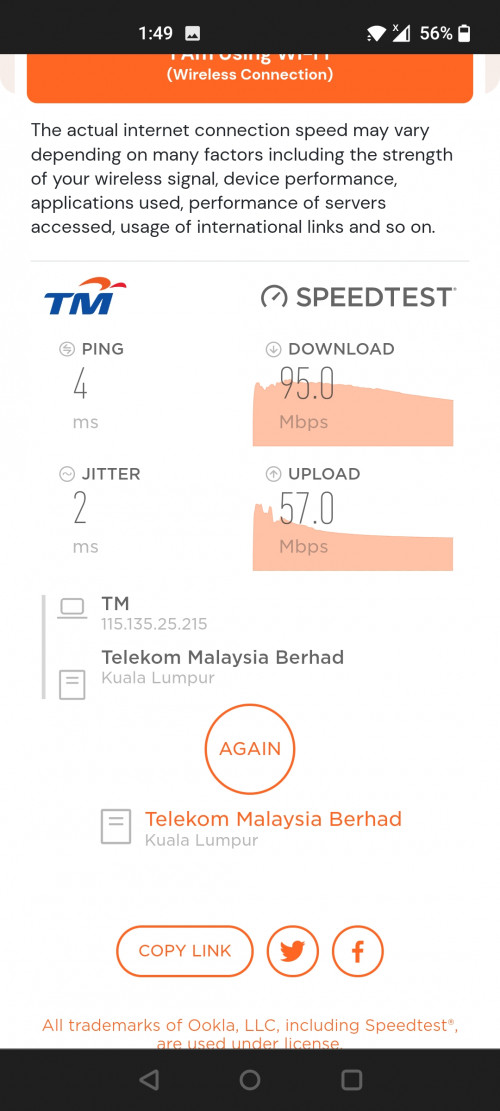
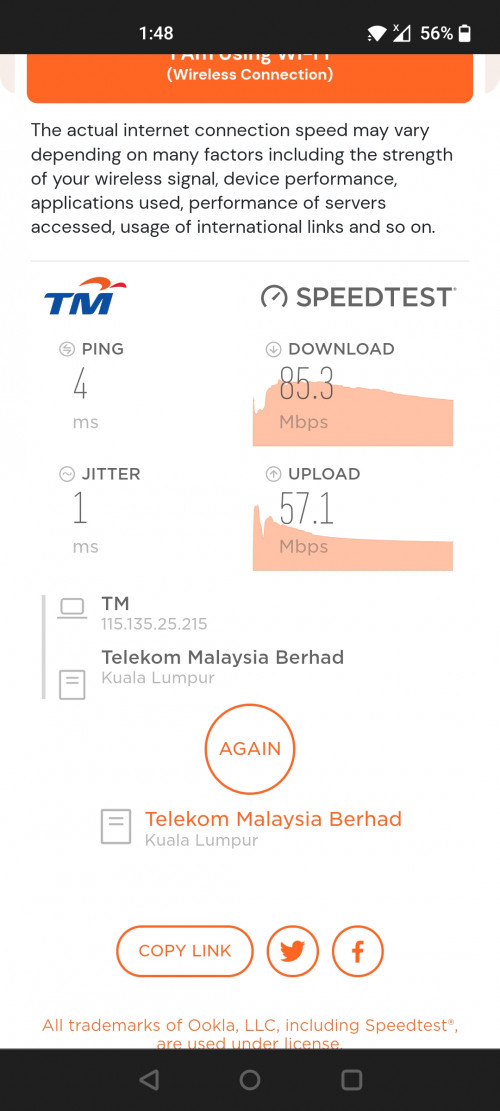
I see I cleared the app data and it's back to normal 😅. I was suspecting with my newly bought Oneplus Nord 5G. This phone when do speedtest on 5Ghz it can't go above 100Mbps. The highest it could go is up to 98.9 Mbps.  The other devices such as Oppo A53 and Redmi 9 can reach up to 118.9Mbps . Already reset the phone wifi settings and even reset the phone but  still the problem persist. Anyhone here using Oneplus device having this kind of issue.

» Click to show Spoiler - click again to hide... «

*
Did you know that...
One plus OxygenOS have too much bug and give up by Oppo?

Now it is replaced by ColorOS, OxygenOS is dead, so... sweat.gif
BenYeeHua
post Dec 21 2021, 12:09 PM

Regular
******
Senior Member
1,873 posts

Joined: Nov 2010


QUOTE(John42 @ Dec 20 2021, 07:37 PM)
I just want to know whether other OnePlus users are facing this issue or not before I go to their Service centre. If it is just a BUG, I can deal with it but what if it is hardware related problem?
*
Some phone having bad antenna for high band 5Ghz, you can try check did your 5Ghz are channel 138, not channel 36 etc

Certain phone compatible with many channel and bandwidth(like 80mhz and 160mhz), but it don't means it is optimized for it, and facing speed drop and interference issues.
BenYeeHua
post Dec 22 2021, 05:04 AM

Regular
******
Senior Member
1,873 posts

Joined: Nov 2010


QUOTE(yongtjunkit @ Dec 22 2021, 04:38 AM)
Seems like it but they require evidence, I used CCTV as the reason to make it easier to understand but in reality don’t have one sweat.gif

Wondering if I can use ASUS router VPN server as a reason?
*
Can try these 2.

1. Saying you VPN back to your home for accessing local CCTV, no IPv6 available for your office because of security issues.
2. Purchase a cheap RM 30-50 CCTV that only allowing open port to access

Or, funny DIY but they don't understand.
3. Using a Android phone or linux virtual machine which using webcam as the CCTV, and open port for it to access. laugh.gif

Still, last time I asked CS when they switch me to Private IP, they don't allow me to switch back Public IP, guess it is only allowed for >100M plans users, even through 100M plan user are getting Private IP la. hmm.gif
BenYeeHua
post Dec 22 2021, 03:12 PM

Regular
******
Senior Member
1,873 posts

Joined: Nov 2010


Fun fact, anyone with a taman/apartment that limited you to 30M plan only, you might be upgraded to 30days trial of 100M already this month, if you speed test can reach 100M dl 50M up(with 5Ghz WiFi or lan cable), then you better maintain the plans before they downgrade you back to 30M. laugh.gif

This post has been edited by BenYeeHua: Dec 22 2021, 03:12 PM
BenYeeHua
post Dec 23 2021, 09:08 PM

Regular
******
Senior Member
1,873 posts

Joined: Nov 2010


QUOTE(gedebe @ Dec 23 2021, 12:43 PM)
means that if the speed is 100M then we shld subscribe to it but still the price is rm129 right?
*
Yes, unless they still reject your upgrade by seeing your speed test running as 100M. doh.gif

Because your area is low budget area, so they limit you to 30M to ensure all of you would not break the total bandwidth that can carry on this fiber signal, as this signal are for whole bigger area that including expensive taman with 800M.

My old town taman outside 1 KM got 800M for 3 floor house, then they pull extension with only 30M for 1-2 floor house in this taman. doh.gif

Unlike China, China is shared total bandwidth, like 10G for the whole signal on fiber, then they give a virtually 50G to most subs/users, as not most users are running on 100% bandwidth, only 20%, so it will still be 10G total bandwidth but dynamic usage, then they can pull more fiber to improve the speed future la. tongue.gif

This post has been edited by BenYeeHua: Dec 23 2021, 09:11 PM
BenYeeHua
post Dec 24 2021, 10:55 PM

Regular
******
Senior Member
1,873 posts

Joined: Nov 2010


QUOTE(PoorMan @ Dec 24 2021, 08:35 AM)
That's just like our mobile data speed. On the best effort basis. If fixed price for a promised bandwidth, then not so good.
*
Yes, but it means, for 100 people that rich on house looking, are getting 800M plan access, for 1k people that not looking rich, only access to 30M, kind of funny because most rich looking house are empty, they all gone to outside because my home town city are dying and reviving as by food city because got KTM upgraded.
So I am unsure total bandwidth for this area using for 50% or not. laugh.gif

QUOTE(soonwai @ Dec 24 2021, 09:32 PM)
Even now can still buy laptop with 100Mbps ethernet port. eg: Dell Inspiron 3505.
*
Some cheap chipset like Realtek or old Qualcomm only can running 100M, running 1G and it might disconnect randomly per 12 hours by spinning fan wind, even with 1 meter long cable, unsolvable case... tongue.gif


BenYeeHua
post Dec 24 2021, 11:02 PM

Regular
******
Senior Member
1,873 posts

Joined: Nov 2010


QUOTE(jhleo1 @ Dec 24 2021, 10:56 PM)
My case everything proceed on the spot at counter and TM point officer told me up to 2 days. I returned home and rest speed the same. Then can't wait just reboot everything then speed upgraded immediately. So my case took few hours only.
*
Yes, just like you don't pay the bill and cut out after 24 hours, then after you paid for it, it will restore just within 10 mins, very quick one. brows.gif
Up to 2 days just for in case they have system error, or the port is unstable, because lot of users just cut the line and leave the house, but the address still holding the line by their account, so TM don't know did your area really can running 300M good or not because of this troublesome users. doh.gif
BenYeeHua
post Dec 25 2021, 03:22 PM

Regular
******
Senior Member
1,873 posts

Joined: Nov 2010


QUOTE(michaelkkl @ Dec 25 2021, 03:12 PM)
A quick lookup shows that Unifi IPv4 to Cloudflare HKG is having some packet loss issue.

IPv6 has no issue as Unifi IPv6 take different route to Cloudflare SGP (via Telstra SG).

Kindly enable IPv6 for better performance to Cloudflare sites.
*
Can confirm, packet drop for SG CDN server too(they failed for downloading data from HK), have to connect JP CDN server to workaround it. doh.gif
All HK line are overloading now, including tencent and baidu.

This post has been edited by BenYeeHua: Dec 25 2021, 03:25 PM
BenYeeHua
post Dec 25 2021, 03:53 PM

Regular
******
Senior Member
1,873 posts

Joined: Nov 2010


QUOTE(heLL_bOy @ Dec 25 2021, 03:33 PM)
i dont have issue on Cloudflare SG PoPs but only HKG PoPs are getting loss packet at 60ms-70ms.
*
The problem is going back to HK, SG to HK also overloaded, so even you are connected to SG, if the data can't obtain from HK, then it is pretty much useless.
For example, Tencent from MY to China also break, they kick me offline at 1 PM, then switched on backup line already.

So far most HK link break, including hkix, which is rare... hmm.gif
A website using CDN at US also failed to going back China, interesting, should be related, I think. hmm.gif

But equinix are fine, just it is using for China Mobile only. tongue.gif
BenYeeHua
post Dec 25 2021, 04:08 PM

Regular
******
Senior Member
1,873 posts

Joined: Nov 2010


QUOTE(heLL_bOy @ Dec 25 2021, 04:00 PM)
which site?

hkix no issue also..

which US cdn provider you mean?

for me, i dont hv issue connecting mainland becos i got few premium server to bypass the CT/CU/CM
*
Hmm, I means, lot of provider going to China are having issues, but I can't verify la, people put the server behind CDN to hide where is their main server, so I can only guess he put it on HK or TW, because he is at mainland. tongue.gif

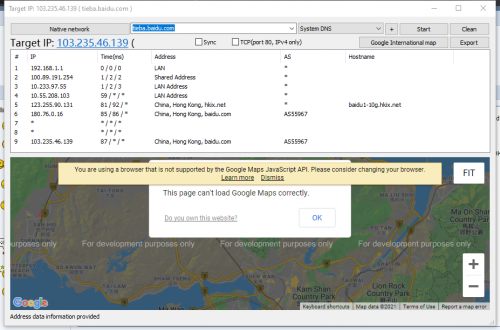
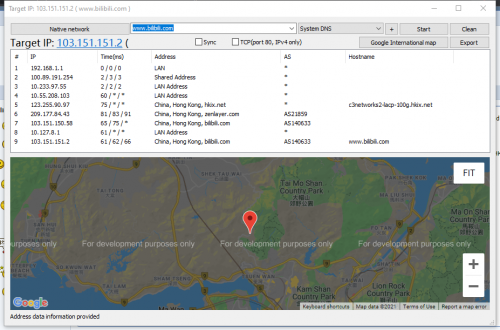
https://tieba.baidu.com/ should be good case for hkix, Bilibili also one, but you will connect to SG, unless you write HK IP to host. icon_rolleyes.gif

QUOTE(Gaia34 @ Dec 25 2021, 04:07 PM)
Experiencing the same issue dry.gif
*
Wait.

Don't tell me, it is another round packet drop for Melaka, JB users only again... doh.gif

This post has been edited by BenYeeHua: Dec 25 2021, 04:09 PM
BenYeeHua
post Dec 25 2021, 04:12 PM

Regular
******
Senior Member
1,873 posts

Joined: Nov 2010


QUOTE(twice1020 @ Dec 25 2021, 04:10 PM)
Guys, try enable IPv6.
Enable IPv6 solve the slow loading problem for me.
*
The problem is, how many website are using IPv6??? doh.gif
BenYeeHua
post Dec 25 2021, 04:30 PM

Regular
******
Senior Member
1,873 posts

Joined: Nov 2010


QUOTE(heLL_bOy @ Dec 25 2021, 04:19 PM)
using public upstream like NTT,PCCW,others go into china of cos got issue this is not first time happening. only Cloudflare certain ip are good to china only the rest provider are still using public upstream connecting into mainland.

only if you paid extra $ you get good connection to china.

tieba.baidu.com ingress traffic is not using HKIX back to TM. not HKIX got issue... i got another server from HKT broadband routing using HKIX no issue on loss packet at all.
*
Wait, so only me is using HKIX going to HK??? doh.gif
So it is really explain why some TM users are having issues, but others are not. brows.gif

» Click to show Spoiler - click again to hide... «

---
And ya, after you said that, it is dropping on internal IP, so it can be TM side on HK dropping packet, before going into hkix... doh.gif

QUOTE(twice1020 @ Dec 25 2021, 04:21 PM)
Sites that using Cloudflare are IPv6 enabled by default.
https://blog.cloudflare.com/98-percent-ipv6/
*
Why you are talking like 98% website also using CloudFlare??? sweat.gif

This post has been edited by BenYeeHua: Dec 25 2021, 04:32 PM

5 Pages < 1 2 3 4 > » Top
Topic ClosedOptions
 

Change to:
| Lo-Fi Version
0.0358sec    0.82    7 queries    GZIP Disabled
Time is now: 14th December 2025 - 04:03 AM