Welcome Guest ( Log In | Register )

Outline · [ Standard ] · Linear+

 TP Link AX50 vs TP Link AX20, Which 1 you prefer?

TP Link AX50 vs TP Link Ax20
 
TP Link AX50 [ 42 ] ** [42.86%]
TP Link AX20 [ 56 ] ** [57.14%]
Total Votes: 98
Guests cannot vote 
views
     
TSAnonymous26
post Oct 28 2020, 12:39 PM, updated 5y ago

Getting Started
**
Junior Member
174 posts

Joined: Dec 2012
Which router is better?
AX50 I heard got overheating issue, any user can confirm this?
Please feel free to leave down your recommendation of any other router which is in the budget range of these 2 devices.
What's the reason behind your choice? please share here, thanks!

Update: After much consideration, decided to grab Asus AX56U instead of TP Link.

This post has been edited by Anonymous26: Jun 3 2021, 01:33 PM
TSAnonymous26
post Oct 28 2020, 02:34 PM

Getting Started
**
Junior Member
174 posts

Joined: Dec 2012
QUOTE(JohnLai @ Oct 28 2020, 02:20 PM)
......Add one more, apparently, running at 160Mhz cause stuttering (interference) issue with cheap unshielded Ethernet cable.

The story:
Last Saturday, two TM technician came to my neighbour house to troubleshoot their "stuttering" Hypptv (the white box decoder).
I visited them and checked them doing the job. When they asked my neighbour when it happened, I realized it was within the week I got my new AX50 router.
Just in case, I reduced AX50 5Ghz channel width from 160Mhz to 80Mhz remotely using my phone WITHOUT them noticing.....and voila, the stuttering of neighbour hypptv gone.

The two TM technicians were still fidgeting around with my neighbour router settings while I tested my AX50.

I noted :
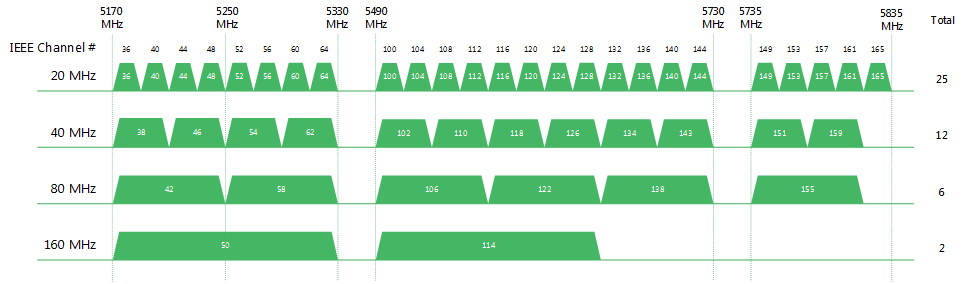
160mhz at channel 36 and 100 will cause the stuttering.
Remember, only two 160mhz channels?
user posted image

Changing back to 80Mhz solves my neighbour hypptv stuttering and blocking artifact issue regardless of channels used.

I can replicate the issue perfectly for my neighbour, but I didn't tell them..... sweat.gif
*
Very in depth analysis bro thumbsup.gif thumbup.gif , so you will prefer AX20 over AX50 as well?
TSAnonymous26
post Oct 28 2020, 06:51 PM

Getting Started
**
Junior Member
174 posts

Joined: Dec 2012
QUOTE(JohnLai @ Oct 28 2020, 06:29 PM)
If I am given the choice, I rather not getting TP-Link product ever again. Serious.
I got 3 TP-Link products (C1200, A6 and AX50)

C1200 = legendary random reboot.
A6 = Non functional IPv6 firewall.
AX50 = BAIT and SWITCH, see below.
Yup, don't forget about the WPA3.

Oh, AX50 will not be getting One MESS and WPA3. TP-Link already confirmed it. puke.gif
*
Any model you prefer? I can take into consideration as well
TSAnonymous26
post Oct 28 2020, 07:13 PM

Getting Started
**
Junior Member
174 posts

Joined: Dec 2012
QUOTE(JohnLai @ Oct 28 2020, 07:05 PM)
ASUS RT-AX56U  brows.gif
Then flash https://www.asuswrt-merlin.net/

» Click to show Spoiler - click again to hide... «


But the price though.... ohmy.gif
*
Got cheap and good 1 or not, this 1 over budget leh haha
TSAnonymous26
post Oct 28 2020, 07:40 PM

Getting Started
**
Junior Member
174 posts

Joined: Dec 2012
QUOTE(JohnLai @ Oct 28 2020, 07:27 PM)
Well, stick with any router with Qualcomm chips.
Openwrt tends to support router with Qualcomm chip. But it is a gamble as openwrt developers might not support some of Qualcomm chip.

For example, I flashed my Archer A6 with OpenWRT snapshot (snapshot version doesn't have LUCI, so I manually installed it via telnet/ssh) to fix the IPv6 firewall issue.
Other feature such as DNS over HTTPS / DNS over TLS  brows.gif  also available. Hassle to setup the VLAN tagging a bit.

The only problem was 5Ghz signal issue https://github.com/openwrt/openwrt/pull/2470 , WHICH was fixed with new board-2.bin  rclxm9.gif

BTW, AX20 is using Broadcom, AVOID at all cost. I think afif92 is mistaken about it using Qualcomm.  hmm.gif
*
Thanks for the enlighten once agn brother, seems like xiaomi model mentioned above could be a good choice too, since it’s using qualcomm chipset
TSAnonymous26
post Nov 1 2020, 05:26 PM

Getting Started
**
Junior Member
174 posts

Joined: Dec 2012
QUOTE(JohnLai @ Oct 31 2020, 07:16 PM)
Weird, 5ghz is fixed on mine. Perhaps our A6 hardware is different? hmm.gif

As for the AX50, it is due to TPLINK shitty support cause Netgear is able to add those WPA3 and "mesh" functionality on same Intel hardware nod.gif

Thus, I agree with you that TS should really opt for Asus router despite the high price. Else TS gonna regret it with TP-Link product later.
*
Hey bro, I had followed all the opinion, decided to increase my budget and bought myself a Asus RT-AX56U, totally 0 regret, the performance of this router is incredible, much much better than my stock TP-Link archer C5V router from Maxis, that TP-Link router is pretty horrible.
TSAnonymous26
post Nov 3 2020, 09:56 PM

Getting Started
**
Junior Member
174 posts

Joined: Dec 2012
QUOTE(NagaK @ Nov 3 2020, 08:08 PM)
Hi guys I’m looking for AX20 router it is good budget router?
11.11 got best discount so I’m planning to get !
My unifi package 800mbps(turbo upgrade)
I’m using maxis provided Airties mesh WiFi as Unifi Router sucks in WiFi coverage
So even new router I’ll keep using Airties as backup WiFi
signal

Which is good Ax50 or AX20
*
Hey bro, I’m now using Asus RT-AX56U, i highly recommend you get this router, much better than TP-Link, not to mention there are sales on shopee 11.11, you can get it for less than RM300, amazing performance and built quality
TSAnonymous26
post Nov 3 2020, 11:44 PM

Getting Started
**
Junior Member
174 posts

Joined: Dec 2012
QUOTE(NagaK @ Nov 3 2020, 10:11 PM)
Good to hear any issues like AX3000? Because I saw in ASUS thread many of them complaining that’s why I curious??
Plus how’s coverage it can cover up typical double story?
*
Nope, the Asus AX56U issue is on software side, and they had released a beta firmware where it managed to address the reported issue, but for me Im using the official firmware and i don encounter any issue as per mentioned at all. Avoid tplink AX3000, that 1 is hardware design flaw, intel chipset in such slim body design will overheat very easily.

For the coverage, im currently staying in 1200sqft condo, the coverage is much stronger compare to my previous router.

Edit:

Speedtest result from previous 2 weeks old tplink router, very unstable performance with constant packet loss, this result was taken right beside the router.
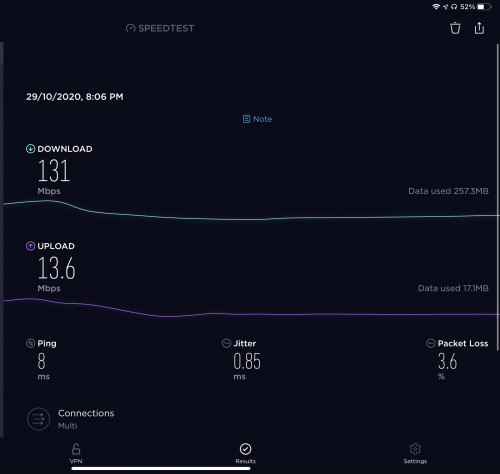
user posted image

Speedtest result from my room with Asus AX56U, 0 packet loss, incredible speed! rclxm9.gif Asus also have much better firmware support, based on my findings, their old router until today still constantly getting new firmware upgrade, below RM300 on Shopee sales is a damn steal!
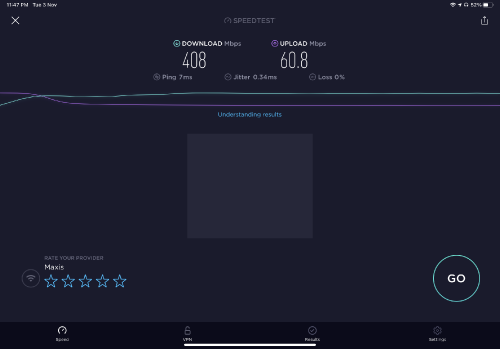
user posted image

FYI: I’m using 300mbps maxis fibre package, with 50mbps upload speed

This post has been edited by Anonymous26: Nov 4 2020, 12:05 AM

TSAnonymous26
post Nov 3 2020, 11:57 PM

Getting Started
**
Junior Member
174 posts

Joined: Dec 2012
QUOTE(Jjuggler @ Nov 3 2020, 11:42 PM)
I don't favor to the Taiwanese brand tbh, but I do admit they are committed to give the best to their customers through a proper R&D and way better in terms of moving forward by providing a good after-sales service. As mentioned by brother Anonymous26, AX56U is indeed a good router. In fact, I personally bought a unit of AX56U and currently in use.

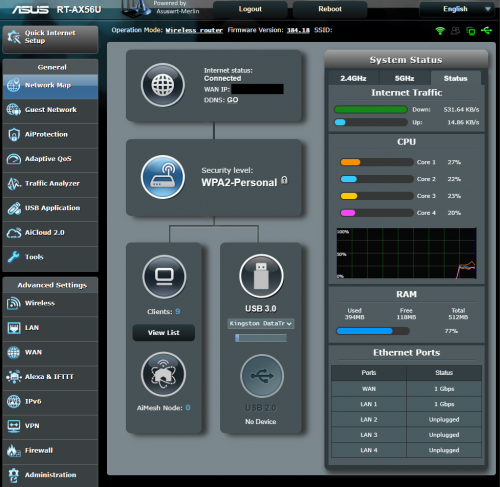
I've personally bought & reviewed the AX20 from TP-Link and the router is good for basic use. It also has WPA3 encryption by default (stock firmware). After I sold my edgerouter 6p due to under-utilization of its true potential, I settled down with AX56U of course flashed with Asus-Merlin firmware due to a few favorable scripts that benefits me. However doing so, WPA3 is not yet implemented in the merlin build for this model. So only stock firmware offers WPA3 by default.

Image attached as a proof:

user posted image
*
Hey bro, indeed, this is my 1st asus router and they are truly impressive, since this is my 1st asus router, do u mind explain to me the benefit of using merlin firmware over stock? Im still a newbie in this field tongue.gif

This post has been edited by Anonymous26: Nov 4 2020, 12:00 AM
TSAnonymous26
post Nov 4 2020, 09:42 AM

Getting Started
**
Junior Member
174 posts

Joined: Dec 2012
QUOTE(nonamer @ Nov 4 2020, 08:54 AM)
i was wrong i think they do support ofdma but somehow is not specified in Wikidevi...maybe initially not supported but now they do

ax50 support 160mhz and is intel chipset same as ax200 adapter...especially important if it is to be use in gaming if want to ensure the best visual quality and experience

if no gaming requirement then xiaomi/redmi or ax20 will be better cause uses less power

https://wikidevi.wi-cat.ru/TP-LINK_Archer_AX20
https://wikidevi.wi-cat.ru/TP-LINK_Archer_AX50
https://wikidevi.wi-cat.ru/Xiaomi_Mi_AX1800
*
If you are gaming, stability is more important than everything else, AX50 has been known for issue such as overheating, the reputation of this particular mode is quite bad therefore there are a lot of discount for this model, any computer shop is selling it cheaper than AX20. If you are on budget, go for AX20, if you willing to spend abit more, go for Asus, avoid AX50
TSAnonymous26
post Nov 4 2020, 10:56 AM

Getting Started
**
Junior Member
174 posts

Joined: Dec 2012
QUOTE(NagaK @ Nov 4 2020, 02:48 AM)
Thank you for your feedback definitely will buy ASUS and I always felt ASUS being premium brand giving good routers hope 11.11 sales I get good deals just now i searched non of them had available for now
*
QUOTE(wiisg @ Nov 4 2020, 04:31 AM)
How to get rm300 deal bro
*
https://shopee.com.my/ASUS-Router-RT-AX56U-...4247.6610567728

RM285 on 11.11, don't miss the deal rclxm9.gif
Last week I just bought this router from Harvey Normal for RM450, damn blush.gif

QUOTE(pl95077 @ Nov 4 2020, 10:38 AM)
This is interesting, can share more how intel chipset on ax50 and ax20e0 adapter can ensure the best visual quality and experience, thank you.
*
I also wonder how ax50 can improve the visual quality, mind sharing more??

This post has been edited by Anonymous26: Nov 4 2020, 10:58 AM
TSAnonymous26
post Nov 5 2020, 10:51 AM

Getting Started
**
Junior Member
174 posts

Joined: Dec 2012
QUOTE(pokeat @ Nov 5 2020, 12:34 AM)
Added to cart, thanks for the link ! Currently using D-Link DIR AX1500, IMO wifi is worse than unifi stock router(Living in 2-storey 1200sqft, upper floor signal  doh.gif using Tenda Range Extender). Having 800mbps plan, I knew the speed would be bottleneck using stock router. Didn't expect D-Link router that sucks. Is there any wifi 6 router best budget for Unifi 800mbps plan ?
*
No problem bro, make sure to check out your order during the period of 12am-2am then only you will be entitled for the discount. D-Link has been known for their awful firmware, for best budget Wifi 6 router, I think the best choice now should still be Asus AX56U, of course the price is definitely more expensive than TP-Link's offering, but what you get is best in class software support. The hardware is well-designed too, it doesn't feel hot or warm even after extended period of intensive usage. After I switch my old TP-Link router to Asus, I definitely able to notice the network quality of my home has vastly improved in terms of speed and stability. I bought this router for RM450 without any sales, but still I think it is well worth it and I am glad I forked out the extra pennies opted for Asus router, this is definitely something I'm going to use for years ahead.

This post has been edited by Anonymous26: Nov 5 2020, 11:06 AM
TSAnonymous26
post Nov 5 2020, 03:13 PM

Getting Started
**
Junior Member
174 posts

Joined: Dec 2012
QUOTE(imahappyklown @ Nov 5 2020, 12:45 PM)
This is the link from previous mentioned.

Question. I live in a two story house and was planning to get an AX20 paired with Mesh Wifi (Deco 4 maybe?). Should I opt for the RT-AX56U without mesh instead if the price are similar to each other (promo)?

At peak time there's about 20 devices connected (phones,pc,laptop), oh and we're not really power users.

Thanks.

PS. Currently using the stock router provided by Maxis, the Archer C5V. Its horrible lol.
*
Why not just buy 2 RT-AX56U during the sales and setup AiMesh? Mind sharing what's the issue you facing with your Archer C5V? I doubt single router alone is enough to cover your two storey house

This post has been edited by Anonymous26: Nov 5 2020, 03:15 PM
TSAnonymous26
post Jun 3 2021, 01:23 PM

Getting Started
**
Junior Member
174 posts

Joined: Dec 2012
QUOTE(blaze91 @ Jun 3 2021, 10:27 AM)
I came across this thread in when in midst of considering to buy tplink ax20. I want to replace the shitty modem given by Maxis Fiber(Archer C5v together with AirTies ).
After going through reviews here, seems like ASUS Router RT-AX56U is being recommended.

p.s: Im staying in a condo and the shitty router's connection is worst, thank god got airties but experienced DC many times. Sigh
Considering the date of this thread since last year, is RT-AX56U is still worth it to get? And also what is the difference with RT-AX55?? I noticed that the ram size only different.
*
Dot not underestimate the ram size of a router, bigger ram size will definitely result in better capabilities to handle higher network traffic, the benefit of bigger ram is more obvious when there are more devices connected to the network and torrenting. Not to mention, AX55 does not have Merlin support at the moment. Based on the specification, it seems there are also some missing features in comparison to AX-56U. The price difference between the 2 is not obvious, i strongly recommend you to get AX-56U, I’ve been using this router close to 1 year, 0 regret, insanely huge improvement from the shitty Maxis and Unifi Router, and it’s getting better with the release of every new firmware update.

This post has been edited by Anonymous26: Jun 3 2021, 01:26 PM


Change to:
| Lo-Fi Version
0.0620sec    0.92    8 queries    GZIP Disabled
Time is now: 18th December 2025 - 07:17 AM