Welcome Guest ( Log In | Register )

5 Pages  1 2 3 > » Bottom

Outline · [ Standard ] · Linear+

 TP Link AX50 vs TP Link AX20, Which 1 you prefer?

TP Link AX50 vs TP Link Ax20
 
TP Link AX50 [ 42 ] ** [42.86%]
TP Link AX20 [ 56 ] ** [57.14%]
Total Votes: 98
Guests cannot vote 
views
     
TSAnonymous26
post Oct 28 2020, 12:39 PM, updated 5y ago

Getting Started
**
Junior Member
174 posts

Joined: Dec 2012
Which router is better?
AX50 I heard got overheating issue, any user can confirm this?
Please feel free to leave down your recommendation of any other router which is in the budget range of these 2 devices.
What's the reason behind your choice? please share here, thanks!

Update: After much consideration, decided to grab Asus AX56U instead of TP Link.

This post has been edited by Anonymous26: Jun 3 2021, 01:33 PM
muhibah
post Oct 28 2020, 01:13 PM

Getting Started
**
Junior Member
241 posts

Joined: Jan 2003
From: Miri, Sarawak


I bought ax20. Having 100mbps speed, i got 80mbps on the farthest corner of my upper floor double storey 20x75 terrace house. Router location at living room near stairs ground floor

This post has been edited by muhibah: Oct 28 2020, 01:14 PM
blacktubi
post Oct 28 2020, 01:35 PM

-
Group Icon
Elite
8,420 posts

Joined: Jul 2008

All AX3000 routers in the market will only run at AX1800 mode by default.

AX3000 is achieved by 160Mhz which is only supported by one device which is Intel AX200.

All routers I have tested disable 160Mhz by default as 160Mhz causes more harm than good.

I will buy the Archer AX20 if I am looking for a budget router. smile.gif
JohnLai
post Oct 28 2020, 02:20 PM

Skeptical Cat
*******
Senior Member
3,669 posts

Joined: Apr 2006
QUOTE(blacktubi @ Oct 28 2020, 01:35 PM)
All AX3000 routers in the market will only run at AX1800 mode by default.

AX3000 is achieved by 160Mhz which is only supported by one device which is Intel AX200.

All routers I have tested disable 160Mhz by default as 160Mhz causes more harm than good.

I will buy the Archer AX20 if I am looking for a budget router. smile.gif
*
......Add one more, apparently, running at 160Mhz cause stuttering (interference) issue with cheap unshielded Ethernet cable.

The story:
Last Saturday, two TM technician came to my neighbour house to troubleshoot their "stuttering" Hypptv (the white box decoder).
I visited them and checked them doing the job. When they asked my neighbour when it happened, I realized it was within the week I got my new AX50 router.
Just in case, I reduced AX50 5Ghz channel width from 160Mhz to 80Mhz remotely using my phone WITHOUT them noticing.....and voila, the stuttering of neighbour hypptv gone.

The two TM technicians were still fidgeting around with my neighbour router settings while I tested my AX50.

I noted :
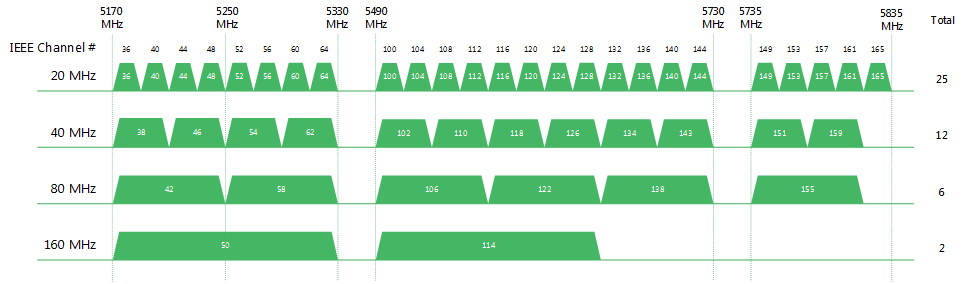
160mhz at channel 36 and 100 will cause the stuttering.
Remember, only two 160mhz channels?
user posted image

Changing back to 80Mhz solves my neighbour hypptv stuttering and blocking artifact issue regardless of channels used.

I can replicate the issue perfectly for my neighbour, but I didn't tell them..... sweat.gif


TSAnonymous26
post Oct 28 2020, 02:34 PM

Getting Started
**
Junior Member
174 posts

Joined: Dec 2012
QUOTE(JohnLai @ Oct 28 2020, 02:20 PM)
......Add one more, apparently, running at 160Mhz cause stuttering (interference) issue with cheap unshielded Ethernet cable.

The story:
Last Saturday, two TM technician came to my neighbour house to troubleshoot their "stuttering" Hypptv (the white box decoder).
I visited them and checked them doing the job. When they asked my neighbour when it happened, I realized it was within the week I got my new AX50 router.
Just in case, I reduced AX50 5Ghz channel width from 160Mhz to 80Mhz remotely using my phone WITHOUT them noticing.....and voila, the stuttering of neighbour hypptv gone.

The two TM technicians were still fidgeting around with my neighbour router settings while I tested my AX50.

I noted :
160mhz at channel 36 and 100 will cause the stuttering.
Remember, only two 160mhz channels?
user posted image

Changing back to 80Mhz solves my neighbour hypptv stuttering and blocking artifact issue regardless of channels used.

I can replicate the issue perfectly for my neighbour, but I didn't tell them..... sweat.gif

*
Very in depth analysis bro thumbsup.gif thumbup.gif , so you will prefer AX20 over AX50 as well?
afif92
post Oct 28 2020, 05:36 PM

Casual
***
Junior Member
374 posts

Joined: Mar 2010
Better go for AX20

Why? because AX50 is using Intel chipset while AX20 is using Broadcom chipset which in future you may or may not receive Tplink One Mesh feature if choose AX50.
SUSnonamer
post Oct 28 2020, 05:54 PM

Getting Started
**
Junior Member
224 posts

Joined: Apr 2019
ax20 doesnt support ofdma and mu-mimo (broadcom doesnt support mu-mimo for ax200)

ax50 doesnt support ofdma but should support mu-mimo since same intel chipset

better get xiaomi ax1800/redmi ax5 which support both ofdma and mu-mimo
JohnLai
post Oct 28 2020, 06:29 PM

Skeptical Cat
*******
Senior Member
3,669 posts

Joined: Apr 2006
QUOTE(Anonymous26 @ Oct 28 2020, 02:34 PM)
Very in depth analysis bro  thumbsup.gif  thumbup.gif , so you will prefer AX20 over AX50 as well?
*
If I am given the choice, I rather not getting TP-Link product ever again. Serious.
I got 3 TP-Link products (C1200, A6 and AX50)

C1200 = legendary random reboot.
A6 = Non functional IPv6 firewall.
AX50 = BAIT and SWITCH, see below.

QUOTE(afif92 @ Oct 28 2020, 05:36 PM)
Better go for AX20

Why? because AX50 is using Intel chipset while AX20 is using Broadcom chipset which in future you [strike] may or may[/strike] not receive Tplink One Mesh feature if choose AX50.
*
Yup, don't forget about the WPA3.

Oh, AX50 will not be getting One MESS and WPA3. TP-Link already confirmed it. puke.gif
TSAnonymous26
post Oct 28 2020, 06:51 PM

Getting Started
**
Junior Member
174 posts

Joined: Dec 2012
QUOTE(JohnLai @ Oct 28 2020, 06:29 PM)
If I am given the choice, I rather not getting TP-Link product ever again. Serious.
I got 3 TP-Link products (C1200, A6 and AX50)

C1200 = legendary random reboot.
A6 = Non functional IPv6 firewall.
AX50 = BAIT and SWITCH, see below.
Yup, don't forget about the WPA3.

Oh, AX50 will not be getting One MESS and WPA3. TP-Link already confirmed it. puke.gif
*
Any model you prefer? I can take into consideration as well
JohnLai
post Oct 28 2020, 07:05 PM

Skeptical Cat
*******
Senior Member
3,669 posts

Joined: Apr 2006
QUOTE(Anonymous26 @ Oct 28 2020, 06:51 PM)
Any model you prefer? I can take into consideration as well
*
ASUS RT-AX56U brows.gif
Then flash https://www.asuswrt-merlin.net/

» Click to show Spoiler - click again to hide... «


But the price though.... ohmy.gif

This post has been edited by JohnLai: Oct 28 2020, 07:05 PM
TSAnonymous26
post Oct 28 2020, 07:13 PM

Getting Started
**
Junior Member
174 posts

Joined: Dec 2012
QUOTE(JohnLai @ Oct 28 2020, 07:05 PM)
ASUS RT-AX56U  brows.gif
Then flash https://www.asuswrt-merlin.net/

» Click to show Spoiler - click again to hide... «


But the price though.... ohmy.gif
*
Got cheap and good 1 or not, this 1 over budget leh haha
JohnLai
post Oct 28 2020, 07:27 PM

Skeptical Cat
*******
Senior Member
3,669 posts

Joined: Apr 2006
QUOTE(Anonymous26 @ Oct 28 2020, 07:13 PM)
Got cheap and good 1 or not, this 1 over budget leh haha
*
Well, stick with any router with Qualcomm chips.
Openwrt tends to support router with Qualcomm chip. But it is a gamble as openwrt developers might not support some of Qualcomm chip.

For example, I flashed my Archer A6 with OpenWRT snapshot (snapshot version doesn't have LUCI, so I manually installed it via telnet/ssh) to fix the IPv6 firewall issue.
Other feature such as DNS over HTTPS / DNS over TLS brows.gif also available. Hassle to setup the VLAN tagging a bit.

The only problem was 5Ghz signal issue https://github.com/openwrt/openwrt/pull/2470 , WHICH was fixed with new board-2.bin rclxm9.gif

BTW, AX20 is using Broadcom, AVOID at all cost. I think afif92 is mistaken about it using Qualcomm. hmm.gif

TSAnonymous26
post Oct 28 2020, 07:40 PM

Getting Started
**
Junior Member
174 posts

Joined: Dec 2012
QUOTE(JohnLai @ Oct 28 2020, 07:27 PM)
Well, stick with any router with Qualcomm chips.
Openwrt tends to support router with Qualcomm chip. But it is a gamble as openwrt developers might not support some of Qualcomm chip.

For example, I flashed my Archer A6 with OpenWRT snapshot (snapshot version doesn't have LUCI, so I manually installed it via telnet/ssh) to fix the IPv6 firewall issue.
Other feature such as DNS over HTTPS / DNS over TLS  brows.gif  also available. Hassle to setup the VLAN tagging a bit.

The only problem was 5Ghz signal issue https://github.com/openwrt/openwrt/pull/2470 , WHICH was fixed with new board-2.bin  rclxm9.gif

BTW, AX20 is using Broadcom, AVOID at all cost. I think afif92 is mistaken about it using Qualcomm.  hmm.gif
*
Thanks for the enlighten once agn brother, seems like xiaomi model mentioned above could be a good choice too, since it’s using qualcomm chipset
afif92
post Oct 29 2020, 01:54 AM

Casual
***
Junior Member
374 posts

Joined: Mar 2010
QUOTE(JohnLai @ Oct 28 2020, 07:27 PM)
Well, stick with any router with Qualcomm chips.
Openwrt tends to support router with Qualcomm chip. But it is a gamble as openwrt developers might not support some of Qualcomm chip.

For example, I flashed my Archer A6 with OpenWRT snapshot (snapshot version doesn't have LUCI, so I manually installed it via telnet/ssh) to fix the IPv6 firewall issue.
Other feature such as DNS over HTTPS / DNS over TLS  brows.gif  also available. Hassle to setup the VLAN tagging a bit.

The only problem was 5Ghz signal issue https://github.com/openwrt/openwrt/pull/2470 , WHICH was fixed with new board-2.bin  rclxm9.gif

BTW, AX20 is using Broadcom, AVOID at all cost. I think afif92 is mistaken about it using Qualcomm.  hmm.gif
*
Where did I say AX20 using Qualcomm? I said it is using Broadcom.. Please check back.
fkinmeng
post Oct 30 2020, 06:12 PM

Look at all my stars!!
*******
Senior Member
6,373 posts

Joined: May 2007
AX-50 going to be on sale for RM250 during 11.11, is it worth it fot basic user?
JohnLai
post Oct 30 2020, 07:14 PM

Skeptical Cat
*******
Senior Member
3,669 posts

Joined: Apr 2006
QUOTE(fkinmeng @ Oct 30 2020, 06:12 PM)
AX-50 going to be on sale for RM250 during 11.11, is it worth it fot basic user?
*
Nope. dry.gif

fkinmeng
post Oct 30 2020, 09:33 PM

Look at all my stars!!
*******
Senior Member
6,373 posts

Joined: May 2007
QUOTE(JohnLai @ Oct 30 2020, 07:14 PM)
Nope.  dry.gif
*
Ah, ok then, thanks for the advice. smile.gif
JohnLai
post Oct 31 2020, 07:16 PM

Skeptical Cat
*******
Senior Member
3,669 posts

Joined: Apr 2006
QUOTE(arthurmorgan @ Oct 30 2020, 09:20 PM)
Openwrt is not really a miracle, i flashed my Archer A6 with both prebuild Openwrt at the bottom of the github pull request thread that you linked to. Neither of them really solved the 5 ghz issues. In fact, the 5 ghz speed and range is much worst than TM provided DIR 842.

The reason why A6/C6 and DIR842 are still not supported in stable branch ( only unstable snapshot available for now ) is quite clear. Some proprietary blobs from Qualcomm on newer chips such as QCA988x are still troublesome for developers to reverse engineer and fixing that then push them to Linux kernel upstream and Openwrt. I can see similar 5ghz issues on other routers with identical hardware with C6/A6/DIR842 ( the three have essentially identical hardware).

Oh to keep this in topic, AX20 is recommended for budget picks despite the generally bad software support from TPLINK on their products, if only you have limited budget <300. Avoid AX50 due to issues mentioned above due to Intel hardware limitations (or TPLINK shitty support). If you really want AX3000 class router, step up and get it from ASUS. ASUS is the only choice unfortunately ( despite the price premium ) if you want to get decent router with decent support.
*
Weird, 5ghz is fixed on mine. Perhaps our A6 hardware is different? hmm.gif

As for the AX50, it is due to TPLINK shitty support cause Netgear is able to add those WPA3 and "mesh" functionality on same Intel hardware nod.gif

Thus, I agree with you that TS should really opt for Asus router despite the high price. Else TS gonna regret it with TP-Link product later.
TSAnonymous26
post Nov 1 2020, 05:26 PM

Getting Started
**
Junior Member
174 posts

Joined: Dec 2012
QUOTE(JohnLai @ Oct 31 2020, 07:16 PM)
Weird, 5ghz is fixed on mine. Perhaps our A6 hardware is different? hmm.gif

As for the AX50, it is due to TPLINK shitty support cause Netgear is able to add those WPA3 and "mesh" functionality on same Intel hardware nod.gif

Thus, I agree with you that TS should really opt for Asus router despite the high price. Else TS gonna regret it with TP-Link product later.
*
Hey bro, I had followed all the opinion, decided to increase my budget and bought myself a Asus RT-AX56U, totally 0 regret, the performance of this router is incredible, much much better than my stock TP-Link archer C5V router from Maxis, that TP-Link router is pretty horrible.
NagaK
post Nov 3 2020, 08:08 PM

Regular
******
Senior Member
1,196 posts

Joined: Sep 2018


Hi guys I’m looking for AX20 router it is good budget router?
11.11 got best discount so I’m planning to get !
My unifi package 800mbps(turbo upgrade)
I’m using maxis provided Airties mesh WiFi as Unifi Router sucks in WiFi coverage
So even new router I’ll keep using Airties as backup WiFi
signal

Which is good Ax50 or AX20


5 Pages  1 2 3 > » Top
 

Change to:
| Lo-Fi Version
0.0497sec    0.74    7 queries    GZIP Disabled
Time is now: 17th December 2025 - 04:08 PM