Welcome Guest ( Log In | Register )

Outline · [ Standard ] · Linear+

 TP Link AX50 vs TP Link AX20, Which 1 you prefer?

TP Link AX50 vs TP Link Ax20
 
TP Link AX50 [ 42 ] ** [42.86%]
TP Link AX20 [ 56 ] ** [57.14%]
Total Votes: 98
Guests cannot vote 
views
     
TSAnonymous26
post Oct 28 2020, 12:39 PM, updated 5y ago

Getting Started
**
Junior Member
174 posts

Joined: Dec 2012
Which router is better?
AX50 I heard got overheating issue, any user can confirm this?
Please feel free to leave down your recommendation of any other router which is in the budget range of these 2 devices.
What's the reason behind your choice? please share here, thanks!

Update: After much consideration, decided to grab Asus AX56U instead of TP Link.

This post has been edited by Anonymous26: Jun 3 2021, 01:33 PM
muhibah
post Oct 28 2020, 01:13 PM

Getting Started
**
Junior Member
241 posts

Joined: Jan 2003
From: Miri, Sarawak


I bought ax20. Having 100mbps speed, i got 80mbps on the farthest corner of my upper floor double storey 20x75 terrace house. Router location at living room near stairs ground floor

This post has been edited by muhibah: Oct 28 2020, 01:14 PM
blacktubi
post Oct 28 2020, 01:35 PM

-
Group Icon
Elite
8,421 posts

Joined: Jul 2008

All AX3000 routers in the market will only run at AX1800 mode by default.

AX3000 is achieved by 160Mhz which is only supported by one device which is Intel AX200.

All routers I have tested disable 160Mhz by default as 160Mhz causes more harm than good.

I will buy the Archer AX20 if I am looking for a budget router. smile.gif
JohnLai
post Oct 28 2020, 02:20 PM

Skeptical Cat
*******
Senior Member
3,669 posts

Joined: Apr 2006
QUOTE(blacktubi @ Oct 28 2020, 01:35 PM)
All AX3000 routers in the market will only run at AX1800 mode by default.

AX3000 is achieved by 160Mhz which is only supported by one device which is Intel AX200.

All routers I have tested disable 160Mhz by default as 160Mhz causes more harm than good.

I will buy the Archer AX20 if I am looking for a budget router. smile.gif
*
......Add one more, apparently, running at 160Mhz cause stuttering (interference) issue with cheap unshielded Ethernet cable.

The story:
Last Saturday, two TM technician came to my neighbour house to troubleshoot their "stuttering" Hypptv (the white box decoder).
I visited them and checked them doing the job. When they asked my neighbour when it happened, I realized it was within the week I got my new AX50 router.
Just in case, I reduced AX50 5Ghz channel width from 160Mhz to 80Mhz remotely using my phone WITHOUT them noticing.....and voila, the stuttering of neighbour hypptv gone.

The two TM technicians were still fidgeting around with my neighbour router settings while I tested my AX50.

I noted :
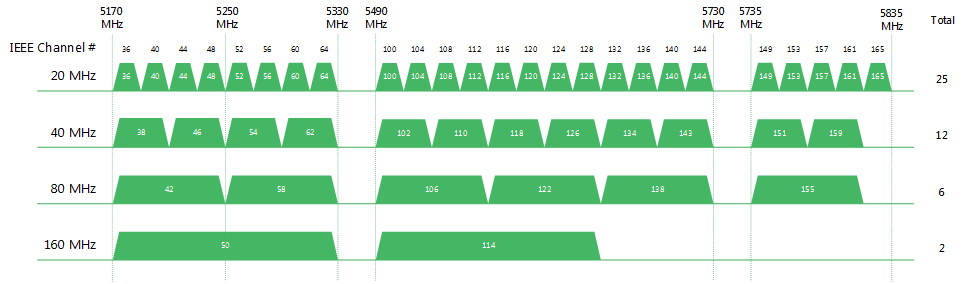
160mhz at channel 36 and 100 will cause the stuttering.
Remember, only two 160mhz channels?
user posted image

Changing back to 80Mhz solves my neighbour hypptv stuttering and blocking artifact issue regardless of channels used.

I can replicate the issue perfectly for my neighbour, but I didn't tell them..... sweat.gif


TSAnonymous26
post Oct 28 2020, 02:34 PM

Getting Started
**
Junior Member
174 posts

Joined: Dec 2012
QUOTE(JohnLai @ Oct 28 2020, 02:20 PM)
......Add one more, apparently, running at 160Mhz cause stuttering (interference) issue with cheap unshielded Ethernet cable.

The story:
Last Saturday, two TM technician came to my neighbour house to troubleshoot their "stuttering" Hypptv (the white box decoder).
I visited them and checked them doing the job. When they asked my neighbour when it happened, I realized it was within the week I got my new AX50 router.
Just in case, I reduced AX50 5Ghz channel width from 160Mhz to 80Mhz remotely using my phone WITHOUT them noticing.....and voila, the stuttering of neighbour hypptv gone.

The two TM technicians were still fidgeting around with my neighbour router settings while I tested my AX50.

I noted :
160mhz at channel 36 and 100 will cause the stuttering.
Remember, only two 160mhz channels?
user posted image

Changing back to 80Mhz solves my neighbour hypptv stuttering and blocking artifact issue regardless of channels used.

I can replicate the issue perfectly for my neighbour, but I didn't tell them..... sweat.gif
*
Very in depth analysis bro thumbsup.gif thumbup.gif , so you will prefer AX20 over AX50 as well?
afif92
post Oct 28 2020, 05:36 PM

Casual
***
Junior Member
374 posts

Joined: Mar 2010
Better go for AX20

Why? because AX50 is using Intel chipset while AX20 is using Broadcom chipset which in future you may or may not receive Tplink One Mesh feature if choose AX50.
SUSnonamer
post Oct 28 2020, 05:54 PM

Getting Started
**
Junior Member
224 posts

Joined: Apr 2019
ax20 doesnt support ofdma and mu-mimo (broadcom doesnt support mu-mimo for ax200)

ax50 doesnt support ofdma but should support mu-mimo since same intel chipset

better get xiaomi ax1800/redmi ax5 which support both ofdma and mu-mimo
JohnLai
post Oct 28 2020, 06:29 PM

Skeptical Cat
*******
Senior Member
3,669 posts

Joined: Apr 2006
QUOTE(Anonymous26 @ Oct 28 2020, 02:34 PM)
Very in depth analysis bro  thumbsup.gif  thumbup.gif , so you will prefer AX20 over AX50 as well?
*
If I am given the choice, I rather not getting TP-Link product ever again. Serious.
I got 3 TP-Link products (C1200, A6 and AX50)

C1200 = legendary random reboot.
A6 = Non functional IPv6 firewall.
AX50 = BAIT and SWITCH, see below.

QUOTE(afif92 @ Oct 28 2020, 05:36 PM)
Better go for AX20

Why? because AX50 is using Intel chipset while AX20 is using Broadcom chipset which in future you [strike] may or may[/strike] not receive Tplink One Mesh feature if choose AX50.
*
Yup, don't forget about the WPA3.

Oh, AX50 will not be getting One MESS and WPA3. TP-Link already confirmed it. puke.gif
TSAnonymous26
post Oct 28 2020, 06:51 PM

Getting Started
**
Junior Member
174 posts

Joined: Dec 2012
QUOTE(JohnLai @ Oct 28 2020, 06:29 PM)
If I am given the choice, I rather not getting TP-Link product ever again. Serious.
I got 3 TP-Link products (C1200, A6 and AX50)

C1200 = legendary random reboot.
A6 = Non functional IPv6 firewall.
AX50 = BAIT and SWITCH, see below.
Yup, don't forget about the WPA3.

Oh, AX50 will not be getting One MESS and WPA3. TP-Link already confirmed it. puke.gif
*
Any model you prefer? I can take into consideration as well
JohnLai
post Oct 28 2020, 07:05 PM

Skeptical Cat
*******
Senior Member
3,669 posts

Joined: Apr 2006
QUOTE(Anonymous26 @ Oct 28 2020, 06:51 PM)
Any model you prefer? I can take into consideration as well
*
ASUS RT-AX56U brows.gif
Then flash https://www.asuswrt-merlin.net/

» Click to show Spoiler - click again to hide... «


But the price though.... ohmy.gif

This post has been edited by JohnLai: Oct 28 2020, 07:05 PM
TSAnonymous26
post Oct 28 2020, 07:13 PM

Getting Started
**
Junior Member
174 posts

Joined: Dec 2012
QUOTE(JohnLai @ Oct 28 2020, 07:05 PM)
ASUS RT-AX56U  brows.gif
Then flash https://www.asuswrt-merlin.net/

» Click to show Spoiler - click again to hide... «


But the price though.... ohmy.gif
*
Got cheap and good 1 or not, this 1 over budget leh haha
JohnLai
post Oct 28 2020, 07:27 PM

Skeptical Cat
*******
Senior Member
3,669 posts

Joined: Apr 2006
QUOTE(Anonymous26 @ Oct 28 2020, 07:13 PM)
Got cheap and good 1 or not, this 1 over budget leh haha
*
Well, stick with any router with Qualcomm chips.
Openwrt tends to support router with Qualcomm chip. But it is a gamble as openwrt developers might not support some of Qualcomm chip.

For example, I flashed my Archer A6 with OpenWRT snapshot (snapshot version doesn't have LUCI, so I manually installed it via telnet/ssh) to fix the IPv6 firewall issue.
Other feature such as DNS over HTTPS / DNS over TLS brows.gif also available. Hassle to setup the VLAN tagging a bit.

The only problem was 5Ghz signal issue https://github.com/openwrt/openwrt/pull/2470 , WHICH was fixed with new board-2.bin rclxm9.gif

BTW, AX20 is using Broadcom, AVOID at all cost. I think afif92 is mistaken about it using Qualcomm. hmm.gif

TSAnonymous26
post Oct 28 2020, 07:40 PM

Getting Started
**
Junior Member
174 posts

Joined: Dec 2012
QUOTE(JohnLai @ Oct 28 2020, 07:27 PM)
Well, stick with any router with Qualcomm chips.
Openwrt tends to support router with Qualcomm chip. But it is a gamble as openwrt developers might not support some of Qualcomm chip.

For example, I flashed my Archer A6 with OpenWRT snapshot (snapshot version doesn't have LUCI, so I manually installed it via telnet/ssh) to fix the IPv6 firewall issue.
Other feature such as DNS over HTTPS / DNS over TLS  brows.gif  also available. Hassle to setup the VLAN tagging a bit.

The only problem was 5Ghz signal issue https://github.com/openwrt/openwrt/pull/2470 , WHICH was fixed with new board-2.bin  rclxm9.gif

BTW, AX20 is using Broadcom, AVOID at all cost. I think afif92 is mistaken about it using Qualcomm.  hmm.gif
*
Thanks for the enlighten once agn brother, seems like xiaomi model mentioned above could be a good choice too, since it’s using qualcomm chipset
afif92
post Oct 29 2020, 01:54 AM

Casual
***
Junior Member
374 posts

Joined: Mar 2010
QUOTE(JohnLai @ Oct 28 2020, 07:27 PM)
Well, stick with any router with Qualcomm chips.
Openwrt tends to support router with Qualcomm chip. But it is a gamble as openwrt developers might not support some of Qualcomm chip.

For example, I flashed my Archer A6 with OpenWRT snapshot (snapshot version doesn't have LUCI, so I manually installed it via telnet/ssh) to fix the IPv6 firewall issue.
Other feature such as DNS over HTTPS / DNS over TLS  brows.gif  also available. Hassle to setup the VLAN tagging a bit.

The only problem was 5Ghz signal issue https://github.com/openwrt/openwrt/pull/2470 , WHICH was fixed with new board-2.bin  rclxm9.gif

BTW, AX20 is using Broadcom, AVOID at all cost. I think afif92 is mistaken about it using Qualcomm.  hmm.gif
*
Where did I say AX20 using Qualcomm? I said it is using Broadcom.. Please check back.
fkinmeng
post Oct 30 2020, 06:12 PM

Look at all my stars!!
*******
Senior Member
6,373 posts

Joined: May 2007
AX-50 going to be on sale for RM250 during 11.11, is it worth it fot basic user?
JohnLai
post Oct 30 2020, 07:14 PM

Skeptical Cat
*******
Senior Member
3,669 posts

Joined: Apr 2006
QUOTE(fkinmeng @ Oct 30 2020, 06:12 PM)
AX-50 going to be on sale for RM250 during 11.11, is it worth it fot basic user?
*
Nope. dry.gif

fkinmeng
post Oct 30 2020, 09:33 PM

Look at all my stars!!
*******
Senior Member
6,373 posts

Joined: May 2007
QUOTE(JohnLai @ Oct 30 2020, 07:14 PM)
Nope.  dry.gif
*
Ah, ok then, thanks for the advice. smile.gif
JohnLai
post Oct 31 2020, 07:16 PM

Skeptical Cat
*******
Senior Member
3,669 posts

Joined: Apr 2006
QUOTE(arthurmorgan @ Oct 30 2020, 09:20 PM)
Openwrt is not really a miracle, i flashed my Archer A6 with both prebuild Openwrt at the bottom of the github pull request thread that you linked to. Neither of them really solved the 5 ghz issues. In fact, the 5 ghz speed and range is much worst than TM provided DIR 842.

The reason why A6/C6 and DIR842 are still not supported in stable branch ( only unstable snapshot available for now ) is quite clear. Some proprietary blobs from Qualcomm on newer chips such as QCA988x are still troublesome for developers to reverse engineer and fixing that then push them to Linux kernel upstream and Openwrt. I can see similar 5ghz issues on other routers with identical hardware with C6/A6/DIR842 ( the three have essentially identical hardware).

Oh to keep this in topic, AX20 is recommended for budget picks despite the generally bad software support from TPLINK on their products, if only you have limited budget <300. Avoid AX50 due to issues mentioned above due to Intel hardware limitations (or TPLINK shitty support). If you really want AX3000 class router, step up and get it from ASUS. ASUS is the only choice unfortunately ( despite the price premium ) if you want to get decent router with decent support.
*
Weird, 5ghz is fixed on mine. Perhaps our A6 hardware is different? hmm.gif

As for the AX50, it is due to TPLINK shitty support cause Netgear is able to add those WPA3 and "mesh" functionality on same Intel hardware nod.gif

Thus, I agree with you that TS should really opt for Asus router despite the high price. Else TS gonna regret it with TP-Link product later.
TSAnonymous26
post Nov 1 2020, 05:26 PM

Getting Started
**
Junior Member
174 posts

Joined: Dec 2012
QUOTE(JohnLai @ Oct 31 2020, 07:16 PM)
Weird, 5ghz is fixed on mine. Perhaps our A6 hardware is different? hmm.gif

As for the AX50, it is due to TPLINK shitty support cause Netgear is able to add those WPA3 and "mesh" functionality on same Intel hardware nod.gif

Thus, I agree with you that TS should really opt for Asus router despite the high price. Else TS gonna regret it with TP-Link product later.
*
Hey bro, I had followed all the opinion, decided to increase my budget and bought myself a Asus RT-AX56U, totally 0 regret, the performance of this router is incredible, much much better than my stock TP-Link archer C5V router from Maxis, that TP-Link router is pretty horrible.
NagaK
post Nov 3 2020, 08:08 PM

Regular
******
Senior Member
1,196 posts

Joined: Sep 2018


Hi guys I’m looking for AX20 router it is good budget router?
11.11 got best discount so I’m planning to get !
My unifi package 800mbps(turbo upgrade)
I’m using maxis provided Airties mesh WiFi as Unifi Router sucks in WiFi coverage
So even new router I’ll keep using Airties as backup WiFi
signal

Which is good Ax50 or AX20

TSAnonymous26
post Nov 3 2020, 09:56 PM

Getting Started
**
Junior Member
174 posts

Joined: Dec 2012
QUOTE(NagaK @ Nov 3 2020, 08:08 PM)
Hi guys I’m looking for AX20 router it is good budget router?
11.11 got best discount so I’m planning to get !
My unifi package 800mbps(turbo upgrade)
I’m using maxis provided Airties mesh WiFi as Unifi Router sucks in WiFi coverage
So even new router I’ll keep using Airties as backup WiFi
signal

Which is good Ax50 or AX20
*
Hey bro, I’m now using Asus RT-AX56U, i highly recommend you get this router, much better than TP-Link, not to mention there are sales on shopee 11.11, you can get it for less than RM300, amazing performance and built quality
NagaK
post Nov 3 2020, 10:11 PM

Regular
******
Senior Member
1,196 posts

Joined: Sep 2018


QUOTE(Anonymous26 @ Nov 3 2020, 09:56 PM)
Hey bro, I’m now using Asus RT-AX56U, i highly recommend you get this router, much better than TP-Link, not to mention there are sales on shopee 11.11, you can get it for less than RM300, amazing performance and built quality
*
Good to hear any issues like AX3000? Because I saw in ASUS thread many of them complaining that’s why I curious??
Plus how’s coverage it can cover up typical double story?

This post has been edited by NagaK: Nov 3 2020, 10:14 PM
Jjuggler
post Nov 3 2020, 11:42 PM

Narcissistic Genius
******
Senior Member
1,343 posts

Joined: Dec 2016
QUOTE(NagaK @ Nov 3 2020, 10:11 PM)
Good to hear any issues like AX3000? Because I saw in ASUS thread many of them complaining that’s why I curious??
Plus how’s coverage it can cover up typical double story?
*
I don't favor to the Taiwanese brand tbh, but I do admit they are committed to give the best to their customers through a proper R&D and way better in terms of moving forward by providing a good after-sales service. As mentioned by brother Anonymous26, AX56U is indeed a good router. In fact, I personally bought a unit of AX56U and currently in use.

I've personally bought & reviewed the AX20 from TP-Link and the router is good for basic use. It also has WPA3 encryption by default (stock firmware). After I sold my edgerouter 6p due to under-utilization of its true potential, I settled down with AX56U of course flashed with Asus-Merlin firmware due to a few favorable scripts that benefits me. However doing so, WPA3 is not yet implemented in the merlin build for this model. So only stock firmware offers WPA3 by default.

Image attached as a proof:

user posted image

This post has been edited by Jjuggler: Nov 3 2020, 11:44 PM
TSAnonymous26
post Nov 3 2020, 11:44 PM

Getting Started
**
Junior Member
174 posts

Joined: Dec 2012
QUOTE(NagaK @ Nov 3 2020, 10:11 PM)
Good to hear any issues like AX3000? Because I saw in ASUS thread many of them complaining that’s why I curious??
Plus how’s coverage it can cover up typical double story?
*
Nope, the Asus AX56U issue is on software side, and they had released a beta firmware where it managed to address the reported issue, but for me Im using the official firmware and i don encounter any issue as per mentioned at all. Avoid tplink AX3000, that 1 is hardware design flaw, intel chipset in such slim body design will overheat very easily.

For the coverage, im currently staying in 1200sqft condo, the coverage is much stronger compare to my previous router.

Edit:

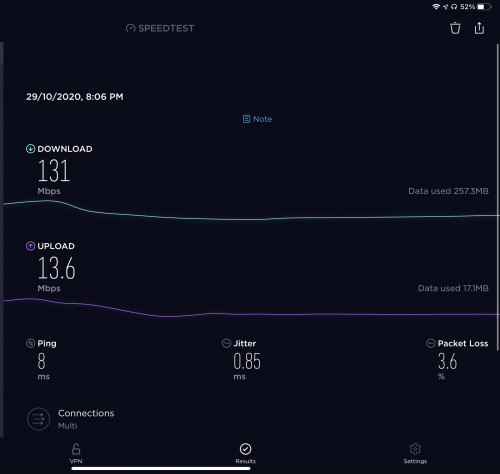
Speedtest result from previous 2 weeks old tplink router, very unstable performance with constant packet loss, this result was taken right beside the router.
user posted image

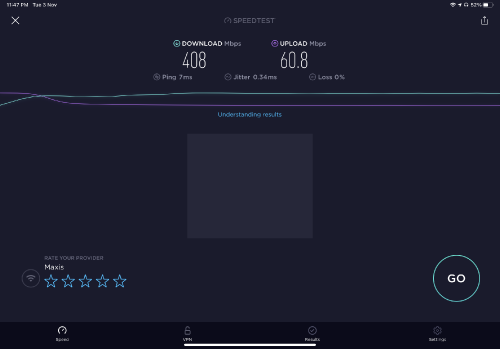
Speedtest result from my room with Asus AX56U, 0 packet loss, incredible speed! rclxm9.gif Asus also have much better firmware support, based on my findings, their old router until today still constantly getting new firmware upgrade, below RM300 on Shopee sales is a damn steal!

user posted image

FYI: I’m using 300mbps maxis fibre package, with 50mbps upload speed

This post has been edited by Anonymous26: Nov 4 2020, 12:05 AM
TSAnonymous26
post Nov 3 2020, 11:57 PM

Getting Started
**
Junior Member
174 posts

Joined: Dec 2012
QUOTE(Jjuggler @ Nov 3 2020, 11:42 PM)
I don't favor to the Taiwanese brand tbh, but I do admit they are committed to give the best to their customers through a proper R&D and way better in terms of moving forward by providing a good after-sales service. As mentioned by brother Anonymous26, AX56U is indeed a good router. In fact, I personally bought a unit of AX56U and currently in use.

I've personally bought & reviewed the AX20 from TP-Link and the router is good for basic use. It also has WPA3 encryption by default (stock firmware). After I sold my edgerouter 6p due to under-utilization of its true potential, I settled down with AX56U of course flashed with Asus-Merlin firmware due to a few favorable scripts that benefits me. However doing so, WPA3 is not yet implemented in the merlin build for this model. So only stock firmware offers WPA3 by default.

Image attached as a proof:

user posted image
*
Hey bro, indeed, this is my 1st asus router and they are truly impressive, since this is my 1st asus router, do u mind explain to me the benefit of using merlin firmware over stock? Im still a newbie in this field tongue.gif

This post has been edited by Anonymous26: Nov 4 2020, 12:00 AM
Jjuggler
post Nov 4 2020, 12:10 AM

Narcissistic Genius
******
Senior Member
1,343 posts

Joined: Dec 2016
QUOTE(Anonymous26 @ Nov 3 2020, 11:57 PM)
Hey bro, indeed, this is my 1st asus router and they are truly impressive, since this is my 1st asus router, do u mind explain to me the benefit of using merlin firmware over stock? Im still a newbie in this field  tongue.gif
*
Hi bro. Answering your question regarding the benefits of using asus-merlin firmware over stock firmware is pretty simple. Merlin always ahead in fixing a few bugs which ASUS's developers will eventually solve in the later build, imagine the story of tortoise (asus-merlin) and hare (asuswrt) story. Asus-merlin has more feedback from their end-users since the visitors there is more than here. So it will help him to fix the identified issue in the later build. You can refer to this thread for more info on the goal of this firmware being developed. Other reason why Merlin is somehow a looks cool is due to ability to run scripts such as diversion (router level adblocking - similar to pihole) and other constantly maintained scripts (refer here to view the available scripts -> packages). I don't say stock firmwares are the worst, but both have similar purpose in the end, to provide stability and solving identified bugs for a better internet experience (i.e. without crash or kernel panics that eventually makes the router to self-reboot or freeze). For standard users, asuswrt is better. For power users who want to fully utilize their investment, Asus-merlin is the way, well only supported models.
pl95077
post Nov 4 2020, 12:40 AM

Getting Started
**
Junior Member
245 posts

Joined: Feb 2010
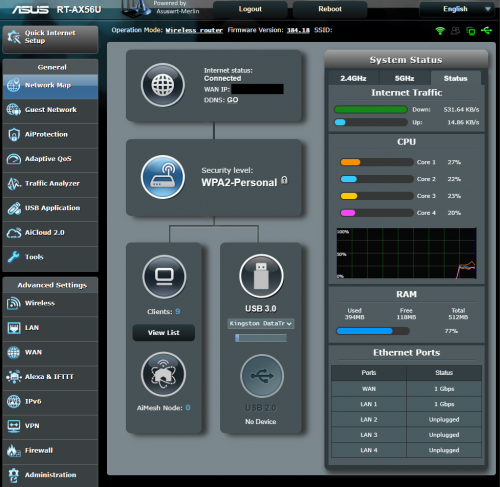
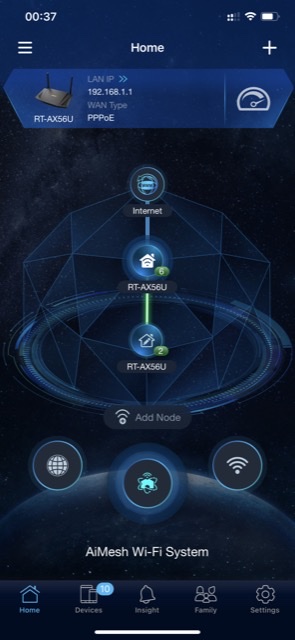
2 units of RT-AX56U for AiMesh 😜

user posted image

This post has been edited by pl95077: Nov 4 2020, 12:44 AM
Doraku
post Nov 4 2020, 01:28 AM

Old threads digger
******
Senior Member
1,155 posts

Joined: Apr 2016


QUOTE(nonamer @ Oct 28 2020, 05:54 PM)
ax20 doesnt support ofdma and mu-mimo (broadcom doesnt support mu-mimo for ax200)

ax50 doesnt support ofdma but should support mu-mimo since same intel chipset

better get xiaomi ax1800/redmi ax5 which support both ofdma and mu-mimo
*
I thought 802.11AX required MU-MIMO and OFDMA to be supported?
NagaK
post Nov 4 2020, 02:48 AM

Regular
******
Senior Member
1,196 posts

Joined: Sep 2018


QUOTE(Anonymous26 @ Nov 3 2020, 11:44 PM)
Nope, the Asus AX56U issue is on software side, and they had released a beta firmware where it managed to address the reported issue, but for me Im using the official firmware and i don encounter any issue as per mentioned at all. Avoid tplink AX3000, that 1 is hardware design flaw, intel chipset in such slim body design will overheat very easily.

For the coverage, im currently staying in 1200sqft condo, the coverage is much stronger compare to my previous router.

Edit:

Speedtest result from previous 2 weeks old tplink router, very unstable performance with constant packet loss, this result was taken right beside the router.
user posted image

Speedtest result from my room with Asus AX56U, 0 packet loss, incredible speed! rclxm9.gif Asus also have much better firmware support, based on my findings, their old router until today still constantly getting new firmware upgrade, below RM300 on Shopee sales is a damn steal!

user posted image

FYI: I’m using 300mbps maxis fibre package, with 50mbps upload speed
*
Thank you for your feedback definitely will buy ASUS and I always felt ASUS being premium brand giving good routers hope 11.11 sales I get good deals just now i searched non of them had available for now
NagaK
post Nov 4 2020, 02:53 AM

Regular
******
Senior Member
1,196 posts

Joined: Sep 2018


QUOTE(Jjuggler @ Nov 3 2020, 11:42 PM)
I don't favor to the Taiwanese brand tbh, but I do admit they are committed to give the best to their customers through a proper R&D and way better in terms of moving forward by providing a good after-sales service. As mentioned by brother Anonymous26, AX56U is indeed a good router. In fact, I personally bought a unit of AX56U and currently in use.

I've personally bought & reviewed the AX20 from TP-Link and the router is good for basic use. It also has WPA3 encryption by default (stock firmware). After I sold my edgerouter 6p due to under-utilization of its true potential, I settled down with AX56U of course flashed with Asus-Merlin firmware due to a few favorable scripts that benefits me. However doing so, WPA3 is not yet implemented in the merlin build for this model. So only stock firmware offers WPA3 by default.

Image attached as a proof:

user posted image
*
So which you recommend my devices mostly support WPA2 not WPA3 not concern maybe future proof of I had mostly 9/ 12
Devices connected simultaneously basic functions more than enough even tho I liked ASUS customization AX20 or ASUS AX56U if you don’t mind can you share your review of ASUS AX56U?

wiisg
post Nov 4 2020, 04:31 AM

Getting Started
**
Junior Member
288 posts

Joined: Dec 2008
QUOTE(Anonymous26 @ Nov 3 2020, 09:56 PM)
Hey bro, I’m now using Asus RT-AX56U, i highly recommend you get this router, much better than TP-Link, not to mention there are sales on shopee 11.11, you can get it for less than RM300, amazing performance and built quality
*
How to get rm300 deal bro
kllonely1
post Nov 4 2020, 05:07 AM

Casual
***
Junior Member
321 posts

Joined: Oct 2004
QUOTE(afif92 @ Oct 29 2020, 01:54 AM)
Where did I say AX20 using Qualcomm? I said it is using Broadcom.. Please check back.
*
asus uses broadcom,
does that means it is not good?

SUSnonamer
post Nov 4 2020, 08:54 AM

Getting Started
**
Junior Member
224 posts

Joined: Apr 2019
QUOTE(Doraku @ Nov 4 2020, 01:28 AM)
I thought 802.11AX required MU-MIMO and OFDMA to be supported?
*
i think they do support ofdma but somehow is not specified in Wikidevi...maybe initially not supported but now they do

ax50 support 160mhz and is intel chipset same as ax200 adapter...especially important if it is to be use in gaming if want to ensure the best visual quality and experience

if no hardcore gaming requirement then xiaomi/redmi or ax20 will be more suitable (cheaper and uses less power)

https://wikidevi.wi-cat.ru/TP-LINK_Archer_AX20
https://wikidevi.wi-cat.ru/TP-LINK_Archer_AX50
https://wikidevi.wi-cat.ru/Xiaomi_Mi_AX1800

This post has been edited by nonamer: Nov 4 2020, 09:41 AM
TSAnonymous26
post Nov 4 2020, 09:42 AM

Getting Started
**
Junior Member
174 posts

Joined: Dec 2012
QUOTE(nonamer @ Nov 4 2020, 08:54 AM)
i was wrong i think they do support ofdma but somehow is not specified in Wikidevi...maybe initially not supported but now they do

ax50 support 160mhz and is intel chipset same as ax200 adapter...especially important if it is to be use in gaming if want to ensure the best visual quality and experience

if no gaming requirement then xiaomi/redmi or ax20 will be better cause uses less power

https://wikidevi.wi-cat.ru/TP-LINK_Archer_AX20
https://wikidevi.wi-cat.ru/TP-LINK_Archer_AX50
https://wikidevi.wi-cat.ru/Xiaomi_Mi_AX1800
*
If you are gaming, stability is more important than everything else, AX50 has been known for issue such as overheating, the reputation of this particular mode is quite bad therefore there are a lot of discount for this model, any computer shop is selling it cheaper than AX20. If you are on budget, go for AX20, if you willing to spend abit more, go for Asus, avoid AX50
pl95077
post Nov 4 2020, 10:38 AM

Getting Started
**
Junior Member
245 posts

Joined: Feb 2010
QUOTE(nonamer @ Nov 4 2020, 09:54 AM)
i think they do support ofdma but somehow is not specified in Wikidevi...maybe initially not supported but now they do

ax50 support 160mhz and is intel chipset same as ax200 adapter...especially important if it is to be use in gaming if want to ensure the best visual quality and experience

if no hardcore gaming requirement then xiaomi/redmi or ax20 will be more suitable (cheaper and uses less power)

https://wikidevi.wi-cat.ru/TP-LINK_Archer_AX20
https://wikidevi.wi-cat.ru/TP-LINK_Archer_AX50
https://wikidevi.wi-cat.ru/Xiaomi_Mi_AX1800
*
This is interesting, can share more how intel chipset on ax50 and ax20e0 adapter can ensure the best visual quality and experience, thank you.
TSAnonymous26
post Nov 4 2020, 10:56 AM

Getting Started
**
Junior Member
174 posts

Joined: Dec 2012
QUOTE(NagaK @ Nov 4 2020, 02:48 AM)
Thank you for your feedback definitely will buy ASUS and I always felt ASUS being premium brand giving good routers hope 11.11 sales I get good deals just now i searched non of them had available for now
*
QUOTE(wiisg @ Nov 4 2020, 04:31 AM)
How to get rm300 deal bro
*
https://shopee.com.my/ASUS-Router-RT-AX56U-...4247.6610567728

RM285 on 11.11, don't miss the deal rclxm9.gif
Last week I just bought this router from Harvey Normal for RM450, damn blush.gif

QUOTE(pl95077 @ Nov 4 2020, 10:38 AM)
This is interesting, can share more how intel chipset on ax50 and ax20e0 adapter can ensure the best visual quality and experience, thank you.
*
I also wonder how ax50 can improve the visual quality, mind sharing more??

This post has been edited by Anonymous26: Nov 4 2020, 10:58 AM
joeyrm
post Nov 4 2020, 11:28 AM

Getting Started
**
Junior Member
116 posts

Joined: Jul 2005


QUOTE(wiisg @ Nov 4 2020, 04:31 AM)
How to get rm300 deal bro
*
i've found at least one 11.11 deal in shopee for RM285, but it's only valid on 11.11 between 12am-2am. Better check-outand put that in your basket if u're interested.
Gary
post Nov 4 2020, 12:00 PM

Getting Started
**
Junior Member
267 posts

Joined: Nov 2004
From: Rock Caves
QUOTE(Anonymous26 @ Nov 4 2020, 10:56 AM)
https://shopee.com.my/ASUS-Router-RT-AX56U-...4247.6610567728

RM285 on 11.11, don't miss the deal  rclxm9.gif
Last week I just bought this router from Harvey Normal for RM450, damn  blush.gif
I also wonder how ax50 can improve the visual quality, mind sharing more??
*
Yea pretty good deal under. RM285 for this RT-AX56U
Jjuggler
post Nov 4 2020, 12:25 PM

Narcissistic Genius
******
Senior Member
1,343 posts

Joined: Dec 2016
QUOTE(NagaK @ Nov 4 2020, 02:53 AM)
So which you recommend my devices mostly support WPA2 not WPA3 not concern maybe future proof of I had mostly 9/ 12
Devices connected simultaneously basic functions more than enough even tho I liked ASUS customization AX20 or ASUS AX56U if you don’t mind can you share your review of ASUS AX56U?
*
Hi mate. I've reviewed the router before. However, I must remind you that, in order to take full adavantage of WiFi 6 speed, you should have at-least a WiFi 6 client like PCE-AX58BT or Archer TX3000E. For 500Mbps users and below, it is possible to achieve desired wireless speed with a standard wireless clients (must support AC). All WiFi 6 routers are backwards compatible. Since the AX56U models getting quite rave reviews from the users, I decided to buy a unit for me. Based on my personal use, I don't really experience any major issues. Before I flash my router to merlin firmware, I did run the stock firmware (before the beta firmware issued) and the only issue I faced so far with the stock firmware is the wireless stability which later solved by patching the beta firmware.

Comparing an Archer AX20 with AX56U is, tbh is ridiculous. The Archer AX20 features basic features, which beneficial for normal home users. On the other hand, the AX56U suitable for those who like to customize their router to fit their needs, often called as power users. Since the AX56U features a broadcom processor, it is now supported by Asus-Merlin which benefits the power users to run their favorite scripts. Say the kancil is the AX56U, but with turbo instead, that's how merlin unleashes the potential of the router.
Exeunt
post Nov 4 2020, 01:30 PM

Enthusiast
*****
Senior Member
828 posts

Joined: Nov 2010


QUOTE(Anonymous26 @ Nov 3 2020, 10:56 PM)
Hey bro, I’m now using Asus RT-AX56U, i highly recommend you get this router, much better than TP-Link, not to mention there are sales on shopee 11.11, you can get it for less than RM300, amazing performance and built quality
*
got link tak bro ? i search around in shoppe cant find

now comtplating on ax 20 vs ax50 because both below 250 on 11.11 sale, but if u say ax56u can get below rm300 then its a good deal.. but cant find the promo link
Exeunt
post Nov 4 2020, 01:31 PM

Enthusiast
*****
Senior Member
828 posts

Joined: Nov 2010


QUOTE(Gary @ Nov 4 2020, 01:00 PM)
Yea pretty good deal under. RM285 for this RT-AX56U
*
ok thanks !
pokeat
post Nov 5 2020, 12:34 AM

Casual
***
Junior Member
438 posts

Joined: Oct 2008
From: Goblintown


QUOTE(Anonymous26 @ Nov 4 2020, 10:56 AM)
https://shopee.com.my/ASUS-Router-RT-AX56U-...4247.6610567728

RM285 on 11.11, don't miss the deal  rclxm9.gif
Last week I just bought this router from Harvey Normal for RM450, damn  blush.gif
I also wonder how ax50 can improve the visual quality, mind sharing more??
*
Added to cart, thanks for the link ! Currently using D-Link DIR AX1500, IMO wifi is worse than unifi stock router(Living in 2-storey 1200sqft, upper floor signal doh.gif using Tenda Range Extender). Having 800mbps plan, I knew the speed would be bottleneck using stock router. Didn't expect D-Link router that sucks. Is there any wifi 6 router best budget for Unifi 800mbps plan ?

This post has been edited by pokeat: Nov 5 2020, 12:35 AM
TSAnonymous26
post Nov 5 2020, 10:51 AM

Getting Started
**
Junior Member
174 posts

Joined: Dec 2012
QUOTE(pokeat @ Nov 5 2020, 12:34 AM)
Added to cart, thanks for the link ! Currently using D-Link DIR AX1500, IMO wifi is worse than unifi stock router(Living in 2-storey 1200sqft, upper floor signal  doh.gif using Tenda Range Extender). Having 800mbps plan, I knew the speed would be bottleneck using stock router. Didn't expect D-Link router that sucks. Is there any wifi 6 router best budget for Unifi 800mbps plan ?
*
No problem bro, make sure to check out your order during the period of 12am-2am then only you will be entitled for the discount. D-Link has been known for their awful firmware, for best budget Wifi 6 router, I think the best choice now should still be Asus AX56U, of course the price is definitely more expensive than TP-Link's offering, but what you get is best in class software support. The hardware is well-designed too, it doesn't feel hot or warm even after extended period of intensive usage. After I switch my old TP-Link router to Asus, I definitely able to notice the network quality of my home has vastly improved in terms of speed and stability. I bought this router for RM450 without any sales, but still I think it is well worth it and I am glad I forked out the extra pennies opted for Asus router, this is definitely something I'm going to use for years ahead.

This post has been edited by Anonymous26: Nov 5 2020, 11:06 AM
imahappyklown
post Nov 5 2020, 12:45 PM

Getting Started
**
Junior Member
122 posts

Joined: Dec 2008
QUOTE(Exeunt @ Nov 4 2020, 01:30 PM)
got link tak bro ? i search around in shoppe cant find

now comtplating on ax 20 vs ax50 because both below 250 on 11.11 sale, but if u say ax56u can get below rm300 then its a good deal.. but cant find the promo link
*
This is the link from previous mentioned.

Question. I live in a two story house and was planning to get an AX20 paired with Mesh Wifi (Deco 4 maybe?). Should I opt for the RT-AX56U without mesh instead if the price are similar to each other (promo)?

At peak time there's about 20 devices connected (phones,pc,laptop), oh and we're not really power users.

Thanks.

PS. Currently using the stock router provided by Maxis, the Archer C5V. Its horrible lol.

This post has been edited by imahappyklown: Nov 5 2020, 12:47 PM
TSAnonymous26
post Nov 5 2020, 03:13 PM

Getting Started
**
Junior Member
174 posts

Joined: Dec 2012
QUOTE(imahappyklown @ Nov 5 2020, 12:45 PM)
This is the link from previous mentioned.

Question. I live in a two story house and was planning to get an AX20 paired with Mesh Wifi (Deco 4 maybe?). Should I opt for the RT-AX56U without mesh instead if the price are similar to each other (promo)?

At peak time there's about 20 devices connected (phones,pc,laptop), oh and we're not really power users.

Thanks.

PS. Currently using the stock router provided by Maxis, the Archer C5V. Its horrible lol.
*
Why not just buy 2 RT-AX56U during the sales and setup AiMesh? Mind sharing what's the issue you facing with your Archer C5V? I doubt single router alone is enough to cover your two storey house

This post has been edited by Anonymous26: Nov 5 2020, 03:15 PM
imahappyklown
post Nov 5 2020, 03:24 PM

Getting Started
**
Junior Member
122 posts

Joined: Dec 2008
QUOTE(Anonymous26 @ Nov 5 2020, 03:13 PM)
Why not just buy 2 RT-AX56U during the sales and setup AiMesh? Mind sharing what's the issue you facing with your Archer C5V? I doubt single router alone is enough to cover your two storey house
*
Ah,did not crossed my mind on getting two routers. I'll read up further on AiMesh in that case.

Currently the main issues we face is the abysmal range and disconnection every now and then.

Thanks for the advice.
jchong
post Nov 7 2020, 11:12 AM

****************
*******
Senior Member
5,989 posts

Joined: Nov 2005
I'm also thinking of getting 2 units of this RT-AX56U and using AiMesh.

But before that wanted to know if any user experience with RT-AX56U and AiMesh. Is it stable and working well?
pl95077
post Nov 7 2020, 01:57 PM

Getting Started
**
Junior Member
245 posts

Joined: Feb 2010
QUOTE(jchong @ Nov 7 2020, 12:12 PM)
I'm also thinking of getting 2 units of this RT-AX56U and using AiMesh.

But before that wanted to know if any user experience with RT-AX56U and AiMesh. Is it stable and working well?
*
It is rock!

I'm staying in double stories too.
Before that I'm using 1 AX56, it is good enough to covered the whole house, but then some of the area is 2.4Ghz, which is slower speed in certain part of my house.

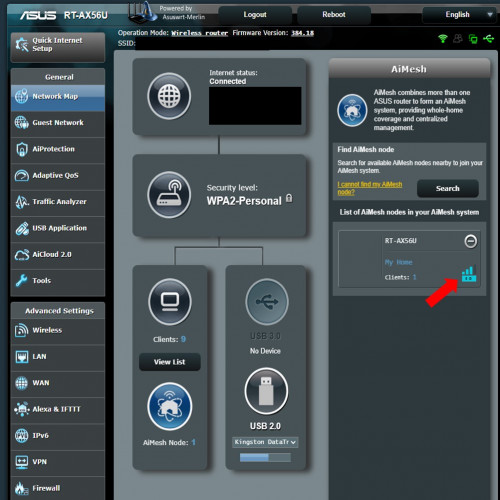
Then I decided to add 1 more AX56 as AiMesh, now my house is covered with 5Ghz.

user posted image

This post has been edited by pl95077: Nov 7 2020, 02:01 PM
bpay14
post Nov 10 2020, 03:22 PM

On my way
****
Senior Member
557 posts

Joined: Jan 2006
thank god i came into this post.. was considering AX20, and a little bit struggle to consider AX50..

now seems like RT-AX56U is not a bad choice too..

thx all for the input and experience sharing. =)
k00Lric
post Nov 10 2020, 07:54 PM

Getting Started
**
Junior Member
121 posts

Joined: Sep 2008


QUOTE(Anonymous26 @ Nov 4 2020, 10:56 AM)
https://shopee.com.my/ASUS-Router-RT-AX56U-...4247.6610567728

RM285 on 11.11, don't miss the deal  rclxm9.gif
Last week I just bought this router from Harvey Normal for RM450, damn  blush.gif
I also wonder how ax50 can improve the visual quality, mind sharing more??
*
Have you bought any gadget from that seller that offer the deal? Cause i heard alot of stories regarding that seller in shopee.
bpay14
post Nov 11 2020, 12:09 AM

On my way
****
Senior Member
557 posts

Joined: Jan 2006
this AX56U RM285??
maybe just few pieces.. can't grab it.. gone i think within one min.. LOL
jchong
post Nov 11 2020, 12:10 AM

****************
*******
Senior Member
5,989 posts

Joined: Nov 2005
QUOTE(Anonymous26 @ Nov 4 2020, 10:56 AM)
Anyone manage to get this deal on the AX56U?

I added to cart ahead of time, then at 12.03am I went to check out, price was RM285 but just as I was going to pay the system said there was some issue.

When I went back to reload the cart, the price showed RM429. It was still only 12.04am. I wonder what happened?
bpay14
post Nov 11 2020, 12:12 AM

On my way
****
Senior Member
557 posts

Joined: Jan 2006
QUOTE(jchong @ Nov 11 2020, 12:10 AM)
Anyone manage to get this deal on the AX56U?

I added to cart ahead of time, then at 12.03am I went to check out, price was RM285 but just as I was going to pay the system said there was some issue.

When I went back to reload the cart, the price showed RM429. It was still only 12.04am. I wonder what happened?
*
same here.. probably seller just allow 5 or 10 unit then all grab, blahh.. sold out within 1min.. rclxms.gif

update: it seems like shopee issue.. LOL

im going back for AX20.. doh.gif

user posted image

This post has been edited by bpay14: Nov 11 2020, 12:31 AM
QuantumEdge
post Nov 21 2020, 09:27 AM

Regular
******
Senior Member
1,601 posts

Joined: Jan 2016


QUOTE(Jjuggler @ Nov 3 2020, 11:42 PM)
I don't favor to the Taiwanese brand tbh, but I do admit they are committed to give the best to their customers through a proper R&D and way better in terms of moving forward by providing a good after-sales service. As mentioned by brother Anonymous26, AX56U is indeed a good router. In fact, I personally bought a unit of AX56U and currently in use.

I've personally bought & reviewed the AX20 from TP-Link and the router is good for basic use. It also has WPA3 encryption by default (stock firmware). After I sold my edgerouter 6p due to under-utilization of its true potential, I settled down with AX56U of course flashed with Asus-Merlin firmware due to a few favorable scripts that benefits me. However doing so, WPA3 is not yet implemented in the merlin build for this model. So only stock firmware offers WPA3 by default.

Image attached as a proof:

user posted image
*
How's the signal strength when comparing AX20 against AX56U?
shinjite
post Nov 21 2020, 10:48 AM

�ŞħĬΩĵΐŦ��
********
All Stars
19,321 posts

Joined: Jan 2003
From: Klang


QUOTE(jchong @ Nov 11 2020, 12:10 AM)
Anyone manage to get this deal on the AX56U?

I added to cart ahead of time, then at 12.03am I went to check out, price was RM285 but just as I was going to pay the system said there was some issue.

When I went back to reload the cart, the price showed RM429. It was still only 12.04am. I wonder what happened?
*
Mine failed as well, was about to checkout and then I got told that the promo has ended.
Jjuggler
post Nov 21 2020, 11:17 AM

Narcissistic Genius
******
Senior Member
1,343 posts

Joined: Dec 2016
QUOTE(QuantumEdge @ Nov 21 2020, 09:27 AM)
How's the signal strength when comparing AX20 against AX56U?
*
Based on my personal usage, the AX20 excel in terms of wireless performance while the AX56U excel in terms of hardware and firmware features. If I were you, I would go for the expensive AX56U than the AX20. Recently the AX56U received an unpleasant backlash due to its performance depleting after the recent firmware patch, however ASUS did release a beta firmware, which somehow temporarily solve the problem. You can follow the latest post by members here.
red4900
post Nov 21 2020, 11:56 AM

Casual
***
Junior Member
464 posts

Joined: Aug 2008
Does anybody know how to set up RT-AX55 with TIME?

In the setup page, I see in the special requirement from ISP there is no dropdown for TIME, only unifi. How to set this router?

Nvm: just realized i replied in wrong thread lol

Also, the contractor salah tulis pppoe password pfftt. Checked inside the router it's diff than the one written in the service delivery paper

This post has been edited by red4900: Nov 21 2020, 12:20 PM
QuantumEdge
post Nov 21 2020, 01:30 PM

Regular
******
Senior Member
1,601 posts

Joined: Jan 2016


QUOTE(Jjuggler @ Nov 21 2020, 11:17 AM)
Based on my personal usage, the AX20 excel in terms of wireless performance while the AX56U excel in terms of hardware and firmware features. If I were you, I would go for the expensive AX56U than the AX20. Recently the AX56U received an unpleasant backlash due to its performance depleting after the recent firmware patch, however ASUS did release a beta firmware, which somehow temporarily solve the problem. You can follow the latest post by members here.
*
Thanks
I grabbed an AX20 right before 11.11 as I thought RM250 will be the lowest possible price for that particular router.
Who knows Asus dropped AX56U's price to the same 250~300 ish range... doh.gif
On the bright side, AX20 is able to provide full 5ghz coverage in my house
Apart from the lack of firmware features, it is solid innocent.gif


Jjuggler
post Nov 21 2020, 02:10 PM

Narcissistic Genius
******
Senior Member
1,343 posts

Joined: Dec 2016
QUOTE(QuantumEdge @ Nov 21 2020, 01:30 PM)
Thanks
I grabbed an AX20 right before 11.11 as I thought RM250 will be the lowest possible price for that particular router.
Who knows Asus dropped AX56U's price to the same 250~300 ish range... doh.gif
On the bright side, AX20 is able to provide full 5ghz coverage in my house
Apart from the lack of firmware features, it is solid innocent.gif
*
Tbh, I do like TP-LINK routers for their excellent wireless performance and low-cost of ownership. Only if they decide to halt the re-visioning of the current models and only focus on one revision model and provide 2-3 years of firmware support is sufficient enough. In terms of R&D (I personally see their working ethics and can't disclose here) and constantly improving features, ASUS wins. This makes me to trust ASUS networking gears more than other gear provider. Currently I am using their flagship AX11000 router from ASUS. So let it be in promo price or actual price, I don't mind, as long as I get constant firmware patches is fine for me. Even the oldest model, AC68U still getting firmware updates till now. ASUS router might be pricey, but looking at the amount of hardwork they've put into a product, I can say, its totally worth it.
athlonmax
post Nov 21 2020, 03:06 PM

On my way
****
Junior Member
558 posts

Joined: Jan 2003
From: Batu Caves/Gombak


I just grabbed AX20 today to replace the AC1200 that TM gave me.
Will it be a huge difference in terms of wifi speed or other features?
QuantumEdge
post Nov 21 2020, 09:00 PM

Regular
******
Senior Member
1,601 posts

Joined: Jan 2016


QUOTE(athlonmax @ Nov 21 2020, 03:06 PM)
I just grabbed AX20 today to replace the AC1200 that TM gave me.
Will it be a huge difference in terms of wifi speed or other features?
*
Should be getting faster wifi at longer range, more stable too
features wise...AX20 has no useful features around, to be honest...
Momo33
post Nov 24 2020, 11:11 AM

Regular
******
Senior Member
1,448 posts

Joined: Oct 2019
QUOTE(Jjuggler @ Nov 21 2020, 12:17 PM)
Based on my personal usage, the AX20 excel in terms of wireless performance while the AX56U excel in terms of hardware and firmware features. If I were you, I would go for the expensive AX56U than the AX20. Recently the AX56U received an unpleasant backlash due to its performance depleting after the recent firmware patch, however ASUS did release a beta firmware, which somehow temporarily solve the problem. You can follow the latest post by members here.
*
i wonder how the ordinary folks who bought this crap AX56u and face disconnections will feel as i saw so many complaints on the Asus thread.
Most people just buy a router , installed and never touch it again . my taman i see so many complains about their router performance.
they dont know a thing about the router , or login or how to optimize.

the point i get at is how can Asus do this . release a crap router at premium price.
For most people they just want stability and good wifi performance at day 1 .

for me i think asus is now overated .. i find it hard to recommend this to non experts when there are good cheaper performance router s around.

just my opinion. nod.gif


Jjuggler
post Nov 24 2020, 12:39 PM

Narcissistic Genius
******
Senior Member
1,343 posts

Joined: Dec 2016
QUOTE(Momo33 @ Nov 24 2020, 11:11 AM)
i wonder how the  ordinary folks who bought  this  crap AX56u  and face  disconnections will feel  as i saw so many complaints  on the Asus thread.
Most people just buy a router  , installed  and never  touch it again .  my taman  i see so many complains  about their router performance.
they dont know a thing about the router ,  or login or how to optimize.

the point i get at is how can Asus do this .  release a crap router  at premium price.
For most people they just want stability  and good wifi performance  at day 1 .

for me i think asus is now overated  ..  i find it hard to recommend this to non experts  when there are  good cheaper performance router s around.

just my opinion.  nod.gif
*
Hi mate.

First of all, I am thanking you for expressing your point of view towards the brand and the router model. I stand with my point without being affiliated with the brand or being sponsored to defend them. My point is based on my own eyes looking at how they handle the problem and tries to solve the problem. I do agree, ASUS routers are quite pricey compared to other normal routers. Do note that, the premium price you pay, has its own advantage. Most of us including me, will use a router for about 3 to 4 years, depends on how well we take care of the router (more heat, less lifespan or less heat, more lifespan). If you see between three major brands, I mean networking gear brand, only ASUS provide good after sales support in terms of firmware support. I do agree they're quite slow when it comes to fixing bugs, but they took responsibility seriously. Quoting your sentence, "just buy a router, installed and never touch it again", so, if your entire home network is/were compromised by the cyber-criminals, who you should blame? Routers are like computers. They need to be constantly patched with newer firmware to secure the network. From my personal experience, I've used their famous AC68U and, until now, the model is still receiving its update (3.0.0.4.386.40558 dated on 5th November 2020). Do note that the router was released back on somewhere on October 2013, which means 7 years already.

"ASUS is the only vendor not storing any hard-coded credential in its firmware images." - by Peter Weidenbach and Johannes vom Dorp of the Fraunhofer Institute. - Source.

Closing my point here, among networking gear provider in Malaysia, only ASUS took their responsibility seriously. Other networking gear manufacturer may have cheaper router models in the market, but they tend to ignore the current model revision and release newer revision, which is pointless. Some may ignore the bugs presented by independent analyst and this has to be brought up to the public just to get the attention of the company itself. To simplify my sentence here, "router is not just a hardware to connect you to the internet, it acts as your gateway between your clients and the internet, same as the gates that guarding your house from thieves.". You paint the gate so that it doesn't age and do not get rusty which will be easier for the criminals to sneak through your home while you're away, same principle applies to router, securing your router is same like painting your gate with newer technology to prevent the rust a.k.a vulnerabilities present in the current firmware.

P/S: I will take your sentence (problem faced by the common people), "just buy a router, installed and never touch it again" and inform them behalf of the non-techy /non-experts people that, they should implement an auto-update feature in the future firmware release and should be made as a mandatory feature implementation across all their networking gear product line-up.

Momo33
post Nov 24 2020, 01:49 PM

Regular
******
Senior Member
1,448 posts

Joined: Oct 2019
QUOTE(Jjuggler @ Nov 24 2020, 01:39 PM)
Hi mate.

First of all, I am thanking you for expressing your point of view towards the brand and the router model. I stand with my point without being affiliated with the brand or being sponsored to defend them. My point is based on my own eyes looking at how they handle the problem and tries to solve the problem. I do agree, ASUS routers are quite pricey compared to other normal routers. Do note that, the premium price you pay, has its own advantage. Most of us including me, will use a router for about 3 to 4 years, depends on how well we take care of the router (more heat, less lifespan or less heat, more lifespan). If you see between three major brands, I mean networking gear brand, only ASUS provide good after sales support in terms of firmware support. I do agree they're quite slow when it comes to fixing bugs, but they took responsibility seriously. Quoting your sentence, "just buy a router, installed and never touch it again", so, if your entire home network is/were compromised by the cyber-criminals, who you should blame? Routers are like computers. They need to be constantly patched with newer firmware to secure the network. From my personal experience, I've used their famous AC68U and, until now, the model is still receiving its update (3.0.0.4.386.40558 dated on 5th November 2020). Do note that the router was released back on somewhere on October 2013, which means 7 years already.


P/S: I will take your sentence (problem faced by the common people), "just buy a router, installed and never touch it again" and inform them behalf of the non-techy /non-experts people that, they should implement an auto-update feature in the future firmware release and should be made as a mandatory feature implementation across all their networking gear product line-up.
*
i agree with all you said in msg. and asus do make great routers. a joy for techies .
for the common man ... this is a stressful journey due to lack of knowledge. its highly tech stuff.
All they know is i always get disconnection, my speed so slow ,
its will be great if there is a router all auto driven by the firmware . like select best channels , self optimize , plug and play.
for the techies they can select a alternate firmware where they can select their options.

i was using an asus AC1300 4 year now , i bought a tplink ax20 3 months ago just to play around . cos it was cheap .
both are great routers as performance and coverage wise i test was about the same . i like the ax20 for its minimum settings.
you need to be expert to understand all the asus setting like 100 of them rclxub.gif


Jjuggler
post Nov 24 2020, 05:28 PM

Narcissistic Genius
******
Senior Member
1,343 posts

Joined: Dec 2016
QUOTE(Momo33 @ Nov 24 2020, 01:49 PM)
i agree with all you said in msg.  and asus do make great routers.  a joy for techies  .
for the common man ... this is  a stressful journey due to lack of knowledge.  its highly tech stuff.
All they know is  i always get disconnection,  my speed so slow , 
its will be great if there is  a router all auto driven by the firmware .  like select best channels  , self optimize , plug and play.
for the techies they can select a alternate firmware where they can select their  options.

i was using an asus AC1300  4 year now , i bought a tplink ax20  3 months ago  just to play around . cos it was cheap .
both are great routers as performance and coverage wise i test  was about the same .  i like the ax20 for its minimum settings.
you need to be expert to understand  all the asus setting  like  100 of them  rclxub.gif
*
I get your point there mate. Sometimes, I do wonder why ASUS cramp so much unwanted feature in their entry level routers (which won't be fully utilized by common users). On the other hand, for power users under a tight budget, this will be a good option for them to fully utilize the router. Regarding the auto <thing>, most router coded like that these days. In other word, setup your PPPoE credentials, your wireless SSIDs and router login credentials, then you're good to go.

Secondly, Archer AX20 surprisingly a good router. Heck even better than the AX56U in terms of wireless performance. Additionally, it does have a standard features, not too advance and not too basic. Archer AX20's settings seemed simple due to the execution of its user-interface and correctly mapped main button for the feature access (talking about visual pleasing experience). For my personal usage, I only use ASUS (for consumer grade router) or Mikrotik for enterprise (if needed in the future).
lazybump_nonsense
post Nov 29 2020, 01:07 AM

Gotta Catch'em All
******
Senior Member
1,654 posts

Joined: Nov 2011
QUOTE(JohnLai @ Oct 30 2020, 07:14 PM)
Nope.  dry.gif
*
Why ya?
shahie
post Nov 29 2020, 10:04 AM

On my way
****
Junior Member
506 posts

Joined: Feb 2005
Hi

get Ax20 since with quad core processor. typically more powerful than dual core AX50.

http://en.techinfodepot.shoutwiki.com/wiki...K_Archer_AX1800

This post has been edited by shahie: Nov 29 2020, 10:07 AM
gerrard75
post Dec 19 2020, 03:56 PM

New Member
*
Newbie
5 posts

Joined: May 2012
Dear all Sifu. I plan to replace my tplink archer c1200 unifi router, where 2 tplink range extender RE450 (ground floor 40feets away from router) & RE650 (1st floor 60feets away from router ) connected to the router. I always have wifi performance issue from RE650 where download speed around 50Mbps-80Mbps. RE450 i can get almost 200Mbps. I currently using Unifi 500MB package.
thinking replace with router to improve my wifi performance. May i know which router below is better ?

Please advise. thanks.

TPLINK-AX20
ASUS RT-AX55
ASUS RT-AX56U
.

This post has been edited by gerrard75: Dec 19 2020, 04:09 PM
Khalid21
post Dec 19 2020, 04:57 PM

Regular
******
Senior Member
1,138 posts

Joined: May 2010
QUOTE(gerrard75 @ Dec 19 2020, 03:56 PM)
Dear all Sifu. I plan to replace my tplink archer c1200 unifi router, where 2 tplink range extender RE450 (ground floor 40feets away from router) & RE650 (1st floor 60feets away from router ) connected to the router. I always have wifi performance issue from RE650 where download speed around 50Mbps-80Mbps. RE450 i can get almost 200Mbps. I currently using Unifi 500MB package.
thinking replace with router to improve my wifi performance.  May i know which router below is better ?

Please advise. thanks.

TPLINK-AX20
ASUS RT-AX55
ASUS RT-AX56U
.
*
deco x20 / x60
shahie
post Dec 19 2020, 09:22 PM

On my way
****
Junior Member
506 posts

Joined: Feb 2005
QUOTE(gerrard75 @ Dec 19 2020, 03:56 PM)
Dear all Sifu. I plan to replace my tplink archer c1200 unifi router, where 2 tplink range extender RE450 (ground floor 40feets away from router) & RE650 (1st floor 60feets away from router ) connected to the router. I always have wifi performance issue from RE650 where download speed around 50Mbps-80Mbps. RE450 i can get almost 200Mbps. I currently using Unifi 500MB package.
thinking replace with router to improve my wifi performance.  May i know which router below is better ?

Please advise. thanks.

TPLINK-AX20
ASUS RT-AX55
ASUS RT-AX56U
.
*
no...get deco mesh X60, but bare in mind, you still lost 20 to 30% of your ISP speed if you use the wifi backhaul instead of ethernet backhaul, but still more better than range extender, which at most you lost more than half.
gerrard75
post Dec 19 2020, 09:38 PM

New Member
*
Newbie
5 posts

Joined: May 2012
QUOTE(shahie @ Dec 19 2020, 10:22 PM)
no...get deco mesh X60, but bare in mind, you still lost 20 to 30% of your ISP speed if you use the wifi backhaul instead of ethernet backhaul, but still more better than range extender, which at most you lost more than half.
*
Thanks for the suggestion, There is no way to implement ethernet backhaul due to my house design limitation. but i feel so wasting to sacrifice my range extender as i bought it so pricey. i just wondering getting a better router may improve my current wifi performance.
taqu
post Dec 19 2020, 11:10 PM

Enthusiast
*****
Junior Member
864 posts

Joined: May 2005
My friend drilled a hole between ground floor ceiling to first floor to get Ethernet cable upstair 😂
gerrard75
post Dec 19 2020, 11:20 PM

New Member
*
Newbie
5 posts

Joined: May 2012
QUOTE(taqu @ Dec 20 2020, 12:10 AM)
My friend drilled a hole between ground floor ceiling to first floor to get Ethernet cable upstair 😂
*
thumbsup.gif But i afraid i could not do it, my parents will kill me.
shahie
post Dec 20 2020, 06:05 AM

On my way
****
Junior Member
506 posts

Joined: Feb 2005
QUOTE(gerrard75 @ Dec 19 2020, 09:38 PM)
Thanks for the suggestion, There is no way to implement ethernet backhaul due to my house design limitation. but i feel so wasting to sacrifice my range extender as i bought it so pricey. i just wondering getting a better router may improve my current wifi performance.
*
no guarantee also. my setup last time before getting deco also with 2 RE450, 1 RE650, 2 dlink Dir882, all of them in wired AP, from my main mikrotik router. the only downside side was roaming not as fast as deco does.

This post has been edited by shahie: Dec 20 2020, 09:52 PM
Doraku
post Dec 20 2020, 05:58 PM

Old threads digger
******
Senior Member
1,155 posts

Joined: Apr 2016


QUOTE(JohnLai @ Oct 28 2020, 07:05 PM)
ASUS RT-AX56U   brows.gif
Then flash https://www.asuswrt-merlin.net/

» Click to show Spoiler - click again to hide... «


But the price though.... ohmy.gif
*
What is your opinion on RT-AX55 seems like it using the same chip as RT-56U albeit with less DRAM and and Flash memory

its priced at RM349 currently
https://shopee.com.my/Asus-RT-AX55-AX1800-W...0984.4161367975

Oh yeah its also support WPA3

This post has been edited by Doraku: Dec 20 2020, 06:02 PM
JohnLai
post Dec 20 2020, 08:45 PM

Skeptical Cat
*******
Senior Member
3,669 posts

Joined: Apr 2006
QUOTE(Doraku @ Dec 20 2020, 05:58 PM)
What is your opinion on RT-AX55 seems like it using the same chip as RT-56U albeit with less DRAM and and Flash memory

its priced at RM349 currently
https://shopee.com.my/Asus-RT-AX55-AX1800-W...0984.4161367975

Oh yeah its also support WPA3
*
Not sure on that.

I am currently using second hand Asus AC2600 from Singapore M1 fibre bundle.
Already tucked away the TP-Link AX50 in the storeroom. (My most disappointing purchase)
Already give up on Wifi6 AX. Back to AC for me.
Doraku
post Dec 21 2020, 12:32 AM

Old threads digger
******
Senior Member
1,155 posts

Joined: Apr 2016


QUOTE(JohnLai @ Dec 20 2020, 08:45 PM)
Not sure on that.

I am currently using second hand Asus AC2600 from Singapore M1 fibre bundle.
Already tucked away the TP-Link AX50 in the storeroom. (My most disappointing purchase)
Already give up on Wifi6 AX. Back to AC for me.
*
Taking about TP-Link my C1200 starting to have weird ass DHCP problem bangwall.gif bangwall.gif , After awhile of power it on the DHCP server not responding and giving my client a local IPv4 Address, I have to either restart the router, setting a static IP on all of my client or use IPv6 bangwall.gif cry.gif

This post has been edited by Doraku: Dec 21 2020, 12:35 AM
Wan
post Jan 16 2021, 01:54 PM

Glory Hunter
Group Icon
Elite
4,174 posts

Joined: Jan 2003
From: Gua


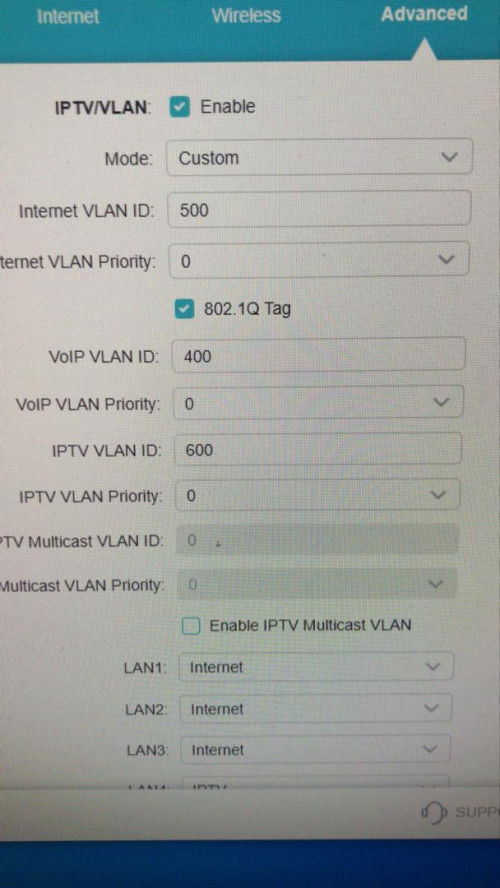
Hi guys. How to setup ax20 for hyyptv. Because if choose the vlan Malaysian-Unifi option, lan 1 is for iptv and lan 4 is for voip. How to remove the voip?

user posted image
jchong
post Jan 26 2021, 10:34 AM

****************
*******
Senior Member
5,989 posts

Joined: Nov 2005
QUOTE(JohnLai @ Dec 20 2020, 08:45 PM)
Already tucked away the TP-Link AX50 in the storeroom. (My most disappointing purchase)
Already give up on Wifi6 AX. Back to AC for me.
*
What was disappointing about the AX50 router? Was it the heat issue?
JohnLai
post Jan 26 2021, 02:54 PM

Skeptical Cat
*******
Senior Member
3,669 posts

Joined: Apr 2006
QUOTE(jchong @ Jan 26 2021, 10:34 AM)
What was disappointing about the AX50 router? Was it the heat issue?
*
AX50 = Mostly scam by TP-Link. They stated the router will receive WPA3 and OneMesh, but they renegade on it. Plus, the router basically abandoned by their engineer immediately after the "flash sale"
jkfoong
post Jan 29 2021, 05:15 PM

Long time member
****
Junior Member
518 posts

Joined: May 2008
QUOTE(JohnLai @ Jan 26 2021, 02:54 PM)
AX50 = Mostly scam by TP-Link. They stated the router will receive WPA3 and OneMesh, but they renegade on it. Plus, the router basically abandoned by their engineer immediately after the "flash sale"
*
Other than that, what was the issue? Any performance issue?
JohnLai
post Jan 29 2021, 05:32 PM

Skeptical Cat
*******
Senior Member
3,669 posts

Joined: Apr 2006
QUOTE(jkfoong @ Jan 29 2021, 05:15 PM)
Other than that, what was the issue? Any performance issue?
*
Performance wise, no issue.
Signal coverage is quite good. nod.gif
*Just don't ever turn on QOS*.
eikozai
post Jan 31 2021, 01:38 AM

Newbie
******
Senior Member
1,120 posts

Joined: May 2011


TP Link Archer AX73 released today for pre-order. RM399 only.
jason970612
post Mar 8 2021, 09:53 PM

New Member
*
Newbie
2 posts

Joined: Feb 2015


Hi, I'm using netgear R7000 and my router is located at second floor. The internet connection at upstairs is perfect but the downstairs is sucks. The 5G is barely connected and the 2.4G also not stable and sometimes disconnected.
Could anyone suggest me how to solve it?
If going to mesh network, I should buy twin pack of mesh or buy two router that connect with aimesh or onemesh?
blaze91
post Jun 3 2021, 10:27 AM

Regular
******
Senior Member
1,009 posts

Joined: Oct 2011


I came across this thread in when in midst of considering to buy tplink ax20. I want to replace the shitty modem given by Maxis Fiber(Archer C5v together with AirTies ).
After going through reviews here, seems like ASUS Router RT-AX56U is being recommended.

p.s: Im staying in a condo and the shitty router's connection is worst, thank god got airties but experienced DC many times. Sigh


Considering the date of this thread since last year, is RT-AX56U is still worth it to get? And also what is the difference with RT-AX55?? I noticed that the ram size only different.

This post has been edited by blaze91: Jun 3 2021, 10:28 AM
TSAnonymous26
post Jun 3 2021, 01:23 PM

Getting Started
**
Junior Member
174 posts

Joined: Dec 2012
QUOTE(blaze91 @ Jun 3 2021, 10:27 AM)
I came across this thread in when in midst of considering to buy tplink ax20. I want to replace the shitty modem given by Maxis Fiber(Archer C5v together with AirTies ).
After going through reviews here, seems like ASUS Router RT-AX56U is being recommended.

p.s: Im staying in a condo and the shitty router's connection is worst, thank god got airties but experienced DC many times. Sigh
Considering the date of this thread since last year, is RT-AX56U is still worth it to get? And also what is the difference with RT-AX55?? I noticed that the ram size only different.
*
Dot not underestimate the ram size of a router, bigger ram size will definitely result in better capabilities to handle higher network traffic, the benefit of bigger ram is more obvious when there are more devices connected to the network and torrenting. Not to mention, AX55 does not have Merlin support at the moment. Based on the specification, it seems there are also some missing features in comparison to AX-56U. The price difference between the 2 is not obvious, i strongly recommend you to get AX-56U, I’ve been using this router close to 1 year, 0 regret, insanely huge improvement from the shitty Maxis and Unifi Router, and it’s getting better with the release of every new firmware update.

This post has been edited by Anonymous26: Jun 3 2021, 01:26 PM
blaze91
post Jun 3 2021, 01:49 PM

Regular
******
Senior Member
1,009 posts

Joined: Oct 2011


QUOTE(Anonymous26 @ Jun 3 2021, 01:23 PM)
Dot not underestimate the ram size of a router, bigger ram size will definitely result in better capabilities to handle higher network traffic, the benefit of bigger ram is more obvious when there are more devices connected to the network and torrenting. Not to mention, AX55 does not have Merlin support at the moment. Based on the specification, it seems there are also some missing features in comparison to AX-56U. The price difference between the 2 is not obvious, i strongly recommend you to get AX-56U, I’ve been using this router close to 1 year, 0 regret, insanely huge improvement from the shitty Maxis and Unifi Router, and it’s getting better with the release of every new firmware update.
*
Thank you 👍🏻
blaze91
post Jun 4 2021, 09:41 AM

Regular
******
Senior Member
1,009 posts

Joined: Oct 2011


QUOTE(Jjuggler @ Nov 24 2020, 05:28 PM)
I get your point there mate. Sometimes, I do wonder why ASUS cramp so much unwanted feature in their entry level routers (which won't be fully utilized by common users). On the other hand, for power users under a tight budget, this will be a good option for them to fully utilize the router. Regarding the auto <thing>, most router coded like that these days. In other word, setup your PPPoE credentials, your wireless SSIDs and router login credentials, then you're good to go.

Secondly, Archer AX20 surprisingly a good router. Heck even better than the AX56U in terms of wireless performance. Additionally, it does have a standard features, not too advance and not too basic. Archer AX20's settings seemed simple due to the execution of its user-interface and correctly mapped main button for the feature access (talking about visual pleasing experience). For my personal usage, I only use ASUS (for consumer grade router) or Mikrotik for enterprise (if needed in the future).
*
So is AX20 is better compared to AX56U? confused.gif
Jjuggler
post Jun 4 2021, 05:55 PM

Narcissistic Genius
******
Senior Member
1,343 posts

Joined: Dec 2016
QUOTE(blaze91 @ Jun 4 2021, 09:41 AM)
So is AX20 is better compared to AX56U? confused.gif
*
budget wise and short term usage = ax20 > ax56.
performance and long term support = ax56 > ax20.

In the end you should decide which is suitable for your use case. If i were you, i will save some cash to opt ax56u than ax20.
blaze91
post Jun 4 2021, 07:17 PM

Regular
******
Senior Member
1,009 posts

Joined: Oct 2011


QUOTE(Jjuggler @ Jun 4 2021, 05:55 PM)
budget wise and short term usage = ax20 > ax56.
performance and long term support = ax56 > ax20.

In the end you should decide which is suitable for your use case. If i were you, i will save some cash to opt ax56u than ax20.
*
Understood. How about tplink AX73 compared to asus AX56U
Jjuggler
post Jun 4 2021, 08:42 PM

Narcissistic Genius
******
Senior Member
1,343 posts

Joined: Dec 2016
QUOTE(blaze91 @ Jun 4 2021, 07:17 PM)
Understood. How about tplink AX73 compared to  asus AX56U
*
Unfortunately I don't test the router yet mate. So I can't give my personal opinion on the ax73. Kindly check other blogger's review before settling down with a right unit which, you prefer suit you and your pocket.
blaze91
post Jun 4 2021, 09:15 PM

Regular
******
Senior Member
1,009 posts

Joined: Oct 2011


QUOTE(Jjuggler @ Jun 4 2021, 08:42 PM)
Unfortunately I don't test the router yet mate. So I can't give my personal opinion on the ax73. Kindly check other blogger's review before settling down with a right unit which, you prefer suit you and your pocket.
*
Thanks bro..yea trying to find it out
blaze91
post Jun 5 2021, 12:36 PM

Regular
******
Senior Member
1,009 posts

Joined: Oct 2011


Hi Sifus anyone can give suggestion?? Im in midst of deciding between
Asus AX56U and Tp-link AX73
yellowbox
post Jun 11 2021, 10:38 AM

New Member
*
Newbie
12 posts

Joined: Jan 2010


QUOTE(blaze91 @ Jun 5 2021, 12:36 PM)
Hi Sifus anyone can give suggestion?? Im in midst of deciding between
Asus AX56U and Tp-link AX73
*
You won't regret getting AX73. It's good for 2 storey house without having to install mesh. Strong signal & good coverage.
blaze91
post Jun 11 2021, 11:48 AM

Regular
******
Senior Member
1,009 posts

Joined: Oct 2011


QUOTE(yellowbox @ Jun 11 2021, 10:38 AM)
You won't regret getting AX73. It's good for 2 storey house without having to install mesh. Strong signal & good coverage.
*
Thank you bought it and been using it for past 2 days. Its awesome. No mest needed!! biggrin.gif
Kaka23
post Jun 13 2021, 11:20 AM

Look at all my stars!!
*******
Senior Member
8,259 posts

Joined: Sep 2009


Is RM220 a good buy for AX20 router? Of better wait for 7.7 sales?
PRSXFENG
post Jun 13 2021, 12:21 PM

Look at all my stars!!
*******
Senior Member
2,613 posts

Joined: Nov 2020


I think it can go down to around 200 ircc?
Zoxoque
post Jun 19 2021, 04:16 PM

Getting Started
**
Junior Member
227 posts

Joined: Oct 2006
From: Shah Alam


QUOTE(athlonmax @ Nov 21 2020, 03:06 PM)
I just grabbed AX20 today to replace the AC1200 that TM gave me.
Will it be a huge difference in terms of wifi speed or other features?
*
any improvement?


Change to:
| Lo-Fi Version
0.1054sec    1.05    7 queries    GZIP Disabled
Time is now: 18th December 2025 - 10:21 PM