Welcome Guest ( Log In | Register )

5 Pages « < 2 3 4 5 >Bottom

Outline · [ Standard ] · Linear+

 TP Link AX50 vs TP Link AX20, Which 1 you prefer?

TP Link AX50 vs TP Link Ax20
 
TP Link AX50 [ 42 ] ** [42.86%]
TP Link AX20 [ 56 ] ** [57.14%]
Total Votes: 98
Guests cannot vote 
views
     
QuantumEdge
post Nov 21 2020, 09:00 PM

Regular
******
Senior Member
1,601 posts

Joined: Jan 2016


QUOTE(athlonmax @ Nov 21 2020, 03:06 PM)
I just grabbed AX20 today to replace the AC1200 that TM gave me.
Will it be a huge difference in terms of wifi speed or other features?
*
Should be getting faster wifi at longer range, more stable too
features wise...AX20 has no useful features around, to be honest...
Momo33
post Nov 24 2020, 11:11 AM

Regular
******
Senior Member
1,448 posts

Joined: Oct 2019
QUOTE(Jjuggler @ Nov 21 2020, 12:17 PM)
Based on my personal usage, the AX20 excel in terms of wireless performance while the AX56U excel in terms of hardware and firmware features. If I were you, I would go for the expensive AX56U than the AX20. Recently the AX56U received an unpleasant backlash due to its performance depleting after the recent firmware patch, however ASUS did release a beta firmware, which somehow temporarily solve the problem. You can follow the latest post by members here.
*
i wonder how the ordinary folks who bought this crap AX56u and face disconnections will feel as i saw so many complaints on the Asus thread.
Most people just buy a router , installed and never touch it again . my taman i see so many complains about their router performance.
they dont know a thing about the router , or login or how to optimize.

the point i get at is how can Asus do this . release a crap router at premium price.
For most people they just want stability and good wifi performance at day 1 .

for me i think asus is now overated .. i find it hard to recommend this to non experts when there are good cheaper performance router s around.

just my opinion. nod.gif


Jjuggler
post Nov 24 2020, 12:39 PM

Narcissistic Genius
******
Senior Member
1,342 posts

Joined: Dec 2016
QUOTE(Momo33 @ Nov 24 2020, 11:11 AM)
i wonder how the  ordinary folks who bought  this  crap AX56u  and face  disconnections will feel  as i saw so many complaints  on the Asus thread.
Most people just buy a router  , installed  and never  touch it again .  my taman  i see so many complains  about their router performance.
they dont know a thing about the router ,  or login or how to optimize.

the point i get at is how can Asus do this .  release a crap router  at premium price.
For most people they just want stability  and good wifi performance  at day 1 .

for me i think asus is now overated  ..  i find it hard to recommend this to non experts  when there are  good cheaper performance router s around.

just my opinion.  nod.gif
*
Hi mate.

First of all, I am thanking you for expressing your point of view towards the brand and the router model. I stand with my point without being affiliated with the brand or being sponsored to defend them. My point is based on my own eyes looking at how they handle the problem and tries to solve the problem. I do agree, ASUS routers are quite pricey compared to other normal routers. Do note that, the premium price you pay, has its own advantage. Most of us including me, will use a router for about 3 to 4 years, depends on how well we take care of the router (more heat, less lifespan or less heat, more lifespan). If you see between three major brands, I mean networking gear brand, only ASUS provide good after sales support in terms of firmware support. I do agree they're quite slow when it comes to fixing bugs, but they took responsibility seriously. Quoting your sentence, "just buy a router, installed and never touch it again", so, if your entire home network is/were compromised by the cyber-criminals, who you should blame? Routers are like computers. They need to be constantly patched with newer firmware to secure the network. From my personal experience, I've used their famous AC68U and, until now, the model is still receiving its update (3.0.0.4.386.40558 dated on 5th November 2020). Do note that the router was released back on somewhere on October 2013, which means 7 years already.

"ASUS is the only vendor not storing any hard-coded credential in its firmware images." - by Peter Weidenbach and Johannes vom Dorp of the Fraunhofer Institute. - Source.

Closing my point here, among networking gear provider in Malaysia, only ASUS took their responsibility seriously. Other networking gear manufacturer may have cheaper router models in the market, but they tend to ignore the current model revision and release newer revision, which is pointless. Some may ignore the bugs presented by independent analyst and this has to be brought up to the public just to get the attention of the company itself. To simplify my sentence here, "router is not just a hardware to connect you to the internet, it acts as your gateway between your clients and the internet, same as the gates that guarding your house from thieves.". You paint the gate so that it doesn't age and do not get rusty which will be easier for the criminals to sneak through your home while you're away, same principle applies to router, securing your router is same like painting your gate with newer technology to prevent the rust a.k.a vulnerabilities present in the current firmware.

P/S: I will take your sentence (problem faced by the common people), "just buy a router, installed and never touch it again" and inform them behalf of the non-techy /non-experts people that, they should implement an auto-update feature in the future firmware release and should be made as a mandatory feature implementation across all their networking gear product line-up.

Momo33
post Nov 24 2020, 01:49 PM

Regular
******
Senior Member
1,448 posts

Joined: Oct 2019
QUOTE(Jjuggler @ Nov 24 2020, 01:39 PM)
Hi mate.

First of all, I am thanking you for expressing your point of view towards the brand and the router model. I stand with my point without being affiliated with the brand or being sponsored to defend them. My point is based on my own eyes looking at how they handle the problem and tries to solve the problem. I do agree, ASUS routers are quite pricey compared to other normal routers. Do note that, the premium price you pay, has its own advantage. Most of us including me, will use a router for about 3 to 4 years, depends on how well we take care of the router (more heat, less lifespan or less heat, more lifespan). If you see between three major brands, I mean networking gear brand, only ASUS provide good after sales support in terms of firmware support. I do agree they're quite slow when it comes to fixing bugs, but they took responsibility seriously. Quoting your sentence, "just buy a router, installed and never touch it again", so, if your entire home network is/were compromised by the cyber-criminals, who you should blame? Routers are like computers. They need to be constantly patched with newer firmware to secure the network. From my personal experience, I've used their famous AC68U and, until now, the model is still receiving its update (3.0.0.4.386.40558 dated on 5th November 2020). Do note that the router was released back on somewhere on October 2013, which means 7 years already.


P/S: I will take your sentence (problem faced by the common people), "just buy a router, installed and never touch it again" and inform them behalf of the non-techy /non-experts people that, they should implement an auto-update feature in the future firmware release and should be made as a mandatory feature implementation across all their networking gear product line-up.
*
i agree with all you said in msg. and asus do make great routers. a joy for techies .
for the common man ... this is a stressful journey due to lack of knowledge. its highly tech stuff.
All they know is i always get disconnection, my speed so slow ,
its will be great if there is a router all auto driven by the firmware . like select best channels , self optimize , plug and play.
for the techies they can select a alternate firmware where they can select their options.

i was using an asus AC1300 4 year now , i bought a tplink ax20 3 months ago just to play around . cos it was cheap .
both are great routers as performance and coverage wise i test was about the same . i like the ax20 for its minimum settings.
you need to be expert to understand all the asus setting like 100 of them rclxub.gif


Jjuggler
post Nov 24 2020, 05:28 PM

Narcissistic Genius
******
Senior Member
1,342 posts

Joined: Dec 2016
QUOTE(Momo33 @ Nov 24 2020, 01:49 PM)
i agree with all you said in msg.  and asus do make great routers.  a joy for techies  .
for the common man ... this is  a stressful journey due to lack of knowledge.  its highly tech stuff.
All they know is  i always get disconnection,  my speed so slow , 
its will be great if there is  a router all auto driven by the firmware .  like select best channels  , self optimize , plug and play.
for the techies they can select a alternate firmware where they can select their  options.

i was using an asus AC1300  4 year now , i bought a tplink ax20  3 months ago  just to play around . cos it was cheap .
both are great routers as performance and coverage wise i test  was about the same .  i like the ax20 for its minimum settings.
you need to be expert to understand  all the asus setting  like  100 of them  rclxub.gif
*
I get your point there mate. Sometimes, I do wonder why ASUS cramp so much unwanted feature in their entry level routers (which won't be fully utilized by common users). On the other hand, for power users under a tight budget, this will be a good option for them to fully utilize the router. Regarding the auto <thing>, most router coded like that these days. In other word, setup your PPPoE credentials, your wireless SSIDs and router login credentials, then you're good to go.

Secondly, Archer AX20 surprisingly a good router. Heck even better than the AX56U in terms of wireless performance. Additionally, it does have a standard features, not too advance and not too basic. Archer AX20's settings seemed simple due to the execution of its user-interface and correctly mapped main button for the feature access (talking about visual pleasing experience). For my personal usage, I only use ASUS (for consumer grade router) or Mikrotik for enterprise (if needed in the future).
lazybump_nonsense
post Nov 29 2020, 01:07 AM

Gotta Catch'em All
******
Senior Member
1,654 posts

Joined: Nov 2011
QUOTE(JohnLai @ Oct 30 2020, 07:14 PM)
Nope.  dry.gif
*
Why ya?
shahie
post Nov 29 2020, 10:04 AM

On my way
****
Junior Member
506 posts

Joined: Feb 2005
Hi

get Ax20 since with quad core processor. typically more powerful than dual core AX50.

http://en.techinfodepot.shoutwiki.com/wiki...K_Archer_AX1800

This post has been edited by shahie: Nov 29 2020, 10:07 AM
gerrard75
post Dec 19 2020, 03:56 PM

New Member
*
Newbie
5 posts

Joined: May 2012
Dear all Sifu. I plan to replace my tplink archer c1200 unifi router, where 2 tplink range extender RE450 (ground floor 40feets away from router) & RE650 (1st floor 60feets away from router ) connected to the router. I always have wifi performance issue from RE650 where download speed around 50Mbps-80Mbps. RE450 i can get almost 200Mbps. I currently using Unifi 500MB package.
thinking replace with router to improve my wifi performance. May i know which router below is better ?

Please advise. thanks.

TPLINK-AX20
ASUS RT-AX55
ASUS RT-AX56U
.

This post has been edited by gerrard75: Dec 19 2020, 04:09 PM
Khalid21
post Dec 19 2020, 04:57 PM

Regular
******
Senior Member
1,138 posts

Joined: May 2010
QUOTE(gerrard75 @ Dec 19 2020, 03:56 PM)
Dear all Sifu. I plan to replace my tplink archer c1200 unifi router, where 2 tplink range extender RE450 (ground floor 40feets away from router) & RE650 (1st floor 60feets away from router ) connected to the router. I always have wifi performance issue from RE650 where download speed around 50Mbps-80Mbps. RE450 i can get almost 200Mbps. I currently using Unifi 500MB package.
thinking replace with router to improve my wifi performance.  May i know which router below is better ?

Please advise. thanks.

TPLINK-AX20
ASUS RT-AX55
ASUS RT-AX56U
.
*
deco x20 / x60
shahie
post Dec 19 2020, 09:22 PM

On my way
****
Junior Member
506 posts

Joined: Feb 2005
QUOTE(gerrard75 @ Dec 19 2020, 03:56 PM)
Dear all Sifu. I plan to replace my tplink archer c1200 unifi router, where 2 tplink range extender RE450 (ground floor 40feets away from router) & RE650 (1st floor 60feets away from router ) connected to the router. I always have wifi performance issue from RE650 where download speed around 50Mbps-80Mbps. RE450 i can get almost 200Mbps. I currently using Unifi 500MB package.
thinking replace with router to improve my wifi performance.  May i know which router below is better ?

Please advise. thanks.

TPLINK-AX20
ASUS RT-AX55
ASUS RT-AX56U
.
*
no...get deco mesh X60, but bare in mind, you still lost 20 to 30% of your ISP speed if you use the wifi backhaul instead of ethernet backhaul, but still more better than range extender, which at most you lost more than half.
gerrard75
post Dec 19 2020, 09:38 PM

New Member
*
Newbie
5 posts

Joined: May 2012
QUOTE(shahie @ Dec 19 2020, 10:22 PM)
no...get deco mesh X60, but bare in mind, you still lost 20 to 30% of your ISP speed if you use the wifi backhaul instead of ethernet backhaul, but still more better than range extender, which at most you lost more than half.
*
Thanks for the suggestion, There is no way to implement ethernet backhaul due to my house design limitation. but i feel so wasting to sacrifice my range extender as i bought it so pricey. i just wondering getting a better router may improve my current wifi performance.
taqu
post Dec 19 2020, 11:10 PM

Enthusiast
*****
Junior Member
864 posts

Joined: May 2005
My friend drilled a hole between ground floor ceiling to first floor to get Ethernet cable upstair 😂
gerrard75
post Dec 19 2020, 11:20 PM

New Member
*
Newbie
5 posts

Joined: May 2012
QUOTE(taqu @ Dec 20 2020, 12:10 AM)
My friend drilled a hole between ground floor ceiling to first floor to get Ethernet cable upstair 😂
*
thumbsup.gif But i afraid i could not do it, my parents will kill me.
shahie
post Dec 20 2020, 06:05 AM

On my way
****
Junior Member
506 posts

Joined: Feb 2005
QUOTE(gerrard75 @ Dec 19 2020, 09:38 PM)
Thanks for the suggestion, There is no way to implement ethernet backhaul due to my house design limitation. but i feel so wasting to sacrifice my range extender as i bought it so pricey. i just wondering getting a better router may improve my current wifi performance.
*
no guarantee also. my setup last time before getting deco also with 2 RE450, 1 RE650, 2 dlink Dir882, all of them in wired AP, from my main mikrotik router. the only downside side was roaming not as fast as deco does.

This post has been edited by shahie: Dec 20 2020, 09:52 PM
Doraku
post Dec 20 2020, 05:58 PM

Old threads digger
******
Senior Member
1,155 posts

Joined: Apr 2016


QUOTE(JohnLai @ Oct 28 2020, 07:05 PM)
ASUS RT-AX56U   brows.gif
Then flash https://www.asuswrt-merlin.net/

» Click to show Spoiler - click again to hide... «


But the price though.... ohmy.gif
*
What is your opinion on RT-AX55 seems like it using the same chip as RT-56U albeit with less DRAM and and Flash memory

its priced at RM349 currently
https://shopee.com.my/Asus-RT-AX55-AX1800-W...0984.4161367975

Oh yeah its also support WPA3

This post has been edited by Doraku: Dec 20 2020, 06:02 PM
JohnLai
post Dec 20 2020, 08:45 PM

Skeptical Cat
*******
Senior Member
3,669 posts

Joined: Apr 2006
QUOTE(Doraku @ Dec 20 2020, 05:58 PM)
What is your opinion on RT-AX55 seems like it using the same chip as RT-56U albeit with less DRAM and and Flash memory

its priced at RM349 currently
https://shopee.com.my/Asus-RT-AX55-AX1800-W...0984.4161367975

Oh yeah its also support WPA3
*
Not sure on that.

I am currently using second hand Asus AC2600 from Singapore M1 fibre bundle.
Already tucked away the TP-Link AX50 in the storeroom. (My most disappointing purchase)
Already give up on Wifi6 AX. Back to AC for me.
Doraku
post Dec 21 2020, 12:32 AM

Old threads digger
******
Senior Member
1,155 posts

Joined: Apr 2016


QUOTE(JohnLai @ Dec 20 2020, 08:45 PM)
Not sure on that.

I am currently using second hand Asus AC2600 from Singapore M1 fibre bundle.
Already tucked away the TP-Link AX50 in the storeroom. (My most disappointing purchase)
Already give up on Wifi6 AX. Back to AC for me.
*
Taking about TP-Link my C1200 starting to have weird ass DHCP problem bangwall.gif bangwall.gif , After awhile of power it on the DHCP server not responding and giving my client a local IPv4 Address, I have to either restart the router, setting a static IP on all of my client or use IPv6 bangwall.gif cry.gif

This post has been edited by Doraku: Dec 21 2020, 12:35 AM
Wan
post Jan 16 2021, 01:54 PM

Glory Hunter
Group Icon
Elite
4,174 posts

Joined: Jan 2003
From: Gua


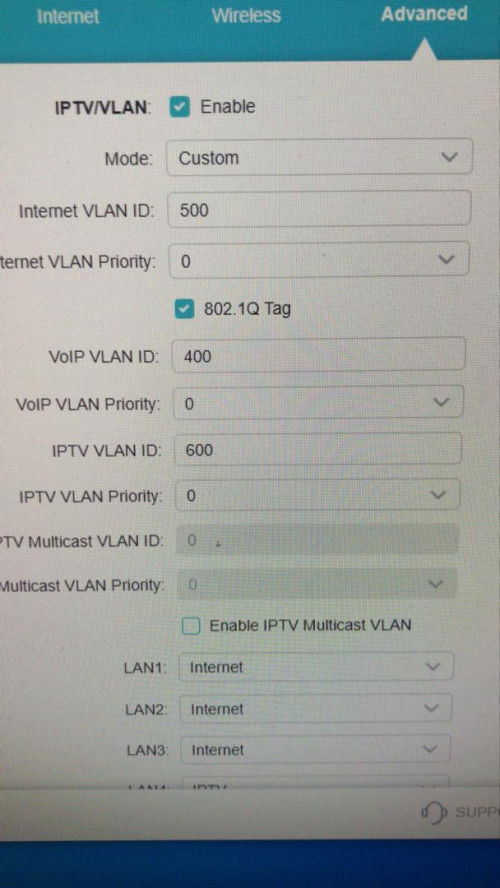
Hi guys. How to setup ax20 for hyyptv. Because if choose the vlan Malaysian-Unifi option, lan 1 is for iptv and lan 4 is for voip. How to remove the voip?

user posted image
jchong
post Jan 26 2021, 10:34 AM

****************
*******
Senior Member
5,989 posts

Joined: Nov 2005
QUOTE(JohnLai @ Dec 20 2020, 08:45 PM)
Already tucked away the TP-Link AX50 in the storeroom. (My most disappointing purchase)
Already give up on Wifi6 AX. Back to AC for me.
*
What was disappointing about the AX50 router? Was it the heat issue?
JohnLai
post Jan 26 2021, 02:54 PM

Skeptical Cat
*******
Senior Member
3,669 posts

Joined: Apr 2006
QUOTE(jchong @ Jan 26 2021, 10:34 AM)
What was disappointing about the AX50 router? Was it the heat issue?
*
AX50 = Mostly scam by TP-Link. They stated the router will receive WPA3 and OneMesh, but they renegade on it. Plus, the router basically abandoned by their engineer immediately after the "flash sale"

5 Pages « < 2 3 4 5 >Top
 

Change to:
| Lo-Fi Version
0.0523sec    1.51    7 queries    GZIP Disabled
Time is now: 17th December 2025 - 10:38 PM