QUOTE(GuyB @ Jul 10 2021, 01:27 PM)
I love you guys!
Aspick and
writesimply...

This is my set-up now.
4K UHD BD Player (Sony UBP-X700) -> HDMI 2.0 -> Onkyo TX-SR606 -> HDMI (will upgrade to HDMI 2.0 next week) -> Philips 4K
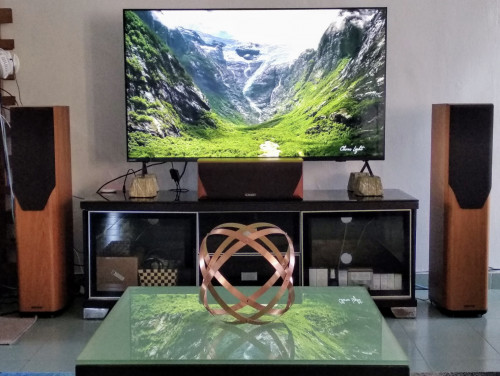
That's a decent setup. Finding matching surrounds might be expensive. My suggestion is either two pairs of bookshelf speakers or two pairs of the DIY DML speakers for the 5.1.2 setup, whenever you upgrade.
Seeing that setup though, a laser 4K short-throw projector with ALR screen would match better with the floorstanders.

QUOTE
Amazon 4K Firestick with direct Ethernet connection -> Philips 4K -> Optical audio -> Onkyo
You don't need the optical cable.
QUOTE
This is my set-up now.
4K UHD BD Player (Sony UBP-X700) -> HDMI 2.0 -> Onkyo TX-SR606 -> HDMI (will upgrade to HDMI 2.0 next week) -> Philips 4K
HDMI would be enough to get you Dolby Digital Plus/Atmos Streaming.
I'm just going to use Atmos-S for Streaming and Atmos-F for Full bandwidth.Once you upgrade to HDMI 2.0/2.1 cable, this becomes your audio return channel - ARC - to the receiver.
QUOTE
My Onkyo can only do Dolby True HD as I’ve only got 2 Mission V62 stand + 1 centre speakers, with subwoofer. Might eventually get the side speakers stands but I’m happy with my set up now.
I’ll eventually upgrade my Onkyo receiver to one that can do Dolby Atmos but I only got the whole sound set up over a year ago. Got all that..speakers, subwoofer and receiver for 1.5K.
Dolby Digital Plus is not new. It was launched about the same time as Dolby TrueHD. So your receiver can handle it.
Great price for the second-hand stuff!
QUOTE
Got the 4K UHD BD player off eBay USA for US$110 and RM105 postage. It’s RM1300 on Lazada!

I’ve another multi-region Blu-ray player i also got from USA that can play my European Blu-ray discs. Set up is on another cupboard stand off to the left. The little white thing on the left is my Amazon Echo Dot to stream Spotify and connected directly to the receiver.

Which 4K UHD player you got? I was looking on Amazon and they don't have the same features.
The Panasonic DP-UB420-K at $200 seems to have all the major features including Dolby Vision than the DP-UB150-K at $150. I would also like a Multi-region BD player but it seems that if you have a 4K UHD, you already have a multi-region player. But I could be wrong on that. 4K BDs seems to be multi-region anyway.
I'm just going to use a PS5 as my 4K BD player, if I ever can buy one at MSRP.

QUOTE
Sorry to hijack this thread with my setup. But the
Philips TV is really a good buy!
Glad that you are somewhat happy with the TV.

QUOTE(GuyB @ Jul 10 2021, 02:04 PM)
It’s on the side, and top...
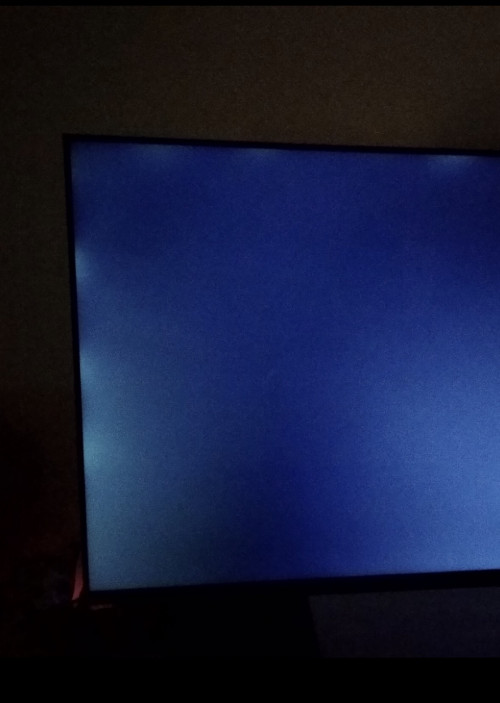
It’s not too obvious.. just irritating.
Already been infected withe upgrade-atitis, I see.
From the looks of it, it is "normal". It looks like this Philips is an edge-lit TV based on the bright patches. I think most lower priced TVs are. As the TV price suggests, you shouldn't try watching it in complete darkness. It's not built for that. Your eyes will adjust in complete brightness and when it's looking at a "black" screen on TV, you'll notice the brighter patches. If it's too bright or too dark or completely off, then you should call for warranty.
Panel uniformity can also an issue but usually if it's within their margin of error, manufacturers would not allow you to return it or request a repair.
QUOTE(GuyB @ Jul 11 2021, 01:34 PM)
I’m not sure about multi channel but the receiver is showing Dolby True HD on it but as I’ only got 3 speakers, there’s no surround. I haven’t streamed anything yet other than some 4K destination videos on YouTube. The sound quality sounds better too though.
Try any of the Netflix movies or shows that shows up as Dolby Atmos. Your TV won't know that you only have the previous gen receiver. It would just output Atmos-S as Dolby Digital Plus. Your receiver will only decode the Dolby Digital Plus signal and ignore the rest.
QUOTE
What side stand speakers do you recommend for the overall effect? I see many choices eg 2nd hand Mission mini speakers on eBay UK but the postage to get here will be exorbitant.
In a perfect setup, it should all be Mission speakers of the same range.
I suggest that you set a budget for 4 speakers of the same model, probably bookshelf speakers that are not too big. Two for the surrounds and two as your height speakers to aim at the ceiling.
QUOTE
I like Onkyo only because of their HDMI inputs so my next upgrade will probably be them too. Why do they cost so high in Malaysia considering they’re made here!
So many good electronics that are made here costs a bomb. Like the Sony TVs.
QUOTE(Aspick @ Jul 10 2021, 06:54 PM)
Thanks for the lesson on Dolby Atmos. I didn't realise you had written a very informative narrative on this subject in the Hisense thread until I read it. It will be beneficial to everyone if a new thread on this subject is created. Then you won't have to repeat yourself. 😅
I didn't mean to repeat myself, or start a lesson.

I think most people would only read the threads that they participate in and won't read the others.
QUOTE
I did not connect TV directly to receiver with HDMI as my receiver's HDMI output has been damaged by lightning. Instead to get ARC working, I connected the TV to the splitter's output with HDMI cable. Then I run an optical cable from the splitter to receiver. In this arrangement, I can get Dolby Digital Plus decoded thru the receiver when playing Netflix app in the TV.
After you've explained it three times, I finally understood your issue. Three time's the charm.
So your HDMI splitter is also a switcher? As in multiple players connected to it and then one HDMI cable goes into the receiver and the other one to the receiver?
Coming back to the TV and the receiver. How are you connecting them? Just using the optical cable? Have you tried connecting the TV to the receiver using one of the inputs on the receiver? This might work in giving you Dolby Digital Plus.
QUOTE
When playing AV test files, file with DD+ in 5.1 format played out in multichannel mode but file with DD+ in 7.1 format only output picture without any sound. Is this bcoz of limitation of the optical cable in this arrangement?
Dolby Digital Plus starts at 1.7 Mbps. It's intended to give more fidelity than the basic Dolby Digital. A short history on Dolby Digital and how optical cable plays into this.
Dolby Digital started in 1992 with the first film released with DD being
Batman Returns. Dolby Digital's data is embedded between the film's sprockets itself. The theatrical DD bitrate is 320 kbps for 5.1 channels.
In January 1995, Paramount released
Clear and Present Danger on Laserdisc. By the 1990s, Laserdiscs had analog and digital (PCM) stereo channels on the platter. Using just the
right analog channel on the Laserdisc, Dolby delivered DD 5.1 at 384 kbps, higher than the theatrical experience.
In November 1996, DVD was introduced and either Dolby Digital 2.0 or PCM 2.0 has to be the mandatory audio that each DVD had to have. By then, more movies are coming out in 5.1 mixes so most chose DD 5.1. The bitrate for DD 5.1 on DVD is 448 kbps.
Of course, while Dolby began rolling out DD Theatrical, DTS was also pushing their format and succeeding to be backwards compatible on film for a single, simple reason - CDs. Instead of putting digital data onto film, DTS uses a timecode data embedded on the film to sync it with a dedicated CD player.
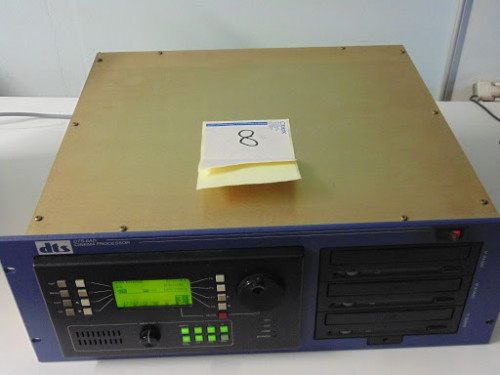
A 120-minute movie would need 2 CDs while anything longer would require 3 CDs. The data rate for DTS theatrical is 784 kbps. This, and the fact that DTS on Laserdisc and DVDs have bitrate of 1.5 Mbps (and 784 kbps), is why AV enthusiasts liked DTS more. Less compression means better audio, as the thinking went. By the way, the first movie with DTS on film and Laserdisc is
Jurassic Park.

So lets come back to CDs. By late 80s and all through the 90s, CD was
the audio format. You can play CDs on CD players and also Laserdisc players. It's bitrate is 1.5 Mbps and the best way to connect a CD player to a receiver would be via
optical cable.
So by the fault of old technology - analog 480i video and 1.5 Mbps optical digital audio - that exists on CD and DVD, and how their players are connected to AV receivers, we get to digital audio and video via HDMI.
Both Dolby and DTS audio compression technologies are scalable. On BD, Dolby Digital 5.1 is 640 kbps. To add more fidelity, DD increases by more than double to 1.7 Mbps to be Dolby Digital Plus at 7.1. But using optical cable at 1.5 Mbps, all that extra audio data and metadata in DD+ and Atmos-S have to be removed. That means you end up with 5.1 when using an optical cable. Scalable.
Phew.

Dolby Digital Plus was probably Dolby's answer to Blu-ray content maker who wanted better fidelity than Dolby Digital but doesn't want to pay for an extra layer on the disc - BD25 instead of BD50.
QUOTE
Dolby Truehd files on pendrive (inserted into the USB slot) cannot be played on this TV. The file won't load at all.
I assume you're using the built-in media player on the TV. I think you have the same TV as GuyB, right? The Philips PUT8215 with Android TV OS?
Have you installed Kodi and tried playing from there? With Kodi, the files can be on the USB flashdrive or your home NAS. It can play them in any format, even in 3D. Also you can enable audio passthrough.
QUOTE
On your last statement, certainly will be saving up now for future renovation with the final goal of having a 7.2.4 system installed in my home. This of course will have to get the blessing of my home minister. 😆
Work on it slow and steady!


 Sep 20 2020, 07:10 PM, updated 3y ago


 Quote
Quote


 lucky me didnt place an order too fast
























 0.2358sec
 0.27
0.27
 6 queries
 GZIP Disabled