QUOTE(GuyB @ Jul 11 2021, 01:34 PM)
I’m not sure about multi channel but the receiver is showing Dolby True HD on it but as I’ only got 3 speakers, there’s no surround. I haven’t streamed anything yet other than some 4K destination videos on YouTube. The sound quality sounds better too though.
Showing Dolby TrueHD when playing your source material from your UHD Bluray player? That will be correct if your current arrangement as follow: UHD BD player -> Receiver -> TV
Try switching the arrangement as follow: UHD BD player -> TV -> (optical cable) -> Receiver
Then play a UHD Bluray disk and choose the audio stream with "Dolby TrueHD" (not "Dolby Digital 5.1 or 7.1)
I doubt you can still get Dolby TrueHD on your receiver.
QUOTE(GuyB @ Jul 11 2021, 01:34 PM)
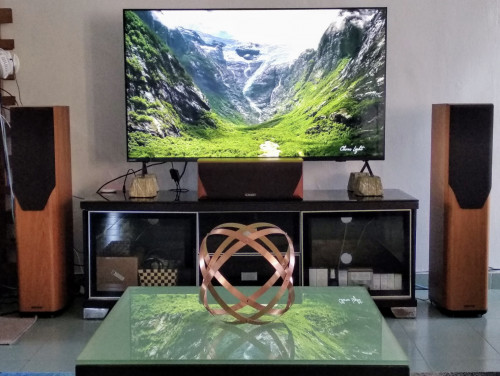
What side stand speakers do you recommend for the overall effect? I see many choices eg 2nd hand Mission mini speakers on eBay UK but the postage to get here will be exorbitant. I like Onkyo only because of their HDMI inputs so my next upgrade will probably be them too. Why do they cost so high in Malaysia considering they’re made here!
I will suggest getting a pair of Mission surround speakers to complement your existing Mission front speakers. Or any bookshelf speakers, preferably British brand to complement the 'warm' sound of your equipment.
QUOTE(GuyB @ Jul 13 2021, 12:37 PM)
Well, there’s no input for my Onkyo from the TV (when using the Firestick). Im only using the Optical Audio cable for sound, and turn on CBL/SAT as the audio. I’ll have to wait till I get my upgraded receiver with Dolby Atmos, then the HDMI ARC will replace the Optical Audio cable. However , do you mean, I can connect the HDMI 2.0 from TV back to the receiver under CBL/SAT? Can a normal HDMI cable handle ARC? It’s just sound right?
I do not think connecting using HDMI cable from TV to your receiver under CBL/SAT (HDMI in port) will work (see my comment below on the experiment I did). Neither will it work with your current HDMI cable from receiver HDMI out port to TV HDMI in port. That is because your receiver model does not have ARC support.
QUOTE(writesimply @ Jul 11 2021, 10:29 PM)
So your HDMI splitter is also a switcher? As in multiple players connected to it and then one HDMI cable goes into the receiver and the other one to the receiver?
Yes its a 4x2 splitter switcher with ARC and EDID as shown in photo below. I got three sources (TV box, Bluray player & Media Player) each with a HDMI cable going into this thing. Then two HDMI cables coming out from it, one to TV and the other to receiver. I also have an optical cable coming out from it to the receiver in oreder to pass the audio return signal from TV to the receiver.

QUOTE(writesimply @ Jul 11 2021, 10:29 PM)
Coming back to the TV and the receiver. How are you connecting them? Just using the optical cable? Have you tried connecting the TV to the receiver using one of the inputs on the receiver? This might work in giving you Dolby Digital Plus.
The splitter switcher is connecting TV to the receiver only for purpose of carrying audio return signal as follow:
TV <-(Audio & Visual) - HDMI cable - (Audio Return)-> Splitter Switcher -> Optical cable (Audio Return)-> Receiver
Connecting TV to any of the inputs of the receiver will not produce any sound.
QUOTE(writesimply @ Jul 11 2021, 10:29 PM)
I assume you're using the built-in media player on the TV. I think you have the same TV as GuyB, right? The Philips PUT8215 with Android TV OS?
Have you installed Kodi and tried playing from there? With Kodi, the files can be on the USB flashdrive or your home NAS. It can play them in any format, even in 3D. Also you can enable audio passthrough.
The built-in media player on the TV cannot decode Dolby TrueHD audio format. The files will not load at all.
I installed Kodi 19.1 into the TV and played the same files. When I enable audio passthrough, I found that Dolby TrueHD files can be played but the receiver display PCM 2.0 with only stereo sound.


 Apr 25 2021, 01:42 PM


 Quote
Quote




 0.0462sec
 0.29
0.29
 7 queries
 GZIP Disabled