

i got this error bro Sub
"stop: c0000221 unknown hard error
\systemroot\system32\ntdll.dll"
(which one shud i choose pnp or text in nlite?)
OS Installing XP with MassStorage(SATA/RAID) Drivers, Can't find HDD in XP Setup ??
OS Installing XP with MassStorage(SATA/RAID) Drivers, Can't find HDD in XP Setup ??
|
|
 Dec 13 2008, 10:14 PM Dec 13 2008, 10:14 PM
|
 
Junior Member
159 posts Joined: Sep 2006 
|
i got this error bro Sub
"stop: c0000221 unknown hard error \systemroot\system32\ntdll.dll" (which one shud i choose pnp or text in nlite?) |
|
|
|
|
|
Dec 14 2008, 01:35 AM
|

Newbie
1 posts Joined: Dec 2008
|
have anyone know where get download sata raid driver for windows xp?
I face 1 problem when i wan to reinstall windows xp,but can;t detect any harddisk. my laptop model is>>>V3759TU hp compaq. urgent help~~~~~~ |
|
|
Dec 14 2008, 06:55 PM
|

Senior Member
2,702 posts Joined: Dec 2004 From: P8X-86A 
|
Problem solved using nLite. Thks for the tips boss subkiller.
This post has been edited by nightzstar: Dec 14 2008, 06:56 PM |
|
|
Dec 14 2008, 10:42 PM
|

Junior Member
46 posts Joined: Dec 2008
|
QUOTE(mailboy85 @ Dec 1 2007, 11:10 AM) THX bro !!! i got it !! hihi . I m J0shua thx for ur post, wil help us a lot. But how with the compaq model notebook. can use acer driver also? ;J0shua Added on December 14, 2008, 11:29 pm QUOTE(SubKi||er @ Aug 10 2007, 11:15 AM) Load the SATA/RAID drivers from floppy Are u sure it work?!! I don't mind looking for drivers for those people in need, but some manufacturers like Compaq is giving me a hard time. They have laptops with the same model number while having different specification from each other which makes it hard for me to find. So i insist that please try to list out your hardware specification as detail as you can for me to help you faster and easier. !! For those who have access to USB floppy drives, here's the step how you want to get XP Setup to detect your SATA harddrive.
! I have updated some of the laptops with its chipset model ! ! There are some laptops which their manufacturer haven't put up the corresponding drivers therefore i would link to a generic driver which should work the same. ! ! I am just providing these details as per my knowledge to computers and would not hold responsible if any damage is done(which in this case should not be possible) to your computer. ! Acer Aspire 4710 [i945GM] - ftp://ftp1.acer.com.sg/Support/files/Acer.../XPSP2/SATA.exe Aspire 4720 [GM965] - http://downloadcenter.intel.com/license_ag...ystems〈=eng Dell Dell Inspiron 1420 - http://support.ap.dell.com/support/topics/...pup&file=205611 Please be awared that for certain cases, drivers would be the same if it is the same chipset. For example, if Aspire 4710 would be a 965GM chipset and 4720 is also using the same 865GM chipset, the same RAID/SATA drivers could be used to do the installation. If you're not sure, please ask first... Post or PM me the laptop model here and i'll find for you and do the updating here. I cannot say ur not working because I see b4 use pen drive to fix this problems b4. Last time i press it to find third party driver but ntg happen and keep on installing The files which downloaded and put into the pen drive is exe file? I dun like to use nlite etc to fix this problems, It causing a lot of time. ;J0shua This post has been edited by J0shua: Dec 15 2008, 11:36 AM |
|
|
Dec 15 2008, 12:21 AM
|

Senior Member
1,654 posts Joined: Jan 2003 From: Miri City, Sarawak. Mood: Missing someone~ 
|
QUOTE(phazell @ Dec 13 2008, 10:14 PM) i got this error bro Sub Sorry but i'm not familiar with nLite. It is already stated that nLite method will not be supported by me..."stop: c0000221 unknown hard error \systemroot\system32\ntdll.dll" (which one shud i choose pnp or text in nlite?) QUOTE(kyosang @ Dec 14 2008, 01:35 AM) have anyone know where get download sata raid driver for windows xp? You ain't reading the first page?I face 1 problem when i wan to reinstall windows xp,but can;t detect any harddisk. my laptop model is>>>V3759TU hp compaq. urgent help~~~~~~ QUOTE(J0shua @ Dec 14 2008, 10:42 PM) hihi . I m J0shua Sorry, but i don't seem to understand what you're trying to express...thx for ur post, wil help us a lot. But how with the compaq model notebook. can use acer driver also? ;J0shua Added on December 14, 2008, 11:29 pm Are u sure it work? I cannot say ur not working because I see b4 use pen drive to fix this problems b4. Last time i press it to find third party driver but ntg happen and keep on installing The files which downloaded and put into the pen drive is exe file? I dun like to use nlite etc to fix this problems, It causing a lot of time. how can get ur help. ;J0shua |
|
|
Dec 15 2008, 12:08 PM
|
|
Junior Member
46 posts Joined: Dec 2008
|
srry subkiller. I typing too rush with my broken english.
haha I mean the file download from acer.com in wat kind of ext? it's *.exe? ;J0shua This post has been edited by J0shua: Dec 15 2008, 12:09 PM |
|
|
|
|
|
Dec 15 2008, 01:03 PM
|
|
Senior Member
1,654 posts Joined: Jan 2003 From: Miri City, Sarawak. Mood: Missing someone~
|
QUOTE(J0shua @ Dec 15 2008, 12:08 PM) srry subkiller. I typing too rush with my broken english. Downloaded file should be *.exe where it should be a tool to prepare your floppy. It would format the floppy and copy all the needed files into your floppy disk.haha I mean the file download from acer.com in wat kind of ext? it's *.exe? ;J0shua |
|
|
Dec 15 2008, 02:15 PM
|
|
Junior Member
46 posts Joined: Dec 2008
|
QUOTE(SubKi||er @ Dec 15 2008, 01:03 PM) Downloaded file should be *.exe where it should be a tool to prepare your floppy. It would format the floppy and copy all the needed files into your floppy disk. Thx bro. I got it.;J0shua Added on December 16, 2008, 5:41 pmsubkiller Last time my frenz solving cannot detect problem by upgrade his motherboard bios version only. It's work? ;J0shua This post has been edited by J0shua: Dec 16 2008, 05:41 PM |
|
|
Dec 17 2008, 02:25 PM
|

Junior Member
97 posts Joined: Sep 2008
|
QUOTE(SubKi||er @ Aug 9 2007, 03:12 PM) Updated : Small changes (14th May 08) Thank for sharing There is 3 part of the guide :
! I would recommend that if possible use a CD-RW for your work unless of course you don't mind throwing a CD in case something mess up ! ! As to simplify most of the errors that i get through PM, I recommend you to use the vanilla version of Windows XP aka clean setup itself without slipstreams. Avoid any "D3vil SP3 Edition" or such. This is due to the fact that some of these CD might have already been slipstreamed with drivers before and the tools listed here might not recognise the previous slipstreamer and mess up the CD. ! There is an increasing amount of thread on the matter and wish that i could be of some help and solve it easy way. I dare not put this in the Guide section so hopefully if its not appropriate here too, Mods please delete the thread or move it elsewhere. Thanks. Opening : Even with the existance of Windows Vista, XP nonetheless is still the choice of OS for a lot of people for now. But because of how old XP is to date and with the emerging of new technologies, the original drivers that came with the XP Setup itself is almost obsolete. To cut the crap short, laptop doesn't have a floppy drive and XP is unable to load SATA/RAID drivers from another location besides floppy. Of course, not all laptop BIOSes can enable native SATA to emulate PATA hence the existance of this guide. So the only ways to install XP on your ub3r new laptop that runs SATA HDD would be to update the driver database in XP Setup itself. Tools needed :
First of all, copy the contents of your CD to a working path, in this case i'll use C:\WINXP Download DriverPack BASE from the link above as well as DriverPack MassStorage. Extract the BASE pack into a new folder and put the MassStorage pack you downloaded into the DriverPacks folder. Run DriverPack...  Select "disc" and choose "Browse". Browse the folder which you copied from the CD earlier and in this case it would be my C:\WINXP. If the setting is grey out like the image below : 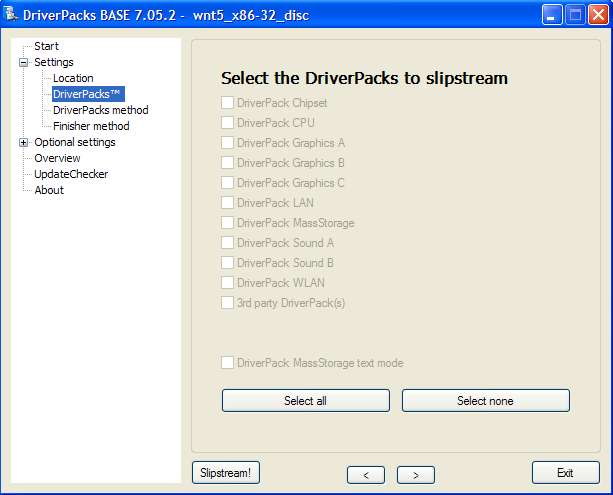 The solution : DO NOT extract the downloaded files into DriverPacks folder. Leave intact as is (i.e. copy that archive into DriverPacks folder). The DPs_BASE will automatically do the extraction. See the image below : QUOTE(SubKi||er) ..put the MassStorage pack you downloaded into the DriverPacks folder. 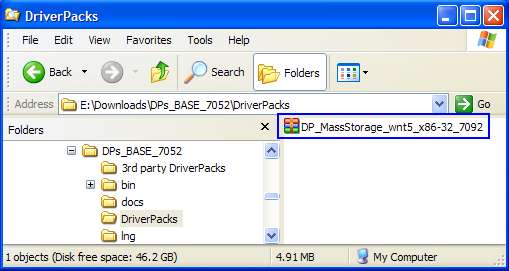 If you do it right, you can have the selection as below  : :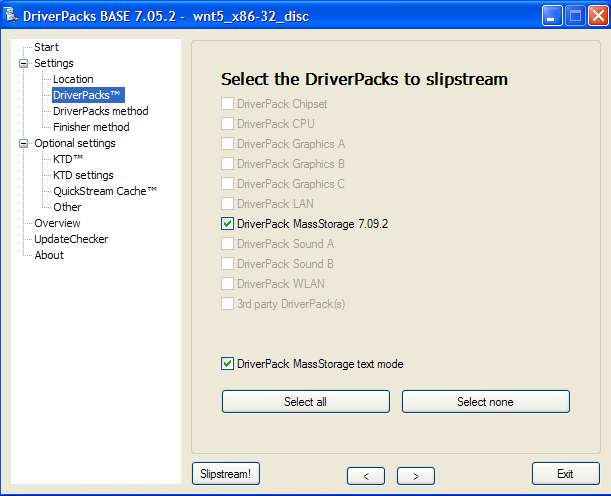 Credits: keyz Execute DPs_BASE.exe and use the installation platform selected to disc. Browse to the XP working directory you copied from the CD just now, in my case C:\WINXP earlier. Select the DriverPacks list that will appear after loading the working directory and put a check mark on DriverPack MassStorage. Put a tick in the box which says "DriverPack MassStorage text mode". Leave all the other settings as it is if you don't know what is it for.  After you're done with everything, hit the SlipStream! button and wait for the process to finish. The process should finish in around 10 minutes. After the slipstream process is finish, proceed by downloading CDIMAGE GUI. Extract and run the application, only change the "Root DIR" to your working directory in my case C:\WINXP and the "Iso file Path" to where you want to save the ISO file generated.  Select the boot.img file to load the bootable image into the ISO file.  Leave all other settings intact as it should unless you know what its doing. (Thanks Sk8teR) After the ISO file is generated, burn it with any burning software to a CD and proceed with booting the setup. Your SATA hard drive should be recognised now without the need to press F6 and load drivers. The DriverPack should contain most SATA/RAID device drivers so it should work on most computers. The End.  |
|
|
Dec 18 2008, 01:47 PM
|
|
Senior Member
1,654 posts Joined: Jan 2003 From: Miri City, Sarawak. Mood: Missing someone~
|
QUOTE(J0shua @ Dec 15 2008, 02:15 PM) Last time my frenz solving cannot detect problem by upgrade his motherboard bios version only. It's work? Might be because when he updated the bios, the IDE mode was changed from SATA to AHCI ;J0shua  |
|
|
Dec 19 2008, 10:07 AM
|
|
Junior Member
46 posts Joined: Dec 2008
|
QUOTE(SubKi||er @ Dec 18 2008, 01:47 PM) Might be because when he updated the bios, the IDE mode was changed from SATA to AHCI icicbut bios is a very serious things le once u wrong, u cannot open pc le. I no brave to try it. ;J0shua This post has been edited by J0shua: Dec 19 2008, 10:08 AM |
|
|
Dec 19 2008, 11:49 AM
|

Senior Member
891 posts Joined: Jul 2007 From: Klang 
|
hie bro... any1 knows where to get Compaq V3839TU sata driver...? can't seems to get even in google
|
|
|
Dec 30 2008, 12:48 PM
|

Junior Member
166 posts Joined: Oct 2004
|
QUOTE(seng87 @ Dec 19 2008, 11:49 AM) hie bro... any1 knows where to get Compaq V3839TU sata driver...? can't seems to get even in google Then you have to look for the chipset for the Compaq v3839TU... |
|
|
|
|
|
Jan 3 2009, 05:00 AM
|

Junior Member
492 posts Joined: Mar 2007 From: KL/Ipoh 
|
I bought a CQ-40-128AU the 1st & 3rd choice doesnt seems to be working. I dont have a floppy disc. Help me pls.
I doesnt work coz it did not found the driver rite? End up having blue screen. Is that normal? |
|
|
Jan 3 2009, 11:05 AM
|
|
Senior Member
1,654 posts Joined: Jan 2003 From: Miri City, Sarawak. Mood: Missing someone~
|
QUOTE(ellena @ Jan 3 2009, 05:00 AM) I bought a CQ-40-128AU the 1st & 3rd choice doesnt seems to be working. I dont have a floppy disc. Help me pls. What is the blue screen error?I doesnt work coz it did not found the driver rite? End up having blue screen. Is that normal? Blue screen is not an indication that driver is not found. It just means your disc is having problem assuming your hardware doesn't give any problems... |
|
|
Jan 3 2009, 04:29 PM
|
|
Junior Member
492 posts Joined: Mar 2007 From: KL/Ipoh
|
i get this error : Stop 0x0000007B (0xF79E0524, 0xC0000034, 0x00000000, 0x00000000)
|
|
|
Jan 3 2009, 09:11 PM
|
|
Senior Member
1,654 posts Joined: Jan 2003 From: Miri City, Sarawak. Mood: Missing someone~
|
QUOTE(ellena @ Jan 3 2009, 04:29 PM) i get this error : Stop 0x0000007B (0xF79E0524, 0xC0000034, 0x00000000, 0x00000000) I think its a problem with your slipstream. Might be your disc wasn't clean initially and the slipstreamer might have spoilt something.You need a clean XP setup disc before you start slipstreaming it. |
|
|
Jan 3 2009, 11:22 PM
|
|
Junior Member
492 posts Joined: Mar 2007 From: KL/Ipoh
|
QUOTE(SubKi||er @ Jan 3 2009, 09:11 PM) I think its a problem with your slipstream. Might be your disc wasn't clean initially and the slipstreamer might have spoilt something. I will try another xp cd later and tell you what is the probYou need a clean XP setup disc before you start slipstreaming it. I will try both nlite and slipstream Tried another xp cd but still the same thing.  Help ms PLS  This post has been edited by ellena: Jan 4 2009, 02:59 AM |
|
|
Jan 5 2009, 09:48 AM
|
|
Senior Member
1,654 posts Joined: Jan 2003 From: Miri City, Sarawak. Mood: Missing someone~
|
QUOTE(ellena @ Jan 3 2009, 11:22 PM) I will try another xp cd later and tell you what is the prob I'm willing to help, just i don't know how...I will try both nlite and slipstream Tried another xp cd but still the same thing. Help ms PLS If you don't slipstream a clean XP Setup disc, it just won't work. Provided that you follow my instructions all correctly... |
|
|
Jan 5 2009, 11:44 AM
|
|
Junior Member
492 posts Joined: Mar 2007 From: KL/Ipoh
|
juz wondering .. does the processor makes any diff ?
mine is AMD .. juz wondering .. already desperate |
| Change to: |  0.0312sec 0.0312sec
 0.35 0.35
 6 queries 6 queries
 GZIP Disabled GZIP Disabled
Time is now: 3rd December 2025 - 12:06 PM |
 Quote
Quote