i choose the i3 instead of i5 to reduce the cost. is i3 = ryzen 3 performance? or i5 is necessary? if i5, need add rm450 and ram upgrade to 16gb also add rm150 (extra rm600)
About the HDD in the customize page, First Hard Drive, i just let it default as Dummy, Extra Storage Holder, i also default as None. Is that right?
don't buy i3, get i5 - no one should be buying 2C4T CPU now. FYI R3 5300U is 4C8T
think if u select dummy, there will be no HDD tray
1. Budget: RM3000 - RM4000 (max) 2. Usage : Strictly office works, word/powerpoint/excel. Gonna deal with a lot of documents 3. Requirements: Display size: 13.3" or preferably 14", (will have external screen). Weight: Lightweight below 2.5kg CPU: No preference, preferably rRyzen 5 3rd gen above, or Intel 11th gen. Previous Gen CPU acceptable as long as it's quad core that came out within 1-2 years. RAM: 8gb minimum, preferably 16gb. GPU: no dedicated required.
My first choice is the Thinkpad T14, I remember helping my sis getting one right around 4k about half a year ago, but seems like it's almost impossible to get a Thinkpad at that price now. My second option is the widely available Huawei D14. Build quaility is so so, I'm using one for 2 years and it does show it's quirks sometimes.
Any other recommendation? How was the zenbook series from Asus? Previously it was well known for their build quality.
Thanks!
This post has been edited by perseides: Jun 28 2021, 10:32 PM
1. Budget: RM3000 - RM4000 (max) 2. Usage : Strictly office works, word/powerpoint/excel. Gonna deal with a lot of documents 3. Requirements: Display size: 13.3" or preferably 14", (will have external screen). Weight: Lightweight below 2.5kg CPU: No preference, preferably rRyzen 5 3rd gen above, or Intel 11th gen. Previous Gen CPU acceptable as long as it's quad core that came out within 1-2 years. RAM: 8gb minimum, preferably 16gb. GPU: no dedicated required.
Ideapad 5i 14/15 customize or 5 14 AMD customize must get at least i5/R3, metal build, 57Wh battery - suggest high sRGB panel, 16GB RAM, 512GB/1TB SSD, can consider MX450 also in Intel model use code LIMITEDTIME, wait time should be around 1 month
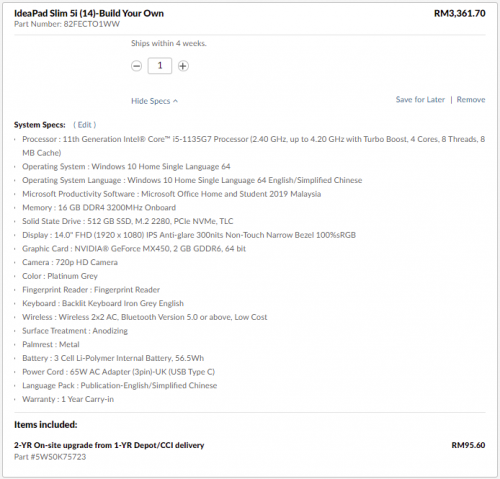
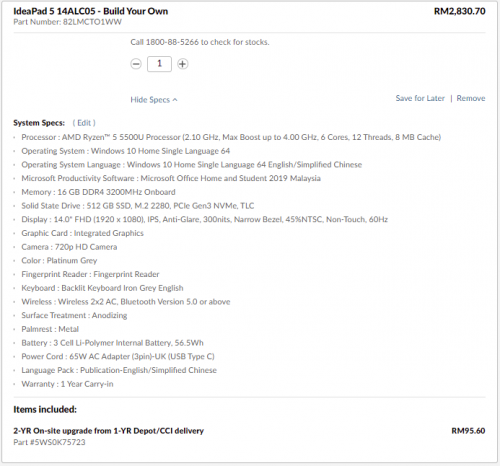
These are the 2 specs i configured. One i5 with MX and the other r5. Which would be the better value/bang for buck in a way future proof? Should i not add MX if i were to get i5, since i am stretching my budget. (which i am comfortable adding provided if i am getting a better value here) Or an R7
One i5 with MX and the other r5. Which would be the better value/bang for buck in a way future proof? Should i not add MX if i were to get i5, since i am stretching my budget. (which i am comfortable adding provided if i am getting a better value here) Or an R7
it depends on whether you need MX450 and 100%sRGB panel or not
would suggest getting 3yr warranty also for peace of mind, it's not that expensive
you can register lenovoedu site with student account, and apply code EDU - should have higher discount
This post has been edited by ZM Fong: Jun 28 2021, 11:20 PM
either Legion 5 (customize, code LENXCIMB), Legion 5 Pro (code IPRICE) or Legion 7 (code IPRICE) with R7+3070 - note that 5 Pro and 7 has more shipment delays, while 5 (non Pro) usually ships within a month
nowadays most laptops don't have hot swap battery
gaming desktops are not cheap now, so gaming laptop become a decent alternative
Thunderbolt is irrelevant for 99% of users
you're welcome
Hows asus strix g17 compared to legion 7 in build, thermal, price and performance wise? Which would you recommend for best bang for your buck?
btw what making gaming desktops not cheap now a days? is it a malaysia thing or worldwide?
This post has been edited by thundergodz: Jun 30 2021, 07:37 PM


 Jun 28 2021, 05:15 PM


 Quote
Quote







 0.0534sec
 1.07
1.07
 6 queries
 GZIP Disabled