Welcome Guest ( Log In | Register )

5 Pages « < 2 3 4 5 >Bottom

Outline · [ Standard ] · Linear+

 Maxis One Go Wifi, Now with unlimited(?) quota

views
     
ckimsem
post Nov 8 2020, 10:23 AM

Regular
******
Senior Member
1,132 posts

Joined: Jun 2011
From: Perak.


QUOTE(glauncher @ Nov 8 2020, 10:33 AM)
I experience difference between this One Go Wifi speed and my MaxisOne Postpaid 4g speed when insert both sim on the same phone...
*
1) Are you testing it on the same phone on same SIM slot?
2) Is your phone a dual SIM 4G+ supported?
3) How much is the usage for each SIM?

For my previous experience, they both are getting around the same speed at my location.

This post has been edited by ckimsem: Nov 8 2020, 10:25 AM
ckimsem
post Nov 14 2020, 12:34 AM

Regular
******
Senior Member
1,132 posts

Joined: Jun 2011
From: Perak.


QUOTE(Eugene91 @ Nov 13 2020, 04:54 PM)
I'm wondering if the ZTE Modem is Cat4 or Cat6? Does it receive 4G+ signal? I only bought a sim card to test on my TP-Link MR100 modem. Thinking to get the ZTE modem if it does indeed support 4G+ / LTE-A

This site mentiones it supports Cat4.
https://store.maxis.com.my/productdetails/c...normal-contract
*
No, the ZTE from Maxis is a 4G only router.
ckimsem
post Nov 24 2020, 07:45 AM

Regular
******
Senior Member
1,132 posts

Joined: Jun 2011
From: Perak.


QUOTE(Eugene91 @ Nov 23 2020, 09:58 PM)
Maxis said it's normal to me. but seriously 7pm-12am?  ranting.gif

I told them outside of those hours i can get 60-70Mbps but during this time less than 10Mbps and Youtube only 1.5Mbps.
*
After consumed 300GB, the speed would be throttled to 20~30mbps. So, your location may have network congestion. And, YouTube is getting throttled at night time from 8pm~12pm at 1.5mbps whether or not you have reached 300GB.
ckimsem
post Nov 26 2020, 08:29 PM

Regular
******
Senior Member
1,132 posts

Joined: Jun 2011
From: Perak.


QUOTE(budi1413 @ Nov 26 2020, 09:10 PM)
pujimak maxshit.

ive been throttled 2mbps now.

kenot stream iptv. sad.gif
*
Many users of this Go WiFi plan already confirmed all video streaming sites would get throttled to 512kbps once reaches 300GB usage. So, this plan is definitely not suitable for users who loves to watch TV.
ckimsem
post Nov 28 2020, 07:35 PM

Regular
******
Senior Member
1,132 posts

Joined: Jun 2011
From: Perak.


QUOTE(jo5h_ua @ Nov 28 2020, 07:44 PM)
Hi all, can I just walk into the store and sign up immediately, or must I leave my number for them to call me?
*
Yes, you can just walk into the Maxis store and sign up immediately walk away with the SIM only with no contract.
You may need to wait for the ZTE 4G router if that particular store has no stock, and remember, taking the 4G router will bind you into 24 months contact.
ckimsem
post Dec 2 2020, 08:00 AM

Regular
******
Senior Member
1,132 posts

Joined: Jun 2011
From: Perak.


QUOTE(budi1413 @ Dec 2 2020, 07:27 AM)
got contract ke? why need to pay termination fee?
*
If you take the 4G router provided by Maxis, it'll have a 12-months contract.
SIM only is free of contract.
ckimsem
post Dec 2 2020, 03:48 PM

Regular
******
Senior Member
1,132 posts

Joined: Jun 2011
From: Perak.


QUOTE(Zack_Cloud14 @ Dec 2 2020, 02:37 PM)
Yup. To anyone who wants to get the plan, please be cautious that the throttle is really bad from 8pm to 12 am and DO NOT take the modem as the modem can't get a good signal indoors. I ended up getting Huawei B818 , sharing with my bro, and the speed is much much better before the throttling. With the ZTE router, I had to place it near the window to get roughly 30-40 Mbps but B818 I can place at my living room and get 70Mbps ++ (100 Mbps 12am onwards). Just MaxShit throttle is unbearable. Need more people complain to MCMC but quite doubtful will get any action.

I guess one can only hope...
*
The ZTE router by Maxis is a 4G only router, and 30-40mbps may be its max speed. Huawei B818 is a 4G+ router, plus its signal reception is said to be very powerful. Therefore, of course you’ll get high speed with Huawei B818.
Yes, this plan would throttled video streaming sites at night time from 8pm-12am. And, throttled for all day after 300GB usage. Still, the browsing and downloading were throttled at 20mbps which was acceptable to me. You may try complaining to MCMC and see if it’s gonna changed, good luck.

I used this plan two months back as home internet, terminated it because my home finally has Unifi fiber internet in OCTOBER 2020. Luckily, I did not take the router, otherwise I’ll have to use it until May 2021.

This post has been edited by ckimsem: Dec 2 2020, 03:54 PM

ckimsem
post Dec 3 2020, 09:03 PM

Regular
******
Senior Member
1,132 posts

Joined: Jun 2011
From: Perak.


QUOTE(ahhann @ Dec 3 2020, 09:18 PM)
The throttle not only streaming, extended till the whole bandwidth. I still puzzled in where of the clause did they highlight this throttle, else this is mis-inform customer and they should be penalized for this.
It's annoying that I can't continue work with the reduced bandwidth. Dealing with big data is no fun with this throttle.
*
As my previous usage, all video streaming sites, google play store updating/downloading, FaceBook are getting badly throttled to 512kbps, while speedtest, downloading sites (e.g. filehippo), Steam games updating/downloading are throttled to 20~30mbps.

Anyways, sorry to hear that and that's very bad of Maxis. Probably, Maxis has amended this MaxisONE Go WiFi again since the TnC stated.

6.4 - Maxis reserves the right to modify for any reason whatsoever or suspend or terminate (temporarily or permanently) the Services at any time and from time to time with or without notice. You agree that Maxis shall not be liable to you or to any other party for such modification, suspension or termination of the Services.


ckimsem
post Dec 6 2020, 08:05 AM

Regular
******
Senior Member
1,132 posts

Joined: Jun 2011
From: Perak.


QUOTE(dylan_chng @ Dec 5 2020, 08:44 PM)
My family Streamyx was unreliable and only 4 down, 0.4 up.

Recently borrowed a TP-Link MR6400 with Maxis sim card although unsure what plan.

Was really impressed by the performance and my family subscribed to the unlimited plan. Bought for my family a TP-Link MR6400 too.

One speedtest, around 30 down, 40 up.

Going to battle test it and see whether it can fit my family needs before terminating our Streamyx.
*
You should have got a 4G+ router instead if your location supports 4G+ network. TP Link MR6400 is a 4G only router, and so ±30mbps might be the max speed you could get using that router.
Do take note that this MaxisONE Go WiFi is not truly unlimited high speed internet, it has a quota of 300GB high speed and after that it's throttled to ±20mbps. Furthermore, all video streaming sites will be badly throttled.

This post has been edited by ckimsem: Dec 6 2020, 08:07 AM
ckimsem
post Dec 8 2020, 09:02 PM

Regular
******
Senior Member
1,132 posts

Joined: Jun 2011
From: Perak.


QUOTE(kayent @ Dec 8 2020, 07:06 PM)
if you're still under contract then try/demand for it. make a fuss
as for mine, my contract has already expired. just that im stuck with them cuz unifi no port at my area.

meanwhile i did contact them back.
1 hour, 3 agents later, they still cant provide a solution and they just filed another report Cxxxxxxxx. dry.gif
*
Have you tried DiGi infinite 150 although it is a bit pricier or a cheaper alternative Unifi Air which is at your location? Since you’re not under contract, you may try them if you haven’t.
ckimsem
post Dec 24 2020, 07:54 AM

Regular
******
Senior Member
1,132 posts

Joined: Jun 2011
From: Perak.


QUOTE(sp6068 @ Dec 23 2020, 11:12 PM)
Hah their own speedtest pun sama shows throttled.

https://maxis.speedtestcustom.com/result/8c...23-2557edc4e80f

user posted image
*
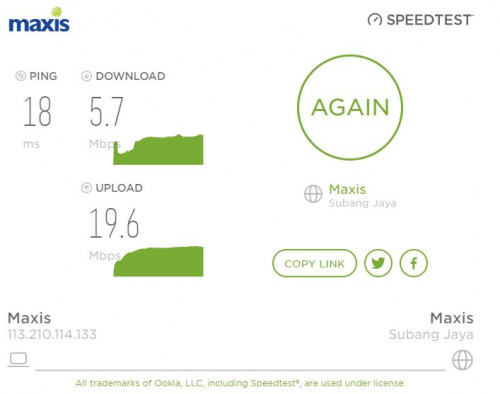
Your upload speed is +19mbps. It's more like congestion than throttled.
ckimsem
post Dec 30 2020, 07:39 PM

Regular
******
Senior Member
1,132 posts

Joined: Jun 2011
From: Perak.


QUOTE(sp6068 @ Dec 30 2020, 07:36 PM)
Theres no other who offers unlimited except Unifi air. My area unifi air not stronk. TM themselves said the coverage here is poor.

If it wasn't for no port issue would not even bother to take 4G plans.
*
You may also complain to MCMC on Unifi Air poor coverage. Since Unifi is an GLC, I believe it may get approval for erecting tower or enhancing network faster and easier than non-GLC ones.
Otherwise, terminate it and just make do with whatever is good for you.

This post has been edited by ckimsem: Dec 30 2020, 07:40 PM
ckimsem
post Jan 5 2021, 07:50 AM

Regular
******
Senior Member
1,132 posts

Joined: Jun 2011
From: Perak.


QUOTE(sp6068 @ Jan 4 2021, 11:30 PM)
Probably the reason why. I'm still experiencing slow speed from 8-12. Peak speed it can reach is 5mbps if not its always around 2mbps

user posted image
*
How much have you used for this month? and How much GB do you use usually for a month?
ckimsem
post Jan 5 2021, 07:27 PM

Regular
******
Senior Member
1,132 posts

Joined: Jun 2011
From: Perak.


QUOTE(sp6068 @ Jan 5 2021, 07:23 PM)
Usually >300gb. Household of 4. As of today is 311.44GB have not reach billing date yet. This is our main house internet. Maxis has a stupid FUP rules which states even its "unlimited" behind theres a catch. Unfortunately unifi air coverage is the worst in Malaysia cant turn to choose them.
I wish can terminate that easily. If my place unifi air has better coverage would have already gone for them. Not to mention cheaper lagi.
*
Yes, I really don’t like that Maxis stated “unlimited even if you’re not in fibre coverage area” on its webpage.
BTW, have you tried DiGi infinite 150 which gives 1000GB quota?

This post has been edited by ckimsem: Jan 5 2021, 07:28 PM
ckimsem
post Jan 5 2021, 08:54 PM

Regular
******
Senior Member
1,132 posts

Joined: Jun 2011
From: Perak.


QUOTE(sp6068 @ Jan 5 2021, 09:16 PM)
That one is postpaid brah and 150 is big sum for just 4G data. I only want internet with router/modem. The only 2 companies that give unlimited is Maxis and Unifi.
*
Only 2 doh.gif, Please update yourself, this DiGi i150 unlimited data plan came up for quite some time before Maxis and Unifi.
Yes, that’s a postpaid plan with unlimited data + unlimited tethering, which means you can use on a 4G router as a home broadband provided that your location has a good connection. It’s an alternative for Unifi Air unlimited data, plus you get unlimited calls if the 4G router can connect a phone using RJ-11 cable.
Go and check https://forum.lowyat.net/topic/4676932

This post has been edited by ckimsem: Jan 5 2021, 09:11 PM
ckimsem
post Feb 14 2021, 10:06 PM

Regular
******
Senior Member
1,132 posts

Joined: Jun 2011
From: Perak.


QUOTE(amil123 @ Feb 14 2021, 10:00 PM)
hi guys just one question , is maxis one go wifi sim lock to a certain modem?
because i wanted to use this plan with tplink mr600+parabolic antenna

i test my maxis postpaid plan speed seem good get around 70mbps
*
No, you can use the SIM in any 4G supported devices, eg. Phone, router, MiFi, etc.
You could take the SIM only, and it doesn't have contract.
12 months contract applied if you take the 4G router for RM1.
ckimsem
post Mar 7 2021, 12:14 PM

Regular
******
Senior Member
1,132 posts

Joined: Jun 2011
From: Perak.


QUOTE(hamkeling72 @ Mar 6 2021, 11:49 PM)
Really regret signing up this plan with 12-months contract. Speed is really bad. Especially from 7pm-12am.
*
You should take the SIM only to test your location cause the 4G router from Maxis is not good.
ckimsem
post Mar 10 2021, 06:13 PM

Regular
******
Senior Member
1,132 posts

Joined: Jun 2011
From: Perak.


QUOTE(sp6068 @ Mar 10 2021, 03:00 PM)
I have a feeling the ZTE router is bottlenecking the speed. I can never go beyond 30mbps at night when no congestion. In comparison, my umobile hotspot can reach 48mbps on VPN in the middle of the night.
*
In comparison? Which means you tried both SIMs in the same ZTE router?
For what I meant no good is that it’s a 4G only router. So, if one’s location supports 4G+, they may not get the full speed at their location using the ZTE router by Maxis.
ckimsem
post Mar 12 2021, 07:47 AM

Regular
******
Senior Member
1,132 posts

Joined: Jun 2011
From: Perak.


QUOTE(Langiler @ Mar 12 2021, 03:50 AM)
Hello, how to subscribe with sim only? in Maxis website there is no option to buy sim only, forced to buy sim along with ZTE router
*
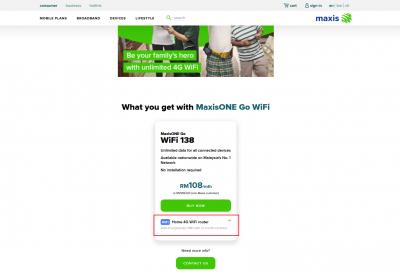
Please read carefully "Add on (optional): RM1 with 12-month contract" below the "buy now". Only if you take the 4G router from Maxis for RM1, you'll be tied to a 12-month contract. I don't see any "forcing" like you said.
This plan is RM138: NP. There's an RM30 rebate for 12-month (no contract) = RM108 if you're a Maxis postpaid user. Anyway, you may just visit any Maxis center and walk away with the SIM only free-of-contract.
Attached Image
BTW, I was using this plan previously. Already terminated it due to changing to Unifi Fiber finally got coverage at my location.

This post has been edited by ckimsem: Mar 12 2021, 07:53 AM
ckimsem
post Apr 3 2021, 08:21 PM

Regular
******
Senior Member
1,132 posts

Joined: Jun 2011
From: Perak.


QUOTE(aliffsyfq_ @ Apr 3 2021, 07:17 PM)
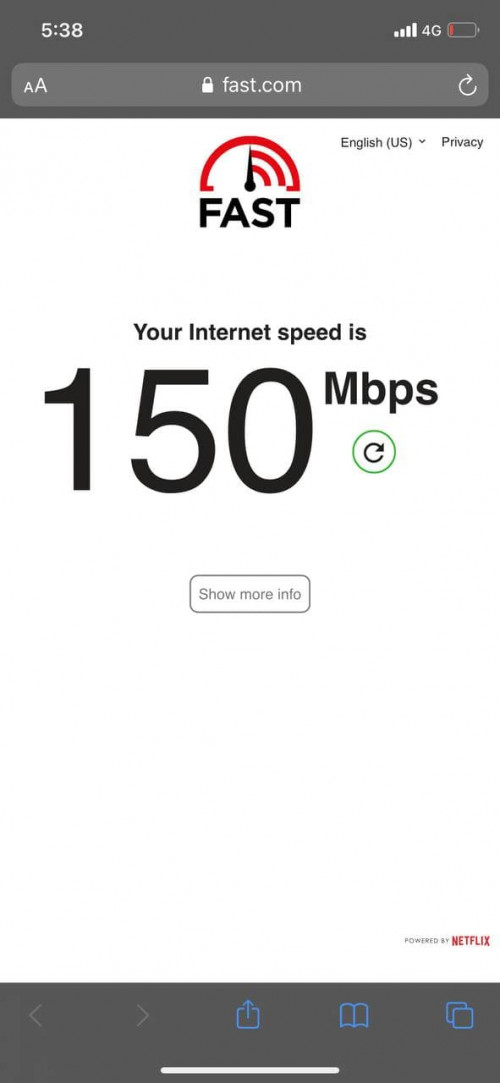
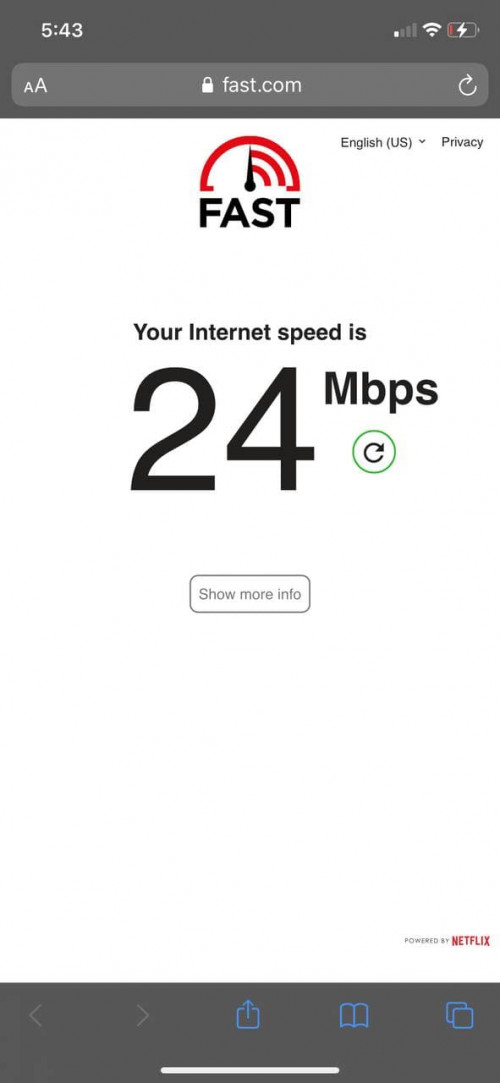
Hi! I just subscribed to MaxisOne GO Wifi. I got around 20 mbps through the router but when i insert the sim into my phone, i easily got 100+mbps. The first image is when i connected to the wifi through the router and the latter is when i inserted the sim into my phone and used it as data. Does changing to a better router help with this, if so what router should i get?

user posted image

user posted image
*
Which router do you use? Some routers are 4G only capable, which may limit the speed to 30+mbps.
Which phone do you use? Most of the phones nowadays are 4G+ capable, that’s why you may reach 100+mbps on 4G+ network.
So, there’s a high chance of getting better speed with a good router, e.g. Huawei B618 or B818.
Note: for congestion issues, regardless of whatever router you use, it’ll be the same. And, also there’s the throttling issue as some people said here, plus the 300gb high speed quotas.

This post has been edited by ckimsem: Apr 3 2021, 08:22 PM

5 Pages « < 2 3 4 5 >Top
 

Change to:
| Lo-Fi Version
0.0407sec    1.29    7 queries    GZIP Disabled
Time is now: 18th December 2025 - 11:37 PM