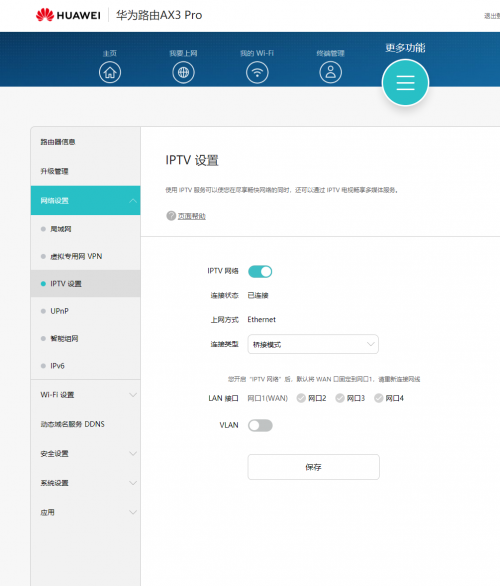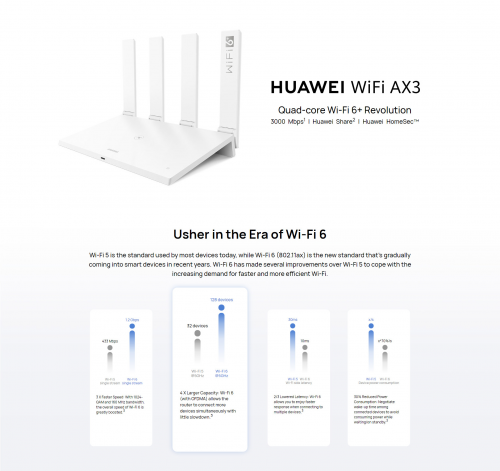
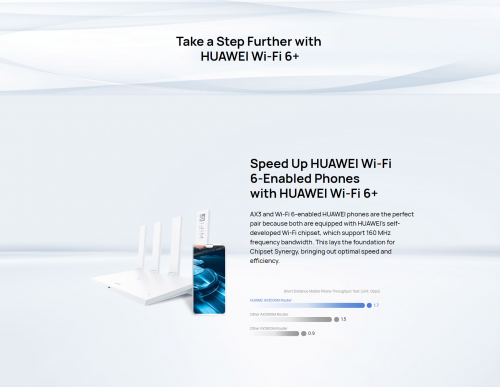
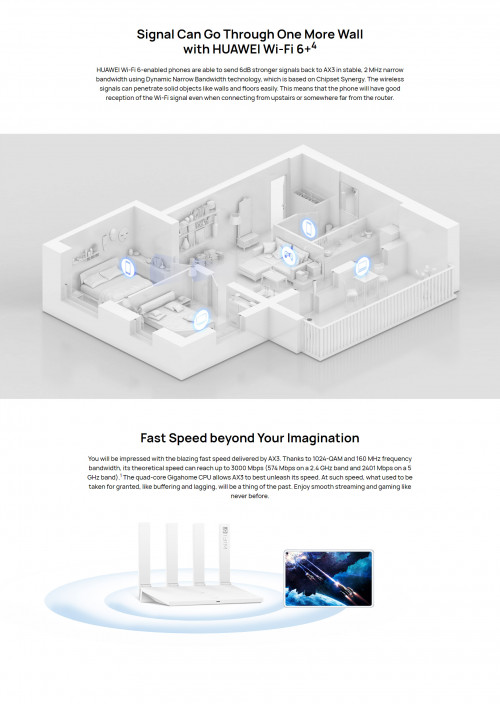
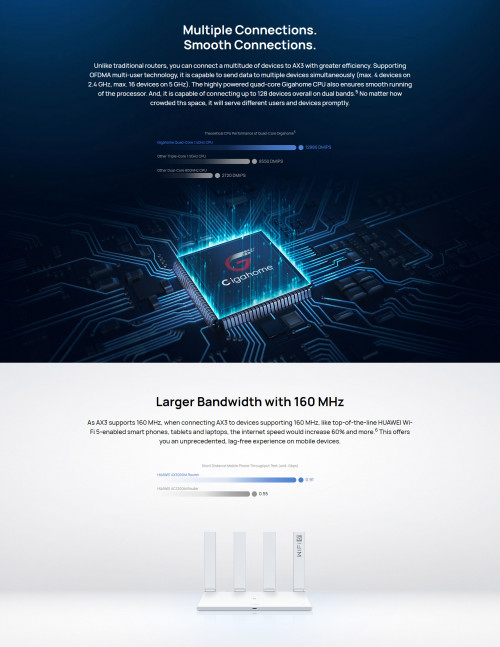

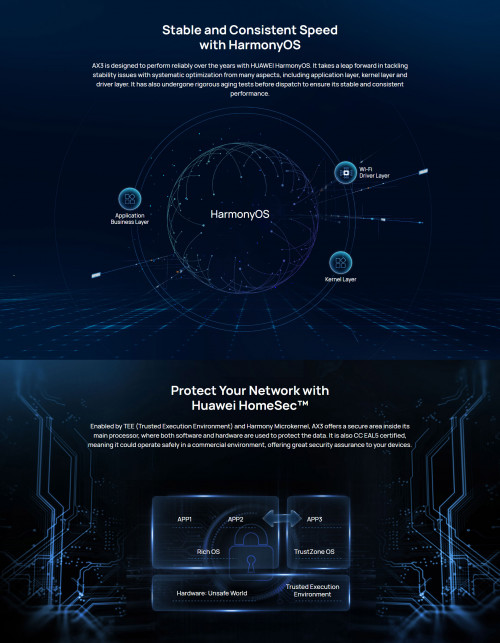
Specs:
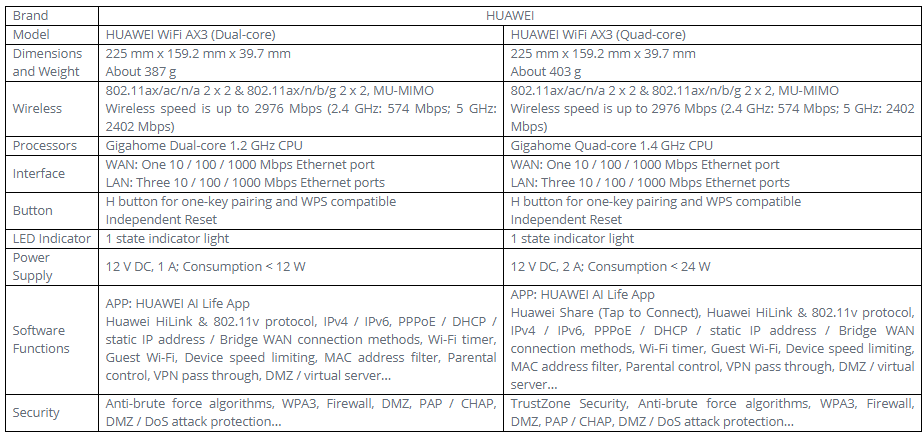
Link:
https://sea.banggood.com/HUAWEI-WiFi-AX3-Qu...ur_warehouse=CN
Huawei WiFi AX3 3000 Mbps router
|
|
 May 12 2020, 04:22 PM, updated 5y ago May 12 2020, 04:22 PM, updated 5y ago
Show posts by this member only | IPv6 | Post
#1
|
 
Junior Member
504 posts Joined: Oct 2012 From: It's all relative  
|
3000 Mbps WiFi 6 router by Huawei, costs only RM294.42. Not sure of Huawei track record when it comes to routers. Any thoughts?
Specs: Link: https://sea.banggood.com/HUAWEI-WiFi-AX3-Qu...ur_warehouse=CN |
|
|
|
|
|
May 12 2020, 04:32 PM
Show posts by this member only | Post
#2
|

Junior Member
976 posts Joined: Nov 2014 From: Sandakan, Sabah
|
why not use wifi mesh? cover more blank area than single router
|
|
|
May 12 2020, 04:46 PM
Show posts by this member only | IPv6 | Post
#3
|

Junior Member
485 posts Joined: May 2006
|
Am looking forward to comparing the AX3 Pro with the Xiaomi AX3600 when stock arrives soon from my friend.
|
|
|
May 12 2020, 04:51 PM
Show posts by this member only | IPv6 | Post
#4
|
|
Junior Member
504 posts Joined: Oct 2012 From: It's all relative
|
QUOTE(wailam @ May 12 2020, 04:32 PM) why not use wifi mesh? cover more blank area than single router I realise the benefit of mesh routers, but I'm hoping to just discuss about this particular router here. |
|
|
May 12 2020, 04:54 PM
Show posts by this member only | Post
#5
|
|
Senior Member
3,389 posts Joined: Sep 2019
|
Cheappp la, where to buy in Malaysia?
|
|
|
May 12 2020, 04:57 PM
Show posts by this member only | IPv6 | Post
#6
|
|
Junior Member
504 posts Joined: Oct 2012 From: It's all relative
|
QUOTE(waghyu @ May 12 2020, 04:54 PM) Cheappp la, where to buy in Malaysia? Not available yet. You can preorder at Banggood: https://sea.banggood.com/HUAWEI-WiFi-AX3-Qu...ur_warehouse=CNLooks like will be available May 17 based on the page. This post has been edited by amir.asyraf: May 12 2020, 04:57 PM |
|
|
|
|
|
May 12 2020, 04:59 PM
Show posts by this member only | Post
#7
|
|
Senior Member
3,389 posts Joined: Sep 2019
|
QUOTE(amir.asyraf @ May 12 2020, 04:57 PM) Not available yet. You can preorder at Banggood: https://sea.banggood.com/HUAWEI-WiFi-AX3-Qu...ur_warehouse=CN I like, thanks.Looks like will be available May 17 based on the page. |
|
|
May 12 2020, 05:26 PM
Show posts by this member only | Post
#8
|
|
Junior Member
224 posts Joined: Apr 2019
|
its 2x2 not so good for multi user but personally i prefer 2x2 router minimal electricity usage only problem for me is the coverage probably just good for normal, small home
|
|
|
May 12 2020, 06:37 PM
Show posts by this member only | Post
#9
|
|
Junior Member
375 posts Joined: Mar 2008 From: Selangor
|
Dual or triple band?
|
|
|
May 12 2020, 07:30 PM
|
 
Elite
8,421 posts Joined: Jul 2008 
|
Have a chance to test the non Pro AX3 previously.
5Ghz WiFi 6 peak on 800Mbps but always will fluctuate from 400 to 800Mbps. Kinda expected from a router at this price point considering there's no way Huawei can put a decent WiFi front end module (FEM). TP-Link Archer AX10 can hit over 800Mbps consistently. Broadcom chipset > Huawei WiFi chip. What you pay is what you get. |
|
|
May 12 2020, 08:30 PM
|

Senior Member
5,714 posts Joined: Mar 2007 
|
There won’t be any VLAN tagging available probably. You will need a smart switch to use this router. Good luck to those who won’t know this and buy the router. We will see them asking questions here on why they are not able to connect to Unifi or Maxis.
|
|
|
May 12 2020, 08:37 PM
|
|
Junior Member
504 posts Joined: Oct 2012 From: It's all relative
|
QUOTE(yed @ May 12 2020, 06:37 PM) Dual or triple band? DualQUOTE(blacktubi @ May 12 2020, 07:30 PM) Have a chance to test the non Pro AX3 previously. That's a shame, will you be posting the review for it on your site?5Ghz WiFi 6 peak on 800Mbps but always will fluctuate from 400 to 800Mbps. Kinda expected from a router at this price point considering there's no way Huawei can put a decent WiFi front end module (FEM). TP-Link Archer AX10 can hit over 800Mbps consistently. Broadcom chipset > Huawei WiFi chip. What you pay is what you get. QUOTE(SilentVampire @ May 12 2020, 08:30 PM) There won’t be any VLAN tagging available probably. You will need a smart switch to use this router. Good luck to those who won’t know this and buy the router. We will see them asking questions here on why they are not able to connect to Unifi or Maxis. I'm not able to find the detailed spec sheet... so not sure. blacktubi have tested it out, does it have VLAN tagging? |
|
|
May 12 2020, 09:54 PM
|
|
Elite
8,421 posts Joined: Jul 2008
|
QUOTE(amir.asyraf @ May 12 2020, 08:37 PM) Dual The one I tested in a China version and it doesn't have VLAN tagging capability.That's a shame, will you be posting the review for it on your site? I'm not able to find the detailed spec sheet... so not sure. blacktubi have tested it out, does it have VLAN tagging? I won't write a review for the model. Hopefully the Pro variant could be better. |
|
|
|
|
|
Jun 10 2020, 10:27 PM
|

Junior Member
13 posts Joined: Sep 2008
|
|
|
|
Jun 10 2020, 10:49 PM
|

Senior Member
736 posts Joined: Jun 2006 From: Ipoh
|
QUOTE(blacktubi @ May 12 2020, 09:54 PM) The one I tested in a China version and it doesn't have VLAN tagging capability. Pro version have extra amplifier for 5G comparing to AX3 (non pro).I won't write a review for the model. Hopefully the Pro variant could be better. I hope you can test out the AX3 pro later. I saw in other YouTube reviewer, the performance of AX3 Pro is almost comparable to Xiaomi AX3600 which is more expensive model. Router Redmi AX5 Antennas 4 2.4G amplifier 2.4G high power x2 5G amplifier 5G mid-power x2 Signal Strength 5dBi Router Huawei AX3 Antennas 4 2.4G amplifier 2.4G high power x2 5G amplifier / Signal Strength 5dBi Router Huawei AX3 Pro Antennas 4 2.4G amplifier 2.4G high power x2 5G amplifier 5G mid-power x2 Signal Strength 5dBi |
|
|
Jun 11 2020, 02:00 PM
|

All Stars
14,909 posts Joined: Jul 2005
|
QUOTE(lawolf @ Jun 10 2020, 10:27 PM) https://forums.hardwarezone.com.sg/internet...-6264048-3.html That VLAN is for something else. Not really configurableax3 pro have VLAN tagging capability https://forums.hardwarezone.com.sg/internet...6264048-12.html This post has been edited by sHawTY: Jun 11 2020, 02:02 PM |
|
|
Jun 12 2020, 01:49 AM
Show posts by this member only | IPv6 | Post
#17
|

Junior Member
143 posts Joined: Aug 2014
|
QUOTE(SilentVampire @ May 12 2020, 08:30 PM) There won’t be any VLAN tagging available probably. You will need a smart switch to use this router. Good luck to those who won’t know this and buy the router. We will see them asking questions here on why they are not able to connect to Unifi or Maxis. Noobs here. Can smart switch set vlan tag for any router including the china made one? I see a lot of China router if direct import is 3 times cheaper but cannot set vlan tag to unifi. If use smart switch can use unifi on those router? What is the cheapest smart switch recommended? |
|
|
Jun 12 2020, 04:43 AM
Show posts by this member only | IPv6 | Post
#18
|
|
Junior Member
485 posts Joined: May 2006
|
QUOTE(Imp Bron @ Jun 12 2020, 01:49 AM) Noobs here. Can smart switch set vlan tag for any router including the china made one? I see a lot of China router if direct import is 3 times cheaper but cannot set vlan tag to unifi. If use smart switch can use unifi on those router? What is the cheapest smart switch recommended? I would be of interest to know as well.  |
|
|
Jun 12 2020, 09:00 AM
|
|
Senior Member
5,714 posts Joined: Mar 2007
|
QUOTE(Imp Bron @ Jun 12 2020, 01:49 AM) Noobs here. Can smart switch set vlan tag for any router including the china made one? I see a lot of China router if direct import is 3 times cheaper but cannot set vlan tag to unifi. If use smart switch can use unifi on those router? What is the cheapest smart switch recommended? QUOTE(chaos32 @ Jun 12 2020, 04:43 AM) I would be of interest to know as well. I'll answer both of your questions since you both want to know the same thing. Yes, the smart switch can set any VLAN tagging for any router including the China made one. See bro [Blacktubi] excellent tutorial on how to do so here: https://www.blacktubi.com/guide/make-any-ro...-work-on-unifi/. The cheapest smart switch would be the TP-Link TL-SG105E.Kepp in mind though, the China router have no local warranty, and any issues you have will require the router to be sent back to China for warranty claims. |
|
|
Jun 12 2020, 10:04 AM
Show posts by this member only | IPv6 | Post
#20
|
|
Junior Member
485 posts Joined: May 2006
|
QUOTE(SilentVampire @ Jun 12 2020, 09:00 AM) I'll answer both of your questions since you both want to know the same thing. Yes, the smart switch can set any VLAN tagging for any router including the China made one. See bro [Blacktubi] excellent tutorial on how to do so here: https://www.blacktubi.com/guide/make-any-ro...-work-on-unifi/. The cheapest smart switch would be the TP-Link TL-SG105E. Thanks for pointing in the right direction. Cheers. Kepp in mind though, the China router have no local warranty, and any issues you have will require the router to be sent back to China for warranty claims.  |
|
|
Jun 12 2020, 04:48 PM
|
|
Junior Member
13 posts Joined: Sep 2008
|
QUOTE(SilentVampire @ Jun 12 2020, 09:00 AM) I'll answer both of your questions since you both want to know the same thing. Yes, the smart switch can set any VLAN tagging for any router including the China made one. See bro [Blacktubi] excellent tutorial on how to do so here: https://www.blacktubi.com/guide/make-any-ro...-work-on-unifi/. The cheapest smart switch would be the TP-Link TL-SG105E. Kepp in mind though, the China router have no local warranty, and any issues you have will require the router to be sent back to China for warranty claims. 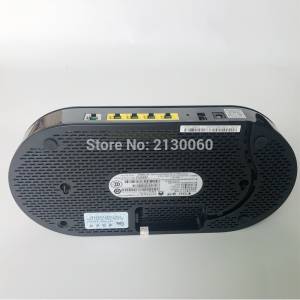 i straight replace tm huawei onu . Currently i using huawei HS8145V , direct setting vlan tagging and straight dial pppoe from this device . No need smart switch . Chan Hensem liked this post
|
|
|
Jun 12 2020, 05:33 PM
Show posts by this member only | IPv6 | Post
#22
|
|
Junior Member
248 posts Joined: Aug 2018
|
QUOTE(lawolf @ Jun 12 2020, 04:48 PM) i straight replace tm huawei onu . Currently i using huawei HS8145V , direct setting vlan tagging and straight dial pppoe from this device . No need smart switch . Chan Hensem liked this post
|
|
|
Jun 16 2020, 11:41 AM
|
|
Junior Member
13 posts Joined: Sep 2008
|
QUOTE(heidarren @ Jun 12 2020, 05:33 PM) How do you setup this to replace onu? ONU password you can retrieve from original tm huawei btu Tutorial can refer here : https://www.youtube.com/watch?v=AD2D5it_QIc https://www.youtube.com/watch?v=4oDWCp0dB2c&t=67s This post has been edited by lawolf: Jun 16 2020, 11:42 AM Chan Hensem liked this post
|
|
|
Jun 16 2020, 12:07 PM
|

Senior Member
1,941 posts Joined: Jan 2003
|
QUOTE(lawolf @ Jun 16 2020, 11:41 AM) ONU password you can retrieve from original tm huawei btu I wonder is this the newer version of HG8240H where they no longer block the web access? The version I'm having do restrict access to all LAN ports.Tutorial can refer here : https://www.youtube.com/watch?v=AD2D5it_QIc https://www.youtube.com/watch?v=4oDWCp0dB2c&t=67s |
|
|
Jun 16 2020, 12:11 PM
|
|
Junior Member
13 posts Joined: Sep 2008
|
QUOTE(thankyou @ Jun 16 2020, 12:07 PM) I wonder is this the newer version of HG8240H where they no longer block the web access? The version I'm having do restrict access to all LAN ports. after reset you can access to web gui ,then retrieve the serial no and & onu .Then go to huawei hs8145v paste the serial no & onu password . Setup PPPoe and vlan tagging as usual . |
|
|
Jun 16 2020, 12:14 PM
|
|
Senior Member
1,941 posts Joined: Jan 2003
|
QUOTE(lawolf @ Jun 16 2020, 12:11 PM) after reset you can access to web gui ,then retrieve the serial no and & onu . Ah okay. after reset! Thank you.Then go to huawei hs8145v paste the serial no & onu password . Setup PPPoe and vlan tagging as usual . |
|
|
Jun 25 2020, 10:52 PM
|

Junior Member
325 posts Joined: Jan 2008 From: Kuala Lumpur
|
I just gotten this router today and setup according to the black tubi method I got mine from taobao directly, so AX3 pro for just around rm200 ( the pro got better external signal amplifier do choose the pro version) You will need a manged switch like Tp-link SG105E , or Mercury SG105Pro ( sub brand under Tplink ? look the same even the menu is a carbon copy but cheaper in taobao , around rm50) following the guide of black tubi to setup the switch, however do note, if you plan to use the switch function, another cable from router need to be connected to the free port. This is due to different VLAN. So my setup is port 5 to router WAN , port 2/3/4 as switch , port 1 from ONU. I skip IPTV port since i did not use it. then connect port 1 to router , any port from router to pc , setup PPPoE (unifi acct + password) , setup Wifi as per normal and you are done. the interface is rather simple , so there are not much mess around with. There are no CPU / temperate / client list like Asus , so its really basic. So I cannot tell how is the performance really like on high load. You can translate to english after its connected to internet. PS : there is the "user experience improvement program", like how facebook /google. It however state the data may be provide to government(china) if requested. Make sense in china , not in malaysia , so please turn that off. This post has been edited by angelic88: Jun 25 2020, 11:00 PM Daredevil71 liked this post
|
|
|
Jun 30 2020, 01:45 PM
|
|
Junior Member
464 posts Joined: Mar 2005
|
Apparently OOKAS is bringing this via pre-order and ready for Unifi/Maxis.
https://s.lazada.com.my/s.bHoww |
|
|
Jul 1 2020, 10:24 AM
Show posts by this member only | IPv6 | Post
#29
|
|
Senior Member
1,873 posts Joined: Nov 2010
|
And also Huawei Vmall.
https://shop.huawei.com/my/mid-year-sale.html QUOTE HUAWEI Wifi AX3 No Free Gift 299 https://shop.huawei.com/my/notice-1121 HUAWEI WIFI AX3 QUAD-CORE (WHITE) https://shop.huawei.com/my/product/huawei-wifi-ax3 This post has been edited by BenYeeHua: Jul 1 2020, 10:25 AM |
|
|
Jul 2 2020, 02:30 AM
|
|
Senior Member
1,974 posts Joined: Dec 2011
|
QUOTE(lawolf @ Jun 12 2020, 04:48 PM) i straight replace tm huawei onu . Currently i using huawei HS8145V , direct setting vlan tagging and straight dial pppoe from this device . No need smart switch .  . Didn't know that there is such a device. Thought that optical modem is always separated from the router. However, this model don't support WiFi 6. . Didn't know that there is such a device. Thought that optical modem is always separated from the router. However, this model don't support WiFi 6.QUOTE(Morpheus2be @ Jun 30 2020, 01:45 PM) Apparently OOKAS is bringing this via pre-order and ready for Unifi/Maxis. https://s.lazada.com.my/s.bHoww QUOTE(BenYeeHua @ Jul 1 2020, 10:24 AM) And also Huawei Vmall. Interested to know what are the differences in the firmware compared to China version. https://shop.huawei.com/my/mid-year-sale.html https://shop.huawei.com/my/notice-1121 HUAWEI WIFI AX3 QUAD-CORE (WHITE) https://shop.huawei.com/my/product/huawei-wifi-ax3  |
|
|
Jul 2 2020, 10:18 AM
Show posts by this member only | IPv6 | Post
#31
|
|
Senior Member
1,873 posts Joined: Nov 2010
|
QUOTE(ipohps3 @ Jul 2 2020, 02:30 AM) Interested to know what are the differences in the firmware compared to China version. Normally is higher wattage on WiFi and IPTV/VLAN support, with a few feature disable because of Malaysia law or lack of ROM size.The OOKAS is cheaper if you open using Lazada App and pay for the Deposit, which is RM 269. Also if you lucky, topup to Lazada wallet and get RM 77, well.  For Huawei Vmall, only lucky draw and official very fast shipping.  |
|
|
Jul 2 2020, 12:36 PM
Show posts by this member only | IPv6 | Post
#32
|

Senior Member
2,856 posts Joined: Mar 2012
|
Anyone here uses the Huawei WS5200 router?
Just want to ask, is the coverage comparable to my old Asus RT-N66U? Got option to do static routes in the UI? Want to replace it after using it for 5 years. This post has been edited by khainiz94: Jul 2 2020, 12:37 PM |
|
|
Jul 2 2020, 08:26 PM
Show posts by this member only | IPv6 | Post
#33
|

Senior Member
1,725 posts Joined: Jan 2003
|
|
|
|
Jul 2 2020, 08:55 PM
|
|
Junior Member
248 posts Joined: Aug 2018
|
There's a trustworthy website compared it with Xiaomi AX3600, conclusion is if you are using Huawei phones, AX3 or AX3 Pro is good, or else go for AX3600 https://www.acwifi.net/9937.html , if you can read Chinese Intel AX200 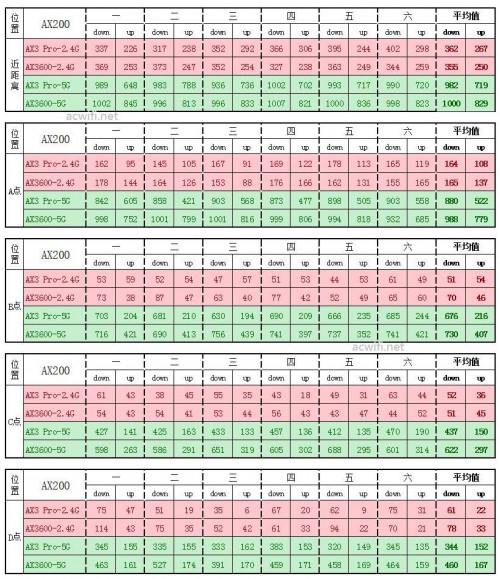 Mate 20 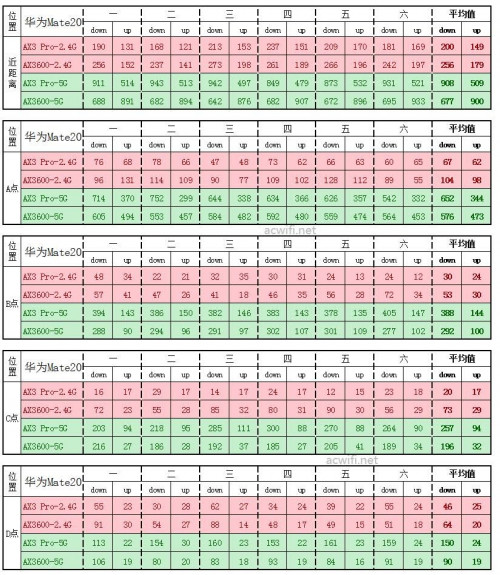 Mi10 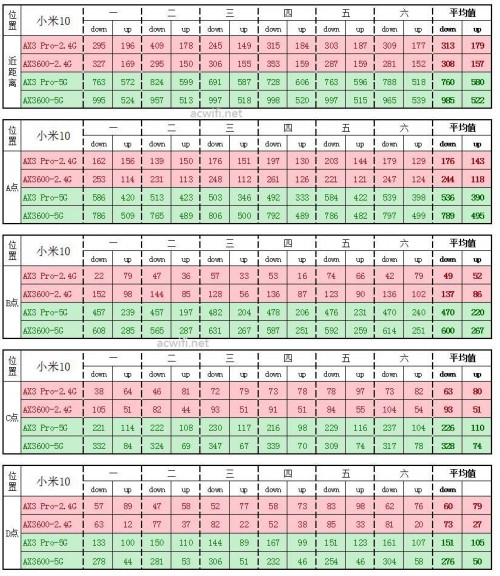 iPhone SE2 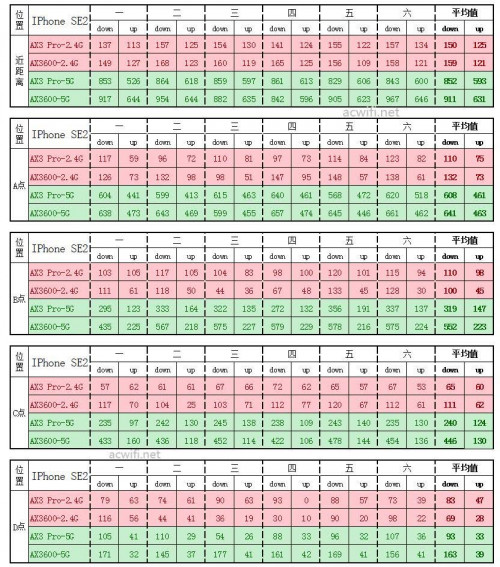 Alpha_Tay liked this post
|
|
|
Jul 2 2020, 09:01 PM
|
|
Elite
8,421 posts Joined: Jul 2008
|
I will be buying a unit and see how it compare against ASUS and TP-Link entry level Wi-Fi 6 router.
Since this is powered by Huawei's own HiSilicon, it's a totally unknown territory. I used to try the China model and frankly speaking, it is slow. |
|
|
Jul 2 2020, 10:33 PM
Show posts by this member only | IPv6 | Post
#36
|
|
Senior Member
1,725 posts Joined: Jan 2003
|
|
|
|
Jul 9 2020, 10:33 PM
|

Senior Member
2,061 posts Joined: Jan 2003 From: Jabaronie to Astaka Status: のあ..?
|
Just got the router...and already setup the router. Will do some testing this weekend..
And yes it does support our ISP and also can set custom vlan if you want to 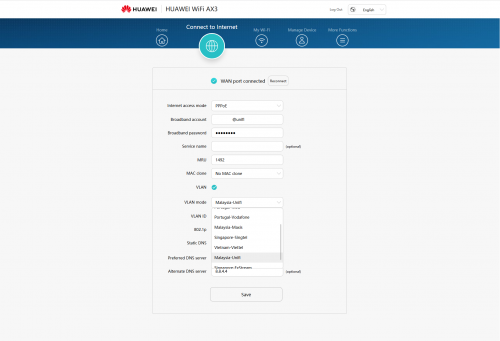 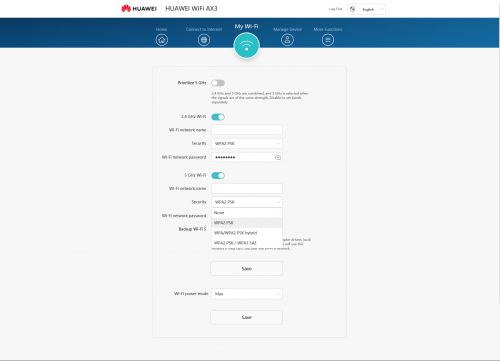 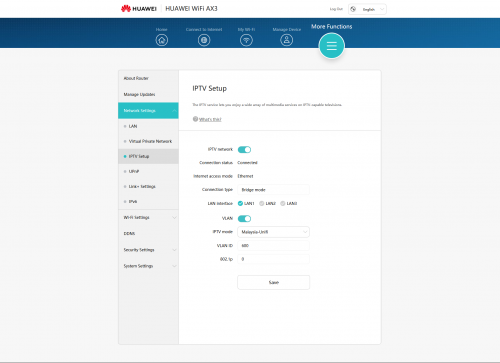 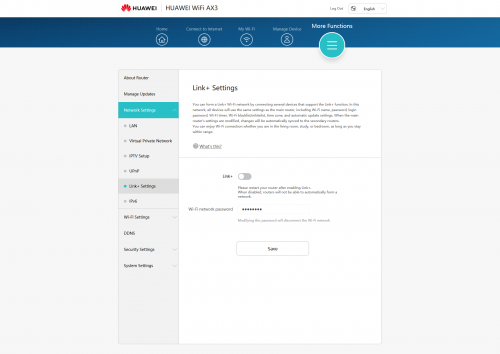 |
|
|
Jul 10 2020, 07:08 AM
Show posts by this member only | IPv6 | Post
#38
|
|
Junior Member
504 posts Joined: Oct 2012 From: It's all relative
|
QUOTE(mdzaboy @ Jul 9 2020, 10:33 PM) Just got the router...and already setup the router. Will do some testing this weekend.. Oh that's cool. And yes it does support our ISP and also can set custom vlan if you want to I'm interested in knowing its sustained speed & heavy load performance. |
|
|
Jul 10 2020, 09:00 AM
|
|
Junior Member
13 posts Joined: Sep 2008
|
QUOTE(mdzaboy @ Jul 9 2020, 10:33 PM) Just got the router...and already setup the router. Will do some testing this weekend.. wow global version support vlan tagging , dump your firmware bro .And yes it does support our ISP and also can set custom vlan if you want to |
|
|
Jul 10 2020, 01:17 PM
|

Senior Member
3,657 posts Joined: May 2005
|
Also got the router yesterday. Setting it up was a breeze. Tested in few spot in the house, speed ok lah compared to the old TM router. Now my laptop can achieve max unifi speed on wifi. Before this max only 260 Mbps on wifi. What more you want from that price range kan.
|
|
|
Jul 10 2020, 02:31 PM
|
|
Junior Member
341 posts Joined: Jun 2008
|
QUOTE(frozzbyte @ Jul 10 2020, 01:17 PM) Also got the router yesterday. Setting it up was a breeze. Tested in few spot in the house, speed ok lah compared to the old TM router. Now my laptop can achieve max unifi speed on wifi. Before this max only 260 Mbps on wifi. What more you want from that price range kan. max unifi speed on wifi is how much?i wish it have a usb port actually |
|
|
Jul 10 2020, 08:43 PM
|
|
Senior Member
3,657 posts Joined: May 2005
|
QUOTE(vignaroli @ Jul 10 2020, 02:31 PM) max unifi speed on wifi is how much? 800Mbpsi wish it have a usb port actually |
|
|
Jul 10 2020, 08:44 PM
|
|
Senior Member
1,974 posts Joined: Dec 2011
|
QUOTE(vignaroli @ Jul 10 2020, 02:31 PM) max unifi speed on wifi is how much? what is the use of usb on a router?i wish it have a usb port actually |
|
|
Jul 10 2020, 09:14 PM
|

Senior Member
735 posts Joined: Jan 2003 From: Selayang , Kepong
|
QUOTE(lawolf @ Jun 16 2020, 12:11 PM) after reset you can access to web gui ,then retrieve the serial no and & onu . what mean u cucuk the hole to reset? then inside the config won't gone? Then go to huawei hs8145v paste the serial no & onu password . Setup PPPoe and vlan tagging as usual . |
|
|
Jul 10 2020, 09:28 PM
Show posts by this member only | IPv6 | Post
#45
|
|
Junior Member
341 posts Joined: Jun 2008
|
QUOTE(ipohps3 @ Jul 10 2020, 08:44 PM) what is the use of usb on a router? I will plug in my external hardisk to the router so that my all devices can play my video and music in the hardisk. |
|
|
Jul 10 2020, 09:29 PM
Show posts by this member only | IPv6 | Post
#46
|
|
Junior Member
341 posts Joined: Jun 2008
|
QUOTE(frozzbyte @ Jul 10 2020, 08:43 PM) 800Mbps Ur laptop can run wifi at 800mbps? cikgutan liked this post
|
|
|
Jul 10 2020, 10:37 PM
|
|
Junior Member
13 posts Joined: Sep 2008
|
QUOTE(gahkin @ Jul 10 2020, 09:14 PM) what mean u cucuk the hole to reset? then inside the config won't gone? don't shy , you can cucuk the hole everyday , config wont gone .Just retrieve the onu password only |
|
|
Jul 10 2020, 11:24 PM
Show posts by this member only | IPv6 | Post
#48
|
|
Senior Member
1,725 posts Joined: Jan 2003
|
QUOTE(mdzaboy @ Jul 9 2020, 10:33 PM) Just got the router...and already setup the router. Will do some testing this weekend.. hi, can you confirm that is this global version or china version for pppoe vlan support included? thx in adv.And yes it does support our ISP and also can set custom vlan if you want to |
|
|
Jul 11 2020, 10:19 AM
|
|
Senior Member
2,061 posts Joined: Jan 2003 From: Jabaronie to Astaka Status: のあ..?
|
QUOTE(amir.asyraf @ Jul 10 2020, 07:08 AM) Oh that's cool. Currently doing testing.. I'm interested in knowing its sustained speed & heavy load performance.  QUOTE(lawolf @ Jul 10 2020, 09:00 AM) wow global version support vlan tagging , dump your firmware bro . Atleast not ch firmware..lolQUOTE(Alpha_Tay @ Jul 10 2020, 11:24 PM) hi, can you confirm that is this global version or china version for pppoe vlan support included? thx in adv. Yes, global. U can check at the 1st pic. Once u choose the prefer ISP, the vlan tagging will appear and also can change the vlan tagging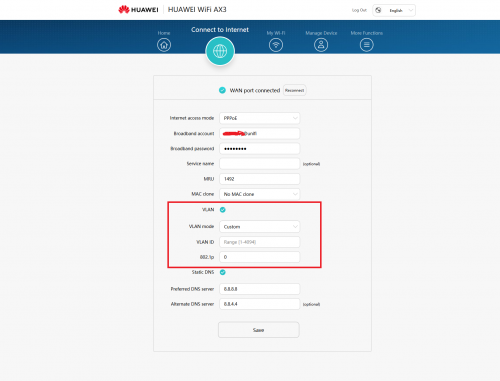 This post has been edited by mdzaboy: Jul 11 2020, 10:24 AM Alpha_Tay liked this post
|
|
|
Jul 11 2020, 11:37 AM
|
|
Senior Member
3,657 posts Joined: May 2005
|
QUOTE(vignaroli @ Jul 10 2020, 09:29 PM) Ur laptop can run wifi at 800mbps? Yes, why not? |
|
|
Jul 11 2020, 05:32 PM
Show posts by this member only | IPv6 | Post
#51
|

Junior Member
252 posts Joined: Apr 2006
|
QUOTE(mdzaboy @ Jul 9 2020, 10:33 PM) Just got the router...and already setup the router. Will do some testing this weekend.. This one you get from Taobao or Lazada ? And yes it does support our ISP and also can set custom vlan if you want to  |
|
|
Jul 11 2020, 06:49 PM
|
|
Senior Member
1,974 posts Joined: Dec 2011
|
is it possible to load the local firmware on the China version?
|
|
|
Jul 11 2020, 07:41 PM
|

Senior Member
962 posts Joined: Dec 2004 From: Kulai
|
Just got the router preordered from ookas. So far so good much better than my old ws880.
|
|
|
Jul 11 2020, 08:48 PM
|
|
Senior Member
2,061 posts Joined: Jan 2003 From: Jabaronie to Astaka Status: のあ..?
|
QUOTE(denver1347 @ Jul 11 2020, 05:32 PM) This one you get from Taobao or Lazada ? Official huawei store malaysia |
|
|
Jul 11 2020, 09:57 PM
Show posts by this member only | IPv6 | Post
#55
|
|
Junior Member
252 posts Joined: Apr 2006
|
QUOTE(mdzaboy @ Jul 11 2020, 08:48 PM) Official huawei store malaysia No stock for now.  |
|
|
Jul 11 2020, 10:18 PM
|
|
Senior Member
3,038 posts Joined: Dec 2011
|
QUOTE(denver1347 @ Jul 11 2020, 09:57 PM) No stock for now. lazada viewnet got stock. |
|
|
Jul 12 2020, 06:32 AM
|
|
Junior Member
464 posts Joined: Mar 2005
|
Just from observation, I think AX3 Wifi is weaker than my old Tenda AC18. I can't get signal outside of my house anymore.
|
|
|
Jul 12 2020, 04:51 PM
|

Junior Member
123 posts Joined: Nov 2007
|
Does this router support Mesh wifi and automatic band steering?
Also, anyone tried the mesh yet? I've used a couple of mesh router combos to utter disappointment so far. TPLink Deco M4 (I have v1.0) - Initially seems OK. Seamless and fast migration between nodes - but long connecting devices will suddenly lost internet connection after a while. (Phones, various IOT devices, etc) Asus AC67u routers with AiMesh - Connection is stable - But terrible node migration. I still usually have to disconnect and reconnect. - Heat Dlink Exo Dir-2660 + DRA-1360 - Stable connection - Don't like the limitations of the router (max 25 IP assignments, etc) - No more Dlink Dynamic DNS service  Dlink COVR-1100 - Not easy to setup - Slow speede - Intermittent loss of wifi on some devices This post has been edited by techm: Jul 12 2020, 04:57 PM |
|
|
Jul 12 2020, 10:15 PM
|
|
Junior Member
649 posts Joined: Jan 2011
|
For Unifi users, when you change from current router (say AC18) to AX3, do you need to get new login password from Unifi to setup pppoe or, use the current password will do? Appreciate advice, taikors.
|
|
|
Jul 12 2020, 10:17 PM
|
|
Senior Member
3,038 posts Joined: Dec 2011
|
QUOTE(ceras @ Jul 12 2020, 10:15 PM) For Unifi users, when you change from current router (say AC18) to AX3, do you need to get new login password from Unifi to setup pppoe or, use the current password will do? Appreciate advice, taikors. Use back current password will do. |
|
|
 Jul 12 2020, 10:35 PM Jul 12 2020, 10:35 PM
|
|
Junior Member
649 posts Joined: Jan 2011
|
QUOTE(jusbella @ Jul 12 2020, 10:17 PM) Use back current password will do. TQ for the advice...I recall having problems earlier when I switched from dlink router to Tenda AC18 . Have to call up unifi and remembered that they said have to issue new pw each time there is router change. |
|
|
Jul 12 2020, 10:39 PM
|
|
Senior Member
3,038 posts Joined: Dec 2011
|
QUOTE(ceras @ Jul 12 2020, 10:35 PM) TQ for the advice... Nope, the pppoe username password is fixed and can be use in any router.I recall having problems earlier when I switched from dlink router to Tenda AC18 . Have to call up unifi and remembered that they said have to issue new pw each time there is router change. |
|
|
Jul 12 2020, 10:54 PM
|
|
Junior Member
649 posts Joined: Jan 2011
|
QUOTE(jusbella @ Jul 12 2020, 10:39 PM) Nope, the pppoe username password is fixed and can be use in any router. OK thanks |
|
|
Jul 13 2020, 12:07 PM
|
|
Junior Member
649 posts Joined: Jan 2011
|
How to get the vlan config and setup for hypptv box in AX3? Is the vlan config auto assigned or do we need to get it from Unifi? Thanks for assistance....
|
|
|
Jul 13 2020, 12:24 PM
|
|
Senior Member
3,038 posts Joined: Dec 2011
|
QUOTE(ceras @ Jul 13 2020, 12:07 PM) How to get the vlan config and setup for hypptv box in AX3? Is the vlan config auto assigned or do we need to get it from Unifi? Thanks for assistance.... Only pro version have vlan config. |
|
|
Jul 13 2020, 12:42 PM
|
|
Junior Member
649 posts Joined: Jan 2011
|
QUOTE(jusbella @ Jul 13 2020, 12:24 PM) Only pro version have vlan config. Yes, I am referring to the pro quad core version. Just wondering if vlan is auto assigned or requires manual setup needing config parameters from unifi. I understand Hypptv box needs to be plugged into vlan port to function, right? |
|
|
Jul 13 2020, 01:58 PM
|
|
Senior Member
1,282 posts Joined: Jan 2003
|
QUOTE(ceras @ Jul 13 2020, 12:42 PM) Yes, I am referring to the pro quad core version. Just wondering if vlan is auto assigned or requires manual setup needing config parameters from unifi. I understand Hypptv box needs to be plugged into vlan port to function, right? If got option to select unifi then quite easy.If not, can follow blacktubi guide here although for diff brand but same setting https://www.blacktubi.com/guide/mercusys-unifi-setup/ This post has been edited by enduser: Jul 13 2020, 01:59 PM |
|
|
Jul 13 2020, 02:12 PM
|
|
Senior Member
2,061 posts Joined: Jan 2003 From: Jabaronie to Astaka Status: のあ..?
|
QUOTE(ceras @ Jul 13 2020, 12:07 PM) How to get the vlan config and setup for hypptv box in AX3? Is the vlan config auto assigned or do we need to get it from Unifi? Thanks for assistance.... Can check at my post..got unifi settings there. No need to put the vlan id. |
|
|
Jul 13 2020, 02:36 PM
|
|
Junior Member
649 posts Joined: Jan 2011
|
QUOTE(enduser @ Jul 13 2020, 01:58 PM) If got option to select unifi then quite easy. TQ for the adviceIf not, can follow blacktubi guide here although for diff brand but same setting https://www.blacktubi.com/guide/mercusys-unifi-setup/ |
|
|
Jul 13 2020, 02:36 PM
|
|
Junior Member
649 posts Joined: Jan 2011
|
QUOTE(mdzaboy @ Jul 13 2020, 02:12 PM) Can check at my post..got unifi settings there. No need to put the vlan id. TQ for the advice |
|
|
Jul 15 2020, 06:59 PM
|

Senior Member
1,704 posts Joined: Jan 2005
|
QUOTE(angelic88 @ Jun 25 2020, 10:52 PM) I just gotten this router today and setup according to the black tubi method do huawei ax3 pro ...can setup unifi ppoe by using unifi account?I got mine from taobao directly, so AX3 pro for just around rm200 ( the pro got better external signal amplifier do choose the pro version) You will need a manged switch like Tp-link SG105E , or Mercury SG105Pro ( sub brand under Tplink ? look the same even the menu is a carbon copy but cheaper in taobao , around rm50) following the guide of black tubi to setup the switch, however do note, if you plan to use the switch function, another cable from router need to be connected to the free port. This is due to different VLAN. So my setup is port 5 to router WAN , port 2/3/4 as switch , port 1 from ONU. I skip IPTV port since i did not use it. then connect port 1 to router , any port from router to pc , setup PPPoE (unifi acct + password) , setup Wifi as per normal and you are done. the interface is rather simple , so there are not much mess around with. There are no CPU / temperate / client list like Asus , so its really basic. So I cannot tell how is the performance really like on high load. You can translate to english after its connected to internet. PS : there is the "user experience improvement program", like how facebook /google. It however state the data may be provide to government(china) if requested. Make sense in china , not in malaysia , so please turn that off. thanks ... |
|
|
Jul 16 2020, 01:36 AM
Show posts by this member only | IPv6 | Post
#72
|

Senior Member
2,455 posts Joined: Feb 2005 From: --Hidden--
|
QUOTE(sgpdsmss @ Jul 15 2020, 06:59 PM) do huawei ax3 pro ...can setup unifi ppoe by using unifi account? The local Malaysia unit yes. thanks ... Taobao unit no. |
|
|
Jul 16 2020, 07:22 AM
|
|
Senior Member
1,704 posts Joined: Jan 2005
|
QUOTE(rkwan67 @ Jul 16 2020, 01:36 AM) The local Malaysia unit yes. any firmware update for taobao unit to enable ppoe for unifi ?Taobao unit no. thanks ... |
|
|
Jul 16 2020, 10:05 AM
Show posts by this member only | IPv6 | Post
#74
|
|
Senior Member
1,725 posts Joined: Jan 2003
|
QUOTE(rkwan67 @ Jul 16 2020, 01:36 AM) The local Malaysia unit yes. only AX3 has Official Malaysia Stock right?Taobao unit no. |
|
|
Jul 16 2020, 10:19 AM
|
|
Senior Member
2,455 posts Joined: Feb 2005 From: --Hidden--
|
QUOTE(Alpha_Tay @ Jul 16 2020, 10:05 AM) only AX3 has Official Malaysia Stock right? Malaysia ax3 is equivalent spec to Ax3 pro of taobao. |
|
|
Jul 16 2020, 10:33 AM
Show posts by this member only | IPv6 | Post
#76
|

Junior Member
450 posts Joined: Mar 2011
|
Is it advisable to enable IPv6 on this HW AX3 Quad-Core router?
The TM technicians, who installed my previous TP-Link Archer C1200, advised me not to but that was done years ago. Any difference in speed or range compared to IPv4 only? |
|
|
Jul 16 2020, 12:35 PM
Show posts by this member only | IPv6 | Post
#77
|
|
Senior Member
1,725 posts Joined: Jan 2003
|
QUOTE(rkwan67 @ Jul 16 2020, 10:19 AM) Malaysia ax3 is equivalent spec to Ax3 pro of taobao. so is it Official Malaysia Stock of AX3 and Official China Stock of AX3 Pro has PPPoE Vlan Support with Default Firmware? |
|
|
Jul 16 2020, 12:56 PM
Show posts by this member only | IPv6 | Post
#78
|
|
Junior Member
450 posts Joined: Mar 2011
|
QUOTE(Alpha_Tay @ Jul 16 2020, 12:35 PM) so is it Official Malaysia Stock of AX3 and Official China Stock of AX3 Pro has PPPoE Vlan Support with Default Firmware? Only Quad Core Malaysian (& Global) version has the firmware to support VLAN. |
|
|
Jul 16 2020, 12:58 PM
|
|
Senior Member
2,455 posts Joined: Feb 2005 From: --Hidden--
|
QUOTE(Alpha_Tay @ Jul 16 2020, 12:35 PM) so is it Official Malaysia Stock of AX3 and Official China Stock of AX3 Pro has PPPoE Vlan Support with Default Firmware? Crystal is right. Don't confuse spec and firmware, it's different. Only Malaysian unit Ax3 can do native vlan for unifi. Taobao unit Ax3 pro / Ax3 still no native vlan pppoe for unifi. |
|
|
Jul 16 2020, 01:02 PM
|

Senior Member
2,256 posts Joined: Feb 2012
|
QUOTE(amir.asyraf @ May 12 2020, 04:22 PM) 3000 Mbps WiFi 6 router by Huawei, costs only RM294.42. Not sure of Huawei track record when it comes to routers. Any thoughts? Specs: Link: https://sea.banggood.com/HUAWEI-WiFi-AX3-Qu...ur_warehouse=CN QUOTE(wailam @ May 12 2020, 04:32 PM) why not use wifi mesh? cover more blank area than single router Overpriced man..... less than 240CNY in china, sell RM299 in malaysia.....-- MESH only capable of surfing internet.... still too far away to build a high performance local network. i am not talking about those high-end mesh that cost RM2~3K... those RM200~300 mesh is shit. |
|
|
Jul 16 2020, 01:10 PM
Show posts by this member only | IPv6 | Post
#81
|
|
Senior Member
1,725 posts Joined: Jan 2003
|
according to china end user review, Xiaomi AloT Router AX3600 by default has IPv6 Inbound Firewall Turn on and no user configurable at Router Webpages or Apps YET, maybe available in future firmware updates, something like TP-Link Deco Series. china end user there also mention Huawei but didn't mention Model. the next generation of WiFi Chipset firmware has alot of setting turn on by default and no user configurable at Router Webpages or Apps YET.
https://www.acwifi.net/9478.html https://www.acwifi.net/9665.html QUOTE(Alpha_Tay @ Jun 15 2020, 05:31 PM) tried TP-Link M4 Mesh Router v2 Latest Firmware 190917, PPPoE MTU was hardcoded 1480 and not configurable, same as alot of other setting, like UPnP, etc, all are default enable and currently not configurable via Apps or router web interface, while router web interface has a System Log and other simple diagram, the configurable option maybe release in future firmware and Apps update. the ipv6 dns would stuck at google ipv6 dns, no matter what user set it to be. set it to router mode with PPPoE and all other setting is working, then change to AP mode still working, then change back to Router Mode would stuck at PPPoE no connect bug, have to reset and reconfig. |
|
|
Jul 16 2020, 01:22 PM
|
|
Junior Member
224 posts Joined: Apr 2019
|
QUOTE(Crystal2 @ Jul 16 2020, 10:33 AM) Is it advisable to enable IPv6 on this HW AX3 Quad-Core router? ipv6 will result in noticeably faster surfing speed but the problem i faced was every time router reboot or change wan ip the win7 pc need to manually perform disable and re-enable back the network adapter to refresh the ipv6 assigned ips maybe people with good knowledge of ipv6 or windows knows how to overcome it but i couldntThe TM technicians, who installed my previous TP-Link Archer C1200, advised me not to but that was done years ago. Any difference in speed or range compared to IPv4 only? This post has been edited by nonamer: Jul 16 2020, 01:39 PM |
|
|
Jul 16 2020, 01:58 PM
Show posts by this member only | IPv6 | Post
#83
|
|
Senior Member
1,725 posts Joined: Jan 2003
|
that is getting confuse,
China Version of AX3 is Dual-Core, China Version of AX3 Pro is Quad-Core, Malaysia Official Stock of AX3 is Quad-Core, there is no Malaysia Official Stock of AX3 Pro yet, the Graph of Malaysia Official Stock of AX3 Quad-Core list Ax3 Pro 300 AC1200 574 AX3 Pro 2.4 GHz 867 AC1200 2402 AX3 Pro 5 GHz 1167 AC1200 2976 AX3 Pro Total https://consumer.huawei.com/my/routers/ax3-quad-core/ Huawei Global has both AX3 Dual-Core and Quad-Core listed. https://consumer.huawei.com/en/routers/ax3-quad-core/ https://consumer.huawei.com/en/routers/ax3-dual-core/ QUOTE(Crystal2 @ Jul 16 2020, 12:56 PM) Only Quad Core Malaysian (& Global) version has the firmware to support VLAN. QUOTE(rkwan67 @ Jul 16 2020, 12:58 PM) Crystal is right. Don't confuse spec and firmware, it's different. Only Malaysian unit Ax3 can do native vlan for unifi. Taobao unit Ax3 pro / Ax3 still no native vlan pppoe for unifi. |
|
|
Jul 17 2020, 08:08 PM
|

Junior Member
8 posts Joined: Nov 2007
|
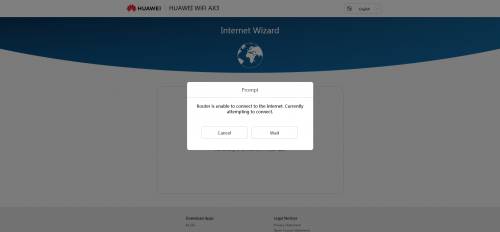 just bought one AX3 today , wanted to set up, but pop out this . and limited internet access . the existing tenda router works just perfectly. does anyone have this problem? |
|
|
Jul 17 2020, 10:50 PM
Show posts by this member only | IPv6 | Post
#85
|
|
Junior Member
450 posts Joined: Mar 2011
|
QUOTE(daifanshu @ Jul 17 2020, 08:08 PM) just bought one AX3 today , wanted to set up, but pop out this . and limited internet access . the existing tenda router works just perfectly. does anyone have this problem? 1) your ISP 2) router from Malaysia or China firmware |
|
|
Jul 18 2020, 09:20 AM
|
|
Probation
10 posts Joined: Jul 2020
|
Don't even buy any "Wifi 6" routers now.
The standard hasn't even been established yet. lagipun a few months after the standard is officially established, Wifi 6e standard is right around the corner. You're wasting money for something that isn't even official yet |
|
|
Jul 18 2020, 12:18 PM
|

Junior Member
584 posts Joined: May 2013
|
QUOTE(HG8240HMaxis @ Jul 18 2020, 10:20 AM) Don't even buy any "Wifi 6" routers now. Means?The standard hasn't even been established yet. lagipun a few months after the standard is officially established, Wifi 6e standard is right around the corner. You're wasting money for something that isn't even official yet |
|
|
Jul 18 2020, 01:14 PM
|
|
Probation
10 posts Joined: Jul 2020
|
QUOTE(xCryptik @ Jul 18 2020, 12:18 PM) Means? AX is what they're using to say Wifi 6 capable. marketing stunts.But wifi 6 isn't an official thing *yet*. Later in 2020 it will properly be announced. Then you have to wait for routers to properly implement it. But there's also the upcoming wifi 6e thats gonna be a standard soon in 2021. Like you bought this new shit hitting the town, the mcflurry. Then next day you wanna see how other people feel about that mcflurry, so you waltz into the shop again; and you got fucking scammed cause mcd realize that the machine should be outputting more oreos and youre like wtf, mine didnt have this much oreos yesterday. But you know what, you're so good with money that you have exactly enough money left for one more mcflurry, so you buy another mcflurry, "yum, delicious mcflurry with more oreos?!! woo! i gotta comeback here next month when i get paid again" Then you come back in like a week to tell your friends they gotta try the mcflurry, surprise surprise, mcd officially states the cup was too small, it should have at least been 2x as large all for the same price, your friends get to enjoy that 2x more mcflurry with more oreos. What did you get? You spent twice as much as them, for the same volume, and less oreos. You got scammed. |
|
|
Jul 18 2020, 03:10 PM
|
|
Junior Member
464 posts Joined: Mar 2005
|
|
|
|
Jul 18 2020, 06:00 PM
|
|
Junior Member
8 posts Joined: Nov 2007
|
QUOTE(Crystal2 @ Jul 17 2020, 10:50 PM) Please give more details: Malaysia model , 1) your ISP 2) router from Malaysia or China firmware i have solved the problem by using phone to connect , in 3 mins instead of using pc to setup. |
|
|
Jul 19 2020, 07:57 PM
Show posts by this member only | IPv6 | Post
#91
|
|
Junior Member
450 posts Joined: Mar 2011
|
Is there a setting for auto reboot every few days?
|
|
|
Jul 20 2020, 11:25 AM
Show posts by this member only | IPv6 | Post
#92
|
|
Senior Member
1,725 posts Joined: Jan 2003
|
IEEE 802.11ax, marketed as Wi-Fi 6 by Wi-Fi Alliance,[1][2] is a draft Wi-Fi specification standard, and the proposed successor to Wi-Fi 5.[3] The 802.11ax standard is expected to become an official IEEE specification in September 2020.[4]
https://en.wikipedia.org/wiki/IEEE_802.11ax |
|
|
Jul 25 2020, 02:58 PM
Show posts by this member only | IPv6 | Post
#93
|

Junior Member
21 posts Joined: Mar 2010 From: Ipoh, Perak
|
How to change dns?cant find the setting
|
|
|
Jul 26 2020, 12:21 AM
|
|
Senior Member
3,657 posts Joined: May 2005
|
QUOTE(shah6287 @ Jul 25 2020, 02:58 PM) How to change dns?cant find the setting Go to the web interface -> Connect to Internet -> Tick the static DNS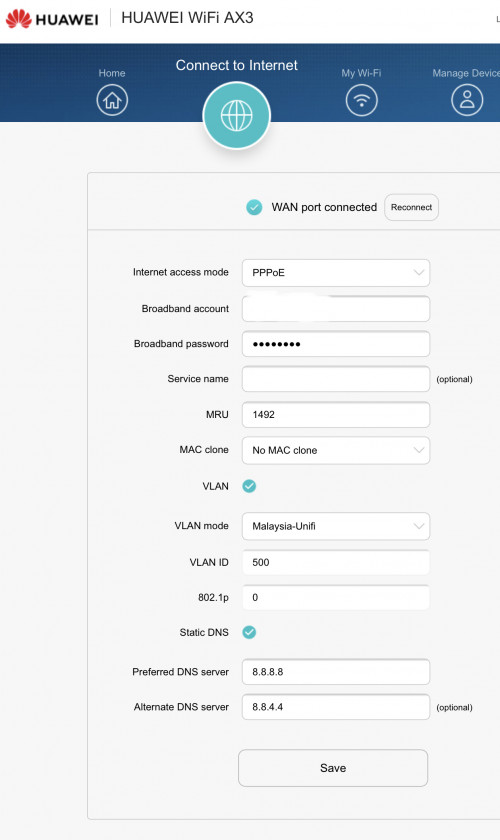 |
|
|
Jul 26 2020, 09:55 AM
Show posts by this member only | IPv6 | Post
#95
|
|
Junior Member
450 posts Joined: Mar 2011
|
QUOTE(frozzbyte @ Jul 26 2020, 12:21 AM) Go to the web interface -> Connect to Internet -> Tick the static DNS Is it necessary to enable Static DNS? I didn't and the internet speed seems OK & stable. |
|
|
Jul 26 2020, 10:01 AM
|
|
Junior Member
504 posts Joined: Oct 2012 From: It's all relative
|
QUOTE(Crystal2 @ Jul 26 2020, 09:55 AM) Is it necessary to enable Static DNS? I didn't and the internet speed seems OK & stable. It's not necessary. However, compared to the default (provided by ISP), they're usually a bit faster and more reliable. Also you can get around basic site blocking (which checks domain name). |
|
|
Jul 26 2020, 11:07 AM
Show posts by this member only | IPv6 | Post
#97
|
|
Junior Member
450 posts Joined: Mar 2011
|
QUOTE(amir.asyraf @ Jul 26 2020, 10:01 AM) It's not necessary. However, compared to the default (provided by ISP), they're usually a bit faster and more reliable. Also you can get around basic site blocking (which checks domain name). Noted, TQ.I will try the static DNS. |
|
|
Jul 26 2020, 11:08 AM
Show posts by this member only | IPv6 | Post
#98
|
|
Junior Member
450 posts Joined: Mar 2011
|
[deleted]
This post has been edited by Crystal2: Jul 26 2020, 11:09 AM |
|
|
Jul 26 2020, 07:37 PM
Show posts by this member only | IPv6 | Post
#99
|
|
Junior Member
21 posts Joined: Mar 2010 From: Ipoh, Perak
|
QUOTE(frozzbyte @ Jul 26 2020, 12:21 AM) Go to the web interface -> Connect to Internet -> Tick the static DNS Ok thanks..how about dns setting for ipv6.. chungf1 liked this post
|
|
|
Jul 26 2020, 08:38 PM
|
|
Senior Member
3,657 posts Joined: May 2005
|
QUOTE(shah6287 @ Jul 26 2020, 07:37 PM) Ok thanks..how about dns setting for ipv6.. No idea. I’m not using ipv6 |
|
|
Jul 27 2020, 01:45 AM
|
|
Senior Member
1,725 posts Joined: Jan 2003
|
one of Huawei Marketing for HUAWEI WiFi WS5200 (Dual-core) and (Quad-core) is below, they knew the latest Router CPU would be able to processing faster than and limited by 1Gbps WAN port.
>80%(Free CPU) CPU occupancy test 10 Wi-Fi devices test for 15 days 80%空闲CPU CPU占用专项测试 连接10个Wi-Fi设备 持续15天 HUAWEI WiFi WS5200 (Dual-core) , (Quad-core) and HUAWEI WiFi AX3 (Dual-core) , (Quad-core) are using different variant of almost same Huawei SoC HI5651T 1.4GHz (Quad-core) HI5651L 1.2GHz (Dual-core) HI5651T 1GHz (Quad-core) Hi5651H 800MHz (Dual-core) https://www.acwifi.net/9665.html https://www.acwifi.net/8182.html https://www.acwifi.net/6720.html https://consumer.huawei.com/my/routers/ws5200/ https://shop.huawei.com/my/product/huawei-wifi-ws5200-router https://consumer.huawei.com/en/routers/ws5200/ https://consumer.huawei.com/content/dam/hua...e/ws5200/10.jpg https://consumer-img.huawei.com/content/dam.../ws5200/m10.jpg https://consumer.huawei.com/cn/routers/ws5200/ https://consumer-img.huawei.com/content/dam...section13Bg.jpg https://consumer-img.huawei.com/content/dam...tion13Bgmin.jpg https://consumer.huawei.com/cn/routers/ws5200-four-cores/ QUOTE(Alpha_Tay @ Jul 20 2020, 01:25 AM) AX20 can get 800mbps download 200mbps upload over LAN with only 10%-20% CPU Usage. even Deco M4 can get 800mbps download 200mbps upload over LAN, but not that stable and smooth. |
|
|
Jul 27 2020, 11:47 AM
|
|
Elite
8,421 posts Joined: Jul 2008
|
Alpha_Tay
Most routers are capable of Gigabit+ speed with NAT acceleration. However, even top of the line Broadcom BCM4908 struggle with Gigabit once NAT acceleration is forcefully disabled. This post has been edited by blacktubi: Jul 27 2020, 11:48 AM |
|
|
Jul 27 2020, 02:48 PM
|
|
Senior Member
1,725 posts Joined: Jan 2003
|
QUOTE(blacktubi @ Jul 27 2020, 11:47 AM) Alpha_Tay but there is still a bunch of router incapable to do gigabit speed.Most routers are capable of Gigabit+ speed with NAT acceleration. However, even top of the line Broadcom BCM4908 struggle with Gigabit once NAT acceleration is forcefully disabled. https://forum.lowyat.net/topic/4862383 |
|
|
Jul 27 2020, 06:48 PM
Show posts by this member only | IPv6 | Post
#104
|
|
Senior Member
1,050 posts Joined: Feb 2006 From: KL
|
QUOTE(shah6287 @ Jul 26 2020, 07:37 PM) Ok thanks..how about dns setting for ipv6.. I don't think there's a setting to change the DNS setting for ipv6 unfortunately. |
|
|
Jul 28 2020, 01:09 PM
Show posts by this member only | IPv6 | Post
#105
|
|
Junior Member
450 posts Joined: Mar 2011
|
QUOTE(jimmy.soo @ Jul 27 2020, 06:48 PM) I don't think there's a setting to change the DNS setting for ipv6 unfortunately. Yeah, I too can't find the DNS setting for IPv6. Anyway, when you can find the settings in AX3, below is the public DNS for IPv6.https://developers.google.com/speed/public-dns/docs/using "...Google Public DNS IP addresses The Google Public DNS IP addresses (IPv4) are as follows: 8.8.8.8 8.8.4.4 The Google Public DNS IPv6 addresses are as follows: 2001:4860:4860::8888 2001:4860:4860::8844 You can use either address as your primary or secondary DNS server..." This post has been edited by Crystal2: Jul 28 2020, 07:50 PM |
|
|
Jul 28 2020, 08:59 PM
Show posts by this member only | IPv6 | Post
#106
|
|
Junior Member
450 posts Joined: Mar 2011
|
QUOTE(Crystal2 @ Jul 28 2020, 01:09 PM) Yeah, I too can't find the DNS setting for IPv6. Anyway, when you can find the settings in AX3, below is the public DNS for IPv6. I found the settings at 192.168.3.1 router page:https://developers.google.com/speed/public-dns/docs/using "...Google Public DNS IP addresses The Google Public DNS IP addresses (IPv4) are as follows: 8.8.8.8 8.8.4.4 The Google Public DNS IPv6 addresses are as follows: 2001:4860:4860::8888 2001:4860:4860::8844 You can use either address as your primary or secondary DNS server..." More Functions/Network Settings/IPv6. Anyone knows the prefix for the IPv6 Google Public DNS without which it can't save/update the changes. I daren't experiment. This post has been edited by Crystal2: Jul 28 2020, 10:41 PM Attached thumbnail(s) 
|
|
|
Jul 29 2020, 10:45 PM
Show posts by this member only | IPv6 | Post
#107
|
|
Junior Member
289 posts Joined: Sep 2012
|
QUOTE(Crystal2 @ Jul 28 2020, 08:59 PM) I found the settings at 192.168.3.1 router page: More Functions/Network Settings/IPv6. Anyone knows the prefix for the IPv6 Google Public DNS without which it can't save/update the changes. I daren't experiment. 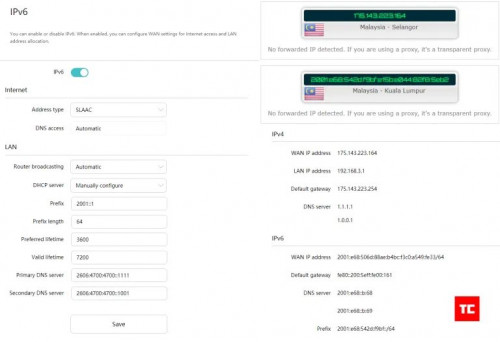 Credit to Arun from TechCyn |
|
|
Jul 30 2020, 07:23 AM
Show posts by this member only | IPv6 | Post
#108
|
|
Junior Member
450 posts Joined: Mar 2011
|
QUOTE(jacktiew @ Jul 29 2020, 10:45 PM) Credit to Arun from TechCyn I put 2001:1 as prefix and it works when I tested it with http://ip6.me in browser. |
|
|
Aug 8 2020, 11:51 AM
|

Senior Member
1,162 posts Joined: Sep 2008 From: PJ
|
Does the software comes with parental control in place?
|
|
|
Aug 9 2020, 10:14 PM
Show posts by this member only | IPv6 | Post
#110
|
|
Junior Member
450 posts Joined: Mar 2011
|
QUOTE(peter32 @ Aug 8 2020, 11:51 AM) Does the software comes with parental control in place? YesAttached thumbnail(s) 
|
|
|
Aug 9 2020, 10:48 PM
Show posts by this member only | IPv6 | Post
#111
|
|
Senior Member
1,162 posts Joined: Sep 2008 From: PJ
|
Thanks a lot. Crystal2 liked this post
|
|
|
Aug 10 2020, 10:33 AM
|
|
Junior Member
341 posts Joined: Jun 2008
|
unable to detect 5g signal in repeater mode, but saw the huawei website Q & A suppose able to do so, not sure what's wrong
|
|
|
Aug 12 2020, 08:41 PM
|
|
Probation
2 posts Joined: Aug 2020
|
QUOTE(angelic88 @ Jun 25 2020, 10:52 PM) I just gotten this router today and setup according to the black tubi method I got mine from taobao directly, so AX3 pro for just around rm200 ( the pro got better external signal amplifier do choose the pro version) You will need a manged switch like Tp-link SG105E , or Mercury SG105Pro ( sub brand under Tplink ? look the same even the menu is a carbon copy but cheaper in taobao , around rm50) following the guide of black tubi to setup the switch, however do note, if you plan to use the switch function, another cable from router need to be connected to the free port. This is due to different VLAN. So my setup is port 5 to router WAN , port 2/3/4 as switch , port 1 from ONU. I skip IPTV port since i did not use it. then connect port 1 to router , any port from router to pc , setup PPPoE (unifi acct + password) , setup Wifi as per normal and you are done. the interface is rather simple , so there are not much mess around with. There are no CPU / temperate / client list like Asus , so its really basic. So I cannot tell how is the performance really like on high load. You can translate to english after its connected to internet. PS : there is the "user experience improvement program", like how facebook /google. It however state the data may be provide to government(china) if requested. Make sense in china , not in malaysia , so please turn that off. Crystal2 liked this post
|
|
|
Aug 13 2020, 05:40 PM
|
|
Probation
2 posts Joined: Aug 2020
|
Hi, I am noobs here, I also setup like what you mention, but i still can’t connect to internet, by the way, I am using Maxis Fibre. Thank you in advance if you can share more details here, thank you very much.
|
|
|
Aug 15 2020, 11:55 PM
|
|
Probation
8 posts Joined: Aug 2020
|
QUOTE(muncheno @ Jun 10 2020, 10:49 PM) Pro version have extra amplifier for 5G comparing to AX3 (non pro). Global version only have 2 amplifiers chinese version 4I hope you can test out the AX3 pro later. I saw in other YouTube reviewer, the performance of AX3 Pro is almost comparable to Xiaomi AX3600 which is more expensive model. Router Redmi AX5 Antennas 4 2.4G amplifier 2.4G high power x2 5G amplifier 5G mid-power x2 Signal Strength 5dBi Router Huawei AX3 Antennas 4 2.4G amplifier 2.4G high power x2 5G amplifier / Signal Strength 5dBi Router Huawei AX3 Pro Antennas 4 2.4G amplifier 2.4G high power x2 5G amplifier 5G mid-power x2 Signal Strength 5dBi |
|
|
Aug 15 2020, 11:57 PM
|
|
Probation
8 posts Joined: Aug 2020
|
QUOTE(ipohps3 @ Jul 11 2020, 06:49 PM) is it possible to load the local firmware on the China version? You will not switch to a non-Chinese firmware.1. The router will refuse to flash. 2. Available global firmwares are cut in terms of capabilities and are designed for the absence of 2.4Ghz amplifiers. 3. Select English in the browser and the translation will not be clumsy. 4. Set up and forget (score) once. |
|
|
Aug 19 2020, 07:45 PM
|
|
Probation
8 posts Joined: Aug 2020
|
latest firmware chinese and global for AX3 Pro https://onedrive.live.com/?cid=4515ec9c32fc...AGwZ_znvuP-pYTQ
|
|
|
Aug 23 2020, 01:02 PM
Show posts by this member only | IPv6 | Post
#118
|
|
Senior Member
1,050 posts Joined: Feb 2006 From: KL
|
QUOTE(Janushi @ Aug 19 2020, 07:45 PM) latest firmware chinese and global for AX3 Pro https://onedrive.live.com/?cid=4515ec9c32fc...AGwZ_znvuP-pYTQ What are the changes for this new firmware? Can the local version upgraded to this? |
|
|
Aug 25 2020, 03:39 AM
|
|
Probation
8 posts Joined: Aug 2020
|
QUOTE(jimmy.soo @ Aug 23 2020, 01:02 PM) What are the changes for this new firmware? Can the local version upgraded to this? this firmware is now officially released via router upgrade |
|
|
Aug 25 2020, 09:48 AM
Show posts by this member only | IPv6 | Post
#120
|
|
Senior Member
1,050 posts Joined: Feb 2006 From: KL
|
QUOTE(Janushi @ Aug 25 2020, 03:39 AM) this firmware is now officially released via router upgrade Nothing so far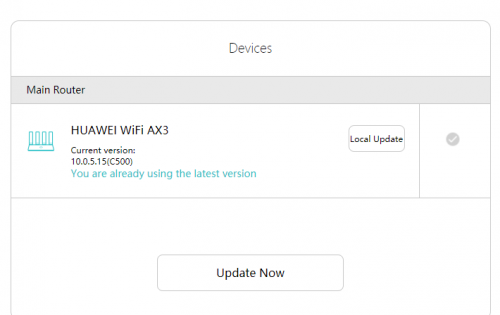 |
|
|
Aug 26 2020, 12:36 AM
|
|
Probation
8 posts Joined: Aug 2020
|
QUOTE(jimmy.soo @ Aug 25 2020, 09:48 AM) Nothing so far this firmware version 10.0.5.41 is for AX3 Pro chinese version only |
|
|
Sep 1 2020, 12:54 AM
|
|
Junior Member
649 posts Joined: Jan 2011
|
QUOTE(jacktiew @ Jul 29 2020, 10:45 PM) Credit to Arun from TechCyn Anyone with the same issue and how to overcome? |
|
|
Sep 1 2020, 10:44 AM
Show posts by this member only | IPv6 | Post
#123
|
|
Junior Member
289 posts Joined: Sep 2012
|
QUOTE(ceras @ Sep 1 2020, 12:54 AM) Tried the above settings for IPv6, but at About Router page, IPv6 says Prefix and DNS server - Unable to obtain Are you using Maxis fibre? Do you have a public IP address?Anyone with the same issue and how to overcome? Disclaimer: I do not own any Huawei AX3. The picture is for unifi setting. I just share the pic and the settings below are just my guessing. If both of above are true, try this. Type: SLAAC, if cannot then use DHCPv6 or 6to4 This post has been edited by jacktiew: Sep 1 2020, 11:30 AM |
|
|
Sep 1 2020, 09:05 PM
|
|
Junior Member
649 posts Joined: Jan 2011
|
QUOTE(jacktiew @ Sep 1 2020, 10:44 AM) Are you using Maxis fibre? Do you have a public IP address? I'm using UnifiDisclaimer: I do not own any Huawei AX3. The picture is for unifi setting. I just share the pic and the settings below are just my guessing. If both of above are true, try this. Type: SLAAC, if cannot then use DHCPv6 or 6to4 Can only use SLACC option , DHCPv6 does not work. Filled in the followings: - 2001::1 as prefix - DNS : 2001:4860:4860::8888 2001:4860:4860::8844 Result shows: prefix - unable to obtain. Any ideas on how to resolve? This post has been edited by ceras: Sep 1 2020, 09:26 PM Attached thumbnail(s) 
|
|
|
Sep 3 2020, 10:34 AM
Show posts by this member only | IPv6 | Post
#125
|
|
Junior Member
289 posts Joined: Sep 2012
|
QUOTE(ceras @ Sep 1 2020, 09:05 PM) I'm using Unifi Then just use SLAAC.Can only use SLACC option , DHCPv6 does not work. Filled in the followings: - 2001::1 as prefix - DNS : 2001:4860:4860::8888 2001:4860:4860::8844 Result shows: prefix - unable to obtain. Any ideas on how to resolve? |
|
|
Sep 3 2020, 07:12 PM
|
|
Junior Member
649 posts Joined: Jan 2011
|
QUOTE(jacktiew @ Sep 3 2020, 10:34 AM) Then just use SLAAC. using SLACC but result still showing: prefix - unable to obtain. |
|
|
Sep 7 2020, 12:11 AM
|
|
Senior Member
1,471 posts Joined: Apr 2019
|
guy, currently my house use 1 router (asus 55uhp) + 3 repeater .....
if i do mesh setup, i just buy 4 mesh and set it up (drop asus router) or do i need anything ? Current Router and modem at 2 1/2 floor back (room) One repeater at 1 floor front. (room) One repeater at ground floor middle (main hall and sub hall) One repeater at 1/2 floor back (dinning and kitchen) * my house have some odds design,it split to front and back part, middle part is high roof front ground to third floor. current fibre speed is 300mbps. should i go for this or xiaomi mesh ? me ok with both device. |
|
|
Sep 9 2020, 12:09 PM
|

Senior Member
1,058 posts Joined: Nov 2009
|
Hi Sifus, I just bought a AX3 local unit. Can I connect a AX3 China to it as Mesh? lygsl liked this post
|
|
|
Sep 10 2020, 10:26 PM
|
|
Senior Member
1,058 posts Joined: Nov 2009
|
Walao, just finished setting up. The WiFi speed is much slower than my previous free WiFi d'link ac1200 from unifi?? Any idea why?
|
|
|
Sep 11 2020, 01:11 AM
|

Senior Member
3,008 posts Joined: Sep 2005 From: T.T.D.I, Bukit Damansara
|
QUOTE(eugenecctan @ Sep 10 2020, 10:26 PM) Walao, just finished setting up. The WiFi speed is much slower than my previous free WiFi d'link ac1200 from unifi?? Any idea why? I saw 1 review on youtube, the guy compared it with his TIME fibre tplink router (looked like a C6) results were not impressive at all, minor improvement and in some spots the stock router was faster.He tested on a 100Mbps account though |
|
|
Sep 11 2020, 12:54 PM
|
|
Senior Member
1,058 posts Joined: Nov 2009
|
QUOTE(cannavaro @ Sep 11 2020, 01:11 AM) I saw 1 review on youtube, the guy compared it with his TIME fibre tplink router (looked like a C6) results were not impressive at all, minor improvement and in some spots the stock router was faster. AX3000 slower than AC1200. Something is not right.He tested on a 100Mbps account though |
|
|
Sep 11 2020, 03:49 PM
|
|
Senior Member
3,008 posts Joined: Sep 2005 From: T.T.D.I, Bukit Damansara
|
QUOTE(eugenecctan @ Sep 11 2020, 12:54 PM) AX3000 slower than AC1200. Something is not right. here's a screenshot from the review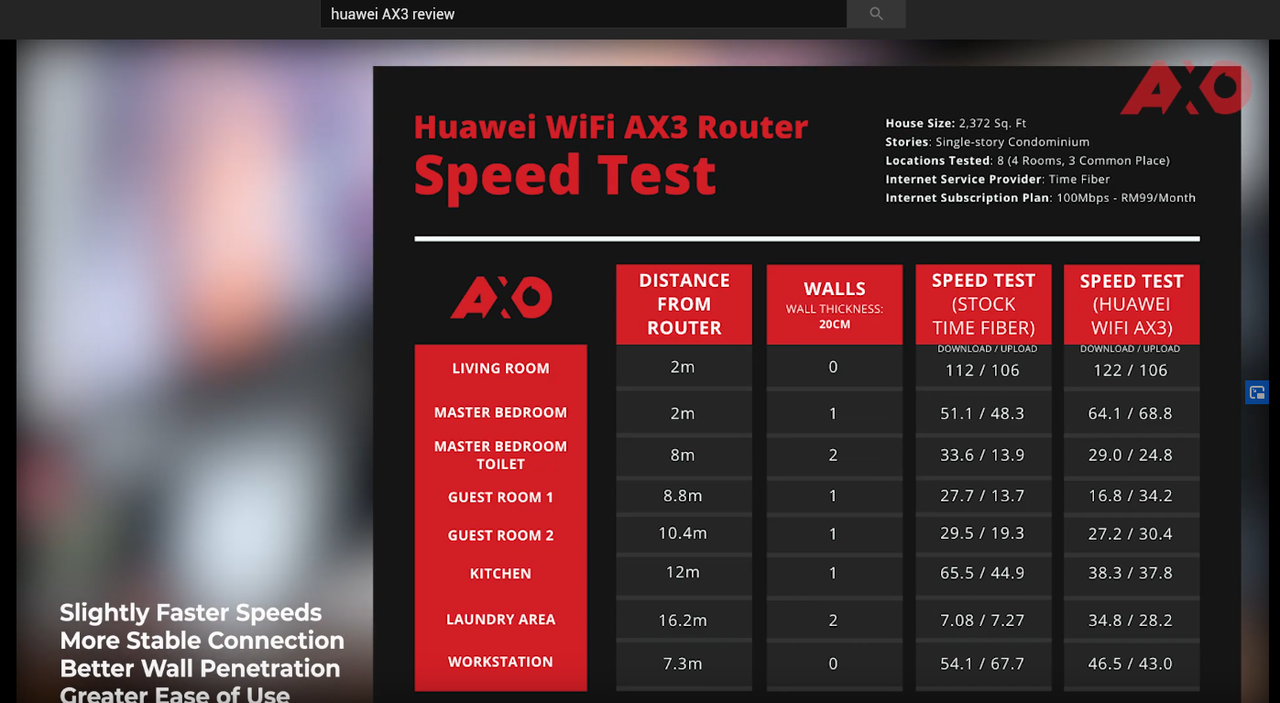 not much of an improvement if you ask me  full video |
|
|
Sep 11 2020, 06:08 PM
|
|
Senior Member
1,058 posts Joined: Nov 2009
|
QUOTE(cannavaro @ Sep 11 2020, 03:49 PM) here's a screenshot from the review not much of an improvement if you ask me full video 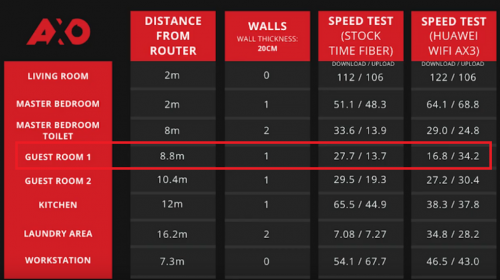 Same issue that I am facing now. Constantly drop below 20mbps even within 10m. |
|
|
Sep 12 2020, 12:29 PM
|
|
Senior Member
1,058 posts Joined: Nov 2009
|
After restart, reset, called Unifi to reset port. Everything still the same. (try all available settings on first day). But after 2 days using it. Today the speed is very good and stable. I have no idea why but will just continue to monitor.
This post has been edited by eugenecctan: Sep 12 2020, 12:30 PM |
|
|
Sep 15 2020, 01:08 PM
Show posts by this member only | IPv6 | Post
#135
|

Junior Member
91 posts Joined: Mar 2008 From: Selangor
|
Dear sifu here
Plan buy 2Unit ax3 To setup mesh WiFi Upstairs Unifi UNO and 1 AX3 as based Downstairs another AX3 To increase WiFi coverage and connect my old pc with Lan cable. This old pc will connected with internet? |
|
|
Sep 18 2020, 11:49 PM
|
|
Senior Member
1,471 posts Joined: Apr 2019
|
QUOTE(eugenecctan @ Sep 9 2020, 12:09 PM) Hi Sifus, is that any different local vs china unit ? I just bought a AX3 local unit. Can I connect a AX3 China to it as Mesh? plan to get 3 unit ax3 pro from china for my house, just not sure abt it now. |
|
|
Sep 19 2020, 01:11 AM
|
|
Junior Member
224 posts Joined: Apr 2019
|
QUOTE(XXXOOOXXXOOO @ Sep 18 2020, 11:49 PM) is that any different local vs china unit ? if vlan support not required then better get china unit as msian firmware unlikely to keep up with latest versionplan to get 3 unit ax3 pro from china for my house, just not sure abt it now. XXXOOOXXXOOO liked this post
|
|
|
Oct 19 2020, 12:24 PM
|

Senior Member
1,485 posts Joined: Dec 2005
|
hi, plan buy 1 Unit ax3 To setup mesh WiFi (to another room) with time fiber router wifi connect on another room
is it likely? some say "yes", some told me "no, at least 2 units" pls advice...thank you |
|
|
Oct 19 2020, 07:22 PM
|

Senior Member
7,740 posts Joined: Jun 2006 From: Some Yih 
|
QUOTE(asiatrader98 @ Oct 19 2020, 12:24 PM) hi, plan buy 1 Unit ax3 To setup mesh WiFi (to another room) with time fiber router wifi connect on another room u need to be in same brand to use mesh wifi.is it likely? some say "yes", some told me "no, at least 2 units" pls advice...thank you or i got it wrong? asiatrader98 liked this post
|
|
|
Oct 19 2020, 09:35 PM
|
|
Junior Member
504 posts Joined: Oct 2012 From: It's all relative
|
QUOTE(asiatrader98 @ Oct 19 2020, 12:24 PM) hi, plan buy 1 Unit ax3 To setup mesh WiFi (to another room) with time fiber router wifi connect on another room is it likely? some say "yes", some told me "no, at least 2 units" pls advice...thank you QUOTE(pikacu @ Oct 19 2020, 07:22 PM) u need to be in same brand to use mesh wifi. The AX3 isn't a mesh-capable router. And yeah, I believe all mesh routers are model/brand specific.or i got it wrong? You can extend normally by making the second router as an access point by connecting the cable from the main router. Or use the second router as a wireless repeater, but only as a last resort because wireless repeater speed, latency, and stability sucks. This post has been edited by amir.asyraf: Oct 19 2020, 09:35 PM asiatrader98 liked this post
|
|
|
Oct 20 2020, 07:42 PM
Show posts by this member only | IPv6 | Post
#141
|
|
Senior Member
1,485 posts Joined: Dec 2005
|
QUOTE(amir.asyraf @ Oct 19 2020, 09:35 PM) The AX3 isn't a mesh-capable router. And yeah, I believe all mesh routers are model/brand specific. thank you amir.asyraf, i think i got the pointYou can extend normally by making the second router as an access point by connecting the cable from the main router. Or use the second router as a wireless repeater, but only as a last resort because wireless repeater speed, latency, and stability sucks. |
|
|
May 4 2021, 05:43 PM
|
|
Junior Member
56 posts Joined: May 2012
|
QUOTE(blacktubi @ May 12 2020, 02:30 PM) Have a chance to test the non Pro AX3 previously. Common Huawei 4G router with built in wifi gives much better coverage, than AX3 dual core does in AC mode. For example in the area where TP-Link C80 performs well, the AX3 does have no coverage at all.5Ghz WiFi 6 peak on 800Mbps but always will fluctuate from 400 to 800Mbps. Kinda expected from a router at this price point considering there's no way Huawei can put a decent WiFi front end module (FEM). TP-Link Archer AX10 can hit over 800Mbps consistently. Broadcom chipset > Huawei WiFi chip. What you pay is what you get. |
|
|
Jun 16 2021, 12:26 AM
|
|
Newbie
29 posts Joined: Jan 2019
|
QUOTE(frozzbyte @ Jul 10 2020, 01:17 PM) Also got the router yesterday. Setting it up was a breeze. Tested in few spot in the house, speed ok lah compared to the old TM router. Now my laptop can achieve max unifi speed on wifi. Before this max only 260 Mbps on wifi. What more you want from that price range kan. How is your experience with the router ? My old tplink c1200 is working fine but I give a try on this ax3 since it's WiFi 6 (I thought would be helpful since wfh most of the time nowadays) . I can't say this ax3pro is better than the old tplink c1200 eventho I really wanted to. Hope there's a solution to this. The signal is not really stable also, Dota gaming keep having lag and high ping. Sigh. |
|
|
Jun 16 2021, 12:29 AM
|
|
Newbie
29 posts Joined: Jan 2019
|
QUOTE(eugenecctan @ Sep 12 2020, 12:29 PM) After restart, reset, called Unifi to reset port. Everything still the same. (try all available settings on first day). But after 2 days using it. Today the speed is very good and stable. I have no idea why but will just continue to monitor. Any update on the router ? Is it working fine ? I have the exact same problem with you man. Same old and new router model also. If you can give an update on it would be helpful. Thanks |
|
|
Jun 25 2021, 10:29 AM
|
|
Senior Member
3,657 posts Joined: May 2005
|
QUOTE(Hawk41 @ Jun 16 2021, 12:26 AM) How is your experience with the router ? My old tplink c1200 is working fine but I give a try on this ax3 since it's WiFi 6 (I thought would be helpful since wfh most of the time nowadays) . I can't say this ax3pro is better than the old tplink c1200 eventho I really wanted to. Hope there's a solution to this. The signal is not really stable also, Dota gaming keep having lag and high ping. Sigh. I don't game so I don't know the performance with gaming. But for my usage it's been very good. Just that the 5ghz coverage is not that great when I close the door in my room. 2.4ghz works fine. |
|
|
Jul 7 2021, 12:13 PM
Show posts by this member only | IPv6 | Post
#146
|

All Stars
10,261 posts Joined: Jan 2003
|
TM Unifi IPV6 works with this router. Settings as attached. Settings: 
IPV6 test 
amir.asyraf liked this post
|
|
|
Jul 13 2021, 12:21 AM
|

Senior Member
1,799 posts Joined: Mar 2012
|
Hi sifus,
Anyone using ax3 pro with maxis fibre? How's maxis ipv6 assignment consistency with this unit? Looking forward to replace my tplink c5400 due to ipv6 inconsistencies which in turn cause me some issues. Also anyone combine WiFi signals both 2.4ghz and 5ghz to a single SSID? Mind sharing experience how it performs? My current router always assigns my device to a slower linkspeed on a combined WiFi bandwidth and getting 5ghz 866mbps on a segregated SSID has always been troublesome. My OCD really don't go along with these issues lol. My current setup involves the router with one of its ethernet port connected to raspberry pi 4 which hosts a few services like adguard home, nextcloud and wireguard. Another ethernet port is connected to my wife's WFH PC while the rest (plus minus 10 devices) rely on WiFi connectivity. Currently with my little budget I'm considering to either get ax3 pro or D-link ax5460. Any advice is really appreciated. Thanks. |
|
|
Jul 16 2021, 09:23 AM
|
|
Junior Member
341 posts Joined: Jun 2008
|
QUOTE(amir.asyraf @ Oct 19 2020, 09:35 PM) The AX3 isn't a mesh-capable router. And yeah, I believe all mesh routers are model/brand specific. i thought ax3 is mesh-capable router, isn't it can mesh with another unit of ax3?You can extend normally by making the second router as an access point by connecting the cable from the main router. Or use the second router as a wireless repeater, but only as a last resort because wireless repeater speed, latency, and stability sucks. |
|
|
Jul 16 2021, 10:22 AM
|
|
Junior Member
504 posts Joined: Oct 2012 From: It's all relative
|
QUOTE(vignaroli @ Jul 16 2021, 09:23 AM) i thought ax3 is mesh-capable router, isn't it can mesh with another unit of ax3? Official hardware specs and advertisement does not mention mesh capability at all |
|
|
Jul 16 2021, 12:07 PM
Show posts by this member only | IPv6 | Post
#150
|
|
Senior Member
1,050 posts Joined: Feb 2006 From: KL
|
QUOTE(vignaroli @ Jul 16 2021, 09:23 AM) i thought ax3 is mesh-capable router, isn't it can mesh with another unit of ax3? there is, it's called Link+ but not sure if it's working as advertised.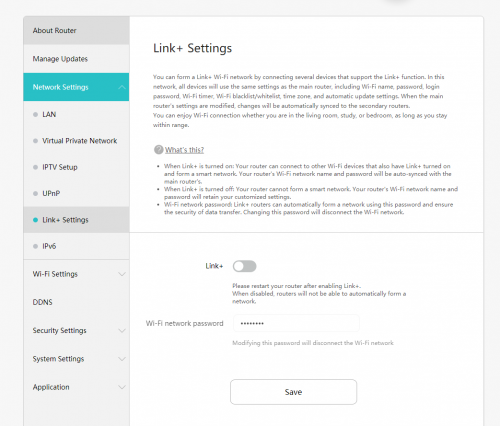 |
|
|
Dec 31 2021, 04:40 PM
|
|
Senior Member
974 posts Joined: Sep 2005
|
anyone have tried using the AX3 pro with Celcom Home Fibre? Any idea if that would work?
Also is it possible to setup mesh for two AX3 pro routers? Does it needs to be the local version? |
|
|
Jan 25 2022, 04:13 PM
Show posts by this member only | IPv6 | Post
#152
|
|
Junior Member
26 posts Joined: May 2012
|
does anyone knows if AX3 pro can be remotely managed from internet ? just like tplink deco series, can manage the router over internet.
|
|
|
Mar 24 2022, 09:43 AM
|
|
Junior Member
407 posts Joined: Dec 2008
|
|
|
|
Mar 24 2022, 12:32 PM
|

Elite
4,541 posts Joined: Jan 2003 From: BSRPPG51 Access Concentrator
|
QUOTE(slackinux @ Mar 24 2022, 09:43 AM) Still no Wifi6E from Huawei, or from any vendor for the matter. |
|
|
Mar 27 2022, 01:06 PM
|

Junior Member
529 posts Joined: Aug 2006 From: Oil Town (Miri)
|
QUOTE(jimmy.soo @ Jul 16 2021, 12:07 PM) there is, it's called Link+ but not sure if it's working as advertised. Link+ is Huawei version of Mesh Link technology. I'm using their Q2 with 3 units.QUOTE(tunasandwich @ Dec 31 2021, 04:40 PM) anyone have tried using the AX3 pro with Celcom Home Fibre? Any idea if that would work? If the router does support VLAN tagging.Also is it possible to setup mesh for two AX3 pro routers? Does it needs to be the local version? QUOTE(esoo88 @ Jan 25 2022, 04:13 PM) does anyone knows if AX3 pro can be remotely managed from internet ? just like tplink deco series, can manage the router over internet. No. |
|
|
Mar 27 2022, 01:20 PM
|

Senior Member
1,030 posts Joined: Jan 2022
|
QUOTE(slackinux @ Mar 24 2022, 09:43 AM) Support client based OpenVPN/Wireguard VPN?Not host your own server. Client connection on top WAN? |
|
|
Apr 22 2022, 03:38 PM
|
|
Junior Member
407 posts Joined: Dec 2008
|
Huawei WIFI Mesh 7 AX6600 coming soon
https://www.youtube.com/watch?v=4wzmAIrbp8Q This post has been edited by slackinux: Apr 22 2022, 03:40 PM |
| Change to: |  0.1239sec 0.1239sec
 1.20 1.20
 6 queries 6 queries
 GZIP Disabled GZIP Disabled
Time is now: 19th December 2025 - 04:04 AM |
 Quote
Quote