Welcome Guest ( Log In | Register )

Outline · [ Standard ] · Linear+

 Mesh Wifi better than Range Extender?

views
     
bee88
post Apr 8 2020, 09:46 PM

Casual
***
Junior Member
303 posts

Joined: Apr 2011
QUOTE(lazylilsnoop @ Apr 8 2020, 09:44 PM)
I really have no idea on this... previously i bought a 2nd hand router thinking i strike a deal, but then it was flashed to something else and i didnt know what to do with it... so i end up buying a new router.

Can you guide me to do this? i have a Xiaomi 3G Router
*
You try Google Pandora box xiaomi r3 router.

I am not sure if urs same model as mine. Mine is the r3 miwifi model. Four antenna.
bee88
post Apr 8 2020, 09:49 PM

Casual
***
Junior Member
303 posts

Joined: Apr 2011
Try this link. I follow the steps one by one and suceeded to flash both my xiaomi.

https://kamrul.dev/how-to-install-openwrt-o...mi-mi-router-3/


With this openwrt firmware, u can do endless pssoibility. Even ur own openvpn for personal use.

This post has been edited by bee88: Apr 8 2020, 09:49 PM
bee88
post Apr 8 2020, 09:51 PM

Casual
***
Junior Member
303 posts

Joined: Apr 2011
Never had any downtime with the old routers after flashed to openwrt.
So basically 3 old router connects wirelessly with no downtime at all.

Cheapest solution ever.
arshad
post Apr 9 2020, 02:14 AM

Blessed
******
Senior Member
1,527 posts

Joined: Apr 2005
From: Heaven


My house using TPLink Deco M5 x 3. so far so good
yed
post Apr 9 2020, 09:23 AM

Casual
***
Junior Member
375 posts

Joined: Mar 2008
From: Selangor


Will mesh connections affect the wifi speed on main router ?
haturaya
post Apr 9 2020, 09:29 AM

Look at all my stars!!
Group Icon
Elite
2,556 posts

Joined: Jan 2003
QUOTE(arshad @ Apr 9 2020, 02:14 AM)
My house using TPLink Deco M5 x 3. so far so good
*
Similar setup. Deco M5 x 3 too. All 3 connected using ethernet cable to my 10 ports Mikrotik router.

Everywhere full bar and max speed. Even when moving around, no significant lag / speed drop.

This post has been edited by haturaya: Apr 9 2020, 02:35 PM
arshad
post Apr 9 2020, 01:41 PM

Blessed
******
Senior Member
1,527 posts

Joined: Apr 2005
From: Heaven


QUOTE(haturaya @ Apr 9 2020, 09:29 AM)
Similar setup. Deco M5 x 3 too. All 3 connected using ethernet cable to my 10 posts Mikrotik router.

Everywhere full bar and max speed. Even when moving around, no significant lag / speed drop.
*
Yup. Bought it during the lazada sale laugh.gif
jas029
post Apr 9 2020, 03:08 PM

Casual
***
Junior Member
335 posts

Joined: Mar 2014


1yr+ mesh wifi user here on a 2-storey house..

couldn't be more happier..

initially, were contemplating access point, extender, power lines, drilling, cabling, etc.. but glad those were not necessary so far
TSlazylilsnoop
post Apr 9 2020, 05:17 PM

Getting Started
**
Junior Member
173 posts

Joined: Sep 2008
QUOTE(jas029 @ Apr 9 2020, 03:08 PM)
1yr+ mesh wifi user here on a 2-storey house..

couldn't be more happier..

initially, were contemplating access point, extender, power lines, drilling, cabling, etc.. but glad those were not necessary so far
*
Your mesh, is it all connected wireless from main router?
can be more details on how you setup? because i might copy.

i'm guessing LAN cable from TM Huawei to Mesh, then wireless connect all Mesh? or LAN from Mesh 1 to Mesh 2?

sorry i'm quite new to this mesh thingy.
TSlazylilsnoop
post Apr 9 2020, 05:18 PM

Getting Started
**
Junior Member
173 posts

Joined: Sep 2008
QUOTE(bee88 @ Apr 8 2020, 09:51 PM)
Never had any downtime with the old routers after flashed to openwrt.
So basically 3 old router connects wirelessly with no downtime at all.

Cheapest solution ever.
*
this solution sounds good!!! but i need learn step by step to configure it sweat.gif
bee88
post Apr 9 2020, 05:53 PM

Casual
***
Junior Member
303 posts

Joined: Apr 2011
Actually mesh will get the same ip subnet? Coz sometimes we need to make sure all devices in the same subnet for them to work.


bee88
post Apr 9 2020, 05:54 PM

Casual
***
Junior Member
303 posts

Joined: Apr 2011
QUOTE(lazylilsnoop @ Apr 9 2020, 05:18 PM)
this solution sounds good!!! but i need learn step by step to configure it  sweat.gif
*
Yes. A little pain in the arse at first but slowly u can configure them.
TSlazylilsnoop
post Apr 9 2020, 10:10 PM

Getting Started
**
Junior Member
173 posts

Joined: Sep 2008
man, i really think the powerline is not a good solution at all, it always gives out 169 IP which made my IPTV couldnt load. some say its because recently the IPTV is not stable =(
jas029
post Apr 9 2020, 11:49 PM

Casual
***
Junior Member
335 posts

Joined: Mar 2014


QUOTE(lazylilsnoop @ Apr 9 2020, 05:17 PM)
Your mesh, is it all connected wireless from main router?
can be more details on how you setup? because i might copy.

i'm guessing LAN cable from TM Huawei to Mesh, then wireless connect all Mesh? or LAN from Mesh 1 to Mesh 2?

sorry i'm quite new to this mesh thingy.
*
just a simple LAN cable from main router/modem (TM in ur case) to the mesh main hub (mesh 1).. from here, wirelessly connected to the nodes (mesh 2, 3, etc) and it pretty much blanket my whole house.. roaming was done automatically, seamlessly and discreetly without any interruption to the connection.. speed was stable as well

would advice to get one with a powerful spec and reputable brand.. this kind of technology, u do get what u pay for

on a side note, so far nothing beat the good-ol LAN cable for performance and reliability though.. i did contemplated to install it afterall in the first place.. but i thought i would give mesh a try before hacking and drilling my poor walls.. surprisingly im a happy user so far


TSlazylilsnoop
post Apr 13 2020, 04:32 PM

Getting Started
**
Junior Member
173 posts

Joined: Sep 2008
QUOTE(bee88 @ Apr 8 2020, 09:51 PM)
Never had any downtime with the old routers after flashed to openwrt.
So basically 3 old router connects wirelessly with no downtime at all.

Cheapest solution ever.
*
OMG, i finally read all the setup procedure for OpenWRT.
the installing part n how to convert to OpenWRT is quite understandable but i think i remember y i didnt use my previous OpenWRT, its because i dunno how to set it up in OpenWRT format, i think the interface is quite manual right? not as easy as clicking on icons etc like factory setup.

but if this solution is good, can you help me setup?

Now my powerline keeps going into 169 IP address and i need to off/on or reconnect the Powerline
either that or the IPTV's (using TX3) app is not responsive.
bee88
post Apr 13 2020, 04:41 PM

Casual
***
Junior Member
303 posts

Joined: Apr 2011
QUOTE(lazylilsnoop @ Apr 13 2020, 04:32 PM)
OMG, i finally read all the setup procedure for OpenWRT.
the installing part n how to convert to OpenWRT is quite understandable but i think i remember y i didnt use my previous OpenWRT, its because i dunno how to set it up in OpenWRT format, i think the interface is quite manual right? not as easy as clicking on icons etc like factory setup.

but if this solution is good, can you help me setup?

Now my powerline keeps going into 169 IP address and i need to off/on or reconnect the Powerline
either that or the IPTV's (using TX3) app is not responsive.
*
Honestly basic setting up is not difficult. Only advance setting need some study. I m no expert and only try n error
TSlazylilsnoop
post Apr 14 2020, 11:02 PM

Getting Started
**
Junior Member
173 posts

Joined: Sep 2008
OMG, i finally realize something with the powerline.

so as usual the powerline LAN cable keeps connecting to 169 address, then today i turn off both (Lvl 1 and G Floor), re-pair it (i ran up and down) when i came down, the AV600 (2) was off (no lights) even when its turn on.
I suspect the power switch/button was a little loose. which maybe cause the unstable power consistency.

Switch to the socket beside it..... VIOLA, all works!!! straight away can watch live TV again! finally
so excited now
jacktiew
post Apr 14 2020, 11:17 PM

Getting Started
**
Junior Member
289 posts

Joined: Sep 2012
QUOTE(lazylilsnoop @ Apr 14 2020, 11:02 PM)
OMG, i finally realize something with the powerline.

so as usual the powerline LAN cable keeps connecting to 169 address, then today i turn off both (Lvl 1 and G Floor), re-pair it (i ran up and down) when i came down, the AV600 (2) was off (no lights) even when its turn on.
I suspect the power switch/button was a little loose. which maybe cause the unstable power consistency.

Switch to the socket beside it..... VIOLA, all works!!! straight away can watch live TV again! finally
so excited now
*
Speed test result?
TSlazylilsnoop
post Apr 14 2020, 11:22 PM

Getting Started
**
Junior Member
173 posts

Joined: Sep 2008
QUOTE(lazylilsnoop @ Apr 2 2020, 04:11 PM)
Oh Nice!!
everything connects now!!! somehow....

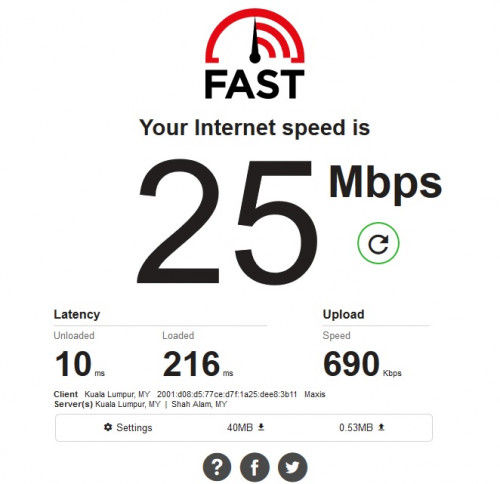
anyway here is the screenshoot of direct plug in AV600(2)

user posted image

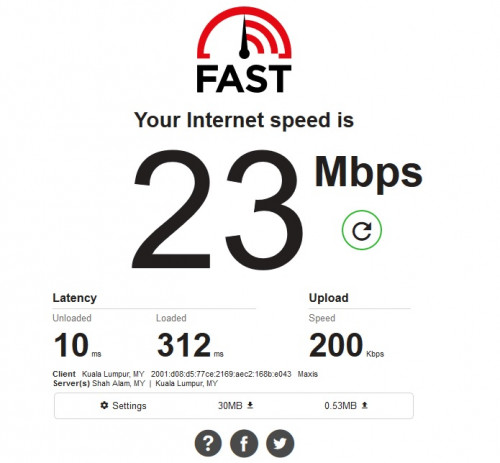
and this is when connected to Xiaomi Router

user posted image

by the way, i cant upload this picture when using the Xiaomi router. had to connect to the Maxis router to upload this

and yes, both powerline adapter is connected direct to the wall socket, no extension.
*
Speed test is the same as this.
I was looking around my house and found 2 Cat5e cable, 1 use for Maxis Router to the AV600(1) and the other from Xiaomi Router to TV Box (cable not long enough for AV600(2) to Xiaomi Router.

i was on Shopee and found out there is Cat7e, so i've placed an order for 3 LAN cable.
Waiting for delivery now
whistling.gif
jacktiew
post Apr 14 2020, 11:30 PM

Getting Started
**
Junior Member
289 posts

Joined: Sep 2012
QUOTE(lazylilsnoop @ Apr 14 2020, 11:22 PM)
Speed test is the same as this.
I was looking around my house and found 2 Cat5e cable, 1 use for Maxis Router to the AV600(1) and the other from Xiaomi Router to TV Box (cable not long enough for AV600(2) to Xiaomi Router.

i was on Shopee and found out there is Cat7e, so i've placed an order for 3 LAN cable.
Waiting for delivery now
whistling.gif
*
Don't think the result will be affected. but happy ending. rejoice.

4 Pages « < 2 3 4Top
 

Change to:
| Lo-Fi Version
0.0175sec    0.40    5 queries    GZIP Disabled
Time is now: 18th December 2025 - 02:18 AM