Welcome Guest ( Log In | Register )

4 Pages < 1 2 3 4 >Bottom

Outline · [ Standard ] · Linear+

 Mesh Wifi better than Range Extender?

views
     
traxxmy
post Apr 1 2020, 03:39 PM

New Member
*
Junior Member
39 posts

Joined: Mar 2020
QUOTE(lazylilsnoop @ Apr 1 2020, 03:23 PM)
access point?
so i'm quite confused already which is which or what is the name properly called. ROFL

access point is connecting the Maxis Router via LAN to another Device (aka Access Point device i.e. TL-WA901ND) via LAN, correct?
i used to have 1 LAN cable from 1st floor to Ground floor which previously i hack and conceal it inside the wall, but since the thunder storm strike it, its DEAD. Don't think i'll hack again.

for now i try using the TP Link AV600 kit, but it doesn't give data to the xiaomi router. i thought it was a plug and play, as long as both pairs.
i try connect direct to TV Box from the AV600 but it doesn't transmit data too.

maybe i did something wrong, can guide me?
*
TP Link AV600 is just a powerline. Ethernet over electrical cable. Access point is like wifi the one you see in public area. Its better for you to engage people to set up instead of getting confusing with all those technical jargon. Access point require set up configuration and laying ethernet/network cable though.
Madgeiser
post Apr 1 2020, 03:39 PM

Casual
***
Junior Member
433 posts

Joined: Jan 2003


QUOTE(jacktiew @ Apr 1 2020, 03:21 PM)
1. Connect a laptop to AV600 (G Floor) with LAN cable to see whether you get internet or not.

2a. If yes, then follow this video to turn Xiaomi router into access point mode to work. Link: Access Point Mode

2b. If no, then there's something wrong within your power line network. Maybe redo the setup for power line. Then repeat from step 1 again.
*
This sounds correct and sensible test to do. My guess would be in your AV,600 also. Sounds like it is not carrying your signal over power lines. If it does, then the next issue would be your XiaoMi router. It is probably operating in router mode, rather than as a regular access point mode. Not to say router mode won't work, but you will have another layer of NAT in your network, and double NATTING is not a very nice thing to have.

The simplest is to change it to access point operating mode. No point to buy new equipment just to get this working, you already have everything, just need to make it all gel together to work.

This post has been edited by Madgeiser: Apr 1 2020, 03:45 PM
TSlazylilsnoop
post Apr 1 2020, 03:54 PM

Getting Started
**
Junior Member
173 posts

Joined: Sep 2008
QUOTE(traxxmy @ Apr 1 2020, 03:39 PM)
TP Link AV600 is just a powerline. Ethernet over electrical cable. Access point is like wifi the one you see in public area. Its better for you to engage people to set up instead of getting confusing with all those technical jargon. Access point require set up configuration and laying ethernet/network cable though.
*
Yea, i've resorted to searching for professional help.
But idk where to find 1 network engineer/technician to help me solve it.

can i not lay another cable? because its really alot of work hacking and concealing it again.
the last guy that lay the cable had to go from Lvl 1 ceiling, then hack thru the lvl 1 wall, then go thru the exterior of my house (had to walk on the onning then down G floor, then punch thru the car porch and back into living room at G. Next he need to conceal it, which again is the whole same process. so i think its too much work n not worth the trouble.
-oc-gassa
post Apr 1 2020, 04:04 PM

Enthusiast
*****
Senior Member
967 posts

Joined: Jan 2003
From: setapak
isn't the difference between mesh VS wifi extender is Mesh u can use the same wifi id with need to changer as compare to extender need to connect the extender different wifi name isi it?
Madgeiser
post Apr 1 2020, 04:50 PM

Casual
***
Junior Member
433 posts

Joined: Jan 2003


QUOTE(-oc-gassa @ Apr 1 2020, 04:04 PM)
isn't the difference between mesh VS wifi extender is Mesh u can use the same wifi id with need to changer as compare to extender need to connect the extender different wifi name isi it?
*
No. I am using same ssid for both my extender and ethernet over power line adapter. In fact same ssid name for both 2.4Ghz and 5Ghz. Simplify things for me.

Only broadcast spectrum is different to avoid clash.
traxxmy
post Apr 1 2020, 05:47 PM

New Member
*
Junior Member
39 posts

Joined: Mar 2020
QUOTE(lazylilsnoop @ Apr 1 2020, 03:54 PM)
Yea, i've resorted to searching for professional help.
But idk where to find 1 network engineer/technician to help me solve it.

can i not lay another cable? because its really alot of work hacking and concealing it again.
the last guy that lay the cable had to go from Lvl 1 ceiling, then hack thru the lvl 1 wall, then go thru the exterior of my house (had to walk on the onning then down G floor, then punch thru the car porch and back into living room at G. Next he need to conceal it, which again is the whole same process. so i think its too much work n not worth the trouble.
*
How you want to lay the cable is up to you. You want to lay cable and just put scoth tape also no problem. Just nice or not only.
SUSnonamer
post Apr 1 2020, 06:05 PM

Getting Started
**
Junior Member
224 posts

Joined: Apr 2019
pull a long ethernet cable from modem/btu to mid area of staircase and put router there (alternatively can also pull fiber cable from modem point)...

it should be enough to cover most homes but if still not enough can set up wired WDS/mesh on every floor near the stairs...

most people narrow minded to think that modem and router need to be located close together

This post has been edited by nonamer: Apr 1 2020, 06:07 PM
TSlazylilsnoop
post Apr 1 2020, 11:53 PM

Getting Started
**
Junior Member
173 posts

Joined: Sep 2008
QUOTE(jacktiew @ Apr 1 2020, 03:21 PM)
1. Connect a laptop to AV600 (G Floor) with LAN cable to see whether you get internet or not.

2a. If yes, then follow this video to turn Xiaomi router into access point mode to work. Link: Access Point Mode

2b. If no, then there's something wrong within your power line network. Maybe redo the setup for power line. Then repeat from step 1 again.
*
so i try connecting the AV600, looks like i'm not getting any signal.
tried re-pairing it, but don't seem to get it connected.

Follow a few option from online video,
i. plug in AV600 main into maxis router, press pair on AV600, then press WPS on Maxis router. After done blinking, plug in AV600 (2) and connect to laptop. then press pair on AV600(2). it blinks a while then goes into still/solid light. Use cmd ping www.google.com, gets time out
ii. plug both AV600(1) and AV600(2) on the same extension wire, press pair on AV600(1) for 5sec, then when blinking, press pair on AV600(2). after both lights up, plug in into laptop. It sorta connects to the internet, try on ping www.google.com, return results. tried surfing using LAN only, it works. So i off n plug both on the other plug point. It says connected but cant surf.

read online that AV600 is a plug and play, that's why i didnt bother checking if its giving signal bangwall.gif
jacktiew
post Apr 2 2020, 12:13 AM

Getting Started
**
Junior Member
289 posts

Joined: Sep 2012
QUOTE(lazylilsnoop @ Apr 1 2020, 11:53 PM)
so i try connecting the AV600, looks like i'm not getting any signal.
tried re-pairing it, but don't seem to get it connected.

Follow a few option from online video,
i. plug in AV600 main into maxis router, press pair on AV600, then press WPS on Maxis router. After done blinking, plug in AV600 (2) and connect to laptop. then press pair on AV600(2). it blinks a while then goes into still/solid light. Use cmd ping www.google.com, gets time out
ii. plug both AV600(1) and AV600(2) on the same extension wire, press pair on AV600(1) for 5sec, then when blinking, press pair on AV600(2). after both lights up, plug in into laptop. It sorta connects to the internet, try on ping www.google.com, return results. tried surfing using LAN only, it works. So i off n plug both on the other plug point. It says connected but cant surf.

read online that AV600 is a plug and play, that's why i didnt bother checking if its giving signal  bangwall.gif
*
Not sure why you need to press WPS button?

Follow this guide to setup your powerline AV600 (not sure is your powerline model or not): https://youtu.be/t1gBYRdReRc

*Try plug in your powerline LAN cable to port 2 or 3 on your router.

This post has been edited by jacktiew: Apr 2 2020, 12:14 AM
TSlazylilsnoop
post Apr 2 2020, 12:27 AM

Getting Started
**
Junior Member
173 posts

Joined: Sep 2008
QUOTE(jacktiew @ Apr 2 2020, 12:13 AM)
Not sure why you need to press WPS button?

Follow this guide to setup your powerline AV600 (not sure is your powerline model or not): https://youtu.be/t1gBYRdReRc

*Try plug in your powerline LAN cable to port 2 or 3 on your router.
*
Yea, this was the video i followed. i must have watch another video which ask to press WPS which in my case doesn't make sense since i do not have a wifi model.
Mine is the same as that video except mine is without the wifi device. both are LAN only.

anyway i manage to pair it.
what i did was i unplug both LAN, then pair it. once the top 2 light goes into solid on then i plug 1 end to router, after it turns solid then plug in the other end to the laptop... and poof it works!!

ping is good, but when do speed test, i only get download 13mbps and upload 0.00mbps
guess it doesnt matter since i can surf.

now gonna bring the AV600(2) to fit downstairs if it works =)
jacktiew
post Apr 2 2020, 12:33 AM

Getting Started
**
Junior Member
289 posts

Joined: Sep 2012
QUOTE(lazylilsnoop @ Apr 2 2020, 12:27 AM)
Yea, this was the video i followed. i must have watch another video which ask to press WPS which in my case doesn't make sense since i do not have a wifi model.
Mine is the same as that video except mine is without the wifi device. both are LAN only.

anyway i manage to pair it.
what i did was i unplug both LAN, then pair it. once the top 2 light goes into solid on then i plug 1 end to router, after it turns solid then plug in the other end to the laptop... and poof it works!!

ping is good, but when do speed test, i only get download 13mbps and upload 0.00mbps
guess it doesnt matter since i can surf.

now gonna bring the AV600(2) to fit downstairs if it works =)
*
Great, now you can do the access point part for xiaomi router 😁

This post has been edited by jacktiew: Apr 2 2020, 12:34 AM
TSlazylilsnoop
post Apr 2 2020, 01:31 AM

Getting Started
**
Junior Member
173 posts

Joined: Sep 2008
QUOTE(jacktiew @ Apr 2 2020, 12:33 AM)
Great, now you can do the access point part for xiaomi router 😁
*
hmm, follow the video but when i plug in Xiaomi WAN, it doesn't blink
then try setup using wireless, then in the "Switch" tab, in the video, there is 3 option;
i. Primary Base station
ii. wireless amplifier mode
iii. network amplifier.

but for me, there is only Option (i) and (ii).
maybe because the Xiaomi WAN doesn't light up. does this mean the Maxis router not giving out data to Xiaomi's WAN?

jacktiew
post Apr 2 2020, 01:36 AM

Getting Started
**
Junior Member
289 posts

Joined: Sep 2012
QUOTE(lazylilsnoop @ Apr 2 2020, 01:31 AM)
hmm, follow the video but when i plug in Xiaomi WAN, it doesn't blink
then try setup using wireless, then in the "Switch" tab, in the video, there is 3 option;
i. Primary Base station
ii. wireless amplifier mode
iii. network amplifier.

but for me, there is only Option (i) and (ii).
maybe because the Xiaomi WAN doesn't light up. does this mean the Maxis router not giving out data to Xiaomi's WAN?
*
1. Maybe you can choose the first one, then go to settings to turn off DHCP. You may follow this link on xiaomi' part.
Turn off DHCP

2. Connect the cable from AV600(2) to your xiaomi router LAN port. It does the same thing.

This post has been edited by jacktiew: Apr 2 2020, 01:44 AM
Madgeiser
post Apr 2 2020, 08:31 AM

Casual
***
Junior Member
433 posts

Joined: Jan 2003


QUOTE(jacktiew @ Apr 2 2020, 01:36 AM)
1. Maybe you can choose the first one, then go to settings to turn off DHCP. You may follow this link on xiaomi' part.
Turn off DHCP

2. Connect the cable from AV600(2) to your xiaomi router LAN port. It does the same thing.
*
Yup, that's will work. Your Maxis router is already giving DHCP. The XiaoMi router is basically just working as a wireless access point and forwarding traffic to your Maxis router via the AV600 power lines.

Ah i forgot, avoid using ethernet over power lines adapter over power extension cables. They don't quite work well together. Always use proper wall socket plug. If it is looped, try using first one, they will give best result.

Why no extension power cables? Because some extension power cables have built in surge protector / suppressor and that messes up the ethernet over power lines signal.

This post has been edited by Madgeiser: Apr 2 2020, 08:39 AM
TSlazylilsnoop
post Apr 2 2020, 09:30 AM

Getting Started
**
Junior Member
173 posts

Joined: Sep 2008
QUOTE(Madgeiser @ Apr 2 2020, 08:31 AM)
Yup, that's will work. Your Maxis router is already giving DHCP. The XiaoMi router is basically just working as a wireless access point and forwarding traffic to your Maxis router via the AV600 power lines.

Ah i forgot, avoid using ethernet over power lines adapter over power extension cables. They don't quite work well together. Always use proper wall socket plug. If it is looped, try using first one, they will give best result.

Why no extension power cables? Because some extension power cables have built in surge protector / suppressor and that messes up the ethernet over power lines signal.
*
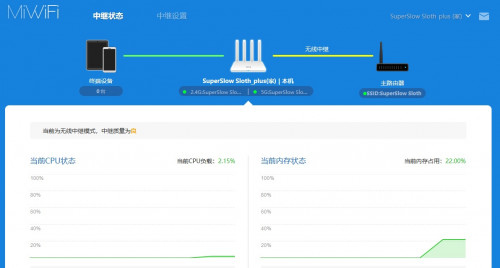
OK, setup wirelessly

user posted image

Do i still need to connect the AV600(2) into the Xiaomi WAN? since its not really giving out data to the Xiaomi's WAN?
the from Xiaomi LAN connect to the TV BOX?

TV Box is now connected directly to from AV600(2), its working at least

Madgeiser
post Apr 2 2020, 10:01 AM

Casual
***
Junior Member
433 posts

Joined: Jan 2003


QUOTE(lazylilsnoop @ Apr 2 2020, 09:30 AM)
OK, setup wirelessly

user posted image

Do i still need to connect the AV600(2) into the Xiaomi WAN? since its not really giving out data to the Xiaomi's WAN?
the from Xiaomi LAN connect to the TV BOX?

TV Box is now connected directly to from AV600(2), its working at least
*
Nope, from AV600 cable should go to LAN on your XiaoMi router, then on XiaoMi router just setup SSID. That's should work.

You can also connect the tvbox to the XiaoMi LAN port if there is any free, which will also work, like a switch.

This post has been edited by Madgeiser: Apr 2 2020, 10:02 AM
TSlazylilsnoop
post Apr 2 2020, 10:03 AM

Getting Started
**
Junior Member
173 posts

Joined: Sep 2008
QUOTE(Madgeiser @ Apr 2 2020, 10:01 AM)
Nope, from AV600 cable should go to LAN on your XiaoMi router, then on XiaoMi router just setup SSID. That's should work.
*
oh, ok
so AV600(2) to Xiaomi LAN then TV Box to the othe Xiaomi LAN.

tried that but once i put plug in AV600(2) into Xiaomi LAN, the xiaomi doesn't give out signal, it gets cut off.
once unplug the LAN, wifi gets back on

This post has been edited by lazylilsnoop: Apr 2 2020, 10:21 AM
Madgeiser
post Apr 2 2020, 11:00 AM

Casual
***
Junior Member
433 posts

Joined: Jan 2003


QUOTE(lazylilsnoop @ Apr 2 2020, 10:03 AM)
oh, ok
so AV600(2) to Xiaomi LAN then TV Box to the othe Xiaomi LAN.

tried that but once i put plug in AV600(2) into Xiaomi LAN, the xiaomi doesn't give out signal, it gets cut off.
once unplug the LAN, wifi gets back on
*
Your XiaoMi is in router mode or access point mode?
jacktiew
post Apr 2 2020, 11:09 AM

Getting Started
**
Junior Member
289 posts

Joined: Sep 2012
QUOTE(lazylilsnoop @ Apr 2 2020, 10:03 AM)
oh, ok
so AV600(2) to Xiaomi LAN then TV Box to the othe Xiaomi LAN.

tried that but once i put plug in AV600(2) into Xiaomi LAN, the xiaomi doesn't give out signal, it gets cut off.
once unplug the LAN, wifi gets back on
*
Have you disable DHCP on xiaomi router already?

If no, then change your xiaomi ip to 192.168.1.253 that is below the DHCP box. Then disable DHCP. so that you can access your xiaomi router again next time

This post has been edited by jacktiew: Apr 2 2020, 11:11 AM
jacktiew
post Apr 2 2020, 11:20 AM

Getting Started
**
Junior Member
289 posts

Joined: Sep 2012
QUOTE(Madgeiser @ Apr 2 2020, 10:01 AM)
Nope, from user posted image
If not mistaken, you are using wireless amplifier mode based on your screenshot. (If I'm not wrong)

You should use primary station mode instead (The first choice among two yous shown me yesterday), and
1. change the change your SSID to match your current one
2. Change xiaomi router IP to 192.168.1.253.
3. turn off DHCP.

This post has been edited by jacktiew: Apr 2 2020, 11:23 AM

4 Pages < 1 2 3 4 >Top
 

Change to:
| Lo-Fi Version
0.0197sec    1.17    5 queries    GZIP Disabled
Time is now: 18th December 2025 - 06:43 AM