

Anyone can check?
Home Networking Ditch ONU, use GPON SFP on Business Grade Router, 2.5G ONU for Unifi & Maxis, NO NEED VLAN
|
|
 May 2 2024, 09:56 PM May 2 2024, 09:56 PM
Return to original view | IPv6 | Post
#101
|
 
Junior Member
932 posts Joined: Dec 2019 
|
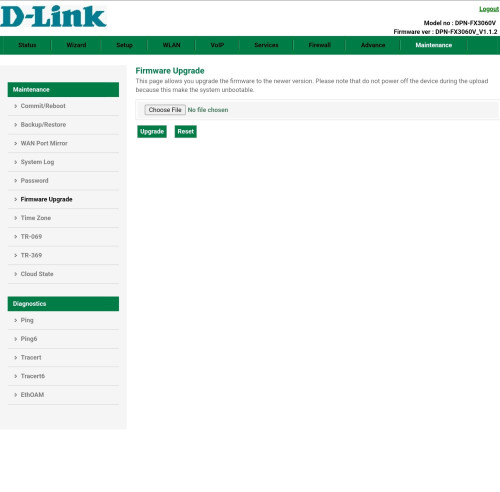
V1.1.2 firmware here, uncertain when it got updated since I just use it for VoIP ever since I swapped to GPON ONU SFP
Anyone can check? |
|
|
|
|
|
May 3 2024, 06:59 PM
Return to original view | IPv6 | Post
#102
|
|
Junior Member
932 posts Joined: Dec 2019
|
QUOTE(Anime4000 @ May 3 2024, 01:29 PM) I bridging VLAN 209 and create PPPoE Server in the Mikrotik. so, D-Link ONR able to connect PPPoE 100.64.0.0/10 through Mikrotik I also bridged 209 over to this, now just gotta wait for them to hopefully push the update verify with my friend and my D-Link ONR is online at TM customer inventory. Check with D-Link Air also show connected. this way I still can use PON Stick and update D-Link when times come. if PON Stick only, TM customer inventory show offline.   |
|
|
May 23 2024, 10:36 PM
Return to original view | IPv6 | Post
#103
|
|
Junior Member
932 posts Joined: Dec 2019
|
Looks like BCM57810S method reaching EOL, lots of issue even with modded driver on OPNSense 24.x
Going to revert back to 23.7.x and stay there for a good while until TM rolls out XGSPON and I can ditch using 2.5G  |
|
|
May 24 2024, 11:08 AM
Return to original view | IPv6 | Post
#104
|
|
Junior Member
932 posts Joined: Dec 2019
|
QUOTE(Anime4000 @ May 23 2024, 10:48 PM) Yes, the BCM57810S indeed EoL, only few refurbish card sold as new in the market. Are there any known cards that support 2.5G at SFP+ rates other than BCM57810S? SFP+ Card to support HiSGMII indeed rare, Wait for Unifi 10G is unknown date Many Linux to determine SFP speed is via SFP I2C info, that's whay I planning to do, my SFP Stick will detect and use 2.5G automatically as per Linux Kernel mentioned Currently looking into just using converter and revert the SMBIOS back to 10G and use SFP ONU that way without rolling back |
|
|
May 25 2024, 09:06 PM
Return to original view | Post
#105
|
|
Junior Member
932 posts Joined: Dec 2019
|
QUOTE(Anime4000 @ May 24 2024, 01:27 PM) SFP Card are hard to find, but many use Banana Pi BPI-R3, native support 2.5G it's SFP, my PON Stick will automatically auto negotiate at 2.5G with OpenWRT. I gave up trying to get OPNSense to work again, after upgrading to 24.1.x, it's just been breaking, device would freeze, nothing works, but weirdly enough phone still works with VLAN passthrough.if need SFP Card to support 2.5G, maybe email support to Intel or Broadcom? Even after rolling back to 23.7.x still same issue, would work for a bit but my router would just do the same freezing cycle after a while, and hard reset would clear it, but nothing in the logs would indicate any fault Currently on a measly GL-Inet OpenWRT router and rolled back all my VLANs config, already booked a unit of UDM SE to replace my network. Will probably try and find a small and low powered router to handle PPPoE via 2.5G and pass through traffic to UDM SE, or just run PPPoE on UDM itself, see how  Been a stressful 2 days of my family pestering me about the wifi not working and waking up to non working internet  |
|
|
May 28 2024, 01:00 PM
Return to original view | Post
#106
|
|
Junior Member
932 posts Joined: Dec 2019
|
QUOTE(Anime4000 @ May 27 2024, 02:42 PM) Same here, every time testing the firmware that I mod to see if that works Not even trying to mod or test, just that the router keeps failing. Gave up and just gonna go the old smart switch to separate VLAN from ONU stick to pipe into router and DPN FX3060V |
|
|
|
|
|
May 28 2024, 07:29 PM
Return to original view | IPv6 | Post
#107
|
|
Junior Member
932 posts Joined: Dec 2019
|
QUOTE(Anime4000 @ May 28 2024, 01:08 PM) Perhaps get Banana Pi BPI-R3 instead? that has support 2.5G at SFP and able to auto-neg 2.5G by reading SFP I2C information Maybe, I’m already on the UDM SE for my router with converter from GPON ONU to 2.5G WANOpenWRT can do what other BSD Router if you dislike Mikrotik  I have another simple 5 port managed switch, might set it up this upcoming weekend to pipe 209 and 600 back into DPN FX3060V and 500 to UDM SE, more devices but that’s the only choice I see since UDM I don’t think support piping VLAN thru their normal LAN ports |
|
|
Jul 23 2024, 08:29 AM
Return to original view | IPv6 | Post
#108
|
|
Junior Member
932 posts Joined: Dec 2019
|
QUOTE(ah_chak @ Jul 23 2024, 12:54 AM) Hi, i'm using pfsense 2.7.2 + 10GTek BCM57810S with anime's pon stick since Dec 2023, no issue at all.. if you would like to revisit linux router, can PM me.. No worries, afaik just my M920q was a faulty unit hence causing the issues I had, now I’m fully on Ubiquiti system now with PPPoE on my UDM SE and able to reach 95% of my 1G pipe   |
|
|
Jul 27 2024, 03:43 PM
Return to original view | IPv6 | Post
#109
|
|
Junior Member
932 posts Joined: Dec 2019
|
QUOTE(Anime4000 @ Jul 27 2024, 01:32 PM) Can you open and remove the heatsink and see what SoC Skyworth using? This only applies to if I use D-Link as my main router and not in bridge mode correct?The D-Link ONR is bad news, kwss found several CVE and I verify with other guy has same CVE Id, 'other guy' found more CVE As I said before, D-Link ONR can be infected firmware, thus disallow bridging + become zombie/botnet. It is possible some user having issue slow speed when using D-Link ONR, also some user cannot bridge... |
|
|
Jul 27 2024, 03:53 PM
Return to original view | IPv6 | Post
#110
|
|
Junior Member
932 posts Joined: Dec 2019
|
QUOTE(Anime4000 @ Jul 27 2024, 03:45 PM) as long D-Link has IP Address, it still can be infected in many ways, either VLAN 209 or VLAN 400 Even with private VLAN 400 only? even disable those, OMCI can override it. Currently my setup is ONU stick to converter to 2.5G switch, pass through port 1 tagged, 400 port 3 untagged, 500 port 5 untagged Does it still have the ability to hop through all those to reach the D-Link ONU? |
|
|
Jul 30 2024, 04:07 PM
Return to original view | Post
#111
|
|
Junior Member
932 posts Joined: Dec 2019
|
QUOTE(kwss @ Jul 27 2024, 05:49 PM) As of now, your setup seems safe, provided you didn't misconfigure anything. Will need to check on my switch to see whether these are possibleYou need to audit to make sure only VLAN 400 reach your D-Link. You also need to audit VLAN 400 is only allowed access to 10.225.0.0/16. Meaning everything else is blocked on VLAN400. This is to prevent ACS from connecting from any VLAN, effectively doing a VLAN bypass. On top of that you need to block access to port 80. 443, 8082 (both ingress and egress) for VLAN400. This is to prevent ACS traffic leaking into VoIP VLAN. If you cannot make sure of the above, I suggest not using the D-Link. Generally Anime4000 advice is correct. If we are not sure if people can set it up securely, we just tell people no. Afterall there are plenty of used Huawei. You can even reuse your ZTE ONU or whatever old ONU you had. Currently as far as I remember, TM VoIP VLAN is the only one I can pass through on my switch as it can’t pass through two VLANs on the same port, so TR-069 is not functioning. My PVID and 802.1Q tagged port 5 to 400 and nothing much is done on the switch itself My Unifi IDS/IPS should detect any botnet activities if it leaks into VLAN500 but need to dig through more firewall rules |
|
|
Sep 26 2024, 02:17 PM
Return to original view | IPv6 | Post
#112
|
|
Junior Member
932 posts Joined: Dec 2019
|
QUOTE(ShaolinTiger @ Sep 25 2024, 11:09 PM) I wanted to check if I have a router without SFP/SFP+ but I have a switch that has a 10Gb SFP port and a regular router would that work with the GPON stick? How would the router know where to get the PPoE via the GPON? From what I remember, people have set SFP+ and LAN port to be in an untagged VLAN and use it as a converter or the sorts But if you have budget, I have a 2.5G transceiver that’s unused if you want to purchase that to use with your router |
|
|
Jun 19 2025, 12:12 PM
Return to original view | Post
#113
|
|
Junior Member
932 posts Joined: Dec 2019
|
QUOTE(hadith_corner @ Jun 18 2025, 11:29 AM) Will this item works with Ubiquity Unifi Dream Machine SE? Currently use the default unifi GN630V COMBO BOX AX3000 SKYWORTH. PPPoE done on UDM SE, PON Stick plugged into CRS305 to split out to UDM SE and ATA device here.Not sure if this device probelmatic or not, but im keep getting networks down/packet loss everyday. Thinking if changing to this device can help resolving this issue. Can personally attest to stability compared to GN630V, but depending on your OLT, you might experience degraded speed. I'm on 2Gbps DL/1Gbps UL here but I can barely crack either of those even on a quiet network. However I can hit near full speed with IDS/IPS off on my UDM SE with GN630V, probably more optimization is needed with PON stick and probably modify some settings on TM's side. I haven't bothered to pester TM to swap OLT ports for me for Alcatel OLT, just keep in mind this is depending on OLT you're assigned to. Stability also is up even with constant high volume traffic (torrenting), 500-600Mbps DL and 400-500Mbps UL and still rock solid. But might be a UDM SE limitation, ping does spike during large DL, so if you have any latency sensitive application, you might experience some high pings. For me it's during my valorant games. |
| Change to: |  0.0925sec 0.0925sec
 0.76 0.76
 7 queries 7 queries
 GZIP Disabled GZIP Disabled
Time is now: 12th December 2025 - 05:01 PM |
 Quote
Quote