

 Jun 2 2023, 09:48 PM


QUOTE(FlierMate @ May 30 2023, 10:55 PM)
I got the same Python program that work in Linux (WSL) but not in Windows.
The error in Windows thrown by python3:
The characters in question is Unicode characters, it cannot be processed in Windows. However, using python3 in Linux to read Unicode characters is OK wor.

Too little info but I'll take a guess, you're trying to read a txt file but Python is having issues converting the byte data into character data using cp1252 encoding.The error in Windows thrown by python3:
CODE
Traceback (most recent call last):
File "C:\Users\BOO\Projects\xx\xx.py", line 309, in <module>
xxFileLines = f.readlines()
^^^^^^^^^^^^^
File "C:\Program Files\WindowsApps\PythonSoftwareFoundation.Python.3.11_3.11.1008.0_x64__qbz5n2kfra8p0\Lib\encodings\cp1252.py", line 23, in decode
return codecs.charmap_decode(input,self.errors,decoding_table)[0]
^^^^^^^^^^^^^^^^^^^^^^^^^^^^^^^^^^^^^^^^^^^^^^^^^^^^^^^
UnicodeDecodeError: 'charmap' codec can't decode byte 0x90 in position 5: character maps to <undefined>
File "C:\Users\BOO\Projects\xx\xx.py", line 309, in <module>
xxFileLines = f.readlines()
^^^^^^^^^^^^^
File "C:\Program Files\WindowsApps\PythonSoftwareFoundation.Python.3.11_3.11.1008.0_x64__qbz5n2kfra8p0\Lib\encodings\cp1252.py", line 23, in decode
return codecs.charmap_decode(input,self.errors,decoding_table)[0]
^^^^^^^^^^^^^^^^^^^^^^^^^^^^^^^^^^^^^^^^^^^^^^^^^^^^^^^
UnicodeDecodeError: 'charmap' codec can't decode byte 0x90 in position 5: character maps to <undefined>
The characters in question is Unicode characters, it cannot be processed in Windows. However, using python3 in Linux to read Unicode characters is OK wor.
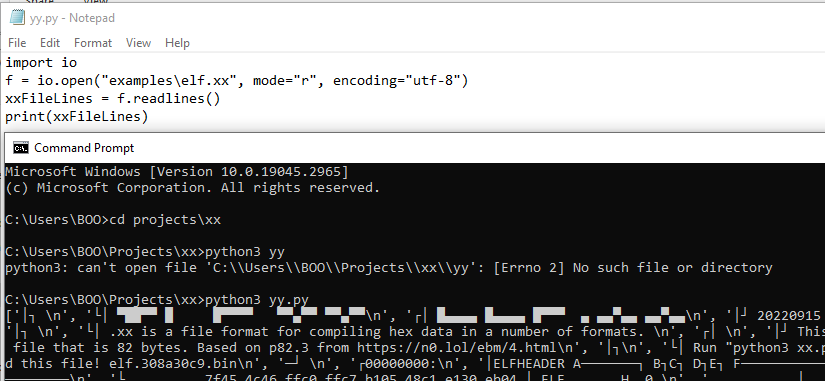
Could be that byte 0x90 doesn't have any character value when using this CP1252 encoding, you could try to open the file using UTF-8 encoding instead.
Something like:
CODE
import io
f = io.open("YourFile.txt", mode="r", encoding="utf-8")
xxFileLines = f.readlines()
I don't work much with txt files when writing my code in Python so take this with a grain of salt.
 Quote
Quote


 0.0557sec
 1.59
1.59
 5 queries
 GZIP Disabled