Welcome Guest ( Log In | Register )

Bump Topic Topic Closed RSS Feed
9 Pages « < 3 4 5 6 7 > » Bottom

Outline · [ Standard ] · Linear+

Unifi Official TM UniFi High Speed Broadband Thread V38, READ 1ST PAGE FOR TURBO SPEED INFO!

views
     
SUSpakji
post Jan 15 2020, 04:37 PM

Regular
******
Senior Member
1,386 posts

Joined: Nov 2012


QUOTE(NeoArcadia @ Jan 15 2020, 04:13 PM)
I thought they would be adding 500mpbs and 800mpbs this time around . unsure.gif
*
but when launch 800mbps but delay delay

QUOTE(dannielshazmeer @ Jan 15 2020, 04:14 PM)
i think tm not rush to launch 500mbps and even 800 mbps
*
yes correct but will be delay delay maybe 3month or 6month or 12month more delay daam zzzzzzzz

we stuck 100mbps
SUSpakji
post Jan 15 2020, 09:53 PM

Regular
******
Senior Member
1,386 posts

Joined: Nov 2012


QUOTE(sonicbull @ Jan 15 2020, 04:39 PM)
Too late to read this message. Got maxis already
*
good luck i cannot guarantee if got problem you own risk

here link https://forum.lowyat.net/topic/4890532
please read you will be disappointed because he don't have internet because need wait solve very slow

he use maxis but connection gone have to wait 30 jan 2019 crazy 3weeks no internet
SUSpakji
post Jan 16 2020, 02:26 AM

Regular
******
Senior Member
1,386 posts

Joined: Nov 2012


QUOTE(soonwai @ Jan 15 2020, 10:51 PM)
Don't worry about it. Pakji hasn't actually used Maxis Fibre before.
*
yes i never used maxis fibre before

because trouble by someone problem that i allready choose unifi TM
previous i used streamyx that TM i prefer TM same company i don't want other ISP like MAXIS

my friend used TIME Fiber seen not much complaint but its apartment only

my home is landed that i already choose TM UNIFI smile.gif

waiting 800mbpz launch zzzzzzzzzzzzzzzzzzzzzzzzz
SUSpakji
post Jan 17 2020, 04:00 AM

Regular
******
Senior Member
1,386 posts

Joined: Nov 2012


QUOTE(Mazda9 @ Jan 16 2020, 10:39 PM)
I’m on 800mbps plan + ultimate pack + free calls plan with no contract at RM159. My question is can I remove the ultimate tv pack?

I tried to downgrade my ultimate to varnam pack to save rm30 but I was told that the downgrade is possible but with 12 months new contract.

I was like WTF!!! Why is my contract to be renewed for 12 months. I logged a case with their TOP management and MCMC and now awaiting for their reply.
*
nice 800mbps RM159 daam i like

i still 100mbps RM129

you are lucky 800mbps plan + ultimate pack + free calls plan daam i wanted
SUSpakji
post Jan 20 2020, 01:20 PM

Regular
******
Senior Member
1,386 posts

Joined: Nov 2012


QUOTE(Spawny @ Jan 20 2020, 10:21 AM)
I need some advise from the all the sifus here.
I was at the TM point earlier to check the availability of internet on my new housing area, they said it the ports will be ready in March.
I can either apply thru UNIFI directly or thru Maxis Fibre plan for it, but base on the packages from both telco I feel the 300mbps from Maxis Fibre suit my needs more and the price is way cheaper than UNIFI.

So my main question for now, has MAXIS Fibre service improve compared to the years before? Are their internet connection as reliable as UNIFI? I know both ride on the same fibre line by TM but I just want to hear opinions before i make my decision

Thanks!
*
don't not take Maxis Fibre its very bad and connection poor and sometime speed unstable you may check facebook a lot complaint
and here complaint link https://forum.lowyat.net/topic/4890532
he using maxis but no internet have wait till 30 JAN 2020 look slow settle and delay delay
i will not take Maxis Fibre so i will stay UNIFI almost stable and smooth i getting full speed for LAN Cable PC Desktop


QUOTE(Spawny @ Jan 20 2020, 10:56 AM)
To be honest i prefer UNIFI, but I want the 300mpbs package with a better deal, the current price is 199 excluding tax. Is there an agent or third party dealers that can give me a better price for the same package? My parents home now is paying 190 for 800mbps which is why the current deal does not look appealing to me.
*
daam you parents home now is paying RM190 to get 800MBPS very nice
i paying 100MBPS RM129 unifi
SUSpakji
post Jan 21 2020, 12:03 AM

Regular
******
Senior Member
1,386 posts

Joined: Nov 2012


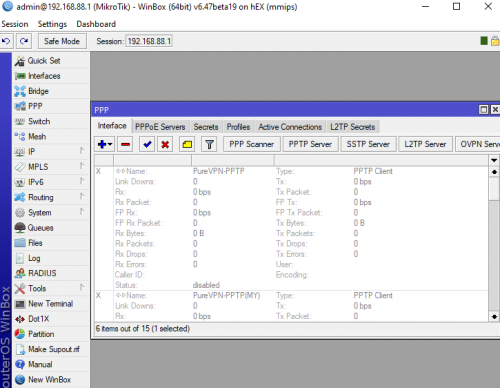
QUOTE(go626201 @ Jan 20 2020, 11:15 PM)
No suitable for normal user.
Need to setup at least 10min for the internet.
Vlan,PPPoE all need to set our self.
But the advantage is Routeros having a lot of function that is not set-able in normal consumer grade router.

user posted image
*
Mikrotik router all configure very hard not suitable for me

i was plan buying Mikrotik thinking now canceled haha hard for me

ASUS Router configure very easy suitable for me ASUS
SUSpakji
post Jan 25 2020, 12:11 AM

Regular
******
Senior Member
1,386 posts

Joined: Nov 2012


QUOTE(jack2 @ Jan 24 2020, 09:31 AM)
I got call from Maxis that they can compensate me the Unifi contract termination fee and go with them.

Worth ma?
*
don't not take Maxis Fibre its very bad and connection poor and sometime speed unstable you may check facebook a lot complaint
and here complaint link https://forum.lowyat.net/topic/4890532
he using maxis but no internet have wait till 30 JAN 2020 look slow settle and delay delay
i will not take Maxis Fibre so i will stay UNIFI almost stable and smooth i getting full speed for LAN Cable PC Desktop
SUSpakji
post Jan 27 2020, 10:49 PM

Regular
******
Senior Member
1,386 posts

Joined: Nov 2012


QUOTE(JustcallmeLarry @ Jan 27 2020, 02:56 AM)
Guys hope you don't mind me asking this here?
Wta is the internet quality of maxis and unifi the same?
*
not same quality

UNIFI is best then Maxis

Please don't not take Maxis Fibre its very bad and connection poor and sometime speed unstable you may check facebook a lot complaint
and here complaint link https://forum.lowyat.net/topic/4890532
he using maxis but no internet have wait till 30 JAN 2020 look slow settle and delay delay
i will not take Maxis Fibre so i will stay UNIFI almost stable and smooth i getting full speed for LAN Cable PC Desktop

you want take maxis you own risk if problem and slow settle and delay delay almost lousy services maxis

batter take unifi i also using unifi never had problem i will stay unifi i will not take maxis
maxis is poor connection
SUSpakji
post Jan 27 2020, 10:57 PM

Regular
******
Senior Member
1,386 posts

Joined: Nov 2012


QUOTE(Kellicros @ Jan 27 2020, 04:44 PM)
Guys, I just subscribed to unifi 300mbps package on my new home, and due to the low wifi speed of the provided Netis router, i have since upgraded to TPLink Archer A9, all is good but I have some issue trying to connect to the new UnifiPlus tvbox via ethernet cable.

Here's my issues,

The Unifi Plus ATV box will not detect the Ethernet connection if I plug it to LAN1(which is for IPTV)

It will detect the connection and works fine if I plug it into any LAN ports other than LAN1.

Now I don't mind using it via WIFI cause I got pretty good speed with the new router,

The real problem is I can't use the LAN1 port for any other devices either. My Router is now crippled from 4 ports to 3 ports.
I can't make any changes in the router setting (like changing LAN1 from IPTV to Internet) because the options are grayed.

If I change the "Mode" from "Malaysia-Unifi" to any other settings I will get no internet.

If I disable IPTV/VLAN by unchecking the box, I will also get no internet.
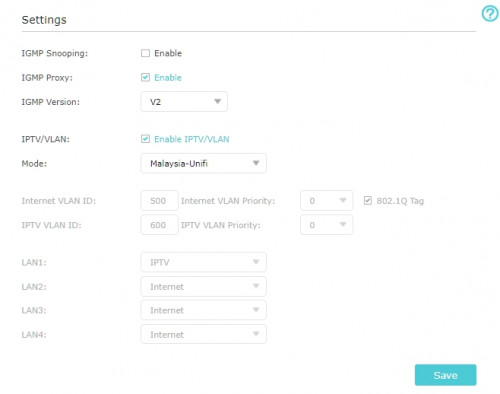
user posted image
Here's what I believe is the issue, the IPTV protocol in the TPLink router is setup for the old Unifi TV Box and is incompatible for the new ATV box.

All I wanted is to make LAN1 working for other devices again, any help would be greatly appreciated.

EDIT: Using a custom setting and changed IPTV to Internet on LAN1 makes the port working again, but I'm wondering, doesn't UNIFI have the dedicated bandwith for UnifiTV? is this still the case if I connect via wifi or LAN setup for "Internet"?
Base on my experience after porting from Unifi to Maxis: Maxis is much less stable, while this is quite unnoticeable with regular use, if you play MMORPG/Online games, you are bound to be disconnected very often. When I had Unifi, I can online/AFK on my MMORPGs for weeks, but on Maxis, I keep getting disconnected, this is also the reason I went back to Unifi for my new home.

*
haha maxis is poor connection lousy services maxis

i still using unifi seen prefect a lot stable
SUSpakji
post Jan 28 2020, 12:42 PM

Regular
******
Senior Member
1,386 posts

Joined: Nov 2012


QUOTE(chickenshit36 @ Jan 28 2020, 10:28 AM)
is unifi experimenting with QoS for applications/service type?

these past few weeks i sometimes cant even load webpages or instagram sometimes, but my netflix works flawlessly.

getting annoyed with the service im getting. sometimes want to do online transaction also have to think twice coz of the unstable connection
*
i don't have problem i also use online transaction maybank seen stable noting problem
i using unifi 100mbps
SUSpakji
post Jan 29 2020, 11:56 PM

Regular
******
Senior Member
1,386 posts

Joined: Nov 2012


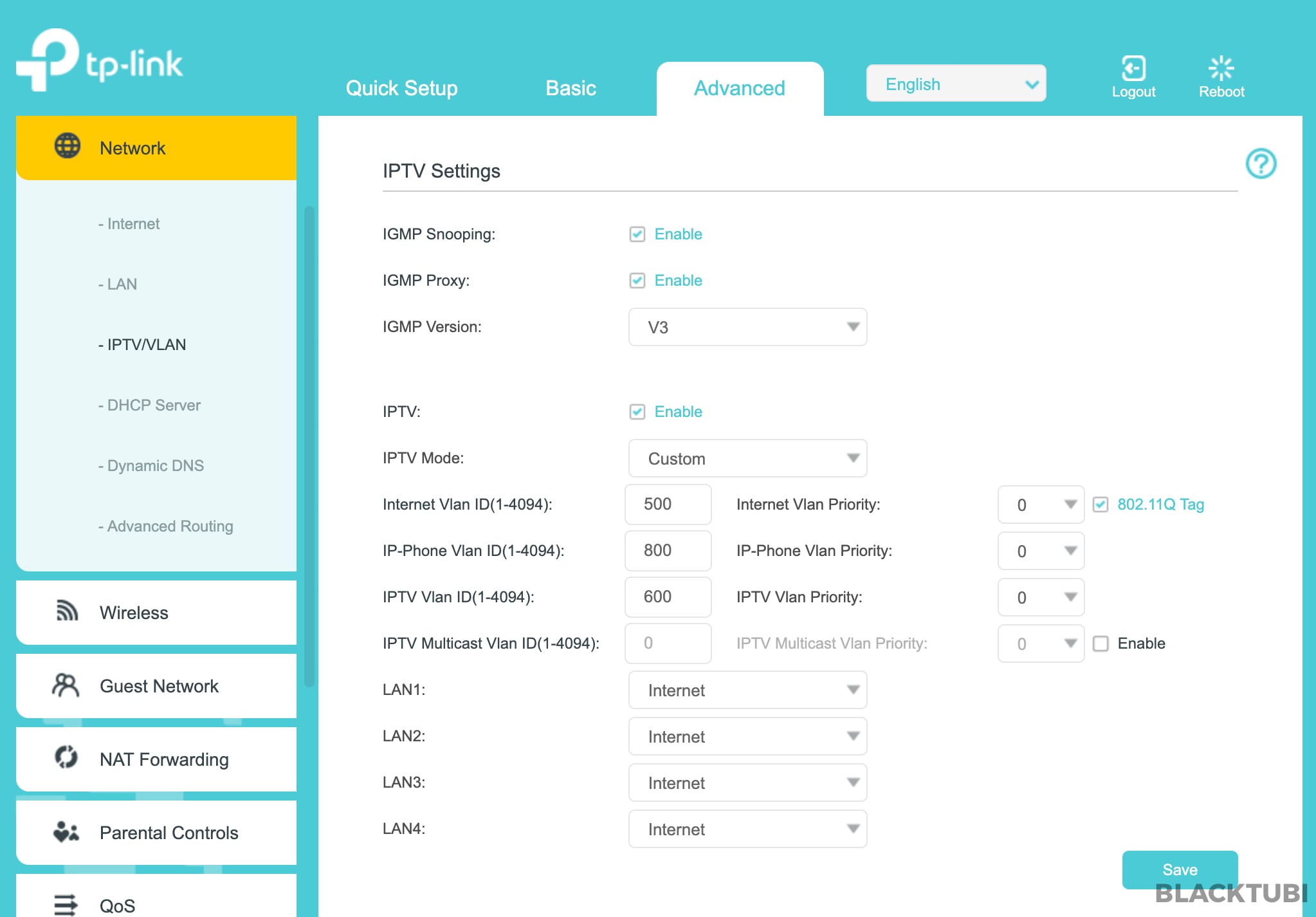
QUOTE(blacktubi @ Jan 29 2020, 02:45 PM)
Kellicros
The new ATV black box no longer work over VLAN connection so it wouldn't work on LAN 1.

Perform manual VLAN tagging to gain normal operation on LAN 1.

user posted image

Follow my settign

TM is moving away from VLAN based deployments to simplify things and prevent compatibility issues with 3rd party router.

The new black box run on a different infra compared to the older silver box. The bitrate is lower due to improved compression.
*
The bitrate is lower for older silver box or just new black box
SUSpakji
post Jan 30 2020, 02:47 AM

Regular
******
Senior Member
1,386 posts

Joined: Nov 2012


QUOTE(lukemanz @ Jan 30 2020, 12:04 AM)
Someone share this: https://www.linkedin.com/posts/zakwanbuang_...6281190400-6pac

[attachmentid=10415377]
*
maybe cache not real 6GBPS i unable trust i still think cache

last time my pc desktop unifi 100mbps i saw speedtest reach 500mbps look like cache but not real speed
my router almost show 100mbps but pc show sometime 900mbps that is cache

hope understand
SUSpakji
post Feb 3 2020, 10:56 PM

Regular
******
Senior Member
1,386 posts

Joined: Nov 2012


QUOTE(judehow @ Feb 2 2020, 06:09 PM)
I am think to buy at tm point so that why can fix for me, cause i scare  if buy outside  tm will not fix for me and i am not IT Expert.
*
seen you are noob
don't buy tm point router its poor
i using unifi btu cannot change because btu is good don't care change btu
i got unifi btu and tm give free router tp link i don't like and seen problem and unstable
so i changed my own ASUS RT-AC68U almost prefect going strong

i was using streamyx that i bought ASUS RT-AC68U with 4mbps streamyx so already upgrade unifi 100mbps rm129
my house tm installer unifi so i already ask PPPOE unifi password i already take photo tm technician his tablet so i already saved my phone then i unplug free tm router and plug my own ASUS RT-AC68U i type unifi password almost connected prefect
SUSpakji
post Feb 3 2020, 11:02 PM

Regular
******
Senior Member
1,386 posts

Joined: Nov 2012


QUOTE(judehow @ Feb 3 2020, 06:26 AM)
Yup , will try . I currently  waiting for the technician  man form tm to check what is the issue , then if is the router  then I see buy router from tm point or computer shop , will try to keep you guys updated.
*
seen you are susah buy router from tm point its very bad i see you are noob rclxub.gif rclxub.gif rclxub.gif

i said not recommend buy router from tm point rclxub.gif

computer shop they sell ASUS Router don't mistake wrong model because wont support
SUSpakji
post Feb 3 2020, 11:45 PM

Regular
******
Senior Member
1,386 posts

Joined: Nov 2012


QUOTE(judehow @ Feb 3 2020, 11:24 PM)
I will check with the  computer shop.
*
once you bought router
you need unifi password

do you know how to setup router if you still noob then lagi lagi susah


SUSpakji
post Feb 4 2020, 12:11 AM

Regular
******
Senior Member
1,386 posts

Joined: Nov 2012


QUOTE(judehow @ Feb 4 2020, 12:08 AM)
I will follow manual  guide
*
ok good luck
SUSpakji
post Feb 21 2020, 03:21 AM

Regular
******
Senior Member
1,386 posts

Joined: Nov 2012


QUOTE(jack2 @ Feb 20 2020, 10:43 AM)
Any Maxis agent? I wanna migrate from Unifi to Maxis
*
here https://forum.lowyat.net/topic/4890532

if you change maxis you own risk if problem happen slow settle
facebook also a lot complaint

i will not change maxis so i will stay unifi
SUSpakji
post Feb 25 2020, 10:19 PM

Regular
******
Senior Member
1,386 posts

Joined: Nov 2012


QUOTE(lohmaikai @ Feb 24 2020, 01:35 PM)
Reading most of comments here make me seriously consider downgrading 800MBps to 100Mbps
Im currently paying rm210 for 800Mbps which i not fully utilise.
Might as well get the 100Mbps and save rm70ish per month

Any heads up from sifus before i proceed to tm point?
*
QUOTE(sHawTY @ Feb 24 2020, 03:19 PM)
RM210 for 800Mb/s, you might as well transfer that account to someone else because it's impossible to get that price for new registration
Once the transfer is completed, then you can register a new account for yourself

Lots of people wants that speed & lots out there are paying much more than what you're paying right now

I'm getting 800Mb/s for RM189, will never terminate it nor sell it another user
*
nice idea i want 800mbps price ok RM210

i still have 100mbps with contract sad.gif
my own account 100mbps can transffer to exchange for 800mbps for me can change my own name ???
SUSpakji
post Feb 27 2020, 01:58 PM

Regular
******
Senior Member
1,386 posts

Joined: Nov 2012


QUOTE(MonsterJ9 @ Feb 27 2020, 01:57 AM)
While playing online multiplayer on PlayStation 4, I was downloading a digital game on PS4 my download speed was very very slow or sometimes not downloading but online match not affected. If I don’t play online game, my download speed is back to normal and very fast.

Previously I was using streamyx 8mbps, I can play online game smoothly and can download a digital game while playing online and it didn’t affect the latency. Now I changed to Unifi 100mbps, everything upside down.

Why?

Btw, I connected via lan cable and my router is netis which was given by TM.
*
its not problem unifi
its problem netis unable handle

i using ASUS RT-AC68U almost stable no more slow

you need to change you own router so i recommend you buy ASUS RT-AC68U Enough

This post has been edited by pakji: Feb 27 2020, 02:03 PM
SUSpakji
post Feb 28 2020, 11:56 PM

Regular
******
Senior Member
1,386 posts

Joined: Nov 2012


QUOTE(heLL_bOy @ Feb 28 2020, 10:55 PM)
anyone encounter issue on the netis DL4480V1 which connecting on wifi on hp it will happen that wifi network connected but no internet running?

any1 could advice on this. i just getting the unifi recently cant figure this issue
*
netis DL4480V1 router very bad a lot problem
please get ASUS RT-AC68U that best i using almost stable no more problem my phone wifi smooth

9 Pages « < 3 4 5 6 7 > » Top
Topic ClosedOptions
 

Change to:
| Lo-Fi Version
0.2524sec    0.53    7 queries    GZIP Disabled
Time is now: 3rd December 2025 - 11:11 PM