Welcome Guest ( Log In | Register )

Bump Topic Topic Closed RSS Feed
9 Pages < 1 2 3 4 5 > » Bottom

Outline · [ Standard ] · Linear+

Unifi Official TM UniFi High Speed Broadband Thread V38, READ 1ST PAGE FOR TURBO SPEED INFO!

views
     
SUSpakji
post Dec 13 2019, 04:36 PM

Regular
******
Senior Member
1,386 posts

Joined: Nov 2012


QUOTE(misspinky @ Dec 13 2019, 11:06 AM)
Allo Technology previously known as Setia Haruman Technology Sdn Bhd that offer City Broadband, lets watch the outcome next year. I can feel, TM will come out another package soon next year whether higher speed or revise current package price package below 300Mbps.
*
i hope tm will come new package 800mbs i waiting


SUSpakji
post Dec 13 2019, 04:37 PM

Regular
******
Senior Member
1,386 posts

Joined: Nov 2012


QUOTE(MGM @ Dec 13 2019, 10:05 AM)
Could this be the reason why TM offers Pay-nothing for 3 months?
https://www.thestar.com.my/business/busines...d-broadband-rsp
*
look like Maxis i wont switch but i will stay tm only
SUSpakji
post Dec 13 2019, 08:05 PM

Regular
******
Senior Member
1,386 posts

Joined: Nov 2012


QUOTE(cHiLdHo0drEaMz @ Dec 13 2019, 05:02 PM)
Why don't you try other service providers for 800Mbps ?  whistling.gif
*
i told you i hate maxis 800mbps i wont take maxis 800mbps because maxshit hahaha a lot complaint and lousy maxis

i will take tm 800mbps that i am waiting

if i take maxis if internet down and never settle and wont come technician house

if i call maxis then they will say will send technician 24hours then next day still no come technician
i saw facebook he still no internet 2-3weeks and some 1month seee trouble look lazy technician come house

that mean lousy technician mad.gif

but TM is good

if tm problem internet i call tm they will say will send technician 24hours then next day technician call me and say want come house then after 15min now already come technician house and settle then technician will left then no more problem

that i prefer TM then maxshit hahaha
SUSpakji
post Dec 13 2019, 10:25 PM

Regular
******
Senior Member
1,386 posts

Joined: Nov 2012


QUOTE(cHiLdHo0drEaMz @ Dec 13 2019, 08:33 PM)
Thank you for explaining why you prefer TM or Maxis  thumbsup.gif
*
i prefer TM because very good and very stable and speed no slow almost full speed i don't have problem

Maxis is very bad because sometime speed unstable and down and settle very slow and keep say wait wait wait 24h 24h 24h bla bla almost shit

QUOTE(soonwai @ Dec 13 2019, 09:12 PM)
Have you subscribed to and used Maxis Fibre before?
*
never never because i already read facebook and some lowyat forum too
someone told maxis fibre give private IP address bangwall.gif mad.gif and speed unstable that i already reading facebook and lowyat forum someone post review too and bad feedback too and disappointed too

TM is best almost give public IP address

hope understand

i see you also using TM unifi you turbo 800mbps you never problem see almost stable then maxshit

SUSpakji
post Dec 14 2019, 11:18 PM

Regular
******
Senior Member
1,386 posts

Joined: Nov 2012


QUOTE(sHawTY @ Dec 14 2019, 02:13 AM)
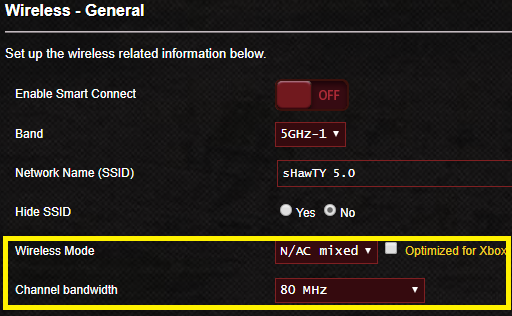
1. Stop using 2.4GHz, those are only for older devices
2. Set your 5GHz wireless mode to only run for Wireless N/AC Mixed
3. Set your 5GHz channel bandwidth to run at 80MHz as per my screenshot below
4. Your wireless card must also support wireless AC in order to get full 300Mb/s

user posted image
*
Please answer

what router you are using ?? GT-AX1100 ??? or what
SUSpakji
post Dec 15 2019, 01:58 AM

Regular
******
Senior Member
1,386 posts

Joined: Nov 2012


QUOTE(sHawTY @ Dec 15 2019, 01:55 AM)
GT-AC5300
*
ohh that model has 8 port lan right

GT-AX1100 4 port lan not enough

i hope asus will make new model upcoming 8 lan port more power full then GT-AX1100

need wait till 2020

i also waiting tm launch 800mbps
SUSpakji
post Dec 15 2019, 01:48 PM

Regular
******
Senior Member
1,386 posts

Joined: Nov 2012


QUOTE(taqu @ Dec 15 2019, 10:21 AM)
One can always add a switch if 4 ports on the router is not enough, unless you need network monitoring on each port. In that case, get a smart/managed switch.
*
yah i don't need switch because my table will messy because BTU + ASUS Router RT-AC68U if add switch hard la space table and messy

that i prefer BTU + Router only clean

i know new model RT-AX88U has 8 lan port but GT-AX1100 more power full then RT-AX88U because RT-AX88U = AX6000 Dual Band and AX11000 Tri-band

that why more power full AX11000 Tri-band

have to wait 2020 new model will be AX11000 Tri-band with 8 lan port but not sure when release maybe Q2 2020 OR Q3 2020 like that
SUSpakji
post Dec 15 2019, 10:29 PM

Regular
******
Senior Member
1,386 posts

Joined: Nov 2012


QUOTE(arslow @ Dec 15 2019, 02:44 PM)
https://s.lazada.com.my/s.Zv586

Ax11000 has been available for a while now...
*
yes that model available Ax11000 its has 4 port

i said have to wait 2020 new model will be AX11000 Tri-band with 8 lan port but not sure when release maybe Q2 2020 OR Q3 2020 like that

i said new model will come out for AX11000 Tri-band not GT-AX1100

RT-AX88U = AX6000 and GT-AX1100 = AX11000 Tri-band

so need wait new model GT-AX____ ????? = AX11000 Tri-band with 8 Port Lan
SUSpakji
post Dec 15 2019, 10:31 PM

Regular
******
Senior Member
1,386 posts

Joined: Nov 2012


QUOTE(taqu @ Dec 15 2019, 05:07 PM)
I'm lucky my router is in store room so I can hide everything there 😁

A mini rack like below can help keeping everything neat too:

https://shopee.com.my/product/48059841/1418510549?smtt=0.0.9
*
that rack i can't move other place because BTU already place computer table so cannot move BTU other place so i can't that why i don't need rack
SUSpakji
post Dec 17 2019, 01:35 PM

Regular
******
Senior Member
1,386 posts

Joined: Nov 2012


QUOTE(arslow @ Dec 17 2019, 12:56 PM)
Ah I missed that... My bad. I guess ax89x isn't good enough for you? It has 8 lan ports but has "only" one 5ghz radio rather than two.
*
not enough for ax89x

i can wait because still using 100mbps that why no need buy urgent router
i still using RT-AC68U enough for 100mbps

once TM Launch 800MBPS then i will upgrade then i will wait new model asus more power full then i will buy it

now no need buy early router because TM Still no launch 800mbps that cannot upgrade that why need wait TM launch 800mbps
SUSpakji
post Dec 17 2019, 02:06 PM

Regular
******
Senior Member
1,386 posts

Joined: Nov 2012


QUOTE(arslow @ Dec 17 2019, 01:49 PM)
I'm currently using ac68u and unifi 800mbps,am able to hit 800mbps as long as the server allows me to...

But yeah the cpu goes to around 95% usage constantly while doing that.

As for me, I'll be waiting till asus launches the final spec (not draft spec like what's available now) ax router which is supposed to replace the ac86u. Hoping that it cost around 700- 800 as that was about the price I paid for the ac68u in August 2013.

Most probably mid 2021 for that to happen.
*
daam lucky you 800mbps cry.gif

same i also bought 2013 ac68u was using streamyx 4mbps lol slow slow

now finally unifi 100mbps jump faster

ac86u that model someone complaint to much overheat compare ac68u no problem no overheat
SUSpakji
post Dec 17 2019, 09:55 PM

Regular
******
Senior Member
1,386 posts

Joined: Nov 2012


QUOTE(wkc5657 @ Dec 17 2019, 03:09 PM)
can buy add on fan if scared overheat, no need external power source, power tap from sub socket on the router itself.
https://www.lazada.com.my/-i412431204-s5976...lFlag=true&mp=1

I also used ac86u and i didn't pasang the fan even though i paranoid and bought it, no overheat issue/don't notice overheat issue till now. The router some more placed near window with direct sunlight. Almost 2 years already, no problem, other than occasionally on/off to restart. Maybe the firmware update can optimise things a bit, because i updated it the very day when i put it to use and one more update a year later.

Suggest you get a switch la....no need waste money buy new top end router. You also need to replace the receiver end antenna to be ax/wifi 6 compatible unit. 2 times cost outlay, no point....
*
i don't like add FAN due noise my RT-AC68U i never put Fan so clean i wont buy ac86u

i don't need switch because my table will messy because BTU + ASUS Router RT-AC68U if add switch hard la space table and messy

that i prefer BTU + Router only clean

i like new top end router upgrade 2020 new model

yah 2 times cost its i am ok but not buying just 2020 new model

This post has been edited by pakji: Dec 17 2019, 10:02 PM
SUSpakji
post Dec 17 2019, 10:00 PM

Regular
******
Senior Member
1,386 posts

Joined: Nov 2012


QUOTE(arslow @ Dec 17 2019, 06:58 PM)
Yeah the ac68u is one of the few really money we'll spent sorta purchase I've done lol.

Still working great and still getting firmware updates after 6 years.

Hope it's ax replacement can be as good as it has been.
*
yah AC68U very strong yah i hope ax replacement upcoming 2020
SUSpakji
post Dec 18 2019, 02:01 AM

Regular
******
Senior Member
1,386 posts

Joined: Nov 2012


QUOTE(sHawTY @ Dec 17 2019, 08:58 PM)
Kau speedtest guna Ethernet cable or WiFi
If WiFi, test again using Ethernet cable
WiFi always add a bit of latency especially if you live in a crowded area
You won't see that with a quad core CPU tongue.gif

user posted image
*
nice speed cry.gif
SUSpakji
post Dec 21 2019, 02:06 AM

Regular
******
Senior Member
1,386 posts

Joined: Nov 2012


QUOTE(tomsulliven @ Dec 20 2019, 03:43 PM)
So my desktop pc need to wifi adapter? Do I need a wifi extender?

user posted image
user posted image
*
pc need to wifi adapter is very bad hard full speed lah

my PC desktop using Lan cable BTU + Router place computer table with PC Desktop too smile.gif

so MY BTU + Router connected Lan cable for my PC desktop
SUSpakji
post Dec 21 2019, 04:39 PM

Regular
******
Senior Member
1,386 posts

Joined: Nov 2012


QUOTE(tomsulliven @ Dec 21 2019, 02:45 PM)
I’m still thinking want to put in room or living room, if put in room how to put the house phone downstairs? Use phone line all the way down? So ugly... if wifi adapter can give my 250mbps of my 300mbps plan than will be thankfully
*
if wifi adapter can give 250mbps i cannot guarantee that speed

i think possible wifi adapter 250mbps if below maybe 150mbps below so i cannot guarantee

will be hard

ohh you house phone is downstairs then you room need cable pull down phone for telephone cable RJ11 pull downstairs to to use phone

if you gaming pc desktop wifi adapter not recommend because ping will be abit high and sometime good and sometime bad you will get lag for during gaming
SUSpakji
post Dec 24 2019, 01:46 AM

Regular
******
Senior Member
1,386 posts

Joined: Nov 2012


QUOTE(lamusiqa @ Dec 23 2019, 01:18 PM)
A buddy of mine just signed up for 300mbps today and the rep at TM Point told him that he will be upgraded to 800mbps after a year because he initially asked for the fastest plan. Anybody heard about this policy?
*
are you sure will upgrade 800MBPS ????

i can do upgrade 300MBPS RM199 but i wanted 800MBPS

can you confined ???? you got 300mbps have you upgraded free 800MBPS please prove me
SUSpakji
post Dec 24 2019, 12:52 PM

Regular
******
Senior Member
1,386 posts

Joined: Nov 2012


QUOTE(lamusiqa @ Dec 24 2019, 09:04 AM)
Uhh Im not sure? That's why I asked in the first place. And it's not me who signed up, it's my friend. I'm already on 800mbps right now.
*
ohh you friend sign up just yestaday right
so need wait 1 year to get 800mbps ??? or end year 2019 ? so jan 2020 will get 800mbps ? hmm.gif

This post has been edited by pakji: Dec 24 2019, 02:06 PM
SUSpakji
post Dec 24 2019, 03:49 PM

Regular
******
Senior Member
1,386 posts

Joined: Nov 2012


QUOTE(frostfrench @ Dec 24 2019, 02:18 PM)
When I wanted to terminate my unifi, I was offer 50mbs for RM99/month, contract 2 years.
I apartment in KL city, should i take the unifi offer or change to MaxisONE prime  30mbs for 89/month?
*
you want change MaxisONE prime you own risk due maxis no good its poor connection you may check facebook
batter stay unifi if you change MaxisONE prime you will get trouble and slow settle and lazy by maxis all waste time

QUOTE(lamusiqa @ Dec 24 2019, 03:40 PM)
The TM Point staff told him he will be upgraded AFTER 1 year in the contract. That's what he was told. Anybody else heard about this policy?
*
ohhh after 1 year will be upgrade but i am not sure they serious or lied but i don't know if after 1 year they don't upgrade that mean wont get 800mbps

but i cannot 100% confirmed

i really need 800mbps

i using 100mbps rm129

i hope tm launch 800mbps if promotion price good i will grab to upgrade
SUSpakji
post Dec 27 2019, 02:08 AM

Regular
******
Senior Member
1,386 posts

Joined: Nov 2012


QUOTE(cHiLdHo0drEaMz @ Dec 26 2019, 10:14 PM)
Hi Guy's

Just wanted to know if ASUS DSL-AC52U support UNIFI ?
*
you unifi is fiber or telephone lan DSL Port ???

9 Pages < 1 2 3 4 5 > » Top
Topic ClosedOptions
 

Change to:
| Lo-Fi Version
0.1754sec    0.41    7 queries    GZIP Disabled
Time is now: 5th December 2025 - 05:36 AM