

QUOTE(amirul hafizz @ Dec 1 2019, 06:11 PM)
i am waiting tm launch unifi plus tv box 4K. need the box.😋

can you ask any news leak 800mbpsUnifi Official TM UniFi High Speed Broadband Thread V38, READ 1ST PAGE FOR TURBO SPEED INFO!
|
|
 Dec 1 2019, 07:29 PM Dec 1 2019, 07:29 PM
Return to original view | Post
#21
|
 
Senior Member
1,386 posts Joined: Nov 2012  
|
QUOTE(amirul hafizz @ Dec 1 2019, 06:11 PM) i am waiting tm launch unifi plus tv box 4K. need the box.😋 can you ask any news leak 800mbps |
|
|
|
|
|
Dec 3 2019, 10:05 PM
Return to original view | Post
#22
|
|
Senior Member
1,386 posts Joined: Nov 2012
|
QUOTE(Lau PH @ Dec 3 2019, 09:07 PM) You Can Get it on Carousell It costs about RM 60. I will Given The Link Above Later or You Can Live Chat to TM Saying That I Wanted to have a new My Nokia BTU Because A Thief had been Stolen this From My Home. wont work don't not buy BTU second hand its wont workhttps://my.carousell.com/p/unifi-modem-noki...0z3nY8KWNf4xyln Even In Mudah also has it. you need ask TM then tm technician come home to setup BTU and activate |
|
|
Dec 3 2019, 10:49 PM
Return to original view | Post
#23
|
|
Senior Member
1,386 posts Joined: Nov 2012
|
QUOTE(Lau PH @ Dec 3 2019, 10:13 PM) Yes I Agree With Your Idea. Live Chat To Telekom Malaysia Them Asap. But For Me Second Hand VDSL 2 ZTE ZXHN H267 A but I had This it Works but Connect To Your Own Custom Router Can Be Possible . VDSL bypass no need activate because like ADSL MODEM Streamyx Fibre is special configuration because need activate MAC Bind for ONU BTU Modem so cannot bypass ADSL AND VDSL can be bypass because no need MAC Bind ADSL AND VDSL most used Telephone cable RJ11 that can be bypass any can use VDSL Modem |
|
|
Dec 3 2019, 11:30 PM
Return to original view | Post
#24
|
|
Senior Member
1,386 posts Joined: Nov 2012
|
QUOTE(Lau PH @ Dec 3 2019, 10:55 PM) Yeah I learned New Things. Even For ONU You Must have the hidden Adminstrator Password and ID even the config file update and For Alcatel Modem Need to Use Telnet and Cmd. Even Fiber Home needs air waves Signals . yes agree with youmy home my area already long waiting unifi 10 year was using streamyx 4mbps  my home was running 2x streamyx 4mbps because my bro to much uploading i getting slow i tension so i sign up second streamyx for usage my own only i can use surfing only and small download crazy bill paying RM148 X2 RM3XX already now my area project complete unifi fibre cable since may 2019 so installed 30 may 2019 seee i hate streamyx my life was boring due too slow i no buy gaming pc because streamyx slow now finally unifi so i plan buy gaming pc coming soon need take time to get money maybe 2020 new pc or 2021 This post has been edited by pakji: Dec 3 2019, 11:30 PM |
|
|
Dec 5 2019, 11:36 PM
Return to original view | Post
#25
|
|
Senior Member
1,386 posts Joined: Nov 2012
|
QUOTE(edwinmiracle @ Dec 5 2019, 02:41 PM) Last week i applied TM unifi at a booth opposite new condo. Can I cancel the application without a cost as I saw the Hotlink Flex Plus Fibre is more attractive and worth for me. why you want cancel unifi you saw Hotlink Flex Plus Fibre cheaper good luck i not recommend you may check facebook a lot complaint for maxis fiberi hate then you take Hotlink Flex Plus Fibre but you own risk because if down and more problem you call they will say will send technician 24hours then next day still no come technician then call again they will saying almost same story almost delay no come technician its waste time but unifi is best almost no problem if problem down i call tm they will say send technician 24hours then next day technician calling me he coming home then fixed then they left no more problem QUOTE(Lau PH @ Dec 5 2019, 02:46 PM) Live Chat To TM Said That I wanted to Cancel my application for Unifi Because I had Found a Better Offer For Others Plans Just Don't Put any Negative Words you think Hotlink Flex Plus Fibre is good lol its very bad i hate maxis fiber someone take Hotlink Flex Plus Fibre but own risk if down can't use internet and call maxis almost wasting come and case very slowlook story https://forum.lowyat.net/topic/4873802 see so technician is poor |
|
|
Dec 5 2019, 11:38 PM
Return to original view | Post
#26
|
|
Senior Member
1,386 posts Joined: Nov 2012
|
QUOTE(edwinmiracle @ Dec 5 2019, 07:00 PM) My hometown still using 4mbps whereas the neighbour beside is using 8mbps. I went to TM Point and the staff said technician need to check the capability of the copper wire. I said when can it know? He said end of this year and now December. If still not upgrading the speed still need to go TM Point make complaint, but I hate doing it so, wasting time and disappointed every time. i am very sorry hear you need wait you area project fibre cable but not sure when they will start project but will be slow and delay we can't do anything |
|
|
|
|
|
Dec 6 2019, 02:00 AM
Return to original view | Post
#27
|
|
Senior Member
1,386 posts Joined: Nov 2012
|
QUOTE(PJng @ Dec 6 2019, 01:12 AM) 0358703878 i doubt Maxis you see screenshot number similar Who is it? Call me twice Truecaller show unifi scammer not unifi scamer i think its Maxis force take maxis home fiber 
|
|
|
Dec 7 2019, 02:53 AM
Return to original view | Post
#28
|
|
Senior Member
1,386 posts Joined: Nov 2012
|
QUOTE(kernel123 @ Dec 6 2019, 05:43 PM) guys.just installed unifi 300Mbps at my home. why i cant get full speed when downloading from real debrid. unlike when using at my sister home please use LAN Cable will get full speed then Wifi |
|
|
Dec 7 2019, 09:08 PM
Return to original view | Post
#29
|
|
Senior Member
1,386 posts Joined: Nov 2012
|
QUOTE(Lau PH @ Dec 7 2019, 08:57 PM) Which Router are You Using? ASUS RT-AC68U full speed LAN Cable pc desktop |
|
|
Dec 7 2019, 11:20 PM
Return to original view | Post
#30
|
|
Senior Member
1,386 posts Joined: Nov 2012
|
QUOTE(Lau PH @ Dec 7 2019, 09:46 PM) Do you Disable IPV6 Client and enable IPV6 Slaac on Your Asus Router. Change TM DNS to 1.1.1.1 and 1.0.0.1 For fast Internet speeds? my asus rt-ac68u default IPV6 are off = disablei use google dns 8.8.8.8 and 8.8.4.4 unblock website so i don't use TM DNS almost stable i waiting 800mbps tm launch then i will upgrade powerful asus router |
|
|
Dec 7 2019, 11:26 PM
Return to original view | Post
#31
|
|
Senior Member
1,386 posts Joined: Nov 2012
|
QUOTE(sHawTY @ Dec 7 2019, 10:07 PM) Anyone else having trouble logging in to UPlay these few days? works for me no problem can login uplay
|
|
|
Dec 8 2019, 01:06 PM
Return to original view | Post
#32
|
|
Senior Member
1,386 posts Joined: Nov 2012
|
QUOTE(AlphaNexer @ Dec 8 2019, 11:15 AM) I'm currently on 300mbps turbo. Contract ended if you want cheaper option take 100mbps unifiBut paying rm189 per month Cannot cancel hypp TV which taking rm30 a month Any advice guys? I wan cheaper option... Might consider maxis rm149 not recommend maxis due unstable and trouble you may check facebook a lot complaint for maxis fiber but you own risk because if down and more problem you call they will say will send technician 24hours then next day still no come technician then call again they will saying almost same story almost delay no come technician its waste time but unifi is best almost no problem if problem down i call tm they will say send technician 24hours then next day technician calling me he coming home then fixed then they left no more problem |
|
|
Dec 8 2019, 02:11 PM
Return to original view | Post
#33
|
|
Senior Member
1,386 posts Joined: Nov 2012
|
QUOTE(soonwai @ Dec 8 2019, 02:05 PM) Go for Maxis, it’s cheaper for 300Mbps. Also check if Digi is available in your area. That’s even cheaper. yah i don't like maxis due problem and most give private ip Maxis service is comparable to Unifi. The only thing I don’t like is that their voip line comes from the router. This is the reason why I’ll never subscribe to Maxis. They’ll most likely give you a private ip to begin with. It has been shown in the past that it’s rather painless to get a public ip. batter unifi then maxis but i hate maxis due a lot problem saw facebook |
|
|
|
|
|
Dec 8 2019, 03:12 PM
Return to original view | Post
#34
|
|
Senior Member
1,386 posts Joined: Nov 2012
|
QUOTE(Lau PH @ Dec 8 2019, 02:20 PM) I also Don't Like Maxis also Forced Marketing Malaysian Way To Gain Commission.Maxis Also Reported Down in Setapak Areas and Many Including Cheras. i also don't like maxis  Headache For Me To Choose Maxis. Better Unifi or Time Fibre. Headache For Me To Choose Maxis. Better Unifi or Time Fibre. he calling me maxis force take maxis home fiber  he told me unifi is very bad change maxis home fiber i told him i will not take maxis home fiber i will stay unifi you see screenshot look talking 10min to much force take maxis home fiber 
|
|
|
Dec 8 2019, 07:47 PM
Return to original view | Post
#35
|
|
Senior Member
1,386 posts Joined: Nov 2012
|
QUOTE(Lau PH @ Dec 8 2019, 06:25 PM) Report to MCMC and CFM or SKMM. QUOTE(Lau PH @ Dec 8 2019, 06:43 PM) Actually I am Taking Unifi 30 Mbps and I am Very Certified With It. And Say NO TO MAXIS MONOPOLY. agree with youyou already saw screenshot why he say unifi bad why like that do u know why he saying unifi is very bad ???? can you explain |
|
|
Dec 9 2019, 01:20 AM
Return to original view | Post
#36
|
|
Senior Member
1,386 posts Joined: Nov 2012
|
QUOTE(Lau PH @ Dec 8 2019, 06:43 PM) Actually I am Taking Unifi 30 Mbps and I am Very Certified With It. And Say NO TO MAXIS MONOPOLY. i happy unifi almost stable prefectQUOTE(Lau PH @ Dec 8 2019, 08:22 PM) Because It Depends The Installer Knowledge and Configuration to Install the Equipment. BTW Once You Registered to ISP Broadband It auto select to assign Which Unifi Contractor, Maxis Contractor, or Time Fibre Contractor based on his free availability.Then it will sent the order Confirmation Number and Which Date to Install your Equipment. i understandYou can't depend on The CS To Select Which Contractor to assign which Contractor that you want ?. It some sort of Real Time Processing That Multitasks One Application to Another. The Equipment will be A Specification on Your Wireless Router Equipment (Only For TM Unifi) Time Fibre is providing All Stable Equipment and They Configure Very Good Router Security Maxis Use TP Link Archer C5V which assigns to Static IP while Using TM ONU/Netis VDSL2 Modem. It also Based on Customer disaffection Towards to Unifi Package Due to Price and Package While For Maxis 100 Mbps it has Free Whole Life Unlimited Calls while TM Unifi is Free 600 min For Calls to All TM Homeline Numbers. For in Sabah and Sarawak TM Unifi Seems to Down for Last Few Weeks but now Okay. Because of Pan Borneo Highway Construction accidentally cut the Fiber Optic Cables. i asking about why he saying unifi bad and force change maxis fiber i already told unifi good and maxis very bad end story for call |
|
|
Dec 9 2019, 01:05 PM
Return to original view | Post
#37
|
|
Senior Member
1,386 posts Joined: Nov 2012
|
unifi seen no slow and youtube smooth no buffering Penang
already stable i don't have any problem and no slow |
|
|
Dec 10 2019, 01:20 PM
Return to original view | Post
#38
|
|
Senior Member
1,386 posts Joined: Nov 2012
|
QUOTE(soonwai @ Dec 10 2019, 01:17 PM) Pretending To Be A Sayfol Student Never Had The Chance To Go To An International School It Is Not Easy nice almost complete 1min below 2.2GB peak 680mbps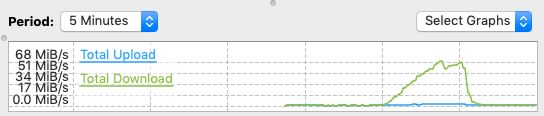 This is the 2.22GB version. Peak 680mbps. i hope tm will launch 800mbps i waiting |
|
|
Dec 11 2019, 11:48 PM
Return to original view | Post
#39
|
|
Senior Member
1,386 posts Joined: Nov 2012
|
QUOTE(lyc1982 @ Dec 11 2019, 02:08 PM) i am using ac86u router... you says edit: i can only achieve 300Mbps max on iphone 11 pro max, does that mean i need to call tm to come and check ?first time tested with iphone 7 plus can achieve 460Mbps...then later can’t anymore no need...but just curious if iphone 11 pro max has dual MiMO (not sure if i write this correctly) which router are you using ? edit: i can only achieve 300Mbps max on iphone 11 pro max, does that mean i need to call tm to come and check ? i answer why you need to call tm to come and check its not wrong unifi you try test LAN Cable you will get full speed 500mbps then achieve 300Mbps max on iphone 11 pro max because wireless cannot tahan full speed just sometime high speed sometime drop speed that is wireless are limited if you want call tm to come and check they will test Lan cable only tm wont do wireless full speed that tm will say best use lan cable |
|
|
Dec 11 2019, 11:48 PM
Return to original view | Post
#40
|
|
Senior Member
1,386 posts Joined: Nov 2012
|
QUOTE(sHawTY @ Dec 11 2019, 09:42 PM) Set your 5GHz to the settings as below: what router you are using ?? GT-AX1100 ??? or whatWireless Mode: N/AC Mixed Channel Bandwidth: 80MHz Also, connect your laptop / desktop directly to your router using Ethernet cable and test the speed If you can reach 500Mb/s on Ethernet cable, there's nothing wrong with your UniFi connection 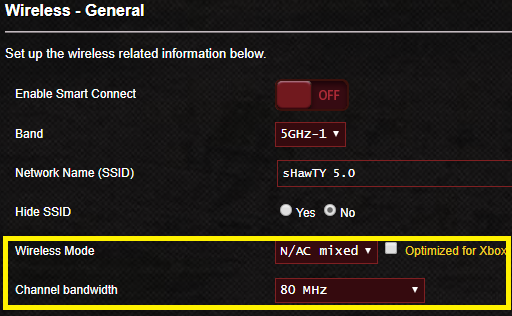 |
|
Topic ClosedOptions
|
| Change to: |  0.2112sec 0.2112sec
 0.76 0.76
 7 queries 7 queries
 GZIP Disabled GZIP Disabled
Time is now: 2nd December 2025 - 04:29 PM |
 Quote
Quote