Outline ·
[ Standard ] ·
Linear+
Unifi Official TM UniFi High Speed Broadband Thread V38, READ 1ST PAGE FOR TURBO SPEED INFO!
|
posthumous
|
 Apr 21 2020, 10:01 PM Apr 21 2020, 10:01 PM
|

|
QUOTE(claptrap @ Apr 21 2020, 07:34 PM) yeah I would prefer to stay with asus for their features and qol menu. It's the one that last longer compared to other brands for me so far. Asus rt-ax56u looks good so far for my budget. I'll check it around online. Thanks for the suggestions! btw, have you tested out your asus power adapter? if you're lucky, the power adapter might be the only thing destroyed by lightning and your router may still be functional |
|
|
|
|
|
posthumous
|
Apr 21 2020, 11:34 PM
|
|
|
QUOTE(jonibooi @ Apr 21 2020, 11:14 PM) This is the website, getting err connection times out when trying to access it https://socialclub.rockstargames.com/no issues on my end  |
|
|
|
|
|
posthumous
|
Apr 26 2020, 02:06 PM
|
|
|
QUOTE(steventan85 @ Apr 26 2020, 01:02 PM) Anyone using Dlink 850L and can take a photo on the power adapter with brands and the adapter? Mine missing and now wanna use it. Want to go shopee and source for it look underneath your dlink router. it should have the sticker stating the power adapter specs |
|
|
|
|
|
posthumous
|
Apr 26 2020, 04:34 PM
|
|
|
QUOTE(Kelvynlim @ Apr 26 2020, 03:55 PM) Hi bro, thank you for the suggestion too.. may I know between TP link and ASUS, which is more stable? I am considering between RTAC66U vs TP link AC2300. Thank you in advance for your input. I am not a tech savvy therefore ease of setting up is also my consideration too. between those 2, i'd get the ac66u b1 unifi setup on asus router is simple enough, watch https://www.youtube.com/watch?v=kHisnAEsKik |
|
|
|
|
|
posthumous
|
Apr 27 2020, 01:47 PM
|
|
|
QUOTE(Mazda9 @ Apr 27 2020, 01:25 PM) Hi, Thanks for your guidance. I have sucessfulyl updated my firmware. Howeve, i cant login or access my asus router page as my current username and password no longer works. Any idea whats the password should be? Tried username and password as admin but cant either. do a factory reset by pressing the reset button on your router (refer to your manual) i prefer the nvram reset method https://www.snbforums.com/threads/beta-asus...e-9#post-473141once done, you can setup login/pw to whatever you like |
|
|
|
|
|
posthumous
|
Apr 29 2020, 03:51 PM
|
|
|
QUOTE(Mazda9 @ Apr 29 2020, 03:34 PM) Guys, Any recommended Asus router better than RT-AC5300 in terms of coverage and other features? if you want better coverage consider adding a mesh node(s) the upper end asus routers have similar features, though some selected few have triband and link aggregation otherwise, you'd want the gt-ax11000 |
|
|
|
|
|
posthumous
|
Apr 29 2020, 05:19 PM
|
|
|
QUOTE(sHawTY @ Apr 29 2020, 04:52 PM) Stick with RT-AC66U B1 Nobody needs 4x4 because nowadays, all devices only support 2x2 Even very high end gaming laptops still use 2x2 Remember to double check with the seller that it's the B1 version, not the old version as RT-AC66U has 2 versions. B1 is the latest version with dual core CPU @Yoooo This. Some aren't aware the AC66u B1 is essentially an AC68u at a cheaper price. Both have the same cpu and ram and many other similarities. This post has been edited by posthumous: Apr 29 2020, 05:20 PM |
|
|
|
|
|
posthumous
|
Apr 30 2020, 01:10 PM
|
|
|
QUOTE(Yoooo @ Apr 30 2020, 11:29 AM) May I know the DDNS available in the AC66U is which services, this major problem now, I cannot create hostname for accessing outside back to my house?  notice there's even a custom field for ddns so you put in whichever service |
|
|
|
|
|
posthumous
|
Apr 30 2020, 01:25 PM
|
|
|
QUOTE(zftrans @ Apr 30 2020, 09:46 AM) but I feel like 175 range has the poorest routing internationally. and I keep getting this range no matter how many times I reconnect. i know this pain. i was stuck on 175.143.x.x for over 3 weeks. no matter how many times i powered off/on and called to request a port reset, the ip refused to switch range. to bypass the crappy routing, i installed a vpn in the router then last week, i had to reboot after making a change in the router and was fortunate to get back 60.53.x.x |
|
|
|
|
|
posthumous
|
May 4 2020, 07:07 PM
|
|
|
QUOTE(afroboy @ May 4 2020, 06:24 PM) Reddit is fine but twitch is unplayable, website is loading but no video. yupe couldn't stream twitch switched to over vpn, everything was smooth - streaming twitch live at 1080p60 |
|
|
|
|
|
posthumous
|
May 9 2020, 03:30 PM
|
|
|
» Click to show Spoiler - click again to hide... « QUOTE(Yoooo @ May 9 2020, 03:22 PM) Hi All, My Asus AX3000 is arrived. Everything works fine and can be loaded correctly. However, after I have updated to latest firmware, I found out there is 2 issues: 1. Cannot link to Asus server to check for latest firmware or confirm it is already latest firmware. [attachmentid=10486292] 2. The "Wireless Log" page is not loaded probably, nothing to display and cannot have other option to select like other page which work normally. [attachmentid=10486299] Before updating to this latest firmware (3.0.0.4.384_8601-gf00bccd), I have no issue at all. Anyone is facing this issue? Thank you. i reckon it'd be best to post your Asus specific issue on the Asus Technical Support thread tho |
|
|
|
|
|
posthumous
|
May 10 2020, 08:07 PM
|
|
|
QUOTE(Yoooo @ May 10 2020, 06:49 PM) I see, no wonder. I have contacted the seller, and the seller asked me to download this firmware: RT-AX58U_9.0.0.4_384_9042-g130f4c5_cferom_pureubi Surprisingly, it works without problem now. But I cannot find the firmware from Asus official website, and the seller stated is from Asus. And said no warranty issue. However, I am still doubt for it actually. Should I look for Asus for RMA?  Please kindly advise me. I am willing to listen.  Thanks in advance. asus' beta version typically starts with 9.x |
|
|
|
|
|
posthumous
|
May 13 2020, 06:13 AM
|
|
|
QUOTE(pakji @ May 13 2020, 01:35 AM) that you give link guidethat you own site but screenshot to small i click unable orignal size i did zoom to much blur  what model i see what model that how much you bought what i see are: EdgeRouter 6P Switch TL-SG1016 NAS AS1002 This post has been edited by posthumous: May 13 2020, 06:52 AM |
|
|
|
|
|
posthumous
|
May 14 2020, 12:40 AM
|
|
|
QUOTE(xxboxx @ May 13 2020, 10:54 PM) I was just wondering if TM block upload. Not using VPN. no issue on my end. i can upload and maintain my ratio just fine |
|
|
|
|
|
posthumous
|
May 14 2020, 09:45 PM
|
|
|
QUOTE(Slyke @ May 14 2020, 06:42 PM) Shopee, it was both Ugreen RJ45. Should've gone for Prolink? But I'm not sure anymore, I need someone that at least uses 20m or longer cable to recommend me. Wish I could send it, but a friend booked it already. Are you using one of those flat type ethernet cables? I find Ugreen to be cables to be good and inexpensive and I've a few CAT6/7 in my home network but they're all the round type. The longest Ugreen ethernet I'm using is 20m and with this I'm still able to get 960+Mbps from NAS to PC. In your router, you might be able to check the status of the ethernet ports 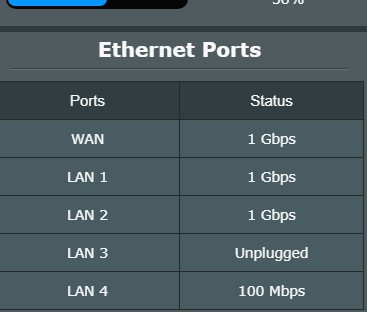 |
|
|
|
|
|
posthumous
|
May 14 2020, 11:10 PM
|
|
|
QUOTE(Slyke @ May 14 2020, 10:38 PM) I'm not really a fan of flat cables, can you link me to where you bought it? I'm using the stock router Unifi gave me, DIR-842 and I can't seem to find the settings for this. I can only set what port is used for what, example port 1 Internet, port 2 IPTV, port 3 VOIP. I can't find settings for that in it. I used this same PC when the router was next to it in the living room using a short cable, now I moved my PC to my room using 20m cable and got stuck with 100Mbps. Network card problem is out of the question as I went to test it back with the short cable and all seems good. I bought all my Ugreen cables from their flagship store on Lazada. What is speed is your NIC set to? 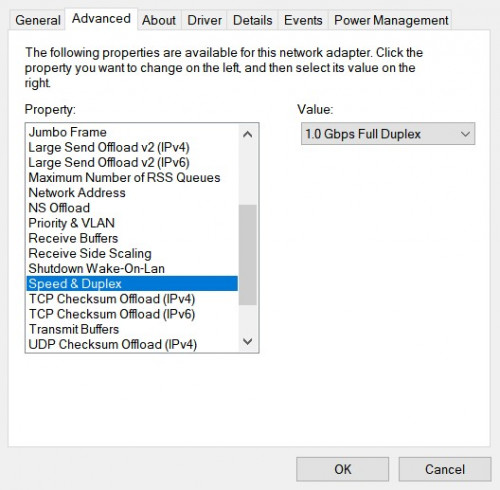 What bandwidth speed is your PC detecting on the NIC? 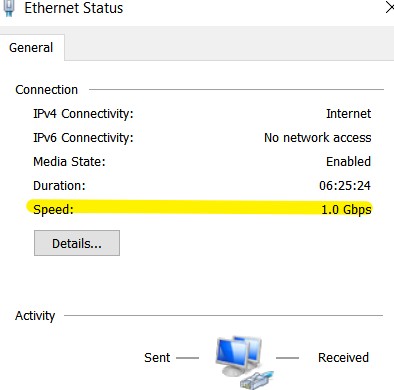 |
|
|
|
|
|
posthumous
|
May 14 2020, 11:42 PM
|
|
|
QUOTE(KIntos @ May 14 2020, 11:27 PM) yes cat 6 cable. During mco speed was still in 300mbps but getting worst since the under water cable issue. now im down below 100mbps since last week. just want to check whether its only me or everyone is having not getting full speed. i'm on 175.143.x.x and still able to get more than 100mbps on torrents just curious, if you run a speedtest to MyRepublic, SG server, what speeds are you getting? |
|
|
|
|
|
posthumous
|
May 15 2020, 12:16 AM
|
|
|
QUOTE(KIntos @ May 14 2020, 11:52 PM) ok. i found my issue. wan connection was detected 100mbps link to my router. reconnected the wan cable getting 1Gbps link. Unifi speedtest still hovering at 350mbps but below 400mbps. Back to MCO condition. Before MCO, was 400mbps to 500mbps. Look like too depended on Asus apps is not good. Only saw the connection link on browser. perhaps that's an indication of imminent cable failure. maybe you should replace that offending cable? |
|
|
|
|
|
posthumous
|
May 15 2020, 01:23 AM
|
|
|
QUOTE(soonwai @ May 14 2020, 05:55 PM) No probs here. V more hrs to "mystery" free game. i tried claiming GTA a few minutes ago but was getting 403 and 500 error it's not just us, it appears to be a global issue with EGS https://www.forbes.com/sites/davidthier/202...s/#72426ad728c7edit:  This post has been edited by posthumous: May 15 2020, 01:30 AM This post has been edited by posthumous: May 15 2020, 01:30 AM |
|
|
|
|
|
posthumous
|
May 17 2020, 02:50 AM
|
|
|
Not at full speed but at least I'm still getting MB download speed 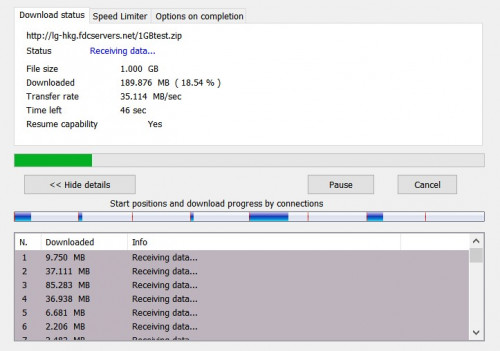 This post has been edited by posthumous: May 17 2020, 02:53 AM This post has been edited by posthumous: May 17 2020, 02:53 AM |
|
|
|
|



 Quote
Quote
 0.2206sec
 0.48
0.48
 7 queries
 GZIP Disabled