
Welcome Guest ( Log In | Register )

Outline · [ Standard ] · Linear+

 Activate wall Ethernet port

views
     
TSnawkaz
post Oct 24 2019, 10:57 PM, updated 7y ago

New Member
*
Newbie
33 posts

Joined: Jan 2011
Hi All,

My house has 3 wall ethernet port. 1 downstairs and the other 2 are upstairs.

Last week I installed Maxis Home Fibre and the installer set it up everything downstairs. The router was connected directly to the Ethernet port downstairs.
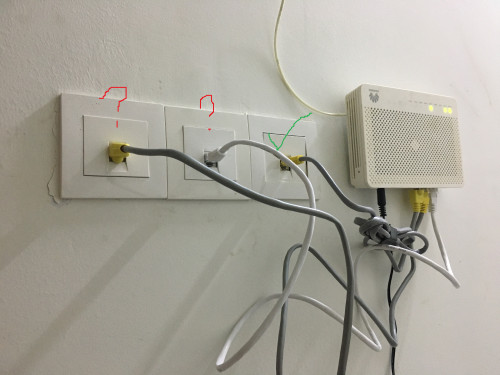
The BTU is located inside the store. See pic below:
user posted image

For some reason, the 2 other ethernet port upstairs are not working. There is no activity light blinking on my laptop when I connect directly to the wall.
I have connected the ethernet cable to the BTU as in the pic above.

The one that is from the router is check marked in green. The other 2 with question mark I supposed is from the 2 port upstairs. But it does not work when I do like this. Seems like the port is not active at all.

Who should I reach out to get this fixed? I called Maxis and they said to contact the house developer as it could be internal wiring issue. But I doubt it because if they can activate the port downstairs to connect it to the router, they should be able to help activate the 2 port upstairs right?

I hope that my issue make sense but if it does not, sorry biggrin.gif
SUS2feidei
post Oct 24 2019, 10:59 PM

Ayam tatau, ayam virgin (c)
*******
Senior Member
3,158 posts

Joined: Oct 2013
most probably your house internal wiring issue.
buraqdunia
post Oct 24 2019, 11:06 PM

On my way
****
Junior Member
617 posts

Joined: Jul 2006


u need a team, 2 or 3 ppl. u alone or us here cannot do diagnose it.
1st thing 2morrow make appointment to nearest pc store that can do networking. NOT electrician from electric/electronic store .

This post has been edited by buraqdunia: Oct 24 2019, 11:10 PM
lukemanz
post Oct 24 2019, 11:33 PM

Getting Started
**
Junior Member
250 posts

Joined: Aug 2009
QUOTE(nawkaz @ Oct 24 2019, 10:57 PM)
Hi All,

My house has 3 wall ethernet port. 1 downstairs and the other 2 are upstairs.

Last week I installed Maxis Home Fibre and the installer set it up everything downstairs. The router was connected directly to the Ethernet port downstairs.
The BTU is located inside the store. See pic below:

user posted image

For some reason, the 2 other ethernet port upstairs are not working. There is no activity light blinking on my laptop when I connect directly to the wall.
I have connected the ethernet cable to the BTU as in the pic above.

The one that is from the router is check marked in green. The other 2 with question mark I supposed is from the 2 port upstairs. But it does not work when I do like this. Seems like the port is not active at all.

Who should I reach out to get this fixed? I called Maxis and they said to contact the house developer as it could be internal wiring issue. But I doubt it because if they can activate the port downstairs to connect it to the router, they should be able to help activate the 2 port upstairs right?

I hope that my issue make sense but if it does not, sorry  biggrin.gif
*
doh.gif doh.gif doh.gif

Only 1 port at the BTU was functional. Other ports remain not function as it is for TM,Celcom, etc

So, to test the other 2 port wall socket, just change the green cable location to the other 2, and connect the other end to the router
momusu
post Oct 25 2019, 09:20 AM

~morning musume fanboy~
*****
Senior Member
812 posts

Joined: Jan 2003
From: FantasyLand
Just get cable tester, can diagnose alone.
qwertyuioped
post Oct 25 2019, 09:23 AM

Enthusiast
*****
Senior Member
942 posts

Joined: Mar 2008
From: Bollinger Bands
Modem --- router --- wall ports. Ini maciam. Cannot plug direct to modem. Main router put beside modem. Buy another router put downstairs. Settle
charleyz
post Oct 25 2019, 09:25 AM

Getting Started
**
Junior Member
87 posts

Joined: Jan 2012


susah sangat....why not use home plug??
momusu
post Oct 25 2019, 09:37 AM

~morning musume fanboy~
*****
Senior Member
812 posts

Joined: Jan 2003
From: FantasyLand
QUOTE(charleyz @ Oct 25 2019, 09:25 AM)
susah sangat....why not use home plug??
*
Does it works with multiple db?
Long ago i tried, and it doesn't work over different db.
TSnawkaz
post Oct 25 2019, 06:08 PM

New Member
*
Newbie
33 posts

Joined: Jan 2011
QUOTE(lukemanz @ Oct 24 2019, 11:33 PM)
doh.gif  doh.gif  doh.gif

Only 1 port at the BTU was functional. Other ports remain not function as it is for TM,Celcom, etc

So, to test the other 2 port wall socket, just change the green cable location to the other 2, and connect the other end to the router
*
Is this fact or just your assumption? I'll try to switch the working port to the other.


QUOTE(momusu @ Oct 25 2019, 09:20 AM)
Just get cable tester, can diagnose alone.
*
Will give it a try

QUOTE(qwertyuioped @ Oct 25 2019, 09:23 AM)
Modem --- router --- wall ports. Ini maciam. Cannot plug direct to modem. Main router put beside modem. Buy another router put downstairs. Settle
*
This is the current setup:

Router -> Ethernet wall socket (near TV area)

Then inside store: Modem -> ethernet wall socket (as shown in the pic with green mark).

With this everything works fine. Can use internet with wifi. Its just the 2 other ethernet port upstairs that is not working. So until the 2 ports fixed, no use to get another router.

QUOTE(charleyz @ Oct 25 2019, 09:25 AM)
susah sangat....why not use home plug??
*
Hmm..haven't tried it..

amirsubhi
post Oct 25 2019, 06:51 PM

The Power Is IN Your Hand!
******
Senior Member
1,472 posts

Joined: Apr 2005
From: SumwHeRe In MaLaYsIa


QUOTE(nawkaz @ Oct 24 2019, 10:57 PM)
Hi All,

My house has 3 wall ethernet port. 1 downstairs and the other 2 are upstairs.

Last week I installed Maxis Home Fibre and the installer set it up everything downstairs. The router was connected directly to the Ethernet port downstairs.
The BTU is located inside the store. See pic below:

user posted image

For some reason, the 2 other ethernet port upstairs are not working. There is no activity light blinking on my laptop when I connect directly to the wall.
I have connected the ethernet cable to the BTU as in the pic above.

The one that is from the router is check marked in green. The other 2 with question mark I supposed is from the 2 port upstairs. But it does not work when I do like this. Seems like the port is not active at all.

Who should I reach out to get this fixed? I called Maxis and they said to contact the house developer as it could be internal wiring issue. But I doubt it because if they can activate the port downstairs to connect it to the router, they should be able to help activate the 2 port upstairs right?

I hope that my issue make sense but if it does not, sorry  biggrin.gif
*
the picture u show is the BTU/ONU, only port 2 from BTU are activate for Maxis Home Fiber and another 3 port will not be functioning,

you should connect router next to btu and LAN from router to be connected to this 3 port

This post has been edited by amirsubhi: Oct 25 2019, 06:51 PM
TSnawkaz
post Oct 25 2019, 08:25 PM

New Member
*
Newbie
33 posts

Joined: Jan 2011
QUOTE(amirsubhi @ Oct 25 2019, 06:51 PM)

you should connect router next to btu and LAN from router to be connected to this 3 port
*
So the BTU connect to the router, then LAN from router to the 3 port at the wall in pic i posted?
qwertyuioped
post Oct 25 2019, 08:27 PM

Enthusiast
*****
Senior Member
942 posts

Joined: Mar 2008
From: Bollinger Bands
QUOTE(nawkaz @ Oct 25 2019, 07:08 PM)
Is this fact or just your assumption? I'll try to switch the working port to the other.
Will give it a try
This is the current setup:

Router -> Ethernet wall socket (near TV area)

Then inside store: Modem -> ethernet wall socket (as shown in the pic with green mark).

With this everything works fine. Can use internet with wifi. Its just the 2 other ethernet port upstairs that is not working. So until the 2 ports fixed, no use to get another router.
Hmm..haven't tried it..
*
Ofcos la its not working. Ppl oledi say that modem other port is locked. You need to wire from your router to those ports on the wall instead from your modem. You plug in to modem ofcos la not working. Direct modem is to call pppoe only.
TSnawkaz
post Oct 25 2019, 08:31 PM

New Member
*
Newbie
33 posts

Joined: Jan 2011
QUOTE(qwertyuioped @ Oct 25 2019, 08:27 PM)
Ofcos la its not working. Ppl oledi say that modem other port is locked. You need to wire from your router to those ports on the wall instead from your modem. You plug in to modem ofcos la not working. Direct modem  is to call pppoe only.
*
Ahha I got the idea now. Will try soon. Thanks
TSnawkaz
post Oct 26 2019, 11:49 PM

New Member
*
Newbie
33 posts

Joined: Jan 2011
Now have another problem. The router installed by the Maxis installer I want to keep it at the TV area. So I put my own router (given by TIME before when I subscribed them) next to the BTU. the problem is I was unable to configure this router to make it to work.

Does anyone know how to configure TP Link AC1200 router following Maxis settings?
WebWalker
post Oct 27 2019, 10:15 AM

Computer Geek
********
All Stars
12,851 posts

Joined: May 2005
From: Puchong, Selangor


QUOTE(nawkaz @ Oct 26 2019, 11:49 PM)
Now have another problem. The router installed by the Maxis installer I want to keep it at the TV area. So I put my own router (given by TIME before when I subscribed them) next to the BTU. the problem is I was unable to configure this router to make it to work.

Does anyone know how to configure TP Link AC1200 router following Maxis settings?
*
From start, you need your Maxis username and password to configure a new router.
hft
post Oct 27 2019, 10:17 AM

Regular
******
Senior Member
1,081 posts

Joined: Aug 2018
QUOTE(nawkaz @ Oct 24 2019, 10:57 PM)
Hi All,

My house has 3 wall ethernet port. 1 downstairs and the other 2 are upstairs.

Last week I installed Maxis Home Fibre and the installer set it up everything downstairs. The router was connected directly to the Ethernet port downstairs.
The BTU is located inside the store. See pic below:

user posted image

For some reason, the 2 other ethernet port upstairs are not working. There is no activity light blinking on my laptop when I connect directly to the wall.
I have connected the ethernet cable to the BTU as in the pic above.

The one that is from the router is check marked in green. The other 2 with question mark I supposed is from the 2 port upstairs. But it does not work when I do like this. Seems like the port is not active at all.

Who should I reach out to get this fixed? I called Maxis and they said to contact the house developer as it could be internal wiring issue. But I doubt it because if they can activate the port downstairs to connect it to the router, they should be able to help activate the 2 port upstairs right?

I hope that my issue make sense but if it does not, sorry  biggrin.gif
*
You need network switch or router, connect to the working port then only connect to the 3 wall ports via the switches.

alextan99
post Oct 27 2019, 10:20 AM

Wassup
*******
Senior Member
2,660 posts

Joined: Jan 2003
From: Somewhere in the world
well get a cable tracer and then trace both ends and make sure all 8 wires inside the ports are good on both ends

TSnawkaz
post Oct 27 2019, 10:58 AM

New Member
*
Newbie
33 posts

Joined: Jan 2011
QUOTE(WebWalker @ Oct 27 2019, 10:15 AM)
From start, you need your Maxis username and password to configure a new router.
*
Yes I do have it already. I went to the config page with admin access. This TP Link have “Malaysia-Maxis” mode so when I select that it auto populate all the Vlan IDs. When I hit save, it still doesn’t work.


QUOTE(hft @ Oct 27 2019, 10:17 AM)
You need network switch or router, connect to the working port then only connect to the 3 wall ports via the switches.
*
Yes I have the additional router. But as I mention in my latest post, I’m having issues setting it up. It does not accept my configuration.


QUOTE(alextan99 @ Oct 27 2019, 10:20 AM)
well get a cable tracer and then trace both ends and make sure all 8 wires inside the ports are good on both ends
*
Thanks but I think now it is not the port issue. Its actually how I place the router and BTU need to be sorted out.
hft
post Oct 27 2019, 11:12 AM

Regular
******
Senior Member
1,081 posts

Joined: Aug 2018
QUOTE(nawkaz @ Oct 27 2019, 10:58 AM)
Yes I do have it already. I went to the config page with admin access. This TP Link have “Malaysia-Maxis” mode so when I select that it auto populate all the Vlan IDs. When I hit save, it still doesn’t work.
Yes I have the additional router. But as I mention in my latest post, I’m having issues setting it up. It does not accept my configuration.
Thanks but I think now it is not the port issue. Its actually how I place the router and BTU need to be sorted out.
*
Nothing to configure really.
WebWalker
post Oct 27 2019, 04:26 PM

Computer Geek
********
All Stars
12,851 posts

Joined: May 2005
From: Puchong, Selangor


QUOTE(nawkaz @ Oct 27 2019, 10:58 AM)
Yes I do have it already. I went to the config page with admin access. This TP Link have “Malaysia-Maxis” mode so when I select that it auto populate all the Vlan IDs. When I hit save, it still doesn’t work.
*
Check the router log file, it should state what went wrong there

2 Pages  1 2 >Top
 

Change to:
| Lo-Fi Version
0.0204sec    0.55    5 queries    GZIP Disabled
Time is now: 17th December 2025 - 08:45 PM
