

 Oct 24 2019, 11:33 PM


QUOTE(nawkaz @ Oct 24 2019, 10:57 PM)
Hi All,
My house has 3 wall ethernet port. 1 downstairs and the other 2 are upstairs.
Last week I installed Maxis Home Fibre and the installer set it up everything downstairs. The router was connected directly to the Ethernet port downstairs.
The BTU is located inside the store. See pic below:
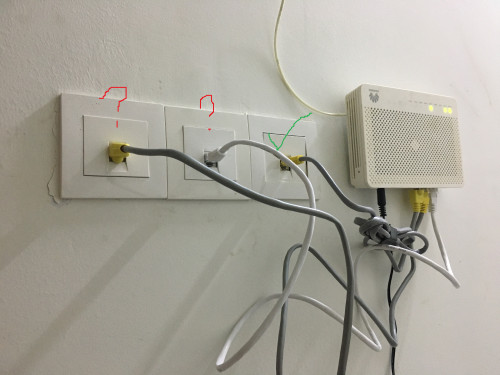
For some reason, the 2 other ethernet port upstairs are not working. There is no activity light blinking on my laptop when I connect directly to the wall.
I have connected the ethernet cable to the BTU as in the pic above.
The one that is from the router is check marked in green. The other 2 with question mark I supposed is from the 2 port upstairs. But it does not work when I do like this. Seems like the port is not active at all.
Who should I reach out to get this fixed? I called Maxis and they said to contact the house developer as it could be internal wiring issue. But I doubt it because if they can activate the port downstairs to connect it to the router, they should be able to help activate the 2 port upstairs right?
I hope that my issue make sense but if it does not, sorry

My house has 3 wall ethernet port. 1 downstairs and the other 2 are upstairs.
Last week I installed Maxis Home Fibre and the installer set it up everything downstairs. The router was connected directly to the Ethernet port downstairs.
The BTU is located inside the store. See pic below:
For some reason, the 2 other ethernet port upstairs are not working. There is no activity light blinking on my laptop when I connect directly to the wall.
I have connected the ethernet cable to the BTU as in the pic above.
The one that is from the router is check marked in green. The other 2 with question mark I supposed is from the 2 port upstairs. But it does not work when I do like this. Seems like the port is not active at all.
Who should I reach out to get this fixed? I called Maxis and they said to contact the house developer as it could be internal wiring issue. But I doubt it because if they can activate the port downstairs to connect it to the router, they should be able to help activate the 2 port upstairs right?
I hope that my issue make sense but if it does not, sorry

Only 1 port at the BTU was functional. Other ports remain not function as it is for TM,Celcom, etc
So, to test the other 2 port wall socket, just change the green cable location to the other 2, and connect the other end to the router
 Quote
Quote
 0.0163sec
 1.06
1.06
 6 queries
 GZIP Disabled