

A new customer (yesterday received the sim) +without device (sim only)
Testing with my phone 2nd sim (Oneplus7T) the speed was around 60MB-71MB
Nice ah.. coverage blue..
Unifi Air, is it good?
Unifi Air, is it good?
|
|
 Jul 3 2020, 12:08 PM Jul 3 2020, 12:08 PM
Return to original view | Post
#1
|
 
Junior Member
611 posts Joined: Apr 2005 From: http://127.0.0.1:80/announce   
|
A new customer (yesterday received the sim) +without device (sim only)
Testing with my phone 2nd sim (Oneplus7T) the speed was around 60MB-71MB Nice ah.. coverage blue.. |
|
|
|
|
|
Jul 3 2020, 02:10 PM
Return to original view | IPv6 | Post
#2
|
|
Junior Member
611 posts Joined: Apr 2005 From: http://127.0.0.1:80/announce
|
QUOTE(focusrite @ Jul 3 2020, 12:33 PM) what time you test? not at peak hour.. around 6pm+.. its for my another house.. unifi port full already.. temoro (saturday) will try use and update back.. |
|
|
Jul 3 2020, 02:17 PM
Return to original view | IPv6 | Post
#3
|
|
Junior Member
611 posts Joined: Apr 2005 From: http://127.0.0.1:80/announce
|
QUOTE(pysh @ Jul 3 2020, 12:38 PM) heads up u cant tether from the phone to another device.. i tether with 8 device:u still need the huawei modem. - lg tv - laptop - 5 android phones - androidbox (tx3) |
|
|
Jul 3 2020, 02:44 PM
Return to original view | IPv6 | Post
#4
|
|
Junior Member
611 posts Joined: Apr 2005 From: http://127.0.0.1:80/announce
|
QUOTE(LohMaiGai @ Jul 3 2020, 02:38 PM) you need to test at multiple location inside your house. aha, i try the sim at my previous house (in front KLTS) (got unifi), the speed very lousy.. unstable.. sometimes above 40Mb, sometimes 15Mb only..I am living at semi-d. ground floor signal very weak, some time 2mbps. if go to upper floor, signal become stronger, certain location some time can give 30mbps. you need to test the location one by one. my house is not under coverage if according to tm web. thanks for the tips ya.. will try them temoro..  |
|
|
Jul 3 2020, 11:57 PM
Return to original view | IPv6 | Post
#5
|
|
Junior Member
611 posts Joined: Apr 2005 From: http://127.0.0.1:80/announce
|
QUOTE(pysh @ Jul 3 2020, 06:50 PM) as in using your phone and share as hotspot? Yes.. just the phone become abit warm (42-43°C) |
|
|
Jul 9 2020, 05:07 PM
Return to original view | IPv6 | Post
#6
|
|
Junior Member
611 posts Joined: Apr 2005 From: http://127.0.0.1:80/announce
|
Just received my Huawei B818 (recommended by khainiz94)
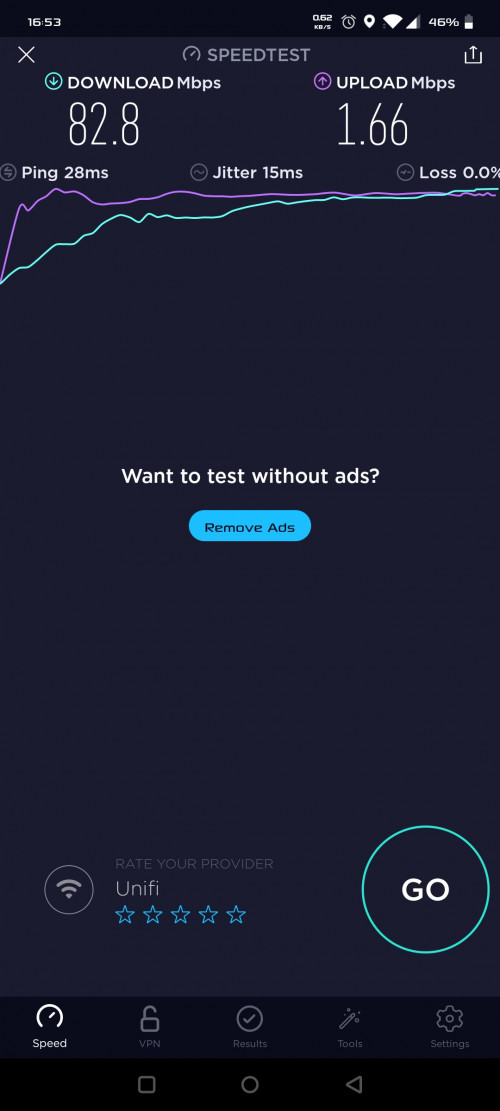 Usage since received (2pm+) until now.. but usage @ my current house (Gombak - Batu 4).. Will bring this device to another house (Gombak Setia area) for testing bcause the device will fully use there. Thanks to khainiz94 for the suggestion and help! I just hope thaf i can change the DNS to my prefered DNS (8.8.4.4 & 1.1.1.1) inside. Its only can set manually for LAN, but not for Wifi. Some forum said it can be done using putty commands.. later will do some reading.. Since using it at my current house now, im diverting all my stuff connected to this device (2 tvs, 3 laptop, 1 pc + 4 container inside (vbox), & 7 android) without a hiccup or lagging or what so ever. My current house using Unifi (800Mbps) pair with mikrotik (hAP AC2) with loads of config inside 😅 All that i can say.. this Huawei B818 is quite a stable performance.. If u guys got budget, go for this model. No regret at all. |
|
|
|
|
|
Jul 10 2020, 12:24 AM
Return to original view | IPv6 | Post
#7
|
|
Junior Member
611 posts Joined: Apr 2005 From: http://127.0.0.1:80/announce
|
QUOTE(khainiz94 @ Jul 9 2020, 10:20 PM) Hahaha. Bcause i refer to you hahahahaDo not thank me only, thank the other forummers who also suggest me to get this Huawei model. I cannot remember his name but thanks to him, now finally I can upgrade my speed from the shitty 4 Mbps Streamyx to this awesome 50 Mbps+ speed internet. Anyway for DNS, you are able to change it directly in the router by inserting some commands in the console of the browser. https://yescrowd.optus.com.au/t5/Broadband-...ing/td-p/529501 But for the B818 code, you replace it with this: $('#dhcp_dns').show(); Ya found the same tutorial also.. but failed to make it appear.. maybe its midnight already.. brain need to rest hahahaha.. later will try la.. |
|
|
Jul 16 2020, 10:41 AM
Return to original view | Post
#8
|
|
Junior Member
611 posts Joined: Apr 2005 From: http://127.0.0.1:80/announce
|
Cant use my CCTV cause DDNS service (private ip)
Try asking TM, they said Unifi Air is a private ip, cannot change Any of you guys can overcome this issue? Can help me? Thank you ya. |
|
|
Jul 25 2020, 02:18 PM
Return to original view | IPv6 | Post
#9
|
|
Junior Member
611 posts Joined: Apr 2005 From: http://127.0.0.1:80/announce
|
QUOTE(Buku latihan @ Jul 24 2020, 07:37 PM) anyone can share gaming experience with unifi air? Not a gamers..but my son & daughter played roblox & ML & PubG etc (online gaming) without a single shout LAGGGGG! connected with 14+ devices. Maybe my im near with the tower. Below is my usage since first time activation 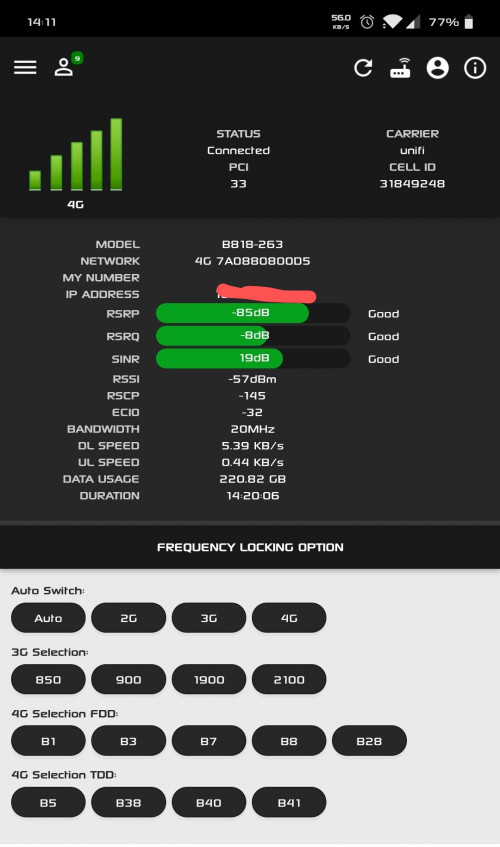 |
|
|
Oct 23 2020, 05:41 PM
Return to original view | Post
#10
|
|
Junior Member
611 posts Joined: Apr 2005 From: http://127.0.0.1:80/announce
|
Good news
im selling my huawei B818-263 bcause just relocated my old Unifi account. Bought from Sing4G (shopee seller). Offer me your price. COD around Gombak (Gombak Setia) or KL PWTC (Office area). |
|
|
Oct 31 2020, 05:40 PM
Return to original view | IPv6 | Post
#11
|
|
Junior Member
611 posts Joined: Apr 2005 From: http://127.0.0.1:80/announce
|
Successfully terminated my Unifi Air (without contract - sim only) package last week.
Terminated in 24hours.. but the refund needs 2-3 months.. -RM22.xx ok lar.. |
|
|
Dec 10 2020, 07:39 PM
Return to original view | IPv6 | Post
#12
|
|
Junior Member
611 posts Joined: Apr 2005 From: http://127.0.0.1:80/announce
|
QUOTE(zerofighter @ Dec 10 2020, 10:20 AM) So I borrowed a friends Unifi Air + B618 that came with it and am getting around 50Mbps If u're interested (B818-263)Given that the B618 is quite expensive any recommendations for an alternate router? Was looking at TP-link MR6400 and Huawei B310, as well as B525 and B535 Just looking to get the most optimum router. Budget up to RM550 Previously i bought from this seller from shopee Sing4g Bought that time (9 July 2020) RM 765 cry.gif Selling RM 580 if u're interested.. This post has been edited by ahlong: Dec 10 2020, 07:39 PM |
|
|
Dec 10 2020, 09:47 PM
Return to original view | IPv6 | Post
#13
|
|
Junior Member
611 posts Joined: Apr 2005 From: http://127.0.0.1:80/announce
|
QUOTE(Cendol_Pulut90 @ Dec 10 2020, 09:09 PM) Mind to share why you wanna sell it ? Relocated my previous Unifi acc end October 2020.. |
|
|
|
|
|
Dec 11 2020, 06:24 PM
Return to original view | IPv6 | Post
#14
|
|
Junior Member
611 posts Joined: Apr 2005 From: http://127.0.0.1:80/announce
|
QUOTE(zerofighter @ Dec 11 2020, 11:58 AM) Ooo I was actually looking at that site. I'm interested in your B818 Can PM me bro.. no problem  |
|
|
Dec 24 2020, 09:32 PM
Return to original view | IPv6 | Post
#15
|
|
Junior Member
611 posts Joined: Apr 2005 From: http://127.0.0.1:80/announce
|
QUOTE(RGRaj @ Dec 22 2020, 11:45 PM) How long have u been using it b4 terminate? How was yor speed & wat r u using now? Start using Unifi Air from early July until 28 October 2020.. The speed max i can reach around 105mbps download.. on peak hour, still reasonable around 50-60mbps.. maybe not too many users around using it.. and upload roughly 6-7mbps.. im back with my Unifi Fiber.. applied relocation roughly 3months..I got the sim oni plan. Thinking of terminating too & stick with digi i150. |
|
|
Feb 14 2021, 07:31 PM
Return to original view | Post
#16
|
|
Junior Member
611 posts Joined: Apr 2005 From: http://127.0.0.1:80/announce
|
Does anyone selling their b818/b618 modem? looking for my friend.
Mine sold already.. if not, will just give to him.. |
|
|
Jan 16 2023, 06:59 AM
Return to original view | IPv6 | Post
#17
|
|
Junior Member
611 posts Joined: Apr 2005 From: http://127.0.0.1:80/announce
|
QUOTE(Billy.Who @ Jan 11 2023, 07:29 PM) Anyone using Unifi Air with those cheap USB modems from Lazada/Shopee? The bold part; i've used it on the phone for a month on 2020. i think this is a new t&c maybe.. later will ask my friend, i think he use it on the phone too lastyear. Will update to u asap.Saw a few good deals with the relevant bands (5 / 38 / 40) for below RM 100. Considering getting one since I only need it for around 2 months Also, anyone using the Air sim via a phone? I asked at a TM Point store and they said Unifi Air doesn't allow it and will block access if the sim is detected on a phone.. |
| Change to: |  0.0633sec 0.0633sec
 0.73 0.73
 7 queries 7 queries
 GZIP Disabled GZIP Disabled
Time is now: 11th December 2025 - 11:37 AM |
 Quote
Quote