Welcome Guest ( Log In | Register )

Outline · [ Standard ] · Linear+

 Unifi Air, is it good?

views
     
RedShirt
post Oct 8 2019, 06:25 PM

On my way
****
Junior Member
515 posts

Joined: Sep 2007
From: PJ


Got some mixed ideas as I read through all the pages.

Can we use the Unifi Air sim card in our phone?

I want to test the signal strength out using my phone first, without going through the 24-months contract.
I stay on the 27th floor of my condo. My phone (Digi) receptions are a bit spotty, so if Unifi Air is the same, then no point for me to get it.
RedShirt
post Oct 8 2019, 09:07 PM

On my way
****
Junior Member
515 posts

Joined: Sep 2007
From: PJ


QUOTE(jsnhoh @ Oct 8 2019, 06:35 PM)
Yes, my make sure your phone supports band 5 LTE.
*
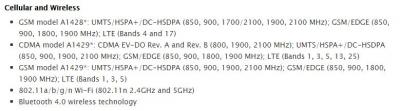
I guess my Note 9 has band 5 support.
Attached Image

I wonder if my spare iPhone 5 will connect, seems like possible (checked that mine is GSM model A1429)
Attached Image


Will get a SIM card to test soon.
It is a real pain that only certain TMpoints have it though.

This post has been edited by RedShirt: Oct 8 2019, 09:07 PM
RedShirt
post Nov 5 2019, 03:06 PM

On my way
****
Junior Member
515 posts

Joined: Sep 2007
From: PJ


Is it just me or Unifi Air sim card when you put it inside a phone, you can't use it to open Hotspot?

I tried with iPhone 7, cannot do Hotspot. It says to contact service provider.

/edit Tried with Galaxy S8+, able to Hotspot (but PC will BSOD when connect to Hotspots from Android phones....iPhone hotspots are okay). Weird.


Guess I have to wait for my Huawei modem to arrive from Shopee.

This post has been edited by RedShirt: Nov 5 2019, 04:01 PM
RedShirt
post Nov 5 2019, 04:03 PM

On my way
****
Junior Member
515 posts

Joined: Sep 2007
From: PJ


Is there a way to check which band I am connected to?
RedShirt
post Nov 5 2019, 09:11 PM

On my way
****
Junior Member
515 posts

Joined: Sep 2007
From: PJ


QUOTE(renyyz @ Nov 5 2019, 08:20 PM)
anyone try unifi air at no coverage area at website? possible or not actually that area can get the signal?
btw, i ask tm, she said this sim cannot put inside phone, only can use ny modem. its true?
*
No, their sim can work on phones (data only, no calling function)

It works on my spare phones, Galaxy S8+ and iPhone 7.
But for some reasons, I cannot enable Hotspot option on the iPhone (it says to ask carrier to enable setting). No issue for my Galaxy to enable Hotspot.

Signal feels kinda weak and slow. Maybe because my place (condo) is on the 27th floor, further away from the tower.
My usual Maxis and Digi lines are also slow up here.

Just order my 4G modem, hopefully it will be better.
RedShirt
post Nov 5 2019, 10:34 PM

On my way
****
Junior Member
515 posts

Joined: Sep 2007
From: PJ


QUOTE(renyyz @ Nov 5 2019, 09:16 PM)
if you check at their website, your place got unifi air coverage or not?
because tm staff tell me unifi air is for area which dont have unifi line/port.
if that area already got unifi line/port, unifi air would not support
*
I am in the coverage area.
RedShirt
post Nov 8 2019, 04:14 PM

On my way
****
Junior Member
515 posts

Joined: Sep 2007
From: PJ


QUOTE(hitokiribatousai @ Nov 8 2019, 12:13 AM)
Just set apn value ‘unifi’ in mobile data - personal hotspot section.
*
Thanks for sharing.


QUOTE(jsnhoh @ Nov 8 2019, 12:22 AM)
Do share your experience with the 4g modem. Thank in advance.
*
My portable 4g modem (the traveling pocket kind) has arrived. So far, the speed at my condo (27th floor) is quite poor and weak, although on their website, I am inside the coverage.

Depending on where I place the portable modem, i get 1-2 bars (full is 4 bars) and speed is slower than I expected. Averaging around 5-7mbps.


Funny thing, when I go back to my family home (landed house) which is NOT in coverage (according to their website), I get full bars and average speed is around 18mbps.

I went ahead and order another Huawei modem (not portable) and see if their receiver can pick up better signal strength at my condo.
RedShirt
post Nov 11 2019, 07:15 PM

On my way
****
Junior Member
515 posts

Joined: Sep 2007
From: PJ


QUOTE(kitter @ Nov 11 2019, 12:33 PM)
Hi,

Any recommended router to use for Unifi Air if I don't want to sign the 2 year contract? As I see the price of 618s-65d is quite pricey.
*
I just ordered a cheap older Huawei. Should be arriving tomorrow for me to test with Unifi Air
RedShirt
post Nov 11 2019, 10:59 PM

On my way
****
Junior Member
515 posts

Joined: Sep 2007
From: PJ


QUOTE(kitter @ Nov 11 2019, 10:09 PM)
Model 618s-65d?
How much you got it?
*
It is the B593s-850.

I understood from the product description that it works with Unifi Air.
Have to wait for it to arrive tomorrow or the day after to test it out.
RedShirt
post Dec 16 2019, 02:05 PM

On my way
****
Junior Member
515 posts

Joined: Sep 2007
From: PJ


QUOTE(sinslayer91 @ Dec 15 2019, 02:40 PM)
Thanks for the replies guys.

Seems like the unifi air isn't worth to get in my area. I'm not sure about the billing but the guy calling me offering the promo said I can cancel it anytime within the 30days, which I am gonna cancel after seeing that it can't get any better than my 8mb stimix.

I wonder if one person can install 2 stimix line at the same address? Cuz if can, i'll just go with 2 stimix line instead of fluctuating unifi air (that can only reach 10mbps), one for pc one for TV. Ditching astro for android box. Then if later the fiber line reach here I can just upgrade from stimix.

Plus, when I asked the guy offering me the unifi air, he said if fiber becomes available later I will still be bound with unifi air contract, cannot terminate or upgrade to fiber.
*
Same goes for me, speed is worse than someone PMS-ing. I NEVER hit the 20mbps, best was around 10mbps but by evening, it goes to 1-2mbps.
Note, I am using it in my 27th floor condo in Damansara Damai.

Fortunately TIME just called and coming over to setup fibre in a week.
Am going to cancel my Unifi Air


Change to:
| Lo-Fi Version
0.0202sec    0.20    7 queries    GZIP Disabled
Time is now: 5th December 2025 - 07:59 AM