Welcome Guest ( Log In | Register )

Outline · [ Standard ] · Linear+

 Unifi Air, is it good?

views
     
SUSCandy12
post Aug 13 2019, 09:59 PM

Regular
******
Senior Member
1,878 posts

Joined: Apr 2019
QUOTE(cjoenic @ Aug 9 2019, 06:03 PM)
user posted image
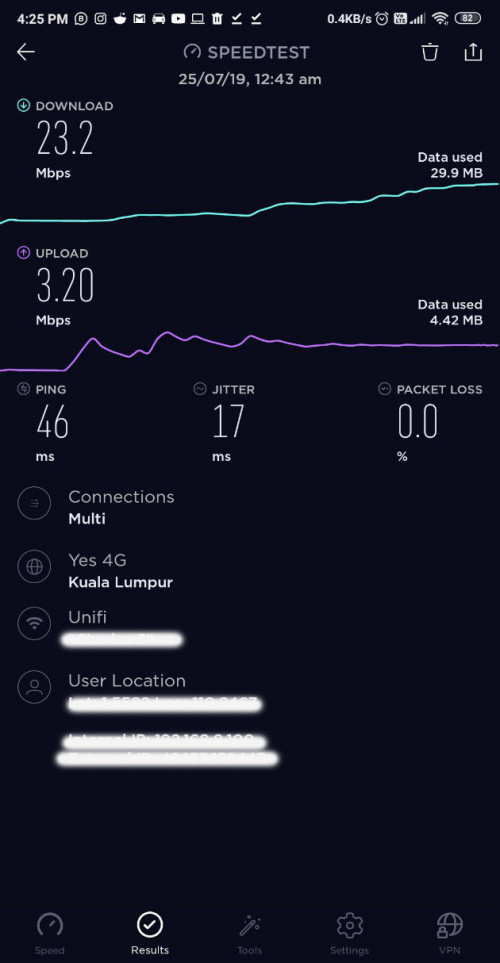
46ms to only a local server is a big NO!

As comparison with fibre, you are expected to get <10ms pings on local servers. It makes a huge difference when gaming and even watching live streaming videos.

This post has been edited by Candy12: Aug 13 2019, 09:59 PM
SUSCandy12
post Aug 16 2019, 09:17 AM

Regular
******
Senior Member
1,878 posts

Joined: Apr 2019
Even with local test servers, 4G would only yield around 20+ms response time. That is totally unsuitable for gaming or live video streaming.
SUSCandy12
post Sep 20 2019, 03:08 PM

Regular
******
Senior Member
1,878 posts

Joined: Apr 2019
The RM79 SIM only option they introduced recently is bad move. Without limiting the number accounts per area, somehow they will introduce some sort of throttling in the long run if things get out of hand like secretly limiting users speed with a non mentioned quota hidden as fair usage policy or some sort.

It might not happen now while it's still new but within 2 years anything can happen.

Some of us who experienced wireless solutions such as from DiGi & UMobile will know what i mean.
SUSCandy12
post Sep 23 2019, 10:53 PM

Regular
******
Senior Member
1,878 posts

Joined: Apr 2019
You guys want to pay RM79 and expect truly unlimited access with your Unifi Air?

Their Unifi Mobile Bebas Weekly which costs more by RM1 if you renew for 4 weeks(1month) in a row for RM20 a week also throttled kaw kaw to only 8Mbps and slow like turtle.

This Unifi Air won't last more so when they're now introducing the SIM-only plan for RM79 a month without contract. It's fated to go the same way as their Bebas Weekly plan expect speed throttling and lots of P2P restrictions in the long run.
SUSCandy12
post Dec 2 2019, 09:21 PM

Regular
******
Senior Member
1,878 posts

Joined: Apr 2019
QUOTE(wolf1991 @ Nov 26 2019, 07:20 PM)
Ya I understand the concept of control cost. If terminate at the end of 24 month of contract, the device also been sim locked and most probably they can just collect the modem from customer.

I think doesn't need to force customer to pay whole contract monthly fee upon termination as this only stop customer from signing to unifi and go to maxis and other provider etc etc. Last time they only charge 500 for termination which is quite reasonable but to force obligation to 24 month in full just doesn't sound right.

They shouldn't change the T&C to forcefully retain customer. What they should doing is improve their service, package and make customer happy to keep them.

LOL. Anyway, this is just my opinion.
*
Yes it might be SIM locked because no operator is dumb enough to provide subsidized modem prices.

Moreover, why must pay 24 months in full? If the customer terminates early just ask for the full price of the modem and some small early terminaiton charges la like RM100-RM200 for the inconvenience processing(which is automated etc.).

24mths X RM79(with 6% tax not included) = ~RM1896

There are many people who live in rented homes, do not have a permanent address or needs to be frequently relocated/with unstable jobs.

You're burdening them and they won't likely sign on such terms.
SUSCandy12
post Dec 6 2019, 10:38 PM

Regular
******
Senior Member
1,878 posts

Joined: Apr 2019
QUOTE(jsnhoh @ Dec 3 2019, 01:11 PM)
Maxis is using TM fibres backbone,  so technically,  there are no different between maxis and unifi. Only difference is when u encounter problem, u need to wait for both parties to fix for u which may caused further delay .
*
Yes there is and the routing of your internet packets differ beyond TM's OLTs.
One will go to Unifi's broadband concentrators the other will head for Maxis's concentrators.

The only sharing will be the first hop to TM's OLTs at the telephone exchange office.

So study your product well dear reseller, don't allow your customer to shame you one day.
SUSCandy12
post Mar 3 2020, 05:13 PM

Regular
******
Senior Member
1,878 posts

Joined: Apr 2019
QUOTE(azwandy @ Mar 1 2020, 04:56 PM)
changed from b525s-65a to b618s-25d.. wow, no wonder b618 is called bangsawan modem.. with luck, u can reach 3 digit speed!! before with b525, max speed is around 80mbps.. cat6 vs cat11, really lot of differences.. all hail b618!!

Fast.com via b618
[attachmentid=10438726]

b525
[attachmentid=10438728]

b618
[attachmentid=10438727]
*
238ms ping bangsawan?
SUSCandy12
post Mar 4 2020, 01:08 PM

Regular
******
Senior Member
1,878 posts

Joined: Apr 2019
QUOTE(azwandy @ Mar 3 2020, 07:48 PM)
https://media.netflix.com/en/company-blog/f...nd-upload-speed

FAST.com Now Measures Latency and Upload Speed
A little over two years ago, we launched FAST.com – a free, fast, and simple way for people to check the speeds they’re getting from their internet service provider. Since then, the site has experienced incredibly strong organic growth. In fact, usage of FAST.com has doubled over the past seven months, * and the site has now generated more than half a billion speed tests from around the world.

We’ve heard from some FAST.com users that they crave more information about their internet connection. That’s why today, we’re adding the ability to measure connection latency and upload speed. Upload speed measures the speed of the connection for uploading data from a user’s device to the internet. Latency – which refers to the time it takes for data to travel from a user’s device to the server and back – will be measured on both unloaded and loaded connections. Unloaded latency measures the round-trip time of a request when there is no other traffic present on a user’s network, while loaded latency measures the round-trip time when data-heavy applications are being used on the network.

For example, let's say you’re playing a game online on your computer. If you’re the only user on the network, then the time between your gaming action (like moving a mouse or clicking it) and the response from the gaming server will approximately match the unloaded latency measurement. However, if someone else is streaming a movie, backing up photos or performing other data-intensive tasks on the same network at the same time, your gaming response time would correspond to the loaded latency measurement. Ideally, those two values for unloaded and loaded latency should be close to each other. If not, that might explain your poor experience with latency sensitive applications (like gaming, video calls or web surfing) under heavy network usage, and you may want to check your home network setup (bufferbloat.net has useful recommendations) or consult with your ISP.

We all want a faster, better internet, yet internet speeds vary greatly and can be affected by other users on your network, or congestion with your internet service provider. We’re adding these new measurements to FAST.com so that consumers will have a more comprehensive view of their internet connection speed at any given time.

As FAST.com grows, we’ll continue to listen to feedback from our users to ensure that the tool is useful and valuable. And no matter what, we’ll always keep the design of FAST.com clean and ad-free.

You can check your upload speed and latency at FAST.com now, and feel free to share the results on Facebook or Twitter.
36ms for unloaded not bad for streaming.. this is same latency that u will get if you are using speedtest algorithm by ookla..

In app netflix speed test show speed around 40-80mbps, which for me is enough..
*
36ms to SG is at least twice that of a good fibre corporate line.
So wireless is always behind wired fibre even your closest 5G access point requires fibre to be hooked up to give you such incredible speeds.

SUSCandy12
post May 8 2020, 03:34 PM

Regular
******
Senior Member
1,878 posts

Joined: Apr 2019
QUOTE(sparrowed @ May 8 2020, 12:14 AM)
even if my area doesnt not show unifi air coverage?
*
My area also no coverage in the map. But I'm getting FULL BAR with 4G+ indicator on my phone. Speed test with quota based dataplan(not unlimited weekly/daily) getting around 90Mbps.

I am using Unifi Mobile Prepaid plan not sure it'll be the same as Unifi Air. But I'm very sure it's Carrier Aggregation not just on Band 5.

This post has been edited by Candy12: May 8 2020, 03:35 PM
SUSCandy12
post Feb 14 2021, 10:59 PM

Regular
******
Senior Member
1,878 posts

Joined: Apr 2019
The killer feature to look out for when buying 4G/5G routers is the ability to manually "Lock Bands/Select Bands".

So far Huawei routers are known for this convenient feature which makes them VERY popular. The other brands you either need to find 3rd party apps such as DC Unlocker to tweak your modem which voids its warranty with high chances of bricking it.


Change to:
| Lo-Fi Version
0.0190sec    0.51    7 queries    GZIP Disabled
Time is now: 6th December 2025 - 04:54 PM