Welcome Guest ( Log In | Register )

5 Pages < 1 2 3 4 5 >Bottom

Outline · [ Standard ] · Linear+

 Unifi Air, is it good?

views
     
khainiz94
post Jun 29 2020, 05:41 PM

Look at all my stars!!
*******
Senior Member
2,856 posts

Joined: Mar 2012


QUOTE(FunkyBass @ Jun 29 2020, 05:11 PM)
How to check coverage
Some info say only city area
Some info say if you can use unifi LTE mobile at that area then it cover
*
You cannot depend fully on the map or TM system.
They did not update it at all.
The only way is to buy a Unifi Mobile BEBAS SIM, check what LTE Band is used there.
If there is only Band 5, that means it is not good enough to subscribe to Unifi Air.
Your area must have Band 40 or 38 for the best experience.
khainiz94
post Jun 30 2020, 06:57 AM

Look at all my stars!!
*******
Senior Member
2,856 posts

Joined: Mar 2012


QUOTE(kitter @ Jun 30 2020, 12:06 AM)
I just signed Unifi Air contract free for parents in a kampung only with Streamyx. This kampung only one Jalan can support up to 8mbps, my house is lucky happened to be in that jalan. But, one thing I consider is the upload speed is too slow.
So I took a risk to apply Unifi Air. I have been using Unifi mobile for 4 years, and I know that it is running band 5 for 4G in my kampung. I don't care that much, bought tp link mr6400 to try on it. It did impress me, I got max 19 to 20mbps download speed max 9.8mbps for upload.
FYI, my kampung is at least 15km away from their official Unifi Air coverage. So far I am quite satisfied. YouTube 1080, TV box no issue at all.
*
Well for kampung is a non-issue using Band 5 because it is less crowded.
In towns and cities, most Band 5 connections are not even able to give at least 1 Mbps download which is really worst than Streamyx.
We have to factor in everything first in order to subscribe it.
You can see how much people complained on FB unifi about unifi mobile due to bad speeds and unstable service thanks to their use of Band 5 with small bandwidth for their LTE service.

That is why I suggest to test unifi mobile BEBAS first, if it is up to par, then you can subscribe to it.
khainiz94
post Jul 1 2020, 10:05 AM

Look at all my stars!!
*******
Senior Member
2,856 posts

Joined: Mar 2012


QUOTE(KennyGump @ Jun 30 2020, 01:01 PM)
B818 or B618 is so expensive.
Around 750-800, alamak.
If I go for normal modem with 150mbps 2.4ghz, only 300+.
But downside is, it won't get the max performance like B618/B818.
Haiz, life is tough.
Imagine getting the contract earlier and you can own that B618 for free.
TM is so unethical.
Now same package but low end modem and downgraded performance.
Ya I agree it is god tier.
But the price is high too.
I would have got that B618 for free if I signed that contract earlier.
Now can only makan sendiri.
*
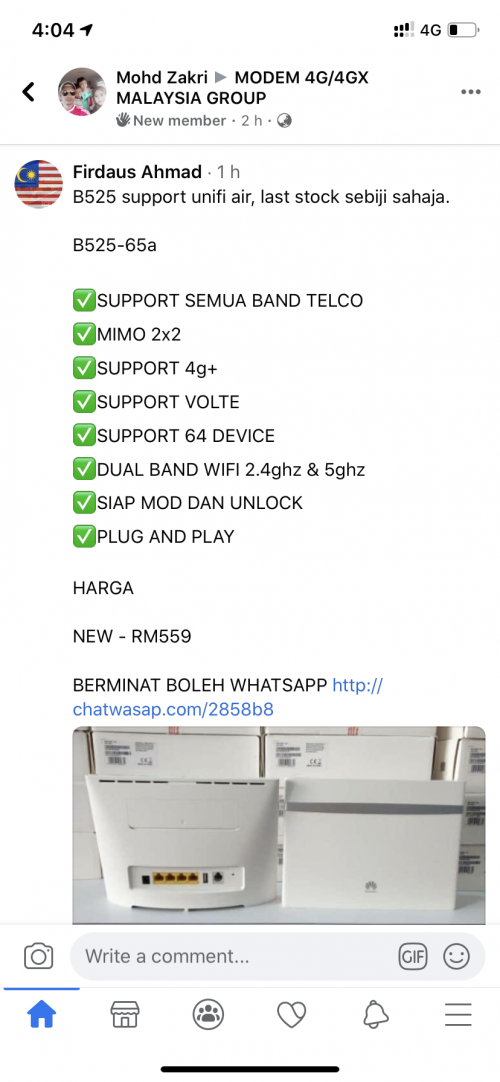
With a little bit of budget, you can get Huawei B525 with 600 Mbps LTE performance around RM500.
Most modems that around that budget you give is not LTE-A, so you cannot take full advantage of the speed to the max.
If you do want that Huawei B525, I can give you the link.

Many people said now there is less B618 because Huawei is replacing it with B818.
But maybe TM did not want it because it is too expensive.
So they replace it with a subpar modem which is ZTE MF286C.
khainiz94
post Jul 2 2020, 06:39 PM

Look at all my stars!!
*******
Senior Member
2,856 posts

Joined: Mar 2012


QUOTE(LemonKnight @ Jul 2 2020, 05:47 PM)
Hey man, so I was thinking of subscribing to the non contract based plan after seeing poor reviews of the ZTE. I'm not willing to spend anything beyond rm400 for a router. How do I find modems that support LTE A? What band am I supposed to look for?
*
For LTE-A modem the budget is a bit high than a typical modem.
Plus with unifi Air using a different band than the three top telcos, so your budget will be a bit high.
I think the cheapest is B525 which is around 400+.
But of course the best is B618-65d which can pull more signal and better stability in terms of speed.
khainiz94
post Jul 2 2020, 06:54 PM

Look at all my stars!!
*******
Senior Member
2,856 posts

Joined: Mar 2012


QUOTE(LemonKnight @ Jul 2 2020, 06:46 PM)
You're getting like 50mbps+ on average download speeds using the b618, yeah?

I'll think about it, I'm looking at reviews and some say they get downloads of 15mbps with a cheaper 200rm router.

Thanks for the reply. Maybe I should just stick to fibre.
*
Yeap but not the B618.
I am using it with B818.
Well you pay cheap, get slower speeds.
But of course that is also depends on how crowded the tower is in that area.

Well if you got fibre, why not stick to that?
If I do have the choice to subscribe to fibre, I will subscribe to it.
Lower ping and more stable speeds.
The only issue is I am left to choose of Streamyx 4 Mbps or unifi Air.
As long unifi Air is able to give good download speeds, I am satisfied already.
khainiz94
post Jul 3 2020, 02:04 PM

Look at all my stars!!
*******
Senior Member
2,856 posts

Joined: Mar 2012


QUOTE(pysh @ Jul 3 2020, 12:38 PM)
heads up u cant tether from the phone to another device..
u still need the huawei modem.
*
Unifi Air can tether.
Unlimited quota and tethering, no speed cap.
khainiz94
post Jul 3 2020, 08:35 PM

Look at all my stars!!
*******
Senior Member
2,856 posts

Joined: Mar 2012


QUOTE(pysh @ Jul 3 2020, 06:50 PM)
as in using your phone and share as hotspot?
*
Yes.
No problem.
khainiz94
post Jul 4 2020, 07:29 PM

Look at all my stars!!
*******
Senior Member
2,856 posts

Joined: Mar 2012


QUOTE(focusrite @ Jul 4 2020, 05:31 PM)
i can't check my rsrq, rsrp, sinr, and rssi at all

tried various apps and they won't show up on any of them

nvm, figured out how to do it.

user posted image
*
Well your SINR is quite bad.
Maybe congested.
khainiz94
post Jul 4 2020, 07:30 PM

Look at all my stars!!
*******
Senior Member
2,856 posts

Joined: Mar 2012


QUOTE(pysh @ Jul 4 2020, 02:22 PM)
wow.. can teach me how ah? or is it cos i'm on iphone?
when i shared at hotspot and connect with another phone, no internet connection..
and just to confirm, its unifi air, not the unifi mobile right?
*
Yes unifi Air.
I use it on my iPad as hotspot.
No issues at all.

You set APN for all the three empty boxes?
Keyword unifi

This post has been edited by khainiz94: Jul 4 2020, 07:32 PM
khainiz94
post Jul 9 2020, 11:48 AM

Look at all my stars!!
*******
Senior Member
2,856 posts

Joined: Mar 2012


QUOTE(dirtinacan @ Jul 8 2020, 11:10 AM)
I bought B818 modem per recomendation in this thread.
As i tested Unifi Bebas plan 1 hour on phone, and think it will be better with the modem.

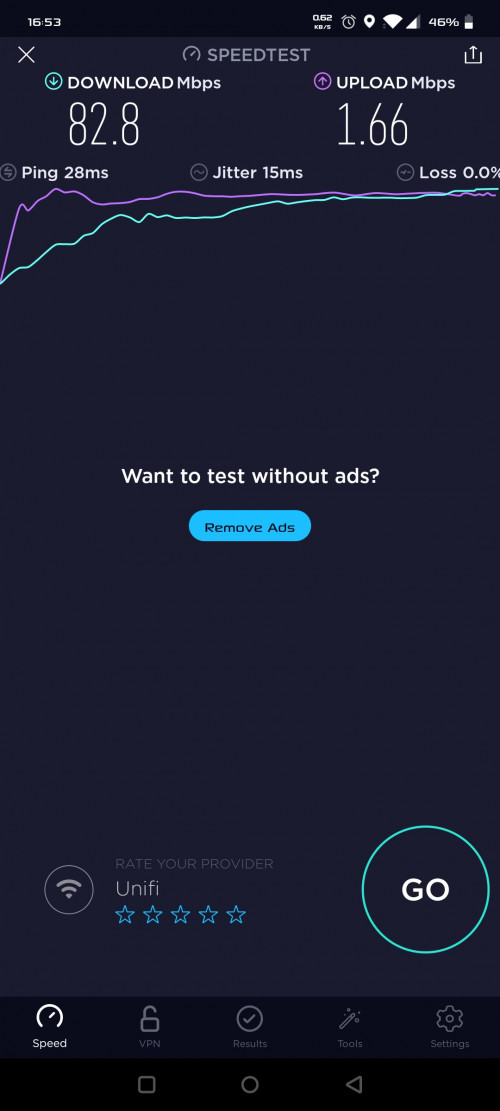
Result on phone 2-3mbps vs on b818 6-11mbps in seremban.

Now, if i subscribe unifi Air, will it be better? i tried multiple times, seems that it will always falls down 6-7mbps vs 12mbps at initial of the test. i used the speedtest app in my android phone.

edit: on phone, i got Band38. how can i check on the b818? anyone can share?
*
FYI Unifi Bebas unlimited package got a speed cap of 8 Mbps.
Thus the speed will always be around that.
That 12 Mbps is a temporary jump but it will go down around that speed of 6 to 8 Mbps.

To check it, you may download HManager app to install.
Only available on Android and have to sideload it.

Wait you get Band 38?
Band 38 is quite rare and most location in Seremban I tested is Band 40.

This post has been edited by khainiz94: Jul 9 2020, 11:50 AM
khainiz94
post Jul 9 2020, 11:51 AM

Look at all my stars!!
*******
Senior Member
2,856 posts

Joined: Mar 2012


QUOTE(SculptureX @ Jul 9 2020, 11:46 AM)
Haih, looking forward to subscribe Unifi Air, in the end now they only include the ZTE 4G LTE modem, which according to this thread, not good at all. sad.gif
*
The specs seems the same like Huawei B618.
But dunno how the performance is less than 2x the performance of Huawei one.
I suggest if you want to get good speeds, you take SIM only pack and buy your own modem.
khainiz94
post Jul 9 2020, 12:01 PM

Look at all my stars!!
*******
Senior Member
2,856 posts

Joined: Mar 2012


QUOTE(inb4 @ Jul 8 2020, 04:40 PM)
I got unifi air sim only and was wondering whether it can work with mobile router like TP-Link M7200. Anyone have any experience?
*
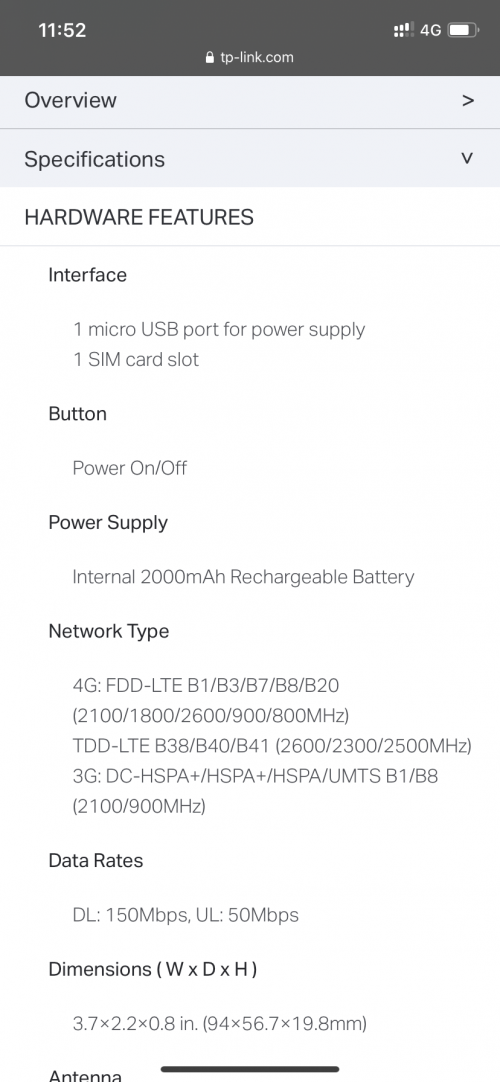
Based on the specs, it is compatible with Band 38 and 40 only.
No luck for Band 5.

user posted image
khainiz94
post Jul 9 2020, 12:02 PM

Look at all my stars!!
*******
Senior Member
2,856 posts

Joined: Mar 2012


QUOTE(tomato people @ Jul 9 2020, 11:58 AM)
Tp link modem..any good?
*
That one I cannot say much.
Never tried it.
Maybe can find in FB group about TP Link modem?
See how the feedback is.

The best so far I know is only Huawei modems.

This post has been edited by khainiz94: Jul 9 2020, 12:05 PM
khainiz94
post Jul 9 2020, 04:05 PM

Look at all my stars!!
*******
Senior Member
2,856 posts

Joined: Mar 2012


QUOTE(SculptureX @ Jul 9 2020, 02:34 PM)
any good alternatives for B618? Hopefully not more than RM500  sweat.gif
*
Huawei B525-65d.

user posted image
khainiz94
post Jul 9 2020, 10:20 PM

Look at all my stars!!
*******
Senior Member
2,856 posts

Joined: Mar 2012


QUOTE(ahlong @ Jul 9 2020, 05:07 PM)
Just received my Huawei B818 (recommended by khainiz94)

user posted image

Usage since received (2pm+) until now.. but usage @ my current house (Gombak - Batu 4)..

Will bring this device to another house (Gombak Setia area) for testing bcause the device will fully use there.

Thanks to khainiz94 for the suggestion and help!

I just hope thaf i can change the DNS to my prefered DNS (8.8.4.4 & 1.1.1.1) inside. Its only can set manually for LAN, but not for Wifi. Some forum said it can be done using putty commands.. later will do some reading..

Since using it at my current house now, im diverting all my stuff connected to this device (2 tvs, 3 laptop, 1 pc + 4 container inside (vbox), & 7 android) without a hiccup or lagging or what so ever. My current house using Unifi (800Mbps) pair with mikrotik (hAP AC2) with loads of config inside 😅

All that i can say.. this Huawei B818 is quite a stable performance.. If u guys got budget, go for this model. No regret at all.
*
Hahaha.
Do not thank me only, thank the other forummers who also suggest me to get this Huawei model.
I cannot remember his name but thanks to him, now finally I can upgrade my speed from the shitty 4 Mbps Streamyx to this awesome 50 Mbps+ speed internet.
Anyway for DNS, you are able to change it directly in the router by inserting some commands in the console of the browser.
https://yescrowd.optus.com.au/t5/Broadband-...ing/td-p/529501

But for the B818 code, you replace it with this:
$('#dhcp_dns').show();
khainiz94
post Jul 10 2020, 03:19 PM

Look at all my stars!!
*******
Senior Member
2,856 posts

Joined: Mar 2012


QUOTE(ms6309 @ Jul 10 2020, 12:03 PM)
Hi Khainiz94, hope you can share your experience.
I am using Streamyx and plan to try Unifi Air. Problem is TM Point said I need to receive call from Marketing team then only can apply Unifi Air.
How true is this?
My area is a few streets away from the coverage.
Should I just apply the sim card only first? I need to pay deposit RM100.
*
I suggest you try to buy the Bebas SIM and try what Band is there available.
Test the line for a few days and also the speed.
If you have only Band 5 connected, I suggest you stay with Streamyx because Unifi Air is really slow on Band 5.
If connected to Band 40 and can get full speed of 8 Mbps (Bebas got cap speed of 8 Mbps), you may try to subscribe for 1 month and put it inside the phone.
If got good speed, then proceed.
And I suggest DO NOT take the device bundle because the modem that TM gives got so many issues and complaints.
Better to buy your own modem and the plus points of owning your own modem is you can put any SIM you want besides the TM modem which locked to unifi Air only.

QUOTE(HippyTony @ Jul 10 2020, 01:48 PM)
I’m also thinking whether I should get prepaid Unifi SIM card to test. Their website coverage is up to my back neighbors but not my house. Can I just buy Unifi Air after testing is good? Do I need TM approvals? No port at my place.
*
Well I suggest to buy the Unifi Bebas SIM and try what Band is there as I explained above.
Only RM10.
But I cannot confirm whether the new SIM will get free BEBAS for one month like previously.
If don’t have, just buy for 1 week at RM20.
Try kaw-kaw.

Then you can apply via online or show proof that your area is able to get the speeds.
That is what I do when I try to migrate from Streamyx to Unifi Air.

khainiz94
post Jul 11 2020, 11:19 PM

Look at all my stars!!
*******
Senior Member
2,856 posts

Joined: Mar 2012


QUOTE(arshad @ Jul 11 2020, 03:18 PM)
how to check the band using iphone?
*
QUOTE(tonyccm @ Jul 11 2020, 07:22 PM)
Type this in dialer *3001#12345#* + “Call”

Main menu > lte>lte neighbor cell meas> freq band ind
*
Here it is.
I thought I gonna post it.
Someone already answer you.
😂
khainiz94
post Jul 12 2020, 11:30 AM

Look at all my stars!!
*******
Senior Member
2,856 posts

Joined: Mar 2012


QUOTE(arshad @ Jul 12 2020, 11:26 AM)
I tried on maxis and digi band 7 using iphone lol
*
iPhone always try to connect to Band 7 no matter what.
khainiz94
post Jul 12 2020, 08:02 PM

Look at all my stars!!
*******
Senior Member
2,856 posts

Joined: Mar 2012


QUOTE(arshad @ Jul 12 2020, 11:33 AM)
So how to check then band 40 hahah
*
For iPhone is a bit complicated to explain.
It should state it connects to Band 40, not Band 7.
Band 7 is not available for Unifi Mobile.
khainiz94
post Jul 14 2020, 10:38 PM

Look at all my stars!!
*******
Senior Member
2,856 posts

Joined: Mar 2012


QUOTE(ms6309 @ Jul 14 2020, 12:38 PM)
Thanks. Yes, I have Unifi Bebas SIM now. Checked it is connected to Band 5 only.
How to search whether any other Bands available in my area?
*
Check maybe cannot.
Maybe can ask any expert here?

5 Pages < 1 2 3 4 5 >Top
 

Change to:
| Lo-Fi Version
0.0708sec    0.54    7 queries    GZIP Disabled
Time is now: 14th December 2025 - 02:36 PM