

Seems like no citi card promotion today...
 Lenovo AMD Laptops worth to buy?, Huge Sales at 11.11 (Citi45 end of Nov)
Lenovo AMD Laptops worth to buy?, Huge Sales at 11.11 (Citi45 end of Nov)
|
|
 Aug 28 2019, 08:55 AM Aug 28 2019, 08:55 AM
|
 
Junior Member
211 posts Joined: Aug 2007 
|
Seems like no citi card promotion today...
|
|
|
Aug 28 2019, 08:56 AM
|

Senior Member
4,800 posts Joined: Mar 2017 
|
QUOTE(cajun2de @ Aug 28 2019, 08:55 AM) Yes it is. Then good wor, can buy 2.5” ssd install for backup |
|
|
Aug 28 2019, 08:57 AM
|
|
Senior Member
4,800 posts Joined: Mar 2017
|
QUOTE(tenable @ Aug 28 2019, 08:55 AM) Seems like no citi card promotion today... This month 31st daysWait on tonight 12Am next morning see how This post has been edited by Benefon: Aug 28 2019, 08:58 AM |
|
|
Aug 28 2019, 09:02 AM
Show posts by this member only | IPv6 | Post
#924
|
|
Junior Member
808 posts Joined: May 2008
|
QUOTE(TOMEI-R @ Aug 27 2019, 05:30 PM) Yalor... E590 is Rm2.3k. Waiting for citi deals 45% off so Rm1.3k lo It won't drop like that. Base price is already around RM2.3K. For them to offer you 45% citi discount means they will up the base price to above RM3,335 and then tell you its 45% off, main it back to RM2300. |
|
|
Aug 28 2019, 09:11 AM
Show posts by this member only | IPv6 | Post
#925
|
|
Junior Member
808 posts Joined: May 2008
|
QUOTE(Benefon @ Aug 28 2019, 07:18 AM) kuci_mayong how is your T495 now? My T495 feels good, if you have T430, it feels like that but more smoother because they mix more plastic and glass fiber (but durability should be same as magnesium body). It also smudges a lot. So far no paint coming off.I felt that the body cover of front and rear very plastics, the colors paint can peel off easily , even tho shipped box packaged can get scratches marks on the display top surface. Pay cheap but the packing very comes with cheap, used with hard pvc to hold the laptop. Can spot the marks on the top  x395 bottom is magnesium but screen part is plastic (so i guess that's why you feel its plastic on top). I am not too sure which has better overall built though, hope you can update us here on this part. Some users on reddit say T495 is better build quality. https://www.reddit.com/r/thinkpad/comments/...5t495s_vs_x395/ https://www.reddit.com/r/thinkpad/comments/..._case_material/ https://www.reddit.com/r/thinkpad/comments/...o_much_cheaper/ From PSREF spec sheet- T495 case material: Display cover: PPS / 50% GF; Bottom: PA / 50% GF X395 case material: Display cover: PPS/GF; Bottom: Magnesium/Aluminum This post has been edited by kuci_mayong: Aug 28 2019, 09:13 AM |
|
|
Aug 28 2019, 09:13 AM
|
|
Senior Member
4,800 posts Joined: Mar 2017
|
QUOTE(kuci_mayong @ Aug 28 2019, 09:11 AM) My T495 feels good, if you have T430, it feels like that but more smoother because they mix more plastic and glass fiber (but durability should be same as magnesium body). It also smudges a lot. So far no paint coming off. Even bottom is plastics feel. I dunno 🤷🏿♂️ x395 bottom is magnesium but screen part is plastic (so i guess that's why you feel its plastic on top). I am not too sure which has better overall built though, hope you can update us here on this part. Some users on reddit say T495 is better build quality. https://www.reddit.com/r/thinkpad/comments/...5t495s_vs_x395/ https://www.reddit.com/r/thinkpad/comments/..._case_material/ From PSREF spec sheet- T495 case material: Display cover: PPS / 50% GF; Bottom: PA / 50% GF X395 case material: Display cover: PPS/GF; Bottom: Magnesium/Aluminum Cause I had remove the bottom cover before. |
|
|
Aug 28 2019, 09:14 AM
Show posts by this member only | IPv6 | Post
#927
|
|
Junior Member
808 posts Joined: May 2008
|
QUOTE(Benefon @ Aug 28 2019, 09:13 AM) Even bottom is plastics feel. I dunno 🤷🏿♂️ You also got the T495 coming soon right? haha then we will get the definite answer. So far i am very very happy with built quality. Feels good to carry around without sleeve or backpack.Cause I had remove the bottom cover before. Btw i updated that post with one more link: https://www.reddit.com/r/thinkpad/comments/...o_much_cheaper/ This post has been edited by kuci_mayong: Aug 28 2019, 09:16 AM |
|
|
Aug 28 2019, 09:18 AM
|
|
Senior Member
4,800 posts Joined: Mar 2017
|
QUOTE(kuci_mayong @ Aug 28 2019, 09:14 AM) You also got the T495 coming soon right? haha then we will get the definite answer. So far i am very very happy with built quality. Feels good to carry around without sleeve or backpack. Haha u have read from reddit.Btw i updated that post with one more link: https://www.reddit.com/r/thinkpad/comments/...o_much_cheaper/ My T495 will let go after get it on hand. Try to get something news |
|
|
Aug 28 2019, 09:19 AM
Show posts by this member only | IPv6 | Post
#929
|
|
Junior Member
808 posts Joined: May 2008
|
QUOTE(Benefon @ Aug 28 2019, 09:18 AM) Haha u have read from reddit. Yeah one good thing about thinkpad is the community behind it. Easy to find troubleshoot if have any issues.My T495 will let go after get it on hand. Try to get something news |
|
|
Aug 28 2019, 09:23 AM
|
|
Senior Member
4,800 posts Joined: Mar 2017
|
QUOTE(kuci_mayong @ Aug 28 2019, 09:19 AM) Yeah one good thing about thinkpad is the community behind it. Easy to find troubleshoot if have any issues. So far mine x395 has not an issue, yesterday windows update , after restarting when login windows showing error on Face ID, but I didn’t set on it, after switch on fingerprint again it is work fine, no more issue already.I heard somebody complain about keyboard issue. |
|
|
Aug 28 2019, 09:26 AM
Show posts by this member only | IPv6 | Post
#931
|
|
Junior Member
808 posts Joined: May 2008
|
QUOTE(Benefon @ Aug 28 2019, 09:23 AM) So far mine x395 has not an issue, yesterday windows update , after restarting when login windows showing error on Face ID, but I didn’t set on it, after switch on fingerprint again it is work fine, no more issue already. What type of keyboard issue? so far so good. love to type on this machine.I heard somebody complain about keyboard issue. |
|
|
Aug 28 2019, 09:29 AM
|
|
Senior Member
4,800 posts Joined: Mar 2017
|
QUOTE(kuci_mayong @ Aug 28 2019, 09:26 AM) What type of keyboard issue? so far so good. love to type on this machine. I saw some reviews said in Lenovo forum, X395 keyboard error , has some keys no responses.So far mine okay, everything are working fine The machines weight exactly on 1.28kg If compare to X1 Carbon level , the Wright so much lighter than all those laptop. This post has been edited by Benefon: Aug 28 2019, 09:31 AM |
|
|
Aug 28 2019, 09:31 AM
Show posts by this member only | IPv6 | Post
#933
|
|
Junior Member
808 posts Joined: May 2008
|
QUOTE(Benefon @ Aug 28 2019, 09:29 AM) I saw some reviews said in Lenovo forum, X395 keyboard error , has some keys no responses. i think maybe similar to what i said earlier when first time get the laptop. i set the region to UK or Malaysia (or something like that), and the symbol keys were wrong (for example: if press @, i will get " instead).So far mine okay, everything are working fine The machines weight exactly on 1.28kg After changing to US keyboard, that fixed the issue. |
|
|
Aug 28 2019, 09:34 AM
|
|
Senior Member
4,800 posts Joined: Mar 2017
|
QUOTE(kuci_mayong @ Aug 28 2019, 09:31 AM) i think maybe similar to what i said earlier when first time get the laptop. i set the region to UK or Malaysia (or something like that), and the symbol keys were wrong (for example: if press @, i will get " instead). Maybe is during fresh windows and Drivers before update could be happen.After changing to US keyboard, that fixed the issue. |
|
|
Aug 28 2019, 09:37 AM
Show posts by this member only | IPv6 | Post
#935
|
|
Junior Member
808 posts Joined: May 2008
|
QUOTE(Benefon @ Aug 28 2019, 09:34 AM) Maybe is during fresh windows and Drivers before update could be happen. Yes could be, should have updated first too in my case.Btw, just want to share with you, RAM prices really drop by 50% in such a short span. Same RAM i bought 1 year ago is now way way cheaper. Could be one reason why Lenovo able to sell so affordable. 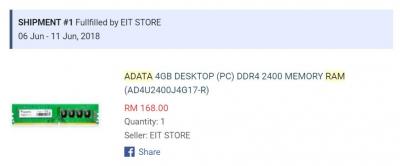

|
|
|
Aug 28 2019, 09:38 AM
Show posts by this member only | IPv6 | Post
#936
|

Senior Member
1,766 posts Joined: Jan 2019
|
QUOTE(kuci_mayong @ Aug 28 2019, 09:11 AM) My T495 feels good, if you have T430, it feels like that but more smoother because they mix more plastic and glass fiber (but durability should be same as magnesium body). It also smudges a lot. So far no paint coming off. But talk about the base case construction, I would prefer the “insert” style of X395 & T495s over the “cap in” style of T495. There’s review commending on the difficulty in disassemble and reassemble the back case of T495.x395 bottom is magnesium but screen part is plastic (so i guess that's why you feel its plastic on top). I am not too sure which has better overall built though, hope you can update us here on this part. Some users on reddit say T495 is better build quality. https://www.reddit.com/r/thinkpad/comments/...5t495s_vs_x395/ https://www.reddit.com/r/thinkpad/comments/..._case_material/ https://www.reddit.com/r/thinkpad/comments/...o_much_cheaper/ From PSREF spec sheet- T495 case material: Display cover: PPS / 50% GF; Bottom: PA / 50% GF X395 case material: Display cover: PPS/GF; Bottom: Magnesium/Aluminum |
|
|
Aug 28 2019, 09:45 AM
Show posts by this member only | IPv6 | Post
#937
|
|
Junior Member
808 posts Joined: May 2008
|
QUOTE(msacras @ Aug 28 2019, 09:38 AM) But talk about the base case construction, I would prefer the “insert” style of X395 & T495s over the “cap in” style of T495. There’s review commending on the difficulty in disassemble and reassemble the back case of T495. Just saw what you mean. You are right, T495 looks harder to open, could even break one of the plastic holder parts by doing so if too aggressive, whereas X395 is just unscrew and lift up.This post has been edited by kuci_mayong: Aug 28 2019, 09:45 AM |
|
|
Aug 28 2019, 09:45 AM
|
|
Senior Member
4,800 posts Joined: Mar 2017
|
QUOTE(msacras @ Aug 28 2019, 09:38 AM) But talk about the base case construction, I would prefer the “insert” style of X395 & T495s over the “cap in” style of T495. There’s review commending on the difficulty in disassemble and reassemble the back case of T495. Actually on the center of x395 base cover has tiny clip on the cover to lock on the body chassis.You need to force to lift up and open out the rear case. This post has been edited by Benefon: Aug 28 2019, 09:51 AM |
|
|
Aug 28 2019, 09:47 AM
|
|
Senior Member
4,800 posts Joined: Mar 2017
|
Whoever get the X395 can able to upgrade for SSD or WWAN card only. The rest nothing can touch.
For T495 at least you can manage to get Ram upgrade. |
|
|
Aug 28 2019, 10:00 AM
|
|
Senior Member
4,800 posts Joined: Mar 2017
|
QUOTE(kuci_mayong @ Aug 28 2019, 09:31 AM) i think maybe similar to what i said earlier when first time get the laptop. i set the region to UK or Malaysia (or something like that), and the symbol keys were wrong (for example: if press @, i will get " instead). Got delay againAfter changing to US keyboard, that fixed the issue. ThinkPad T495 </br> Build Your Own Part Number : 20NJCTO1WW Quantity : 1 Unshipped Quantity : 1 Ordered August 9, 2019 Expected to Ship September 6, 2019 Expected to Arrive September 12, 2019 Bundle Details System Details |
| Bump Topic Topic ClosedOptions New Topic |
| Change to: |  0.0291sec 0.0291sec
 0.55 0.55
 6 queries 6 queries
 GZIP Disabled GZIP Disabled
Time is now: 4th December 2025 - 07:04 PM |
 Quote
Quote