Welcome Guest ( Log In | Register )

11 Pages « < 5 6 7 8 9 > » Bottom

Outline · [ Standard ] · Linear+

 Coocaa Smart TV (32 - 55"), Anyone getting?

views
     
LS3
post Aug 28 2019, 09:25 AM

New Member
*
Junior Member
47 posts

Joined: May 2019
QUOTE(mother84 @ Aug 27 2019, 03:36 PM)
you mean you have to wait the turning on? wait the coocaa loading ?

you need to turn a fast turn on feature in settings.

So, it wont load the logo so long time, just 2 seconds to turn on the TV for me.

It is in HDMI/TV , press menu, then you scroll down to bottom.
And you find find, there is a setting called FAST turn on, or open one. i forgot the name.

Then you can turn on faster.

The way your turn off, is just standby the android, if need wait long time, mean you restart the whole android system.
Just like our android phone.
*
thumbup.gif thumbup.gif thumbup.gif
will try tonight
mother84
post Aug 28 2019, 12:18 PM

Getting Started
**
Junior Member
79 posts

Joined: Feb 2009
From: JB

QUOTE(LS3 @ Aug 28 2019, 09:25 AM)
thumbup.gif  thumbup.gif  thumbup.gif
will try tonight
*
Sure, let us know the result.
I am sure you can do it.
iq_myst
post Aug 28 2019, 01:01 PM

Getting Started
**
Junior Member
225 posts

Joined: Feb 2008


QUOTE(mother84 @ Aug 27 2019, 09:46 AM)
This TV audio output have the optical port.
But no HDMI ARC (Audio Return Channel)
*
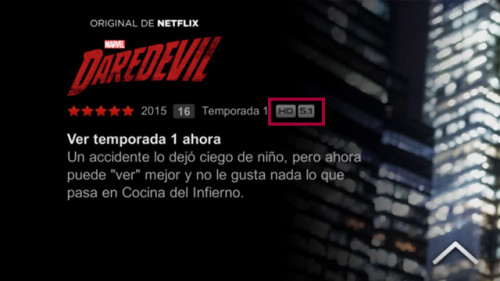
thanks for your reply. but before adding the hardware, the TV itself must be able to play Netflix in 5.1 sound.

does it have logo as below when playing Netflix?

user posted image
mother84
post Aug 28 2019, 01:28 PM

Getting Started
**
Junior Member
79 posts

Joined: Feb 2009
From: JB

i saw the logo before , which is dolby atmos.

LS3
post Aug 28 2019, 07:16 PM

New Member
*
Junior Member
47 posts

Joined: May 2019
QUOTE(mother84 @ Aug 28 2019, 12:18 PM)
Sure, let us know the result.
I am sure you can do it.
*
Faster now after I turn on Fast Boost. Thanks for the info
Zeuss1220
post Aug 30 2019, 12:07 PM

Casual
***
Junior Member
469 posts

Joined: Feb 2011


I received my 50inch model yesterday. So far so good. Bought this specifically because its Android TV.

But i realized the play store doesn't allow All Apps? For example HBO GO I believe should be Chromecast supported? And Astro Go also don't have.

Iinm i have everything updated
mother84
post Aug 30 2019, 12:11 PM

Getting Started
**
Junior Member
79 posts

Joined: Feb 2009
From: JB

Do you all pair the remote control with bluetooth?

It will be more convenience to search by using VOICE Recognisation.

press the top middle(microphone) button,
then, it will start searching, then
HOLD the Left and HOME button,

then u will see the green light flashing...
After that, pairing wil appeared.

After paired, you actually no need point your remote control to the TV sensor receiver,
It is using bluetooth to control the TV.

I found that is so much useful, when i am browsing in Netflix.

https://www.techpinas.com/2019/03/coocaa-An...V-Unboxing.html
puchongite
post Aug 30 2019, 12:12 PM

20k VIP Club
*********
All Stars
33,725 posts

Joined: May 2008
QUOTE(Zeuss1220 @ Aug 30 2019, 12:07 PM)
I received my 50inch model yesterday. So far so good. Bought this specifically because its Android TV.

But i realized the play store doesn't allow All Apps? For example HBO GO I believe should be Chromecast supported? And Astro Go also don't have.

Iinm i have everything updated
*
Not downloadable from play store is not a problem, you can always sideload it from apk download via Chrome or USB thumb drive.

This post has been edited by puchongite: Aug 30 2019, 12:12 PM
mother84
post Aug 30 2019, 12:20 PM

Getting Started
**
Junior Member
79 posts

Joined: Feb 2009
From: JB

Anyone tried using TOSLINK (Optical) port to link with any 5.1 soundbar? performance good?

do you all use any sound bar with Dolby Atmos?

thinking of :
Yamaha YAS-207
Samsung by Harman Kardon Q60R
Zeuss1220
post Aug 30 2019, 12:39 PM

Casual
***
Junior Member
469 posts

Joined: Feb 2011


QUOTE(puchongite @ Aug 30 2019, 12:12 PM)
Not downloadable from play store is not a problem, you can always sideload it from apk download via Chrome or USB thumb drive.
*
any idea why not downloadable from playstore? region locked? device not compatible with app? app not compatible with device?

This post has been edited by Zeuss1220: Aug 30 2019, 12:39 PM
AVFAN
post Aug 30 2019, 12:48 PM

20k VIP Club
*********
All Stars
24,471 posts

Joined: Nov 2010
QUOTE(Zeuss1220 @ Aug 30 2019, 12:39 PM)
any idea why not downloadable from playstore? region locked? device not compatible with app? app not compatible with device?
*
becos the apps u mentioned are not ATV approved.
approved ones appear in TV playstore, will be displayed on homescreen if installed.
quasi approved ones not found in playstore but if u sideload them, they will appear in homescreen.
unapproved ones not found in playstore, can sideload but will not be in homescreen - u need to install "sideload launcher" app from playstore.
this app appears in homescreen, u can enter it to access ALL installed apps.

ATV os is not exactly the same as generic android - more restrictions, security.
some android apps may not work properly in ATV; some will be rejected by TV security.
above applies to all ATV tv's incl sony's and sharp's.
puchongite
post Aug 30 2019, 12:49 PM

20k VIP Club
*********
All Stars
33,725 posts

Joined: May 2008
QUOTE(Zeuss1220 @ Aug 30 2019, 12:39 PM)
any idea why not downloadable from playstore? region locked? device not compatible with app? app not compatible with device?
*
There are many ways of blocking an app to show up in the play store.

The version of google play ( com.vending.android ) for ATV identifies itself as a ATV device, and so apk's which do not declare itself compatible with ATV with not show up. But you need not worry about the details.

It is simply not downloadable, that's all. After you sideloaded it, it should should still run fine.

Some apps will install but will not show up with a launchable ICON. Also no implication to execution.

This post has been edited by puchongite: Aug 30 2019, 12:55 PM
Zeuss1220
post Aug 30 2019, 01:12 PM

Casual
***
Junior Member
469 posts

Joined: Feb 2011


QUOTE(AVFAN @ Aug 30 2019, 12:48 PM)
becos the apps u mentioned are not ATV approved.
approved ones appear in TV playstore, will be displayed on homescreen if installed.
quasi approved ones not found in playstore but if u sideload them, they will appear in homescreen.
unapproved ones not found in playstore, can sideload but will not be in homescreen - u need to install "sideload launcher" app from playstore.
this app appears in homescreen, u can enter it to access ALL installed apps.

ATV os is not exactly the same as generic android - more restrictions, security.
some android apps may not work properly in ATV; some will be rejected by TV security.
above applies to all ATV tv's incl sony's and sharp's.
*
QUOTE(puchongite @ Aug 30 2019, 12:49 PM)
There are many ways of blocking an app to show up in the play store.

The version of google play ( com.vending.android ) for ATV identifies itself as a ATV device, and so apk's which do not declare itself compatible with ATV with not show up. But you need not worry about the details.

It is simply not downloadable, that's all. After you sideloaded it, it should should still run fine.

Some apps will install but will not show up with a launchable ICON. Also no implication to execution.
*
I see. Okay, I'm gonna try Astro Go later see how it goes.
adliazaddin
post Aug 30 2019, 04:59 PM

Casual
***
Junior Member
329 posts

Joined: Jun 2007
From: behind you


hey... coocaa lazada is doing promotion again.. thinking to get the TV since my tv now died...

is the tv worth every cent?
mother84
post Aug 30 2019, 05:00 PM

Getting Started
**
Junior Member
79 posts

Joined: Feb 2009
From: JB

QUOTE(adliazaddin @ Aug 30 2019, 04:59 PM)
hey... coocaa lazada is doing promotion again.. thinking to get the TV since my tv now died...

is the tv worth every cent?
*
oh yes, it is not too bad.
Worth to buy.

Only things is the color is too RED for me.
adliazaddin
post Aug 30 2019, 05:03 PM

Casual
***
Junior Member
329 posts

Joined: Jun 2007
From: behind you


QUOTE(mother84 @ Aug 30 2019, 05:00 PM)
oh yes, it is not too bad.
Worth to buy.

Only things is the color is too RED for me.
*
can play 4k netflix?
mother84
post Aug 30 2019, 05:05 PM

Getting Started
**
Junior Member
79 posts

Joined: Feb 2009
From: JB

QUOTE(adliazaddin @ Aug 30 2019, 05:03 PM)
can play 4k netflix?
*
Yes, of course it can.

it is a 4K TV with android and netflix installed.
Just connect to your wifi / LAN cable, it will works.

Of course you also need a netflix account.

You can get netflix account from me, RM15 per month only.
It is sharing account slot.
adliazaddin
post Aug 30 2019, 05:15 PM

Casual
***
Junior Member
329 posts

Joined: Jun 2007
From: behind you


QUOTE(mother84 @ Aug 30 2019, 05:05 PM)
Yes, of course it can.

it is a 4K TV with android and netflix installed.
Just connect to your wifi / LAN cable, it will works.

Of course you also need a netflix account.

You can get netflix account from me, RM15 per month only.
It is sharing account slot.
*
naaiiissss.... i already have netflix account
adliazaddin
post Aug 30 2019, 05:29 PM

Casual
***
Junior Member
329 posts

Joined: Jun 2007
From: behind you


One last question

I watched on YouTube this tv include a poprietary back panel wall mount... And that mount is not included anymore.. can it fit with universal wall mount?
Zeuss1220
post Aug 30 2019, 08:48 PM

Casual
***
Junior Member
469 posts

Joined: Feb 2011


QUOTE(Zeuss1220 @ Aug 30 2019, 01:12 PM)
I see. Okay, I'm gonna try Astro Go later see how it goes.
*
Installed and logged in successfully but can't play the videos

11 Pages « < 5 6 7 8 9 > » Top
 

Change to:
| Lo-Fi Version
0.0205sec    0.78    6 queries    GZIP Disabled
Time is now: 22nd December 2025 - 12:12 AM