Welcome Guest ( Log In | Register )

17 Pages « < 14 15 16 17 >Bottom

Outline · [ Standard ] · Linear+

 Any Comment on Sharp Android TV 4TC60AL1X?

views
     
AVFAN
post Dec 29 2020, 09:50 PM

20k VIP Club
*********
All Stars
24,453 posts

Joined: Nov 2010
QUOTE(pvateme @ Dec 29 2020, 04:13 PM)
Need help.

I have one TV box for months. It's screen color in normal mode when am using it with my previous 835 TV.

After changing to CK1X, it's screen color become very dark. I try to adjust from TV unset user mode, like changing the brightness. There is one screen resolution setting in the TV box, deep color mode, but that's off.

I noticed my TV box display color is in white when TV just started. After a few seconds it refresh and then screen become yellowish. Anyone know what's the culprit? My TV box support 4k-60hz display, do you think is the cable quality issue? I did tried 720p, still same color.
*
the problem is probably the setting in either TV or box is wrong.

TV auto detects if input is 4k or 1080p 720p.. u can check the MODE - std or movie or HDR or...? set tostd or movie and see.

box, u should set to 1080p 50hz or 60hz for normal use, set to 4k, 24hz, or whatever when u should, according to the source.


pvateme
post Dec 30 2020, 09:03 PM

Enthusiast
*****
Senior Member
878 posts

Joined: Dec 2008


QUOTE(AVFAN @ Dec 29 2020, 09:50 PM)
the problem is probably the setting in either TV or box is wrong.

TV auto detects if input is 4k or 1080p 720p.. u can check the MODE - std or movie or HDR or...? set tostd or movie and see.

box, u should set to 1080p 50hz or 60hz for normal use, set to 4k, 24hz, or whatever when u should, according to the source.
*
I tried your recommended settings but no luck.
Now am suspecting this:
https://www.benq.eu/en-eu/knowledge-center/...difference.html

There is one setting under picture, namely HDMI RGB Range. But it was grayed out, I could not change the setting. Is it normal on this setting being grayed out?

This post has been edited by pvateme: Dec 30 2020, 09:06 PM
AVFAN
post Dec 30 2020, 10:22 PM

20k VIP Club
*********
All Stars
24,453 posts

Joined: Nov 2010
QUOTE(pvateme @ Dec 30 2020, 09:03 PM)
I tried your recommended settings but no luck.
Now am suspecting this:
https://www.benq.eu/en-eu/knowledge-center/...difference.html

There is one setting under picture, namely HDMI RGB Range. But it was grayed out, I could not change the setting. Is it normal on this setting being grayed out?
*
i start to suspect your box.

your tv, alto i dun have but i have similar sharps.

with my box, there is no such problem, incl RGB settings.


see if any diff if u use hdmi 1, 2, 3... becos some inputs have lower capability.

lastly, i can only suggest u try the box on another 4k tv and see what happens.
pvateme
post Jan 2 2021, 09:38 PM

Enthusiast
*****
Senior Member
878 posts

Joined: Dec 2008


QUOTE(AVFAN @ Dec 30 2020, 10:22 PM)
i start to suspect your box.

your tv, alto i dun have but i have similar sharps.

with my box, there is no such problem, incl RGB settings.
see if any diff if u use hdmi 1, 2, 3... becos some inputs have lower capability.

lastly, i can only suggest u try the box on another 4k tv and see what happens.
*
Juts got the chance to test the box with my father's TV, LC60UA6800X.
The display color of my box is just normal as before.
Here attached the screen shots from LC60UA6800X and CK1X. Obviously my TV's color is towards red.

I tested all the 3 cables that i have. Will test again with the cable my father using.

Attached Image Attached Image
AVFAN
post Jan 3 2021, 10:28 AM

20k VIP Club
*********
All Stars
24,453 posts

Joined: Nov 2010
QUOTE(pvateme @ Jan 2 2021, 09:38 PM)
Juts got the chance to test the box with my father's TV, LC60UA6800X.
The display color of my box is just normal as before.
Here attached the screen shots from LC60UA6800X and CK1X. Obviously my TV's color is towards red.

I tested all the 3 cables that i have. Will test again with the cable my father using.
*
it is definitely redder than normal.

besides trying a diff hdmi cable, check also the av mode/picture setting/advance settings - color, hue, tint, saturation, etc.

possible the default settings went awry or initial calibration not done properly.

if so, should call for sharp service help.
pvateme
post Jan 3 2021, 01:43 PM

Enthusiast
*****
Senior Member
878 posts

Joined: Dec 2008


QUOTE(AVFAN @ Jan 3 2021, 10:28 AM)
it is definitely redder than normal.

besides trying a diff hdmi cable, check also the av mode/picture setting/advance settings - color, hue, tint, saturation, etc.

possible the default settings went awry or initial calibration not done properly.

if so, should call for sharp service help.
*
Do you think sharp cs will help? They might said it is my box issue since the display on the TV home screen is ok. Watching movies from any app from TV os had no such reddish issue.

Next is, I will take the TV box from my father (another brand) to test with my TV.

This post has been edited by pvateme: Jan 3 2021, 01:44 PM
AVFAN
post Jan 3 2021, 02:29 PM

20k VIP Club
*********
All Stars
24,453 posts

Joined: Nov 2010
QUOTE(pvateme @ Jan 3 2021, 01:43 PM)
Do you think sharp cs will help? They might said it is my box issue since the display on the TV home screen is ok. Watching movies from any app from TV os had no such reddish issue.

Next is, I will take the TV box from my father (another brand) to test with my TV.
*
Do all u can to isolate the root of the problem.

Yes try other box, other apps, diff playback files.

If yr box works ok on 1 tv but not the other wih box settings unchaged, something is very odd.

That is also strange if both tvs are set to similar mode and picture settings.

For CS to come check, u must have good reason. If tv apps work ok, they will not bother with outcome from boxes.
pvateme
post Jan 3 2021, 03:37 PM

Enthusiast
*****
Senior Member
878 posts

Joined: Dec 2008


QUOTE(AVFAN @ Jan 3 2021, 02:29 PM)
Do all u can to isolate the root of the problem.

Yes try other box, other apps, diff playback files.

If yr box works ok on 1 tv but not the other wih box settings unchaged, something is very odd.

That is also strange if both tvs are set to similar mode and picture settings.

For CS to come check, u must have good reason. If tv apps work ok, they will not bother with outcome from boxes.
*
Thank you for being so supportive to us although you are not working in Sharp. thumbup.gif
I decided to lodge report to Sharp. Because, I also tested all HDMI with my Unifi TV Box which I didnt turn on for many months. And yes, screen show reddish color too.
Thejs P
post Feb 18 2021, 04:01 AM

New Member
*
Probation
22 posts

Joined: Jul 2020
QUOTE(coolkwc @ Jan 2 2020, 11:27 AM)
Just bought 4TC60AL1X 2 days ago after my Sharp 60" full HD give up on me after only 6 years usage. i bought for RM2700+ and I know i can found cheaper (RM2500+) online however hesitate if need to claim warranty, so just settled with physical shop.
Unfortunately the TV screen have a long and deep scratch upon unboxing, so the shop will exhange a new one for me this weekend while i watch this unit 1st.

2 days usage enough for me to post a review, here you go:

1. Why i choose this Sharp model? Because it is CHEAP!!! Yet the PQ is good enough and functionality is top notch. The colour is indeed wide gamut (123% as claimed), it display some colour shade that i never seen before on my calibrated 99% sRGB monitor.

2. 'Unknown' Japan panel type used, but i suspect is at least IPS or VA. From naked eye the contrast is very good and it proofed with my Xrite i1Display Pro, got 1800:1 contrast ratio, this is in VA panel territory already!! In contrast, my QHD 165Hz IPS panel worth 3k only able to get 1000:1 ratio.

3. As usual, the default picture setup is overemphasize on contrast, vivid colour and noise reduction. The out of box image is bluish (that's why you see a vivid colour and 'crystal clear' white), not sharp in 1080p video and contrast too high (black too black, lost the mid tone and shadow details). So at 1st i change the mode to 'standard', reduce the contrast to +28 (Now you can see the details in the highlight as the result of not clipped), colour to 0, sharpness to +2, active contrast to OFF, tint at middle. I also turn OFF the digital noise reduction, this has a big impact on the crisp and sharpness, it released all the details even when i just play Astro Full HD, i can clearly see the sharp tiny hair and face details of the human when the DNR is turn OFF, you don't really need that at all!!

4. The 4k upscaler is top notch, the image even look sharper compare with my previous dot to dot 1080 playback!! But some colour noise perceived in plain background if DNR turn OFF, don't get me wrong, the noise level is minimal and unnoticeable in 99% of time.

5. Like what i said in 3), the out of box image is bluish for wow crystal clear white, but luckily the white temp can be adjusted. I hook up the Xrite i1Display Pro can calibrate the white balance. The colour temp i set to LOW (lowest setting), but the white balance still tad blue at 7600k, my target is to adjusted to 6500k. So reduce the BLUE GAIN all the way down to -25 to achieve 6500k white balance.

6. SQ wise, as sucks as my previous Sharp TV, well you can't expect a good sound from a tiny, thin and down facing speaker right? I just listen the built-in speaker for 2 minutes (torture) before i figure out how to output and bypass the internal speaker. I hook up to my external amp and speaker by using the 3.5mm to RCA cable, settle.

7. Android 8 is handy, smoothness during scroll/navigate menu can't compare to galaxy S7 edge Android 8, haha, cannot expect too much i think. Haven't download any apps yet as the TV need to be changed again. But youtube playback is good enough.

8. Film mode - This is interpolation technology same as SVP manager in PC to increase the 25/30 fps movie to higher framerate real time (to panel max refresh rate, again unknown in this model as didn't mentioned), i'm surprise to get this feature as it didn't include in the specsheet. But please expect to get some picture artifacts in some circumstance, you can turn it OFF for highest PQ.

9. This is edge lit panel, some light bleed at the bottom in full black mode with dark room ambient, not a big deal as TV is far field viewing and unnoticeable most of the time. Screen brightness and colour uniformity is good, minimal clouding observed in full grey mode, again you won't notice unless your day to day activity is to display full grey on the TV!!

Overall very happy with the purchase, CP ratio is high if not highest compare to Samsung and Sony based on PQ and feature aspect. I reserved for reliability/longevity considering my previous malfunctioned Sharp model just 6 years old with 'normal' viewing time per day.
*
This is super cool, measuring contrast ratio from tools such as Xrite i1Display Pro is exactly what we need.
Btw, how did you measure the contrast ratio, on some checkboard pattern? Did you turn off the room lights?


If you start a review channel or website, for sure you can become the Vincent Teoh of Malaysia.
As you know all these TV marketing just but buzzwords which have no meaning, and artificially boost their contrat ratio measurements by using non-standard ways of measuring or measuring dynamic contrast ratio.
And all these youtube channels only review US models. Brands they keep hyping suhc as TCL and Vizio dont have the same models here.
We need Malaysian TV reviews.

alesi616
post Feb 22 2021, 07:59 PM

Enthusiast
*****
Junior Member
810 posts

Joined: Mar 2008
Hi all,

My sharp 4TC50AL1X is occasionally restart by itself since 2 days ago… anyone has any clue on that? It is as frequent as 30 mins restart once.
I check the firmware it is latest.

How many years warranty it has? 1 or 2 years? I just bought it on May 2019, less than 2 yrs.

This post has been edited by alesi616: Feb 22 2021, 08:00 PM
xphossis
post Apr 13 2021, 05:33 PM

Me Gusta!
*****
Senior Member
878 posts

Joined: Jan 2003
From: KL
user posted image

Hi guys, is this dead pixel? Can it be fixed?

Thank you for any advice.
Vanquish_08
post May 25 2021, 04:30 PM

Getting Started
**
Junior Member
128 posts

Joined: Mar 2015


Hi guys,

Can the existing owners of this TV provide some feedback on their experience after a couple of years on? I am planning on getting one (was quoted RM 2.5K
by a local shop) for my condo in KL where I am spending a bit more time now due to work. I have a proper HT set up back in JB but the one in the condo will
be just for Astro, Netflix, Youtube and movies from my HDD.

Cheers,
V.
Kuantan Guy
post Jun 18 2021, 11:37 PM

Getting Started
**
Junior Member
75 posts

Joined: Mar 2021
QUOTE(pvateme @ Jan 2 2021, 09:38 PM)
Juts got the chance to test the box with my father's TV, LC60UA6800X.
The display color of my box is just normal as before.
Here attached the screen shots from LC60UA6800X and CK1X. Obviously my TV's color is towards red.

I tested all the 3 cables that i have. Will test again with the cable my father using.

Attached Image Attached Image
*
Why do u need TV box again?
My new CK1X is hooked directly to unifi
Many new apps now can watch all news, latest movies, etc

enduser
post Aug 30 2021, 05:54 PM

Regular
******
Senior Member
1,280 posts

Joined: Jan 2003
Got new firmware update

Old : 20200_20200622
New : 20300_20210717

Still android 8 with security update 5 januari 2021

Only latest kernel version it seems
kkm
post Aug 30 2021, 09:37 PM

Regular
******
Senior Member
1,258 posts

Joined: Jan 2003
QUOTE(enduser @ Aug 30 2021, 05:54 PM)
Got new firmware update

Old : 20200_20200622
New :  20300_20210717

Still android 8 with security update 5 januari 2021

Only latest kernel version it seems
*
Couldn't see anything new...

coolkwc
post Dec 8 2021, 11:05 PM

Fall in love with audio again.
*******
Senior Member
3,112 posts

Joined: Jul 2006
Got new firmware update

20400_20211112

Downloading but won't expect anything new, Consider ok for still receive update for a 2 years old TV
GUESS
post Dec 13 2021, 12:52 PM

Getting Started
**
Junior Member
193 posts

Joined: Jan 2003
From: KL


Bad experience with SHARP.
tv power supply 2x faulty and lcd faulty within 2years hence replace using warranty.
KTCY
post Sep 22 2022, 12:27 PM

BumbleBeeā„¢
********
All Stars
12,505 posts

Joined: May 2007
From: Triumph in the Skies Status:In LoV3 Again
Any idea what's the difference between 4TC70D1LX vs 4TC70DK1X

From spec it seems like everything the same.

This post has been edited by KTCY: Sep 22 2022, 12:30 PM
anon118
post Jan 2 2023, 05:24 PM

Getting Started
**
Junior Member
216 posts

Joined: Nov 2015
I think my TV is still good but on Android 6. Not sure how I can manually update the Android version
pvateme
post Aug 28 2023, 07:47 AM

Enthusiast
*****
Senior Member
878 posts

Joined: Dec 2008


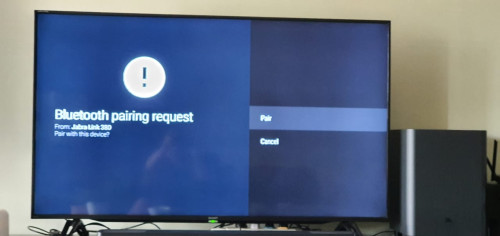
Is there a way to stop the Bluetooth from available from pairing? my neighbour's jabra usb dongle keep interfere with my tv...

user posted image

17 Pages « < 14 15 16 17 >Top
 

Change to:
| Lo-Fi Version
0.0334sec    0.62    6 queries    GZIP Disabled
Time is now: 3rd December 2025 - 10:43 AM